

Best AI for PowerPoint: Consulting and Boardroom-Style Slides
Six tools compared on the slides that actually get argued over: multi-step frameworks, journeys, driver trees and data exhibits held to a firm template. Every price and capability below was read off the vendor's own live pages in September 2026.
The short version. Choose the route before the brand. Add-ins write into the open file, chat connectors build the deck from work you already did, and web apps build on their own canvas and hand back an export. Where a rival is the better buy, this page says so and sends you there.
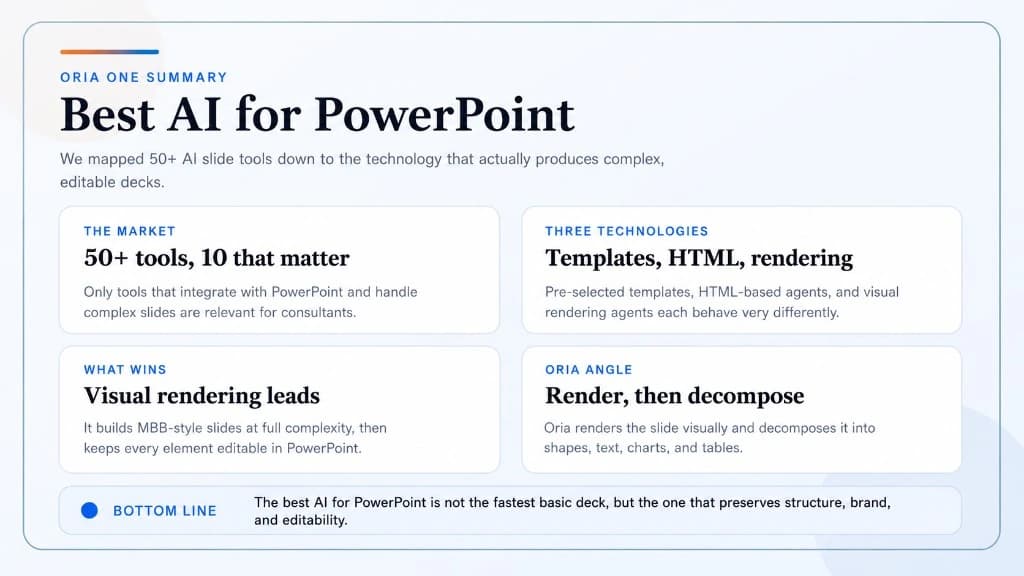
The phrase "best AI for PowerPoint" now covers three different products wearing one search box, and the choice between them is made before you compare a single feature. An add-in loads in the task pane and writes into the .pptx you already have open. A chat assistant with an Office connector builds the deck out of the reasoning you did somewhere else. A web generator builds on its own canvas and hands you an export.
The route decides what your slide inherits. Work done in the file inherits your slide master and your colleagues' edits. Work done in a chat inherits your source documents and your argument. Work done on somebody else's canvas inherits a design system that is not yours, plus an export step, which is precisely where a strict corporate template gets tested and usually loses.
One date reshaped this comparison. Anthropic's Claude for PowerPoint went generally available on 7 May 2026, which means any roundup written before that is describing a smaller field than the one you are buying in.
Quick answer: what is the best AI for PowerPoint?
There is no single winner, and a roundup that hands you one is selling something. Sort by route first, then by the one constraint that actually binds in your team: approval, price, Google Slides coverage, or the density of the exhibits you ship.
For high-end, consultant-led PowerPoint work in 2026, four platforms build inside PowerPoint itself. Claude for PowerPoint, generally available since 7 May 2026 on paid Claude plans, generates on the template already loaded in your deck and writes native editable charts rather than images. Microsoft 365 Copilot is the easiest to approve because it is already licensed in the tenant. Oria, from 19 dollars a month, is aimed at dense corporate and consulting exhibits held to a firm template. Plus AI, from 10 dollars per user per month billed annually, is the cheapest seat and the only one that also covers Google Slides. Gamma and Beautiful.ai are web-first and better for visual, narrative decks.
 Beautiful.ai
 Claude for PowerPoint
 Gamma
Gamma Copilot
 Oria
Oria Plus AI
How we chose the tools on this list
Five tests, applied the same way to each tool.
It has to end in a real .pptx
Add-in, chat connector or export, the route is open. The artefact is not: a PowerPoint file that opens on your master and that a colleague can mark up. A share link is a different product.
Template behaviour is tested on a master, not a palette
Matching a hex code is trivial. We looked at what each tool does with a slide master, its layouts and its fonts, and what happens when generated text overruns its placeholder.
Density is the test, not tidiness
Every tool is competent on a title and three bullets. We judged each on a seven-step journey with a pain point per step and a data exhibit with a callout rail, because that is the slide that comes back from review.
Price is the vendor's own published list price
Read off each public pricing page in September 2026, both billing cycles, no negotiated discounts. Where a vendor would not serve us a price, this page says so rather than guessing.
Published limits count as evidence
What a vendor writes down about where its own tool should not be used is worth more than a feature list. Two of the six publish explicit non-recommended uses, and we quote them.
We ignored template library size, which model a vendor advertises under the hood, vendor speed claims, and any comparison a vendor wrote about itself, including the other ones on this site. Rework is weighted heavily instead, because the failure mode is now measured. BetterUp Labs and the Stanford Social Media Lab surveyed 1,150 full-time US desk workers in September 2025 and found that 40 percent had received what they named "workslop" in the previous month: AI-generated content that looks finished and is not. Each instance took roughly two hours to resolve, an estimated 186 dollars per employee per month. A deck produced in eight seconds that costs an hour of relayout has saved you nothing.
Key takeaways
Pick the route before you pick the brand. Add-ins write into the open file, chat connectors build the deck from reasoning you did elsewhere, and web apps build on their own canvas and hand back an export. Most shortlists collapse once you choose a side.
Editable is table stakes now; survivable is not. All six return native shapes and text. The real question is whether the structure holds when you edit it: delete the fourth step of a seven-step journey and see whether the other six re-space or the slide has to be regenerated.
Density is where the field splits, and it splits early. A bullet deck tells you nothing. Run the same journey or driver tree through each candidate in one sitting and time the cleanup, not the generation. That test predicts most of the difference in a working week.
Brand control means the master, not the palette. Holding a firm template means the right fonts, title block, footer and layout patterns, plus sensible behaviour on overflow. Several tools gate serious template work behind a team tier, so price that in before the pilot.
Read what the entry price gates, not the entry price. Published September 2026 seats run from 10 dollars a month to 32, and the cheap tiers withhold different things: custom branding on one, a qualifying host licence on another.
Best AI for PowerPoint, compared on five decision rules
The five columns are the five takeaways above, in the same order. Tools are listed alphabetically, not in rank order. Every figure was read off the vendor's own pricing or documentation pages in September 2026.
Sources: claude.com documentation and pricing, beautiful.ai pricing, Gamma's help centre, Microsoft's own Microsoft 365 Copilot business pricing page, oria.one pricing, and plusai.com pricing, all read in September 2026. Vendor pricing changes often. Verify before you buy.
If your shortlist is narrower than this, two companion pages go deeper. The best AI PowerPoint add-in for consultants covers add-ins only, led by price and security, and the best AI presentation tool for strategy consultants is the ranked shortlist, including chart specialists this page does not cover.
What is consulting presentation AI, and what does it have to do?
Consulting presentation AI is the narrow part of this market that assumes the deck is the deliverable rather than an illustration of one. The working definition is practical: it has to hold an enforced corporate template, carry exact figures without paraphrasing them away, build layouts that are structures rather than bullet lists, and stay editable at eleven at night when a partner sends back three changes. A tool that fails any one of those is not slower, it is in the wrong category.
The volume behind that requirement is easy to underestimate. The Ultimate Global PowerPoint Study, commissioned from Nielsen by empower and run as an online survey of 1,102 employees in Germany and the United States, found that consulting departments spend eight hours a week in PowerPoint, that 37 percent of all PowerPoint working time goes on formatting rather than content, and that 47 percent of presentations do not comply with their own company's design guidelines. The second and third numbers are the ones AI can move. The first one is why anybody bothers.
Brand compliance is where the cheapest kind of AI slide generation gives itself away. A tool that picks a fixed layout and pours your content into it returns something tidy, on a template that is not yours, having quietly dropped whatever did not fit. The exhibit below is from Oria's own market study, so read it as a vendor's comparison rather than an independent test, but the failure mode is real and you can reproduce it with your own worst slide.
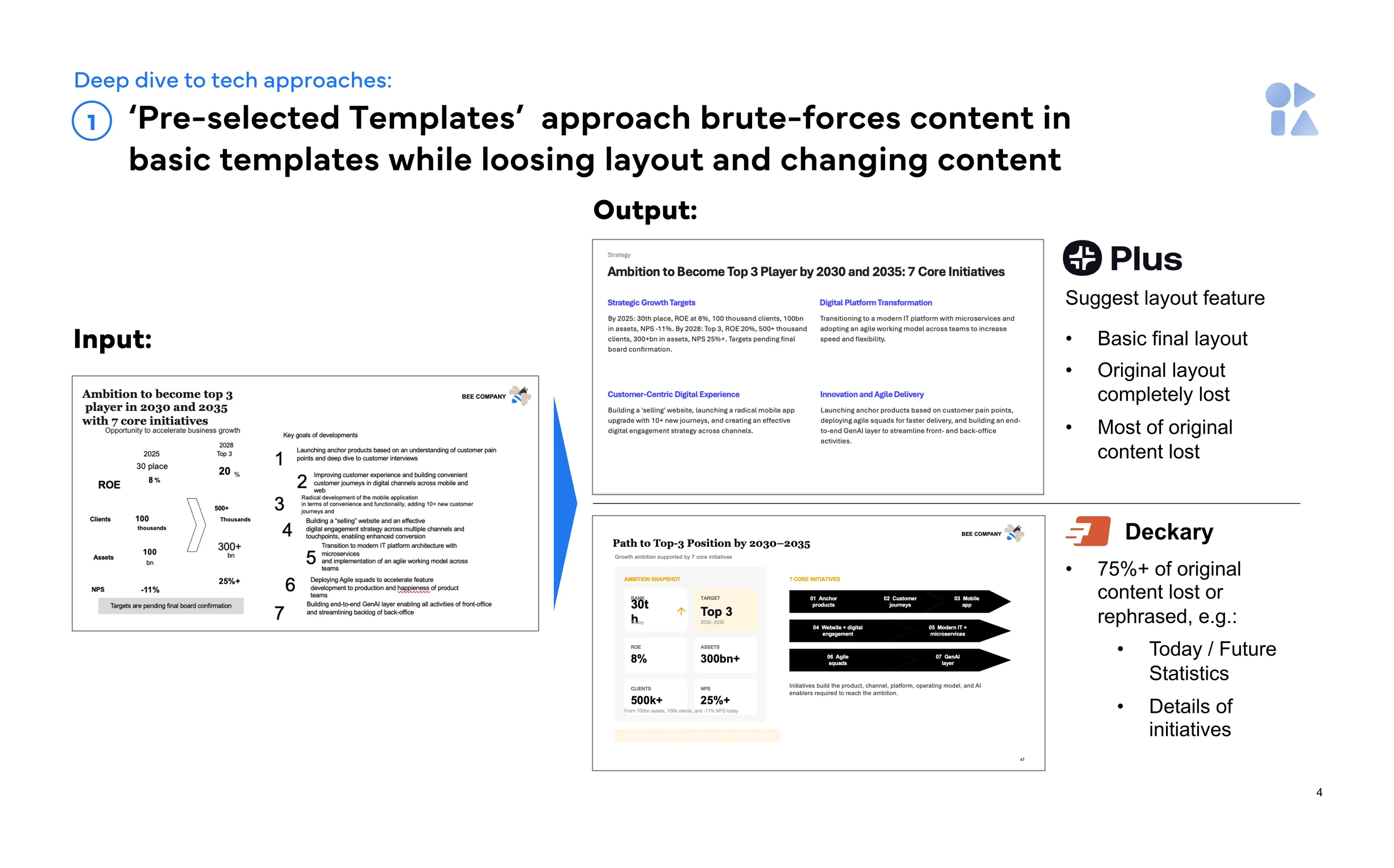
Input versus output for template-led generation, from Oria's own market study. The slide is rebuilt cleanly; the metric table and the per-initiative detail are what goes missing.
Jeff Bezos, Amazon 2017 letter to shareholders
"We don't do PowerPoint (or any other slide-oriented) presentations at Amazon. Instead, we write narratively structured six-page memos."
That is worth keeping on the table. None of the six tools below fixes a weak argument, and there are decisions for which a memo is the better artefact. What these tools change is the cost of the deck work that is assembly rather than thinking. If the thinking is not done, a faster deck gets you to the wrong answer sooner.
Which consulting presentation AI tools run inside PowerPoint?
Four of the six. Microsoft 365 Copilot is built into PowerPoint wherever the tenant licenses it. Claude for PowerPoint installs from Microsoft AppSource and runs on PowerPoint for the web, on Windows with a Microsoft 365 subscription, and on Mac from version 16.46. Plus AI installs as a PowerPoint add-in and a Google Slides add-on. Oria runs in the PowerPoint task pane on Windows, macOS and PowerPoint for the web, and also as an MCP connector for Claude and ChatGPT, so a slide can be built from the chat rather than the task pane. Gamma and Beautiful.ai build on their own canvas and export afterwards.
That export step is not a detail. Gamma's own help centre is candid about it: exports "reflect Present Mode, not Edit Mode, so some visual differences are expected", charts and diagrams can come out smaller or shifted, and Google Slides ignores the fonts Gamma embeds in the exported file. Gamma is built on scrolling cards rather than 16:9 exhibit frames, so a certain amount of that is the format, not a bug.
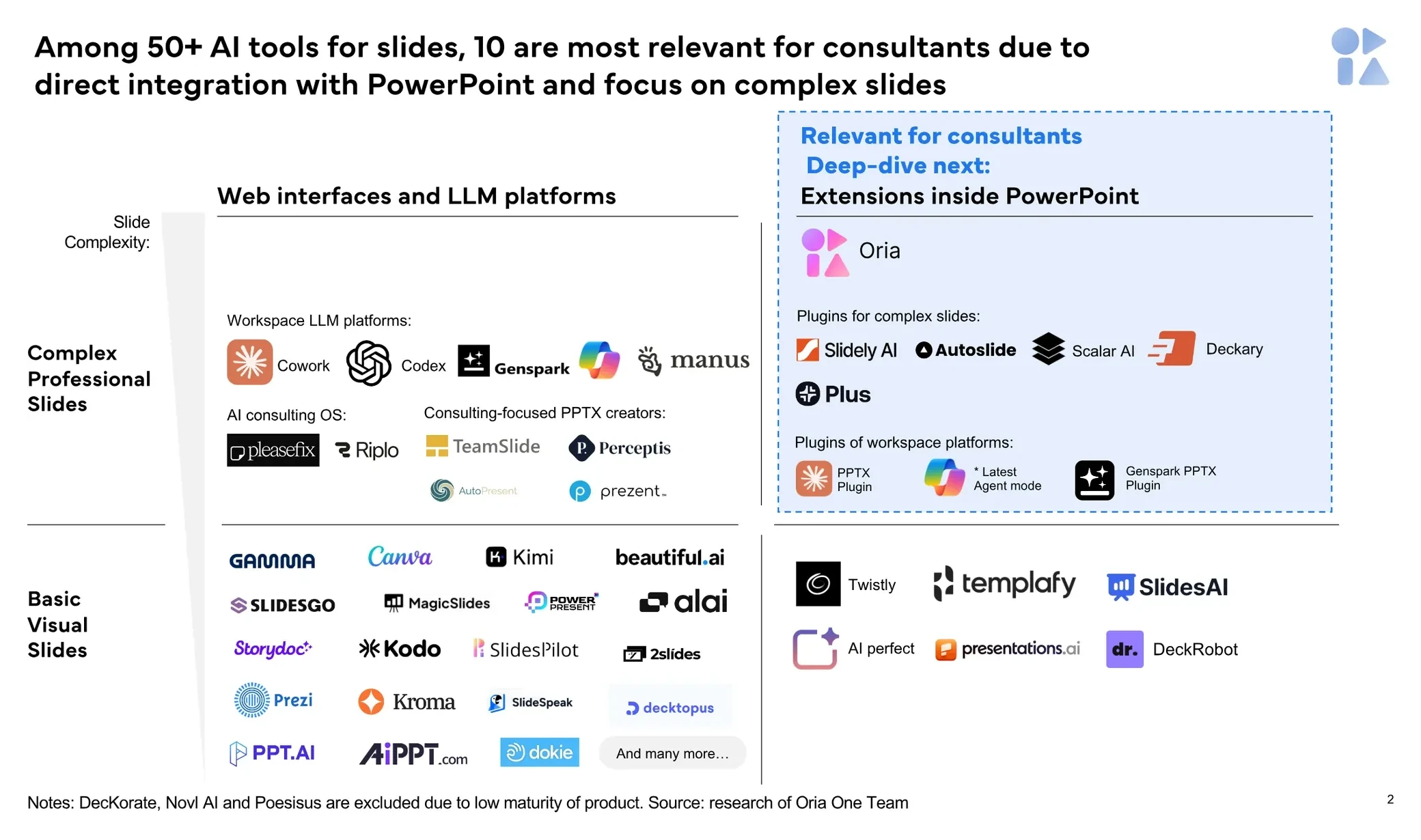
Among 50+ AI tools for slides, only about 10 integrate with PowerPoint and target complex slides. The rest are a different market, and a good one.
Underneath the routes sit three ways of actually making a slide, and they predict quality better than the brand does. Template engines pick a fixed layout and fit your content into it: fast and lossy. Markup engines have the model write the slide as structured code, which keeps the content and tends to look machine-made. Render-then-decompose engines design the slide as a complete composition first and then rebuild it as native objects, holding complex structure at the cost of a slower first pass.
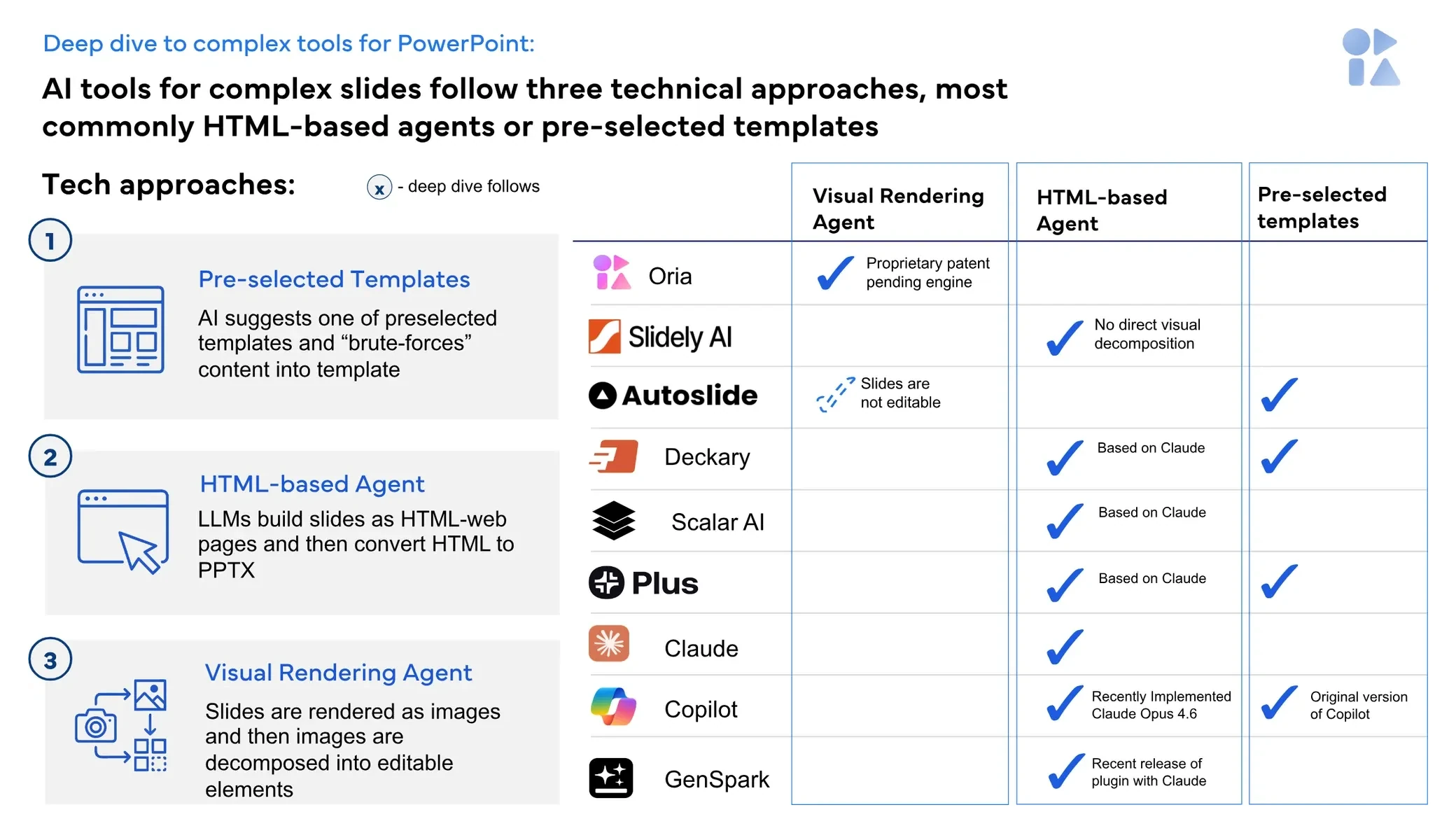
The three generation methods and where the major tools fall. Most products are template or markup engines.
What are the best consulting presentation AI tools in 2026?
Ranked by how well each handles a template-locked exhibit rather than a bullet deck, the shortlist is short: Claude for PowerPoint, Oria and Microsoft 365 Copilot work on the open file, and Plus AI joins them when Google Slides is also in play. Beautiful.ai and Gamma are strong products aimed at a different deck. Ranked by ease of approval, the order inverts almost exactly, which is why so many teams end up running two tools rather than one.
It is also worth knowing how early you are. The US Census Bureau's Business Trends and Outlook Survey put AI use at 19.8 percent of US firms as of 3 May 2026, rising to 37 percent among firms with at least 250 employees, with Information at 39.7 percent and Finance and Insurance at 33.9 percent. Professional services adoption is real but far from settled, so a two-year lock-in on any of these is a bet, not a decision.
One test separates the field faster than any feature list. Run the ugliest real exhibit you own through every candidate in one sitting, on your own master, then delete step four of the journey. Tools that re-space the remaining six are doing layout. Tools that need the slide regenerated are doing generation, which is a different and much less useful thing. If your starting point is an existing bad slide, our guide to improving ugly PowerPoint slides covers the repair route.
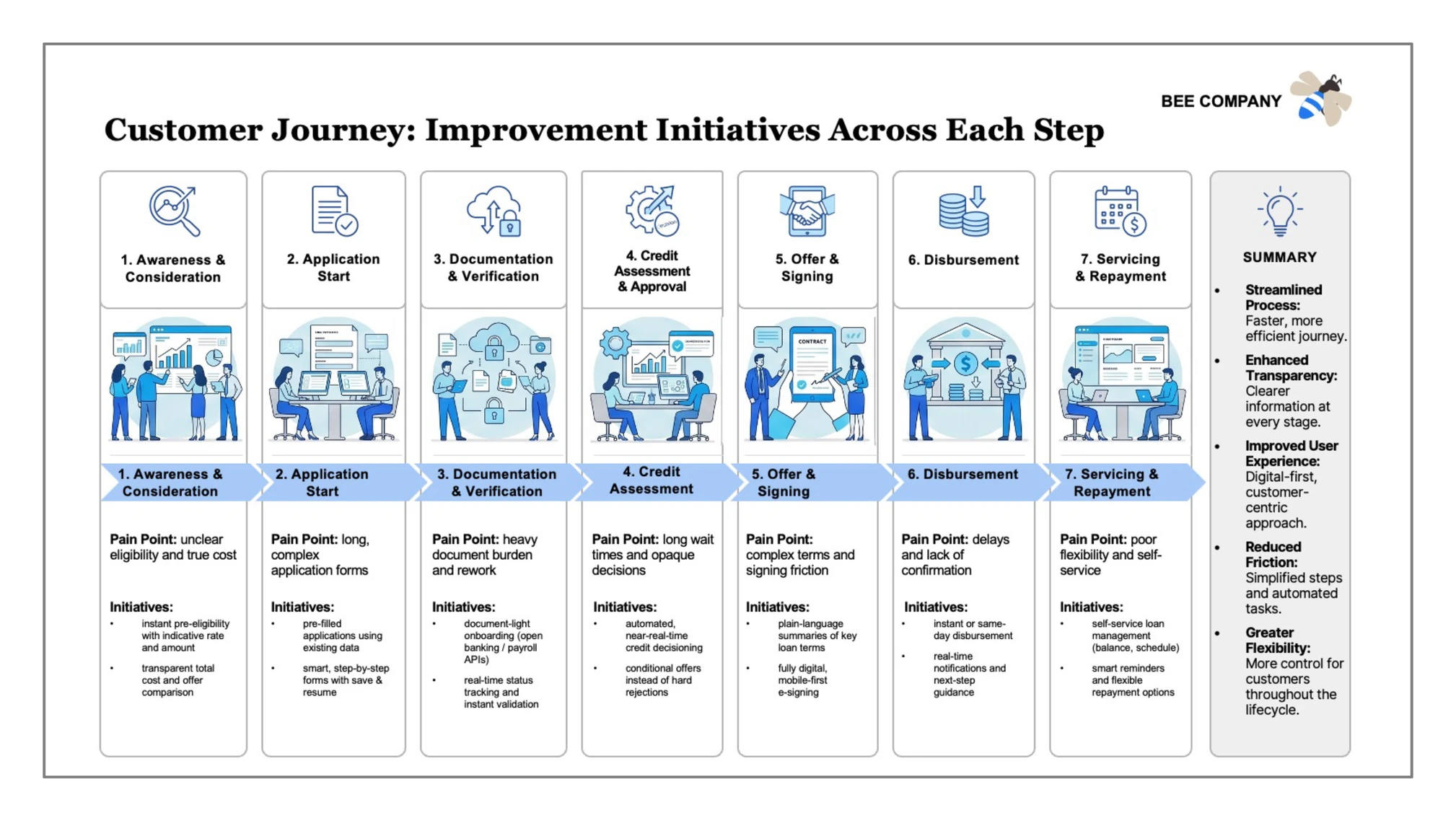
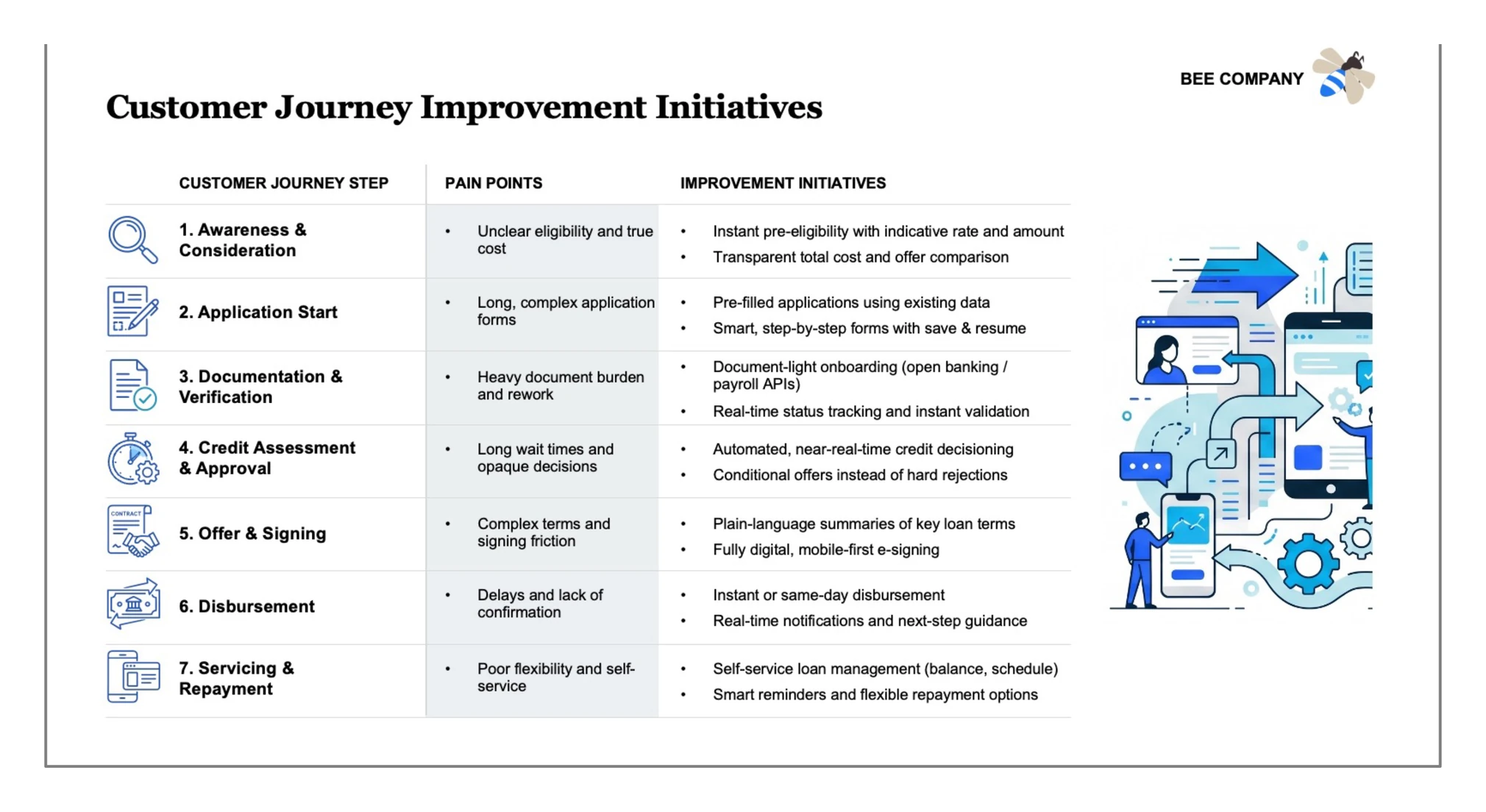
The second thing to watch is whether a tool can return the same content in a genuinely different shape. The exhibit below carries the identical seven-step journey as a table rather than a process flow. Asking for both and choosing is a different workflow from accepting one draft and editing it.
Beautiful.ai: who is it built for?
Beautiful.ai is built for the team that wants every deck to look the same without hiring a designer. Its Smart Slides are the product: the company describes them as "intelligent layouts that realign, resize, and animate your content automatically", so spacing, alignment and hierarchy are handled by rule rather than by hand. For a recurring business review produced by a dozen people, that is a genuinely strong answer.
Pricing from beautiful.ai in September 2026: Pro at 14.50 dollars a month billed annually or 45 monthly, with unlimited AI content generation, custom branding and styling, and editable PowerPoint export. Team is 40 dollars per user per month billed annually or 50 monthly, adding live collaborative editing, custom branded themes and engagement tracking. There is a 14-day free trial.
The limit is the same thing as the strength. Rules that keep a standard slide tidy also flatten a bespoke one, so a driver tree or a market-sizing bridge arrives simplified rather than reproduced. It also lives in its own editor, so a strict corporate master is approximated rather than applied. The head-to-head detail is in Oria vs Beautiful.ai.
The trade-off: the most consistent house look of the six, bought by giving up control of the layout.
Claude for PowerPoint: who is it built for?
Claude for PowerPoint is built for the person whose deck is downstream of a lot of analysis. It went generally available on 7 May 2026 and is included with Pro, Max, Team and Enterprise Claude plans, so for a team already paying for Claude it costs nothing extra. Anthropic states it builds new slides on your existing client or corporate template, makes pinpoint edits to a single slide without regenerating the deck, converts bullets into diagrams and native editable PowerPoint charts, and pulls external context through connectors.
Template handling is explicit: Anthropic says Claude reads the slide master, layouts, fonts and colour scheme in your deck, and recommends starting with the template already applied. It runs on PowerPoint for the web, on Windows with a Microsoft 365 subscription from build 16.0.13127.20296, and on Mac from 16.46. It does not run on PowerPoint 2016 or 2019 perpetual licences, on iPad or on Android. Claude Pro is 20 dollars a month, or 17 billed annually.
Anthropic also publishes its own limits, which is rarer than it should be. It says the add-in is not recommended for final client deliverables without human review, for presentations containing highly sensitive or regulated data without proper controls, or for replacing your judgment on design and narrative flow. It also warns to "only use Claude for PowerPoint with trusted files", because external templates and vendor files can carry prompt injections. Our guide to using Claude for PowerPoint walks the setup.
The trade-off: the best route from reasoning to slide structure, and a deck whose design ambition is capped by what you ask for.
Gamma: who is it built for?
Gamma is built for the deck that will be read as a link. It is the fastest of the six to a good-looking first draft, and for a narrative overview, a launch update or a fundraising story it beats everything else here without much argument. Its documents are scrolling cards rather than fixed slides, which is why they read so well in a browser.
Gamma bills from a credit pool rather than a feature ladder. Its help centre lists 1,000 monthly credits on Plus, 4,000 on Pro and 20,000 on Ultra, alongside Free and Business tiers. We could not load Gamma's public pricing page in September 2026, so no per-seat figure is quoted here.
The limit is the export, and Gamma says so itself. Tables come out as real editable tables and theme fonts are embedded in the .pptx, but exports reflect Present Mode rather than Edit Mode, charts and diagrams can shift or shrink, and Google Slides substitutes its own fonts. Translating a card-based document onto a 16:9 corporate master is work, every time. If you like the speed but need the file to hold, the Gamma alternative guide for consulting decks covers the swap.
The trade-off: the best first draft in the category, on the format least willing to become a PowerPoint file.
Microsoft 365 Copilot: who is it built for?
Copilot is built for the organisation that has already decided, at tenant level, which AI it is allowed to use. It is not an add-in you install so much as a licence you assign, which makes it by far the cheapest option to get through procurement: no new supplier, no new data processing agreement, no new data flow to explain to risk.
Microsoft's own business pricing page in September 2026 listed the Microsoft 365 Copilot Business add-on from 18 dollars per user per month paid yearly, reduced from a list price of 21, or 25.20 on monthly billing, and states that a separate licence for a qualifying Microsoft 365 plan is required. Bundled alternatives were Business Standard with Copilot at 23.50 per user per month paid yearly and Business Premium with Copilot at 32.
Where it is weak is the slide itself. Copilot is good at turning a document into a clean title-and-bullet deck and at rewriting what is on the canvas. Put it on a seven-step journey or a driver tree and the result is legible and obviously machine-made, which is exactly what partner review sends back. If that is your situation, converting Copilot slides into brand decks is the repair path most teams end up on.
The trade-off: the easiest tool here to get approved, and the hardest to get a board-grade exhibit out of.
Oria: who is the Oria PowerPoint add-in built for?
Oria is built for corporate documents and consulting presentations: board packs, steering committee decks, diligence exhibits, operating-model slides, multi-step frameworks and journeys held to an enforced corporate template. That is the whole design, and it explains both what it is good at and where it is the wrong answer. It reaches you two ways: as an add-in in the PowerPoint task pane on Windows, macOS and PowerPoint for the web, and as a connector for Claude and ChatGPT over MCP, so the slide can be built from the chat you are already in without opening PowerPoint. The method is to render the slide as a finished design first, then rebuild that design as native PowerPoint objects, so shapes, icons, text, charts and tables all stay editable, and to return several distinct design options rather than one draft.
The two exhibits below are one strategy-on-a-page brief returned as two designs, data-led and illustrated. Both keep the full metric table and all seven initiatives, the part template-led generation tends to lose.
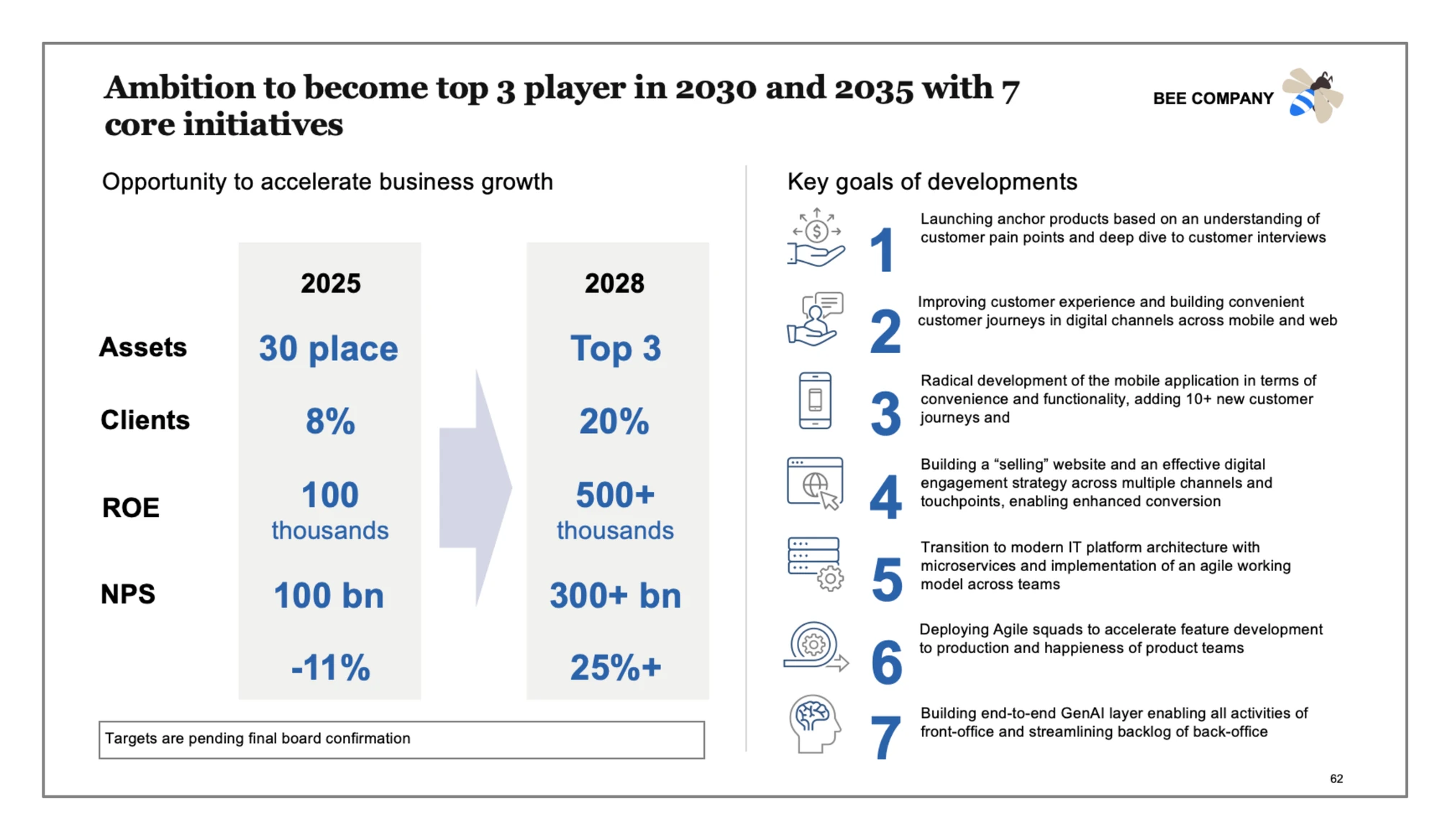
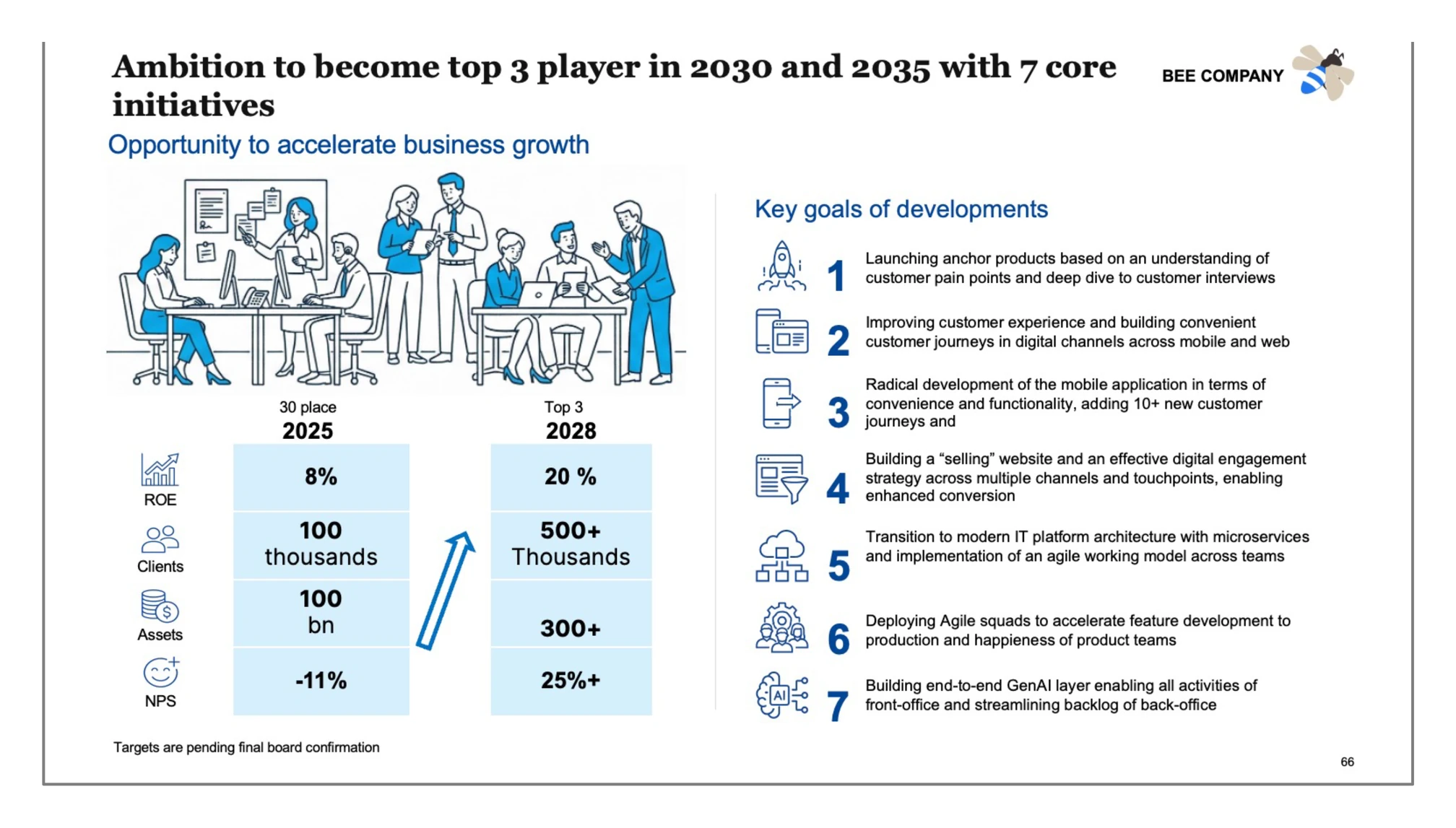
Pricing from oria.one in September 2026: Starter at 19 dollars a month for 60 tokens, Professional at 59 for 200 tokens and the Claude and ChatGPT MCP connector, Team at 399 for a 1,200-token shared pool, and Enterprise by agreement with private cloud deployment, white labelling and custom LLM integration. There is a 7-day trial or 20 free tokens. On data handling, Oria states it does not use your content to train, fine-tune or improve AI models, and that slide content is not stored: working artefacts self-destruct within an hour and outputs are wiped on a short rolling window.
The limits follow from the focus. Oria is built for the corporate environment only, so it loses on highly visual work: founder fundraising and pitch decks, launch and campaign decks, student presentations, marketing one-pagers. Where the job is visual impact rather than defensible content, a design-led tool such as Gamma, Canva, Pitch or Beautiful.ai will beat it and look better doing it. It is also PowerPoint-only, so a mixed Google Slides team needs a second tool, and on a plain bullet deck it is over-engineered and you will not see the difference.
The trade-off: the most layout-capable option for dense corporate and consulting slides held to a firm template, and the wrong one for visual-first decks.
Plus AI: who is it built for?
Plus AI is built for the team split across Google Slides and PowerPoint that wants one tool for both. It installs as a native PowerPoint add-in and as a Google Workspace add-on, and the vendor states it writes native PPTX through its own Open XML renderer rather than exporting images or converting HTML, so the output is editable in whichever app you opened.
It is also the cheapest credible seat here. On plusai.com in September 2026: Basic at 10 dollars per user per month billed annually or 15 monthly with 1,500 AI credits, Pro at 20 annually or 25 monthly with 3,000 credits, Team at 30 annually or 40 monthly with 6,000 credits and custom branding for logo, colours and fonts, and Max at 200 annually with unlimited credits. Enterprise adds advanced templates and asset libraries. Every plan carries a 7-day free trial with 1,000 credits.
The limit is layout ambition and where branding sits. Plus AI is very good at clean standard decks and at rewriting existing slides, and a dense bespoke framework is the weaker case. Custom branding is gated to the Team tier at 30 dollars per user per month, which changes the calculation if brand control was the reason you were buying. The detail is in Oria vs Plus AI.
The trade-off: the widest app coverage at the lowest price, with the least appetite for non-standard layouts.
How does AI rebuild a rendered slide as editable PowerPoint objects?
This is the step that decides whether "editable" means anything. Host-native tools such as Copilot and Claude for PowerPoint sidestep it: they write through the Office object model, so what they produce is native by construction. Render-then-decompose tools have to earn it, reading their own rendered picture back into shapes, icons, text runs, connectors, charts and tables. A tool that stops halfway leaves you an image of a slide. The three exhibits below walk one brief through that route: the same prompt returned as two competing designs, then the chosen design delivered as a working PowerPoint file.
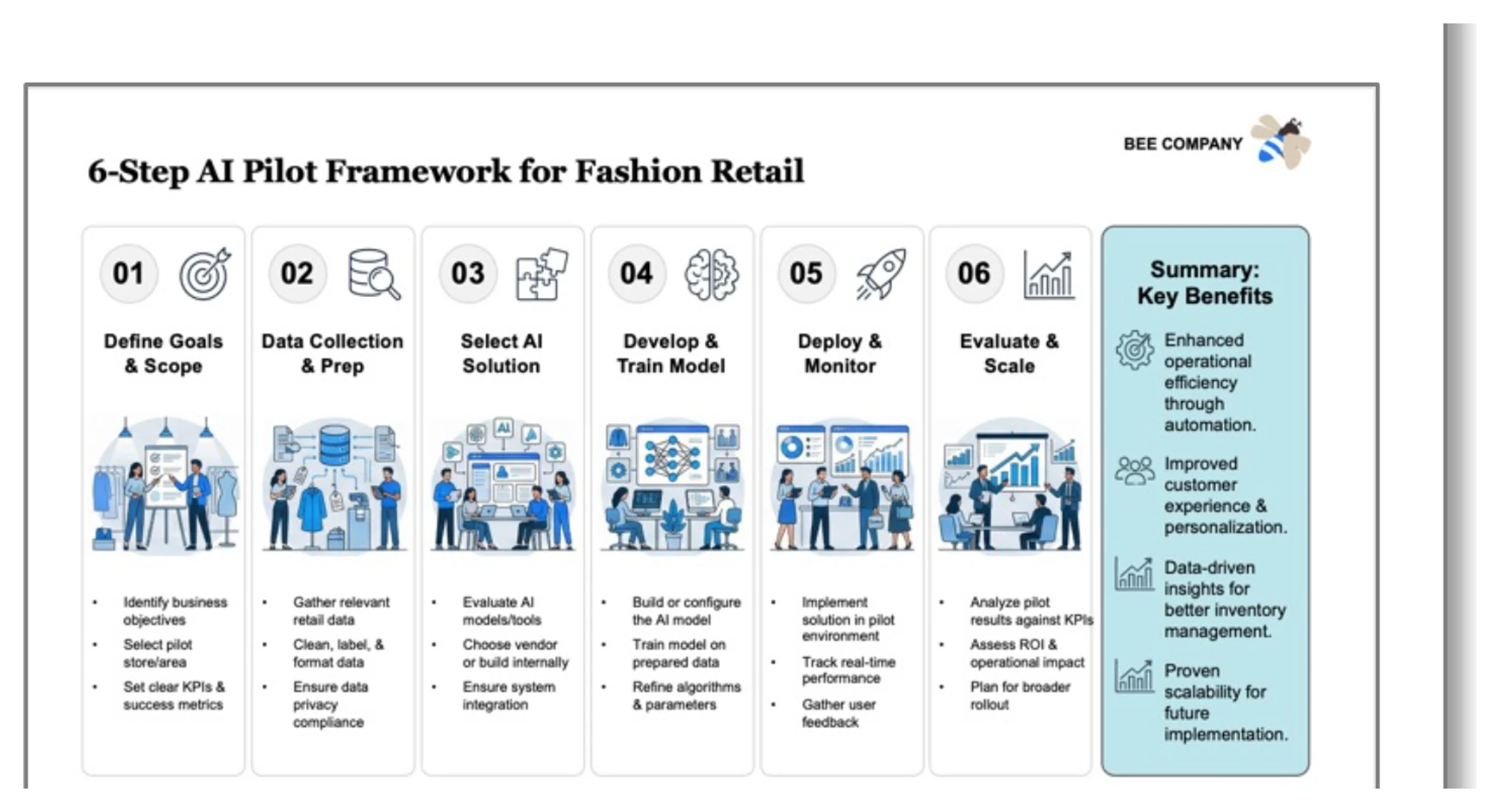

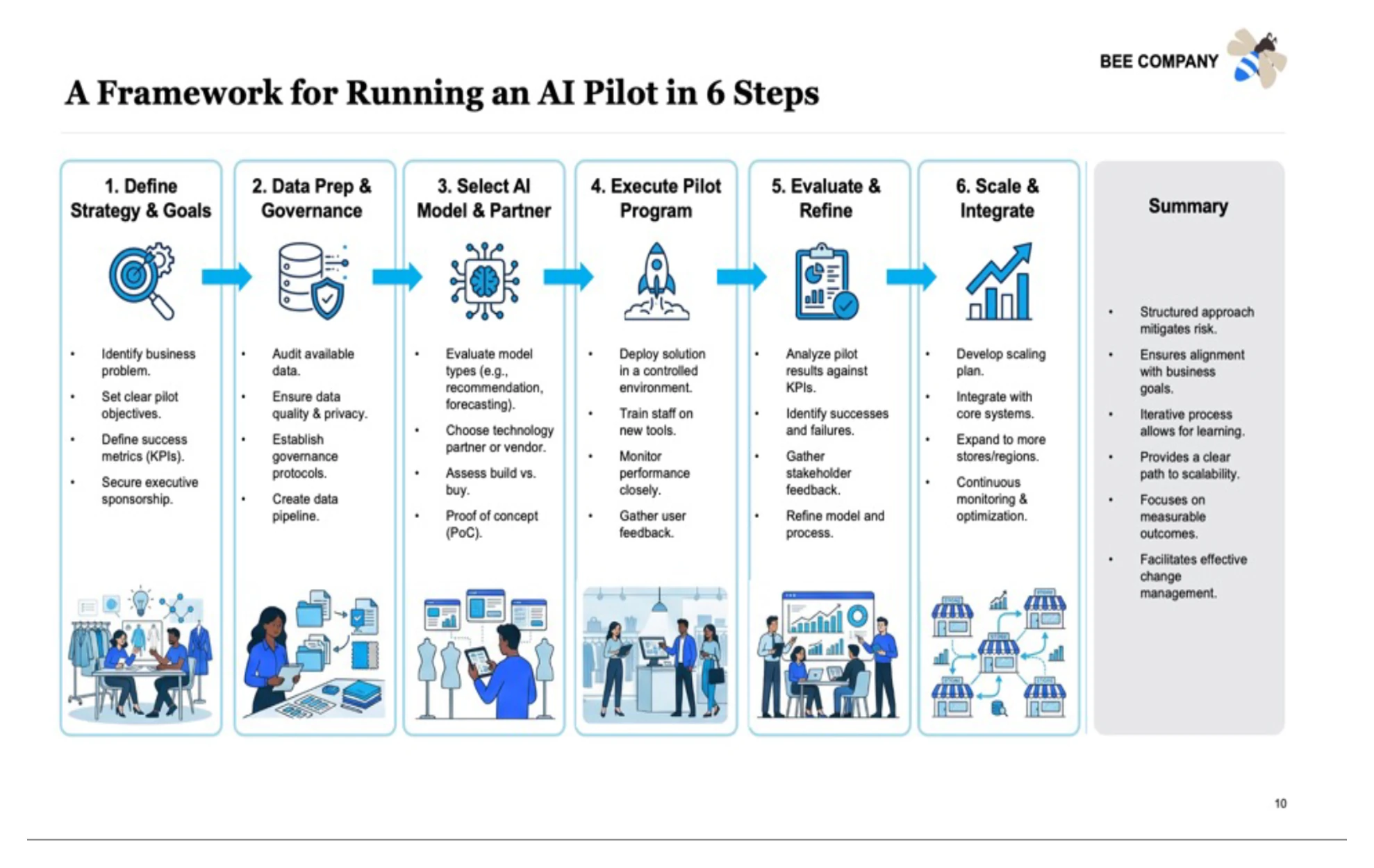
Whichever route your shortlist takes, test this and not the generation time. Open the delivered file, click the third box, and see what selects: a text frame you can retype, or a picture. Then change a font on the master and see what follows it. Those two clicks tell you more about a tool than any feature table, this one included.
Which AI for PowerPoint fits your constraint?
Most shortlists collapse the moment you name the one constraint that actually binds. Find yours on the left. Several of these send you somewhere other than here, which is the point.
Two pairings are common enough to name. Copilot for the first draft plus a layout-focused tool for the twenty slides that go in front of a client covers the firm already standardised on Microsoft. A chat assistant for structure plus an in-file tool for exhibits covers the team that thinks somewhere other than the task pane, and the consultant's guide to Claude sets out that workflow. If you are weighing the two assistants directly, Claude vs Copilot for business presentations is the head-to-head.
Frequently asked questions
What is the best AI for PowerPoint?
There is no single best, because the six credible options optimise for different constraints. Claude for PowerPoint, generally available since 7 May 2026 on paid Claude plans, builds on your loaded template and writes native editable charts. Microsoft 365 Copilot is the easiest to get approved. Oria is aimed at dense corporate and consulting exhibits held to a firm template. Plus AI is the cheapest seat and the only one covering Google Slides. Gamma and Beautiful.ai are web-first and better for visual, narrative decks.
What is the best AI for consulting slides?
Consulting slides are the hardest case in this category: multi-step frameworks, journeys with a pain point per step, driver trees and data exhibits, all held to a template somebody audits. On that narrow test the shortlist is Claude for PowerPoint, Oria and Microsoft 365 Copilot, because all three work on the open file rather than exporting into it. Copilot is strongest on approval and weakest on intricate layouts, Claude is strongest at turning reasoning into structure, and Oria is built for the dense template-locked exhibit and weakest on visual-first work.
Is there an AI that works inside PowerPoint itself?
Yes, four of the six here. Microsoft 365 Copilot is built into PowerPoint for tenants that license it. Claude for PowerPoint installs from Microsoft AppSource and runs on PowerPoint for the web, on Windows with a Microsoft 365 subscription, and on Mac from version 16.46. Plus AI installs as a PowerPoint add-in and a Google Slides add-on. Oria runs in the PowerPoint task pane on Windows, macOS and the web, and also as an MCP connector for Claude and ChatGPT. Gamma and Beautiful.ai export afterwards instead.
Can AI keep my firm's PowerPoint template?
Partly, and this is the most variable feature in the category. Anthropic states that Claude reads the slide master, layouts, fonts and colour scheme on your open deck and aims to maintain template compliance, and recommends applying your template before you generate. Copilot inherits the theme on the open deck. Oria applies fonts, colours, logos and layout patterns from a saved corporate style. Plus AI unlocks branding at its Team tier and Beautiful.ai gates custom branded themes to Team. Test overflow behaviour, not colour matching.
How much does AI for PowerPoint cost?
Published September 2026 list prices ran from 10 dollars per user per month to 32. Plus AI Basic is 10 billed annually, Beautiful.ai Pro is 14.50 billed annually, Claude Pro is 17 billed annually or 20 monthly and includes the PowerPoint add-in, Microsoft's Copilot Business add-on starts at 18 per user per month paid yearly on top of a qualifying Microsoft 365 licence, and Oria Starter is 19. Gamma prices by credit pool rather than by published seat figure. Read what each entry tier withholds before you compare the numbers.
Is Claude for PowerPoint better than Copilot for slide decks?
They are aimed at different problems. Copilot is a tenant licence with the strongest compliance documentation and the easiest approval path, and it is at its best turning an existing document into a clean standard deck. Claude for PowerPoint is stronger at turning reasoning into slide structure, converting bullets into diagrams and native editable charts, and editing one slide without regenerating the deck. Anthropic publishes its own limits: it is not recommended for final client deliverables without human review, or for regulated data without proper controls.
What is Oria, and how does the Oria PowerPoint add-in work?
Oria, at oria.one, reaches you two ways: as an add-in that runs in the PowerPoint task pane on Windows, macOS and PowerPoint for the web, and as a connector for Claude and ChatGPT over MCP, so a slide can be built from the chat you are already working in. You describe the slide in plain English, Oria renders it as a finished design, then rebuilds that design as native PowerPoint elements so shapes, icons, text, charts and tables stay editable. It offers several distinct design options rather than one default draft, and applies a saved corporate style. Paid plans start at 19 dollars a month.