

Claude PowerPoint Skill: The Free Slide Design Skill
Claude writes the content well and the slides badly. The free Claude PowerPoint skill on this page adds the design layer, and the rest of the page sets it against the built-in pptx skill, Anthropic's own add-in, Copilot and the design-led tools that beat all of them on visual work.
What a Claude PowerPoint skill actually is
Three things can put a slide in front of you, and people call all three a Claude PowerPoint skill. Claude can write a .pptx file itself, inside the chat. Anthropic ships an add-in that works inside the deck you already have open. And a Skill can sit between the two, carrying a design method neither of them ships with by default.
The decision is which of those you install first, and what you expect back. Default Claude writes strong content and weak slides: text in boxes, no hierarchy, nothing that survives a management meeting. A slide design skill does not make the words better, because the words were never the problem. It changes what Claude hands back, from a chat reply into a design instruction something else can build from: a layout, a hierarchy for the argument, and the visual treatment a designer would pick.
The free Skill file below is that layer, and the setup follows it, so you can have it working before you read the comparison. A boardroom-tuned version of the same method is in claude skills for consulting slide design.
What it can do
- Turn a document, a brief or rough notes into a slide-by-slide structure you approve before anything is built
- Write the design instruction for each slide: the layout, the hierarchy of the argument, and the chart where one is needed
- Significantly improve the design of slides you already have
- Convert photos of your sketches into proper, polished slides
- Switch between a strict, a standard and a visually rich treatment depending on the audience
Quick answer: which Claude PowerPoint skill should you use?
There is no single one, and a page that hands you one has picked a route and hidden the other two. Sort by where you want the slide built.
There are three routes from Claude to a PowerPoint slide in 2026. Claude's built-in pptx skill creates a .pptx inside claude.ai on every plan including Free, which suits a quick internal deck with no template to respect. Claude for PowerPoint, Anthropic's own add-in, has been generally available to Pro, Max, Team and Enterprise plans since 7 May 2026; it builds on the template already loaded in the deck, reads the slide master, and writes native editable charts. The free Claude PowerPoint skill on this page takes the third route: Claude writes the design instructions and Oria, from 19 dollars a month, renders them for dense corporate exhibits. Gamma, Canva and Beautiful.ai are the better answer for visual, design-led decks.
How to install the Claude PowerPoint skill
Five steps, and the first four are one-time. Anthropic makes Skills available on Free, Pro, Max, Team and Enterprise plans, and its documentation notes two things worth knowing before you start: a custom skill uploads as a zip containing the skill folder, and Skills require code execution to be enabled in your Claude settings.
Download the Skill
The file is a zip holding a SKILL.md and three reference documents: a formatting guide, a set of design principles, and worked examples at three levels of visual richness. You will drop it into Claude in step 3.
Slide Design Skill for Claude
Zipped SKILL.md · Free · No login required
Install A Design Rendering Engine For Slides
The Skill writes design instructions; a separate rendering engine turns them into finished PowerPoint slides. Click the button below to install Oria into Claude on mobile or desktop, or open the PowerPoint add-in directly on Mac or Windows, authorize the install if prompted, and complete the quick one-minute sign-up. For the full connector walkthrough with screenshots, see how to install Oria in Claude and ChatGPT.
Open Oria in PowerPoint
Launch the add-in install flow directly in PowerPoint.
Button didn't work? Try opening Oria directly in PowerPoint again.
 Open in PowerPoint
Install the Skill into Claude
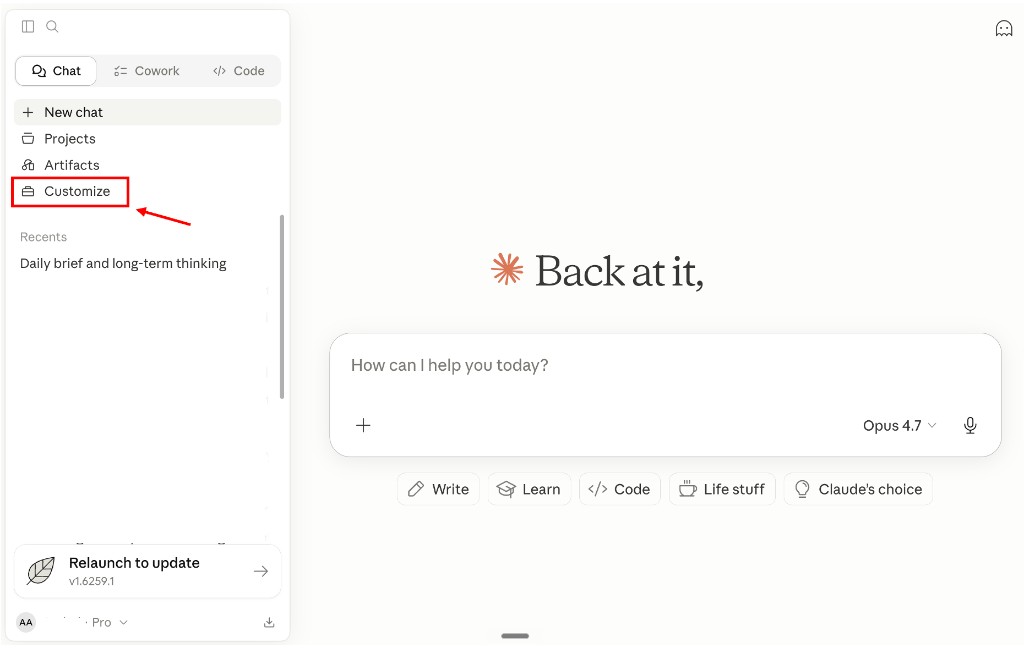
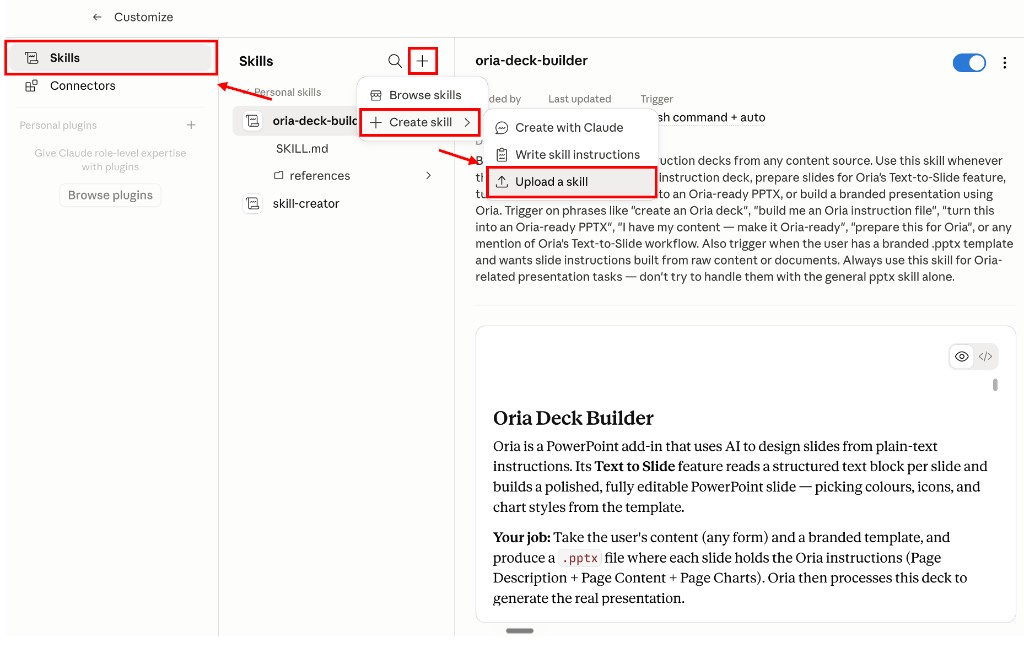
In Claude, open the left sidebar and click Customize. Go to the Skills tab, click the + button, choose Create skill → Upload a skill, and select the file you just downloaded. If the upload is rejected, the usual cause is code execution being switched off rather than anything wrong with the file.
Activate the Skill in Claude
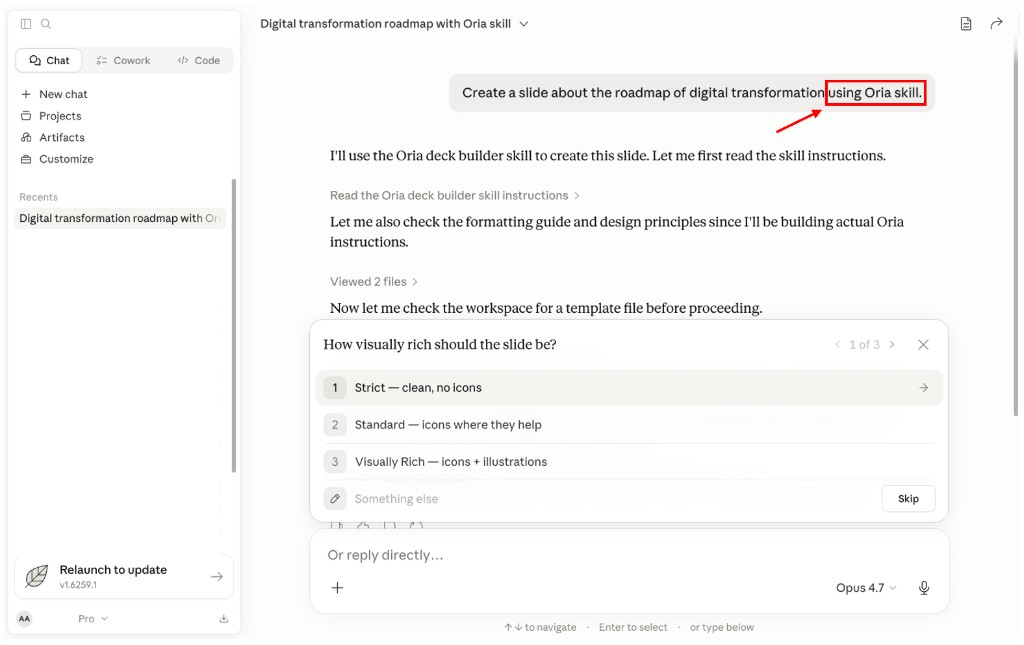
Open a new conversation inside the project. Reference the Skill explicitly in your prompt, for example, "Use Oria skill" so Claude loads it before producing the slide. Anthropic documents a second route for the Microsoft 365 add-ins: any Skill you have enabled in your Claude settings is available in all of them, and typing a forward slash in the sidebar lists the ones relevant to the app you are in.
Generate the slide in PowerPoint
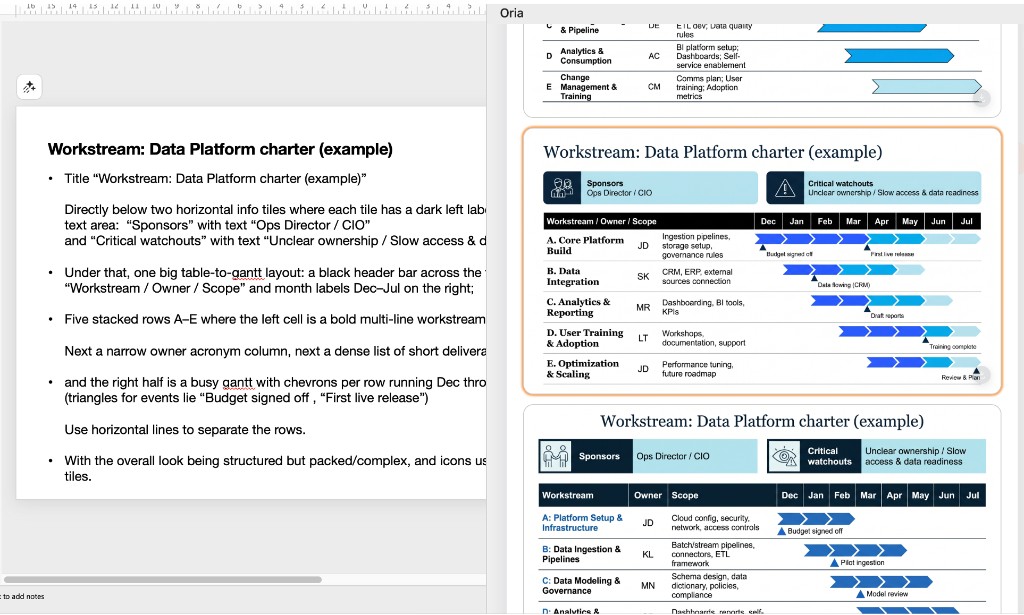
Paste your content (rough ideas, a slide you already have, or a sketch) into Claude. Claude returns design instructions in the Skill's format: a page description, the page content, and a chart block where the slide carries data. Open PowerPoint, paste those instructions into Oria, click Text to Slide, then select the slide design you like. It will be added to your deck as a fully editable PowerPoint slide. For a whole deck rather than one exhibit, hand the Skill your source document and a one-slide branded template, and it writes the instruction file for every slide at once.
How we chose the routes on this page
Five tests, applied the same way to each route.
It has to end in a real .pptx
Chat, task pane or export, the route is open. The artefact is not: a PowerPoint file that opens on your master and that a colleague can mark up in the meeting.
Template behaviour is judged on a slide master, not a palette
Matching a hex code is trivial. What matters is what each route does with a master, its layouts and its fonts, and what happens when generated text overruns a placeholder.
Density is the test, not tidiness
Every route is competent on a title and three bullets. We judged each on a seven-step journey with a pain point per step, and on a data exhibit with a callout rail, because that is the slide that comes back from review.
Install steps are counted, not glossed
A free skill that needs two accounts, a plan tier and an add-in is not free of effort. Each route below is described by what you actually have to do before the first slide appears.
Published limits count as evidence
What a vendor writes down about where its own product should not be used is worth more than a feature list. Anthropic publishes such a list for the PowerPoint add-in, and it is quoted here.
We ignored template library size, which model is running underneath, and vendor speed claims. Rework is weighted heavily instead, because the failure mode is now measured rather than assumed. BetterUp Labs and the Stanford Social Media Lab surveyed 1,150 full-time US desk workers in September 2025 and found that 40 percent had received what the researchers named "workslop" in the previous month: AI-generated content that looks finished and is not. Each instance took around two hours to resolve, an estimated 186 dollars per employee per month. A slide generated in eight seconds that costs an hour of relayout has saved you nothing, so every route below is judged on what it leaves you to clean up.
Key takeaways
Decide where the slide gets built before you pick a skill. Inside claude.ai you get a downloaded file that knows nothing about your template. Inside PowerPoint the assistant works on the deck you already have open. Over a connector the slide is built from the chat you are already in. Most shortlists collapse once you choose a side.
A skill writes instructions; something else has to render them. This is the single most common misunderstanding about a Claude PowerPoint skill. The Skill file changes what Claude hands back. It does not put pixels on a slide. Whether the result is editable PowerPoint objects or a flat image depends entirely on what renders it.
Template compliance is a slide master question. Ask whether the route reads the master, the layouts, the fonts and the colour scheme of the file you are working in, or whether it approximates them on its own canvas and hands you an export. Only the in-application routes do the former.
Count the install steps before you count the features. Built-in file creation needs nothing. The add-in needs a marketplace install and a supported Office build. The Skill route needs a zip uploaded into Claude, code execution switched on, and a renderer installed in PowerPoint. All three are short; none of them is zero.
Most of these are already inside a plan you pay for. Skills and file creation are included on every Claude plan including Free. The PowerPoint add-in is included with Pro, Max, Team and Enterprise. Only the render layer and the design-led web tools are a separate line item, so price the gap, not the whole stack.
Claude PowerPoint skills compared on five decision rules
The five columns are the five takeaways above, in the same order. Rows are grouped by where the slide gets built, not ranked. Anthropic figures are from its own product documentation; the other prices were read off the vendors' published pages in September 2026, and the full pricing comparison lives in the best AI for PowerPoint.
Claude pptx skill: who is built-in file creation built for?
The built-in pptx skill is built for the person who wants a file out of the conversation and has nothing to install and nobody to ask. Anthropic's documentation is specific about the scope: Claude can create Excel spreadsheets, PowerPoint presentations, Word documents and PDFs, the feature is enabled by default on Free, Pro and Max with Team and Enterprise owners able to switch it off, the work happens in a private computing environment inside claude.ai, and files are capped at 30MB.
It is also the clearest illustration of what a skill is. Simon Willison, who wrote the first widely read technical account of the feature on 16 October 2025, described the mechanism plainly: "Skills are conceptually extremely simple: a skill is a Markdown file telling the model how to do something." Anthropic's own document creation is built that way, which is why a downloaded Skill file can extend it rather than fight it.
The output is the limit. Nothing in that private environment has seen your slide master, so what comes back is a competent generic deck you then restyle. That matters more than it sounds: Anthropic's own Economic Index report for June 2026 found that documents and reports are the single largest category of work output on Claude, at 20 percent of work conversations, and that 93 percent of conversations produce an artefact of some kind. Most of that volume never touches a corporate template.
The trade-off: a real .pptx in minutes with nothing installed, bought by giving up any knowledge of your template.
Claude for PowerPoint: who is Anthropic's own add-in built for?
The add-in is built for the person whose deck is downstream of a lot of analysis and who wants the assistant in the file rather than beside it. It became generally available on 7 May 2026 and is included with Pro, Max, Team and Enterprise plans, so for a team already paying for Claude it adds nothing to the bill. Anthropic states that it builds new slides on your existing client or corporate template, makes pinpoint edits to a single slide without regenerating the deck, converts bullets into diagrams and native editable PowerPoint charts, and pulls external context through connectors.
Template handling is the part worth reading twice: Anthropic says Claude reads the slide master, layouts, fonts and colour scheme in your deck and uses them when generating or editing, and recommends starting with the template already applied. Skills work here too. Any Skill enabled in your Claude settings is available in every Microsoft 365 add-in, and typing a forward slash in the sidebar lists the ones relevant to the app you are in. The version floor is real: PowerPoint on the web, Windows with a Microsoft 365 subscription from build 16.0.13127.20296, and Mac from 16.46, with perpetual 2016 and 2019 licences, iPad and Android excluded.
Anthropic also publishes where not to use it, which is more useful than a feature list: not for final client deliverables without human review, not for highly sensitive or regulated data without proper controls, and not as a replacement for your judgement on design and narrative flow. It warns separately that downloaded templates and vendor files can carry prompt injections.
The trade-off: the only route that edits your live deck in place, bought with a hard floor on Office builds and a paid Claude plan.
Claude PowerPoint skill: who is the free Skill on this page built for?
This one is built for the person who already has the content and wants the design decision made before anything is rendered. Inside the zip is a SKILL.md and three reference files: a formatting guide, a set of design principles, and worked examples. The method it carries is procedural rather than stylistic. It looks for a one-slide branded .pptx in the workspace and asks you to confirm it. It asks how visually rich the deck should be, strict and clean, standard with icons, or visually rich with illustrations, and holds that choice across every slide.
Then it does the part people expect the renderer to do. Given raw material rather than ready-made slides, it analyses the narrative arc, proposes a slide structure and waits for your approval before building anything. For each approved slide it writes a page description, the page content, and a chart specification where the slide carries data, into one instruction file. Two of its internal rules explain more about slide quality than any feature list: never specify a colour unless the colour carries meaning, such as red for underperformance, and keep layouts flat, with every element in its own region and nothing overlapping.
Be clear about what it is not. It produces instructions, not slides. Without a renderer you have a well-structured text file, and the instruction format it writes is Oria's, so it is not a portable design layer you can point at another tool. It also leans on Claude's own pptx toolkit to assemble the file, which is why code execution has to be on.
The trade-off: the design decision is made and reviewable before rendering, bought by depending on a second tool to render it.
Claude PowerPoint design skill: who is the Oria render layer built for?
Oria reaches you two ways: as a PowerPoint add-in in the task pane on Windows, macOS and the web, and as a connector for Claude and ChatGPT over MCP, so a slide can be built from the chat you are already in without opening PowerPoint. It is built for corporate documents and consulting presentations: board packs, steering committee decks, diligence exhibits, operating-model slides, dense frameworks held to an enforced corporate template. That is the whole design, and it is the reason the Skill above asks for a branded template before it asks anything else.
The case for a render layer at all is the formatting tax. The Nielsen Company and empower surveyed 1,102 employees in Germany and the United States for The Ultimate Global PowerPoint Study and found consulting departments spending eight hours a week in PowerPoint, 37 percent of all PowerPoint working time going on formatting, and 47 percent of presentations failing their own company's design guidelines. A renderer that reads a template rather than being told about it attacks the formatting hours and the compliance rate at the same time. On data handling, Oria does not train on customer content, Professional and Team do not persist presentation content after delivery, and Enterprise adds private cloud deployment and custom LLM integration. Starter is 19 dollars a month, Professional 59, Team 399, Enterprise by agreement.
Its limit is the same thing as its focus. Because it is built for the corporate environment only, it loses on highly visual work: founder fundraising and pitch decks, launch and campaign decks, student presentations, marketing one-pagers. Where the job is visual impact rather than defensible content, a design-led tool such as Gamma, Canva, Pitch or Beautiful.ai will beat it and look better doing it. If that is your brief, the design-led block below is the one to read.
The trade-off: built for the template-locked corporate exhibit, and the wrong tool the moment the brief turns visual.
Claude ppt skill or Microsoft 365 Copilot: who is Copilot built for?
Copilot is built for the organisation where the obstacle is not capability but approval. It is already inside PowerPoint, already licensed in the tenant, and adds no new supplier, no new data processing agreement and no new data flow for anybody to explain. Where a Claude skill route needs an upload, a plan and an add-in, Copilot needs an administrator to assign a licence. As published in September 2026, Microsoft 365 Copilot Business runs at 18 dollars per user per month on an annual plan, a promotional rate against a 21 dollar list, and it is an add-on that needs a qualifying Microsoft 365 plan underneath it.
What comes back is the honest cost. Copilot inherits the theme on the open deck and produces native objects, but usually in standard title-and-bullet form: clean, fast and visibly machine-made once the content is an operating model or a seven-step journey rather than a list. For a first draft that a human then rebuilds, that is often enough, and plenty of teams pair it with something sharper for the twenty slides that go in front of a client. The head-to-head detail is in Claude vs Copilot for business presentations.
The trade-off: the easiest approval in the building, bought with the most generic slide on this page.
Claude slides skill or a design tool: who are Gamma, Canva and Beautiful.ai built for?
These are built for the decks where the slide has to land visually in ten seconds: founder fundraising decks, launch and campaign decks, student presentations, marketing one-pagers and recruiting collateral. Gamma is web-first and card-based, exports to .pptx and PDF, and embeds theme fonts into the export. Beautiful.ai sells rule-driven Smart Slides that realign and re-space content as you type, with custom branding from Pro at 14.50 dollars a month billed annually. Canva is the one with real brand kits for collateral that is not a deck at all.
None of them is a Claude skill, and that is the point of including them. If your next deck is a seed round rather than a steering committee, no amount of instruction-writing in Claude will beat a tool whose entire design target is visual impact. The cost is the one you would expect: a strict corporate master is approximated on someone else's canvas and handed back as an export, and bespoke structures arrive simplified because the layout rules that keep a standard slide tidy also flatten an unusual one. The head-to-head with the closest of them is in Oria vs Beautiful.ai.
The trade-off: the best-looking deck in the room, bought by giving up the corporate master.
Which Claude slide route fits your constraint?
Most shortlists collapse the moment you name the one constraint that actually binds. Find yours on the left. Several of these send you somewhere other than here, which is the point.
One pairing is common enough to name. Claude for PowerPoint for the edits you make while the deck is open, plus a skill-driven render layer for the handful of exhibits that carry the argument, covers most consulting weeks. If you want the wider PowerPoint workflow rather than the design layer alone, read how to use Claude in PowerPoint, and for the slides you already have and dislike, fixing ugly PowerPoint slides is the narrower job.
What else this design tool can do
The Skill plugs into Claude, but the underlying design engine lives inside PowerPoint. Once Oria is installed, you can use it directly without going through Claude at all, which matters on the days when the input is a slide or a photograph rather than a document.
Improve a slide you already have
Drop in a slide that already has the right content but the wrong design. The tool returns the same content with proper hierarchy, balanced spacing, and a layout the audience actually reads.
Turn rough ideas into a slide
Type the point you want to make. The tool builds the supporting structure (issue tree, 2x2, waterfall, journey, whatever fits) and renders it as a finished slide.
Convert sketches into slides
Take a photo of a whiteboard or a notebook page. The tool reads the layout you drew and produces a polished version in PowerPoint, with real shapes, real type, and real alignment.
The same Skill is one piece of a wider set. For board work specifically there are 25 deck skills for boardroom strategy, for charts there is the Claude dataviz skill set, and the add-in comparison for consulting teams is the best AI PowerPoint add-in for consultants.
Reader discount
20% off Oria with this promo code
Apply the code below at checkout for 20% off your Oria subscription.
Frequently asked questions
Can Claude make PowerPoint slides?
Yes, by three different routes. Claude's built-in pptx skill writes a .pptx inside claude.ai and hands you the file. Claude for PowerPoint, the add-in Anthropic made generally available on 7 May 2026, builds inside the deck you already have open on Pro, Max, Team and Enterprise plans. The free Skill on this page takes a third route: Claude writes the design instructions and Oria renders them as native editable slides in PowerPoint.
How do I install the Claude PowerPoint skill?
Download the file from the setup guide above, then open Claude, click Customize in the left sidebar, open the Skills tab, click the plus button and choose Create skill, then Upload a skill, and select the file you just downloaded. Anthropic's own documentation notes that Skills need code execution enabled and that a custom skill uploads as a zip containing the skill folder. Install Oria in PowerPoint as well, so the instructions have something to render into.
Is the Claude PowerPoint skill free?
The Skill file is free. It downloads from this page with no login and no account, and it runs on Free, Pro, Max, Team and Enterprise plans, because Anthropic makes Skills available on all five. Turning those instructions into finished slides needs Oria, which starts at 19 dollars a month, and this page carries a code worth 20 percent off. Anthropic's own PowerPoint add-in is included with paid Claude plans instead.
What is the difference between the Claude pptx skill and Claude for PowerPoint?
The built-in pptx skill runs inside claude.ai: Claude writes and runs code in a private computing environment, then hands you a finished file to download, with no knowledge of your template. Claude for PowerPoint runs as an add-in in the application itself, reads the slide master, layouts, fonts and colour scheme of the deck you have open, and edits individual slides in place. One produces a file. The other works inside your file.
How do I get Claude to actually use the skill?
Name it. Open a conversation in the project where the Skill is installed and write something like Use Oria skill alongside your request, so Claude loads it before it starts writing. In the Microsoft 365 add-ins there is a second route: Anthropic documents typing a forward slash in the sidebar to list the Skills available for the app you are in, then picking one. Without either, Claude falls back to its default behaviour.
Can the Claude slides skill use my own PowerPoint template?
Yes, and it asks for one before it builds anything. The Skill's first step is to look for a one-slide branded .pptx and confirm it with you, because the renderer reads colours, fonts and layout patterns from that file rather than being told them in prose. The Skill is written never to specify a colour unless colour carries meaning, red for underperformance being the example it gives. Every slide arrives as native objects, so you can restyle afterwards.
Can it build a whole deck, or one slide at a time?
Both, by different routes. Pasting a single instruction block into Text to Slide gives you one slide inside the deck you already have open, which is how most decks are genuinely built, one exhibit at a time and under review. The Skill itself works at deck scale: it splits your content into slides, proposes the structure, waits for your approval, then writes one instruction block per slide into a single PowerPoint file.