

Claude vs Copilot for PowerPoint: An Honest Comparison
Two things changed this year. Anthropic shipped a real PowerPoint add-in, and Microsoft Copilot learned to read the corporate template it used to ignore. That turns the old question into a different one: not which model writes better prose, but which add-in your licence already covers, and whether the finished slide still needs anything on top.
Almost nobody arrives at this comparison wanting to pick a favourite model. They are deciding what to install this afternoon, on a licence they may already own, for a deck that is due. So what follows is built around things you can verify yourself: what each product is documented to do, what it costs, what an administrator has to switch on before it works, and the point at which each one stops being useful.
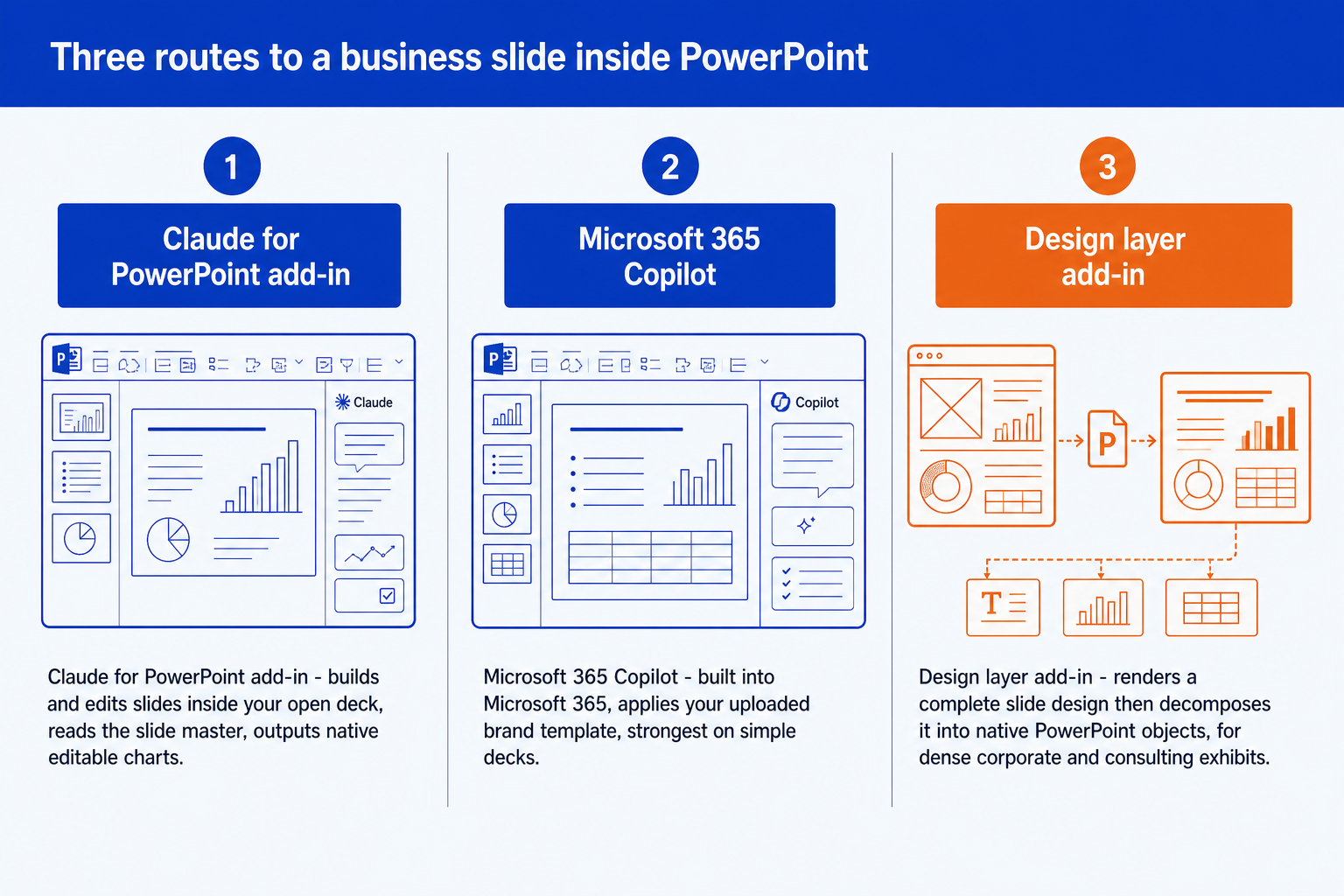
It is also a three-way comparison now rather than a two-way one. Claude for PowerPoint and Microsoft 365 Copilot both build slides inside your template. A design layer such as Oria sits on top of either one when the slide itself has to carry dense corporate logic. For a deck of titles and bullets, the Claude add-in alone is enough, and this page will say so more than once.
Quick answer: Claude, Copilot, or a design layer?
The honest answer depends on one thing almost nobody asks first: which subscription you are already inside. Both of these are add-ons to something else, and the cheaper option is usually whichever one you are not about to buy.
For business presentations in 2026 the sensible default is Claude for PowerPoint, Anthropic's own add-in, generally available since 7 May 2026 on the Pro, Max, Team and Enterprise plans. It builds slides inside the template already loaded in your deck, reads the slide master for fonts and layouts, edits a single slide without regenerating the rest, and emits native editable PowerPoint charts. Microsoft 365 Copilot is the better choice when the deck is assembled from files already in Microsoft 365, or when a brand manager must enforce one template company-wide; Microsoft lists it at 30 dollars per user per month on top of a qualifying Microsoft 365 licence. A design layer such as Oria earns its place only on dense corporate exhibits held to a strict master.
Claude for PowerPoint is for
Anyone already paying for Claude who wants slides built and edited inside the open deck, on the template that is already applied, at no extra cost.
Microsoft 365 Copilot is for
Organisations that want the deck to start from content already in Microsoft 365 and a brand manager to lock the template centrally, without asking users to install anything.
How we compared Claude and Copilot for PowerPoint
Oria makes a competing product, so the method matters more than the conclusion. Here is what was checked, and what was left out.
What each vendor documents, not what each vendor markets. Every capability below was checked against the vendor's own live page: Anthropic's Claude for PowerPoint documentation, Microsoft's Copilot support and pricing pages, and Oria's pricing page. Where a vendor states a limit in its own words, that wording is quoted.
The template test, because it is the one that decides rework. Whether a draft ships or gets rebuilt comes down to whether the tool honours your slide master. Both add-ins now read a corporate template, so the real question is how that is enforced and what an administrator must switch on first.
Total cost including what you must already own. List price alone misleads here. Copilot is an add-on to a qualifying Microsoft 365 licence; the Claude add-in rides on a subscription you may already pay for personally. Both numbers are quoted from the published pricing page.
Admin and data handling, stated plainly for all three. Comparison pages skip this and it is the first thing a firm asks. Retention, model training, audit coverage and the admin toggles each product needs are stated for every option, ours included.
What we ignored on purpose. Benchmark scores, template library counts, stock image libraries, model version numbers that change monthly, and vendor case studies. None of them predicts whether a slide survives a review.
Key takeaways
- Install the Claude add-in first if you already pay for Claude. It is generally available on Pro, Max, Team and Enterprise, it builds inside the deck's existing template, and it costs nothing extra on top of the subscription.
- Choose Microsoft 365 Copilot when the deck starts from content already inside Microsoft 365, or when a brand manager has to enforce one template across the company. It lists at 30 dollars per user per month on top of a qualifying Microsoft 365 licence.
- Neither add-in invents the chart types PowerPoint does not have. A Marimekko, a value driver tree or a synergy bridge is shape work, so if your deck is built from those, the generation step is not your bottleneck.
- Add a design layer such as Oria only when the slide itself has to carry dense consulting logic on an enforced corporate master. For titles and bullets, the Claude add-in alone is enough and a third tool is waste.
- Read the admin column before you pick. Copilot's Brand Kit, its model picker and its Anthropic model toggle are all licence-gated or admin-gated, which is the real reason two people on the same tenant get different results.
Claude for PowerPoint vs Microsoft 365 Copilot vs Oria
Each row below is one of the five decision rules above. Columns are ordered by how close each product sits to PowerPoint itself, not by rank: Copilot is already in the ribbon, Claude is an add-in you install, and Oria is an add-in that also reaches you through a chat connector. Two of the five rows go against Oria, and they are left in.
Capabilities and prices are taken from each vendor's own live documentation and pricing pages, checked in September 2026. Nothing here is estimated.
Claude for Microsoft 365 vs Claude by Anthropic for PowerPoint: what is the difference?
This is the most common confusion in the whole category, and it is not the reader's fault. The word Claude is currently attached to three different things that touch PowerPoint, two of which are made by different companies.
1. Claude for Microsoft 365 and Claude for PowerPoint are the same product. Claude for Microsoft 365 is the name of the Anthropic add-in listing on Microsoft AppSource, covering Excel, Word, PowerPoint and Outlook. Claude for PowerPoint is the PowerPoint half of that listing. You install one thing and get both names. Anthropic notes that the apps share context, so a single conversation can span an open deck, a workbook and an inbox.
2. The slide feature inside Claude.ai is not the add-in. Claude can produce decks in its own web interface. That path never sees your slide master, because there is no open PowerPoint file for it to read. If you want template compliance, you want the add-in, not the chat window.
3. Copilot running a Claude model is a third thing entirely. Microsoft 365 Copilot Premium users editing presentations in PowerPoint got a model picker in a rollout that ran from early April to early May 2026, and Microsoft's message centre entry states that available models include OpenAI models and Anthropic's Claude model. That is Microsoft's product with Anthropic's model inside it, billed by Microsoft, governed by your tenant. It is not the Claude add-in.
The practical test: if you signed in with a Claude account, you are using the Anthropic add-in. If you did not sign in with anything because it was already there, you are using Copilot. Our setup guide for the Claude PowerPoint add-in walks through the install and the first few prompts, and the same distinction applies on the spreadsheet side in our notes on the Claude Excel add-in and its real limits.
Claude for PowerPoint: who is it built for?
It is built for someone who already has a deck open, already has a template applied, and wants the work done in that file rather than in a browser tab. Anthropic's documentation is specific about the shape of the job: build new slides using an existing client or corporate template, make pinpoint edits to specific slides without regenerating entire decks, convert bullets into diagrams and native PowerPoint charts, and iterate on feedback while preserving template compliance.
The template behaviour is the part that changed the category. Claude reads the slide master, layouts, fonts and colour scheme in your deck and uses them when generating or editing, which is why the honest advice is to open your template first and then prompt. It also supports connectors for pulling in external context, Skills for reusable task recipes, and a persistent Instructions field for rules such as one-line bullets or a fixed accent colour.
Anthropic is also unusually direct about where to stop. Its documentation lists what the add-in is not recommended for, and the first item is "Final client deliverables without human review." The second and third are sensitive or regulated data without proper controls, and replacing your judgement on design and narrative flow. Take that at face value: it is a drafting and editing tool that happens to live in the right file.
The trade-off: you get the shortest path from prompt to slide at no extra cost, and you accept that the vendor itself tells you to review everything before a client sees it.
Microsoft 365 Copilot: who is it built for?
It is built for organisations rather than individuals, and the scale shows. On its FY26 Q4 results call on 29 July 2026, Microsoft reported that Microsoft 365 Copilot had passed 30 million paid seats, up from 20 million a quarter earlier. Whatever you think of the output, this is the AI presentation tool most large companies have already bought.
The strongest argument for it is Brand Kit, and this is where older comparison pages including our own were wrong. Copilot now reads an uploaded corporate template. A brand manager uploads a .potx or .pptx into a Brand kit, and with the Strict brand adherence setting on, Microsoft states that Copilot uses only the template and slide master layouts and cannot add or remove placeholder content. Microsoft also states that only the Brand Kit owner or brand manager can change these settings and that end users who create presentations from those templates cannot override them. No other option on this page gives a brand owner that kind of central lock.
The second argument is proximity. Copilot already sits next to the Word document, the workbook and the SharePoint library the deck is built from, so nothing has to be pasted anywhere. If your slides are downstream of files rather than of a conversation, that alone can decide it. If you inherit a Copilot draft that has to end up on a firm master, our guide to converting Copilot slides into brand-compliant decks covers the clean-up pass.
The trade-off: the best central brand controls in the category, bought at the highest price on the page and gated behind licences and admin settings that most individual users cannot change themselves.
Why is Copilot so bad at PowerPoint?
It is worth answering the question people actually type. The complaints are real, but most of them are licence-shaped rather than model-shaped, and Microsoft documents every one of them in its own support pages.
Microsoft states that some Copilot features in PowerPoint work only if the user also has a Designer licence, and lists them: adding a slide, creating a presentation about a specific topic, creating a presentation from a file, organising the presentation, and adding an image. Without that, you get summarisation, open-ended questions and basic chat. Separately, Microsoft states that using your organisation's branding is only available to users licensed with Microsoft Copilot, and creating an official Brand kit requires a Copilot Premium licence plus a brand manager designation that can take up to 24 hours to activate. The model picker is a Microsoft 365 Copilot Premium feature. The Anthropic model toggle for Word, Excel and PowerPoint is an admin setting scoped to EU, EFTA and UK tenants.
Put those together and two colleagues on the same tenant, typing the same prompt, get visibly different results. That reads as an unreliable product when it is actually a differently licensed one. The genuinely product-shaped limits are narrower and also documented: rewrite works only on text boxes and not on shapes or other objects, design suggestions officially support the en-US locale only, and there is a cap on how many words Copilot processes per prompt.
Before you conclude the tool is broken, check three things: whether you hold a Designer licence, whether a Brand kit exists on your tenant, and which model the picker is set to. That sequence resolves most of the complaints in this search.
Oria: who is it built for?
Oria is built for one environment and makes no attempt to be general: corporate documents and consulting presentations. Board packs, steering committee decks, diligence exhibits, operating model slides, dense frameworks held to an enforced corporate template. It renders a slide as a complete design and then decomposes it into native, editable PowerPoint shapes, text, icons and charts with a patent-pending engine.
It reaches you two ways: as a PowerPoint task pane add-in on Windows, macOS and the browser, and as a connector for Claude and ChatGPT over MCP, so a slide can be built from the chat you are already in without opening PowerPoint at all. That second surface matters here, because it means Oria and the Claude add-in are not mutually exclusive: one conversation can draft the storyline and then hand a single exhibit to Oria to render. The MCP setup for Claude and ChatGPT takes a couple of minutes.
On data handling: Oria does not train models on customer content, Professional and Team do not persist presentation content after delivery, and Enterprise adds private cloud deployment and custom LLM integration. Pricing runs from 19 dollars a month for Starter to 399 for Team, on top of whatever you already pay Microsoft or Anthropic.
The limit is the same as the focus. Oria is built for the corporate environment only, so on highly visual work it loses: founder fundraising and pitch decks, launch and campaign decks, student presentations, marketing one-pagers. Where the job is visual impact rather than defensible content, a design-led tool beats it.
The trade-off: the densest corporate exhibits on an enforced master, in exchange for a third subscription and a tool that is the wrong choice the moment the brief is design-led rather than content-led.
Gamma, Canva and the design-first tools: who are they built for?
They are built for the decks the three tools above are worst at: the ones judged on how they look. Gamma, Canva, Pitch and Beautiful.ai start from a design system and fit your content into it, which is exactly the wrong instinct for a board pack and exactly the right one for a launch deck.
This is not a theoretical distinction. In a head-to-head test published on 1 March 2026, Patrick Schaber, a go-to-market operator who writes the Approachable AI newsletter, ran the same company deck through Claude in PowerPoint and through Gamma. His verdict on the visual side was blunt: "The design and layout were far superior to Claude in PowerPoint." His verdict on the content side went the other way: he wrote that from a messaging and positioning standpoint, Claude in PowerPoint did an incredible job of crunching the data quickly and transitioning his slide deck. Two tools, two different jobs, and he ended up recommending running the output of one into the other.
One caveat: that test predates the general availability of the Claude add-in on 7 May 2026, and template handling is the part that has changed most since. The design gap he measured has not closed. If your deck needs to look striking, start there rather than making it a corporate tool's problem. We cover the cases in our guide to when Gamma is and is not the right call and in the Beautiful.ai comparison.
The trade-off: the best-looking first draft in the category, at the cost of template fidelity and of the dense exhibit types a corporate deck is actually made of.
How much do Claude for PowerPoint and Copilot cost in 2026?
Neither vendor charges per deck or per slide, so the whole question is the seat price and what has to sit underneath it.
Microsoft's own enterprise pricing page lists Microsoft 365 Copilot at 30 dollars per user per month, paid yearly on an auto-renewing annual subscription, and states on the same page that a separate licence for a qualifying Microsoft 365 plan is required. Microsoft 365 Copilot Chat is listed as included. So the real number for a new buyer is 30 dollars plus the base suite, not 30 dollars.
Anthropic charges nothing extra for the add-in. Claude Pro is 20 dollars a month billed monthly, or 17 dollars a month on an annual plan, and Claude for Microsoft 365 is included; Max, Team and Enterprise also carry it. For a single consultant who already pays for Claude personally, the marginal cost of adding AI to PowerPoint is zero. That asymmetry is the most underrated fact in this comparison.
Worth keeping in proportion. In the US Census Bureau's March 2026 Household Trends and Outlook Pulse Survey, about 55 percent of US workers said they had used AI on the job for at least one of eleven tasks, and among those who had used it in the previous week, 31 percent said it saved them one to two hours. Neither seat price is large next to an hour or two a week; what usually goes wrong is buying three tools where one would have done. For the wider field beyond these three, see our comparison of AI PowerPoint add-ins and the broader guide to AI for PowerPoint.
What to use when
Only two of the nine rows below send you to Oria. That is the honest shape of this market rather than modesty.
If the deck you inherited is already ugly and the question is repair rather than generation, that is a different job again; our notes on fixing an ugly PowerPoint deck and on building a waterfall chart slide cover the two most common versions of it.
Frequently asked questions
Is Claude or Copilot better for PowerPoint?
For most people, Claude for PowerPoint. It is generally available on Pro, Max, Team and Enterprise, it works inside the template already loaded in the deck, it makes pinpoint single-slide edits, and it adds no cost on top of a Claude subscription. Microsoft 365 Copilot wins in two specific cases: when the deck is assembled from content already sitting in Microsoft 365, and when a brand manager has to enforce one approved template across the whole company.
What is the difference between Claude for Microsoft 365 and Claude for PowerPoint?
They are the same product under two names. Claude for Microsoft 365 is the add-in suite on Microsoft AppSource covering Excel, Word, PowerPoint and Outlook; Claude for PowerPoint is the PowerPoint half of it. What is genuinely different is the slide feature inside Claude.ai itself, which builds decks in the browser rather than in your open file, and Microsoft 365 Copilot running an Anthropic model from its PowerPoint model picker, which is Microsoft's product with Anthropic's model inside it.
Why is Copilot so bad at PowerPoint?
Most of the complaints are licence-shaped rather than model-shaped. Microsoft documents that several Copilot features in PowerPoint work only if the user also has a Designer licence, that using your organisation's branding is only available to users licensed with Microsoft Copilot, and that design suggestions officially support the en-US locale only. Two colleagues on the same tenant can therefore get very different results from the same prompt, which reads as the tool being unreliable rather than differently licensed.
Does Copilot for PowerPoint use Claude?
It can, but it is not the default and it is not automatic. Microsoft rolled out a model picker for Microsoft 365 Copilot Premium users editing presentations in PowerPoint between early April and early May 2026, and its message centre entry states that available models include OpenAI models and Anthropic's Claude model. Separately, tenants in the EU, EFTA and the UK have an admin setting that lets Copilot in Word, Excel and PowerPoint use Anthropic models by default.
Can Claude or Copilot use my corporate PowerPoint template?
Both can now, and any page telling you otherwise is out of date. Claude for PowerPoint reads the slide master, layouts, fonts and colour scheme in your open deck. Copilot's Brand Kit takes an uploaded .potx or .pptx, and with Strict brand adherence enabled Microsoft states Copilot uses only the template and slide master layouts. The difference is enforcement: Claude aims for compliance in the open file, Copilot lets a brand manager lock it centrally.
How much does Microsoft Copilot for PowerPoint cost in 2026?
Microsoft's own enterprise pricing page lists Microsoft 365 Copilot at 30 dollars per user per month, paid yearly on an auto-renewing annual subscription, and states that a separate licence for a qualifying Microsoft 365 plan is required on top. Microsoft 365 Copilot Chat is listed as included. There is no per-deck or per-slide charge, so the marginal cost of a presentation is zero once the seat is paid for.
Do I still need a third-party PowerPoint AI add-in?
Often not. If your decks are titles, bullets and a bar chart on a clean template, the Claude add-in alone will do the job and a third tool is an expense with no matching output. The case for a design layer is narrow and specific: dense corporate exhibits held to a strict master, where the slide itself carries the argument. If the deck is meant to look striking rather than defensible, go to a design-led tool instead.