

Claude for PowerPoint: What It Does and What It Cannot
Claude for PowerPoint is an official add-in: you describe a slide in the task pane and Claude writes it into the open deck. It drafts content well. This page sets out what it does, the five things it will not do, what it costs, and where a design-first add-in like Oria takes over.

This page focuses specifically on the Claude for PowerPoint add-in and how it performs on a real strategy deck. For the full prompts, tips, and workflows, see our broader ultimate guide to Claude for PowerPoint. If you work with Claude day to day, you may also want the consultant's guide to Claude.
Let us start with the part that is easy to confirm: the Claude for PowerPoint add-in exists. You can install it, connect it to PowerPoint, and ask it to turn a brief into slides. For rough content and basic automation, it does the job. So the useful question is not whether Claude can make a slide. It is whether the slide it makes can stand in front of a board, a client, or an investment committee.
To find out, we ran the same strategy-deck briefs through Claude and through Oria and compared the output side by side. The pattern was consistent. Claude understood the content and placed it on the slide. Oria designed the slide. That difference, visual rendering versus content placement, is the whole story of this comparison, and it is what decides whether a deck looks like a real strategy deck or a formatted outline.
Oria is built for the second outcome. It is an AI tool that renders consultant-grade PowerPoint slides with clean structure, deliberate hierarchy, and design discipline, while keeping every shape editable inside PowerPoint. Below, the screenshots are taken from the actual test so you can judge the gap yourself.
Quick verdict
If you only read one section, read this one. Here is what the test showed in plain terms.
 Claude for PowerPoint
- Useful for rough content, outlines, and basic slide automation
- Fast at turning a brief into slide-shaped text
- Struggles with layout, spacing, and visual hierarchy
- Output often reads as a formatted document, not a strategy slide
 Oria
Oria- Stronger on layout quality, hierarchy, and visual polish
- Renders consultant-grade strategy slides with designed layout and content
- Keeps every element editable inside PowerPoint
- Built for board, client, and investor decks
The bottom line: for serious business decks, visual rendering matters more than basic content placement. Claude is a capable writer for slides. Oria is the designer that makes them presentation-ready.
What the Claude for PowerPoint add-in does
The Claude for PowerPoint add-in is the connection between Anthropic's Claude models and Microsoft PowerPoint. It lets you describe a slide in natural language, paste in content, or hand Claude a longer instruction, and it returns a slide built from that input. Because Claude is a strong language model, the content it produces is usually well organized and on topic.
Under the hood, this kind of generation leans on an HTML-based approach, similar to how PowerPoint add-ins inject structured content. Claude effectively lays the slide out the way it would lay out a web document: blocks of text, lists, and boxes arranged in a flow. That works for getting words onto a slide quickly. It is less reliable when a slide needs the spacing, alignment, and visual rhythm of a designed deck. In the test, this showed up as crowded blocks, uneven margins, and a flat hierarchy.
Where the Claude add-in genuinely helps
- Rough drafts: turning a messy brief into a first set of slides to react to
- Content structure: drafting the narrative, headlines, and bullet logic
- Basic automation: producing many simple slides quickly for internal use
Five things the Claude add-in will not do
None of these are bugs. They are the boundary of what a content-first integration is built to do, and knowing them up front saves an afternoon of trying.
It will not design to your template. It writes into the deck you have open, but it does not read your master, your colour tokens or your layout set. Anything brand-critical is a manual pass afterwards.
It will not build a real chart from your numbers. Ask for a waterfall or a stacked bar off a table you paste in and you get shapes that look like a chart rather than a native, editable PowerPoint chart object.
It will not hold a consistent hierarchy across a deck. Slide by slide it is fine. Across twenty slides, headline sizes, body sizes and spacing drift, because each slide is generated on its own.
It will not fix a slide it did not write. Point it at an existing crowded slide and ask it to lay that slide out properly, and it will rewrite the words rather than move the boxes.
It will not work without a paid Claude plan. The add-in is bundled with a subscription rather than sold separately, so there is no free tier and the whole team needs seats before anyone can use it.
| Criterion | Claude for PowerPoint | Oria |
|---|---|---|
| What it optimises for | Getting the right words onto the slide | Getting the slide to look designed |
| Template fidelity | Generic layout, your master ignored | Builds on your own template and colours |
| Charts | Shapes that resemble a chart | Native, editable PowerPoint charts |
| Consistency across a deck | Drifts, each slide is generated alone | One layout system across the deck |
| Editing after generation | Editable, but built as text blocks | Every shape, text box and chart stays native |
| Pricing | Bundled with a paid Claude plan | Its own plan, usable alongside Claude |
If what you want is the workflow rather than the verdict, our guide to using Claude in PowerPoint walks the whole round trip, and the Claude PowerPoint skill for slide design is the free Skill that lifts the design half.
What is Oria?
Oria is an AI PowerPoint tool built around visual rendering. It designs each slide as a composition first, deciding where the eye should go, how elements should be grouped, and how the layout should breathe. It then translates that design into native, editable PowerPoint shapes inside your presentation. The output is meant to look like a deck a consultant or designer would hand over, ready to present with only light edits.
Visual rendering first
Designs each slide as a layout, with intentional spacing, alignment, and a clear focal point.
Consultant-grade layouts
Produces structured strategy slides: step flows, matrices, flywheels, and metric panels.
Editable PowerPoint output
Every shape, text box, and chart stays native and editable inside PowerPoint.
Multiple options, fast
Generates several design variations per brief so you can pick the strongest layout.
The real strategy deck test
We used the same real briefs for both tools. Each brief is the kind of content a strategy team actually works with: a customer-journey improvement story, a marketplace business model, an office-automation use-case map, a board-level ambition slide, and a product positioning comparison. For each one, the same input went to Claude and to Oria with the same instruction.
The test matters because these are not toy prompts. They carry dense content, multiple sections, and a clear visual intent (arrange steps horizontally, build a flywheel, show a 3D office, render a metrics target). That is exactly where the difference between content placement and visual rendering becomes obvious.
The input
A real brief with content plus a clear visual instruction.
The instruction
The same mode for both: convert text to slide, or improve the design.
The comparison
Claude output next to Oria output, judged on real deck quality.
Prompt comparison: Claude vs Oria
Both tools received the same brief. The instruction was deliberately simple so the tool, not the prompt engineering, did the work. Here is the office-automation brief used in one of the runs.
The shared input brief
Create a slide with a beautiful detailed visual in the middle, with a 3D platform showing employees working in an office. Lines point to different parts of that platform and connect to six use cases of office work automation: executive decision support, legal and compliance, financial analysis and control, research and knowledge work, client and stakeholder coordination, and human capital and organization.
Claude instructionConvert text as instruction to slide. Claude reads the brief and assembles the content into a slide layout.
Oria modeText to slide. Oria interprets the same brief and renders a designed slide with the requested central visual.
Output comparison
Same brief, same instruction, two very different results. Claude placed all six use cases on the slide but skipped the central visual and left a flat, evenly weighted layout. Oria rendered the requested 3D office in the center with the six categories arranged around it and connected by leader lines.
ClaudeText to slide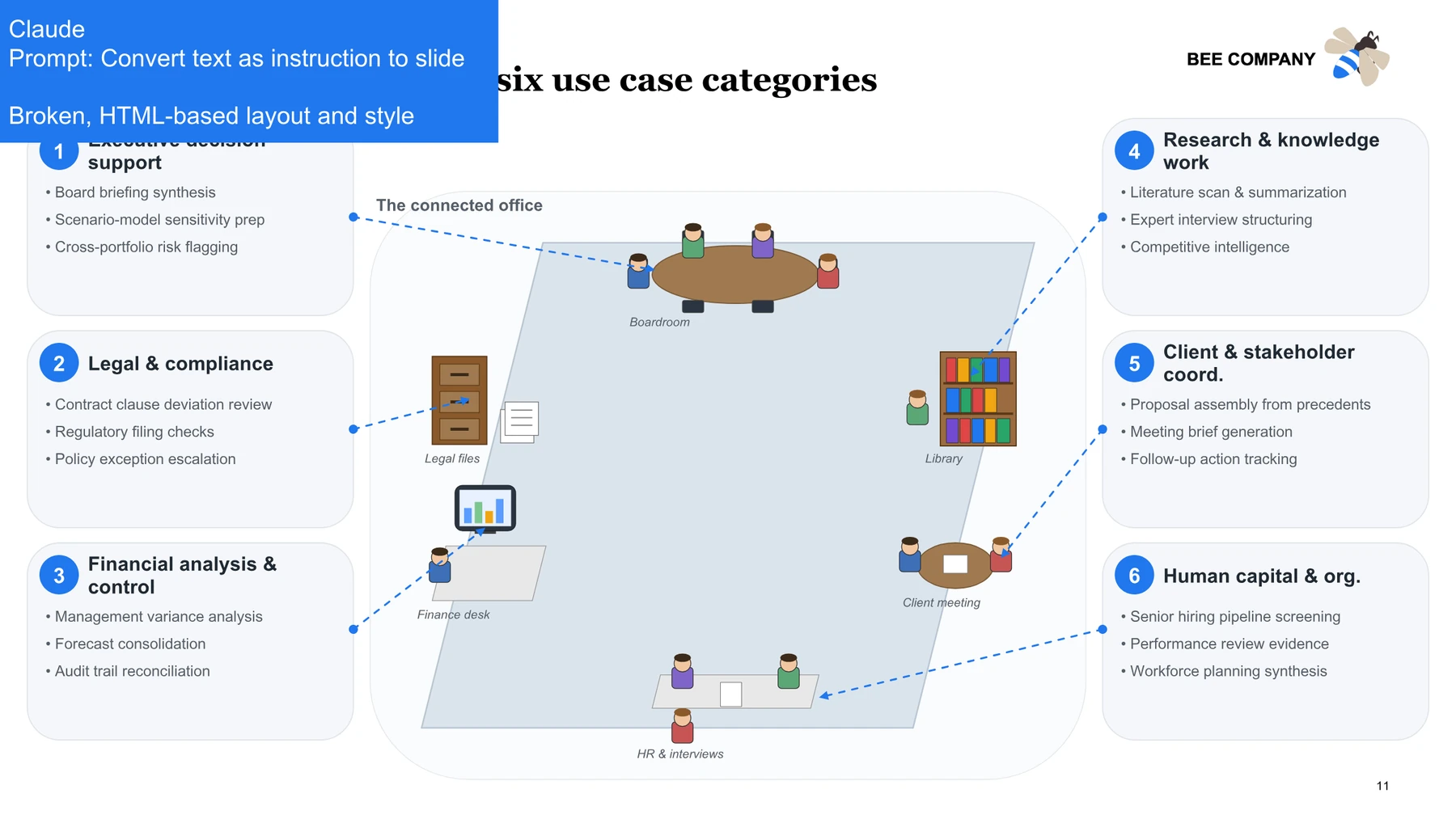
Content is present, but the layout is flat: no central visual, even weighting, and a document-like feel.
OriaText to slide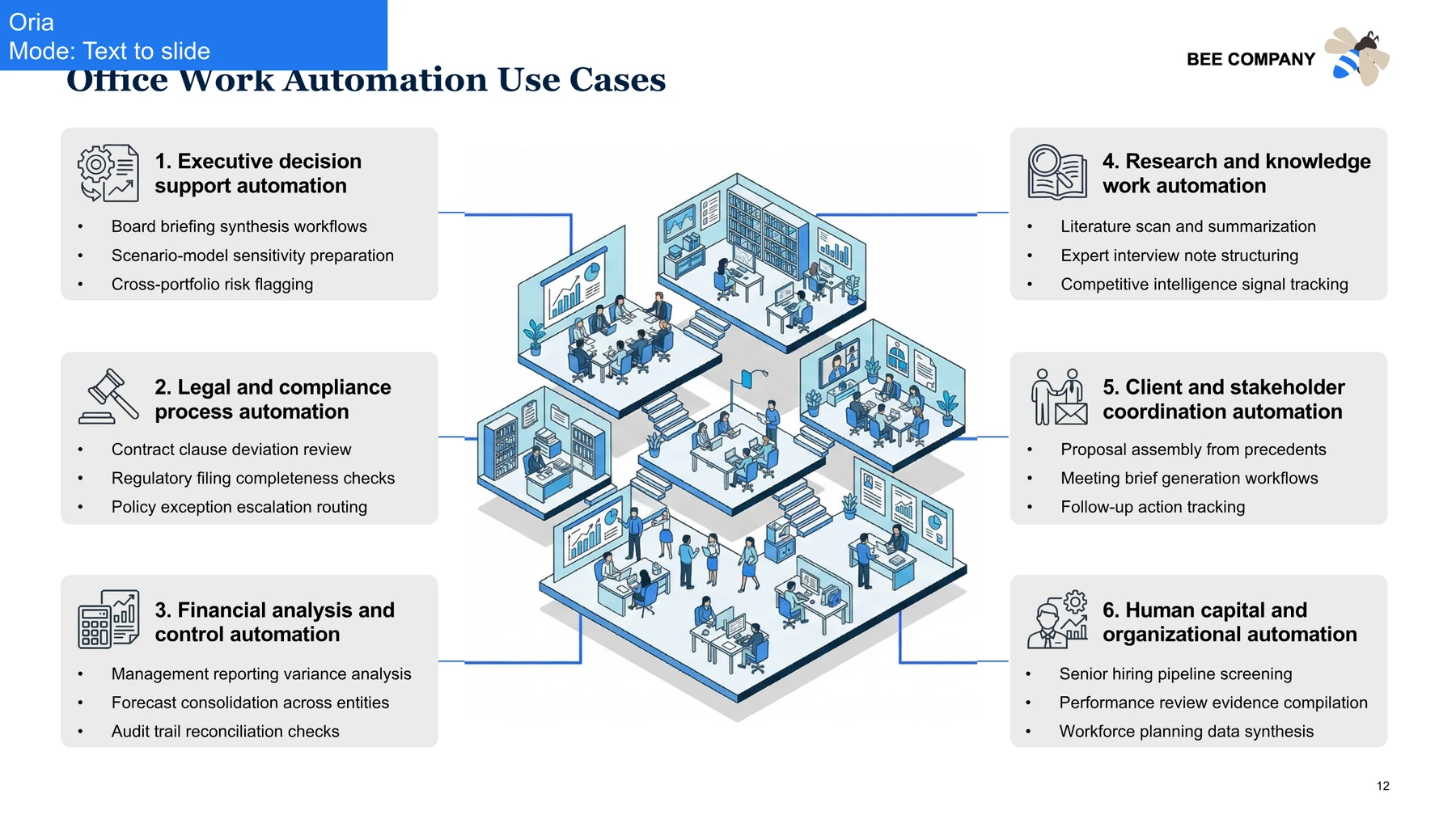
The requested 3D office is rendered in the center, with the six categories grouped and connected around it.
What changed, dimension by dimension
Slide structure
Claude: Sections stacked in a uniform grid with no visual anchor.
Oria: A clear center-and-satellites structure that guides the eye.
Layout quality
Claude: Uneven spacing and crowded blocks in places.
Oria: Balanced spacing, aligned groups, and consistent margins.
Visual rendering
Claude: The requested central illustration was omitted.
Oria: The 3D office illustration was rendered as asked.
Strategy deck readiness
Claude: Reads as a formatted outline for internal use.
Oria: Reads as a slide you could show a client or board.
Time saved and cleanup
Claude: Needs manual redesign to become presentation-ready.
Oria: Usable with light edits, kept fully editable in PowerPoint.
Real examples from the test
Below are more pairs from the same exercise. Each shows the Claude result next to the Oria result for an identical brief, so you can see the pattern hold across very different slide types.
Example 1: Marketplace business model
A marketplace flywheel, a revenue-flow diagram, and a unit-economics panel requested on a single slide.
ClaudeText to slide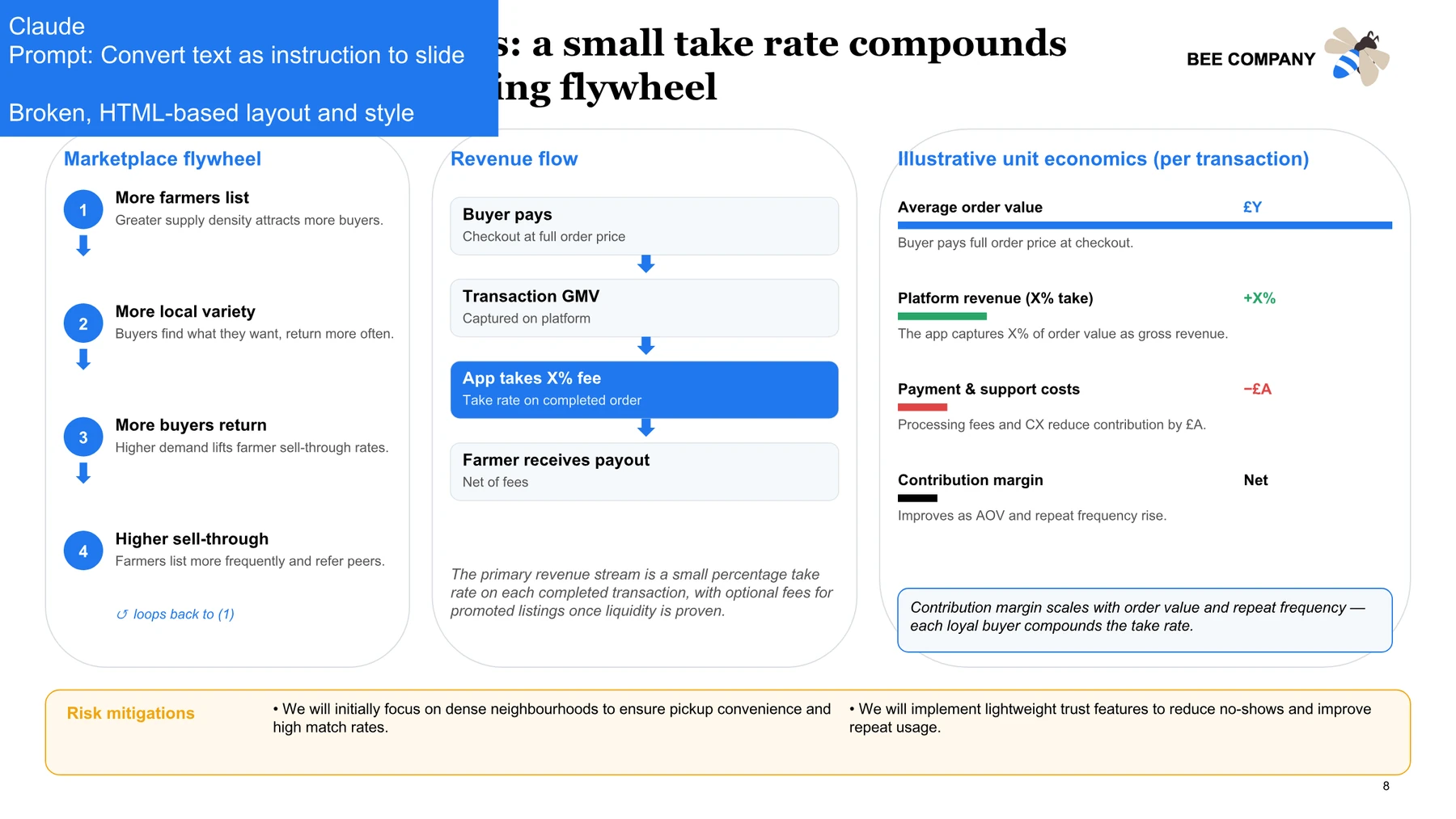
The three components are stacked as lists, losing the flywheel and the flow the brief asked for.
OriaText to slide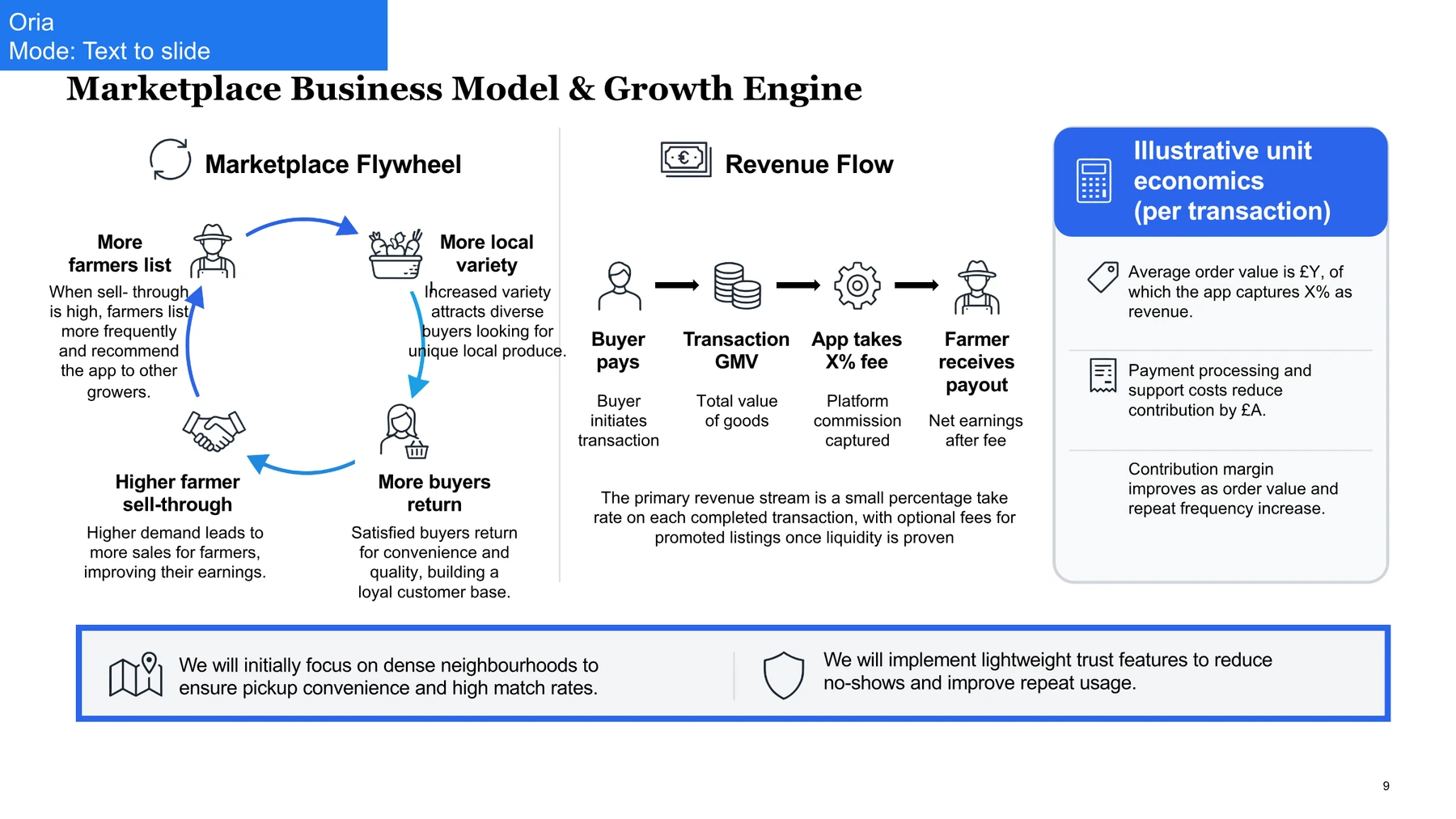
A true circular flywheel, a left-to-right revenue flow, and a boxed unit-economics panel, all on one slide.
Example 2: Improve design on a board ambition slide
An existing board slide with metric targets and seven initiatives, sent to both tools with a single instruction: improve the design.
ClaudeImprove design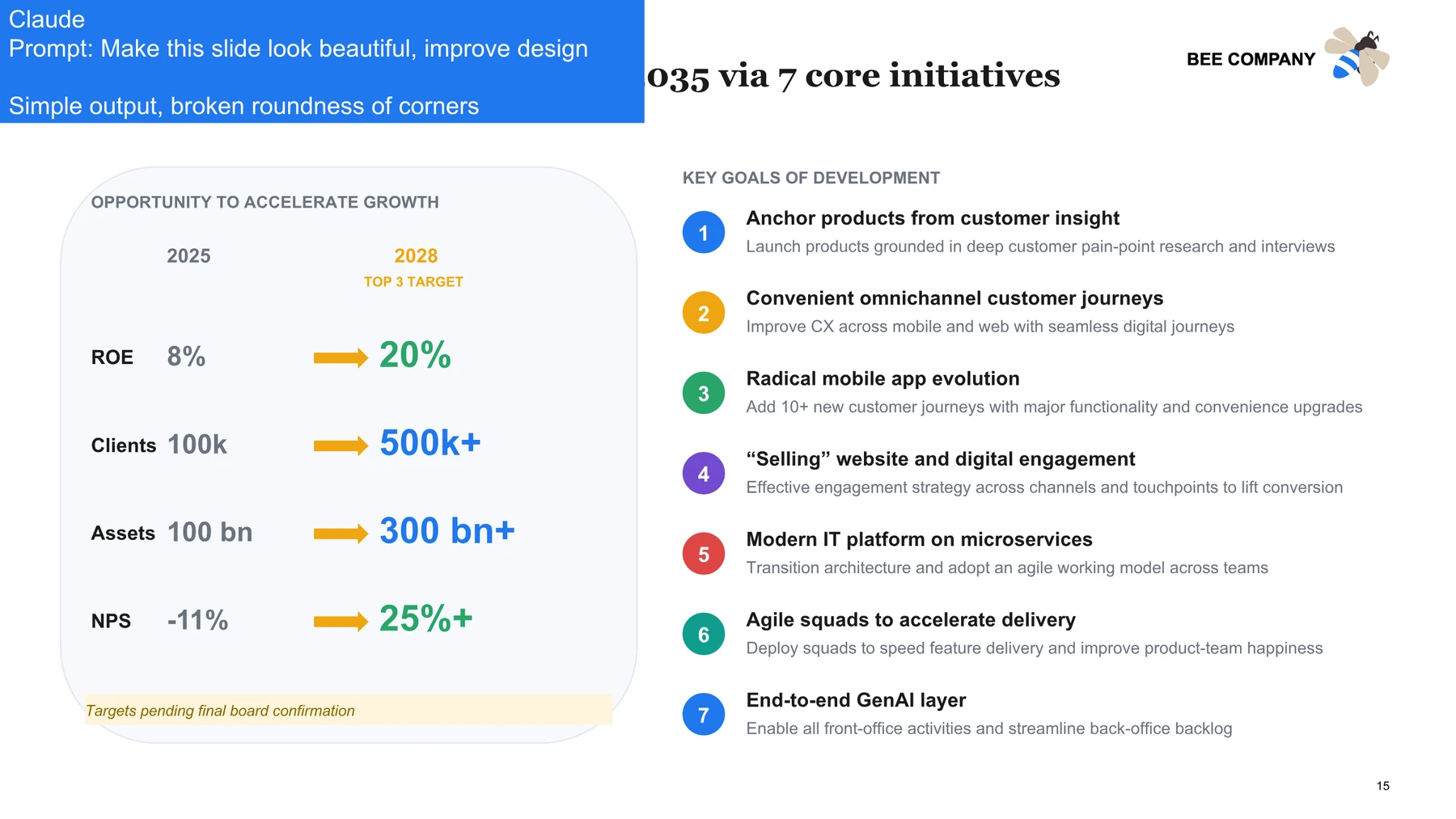
A lighter coat of paint: simple styling, inconsistent rounding, and a still-flat metrics block.
OriaImprove design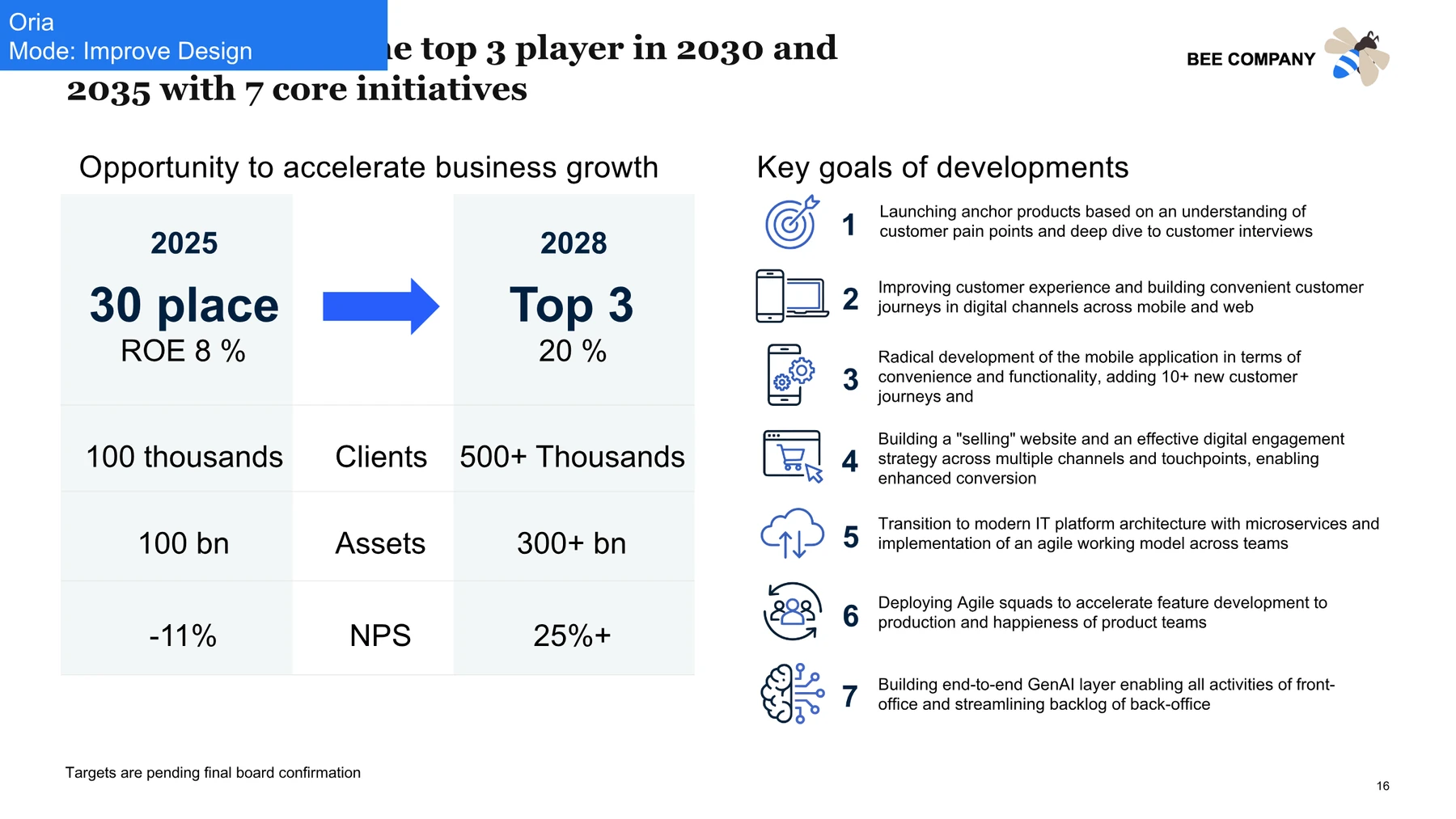
A structured before-and-after metrics panel and numbered initiatives with icons and clear grouping.
Example 3: Product positioning comparison
A dense two-option positioning slide comparing an agent built on top of Claude with a generative design engine across six dimensions.
ClaudeImprove design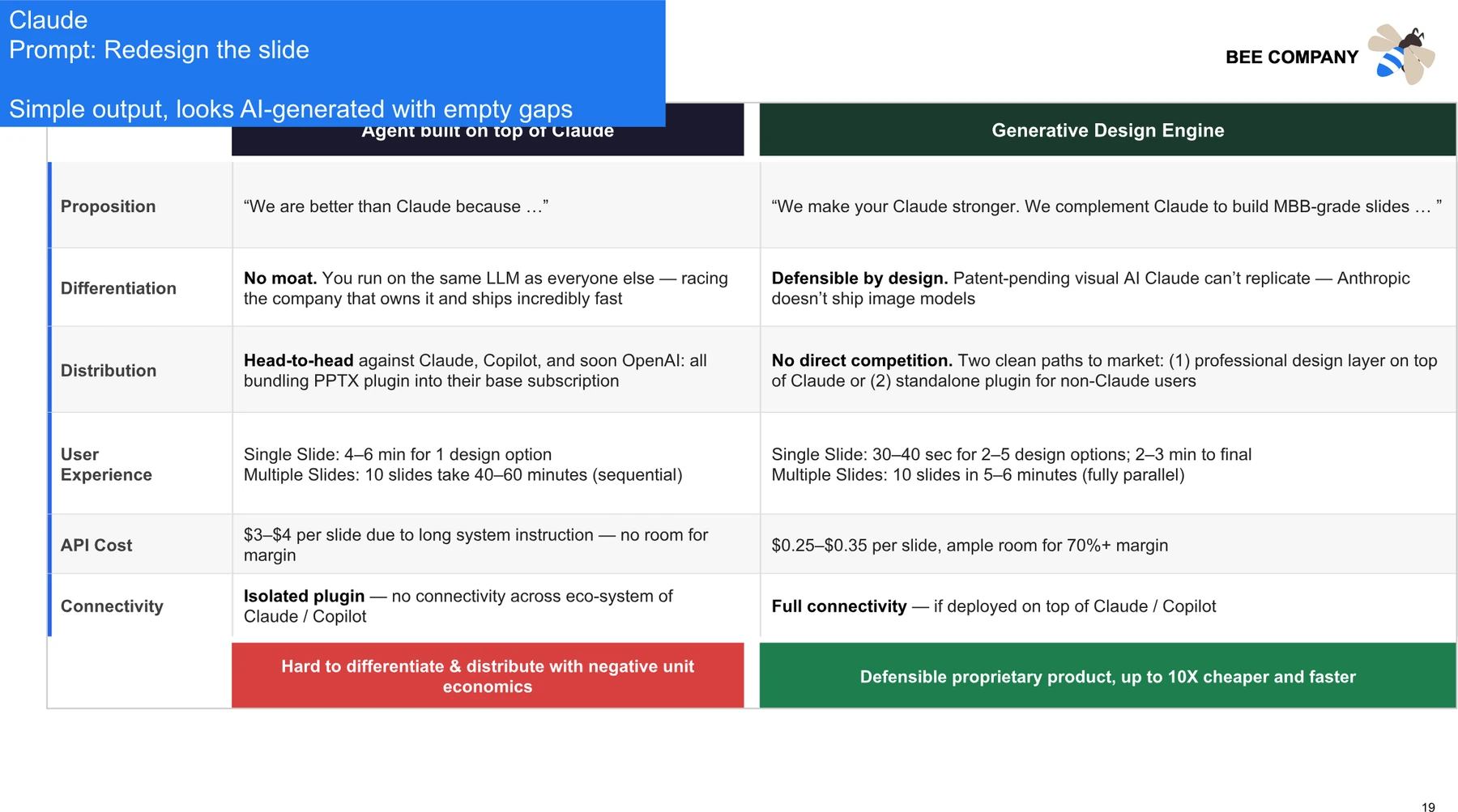
Readable, but it looks AI-generated: empty gaps, heavy color blocks, and uneven density.
OriaImprove design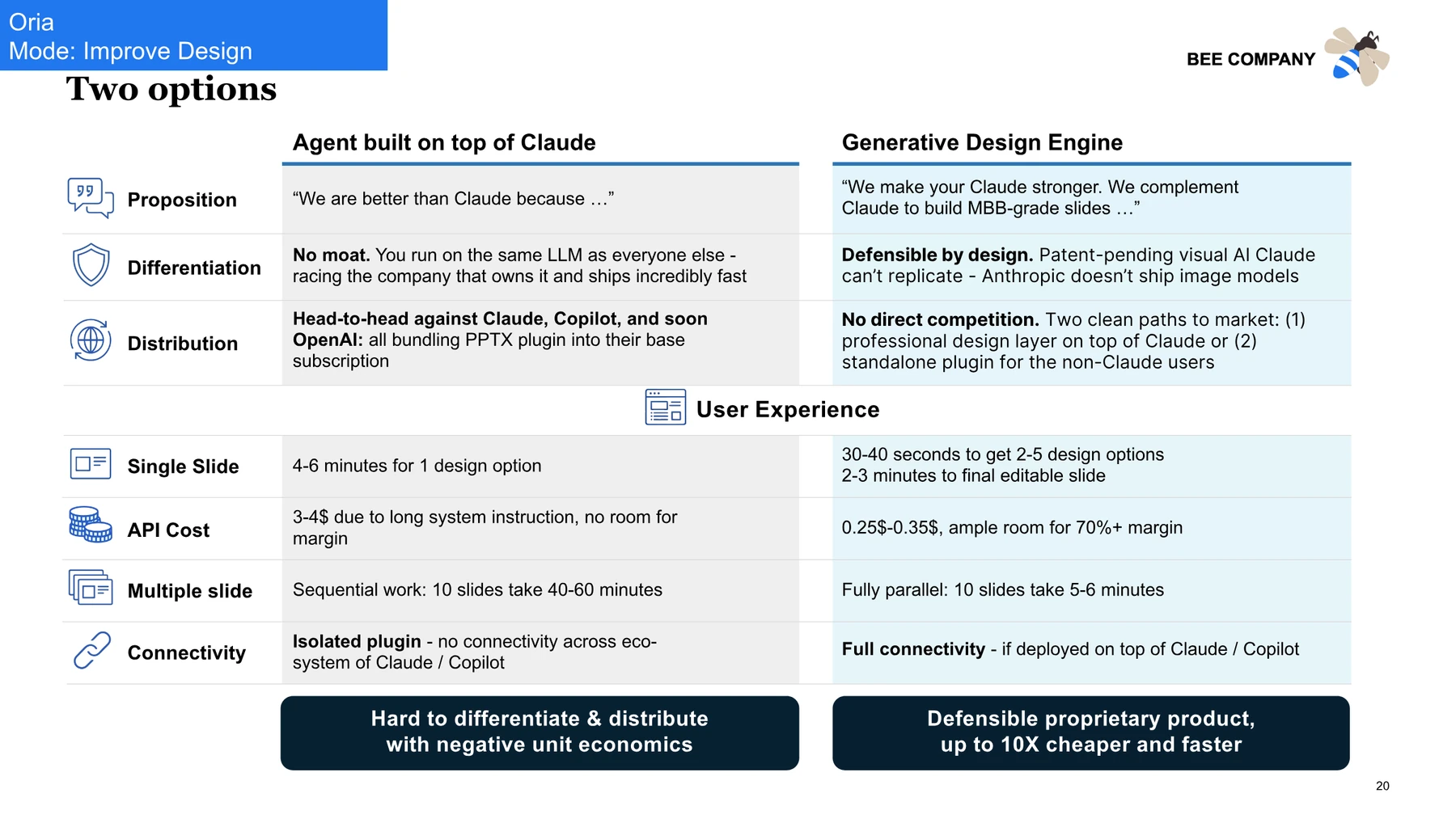
Two aligned panels with row icons, balanced spacing, and a clear takeaway bar under each option.
HTML-based generation vs visual rendering
HTML-based generation is good at one thing: placing content. It can put the right words in roughly the right region of the slide. That is genuinely helpful for a first draft. The limitation is that a strong PowerPoint deck depends on much more than placement. It depends on spacing, rhythm, hierarchy, grouped components, deliberate chart and object placement, and slide logic that makes the message obvious at a glance.
Visual rendering treats the slide as a designed surface from the start. That is the approach Oria takes, and it is why the same content comes out looking composed rather than assembled. The two columns below summarize the practical difference.
HTML-based generation
- Places content in document-style blocks
- Hierarchy is often flat and evenly weighted
- Spacing and margins can drift or crowd
- Complex visuals are simplified or skipped
Visual rendering (Oria)
- Designs the layout before placing content
- Builds a clear focal point and hierarchy
- Keeps spacing, alignment, and rhythm consistent
- Renders the requested diagrams and visuals
Who should use which tool
Choose the Claude add-in when- You want a fast rough draft to react to
- You are experimenting with structure and narrative
- You need basic automation for internal slides
- Final visual polish is not the priority yet
Choose Oria when- You are building board, client, or investor decks
- You need consultant-grade layout and hierarchy
- You work in consulting, PE, banking, or corporate strategy
- The slide has to look designed and stay editable
These are not mutually exclusive. A common and effective workflow is to draft with Claude and finish with Oria: let Claude shape the content fast, then render the same input into a polished, editable PowerPoint deck with Oria.
Final verdict
The Claude for PowerPoint add-in is real proof that AI can connect to PowerPoint and generate slides. For rough content and basic automation, it earns its place in the workflow. But serious presentation work is judged on whether the slides look like a real strategy deck, and that is where the test was decisive.
Across every brief, Oria won on visual rendering, layout discipline, business-slide quality, and polished output, while keeping each slide editable inside PowerPoint. If your goal is an executive-ready deck rather than a first draft, Oria is the stronger tool.
Frequently asked questions
Can Claude AI do PowerPoint?
Yes. The official Claude for PowerPoint add-in runs in the PowerPoint task pane, reads the open deck, and writes slides into it from a natural-language brief. It reliably gets the right words onto the right slides. What it does not do is design them: spacing, alignment, hierarchy and template fidelity are still yours to fix.
Is Claude free for PowerPoint?
The add-in itself is not a separate purchase, but it only works while you are signed in to a paid Claude plan, so there is no genuinely free route. A free Claude account can still draft slide content in the chat window, which you then paste into PowerPoint yourself.
What does Claude for PowerPoint cost?
It costs whatever your Claude subscription costs, because the add-in is bundled rather than priced on its own. Budget it as a per-seat Claude plan, and check the current tier list before you commit a team, since the plan that carries the add-in has moved more than once.
Is Claude in PowerPoint any good?
It is good at the half of the job that is writing and weak at the half that is designing. On a real strategy deck it placed the right content and then produced crowded blocks, uneven margins and a flat hierarchy. Treat it as a fast drafter, not as a finisher.
What is the difference between the Claude add-in and Oria?
Claude generates slides the way it generates a web document: structured content laid out in a flow. Oria is visual-rendering-first, designing each slide as a composition and translating it into editable PowerPoint shapes on your own template. The result is cleaner layout, stronger hierarchy and slides that survive a board review.
Can I use Claude for rough drafts and Oria for final slides?
That pairing works well. Use Claude to shape the story and draft content quickly, then use Oria to render the same input into a designed, brand-ready PowerPoint deck. Many teams treat Claude as the writer and Oria as the designer.

Andrew Persh
Founder, Oria
Former top-tier strategy consultant turned product builder. Andrew founded Oria to help professionals create boardroom-ready presentations without the formatting overhead.