

Claude for Consultants: Skills, Prompts and Slide Workflows
How consultants use Claude end to end. The method, the exact prompts, the way to teach Claude a repeatable skill, and how to turn its output into board-ready slides, with a full worked example you can copy today.
What the Consultant's Guide to Claude covers
This is the practical playbook for using Claude on real consulting work, the kind a strategy associate, a corporate strategy analyst, or a finance team actually does under deadline. It is not a tour of features. It is the method, the exact prompts, the way to package a method as a reusable skill, and the handoff that turns Claude's thinking into a board-ready deck. Everything you need is on this page; you will not have to go hunting for the substance elsewhere.
We move in the order a real engagement does: frame the question, build a fact base, structure the analysis, synthesize the answer, and communicate it. At each step you get the specific instruction that makes Claude behave like a trained associate instead of a fluent intern, and at the end a full worked example ties the whole thing together.
Why Claude needs structure to do consulting work
Out of the box, Claude is fluent and fast, and that is exactly the trap. Ask it a business question and it will hand you a confident, well-written answer that skips the things consulting is built on. It tends to answer before it frames. It produces lists where a partner wants an argument. It asserts numbers without showing how it got them. And it writes to fill the page rather than to be skimmed by a busy executive.
None of that is a limitation of the model. It is a limitation of the instruction. The same model, told to state a hypothesis first, to structure the problem so the parts do not overlap and nothing is missing, to show its math, and to lead with the so-what, will produce work that holds up in a review. The rest of this guide is the set of instructions that get you there, every time.
Hold every output to a simple bar: is it decision-oriented, structured before it is analytical, evidence-aware, and readable by an executive in sixty seconds? If a draft fails that bar, the fix is almost always a sharper instruction, not a better model.
The consulting workflow with Claude
A consulting task moves through five stages whether you do it by hand or with Claude. The discipline is to keep Claude inside this structure rather than letting it jump to a fluent conclusion. Claude carries stages one through four, the thinking. Stage five, the deck, is where you hand off to a tool built for slides.
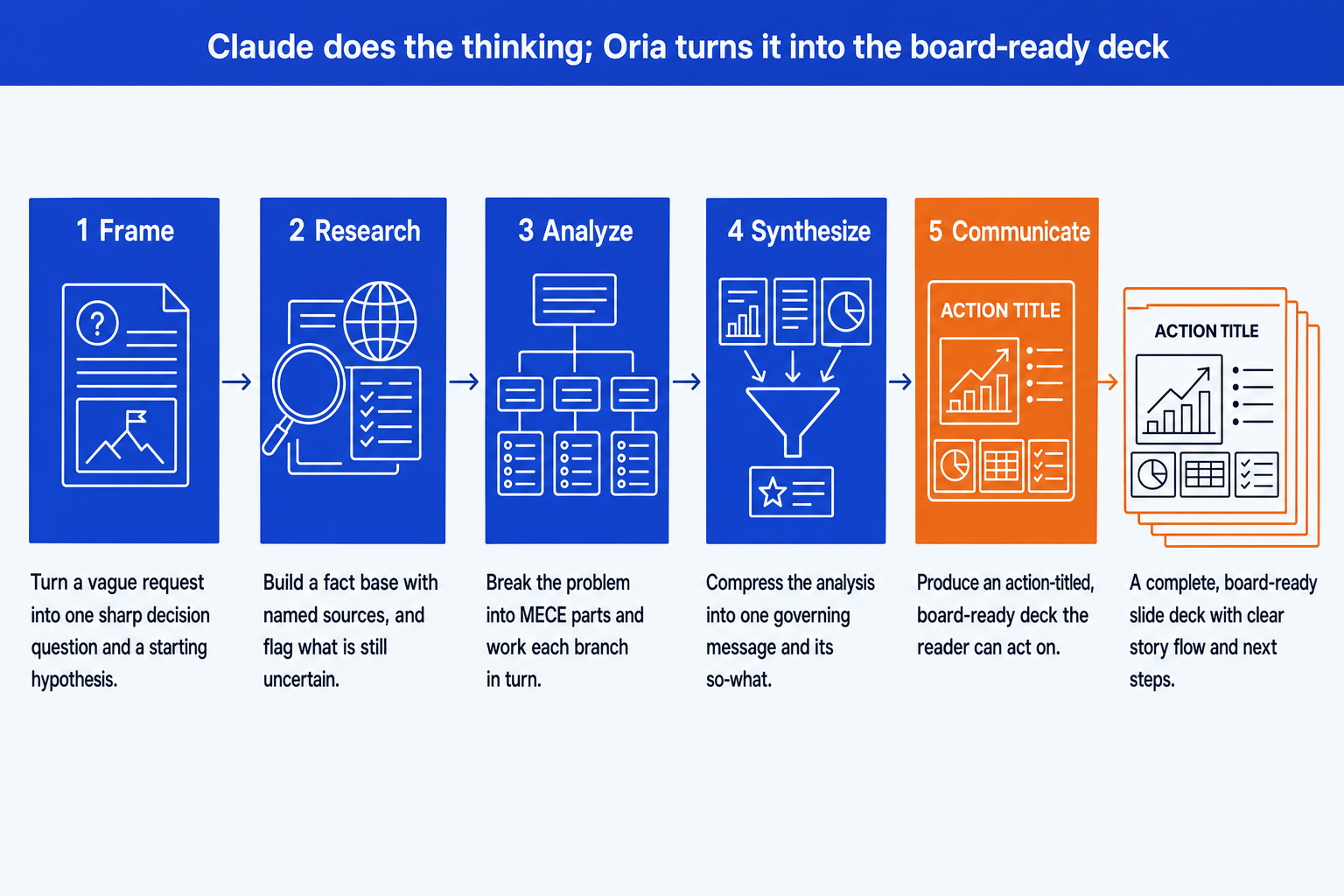
Frame. Force a single decision question and a hypothesis before any analysis. This one step prevents the most common failure: a confident answer to the wrong question.
Research. Build a fact base with sources Claude can name back to you. Treat unsourced claims as drafts, not facts, and ask it to mark what it is unsure about.
Analyze. Structure the problem so the branches are mutually exclusive and collectively exhaustive, then work each branch. Structure first, numbers second.
Synthesize and communicate. Compress the analysis into one governing message with supporting arguments, write an action-titled storyline, then build the slides in Oria.
Skills: teach Claude a repeatable method
A skill is the difference between re-explaining your method every time and teaching it once. Mechanically, a skill is one folder with a single markdown file. The file names the skill, says when to use it, lays out the method as numbered steps, and fixes the output format. You upload it to a Claude Project as project knowledge, then any conversation in that project can run it on command.
Here is a complete, working example. A market-sizing skill that produces a defensible number instead of a guess:
market-sizing/SKILL.md
To use it, create a Claude Project, add the file under project knowledge, then say "use the market-sizing skill to size the UK market for electric fleet leasing." Claude runs your steps in your output format. Here is a second one, for the framing stage:
issue-tree/SKILL.md
Build one skill for each task you repeat. The set worth having first: issue framing, market sizing, competitive analysis, root-cause, pricing, executive summaries, and slide storyline. Together they behave like a consulting operating system that runs the same way across every engagement and every person on the team.
If you want the methods themselves rather than the theory, the 21 strategy skills for consulting work are a free pack covering the six domains this guide walks through. Once a skill is doing real work, deciding whether the next task needs a subagent, an MCP connection, or a plugin instead is its own question, covered in our comparison of Claude skills vs agents vs MCP.
The prompts that do the everyday work
Prompts are the workhorses. Below are the exact ones we use, grouped by the stage of the workflow they serve. Copy a block, replace the bracketed parts, and run them in sequence inside one conversation so each builds on the last. Any prompt you find yourself reusing, promote it to a saved skill (see above).
Stage 1 and 2: Frame and research
Frame the problem
Pressure-test the framing
Build a sourced fact base
Scan the competitive landscape
Stage 3: Analyze
Size the market
Find the root cause
Test a hypothesis
Stage 4: Synthesize
Synthesize to one message
Write the executive summary
Stage 5: Communicate
Build the slide storyline
Sharpen every title into an action title
Stress-test before the meeting
Prep the board Q&A
Tip
Run these in order in one conversation. By the time you reach the storyline prompt, Claude already holds the framing, the facts, and the synthesis in context, so the deck it produces is grounded in your work rather than generic.
From analysis to board-ready slides
Do not ask Claude to build the slides; ask it for the storyline, then build the deck in Oria. Three steps:
Run the storyline prompt above to get action titles and content for each slide.
Check the action titles, read top to bottom, tell the whole story on their own.
Paste the storyline into Oria, which renders the slides in your template with real editable charts.
The slide half of this workflow has its own guide. Our walkthrough of using Claude in PowerPoint covers the round trip from an approved storyline to editable slides, including the handoff most teams get wrong.
A worked example, end to end
Say the brief is "should our client, a mid-size logistics firm, enter the electric-van leasing market in the UK?" Here is the whole task run through the workflow, using the prompts above.
Frame. Prompt one turns the brief into a decision question ("Is UK electric-van leasing attractive enough, and can the client win in it?") and a MECE tree: market attractiveness, right to win, and economics. Each branch gets a hypothesis.
Research. You feed Claude the sources you have and ask it to build the fact base, naming each source and flagging gaps. It lists fleet electrification rates, incumbents, and the two figures it is least sure about.
Analyze and size. Prompt two sizes the market top down from commercial-vehicle registrations and bottom up from fleet counts and lease rates, triangulates, and returns a low, base, and high case with the sensitive assumptions flagged.
Synthesize. Prompt three compresses everything to one governing message ("Enter, but as a financing partner, not an operator") with three supporting arguments.
Communicate. Prompt five produces a twelve-slide action-titled storyline; prompt four writes the executive summary; prompt six gives you the five board objections and your responses. You paste the storyline into Oria and the board deck is built.
Start to finish, that is an afternoon instead of a week, and every step is traceable: you can see the question, the assumptions, the math, and the logic behind the recommendation. That traceability is what makes the output safe to put your name on.
Common mistakes to avoid
One more mistake is choosing a tool from a demo rather than a real brief. We ran the same deck through Copilot and Claude side by side and then through nine AI presentation makers on one consulting brief, and both are worth reading before a team standardises on anything.
Frequently asked questions
Is Claude good enough for consulting work?
Yes, once you give it structure. On its own Claude writes fluent prose but skips the discipline a partner expects: it answers before framing, lists instead of arguing, and rarely shows its sources. Loaded with a method (a skill) or driven by a sharp prompt, it holds a hypothesis, structures a problem MECE, triangulates a number, and writes a skimmable executive summary. The difference is entirely in how you instruct it.
Which Claude model should I use?
Use the most capable model for the thinking work (framing, synthesis, stress testing) where judgment matters, and a faster model for high-volume drafting like turning notes into bullets. If you only want one default, pick the strongest model. The prompts in this guide work on any current Claude model.
Do I need to be technical?
No. Everything here runs in the normal Claude chat or a Claude Project. You paste a prompt, or you upload a few markdown files once and reuse them. There is no code and no setup beyond creating a project.
What is the difference between a skill and a prompt?
A prompt is a single instruction you paste for one task. A skill is a saved method (a small markdown file) that you upload once so Claude runs the same way every time, without you re-explaining it. Use prompts for everyday one-offs; promote a prompt to a skill once you find yourself pasting it repeatedly.
How does Claude work with PowerPoint?
Claude does the thinking: the storyline, the action titles, the bullet logic, the executive summary. It is weak at visual design and editable native charts. The reliable pattern is to draft the structure in Claude, then build the actual slides in Oria so the deck looks board-ready and stays in your template.
Where should a consultant start?
Pick the one task you do most, run a single real piece of work through the matching prompt in this guide, and judge the output against what you would have produced by hand. Once you trust it, save that prompt as a skill and add the next one. Build the habit on real work, not a demo.