

An OpenAI deck is no longer one thing, and the route you pick in the first minute decides whether you end up with a file you can edit or a picture of a slide.
Four routes now start from an OpenAI prompt. The official ChatGPT add-in builds and edits slides inside the .pptx you already have open. ChatGPT on the web can hand back a downloadable .pptx built from an outline. ChatGPT Images can render a whole slide as one high-resolution picture, which is what the free skill further down this page automates. And an MCP connector can pass the argument you worked out in chat to a tool that writes native PowerPoint objects on your template.
People type this both ways, openai deck and open ai deck, and they mean the same question: how do I get from a prompt to something a client can read on Thursday. The answer turns on one variable, which is how much of the slide still has to change after it is generated.
Quick answer: how do you build an OpenAI deck?
There is no single OpenAI slide button, and anything promising one is describing a demo rather than a workflow. Sort by what has to happen to the deck after it is generated, then choose the route that survives it.
OpenAI offers three distinct routes to a deck in 2026. ChatGPT for PowerPoint, the official add-in launched on 21 May 2026 and generally available for Business workspaces since 6 July 2026, builds and edits slides inside the open presentation and leaves the structure editable. ChatGPT on the web returns a plain .pptx download that is strong on structure and weak on design, and OpenAI says template and font handling is not fully supported yet. ChatGPT Images 2.5, released on 8 September 2026, renders a whole slide as one picture, which looks excellent and cannot be corrected afterwards. For decks held to a strict corporate template, pair the chat with an add-in such as Claude for PowerPoint, Microsoft 365 Copilot or Oria.
How we chose the routes on this page
Five tests, applied the same way to each route.
Does the output stay editable in PowerPoint
Can a reviewer click a figure and change it, or is the slide a flat picture that has to be regenerated? Every other criterion on this list is downstream of that one.
Does it build on the template you already have
We started each route with a loaded corporate .pptx rather than a blank deck, and asked whether the result inherited the slide master, the fonts and the colour scheme.
Where the work actually happens
In the open file, in a chat window, or on a third-party canvas. The surface decides what the slide inherits: your master, your source documents, or somebody else's design system.
Who is billed, and on what meter
A subscription seat, workspace credits, or your own API key metered per generated image. The third one is the only route where a long deck has a variable unit cost.
What the fourth revision costs
The first draft flatters every tool. We judged on the pass after a number moved, a section was cut and legal asked for a different footnote.
We ignored image benchmark scores, template library counts, vendor speed claims and any comparison a vendor wrote about itself, including the ones on this site. Availability is no longer the constraint either. Stanford HAI's 2026 AI Index reports that organizational adoption of AI reached 88 percent, so nearly everyone reading this already has at least one of these tools inside the firewall. What separates the routes below is what they hand back when you are finished.
Key takeaways
Editability is the decision, not a feature. A rendered image and a native .pptx object look identical in a screenshot and behave completely differently in a review cycle. Decide which one you need before you compare anything else.
Template fidelity is where every route is still weakest. OpenAI says outright that complex formatting such as template or font handling may not be supported yet in its PowerPoint add-in. Assume a brand pass on any route until you have proved otherwise on your own master.
The surface decides what the slide inherits. Work done inside the file inherits your master and your colleagues' edits. Work done in chat inherits your argument and your source documents. Work done on a web canvas inherits a design system that is not yours, plus an export step.
Cost models differ more than headline prices. Add-ins bill a seat or workspace credits. The image route bills your own OpenAI key per picture, so a 30-slide deck regenerated three times is a metered expense rather than a flat one.
Rendered images win the first draft and lose the fourth. Image generation is now good enough that a rendered slide can beat a hand-built one on looks. It still cannot be corrected, only replaced, which is the wrong trade for anything with live numbers in it.
OpenAI deck routes, compared on five decision rules
The five columns are the five takeaways above, in the same order. Rows are grouped by route rather than ranked, with the in-file add-ins first. Every figure was read off the vendor's own documentation or pricing page in September 2026.
Sources: OpenAI's ChatGPT for PowerPoint help documentation and API pricing page, Anthropic's Claude for PowerPoint documentation, and oria.one pricing, all read in September 2026. Vendor terms change often. Verify before you buy.
This page covers the OpenAI and ChatGPT routes only. If your shortlist is wider than that, the wider comparison of AI for PowerPoint covers the add-in market as a whole, and the best AI presentation tool for strategy consultants is the ranked shortlist including chart specialists neither page repeats.
ChatGPT for PowerPoint: who is it built for?
This is the route most people searching for an openai deck actually want, and it did not exist when most of the advice on the internet was written. OpenAI launched an official ChatGPT add-in for PowerPoint on 21 May 2026, initially as a beta open to every tier from Free through to Enterprise, and its ChatGPT Business release notes record general availability for Business workspaces from 6 July 2026. You install it from Home, then Add-ins, or from the Microsoft marketplace, and sign in with an OpenAI account.
It runs in a side panel inside PowerPoint and, in OpenAI's own description, creates, edits, understands and polishes presentations while preserving editable slide structure. It will take notes, documents, spreadsheets, images or an existing deck as input, generate a structure from them, and modify or insert slides in a deck already under way rather than starting over. It can also audit a finished deck for weak narrative logic and likely audience objections, and it can pull context from connected Gmail, Outlook and SharePoint accounts.
The caveat is OpenAI's own. The company states that some advanced PowerPoint capabilities may not be supported yet, including complex formatting such as template or font handling, and recommends reviewing the add-in's changes before finalising a deck. On a house template with strict masters, that is the sentence to plan around.
The trade-off: the widest reach of any route here, free tiers included, bought at the price of the weakest published guarantee on template compliance.
Claude for PowerPoint: who is it built for?
A page about AI-generated slides written before 7 May 2026 is describing a narrower field than the one you are buying in, because that is the date Anthropic's Claude for PowerPoint went generally available. It belongs on an OpenAI page for one reason: it is the direct comparison for anyone choosing which assistant to point at a deck, and the two behave differently in the file.
Anthropic's documentation is specific about the template question that OpenAI hedges. Claude reads the slide master, layouts, fonts and colour scheme of the deck you already have loaded and uses them when generating or editing, and it converts bullets into diagrams and editable native PowerPoint charts rather than static images. It is generally available on Pro, Max, Team and Enterprise plans, and it runs on PowerPoint for the web, on Windows with a Microsoft 365 subscription at build 16.0.13127.20296 or later, and on Mac from version 16.46. It does not run on the 2016 or 2019 perpetual licences, on iPad or on Android.
Anthropic also publishes what it is not for: final client deliverables without human review, regulated or highly sensitive data without proper controls, and replacing your own judgement on design and narrative flow. It carries an explicit prompt-injection warning to use the add-in only with trusted files, because a downloaded template can carry hidden instructions.
The trade-off: the clearest published commitment to your slide master of any assistant here, available only from the paid Claude plans upward.
Oria: who is the add-in and MCP connector built for?
Oria is the tool behind this site, so read it with that in mind. It reaches you on two surfaces rather than one: a PowerPoint add-in that loads in the task pane on Windows, macOS and PowerPoint for the web, and a connector for both Claude and ChatGPT over MCP, so a slide can be built from the chat you are already in without opening PowerPoint at all. On an OpenAI page that second surface is the relevant one, and the install guide for Claude and ChatGPT covers the setup.
What it is built for is narrow and deliberate: corporate documents and consulting presentations. Board packs, steering committee decks, diligence exhibits, operating-model slides and dense frameworks held to an enforced corporate template. Output is native PowerPoint shapes and text, and a single brief returns several distinct design options rather than one draft to argue with. Plans run from 19 dollars a month for 60 tokens, with Professional at 59 dollars adding the Claude and ChatGPT MCP connector, Team at 399 dollars on a shared pool, and Enterprise adding private cloud deployment and custom model integration. There is a 7-day trial or 20 free tokens.
On data handling, Oria states that it does not train, fine-tune or improve models on customer content, that slide content is not stored, and that working artefacts are discarded within an hour of delivery. Enterprise adds private deployment for organisations that need the model stack inside their own boundary.
The trade-off: built for the corporate environment only, so it loses on highly visual work. For founder fundraising and pitch decks, launch and campaign decks, student presentations and marketing one-pagers, a design-led tool such as Gamma, Canva, Pitch or Beautiful.ai will beat it and look better doing it.
ChatGPT on the web: who is the .pptx download built for?
This is the oldest route and the most misreported. You can ask ChatGPT for an outline and have it return a downloadable .pptx, and on the web or in the desktop app you can invoke the presentation composer directly to open a templates gallery. The file that comes back is real PowerPoint: editable text, editable shapes, no add-in required, nothing to install.
It is also plain. The slides arrive largely unbranded, closer to a structured outline with a layout than to a designed deck, and the advanced formatting limitations OpenAI names for the add-in apply here with more force. That is not a failure so much as a different product: the web route is good at sequence, headline logic and getting fifteen slides of skeleton out of a two-page brief.
Used well, it is the cheapest first step in this whole comparison. Draft the argument in chat, download the .pptx, then apply your template and rebuild the two or three exhibits that carry the meeting. The mistake is treating the download as a deliverable rather than a scaffold, which is how unreviewed AI output ends up in front of a client with the model's default fonts still on it.
The trade-off: free or near-free and instantly editable, at the cost of a design pass you will do yourself every single time.
ChatGPT Images 2.5: who is the rendered-image route built for?
The image route is the one this page was originally written about, and it has moved twice since. OpenAI released gpt-image-2 on 21 April 2026, adding a reasoning step before generation and a large jump in text rendering, which is what made whole-slide rendering viable in the first place. OpenAI's announcement of ChatGPT Images 2.5 on 8 September 2026 put generation latency down by up to 50 percent against Images 2.0, and shipped two API models: Flare as the fast default, which OpenAI says produced high-quality images at two to four times the speed of gpt-image-2 in its own evaluations, and Sunburst for precise editing.
Two practical details decide whether this route fits a deck. The first is aspect ratio. OpenAI's image generation guide recommends 1024x1024, 1536x1024 or 1024x1536, and for custom dimensions requires both edges to be multiples of 16 with neither exceeding 3840 pixels, above which output beyond 2560x1440 is flagged experimental. A 16:9 slide is therefore a custom size, and an exact 1920x1080 is not expressible, because 1080 is not a multiple of 16.
The second is the meter. OpenAI's published API pricing bills gpt-image-2 and both gpt-image-2.5 variants at 30 dollars per million image output tokens and 8 dollars per million image input tokens, charged to your own key. A rendered deck is therefore a variable cost that grows with slide count and with every regeneration, which matters because regeneration is the only way to correct anything.
The trade-off: the best looking single slide you can produce in two minutes, and a slide nobody can edit, translate, re-number or hand to a colleague with a different template.
Gamma and Canva: who are the design-led tools built for?
None of the OpenAI routes are aimed at visual-first decks, so the honest answer for a large share of readers is a tool that is not on OpenAI's roadmap at all. Gamma, Canva, Pitch and Beautiful.ai build on their own canvas with their own design system, which is exactly what you want when the job is a founder pitch, a launch deck, a campaign readout, a conference talk or a student presentation.
The cost of that canvas is the export step. A deck built somewhere other than PowerPoint has to cross a format boundary before it reaches a corporate reviewer, and that crossing is where strict masters, custom fonts and placeholder rules get tested. If the deck will live and die inside the tool that made it, the export question never arises and these are the strongest products in the comparison.
Worth saying plainly: Figma, Canva and Adobe Firefly all shipped gpt-image-2 integrations on its launch day of 21 April 2026, so the OpenAI image model and the design-led tools are not really rivals. Many of these products now call the same model you would call yourself, with a layout engine around it. If you want that comparison in depth, the Gamma alternatives page for consulting decks sets it out.
The trade-off: the best looking decks in the category, produced on a canvas that is not PowerPoint, with an export step between you and a corporate reviewer.
What none of these routes can do for you
Every route above generates an artefact. None of them decides what the artefact should argue. Muhammad Yaseen, FCMA, CGMA, senior manager of finance compliance at Sana Safinaz, put the gap bluntly to FM Magazine in August 2026 after building decks with AI tools: “The AI didn't know which numbers mattered to my audience. It couldn't tell the story behind the variance in Q3.”
That is the reason the editability question is worth this much attention. If the generated deck were final, the format would not matter. It is not final, because the part that makes it worth presenting is added afterwards by the person who knows why the variance happened. A route that lets you make that addition in thirty seconds beats a route that looks better and forces a regeneration.
How to run the OpenAI slides skill, step by step
If the image route is the one you want, here is the version we built. Note what it is: OpenAI now ships Skills of its own, written as a plain-text SKILL.md file in the open Agent Skills format so the same file runs in ChatGPT, Codex and other tools that read that standard, but there is no official OpenAI slide-design skill. This one is ours, it is free, and it drives the image API rather than PowerPoint.
Download the skill
The skill is a PDF file. You will copy the text and paste it into a project in the next step.
OpenAI Image 2 Slide Skill
PDF file · Free · No login required
Paste it into a project
In Claude, open Projects in the left sidebar, click New project, and paste the full contents of the file into the project's custom instructions. Every conversation inside that project then has the skill. The same text also works as a ChatGPT project instruction or as the body of a SKILL.md file, since it is ordinary Markdown.
Tip: name the project something memorable like “Slide Generator” so you can reuse it for every new deck.
Describe the deck
Start a new conversation inside the project and type the kind of presentation you need, for example “Create a strategy review for a mid-market industrials company”. You will get a couple of clarifying questions about audience, sections and level of detail before anything is built, which is the part most one-shot generators skip and the reason the output is usually closer to what you meant.
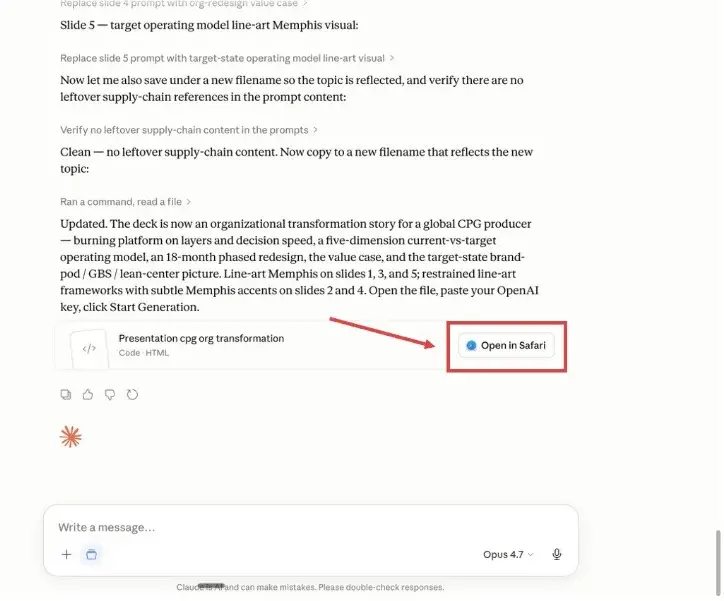
Take the HTML file it returns
Once you have answered the questions, you get a single self-contained HTML file with the full deck plan and the rendering logic built in. Download it to your computer.
The HTML file contains everything needed to render the deck: no extra installs, no backend.
Open it and render the deck
Double-click the HTML file, or drag it into Chrome, Safari or Edge, paste your OpenAI API key, and click Start Generation. The runner calls the OpenAI image API once per slide and renders them in front of you as high-resolution images you can save or drop into a deck. Remember what you are getting: pictures, billed to your own key, which cannot be edited afterwards.
Your API key stays in your browser and is never sent to our servers. You can create or copy a key from the OpenAI API keys page.
What it can do
- Turn a single prompt into a complete strategy or finance deck plan
- Ask diagnostic questions about audience and sections before producing anything
- Render every slide as a high-resolution image through the OpenAI image API
- Run locally in your browser, so your API key never leaves your machine
Example prompts to try
The skill is tuned for strategy and finance work rather than general presentation design. Paste any of the prompts below into the project to see the level of brief it answers best: a subject, a sector, and the sections you want covered.
“Create a due diligence document on a SaaS acquisition target in the cybersecurity space, covering market, product, financials, and key risks.”
“Build a strategy review for a mid-market industrials company, including a SWOT, a 3-horizon roadmap, and an initiative prioritization matrix.”
“Outline the principles of digital transformation for a global CPG player, with operating-model implications and a 12-month execution plan.”
“Prepare a board update on a turnaround plan for a regional retail bank, focused on cost-to-serve, digital channels, and risk posture.”
The rendered deck is a starting point, not a finished one. To get editable slides on your own template from the same kind of brief, pair it with the skill for slide design, which sends design instructions to a tool that writes real shapes and real text.
Which OpenAI deck route fits your constraint?
Most shortlists collapse the moment you name the one constraint that actually binds. Find yours on the left. Several of these send you away from OpenAI entirely, and away from us, which is the point.
One pairing is common enough to name. Use the chat for the argument and an in-file add-in for the exhibits, so the thinking happens where your sources are and the slide happens where your template is. If you are weighing the two assistants directly, the Claude versus Copilot comparison for business presentations is the head-to-head, and converting generated slides onto a brand template covers the clean-up pass whichever route produced them.
Frequently asked questions
Can ChatGPT make a PowerPoint presentation?
Yes, in three different ways. The official ChatGPT add-in builds and edits slides inside PowerPoint itself and keeps the slide structure editable. ChatGPT on the web can return a downloadable .pptx built from an outline, though the slides come back plain and unbranded. And ChatGPT Images can render a slide as a single picture, which looks finished and cannot be edited afterwards.
Is there an official OpenAI PowerPoint add-in?
There is. OpenAI launched ChatGPT for PowerPoint on 21 May 2026 as a beta available across its tiers, and its Business release notes record general availability for Business workspaces from 6 July 2026. You install it from the Home menu in PowerPoint under Add-ins, or from the Microsoft marketplace, then sign in with an OpenAI account.
Does OpenAI have a slides skill?
OpenAI ships Skills, which are reusable workflows written as a plain-text SKILL.md file in the open Agent Skills format, so the same file works in ChatGPT, Codex and other tools that read that standard. There is no official OpenAI slide-design skill. The skill on this page is a community one you paste into a project, and it drives the image route rather than the PowerPoint one.
Can ChatGPT build slides on my company template?
Partly. OpenAI states that some advanced PowerPoint capabilities may not be supported yet, including complex formatting such as template or font handling, so treat brand compliance as something you verify rather than assume. If the template is non-negotiable, an add-in that reads the slide master directly is a safer route than a chat export.
How much does it cost to render a deck as images?
You pay OpenAI directly. The published API pricing bills image output tokens at 30 dollars per million and image input tokens at 8 dollars per million for gpt-image-2 and both gpt-image-2.5 variants. That is a per-picture meter, so the cost of a deck scales with slide count and with how many times you regenerate.
What is the difference between an open ai deck and a Claude deck?
Less than the branding suggests. Both vendors now ship a PowerPoint add-in that writes native slide objects, and both are limited by how well they read your slide master. Claude for PowerPoint is generally available on Pro, Max, Team and Enterprise and converts bullets into editable native charts. OpenAI reaches more tiers, including free ones.
Do I need an OpenAI API key to build slides?
Only for the image route. The PowerPoint add-in and the web .pptx download work from a normal ChatGPT account. The skill on this page produces a self-contained HTML file that calls the image API straight from your browser, so it needs a key from the OpenAI API keys page and bills every render to your own account.