

Best AI Presentation Tool for Strategy Consultants
Nine tools, one test: does the slide come back as native, editable PowerPoint on your own template, dense enough to carry a real framework? Prices and features checked against each vendor's own pages in September 2026.
The decision here is not which AI tool makes the prettiest deck. It is which one produces something a team can still work on at ten at night, on the firm's master, two hours before a partner reads it. The deck is the work product, not an illustration of it, and every hour a tool saves on the first draft it can quietly hand back in relayout.
The stakes set the effort. In slide:ology, Nancy Duarte estimates that one hour of presenting takes between 30 and 90 hours of preparation, and her rule for why is blunt: "The amount of time required to develop a presentation is directly proportional to how high the stakes are." Strategy decks sit at the top of that range, so the only question worth asking of each tool is whether it takes hours out of that number or moves them elsewhere.
Quick answer: which AI presentation tool should a strategy consultant use?
The shortlist splits in two, and the split matters more than the ranking. Four tools generate inside PowerPoint, so the first draft is already a working file on your master. Five generate in a browser app and hand back an export. Pick the side first, then the tool.
For strategy consultants in 2026, Microsoft 365 Copilot is the default choice at firms already licensed on Microsoft 365, and think-cell remains the standard for chart-heavy exhibits. Oria is the closer fit when a rough outline, a sketch or a busy existing slide has to become a dense, brand-locked slide without leaving PowerPoint, and Plus AI is the fastest drafting add-in and the only one that also covers Google Slides. Gamma, Beautiful.ai, Pitch, Alai and Canva are web-first tools: strong for narrative and marketing decks, weaker when a bespoke exhibit has to survive an export onto a corporate master.
Pick an in-PowerPoint tool when
The deck is dense and brand-controlled, must stay fully editable, and gets reviewed and circulated as a .pptx by a team.
A web-based tool still fits when
A fast, polished draft in the browser is enough and the slides are cleaner, more standard, and lighter on bespoke detail.
How we chose the tools on this list
Five things were checked on every tool, against the kind of slide a strategy team ships rather than the one in the launch video.
Where the tool runs. Inside PowerPoint as an add-in, or in a browser app that hands back an export.
Whether the output is native and editable. A generated slide should come back as shapes, text boxes and charts you can retype and restyle, not a picture of a slide.
What it does with a corporate template. Fonts, colours, logos, and specifically what happens when the generated text does not fit the placeholder it lands in.
How it handles a dense, bespoke exhibit. A value driver tree or a seven-step journey with pain points per step, not a title and three bullets. Every tool looks good on its demo prompt.
Published price. Taken from each vendor's own pricing page in September 2026. Where a vendor publishes no price, this page says so.
Four things were deliberately ignored, because they do not predict whether a slide survives review:
- Template-library size. Nobody buys a tool because it ships 8,000 themes.
- Which model is under the hood. The output is the test, not the badge.
- Vendor speed claims. A slide built in eight seconds that needs an hour of relayout is not fast.
- Any comparison a vendor wrote about itself, including the other ones on this site.
Key takeaways
Where it runs decides how much rework you do. A tool that generates inside PowerPoint hands you a file the team can merge and mark up in the same hour. A web-first tool hands you an export, and the export is where a strict master gets tested.
Insist on native, editable output. Microsoft's 2026 Work Trend Index, a 20,000-person survey run by Edelman Data x Intelligence, found 86% of AI users treat AI output as a starting point, not a final answer. An uneditable starting point moves work rather than removing it.
Brand template control is a real differentiator now. Copilot reads an uploaded .potx into a Brand kit, Oria generates on the template you upload, Canva has Brand Kits. What separates them is what each does when the generated text overflows the placeholder.
Framework density is where general tools break. A market-sizing bridge or a competitive landscape grid is not a template region. Test every tool on the ugliest real exhibit you own, on your own master, not on a launch demo.
Entry price is not the cost. Copilot is $30 per user per month on top of a licence you already pay for, Beautiful.ai is $14.50, several tools are free. The real cost is the hour spent rebuilding a slide that came back eighty per cent right, every week.
The shortlist compared
The order runs from the tools closest to the PowerPoint workflow to those furthest from it. That describes where each sits, not how good it is: a marketing team would read this table upside down and be right to.
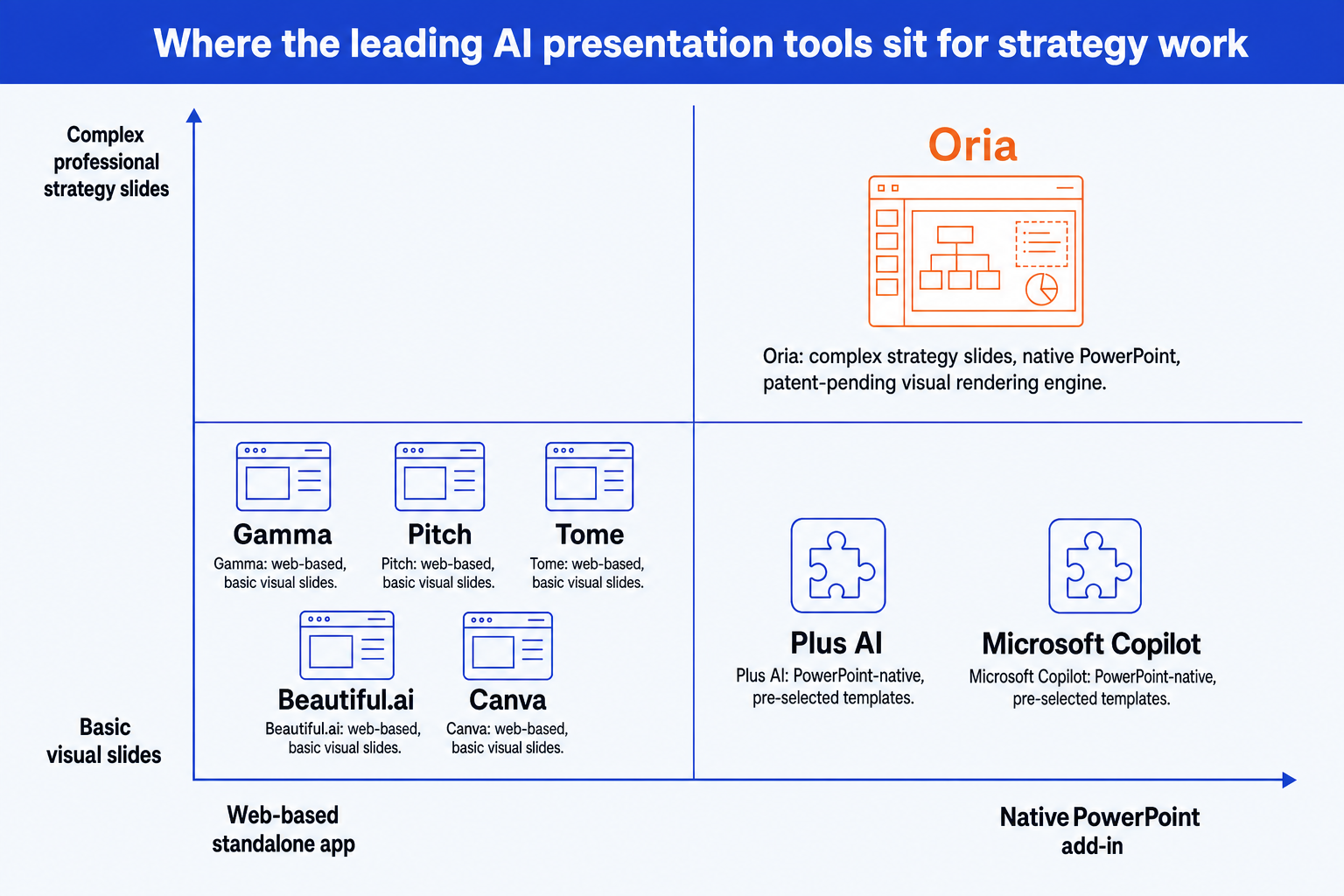
The map above was drawn while Tome's presentation product was still live. It was sunset in March 2025, and the table below reflects that.
| Tool | Where it runs | Native .pptx you can edit | Brand template control | Framework-grade density | Entry price |
|---|---|---|---|---|---|
| Microsoft 365 Copilot | Inside PowerPoint, Windows, Mac, web | Yes, into the open deck | Brand kit from an uploaded .potx | Falls back to the Slide Master on complex slides | $30 per user/month, annual, plus an M365 licence |
| Plus AI | Add-in for PowerPoint and Google Slides | Yes, in the editor you use | Applies your theme to its own layouts | Library layouts; bespoke frames rebuilt by hand | From $10 per user/month billed annually |
| think-cell | Inside PowerPoint | Yes, native charts and shapes | Inherits the deck's existing master | 40+ chart types, but never a whole slide layout | Quoted per user/year, not published |
| Oria | Inside PowerPoint, task pane add-in | Yes, every shape, text box and chart | Generates on the template you upload | Built for dense, multi-element exhibits | $19/month for 60 tokens; 20 free to test |
| Beautiful.ai | Web app, imports and exports .pptx | In its own editor; export varies | Custom branded themes from Pro | Smart Slide rules simplify complex layouts by design | $14.50 per month billed annually |
| Gamma | Web app, exports .pptx or PDF | In its own editor; export varies | Custom fonts and branding on paid tiers | Web-native cards, not exhibit frames | Free tier, 400 credits; paid tiers by credit pool |
| Pitch | Web app, .pptx export from Plus up | In its own editor | Shared templates and teamspaces | Tuned for clean, standard slides | Free tier; Plus from EUR 10/month annually |
| Alai | Web app, .pptx export on every tier | In its own editor | Its own design system, not yours | Options per slide, generic frames | Free tier with 300 monthly credits |
| Canva | Web and desktop design app | Export fidelity to a strict master varies | Brand Kits and Brand Templates from Pro | Marketing layouts, not framework exhibits | Free tier; Pro $144 per year |
| Tome | Discontinued | Not applicable | Not applicable | Not applicable | Sunset announced March 2025; product gone |
The split is technical rather than cosmetic. For why pre-selected templates, HTML-based agents and visual rendering produce such different output, read our guide to the best AI for PowerPoint. It is the most useful lens for judging any tool here, including ones launched after this page.
Microsoft 365 Copilot: who is it built for?
Built for the firm that has already bought Microsoft 365 and does not want a second vendor in the procurement queue. Copilot sits inside PowerPoint on Windows, Mac and the web, drafts from a prompt or an existing document, and since the Brand kit feature landed it can take an uploaded .potx and generate against the layouts and sample slides in it rather than a generic theme. If you dismissed Copilot in 2024 on brand handling, that alone is reason to retest it.
The limits are documented by Microsoft itself. Its PowerPoint support guidance states that Copilot does not change font size or placeholder size when content does not fit, and that without enough sample slides it falls back to the Slide Master, which it warns "may result in less optimal output". On a dense exhibit, the whole task is fitting structure into a fixed frame. Pricing is $30 per user per month on an annual commitment, on top of a qualifying Microsoft 365 licence.
The trade-off: the cheapest tool to adopt if you are already on Microsoft 365, and the one most likely to hand back a slide that needs relaying out. More detail in an honest Copilot comparison.
Plus AI: who is it built for?
Built for the team split across PowerPoint and Google Slides. Plus AI installs as an add-in for both, so the first draft appears in the editor people already have open. Its strength is speed on a standard slide shape: it drafts from a library of pre-built layouts and fills them, which makes a competent agenda, summary page or two-column comparison genuinely fast.
That library is also the ceiling. A value driver tree, a seven-step journey with pain points per step, or a market map sized by segment is not a layout in it, so what lands is a close-enough frame you then rebuild by hand. Published pricing is $10 per user per month billed annually for Basic with 1,500 AI credits, $20 for Pro with 3,000, $30 for Team with 6,000 and $200 for Max with unlimited credits. Monthly billing adds roughly a third, and every paid plan opens with a seven-day trial carrying 1,000 credits.
The trade-off: the quickest route to a competent standard slide in either editor, and the slowest once the slide stops being standard. Side by side in Oria vs Plus AI.
think-cell: who is it built for?
Built for the analyst whose deck is mostly exhibits. think-cell is the PowerPoint add-in a large part of the consulting world would not give up: more than 40 chart types including waterfall, Mekko and Gantt, plus agenda automation and a shared slide library. It is not an AI deck generator in the Gamma sense, although think-cell Assist now layers AI on top, and that distinction is the point. It automates the exhibits hardest to build by hand and leaves the story to you. Pricing is per user per year, quoted through its portal or sales team rather than published as a list price.
If your bottleneck is a waterfall bridging two EBITDA figures, or a Gantt that has to survive six revisions, nothing else here beats it and no AI generator on this page replaces it. Plenty of teams run think-cell for charts and a separate AI tool for layout, which is a perfectly good answer.
The trade-off: the strongest tool here for data exhibits, and it will not write, structure or design a slide for you.
Oria: who is it built for?
Built for corporate and consulting work: the board pack, the steering committee deck, the diligence exhibit, the operating-model slide. This is the one tool here aimed squarely at the output a tier-one consulting firm produces, and that focus is the whole design. Oria runs two ways: in the PowerPoint task pane as a Microsoft 365 add-in on Windows, Mac and the browser, and as a connector for Claude and ChatGPT over MCP, so you can build the slide from the chat you are already working in and never open PowerPoint at all. It takes a rough outline, a sketch, a whiteboard photo or a busy existing slide, returns two to five design directions in roughly 30 to 40 seconds, and decomposes each into native shapes, text boxes, icons and charts on the template you upload. Pricing is $19 a month for 60 tokens, $59 for 200 and $399 for a shared 1,200-token pool, with 20 free tokens to test it.
Where it loses follows directly from that focus. Oria is built for the corporate environment and nothing else, so the further you get from a business document the weaker the fit. A founder's fundraising deck, a launch or campaign deck, a student presentation, a marketing one-pager: work whose job is visual impact rather than defensible content is not what this is tuned for, and Gamma, Canva or Pitch will get you there faster and look better doing it. It is also a slide tool rather than a narrative tool: it will not do your research or write your argument for you.
The trade-off: the closest fit here for corporate and consulting decks held to a firm template, and the wrong tool for visual-first work like a pitch deck or a one-pager.
Beautiful.ai: who is it built for?
Built for the team with no designer that wants every deck to look the same anyway. Beautiful.ai runs on Smart Slides that apply design rules automatically as content is added, across more than 300 layouts, with PowerPoint import and export and custom branding from Pro. Pro is $14.50 per month billed annually or $45 month to month, Team is $40 per user per month billed annually or $50 monthly, and every plan opens with a 14-day trial that asks for a card.
The automatic rules are the product and also the ceiling. A slide with many interdependent elements has to fit a template region, so the layout simplifies and detail gets rephrased or dropped to make it fit. For a business review deck nobody will pull apart, that is a fair trade. For a bespoke exhibit, it is the problem.
The trade-off: the most consistent-looking output for the least effort here, and the least room to build something bespoke. Compared directly in Oria vs Beautiful.ai.
Gamma: who is it built for?
Built for the person whose deliverable is a link rather than a file. Gamma generates decks, documents and web pages in its own browser format and presents them from a share URL, exporting to PowerPoint or PDF when a file is needed. It is the fastest tool here from a blank prompt to something that looks finished, and for an off-site overview, an internal narrative or a pitch page it is genuinely excellent. Its free tier carries 400 one-off credits; paid tiers run on monthly pools of 1,000, 4,000 and 20,000 credits, with extra credits at 1,500 for $6.
For a strategy audience, the export is the test. The design is web-native first, so a strict corporate master carrying a multi-element exhibit is exactly what does not round-trip cleanly into .pptx.
The trade-off: the fastest route from a prompt to something presentable, as long as the presentable thing does not have to be a .pptx on the firm's master. If it does, see the Gamma alternatives for consulting decks.
Pitch: who is it built for?
Built for a team that writes the deck together rather than passing a file around. Pitch is a collaborative browser tool with commenting, version history, teamspaces, shared templates and link tracking, and its collaboration layer is the best of any tool here. The free tier gives one seat and 100 AI credits, Plus is EUR 10 a month billed annually with 500 monthly credits and PowerPoint export, Team is EUR 15, and Business is EUR 20 with 750 credits and unlimited teamspaces.
Two things matter for a strategy team. PowerPoint export sits behind the Plus tier, so the free plan cannot produce a file at all, and the template model is tuned for clean, standard slides rather than dense exhibits with many interdependent pieces.
The trade-off: the best collaboration layer on this list, sitting on a template model built for standard slides.
Alai: who is it built for?
Built for someone who wants several design options per slide and a free tier that still exports a real file. Alai generates image-led slides, offers multiple directions per slide, and keeps PowerPoint and PDF export on every tier including the free one, which carries 300 monthly credits. Paid plans run $20 a month for 800 credits, $30 for 1,600 and $80 for 5,000.
One point of confusion worth clearing up: Alai is a separate company from Tome and did not acquire it, so comparisons describing Alai as "Tome, renamed" are wrong. What Alai does not have is your master. Its design system is its own, so a firm with a strict brand book ends up fighting the tool rather than using it.
The trade-off: the most generous free tier that still exports a .pptx, on a design system that is not yours.
Canva: who is it built for?
Built for marketing, and extremely good at it. Canva pairs an enormous template library with AI generation, and its brand tooling is more serious than most people realise: Pro at $144 a year for one person includes five Brand Kits and Brand Templates, and Business at $250 a year per person takes that to 100 Brand Kits with approvals. For recruiting collateral, social graphics, event decks and one-pagers it is the fastest tool a consulting firm can hand its marketing team.
A consultant asking it for a seven-step customer journey with pain points per step, or a value driver tree that has to sit on the firm's master, is asking a design platform to do something it was never built for. Export fidelity to a strict .pptx master is where that shows up first.
The trade-off: unbeatable for an on-brand marketing visual in five minutes, and the furthest from a strategy exhibit on a corporate master.
Tome: is it still available?
No. Tome announced its move away from presentations in October 2024, and its chief executive confirmed the sunset on 20 March 2025, saying the slides product was being retired that month. Decks users had not exported were lost, tome.app no longer resolves, and the same company now trades as Lightfield selling CRM software. Roundups often cite 30 April 2025 as the closing day; the company never published that date, so treat it as unconfirmed. It appears here only because it still turns up on comparison pages and in a lot of older advice. If you arrived from one of those, Gamma and Alai are the closest web-first replacements, and Plus AI or Copilot if the output has to be PowerPoint.
The trade-off: there is none left to make. Treat any 2026 shortlist that still ranks Tome as a live option as evidence it has not been rechecked since 2024.
Which AI presentation tool should you use?
Match the job to the tool rather than the tool to the firm. Most strategy teams end up running two of these, not one.
Two pairings are common enough to name. think-cell plus an AI layout tool covers the chart-heavy engagement. Copilot for the draft plus a template-aware tool for the exhibits covers the firm already standardised on Microsoft, and turning Copilot slides into brand-compliant decks walks that path. For the wider field of add-ins, see the best AI PowerPoint add-ins for consultants.
On timing: Source Global Research's 2026 survey of UK consulting buyers found the share calling themselves cautious about deploying generative AI fell from 50% in 2025 to 23% in 2026, while the share that had deployed it or were eager to rose from 15% to more than 40%. Client tolerance has moved faster than most firms' tooling decisions.
Frequently asked questions
What is the best AI presentation tool for strategy consultants?
There is no single winner. Microsoft 365 Copilot is the default where a firm is already licensed on Microsoft 365, and think-cell is the standard for chart-heavy exhibits. Oria fits best where a rough outline has to become a dense, brand-locked slide inside PowerPoint, and Plus AI is the quickest drafting add-in and the only one covering Google Slides. Gamma, Beautiful.ai, Pitch, Alai and Canva suit narrative and marketing decks better.
Is there an AI presentation tool that works inside PowerPoint?
Yes, four of them. Microsoft 365 Copilot is built into PowerPoint on Windows, Mac and the web. Plus AI installs as an add-in for PowerPoint and Google Slides. think-cell is a long-standing PowerPoint charting add-in with an AI assistant on top. Oria runs as a Microsoft 365 add-in in the task pane. Gamma, Beautiful.ai, Pitch, Alai and Canva generate in their own browser app and export a file afterwards.
Can AI keep my firm's PowerPoint template?
Partly, and it is the most variable feature here. Copilot builds a Brand kit from an uploaded .potx, though Microsoft's own guidance notes it does not change font or placeholder sizes and falls back to the Slide Master when sample slides are too few. Oria generates directly onto an uploaded corporate template. Canva and Beautiful.ai carry brand kits that govern their own editor, not your master.
How much does an AI presentation tool cost?
Entry prices in September 2026 ran from free to $30 per user per month. Microsoft 365 Copilot is $30 on an annual commitment, on top of a qualifying Microsoft 365 licence. Plus AI starts at $10 billed annually, Beautiful.ai at $14.50, Oria at $19 and Pitch at EUR 10. Canva Pro is $144 a year. Gamma, Pitch, Alai and Canva publish free tiers; think-cell quotes per user per year rather than listing a price.
What happened to Tome?
Tome no longer makes a presentation product. Its chief executive announced the sunset on 20 March 2025, saying the company was "sunsetting our slides product" that month; tome.app no longer resolves to a working site. Decks users had not exported were lost. The same legal entity now trades as Lightfield and sells CRM software. Third-party roundups widely give a 30 April 2025 closing date, but the company never published one, so treat the exact day as unconfirmed. Any 2026 shortlist still ranking Tome as a live AI presentation tool has not been rechecked since 2024.
For the workflow from analysis to a board-ready deck, the consultant's guide to Claude covers the whole path, and how to build a market-sizing slide is a good single exhibit to test any tool on this page against.