

Oria vs Plus AI: Best AI Add-in for Consulting Decks
Oria vs Plus AI compares two AI slide tools, not an add-in against a web app. Plus AI runs inside Google Slides and PowerPoint; Oria reaches you inside PowerPoint or from the Claude or ChatGPT chat you are already in. The real question for corporate and consulting decks is how each one builds the slide, and whether the output stays editable and on your template. Here is the fair, technical breakdown.
Quick answer: Oria or Plus AI?
The honest answer depends on what kind of slide you are building. Both tools reach you inside your existing workflow, Plus AI as an add-on and Oria as a PowerPoint add-in or a Claude and ChatGPT connector, so the real gap is whether the tool renders a finished design first or fits your content into a pre-built layout.
For consulting, banking, and other corporate presentations, Oria is the stronger pick: it renders each slide as a finished design, then rebuilds it as fully editable, native PowerPoint elements on the firm's exact template, and it reaches users both as a PowerPoint add-in and as a connector for Claude and ChatGPT over MCP. Plus AI is the better choice for a standard business deck built quickly across Google Slides and PowerPoint. Neither tool is the right pick for a founder pitch deck, a launch deck, or other highly visual work; a design-led tool such as Gamma, Canva, or Pitch fits that job better.
Oria is for
The consulting, banking, or corporate team building dense, bespoke, brand-controlled decks, whether from inside PowerPoint or from the Claude or ChatGPT chat they already use.
Plus AI is for
The user who wants a fast, attractive standard deck and works across both Google Slides and PowerPoint, where clean default layouts carry the presentation.
How we chose between Oria and Plus AI
Oria makes a competing product, so the method matters more than the verdict. Here is what was checked, and what was left out.
What each vendor documents, not what each vendor markets. Every claim below is checked against the vendor's own material: Oria's product documentation and its Claude and ChatGPT connector pages, and Plus AI's own site and help center.
The rebuild test, because it decides whether a first draft is usable. A polished first slide means little if a routine edit forces a rebuild. Both tools were checked on whether a dense, multi-step, or framework-heavy slide keeps its structure after generation, or gets flattened to fit a layout.
Where each tool actually runs. Both surfaces a vendor claims were checked against real documentation: Oria as a PowerPoint add-in and as a connector for Claude and ChatGPT over MCP, Plus AI as an add-on inside Google Slides and PowerPoint.
Fit by content type, not by brand. Dense corporate and consulting exhibits are separated from highly visual work such as pitch decks and marketing one-pagers, because the two content types reward opposite tools.
What we ignored on purpose. Template gallery size, stock image libraries, and any speed claim neither vendor publishes a benchmark for. A fast slide that gets rebuilt by hand is not a win for either product.
Oria vs Plus AI at a glance
The grid below compares the two on the dimensions that decide whether a slide is usable in a corporate setting. Oria facts come from its own product documentation; Plus AI is described fairly as a template-based add-on, without invented specifics.
Oria claims are documented product facts. Plus AI is framed by its category as a template-based generator, not with invented specifics.
Two add-ins, two ways to build a slide
Whichever surface you reach it from, the clearest way to read Oria vs Plus AI is to ask how each one builds the slide. A template-based add-in fits your content into a layout it already has; a visual rendering engine designs the slide as a whole, then rebuilds it as native editable elements. For a dense consulting slide, that difference cascades into template fidelity and how much of your structure survives. The exhibit below lays out both build methods.
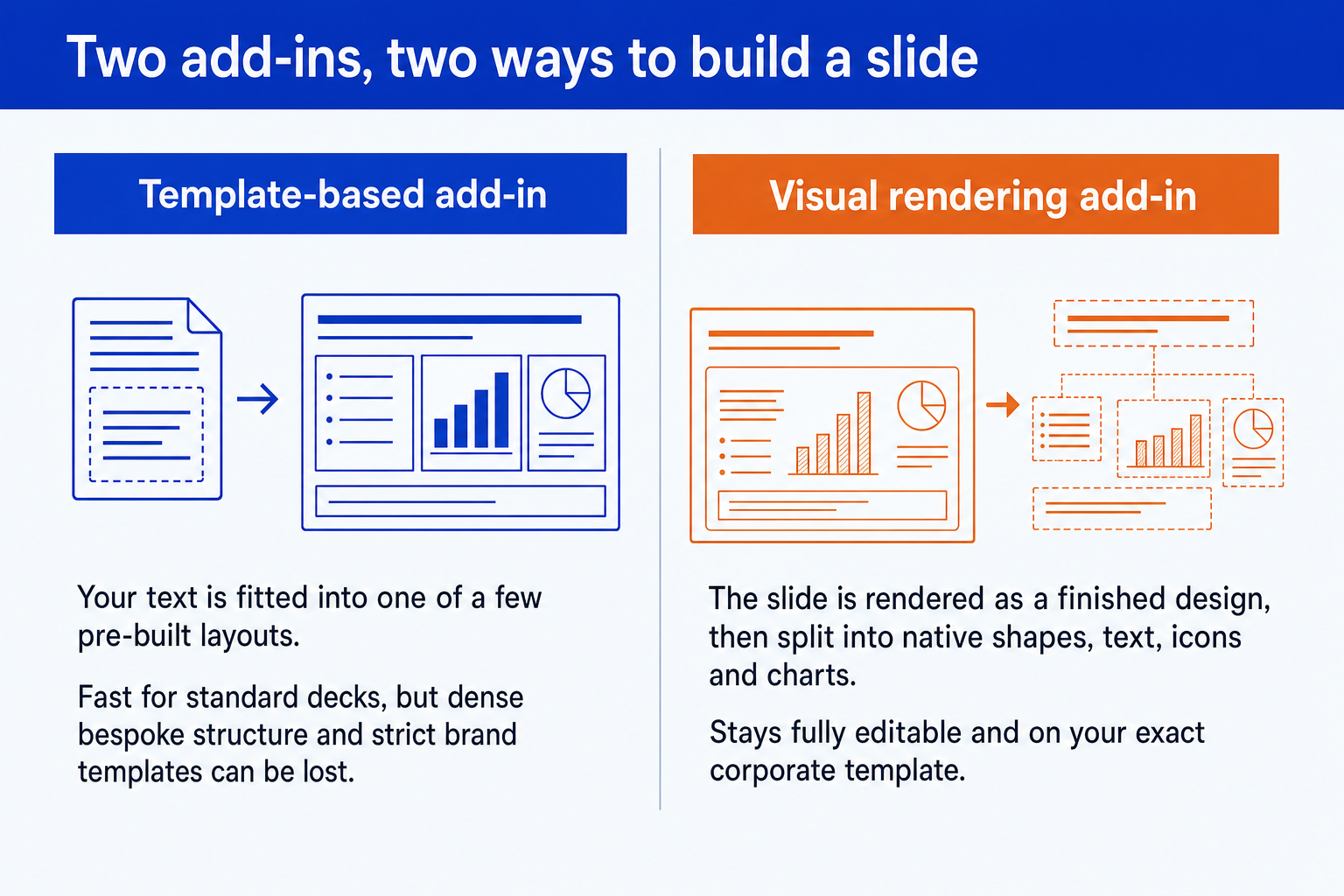
Visual rendering, then native elements. Oria renders the slide as a finished design, then decomposes it into native PowerPoint shapes, text boxes, icons, lines, and charts. The deck is a .pptx from the first second, on your template, ready to merge into a larger file or mark up in a review.
Content fitted into a layout. Plus AI generates inside Google Slides or PowerPoint by placing your content into one of its pre-built layouts and themes. That is fast and clean for standard decks, and the moment a dense, bespoke structure has to fit a chosen layout is where consulting detail can be simplified.
This is ultimately a difference in technical approach, and the approach decides output quality more than the brand name does. For the full explainer, read our guide to the best AI for PowerPoint. It is the single most useful lens for choosing any AI slide tool.
Test editability after the first draft
A polished first generation does not tell you how well a slide will survive real work. The more revealing comparison is the follow-up edit: add a data point, insert another step, change the emphasis, and hand the slide to a colleague. Then check what has to be rebuilt and whether the deck still follows your template.
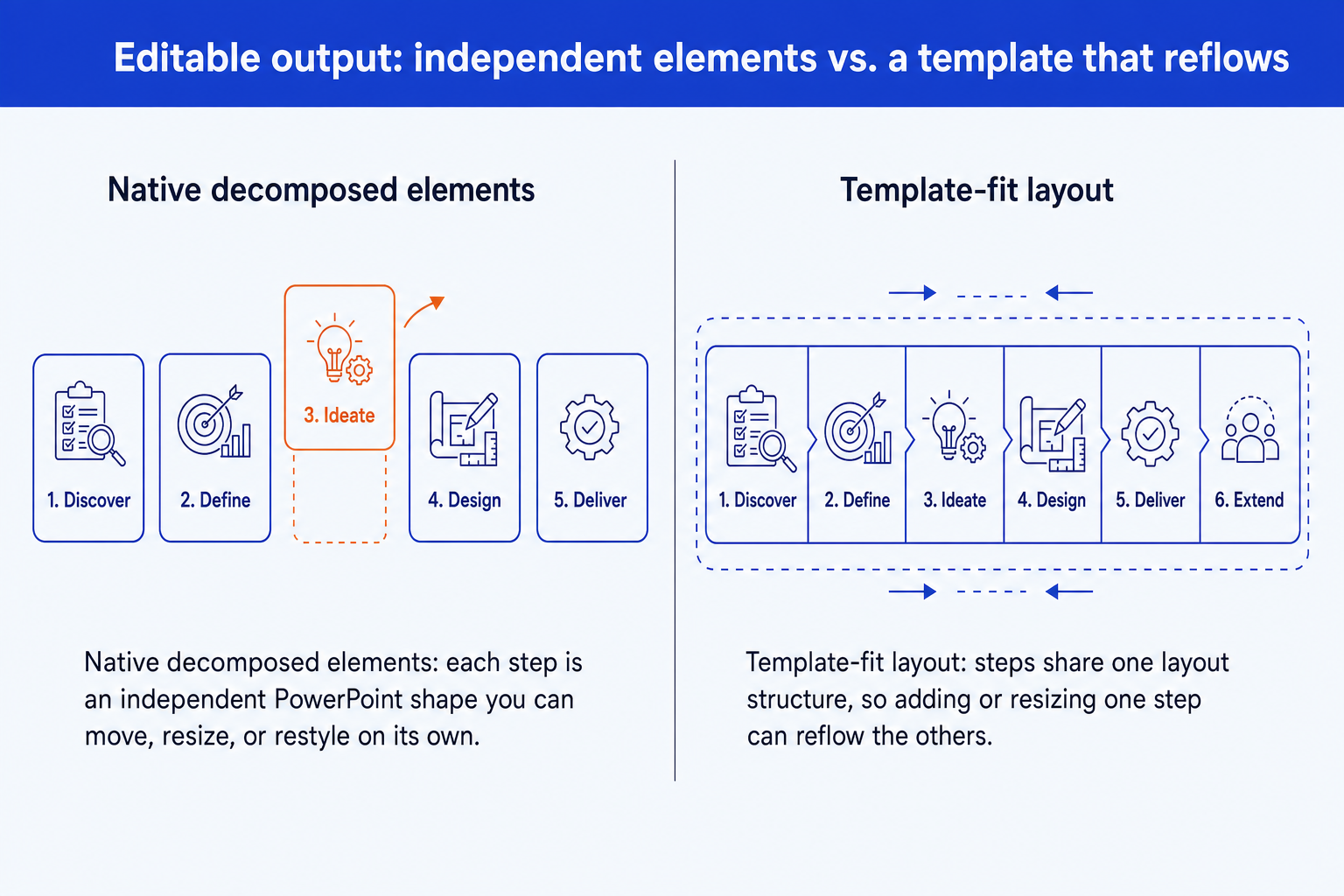
Conceptual example: use the same change request in both products and compare the resulting file, rather than relying on the first draft alone.
This test also makes the trade-off clearer by slide type. A recurring status slide may fit a standard layout perfectly. A market-sizing funnel, RACI, multi-step customer journey, or executive summary with KPI tiles is a better stress test for native editability, brand persistence, and support for bespoke structure.
Where Oria wins for consulting decks
Oria is built for corporate documents and consulting presentations, the dense, brand-controlled work that consultants, bankers, and strategy teams produce. Its advantages are grounded in its approach and in where it runs, a PowerPoint add-in or a Claude and ChatGPT connector.
It renders, then makes it native. Oria designs the slide as a whole and decomposes it into native PowerPoint elements, so dense and bespoke layouts survive instead of being fitted into a stock template.
Output is fully editable. Every shape, text box, icon, line, and chart is native PowerPoint. You can move, retype, recolor, and restyle anything after generation without breaking the layout.
It holds your brand. Upload your corporate template and Oria maintains fonts, colors, logos, and layout patterns across slides, which matters when a deck must pass brand-compliance review.
It handles complex layouts. Multi-step process flows, frameworks, customer journeys, and data-heavy slides are where Oria's edge shows, the bespoke layouts most generators simplify.
It offers multiple design options. For each input, Oria produces several design variations so you choose the visual direction, rather than accepting a single templated output.
The trade-off: Oria is built for the corporate environment only, so it loses on highly visual work: a founder pitch deck, a launch deck, a student presentation, or a marketing one-pager. A design-led tool such as Gamma, Canva, Pitch, or Beautiful.ai wins that job.
If you want to see how this fits the wider workflow of taking analysis to a board-ready deck, our consultant's guide to Claude walks the full path from thinking to slides.
Where Plus AI fits as a template-based add-in
Plus AI is a genuinely good product, and it is fair to say so. It is an AI presentation add-on that turns a prompt into a polished deck inside Google Slides and PowerPoint, with attractive layouts and a fast path from idea to a presentable draft. For a standard business deck, a recurring status update, a sales narrative, or a team that works across both slide apps, that speed and polish are exactly the point.
Its model is template-first: you prompt, Plus AI fits your content into one of its layouts and themes, and you refine from there. That is a strength for clean, standard content, where a good default layout carries the slide.
The trade-offs are the ones shared by the template-based approach, not flaws unique to Plus AI: styling leans on its layouts rather than your firm's exact template, and fitting content into a chosen layout can reshape your original structure. For a fair head-to-head across the wider field, see our guide to the best AI for PowerPoint.
When to pick Oria and when to pick Plus AI
Pick Oria when
- You build decks in PowerPoint, or want to start them from Claude or ChatGPT
- Output must stay fully editable and native
- A strict corporate template is non-negotiable
- Slides are dense, bespoke, framework-heavy
- The deck must pass a partner or board review
Consider Plus AI when
- You want a fast, attractive standard draft
- You work across Google Slides and PowerPoint
- The deck is cleaner and more standard
- You do not need a strict corporate master
- It is a status update, sales, or marketing deck
For the corporate and consulting audience this site serves, the deciding factors usually point one way. If you also weigh add-ins against browser tools, our Oria vs Gamma breakdown weighs the same editability and brand questions against a web-based generator.
If you need X, go to Y
Oria and Plus AI both do their own job well. Neither is the right answer for every deck, and the table below routes you honestly, including to tools this site does not sell.
For setup on the chat-connector route, see our guide to installing Oria in Claude and ChatGPT; for the visual-polish trade-off in more depth, see Oria vs Beautiful.ai.
Frequently asked questions
What is the core difference between Oria and Plus AI?
Oria is AI for corporate documents and consulting presentations. It reaches you two ways, a PowerPoint add-in or a Claude and ChatGPT connector, and produces native, fully editable, on-brand slides through a visual rendering engine either way. Plus AI is an AI presentation add-on for Google Slides and PowerPoint that fits your content into pre-built layouts and themes. The deciding factors are whether dense, bespoke structure survives generation and whether the output holds a strict corporate template.
Which is better for consulting and corporate decks?
For dense, brand-controlled decks that pass a partner review, the tool that keeps output fully editable in PowerPoint and preserves your exact corporate template has the structural advantage. Oria is built for that audience: complex layouts, strict templates, and boardroom standards. Plus AI is strongest on cleaner, more standard business decks and for teams that move between Google Slides and PowerPoint.
Does Plus AI work in PowerPoint?
Yes. Plus AI runs as an add-on inside both Google Slides and Microsoft PowerPoint, which is a genuine strength for teams split across the two apps. The nuance for consulting work is the method. A template-based generator fits your content into a chosen layout, so dense bespoke structure and a strict corporate master can be lost. Oria produces native PowerPoint by rendering the design first and decomposing it into editable elements, so there is nothing to reformat.
Why does the technical approach matter more than the brand name?
Because the approach decides what the output can be. A template-based add-in is excellent at speed and clean defaults, but it reshapes your content to fit a layout. A visual rendering engine designs the slide as a whole, then rebuilds it as native editable PowerPoint elements on your template. For a 7-step customer journey or a dense framework slide, that difference is the gap between a slide that communicates your point and one that has been simplified to fit.
Which should I pick?
Pick Oria if you build complex, brand-controlled corporate or consulting decks, whether inside PowerPoint or from Claude or ChatGPT. Consider Plus AI for a fast, attractive standard deck across Google Slides and PowerPoint. If the job is a founder pitch deck or another highly visual piece, a design-led tool wins instead. Read our guide to the best AI for PowerPoint for why the underlying methods produce such different output.