

How to Make McKinsey-Style Slides with Claude and Oria
The exact prompts and the step-by-step method for turning Claude into action titles, a MECE body, and a Pyramid Principle storyline, then rendering it as a board-ready, fully editable deck in Oria.
Free skills and prompts for Claude and strategy work
Templates for Claude, ChatGPT and Perplexity — from diagnostics to board-ready decks.
To make McKinsey-style slides with Claude, instruct it to write action titles, build a MECE body, and order the deck by the Pyramid Principle, then paste that storyline into Oria to render board-ready, editable slides. Claude does the thinking. Oria does the design. The prompts below are the part you copy.
What makes a slide McKinsey-style
The look is not the point. A McKinsey-style slide is defined by its discipline, and that discipline is what you can instruct Claude to enforce. Five rules carry almost all of it.
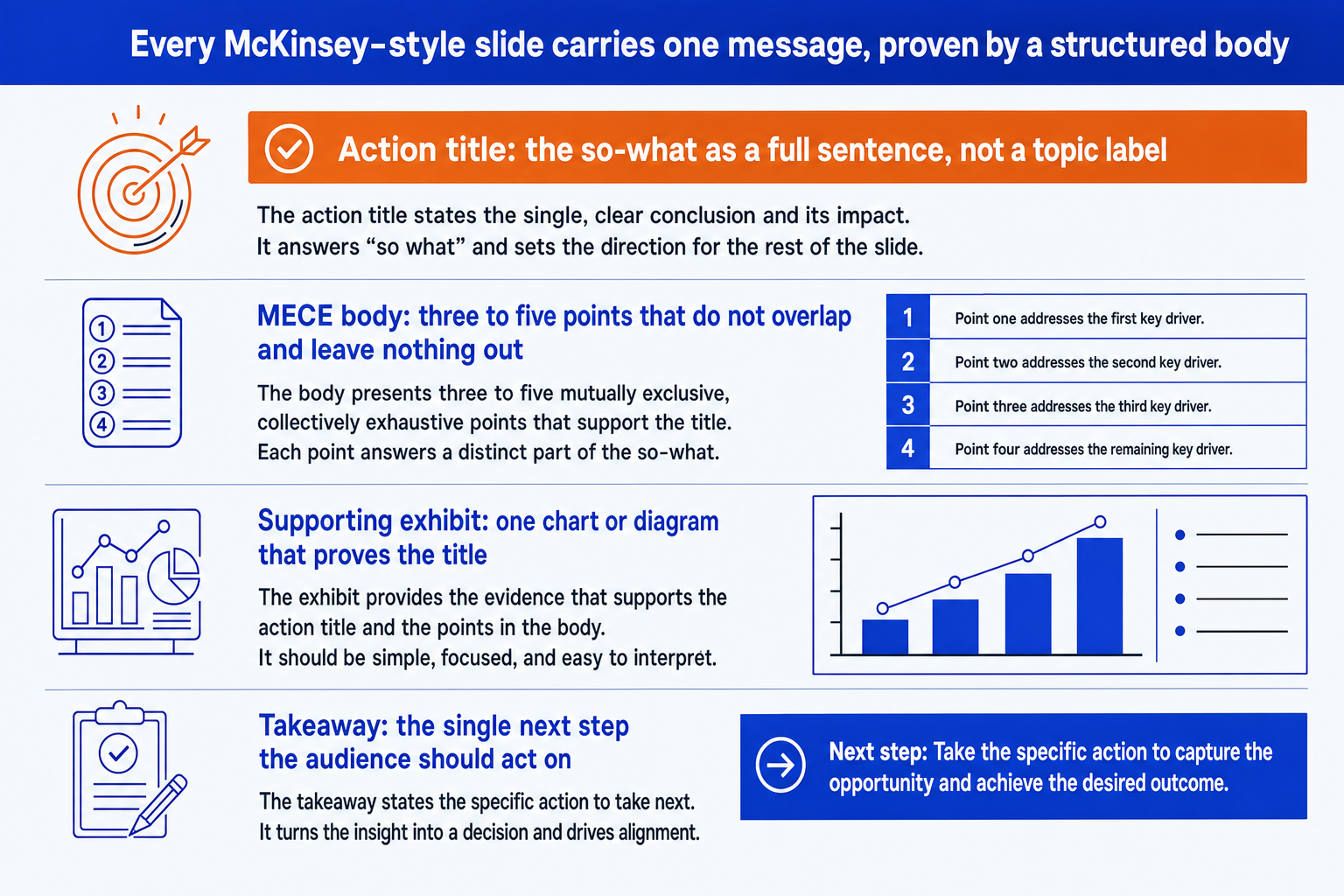
Action titles. The title states the so-what as a full sentence, not a topic label. "Market is consolidating around two players" beats "Market overview".
One message per slide. Each slide makes exactly one point. If you cannot say the point in one sentence, it is two slides.
A MECE body. Three to five supporting points that are mutually exclusive and collectively exhaustive. No overlap, nothing missing.
Exhibit-led. One chart or diagram that proves the title, not decoration. The exhibit and the title argue the same point.
Over the whole deck, the fifth rule is the Pyramid Principle: lead with the governing answer, then group the support beneath it so the action titles, read in order, tell the story on their own. For the deeper treatment of these frameworks see the complete guide to McKinsey presentations with Claude.
The step-by-step method with Claude
Run these four steps in one conversation so each builds on the last. Do not skip to slide design. Get the structure right in text first.
Frame the storyline. Open with SCQA. State the situation, the complication, the question, and your one-line answer. This becomes the spine the rest of the deck hangs on.
Write the action titles. Turn the storyline into one action title per slide, each a full sentence stating the so-what. Then audit them in order: they should tell the whole argument without the bodies.
Build a MECE body. For each title, ask Claude for three to five supporting points that do not overlap and leave nothing out. Cut anything that does not prove the title.
Spec one exhibit. For the key slides, have Claude describe the single chart or diagram that proves the title, the type, the axes, and the one element to emphasize.
The anatomy of a McKinsey-style slide
Every slide you build in this method has the same four parts, top to bottom. Keep this shape in mind when you read Claude's output and when you brief Oria.
The prompts for McKinsey-style slides
These are the exact prompts. Copy a block, replace the bracketed parts, and run them in sequence inside one conversation. Grouped by stage. For a larger library see the full set of Claude prompts for McKinsey slides.
Stage 1: Storyline and ghost deck
Frame the storyline with SCQA
Build the ghost deck
Stage 2: Action titles
Rewrite topic titles into action titles
Audit the title flow
Stage 3: MECE body
Build a MECE body for one slide
Pressure-test the body for MECE
Stage 4: Executive summary and exhibits
Write the executive summary slide (SCQA)
Spec the exhibit that proves the title
Tip
Run these in order in one chat. By the exhibit step Claude already holds your storyline, titles, and bodies in context, so the specs stay grounded in your argument instead of going generic.
The Oria one-prompt route to the deck
Do not ask Claude to build the PowerPoint. Take the storyline you just wrote and hand it to Oria's Text to Slide inside PowerPoint. Three steps:
Copy the action titles and MECE bodies from Claude into one block of text.
Open Oria in the PowerPoint task pane and paste it into Text to Slide.
Oria renders 2 to 5 design options per slide, fully editable and in your corporate template. Pick the best and refine.
Because Oria produces native, editable PowerPoint elements rather than a flat image or fragile HTML, the deck looks designer-made and stays on-brand. A single slide previews in 30 to 40 seconds. If you would rather load the method once and reuse it, the Claude skills for McKinsey slides package the same prompts as a saved skill.
Common mistakes to avoid
Frequently asked questions
What exactly makes a slide McKinsey-style?
Four things. The title is an action title: it states the so-what as a full sentence, not a topic label. The slide carries one message and one message only. The body is MECE, three to five points that do not overlap and leave nothing out. And the whole deck follows the Pyramid Principle, so the governing answer comes first and the support hangs underneath it. Get those four right and the deck reads like consulting work, whatever the brand.
Can Claude write good action titles on its own?
Not by default. Ask for a title and Claude tends to return a topic label like "Market overview". You have to instruct it explicitly: rewrite the title as a full sentence that states the conclusion and its implication, and then audit whether the titles, read top to bottom, tell the whole story on their own. The action-title rewrite and audit prompts below do exactly that.
Should I let Claude build the actual PowerPoint slides?
No. Claude is strong at the thinking, the storyline, the action titles, the MECE body, and the executive summary, and weak at visual design and editable native charts. The reliable pattern is to draft the structure in Claude, then build the slides in Oria so the deck is board-ready, on-brand, and fully editable inside PowerPoint.
What is SCQA and when do I use it?
SCQA stands for Situation, Complication, Question, Answer. It is the standard way to open a consulting deck or an executive summary: state the stable context, the change that creates tension, the question that follows, and your answer. Use it for the executive summary slide and to frame the storyline before you write individual titles.
Which Claude model should I use for this?
Use the most capable model for the structural work, framing the storyline, writing action titles, and stress-testing the logic, where judgment matters most. A faster model is fine for high-volume drafting like turning rough notes into bullets. The prompts here work on any current Claude model.