

The Complete Guide to McKinsey-Style Presentations with Claude
Everything it takes to build McKinsey-style presentations with Claude: the method behind the format, the exact copy-paste prompts, the skills worth saving, and the handoff that turns a storyline into a board-ready deck.
Free skills and prompts for Claude and strategy work
Templates for Claude, ChatGPT and Perplexity — from diagnostics to board-ready decks.
What this guide to McKinsey-style presentations with Claude covers
McKinsey-style presentations with Claude come down to one habit: do the thinking in Claude with real consulting discipline, then build the slides in a tool made for design. This page is the hub for that workflow. It walks the method that makes a deck read like top-tier consulting work, gives you the exact prompts to run, points you to the skills worth saving, and shows how a storyline becomes an editable board deck. Everything you need is here. The links send you deeper, they do not replace the substance on this page.
Read it top to bottom and you have a repeatable system. Frame the question, draft the storyline as action titles, build MECE bodies, attach one exhibit per slide, then render the deck. The same loop produces a board pre-read, a pitch book section, or a single rescue slide. If you only want the artifacts, jump to the prompts library, which is the heaviest part of the page.
The McKinsey method, in plain terms
The format is a set of rules, not a template. Learn the rules and you can brief Claude to follow them. These are the seven that matter.
Action titles
Every slide title states the so-what as a full sentence, not a topic label. Read in order, the titles tell the whole story on their own.
Pyramid Principle
Lead with the answer, then the supporting arguments, then the detail. The reader gets the recommendation in the first ten seconds.
SCQA
Open the deck with Situation, Complication, Question, Answer. It sets up why the work matters before any analysis lands.
MECE
Body points are mutually exclusive and collectively exhaustive: no overlap, nothing missing. Three to five points per slide, never more.
One message per slide
Each slide makes a single point. If a slide is making two, it is two slides. The action title is that one point.
Exhibit-led
One chart, diagram, or framework per slide does the proving. The body text supports the exhibit, it does not repeat it.
Ghost deck first
Write all the action titles before building any slide. The titles alone are the argument; only then do you fill in exhibits and bodies.
Claude is good at all seven once you name them in the instruction. The McKinsey presentation skill for Claude packages the rules into a single file so you do not have to restate them each time.
The workflow with Claude, end to end
A McKinsey-style deck moves through five stages. Claude carries the first four, the thinking. The fifth, the rendered deck, is the handoff to Oria. Keep Claude inside this order rather than letting it jump to a finished-looking answer.
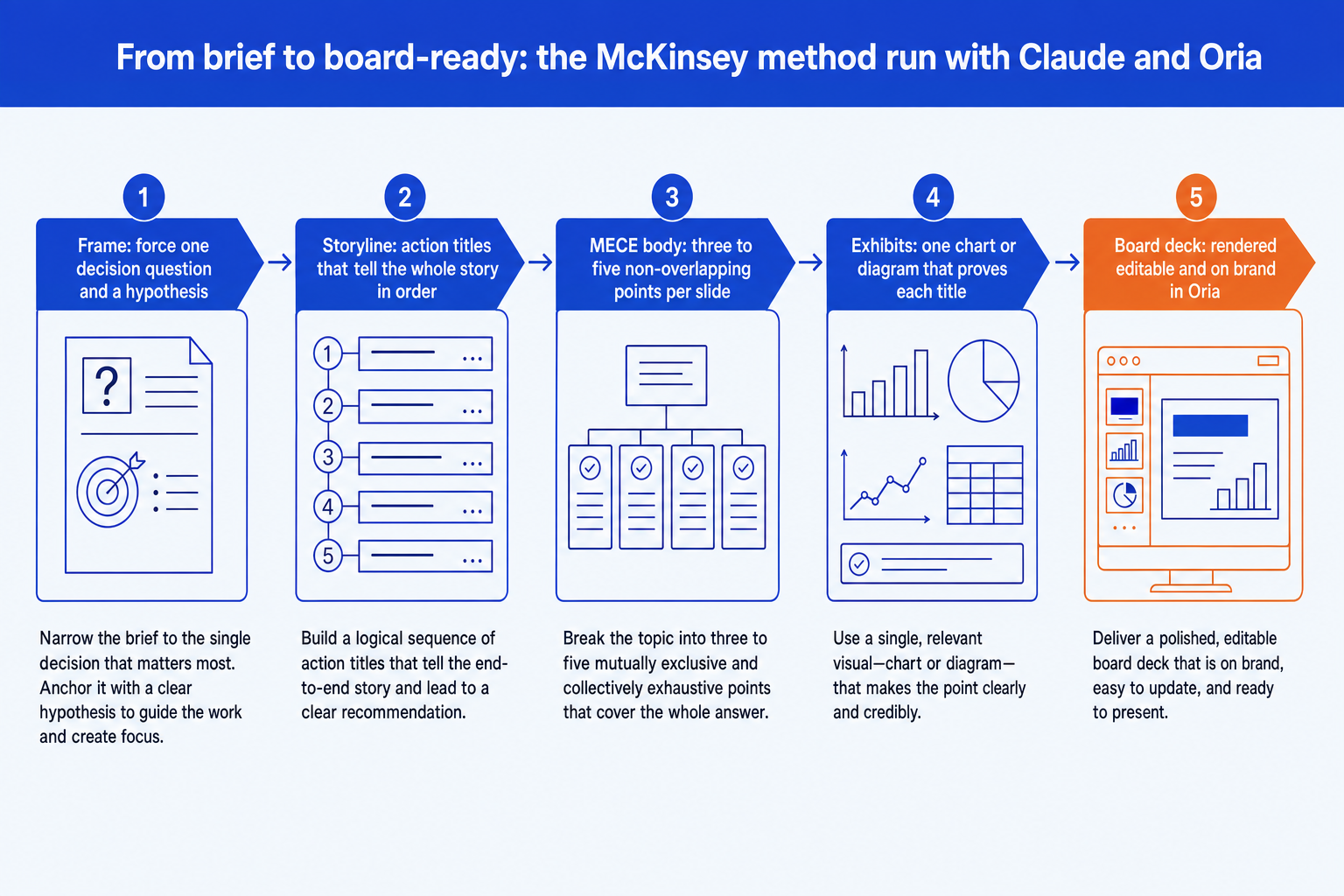
Frame. Force one decision question and a hypothesis before any analysis. This single step prevents a confident answer to the wrong question.
Storyline. Write the action titles as full sentences. Read top to bottom they must hold together as one argument before any slide is built.
MECE body. Fill each slide with three to five non-overlapping points that support its title. No overlap, nothing missing, never more than five.
Exhibits. Attach one chart or diagram per slide that proves the title. The exhibit does the arguing; the body text supports it.
Board deck. Paste the storyline into Oria, which renders each slide as editable, on-brand PowerPoint elements with design options to choose from.
For the full slide-building walkthrough, see how to make McKinsey-style slides with Claude.
A prompts library for McKinsey-style decks
These are the exact prompts, grouped by stage. Copy a block, replace the bracketed parts, and run them in sequence inside one conversation so each builds on the last. Any prompt you reuse weekly, promote it to a saved skill. For more, see the Claude prompts for McKinsey slides.
Stage 1: Frame the problem
Force a decision question and hypothesis
Set up the SCQA
Stage 2: Build the storyline
Draft the action-title storyline
Pressure-test the storyline
Stage 3: Build MECE bodies
Write a MECE body for one slide
Check MECE across the deck
Stage 4: Specify exhibits
Pick the right exhibit per slide
Spec a waterfall bridge
Stage 5: Communicate and defend
Write the executive summary slide
Prep the board Q&A
Tip
Run these in order in one conversation. By the time you reach the exhibit prompts, Claude already holds the framing, the storyline, and the bodies in context, so the specs it writes are grounded in your work rather than generic.
Skills worth saving
A skill is one markdown file you upload to a Claude Project so a method runs the same way every time, without you re-explaining it. Once a storyline or MECE prompt earns its keep, promote it. Here is the storyline skill in full, ready to drop into a project:
mckinsey-storyline/SKILL.md
Build a small set and they behave like a slide-writing operating system. The ready-made pack is the Claude skills for McKinsey slides; for the broader strategy library, see the 21 strategy skills for Claude. If you are new to skills overall, the consultant's guide to Claude covers the basics.
Building specific slide types
The method is the same for every exhibit-led slide: one action title, one exhibit that proves it, MECE supporting points. The two most common consulting exhibits have their own step-by-step guides.
From storyline to a board deck in Oria
Do not ask Claude to render the slides. Ask it for the storyline, then build the deck in Oria inside PowerPoint. Three steps:
Run the storyline and MECE prompts above to get action titles, body points, and an exhibit spec per slide.
Paste that storyline into Oria's Text to Slide. It renders each slide as native, editable elements in your template.
Pick from the two to five design options per slide, then refine wording in PowerPoint. The deck stays on brand and editable.
Common mistakes to avoid
Frequently asked questions
What makes a presentation McKinsey-style?
Three things. The titles are action titles that state the so-what as a full sentence, so the titles read in order tell the whole story on their own. The structure follows the Pyramid Principle: answer first, then the supporting arguments, then the detail. And every slide carries one message proven by one exhibit, with the body points MECE so they do not overlap and nothing is missing. Claude can produce all three once you instruct it to.
Can Claude actually write the storyline, or just bullets?
It writes the storyline well once you force the discipline. Ask for action titles as full sentences and require that the titles, read top to bottom, hold together as an argument. Claude is strong at compressing analysis into one governing message and laying out a SCQA flow. It is weak at building the editable, on-brand slides themselves, which is the handoff to Oria.
Do I need a Claude skill, or are prompts enough?
Prompts are enough to start. Promote a prompt to a saved skill once you find yourself pasting it every week. A skill is one markdown file you upload to a Claude Project so the method runs the same way every time without re-explaining it. The McKinsey skill set on this page packages the storyline, MECE, and exhibit steps for you.
How do I get from a Claude storyline to a finished deck?
Do not ask Claude to render the slides. Ask it for the storyline with action titles and MECE body points, then paste that into Oria inside PowerPoint. Oria builds each slide as native, editable elements in your corporate template, with two to five design options per slide. You keep the thinking in Claude and the design in Oria.
Which slide types does this method cover?
Every exhibit-led slide a board deck needs: waterfall bridges, SWOT grids, 2x2 matrices, org charts, market-sizing funnels, and process flows. The method is the same each time. One action title, one exhibit that proves it, MECE supporting points. The how-to guides linked on this page walk specific slide types end to end.