

Best Gamma Alternative for Consulting and Board Decks
The best Gamma alternative for consulting decks is the tool that keeps your slides native, editable, and on-brand inside PowerPoint, not a web app you export from later. Here is a fair roundup of the contenders and where each one fits.
The best Gamma alternative for consulting decks
Gamma is a strong web-based generator for marketing decks, pitches, and web-style pages. Consulting and board decks ask different questions: does the output stay native and editable inside PowerPoint, does it hold a strict corporate template, and can it carry dense, bespoke layouts. Judged on those, the best Gamma alternative is an in-PowerPoint AI add-in. Oria is built for that exact case, with Microsoft Copilot, Plus AI, Beautiful.ai, and Tome fitting lighter or more standard work.
Pick an in-PowerPoint tool when
Your decks are dense and brand-controlled, must stay fully editable, and get reviewed and circulated as a .pptx by a team.
Gamma still fits when
You want a fast, attractive deck or web page in the browser for a pitch, a marketing story, or a link you share, not a strict corporate master.
Why consulting decks push you off Gamma
None of this is a knock on Gamma. It is a web-first tool, and the things that make it fast for marketing are the same things that rub against consulting work. Three frictions show up again and again.
The output lives in a web app. You build and present in the browser and export to PowerPoint when a file is needed. For a deck that gets merged into a larger file and marked up by a partner, that export is a recurring step, not a one-off.
Template control is lighter. Theme-based styling looks good out of the box, but a strict corporate master with fixed fonts, colors, logos, and layout rules is harder to enforce than it is in a native PowerPoint workflow.
Dense layouts are harder to reproduce. Multi-step flows, matrices, and data-heavy exhibits are the daily reality of consulting slides, and a web generator tuned for clean narrative pages has to stretch to match them.
This is really a difference in technical approach, and the approach decides output quality more than the brand name does. Our guide to the best AI for PowerPoint is the single most useful lens for judging any tool on this list.
Four criteria for a consulting-grade tool
Before comparing names, fix the test. For a consulting or board deck, four criteria decide whether an AI slide tool is actually usable. Score any Gamma alternative against these before anything else.
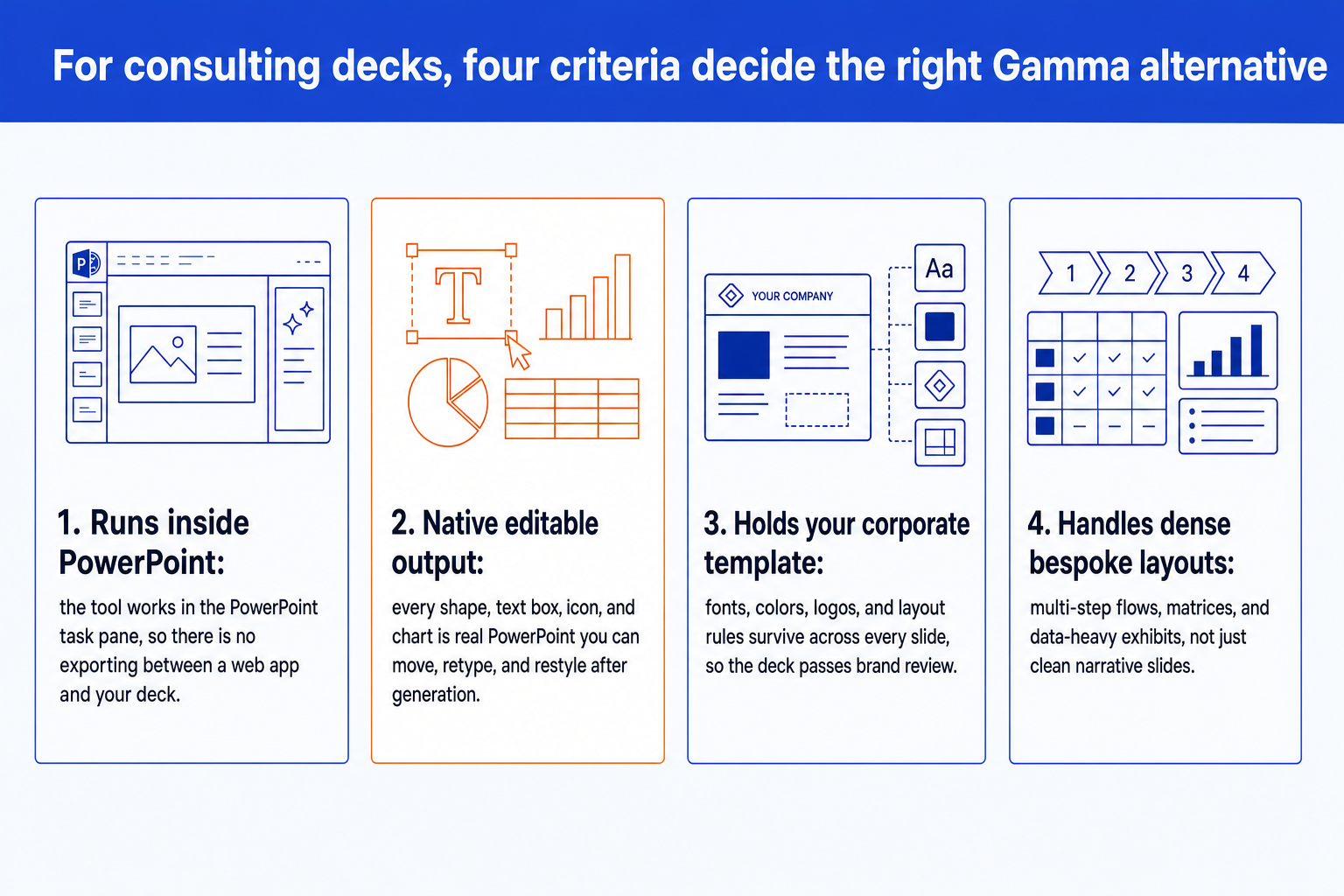
It runs inside PowerPoint. The tool works in the PowerPoint task pane, so there is no exporting between a web app and the deck your firm actually circulates.
Output is native and editable. Every shape, text box, icon, and chart is real PowerPoint you can move, retype, recolor, and restyle after generation, not a flattened image or a locked block.
It holds your corporate template. Fonts, colors, logos, and layout rules survive across every slide, so the deck passes a brand-compliance check without manual reformatting.
It handles dense, bespoke layouts. Multi-step process flows, matrices, customer journeys, and data-heavy exhibits, not just clean narrative slides with one idea each.
Gamma alternatives at a glance
The grid below places each alternative by where it runs, what it hands you, and the work it suits best. Oria facts are drawn from its product documentation. The other tools are framed fairly by the category they belong to, without claiming specific features, pricing, or metrics.
Oria claims are documented product facts. Other tools are framed by their category, not with invented specifics.
The alternatives in depth
Each tool earns its place for a different reader. Here is the fair read on where each one is strong and where a consulting deck strains it.
Microsoft Copilot for PowerPoint
Copilot is the most native option after Oria, because it lives inside PowerPoint and drafts real slides from a prompt or your existing documents. For a Microsoft 365 shop, that proximity is the draw. Its output is a starting draft you still shape by hand, and it is built for broad business use rather than the dense, framework-heavy exhibits a consulting deck demands, so the layout work is largely on you.
Beautiful.ai
Beautiful.ai is a web app built around smart templates that keep a deck tidy as you add content. It is genuinely good for clean, on-message presentations where a strong template does the heavy lifting. The trade-offs are the web-first ones: styling is template-led rather than locked to a strict corporate master, and a .pptx arrives through an export step where fidelity to a bespoke firm template is tested.
Plus AI
Plus AI installs as an add-in for PowerPoint and Google Slides and generates slides inside the editor you already use. Because it works in the host app, the output is editable there, which is a real advantage over a separate web tool. It leans toward standard slide structures, so the densest custom layouts and strict template control still take hands-on work.
Pitch
Pitch is a web-based presentation tool aimed at startup and go-to-market teams. Its polished templates and collaborative workflow make it a practical choice when a team wants to create and review a presentation in the browser. For consulting and board work that is merged into a larger PowerPoint file, marked up during review, or stored in a firm's document-management system, the additional export step makes it a less direct fit than a native PowerPoint workflow.
Tome
Tome is the closest in spirit to Gamma: a web-native tool for scrollable, narrative presentations shared as a link. For product stories and pitches that live on the web, that format is a strength. For a board deck that gets merged, marked up, and circulated as a file, a web-first narrative tool sits a step away from the PowerPoint workflow consultants and bankers run on.
PowerPoint Designer and built-in templates
Designer is the no-cost baseline already inside PowerPoint. It suggests layouts for a slide you have built and keeps everything native and editable. It is useful for light tidy-up on standard slides, but it does not generate dense, bespoke exhibits from a prompt, so it solves a smaller problem than a Gamma alternative usually needs to.
Why Oria is the strongest Gamma alternative
Oria is positioned as AI for complex professional slides, built for the dense, brand-controlled work that consultants, bankers, and strategy teams produce. Measured against the four criteria, it is the alternative that scores on all of them at once.
It lives inside PowerPoint. Oria loads in the task pane as a Microsoft 365 add-in on Windows, macOS, and the browser. There is no switching apps and no export step.
Output is fully editable. Every shape, text box, icon, line, and chart is native PowerPoint, so you can move, retype, recolor, and restyle anything after generation without breaking the layout.
It holds your brand. Upload your corporate template and Oria maintains fonts, colors, logos, and layout patterns across slides, which is what a brand-compliance review actually checks.
It handles complex layouts. Multi-step process flows, frameworks, customer journeys, and data-heavy slides are where Oria's edge shows, the bespoke layouts most generators struggle with.
It gives you options. For each input, Oria produces several design variations, so you choose the visual direction rather than accepting a single output.
That is the head-to-head with Gamma, criterion by criterion. For the same read on another web-first tool, see our Oria vs Beautiful.ai breakdown. For the full path from analysis to a board-ready deck, the consultant's guide to Claude walks the whole workflow.
Pick your Gamma alternative by use case
Choose an in-PowerPoint tool when
- You build decks inside PowerPoint all day
- Output must stay fully editable and native
- A strict corporate template is non-negotiable
- Slides are dense, bespoke, framework-heavy
- The deck must pass a partner or board review
A web-based tool is fine when
- You want a fast, attractive draft in the browser
- The deck is cleaner and more standard
- Presenting from a share link suits the audience
- You do not answer to a strict corporate master
- It is a pitch, marketing, or web-style narrative
For the corporate and consulting audience this site serves, the deciding factors usually point to a native, in-PowerPoint tool. For a fair head-to-head across the wider field, see our guide to the best AI for PowerPoint, which weighs the same editability and brand questions tool by tool.
Frequently asked questions
What is the best Gamma alternative for consulting decks?
For consulting and board decks, the strongest Gamma alternative is the tool that keeps output native and fully editable inside PowerPoint and holds a strict corporate template. Oria is built for exactly that audience: it runs as a PowerPoint add-in and produces editable, on-brand slides, including the dense, framework-heavy layouts consultants and bankers rely on. Microsoft Copilot, Plus AI, Beautiful.ai, Pitch, and Tome each fit lighter or more standard use cases.
Why do consultants look for a Gamma alternative in the first place?
Gamma is a fast, attractive web-based generator, which is ideal for marketing, pitches, and web-style pages. Consulting decks have different requirements: native PowerPoint output that stays editable, fidelity to a strict corporate master, and dense bespoke layouts that pass a partner review. When those are the criteria, a web-first tool that designs in its own format and exports later is a step removed from the file the firm circulates.
Does a Gamma alternative need to run inside PowerPoint?
Not strictly, but it helps. A tool that runs inside PowerPoint, like Oria, Copilot, or Plus AI, produces native slides with no export step and no fidelity loss when a file is required. Web-first tools such as Beautiful.ai and Tome can export to PowerPoint, but the export is the moment a strict corporate template and dense layouts are tested. For decks that get edited by a team and reviewed in PowerPoint, native output removes a recurring point of friction.
Can I keep my corporate template with a Gamma alternative?
It depends on the tool. Oria is designed to upload and hold your corporate template, maintaining fonts, colors, logos, and layout patterns across every slide. Web-first generators apply their own themes well but offer lighter control over a strict, bespoke master. If brand compliance is non-negotiable, weigh template fidelity as heavily as generation speed.
How does Oria compare with Gamma directly?
Oria is an in-PowerPoint add-in that produces native, editable, on-brand slides for dense corporate work. Gamma is a web-based generator that builds decks, documents, and pages presented through a share link or exported to a file. This page is that head-to-head, scored against the four criteria that decide a consulting deck, and for the wider field, our guide to the best AI for PowerPoint weighs the rest of the market.