

A Claude Skill for Consulting-Grade Problem Solving
A single skill that walks an ambiguous business question through eight partner-led stages, from decision question to board-ready recommendation, using MECE issue trees, hypothesis-led analysis, and 80/20 prioritization.
Claude skill for problem solving
You have a business question with no clean answer yet: churn is rising, a market entry looks tempting, margin has to move without hurting growth. Before any analysis starts, you have to decide how to get from that open question to a recommendation someone senior will actually approve. This Claude skill for problem solving is one route to that recommendation, and further down this page it is measured against the other real routes: plain prompting, a narrower MECE-only skill, and a full outside engagement.
The dynamic is partner and associate. Claude acts as a sharp engagement associate: framing the question, building the logic, drafting the analyses, writing the recommendation. You play the partner, setting direction, adding context, making the trade-offs, and approving each stage before the work moves on. The method leans deliberately on consulting-style habits: issue-led framing, MECE logic, hypothesis testing, 80/20 prioritization, answer-first communication, and evidence-backed recommendations.
Mechanically, it's a small bundle of markdown files: a top-level SKILL.md plus a references/ folder with one file per stage, following the same folder-and-metadata format Anthropic documents for every Agent Skill. Upload the core skill through Claude's Skills settings, or keep the complete folder together in Claude Code for the full reference-driven workflow.
Download the skill
SKILL.md plus the references folder, in one zip. Free, no signup.
Quick answer: which route fits your question?
There is no universal right answer, only the right one for your stakes and your deadline. Match the route below to how much judgment and time you actually have, not to whichever tool happens to be open.
For most professionals who already use Claude, the free 8-stage Claude skill for problem solving on this page is the strongest general-purpose route: it forces a decision question, enforces MECE logic through a dedicated stage, and hands off a challenge-tested recommendation rather than raw prose. If you only need the issue tree itself, the narrower MECE Issue Tree skill for Claude is faster. If the stakes justify a staffed team and a multi-week timeline, a top-tier strategy engagement still produces the most complete deliverable. Plain prompting without any skill works for a first pass, but expect more rework later.
How we chose what belongs in this method
This method earned its stages the same way a consulting deliverable earns a slide: it had to survive being questioned. The alternative is real and it is noisy: as of June 2026, roughly 40 skills-compatible products list on Anthropic's open Agent Skills standard, and community catalogs such as SkillsMP index close to 1.9 million public skills, scraped from GitHub and of wildly uneven quality. Four rules decided what stayed in this one, and a fifth decided what to leave out.
- Has to work from an undefined question. Every stage assumes you have not yet decided what the real question is; techniques that assume a pre-scoped brief did not make the cut.
- Has to force MECE, not just describe it. Stage 2 tests every branch pair for overlap and gaps before analysis proceeds, instead of leaving MECE as an instruction Claude might or might not follow.
- Has to separate thinking from rendering. The skill stops at approved content. Slide design, chart building, and file rendering are explicitly out of scope and handed to other tools.
- Has to survive a hostile question. Every recommendation runs through an independent challenge stage before packaging, the same discipline a partner review is meant to provide.
- What we left out on purpose. Data gathering, financial modelling, and market sizing are not automated. The method assumes you already have, or can get, the underlying facts.
Key takeaways
- A route is only as good as the question you hand it. If you cannot yet state the decision in one sentence, no skill, prompt, or engagement will produce a defensible answer; write the question first and choose the route second.
- MECE has to be enforced by something, not just invoked. Plain prompting and a hand-drawn tree both rely on the person doing them remembering to check for gaps and overlaps; a skill that tests every branch removes that failure point.
- Know whether you are buying a specification or a deliverable. A skill can hand you approved content ready for a builder to render; only a full engagement hands you the finished deck or memo itself.
- Speed and completeness trade against each other on every route here. The fastest option needs the most rework afterward; the most complete option needs the most lead time before it starts.
- A recommendation that has never been challenged is a draft, not an answer. Routes without a built-in review stage need you to add one yourself before it goes in front of anyone senior.
Five ways to get to a recommendation, compared
Read the table against the five rules above, not against whichever option you already have open. The route that wins each column is not always this skill, and the category leader for judgment and completeness is not an AI tool at all.
| Route | What it needs from you to start | Who enforces the MECE logic | What comes back | Time to a defensible answer | Built-in challenge step |
|---|---|---|---|---|---|
| This skill (8 stages, free) | A decision question and context; the skill will not proceed without both. | The skill itself, at Stage 2, before any analysis starts. | An approved recommendation, ready for a builder skill to render. | Hours to days, gated by how fast you review each stage. | Yes, a dedicated reviewer stage before drafting starts. |
| Plain Claude or ChatGPT, no skill | Whatever framing you happen to type. Nothing forces a decision question. | You, if you remember to ask and check the branches yourself. | Prose, usually not structured enough to hand a builder unedited. | Fast to start, slow to finish; expect several corrective follow-ups. | No, unless you write a separate challenge prompt yourself. |
| MECE Issue Tree skill for Claude | A question you have already framed; it starts at decomposition. | The skill, thoroughly. Decomposition is its entire job. | A tested tree. No hypotheses, no analysis, no recommendation. | Minutes for the tree; everything downstream is still on you. | Branch tests and assumption checks, not a full recommendation review. |
| Manual issue tree, no AI | A whiteboard and whatever consulting habits you already have. | You, unassisted. The MECE test still applies; nobody runs it for you. | A tree and, eventually, a deck, at whatever pace you draft it. | The slowest route here, roughly associate-hours of work. | Only if you organise one yourself. |
| A top-tier strategy engagement | A budget, a proposal cycle, and weeks of lead time. | Senior review, the practice this entire method is modelled on. | A polished deliverable: deck, memo, and a staffed team behind it. | Weeks to months, not an evening. | Yes, typically several layers of it. |
All of this runs on Anthropic's open Agent Skills standard, including the narrower MECE Issue Tree skill for Claude. For the primary reference on how any Claude skill actually loads, see Anthropic's own engineering guide to Agent Skills.
This Skill: Who Is It Built For?
This is for a professional who already uses Claude, has a real ambiguous business question, and wants a repeatable method rather than a one-off clever prompt. It behaves like a sharp engagement associate: framing the question, building the logic, drafting the analyses, writing the recommendation, while you stay the partner setting direction, adding context, and approving or revising each stage's output.
Two gates run at every stage: an input gate where you supply context, constraints, and preferences, and a review gate where you approve the deliverable or send it back before the workflow continues. That structure matters more than it sounds. SkillsBench, an independent benchmark that evaluated 47,150 publicly available Claude skills, found an average quality score of just 6.2 out of 12, while curated, high-quality skills lifted agent task pass rates by 16.2 percentage points on average. Downloading a random public skill for a task like this one is a real gamble; this one is built to the stricter bar described in How We Chose above, and it is free to inspect before you install it.
The middle of the method is where most of the judgment lives. Stage 5 does not just run analyses; it labels each finding with a confidence level, so a hunch and a tested fact never look the same on the page by the time Stage 6 pulls them into one point of view. That labelling is what a reviewer, or a partner, actually checks first.
The trade-off: it only produces approved written content: a recommendation, a storyline, supporting analysis. It never produces a rendered slide, chart, or file. Pair it with a downstream builder skill, or a tool like Oria, once Stage 8 is approved.
The 8 Stages You Get
Each stage runs through the two gates described above: an input gate where you provide context, judgment, constraints, and preferences, and a review gate where you approve or revise the deliverable before the workflow continues. The result is a clean trail from the original question to the final recommendation.
Frame & Plan
Frame the Question
Method step: Lock the work to one decision question
Reference: 01-frame-the-question.md
Map the Logic
Method step: Build a MECE issue tree with testable branches
Reference: 02-map-the-logic.md
Focus the Work
Method step: Apply 80/20 to the few branches worth deep analysis
Reference: 03-focus-the-work.md
Plan the Analyses
Method step: Turn priorities into workstreams, data, and dependencies
Reference: 04-plan-the-analyses.md
Analyze & Deliver
Run the Analyses
Method step: Test hypotheses with evidence and confidence levels
Reference: 05-run-the-analyses.md
Integrate the Answer
Method step: Pull findings into a single, coherent point of view
Reference: 06-integrate-the-answer.md
Shape the Recommendation
Method step: Translate the answer into actions, economics, and risks
Reference: 07-shape-the-recommendation.md
Package the Story
Method step: Prepare approved content for a deck, memo, or board paper
Reference: 08-package-the-story.md
Stages 1 to 4 sharpen the question and the plan before any analysis runs. Stages 5 to 8 carry the answer through to an approved recommendation and packaged content.
Plain Claude or ChatGPT Prompting: Who Is It Built For?
This is for a genuinely low-stakes question, a first pass before a bigger process, or someone testing whether AI-assisted structuring is worth adopting at all. Open a chat, describe the problem, and ask Claude or ChatGPT to think it through. No download, no setup, and it works today.
The cost shows up later. Nothing forces a decision question, nothing checks that your branches are mutually exclusive and collectively exhaustive, and nothing challenges the recommendation before you act on it. All of that depends entirely on the discipline of whoever is typing. That gap is exactly what structured methods exist to close. Paul Nutt, professor of management sciences at Ohio State University's Fisher College of Business, studied more than 400 real decisions made by managers across the United States, Canada, and Europe over more than 20 years and found that about half of business decisions end in failure. As strategy writer Roger Martin puts it, "Strategy is the act of making a new set of choices designed to solve a problem." An unframed problem produces choices that solve the wrong thing.
The trade-off: the lowest possible barrier to starting, and the highest amount of rework if the question turns out to matter. Fine for a first pass; risky as the sole basis for something that has to survive a room of senior stakeholders.
The MECE Issue Tree Skill for Claude: Who Is It Built For?
This is for someone who has already framed the decision question and needs one thing done well: a tested, MECE issue tree for that specific question, without the seven stages around it. The MECE Issue Tree skill for Claude, also free on this site, is narrower by design: a two-level decomposition method with branch tests, diagnostic questions, and assumption checks, built for exactly that one job.
That narrowness is the point, not a limitation. If your team already has a hypothesis process, an analysis plan, and a house deck format, and the only gap is that trees keep coming back with overlapping branches, installing an eight-stage workflow to fix a one-stage problem is overkill. For the underlying MECE test itself, independent of which skill or format applies it, see the MECE examples and meaning guide, and for ways to actually draw and present the resulting tree, see the issue tree guide on this site.
The trade-off: it decomposes one question fast, but stops there: no hypotheses, no analysis plan, no recommendation. Everything after the tree is still on you.
A Top-Tier Strategy Engagement: Who Is It Built For?
This is for a decision where the cost of being wrong dwarfs the cost of the engagement itself: a major market entry, a turnaround, a board-level restructuring. A top-tier strategy firm brings senior judgment, a staffed team, and the same MECE and hypothesis-led practice this entire method is modelled on, refined over decades of exactly this kind of question.
It also brings a proposal cycle, weeks of lead time before the first workstream starts, and staffing costs measured in consultant-weeks rather than a single evening prompt. None of that is a flaw; it is what the format is actually for. The trade normally makes sense only when the decision is genuinely board-level, the underlying facts are not yet gathered, or the recommendation needs a name and a track record behind it that a downloaded skill cannot supply.
The trade-off: the most complete and most defensible route on this page, and by a wide margin the slowest and most expensive. Wrong choice for a decision that has to ship this week; arguably the only right choice for one that has to survive a board.
If you need something else, go here
Many readers land on a query like this one needing something narrower, or something bigger, than the full eight-stage method. Find your row and go straight there.
| If you need | Go to | Why |
|---|---|---|
| Just the MECE issue tree, nothing else | MECE Issue Tree skill for Claude | Narrower and faster for exactly one stage of this method. |
| The hypothesis tree and the kill-test for one claim | Hypothesis-driven problem solving, explained | Walks the day-one-claim-to-kill-test method this skill's Stage 5 uses, on its own. |
| A refresher on MECE itself and how many branches to use | MECE examples and meaning | The four-question test and worked breakdowns, without the workflow around it. |
| Ways to actually draw and present an issue tree | Issue tree guide | Templates and layouts for the tree this skill's Stage 2 builds. |
| The other Claude skills for strategy work | 21 strategy skills for Claude | The wider collection this skill belongs to. |
| A stake that justifies weeks and a staffed team | A top-tier strategy engagement | Judgment, completeness, and a name you can put in front of a board, at a price and timeline this skill was never meant to replace. |
| The recommendation is approved and has to become slides | Oria, as an add-in or over MCP | Turns Stage 8's packaged content into a native, on-template deck; the skill only writes what to say, never how it looks. |
Setup Guide
- Step 1Download the skill (.zip)
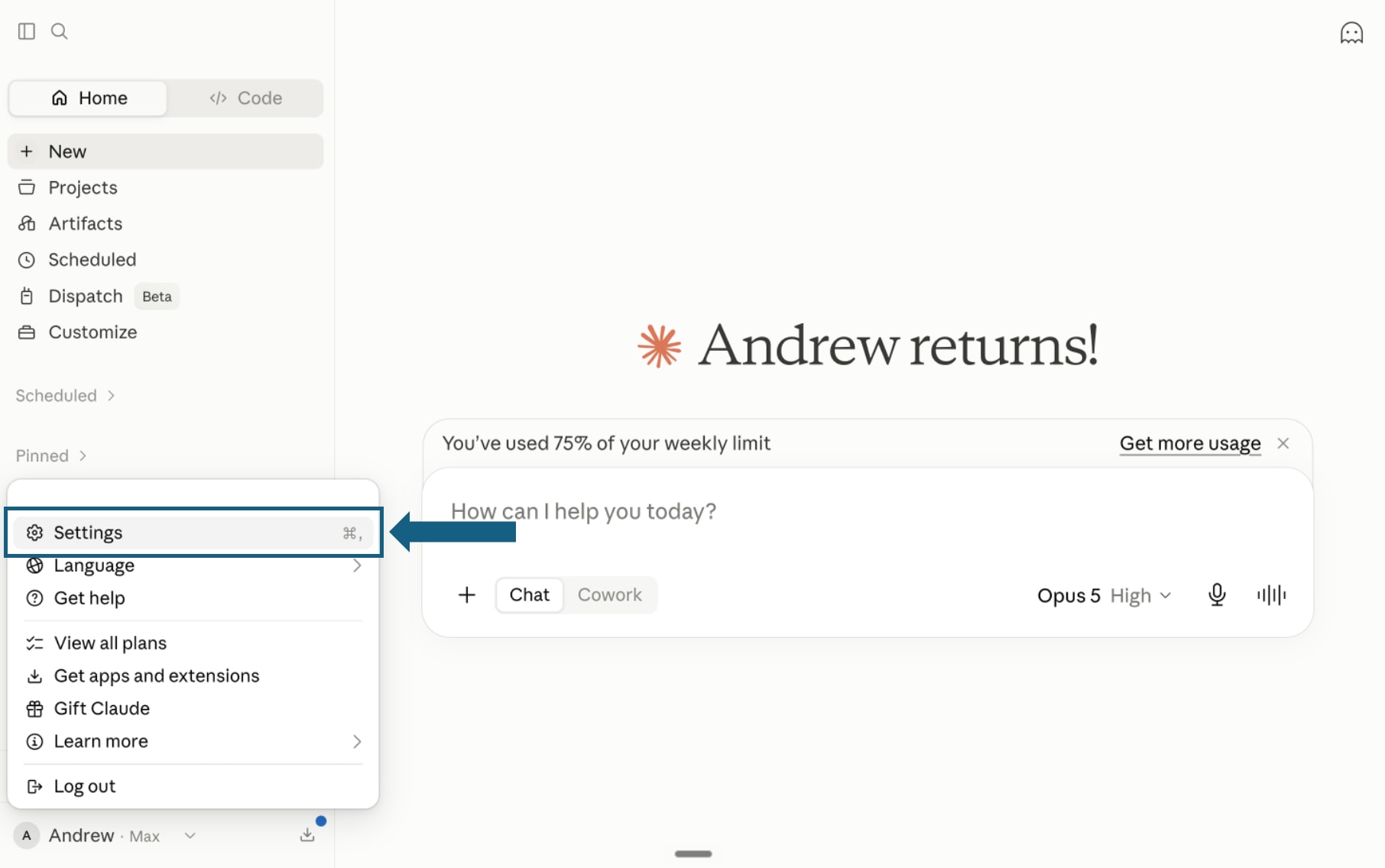
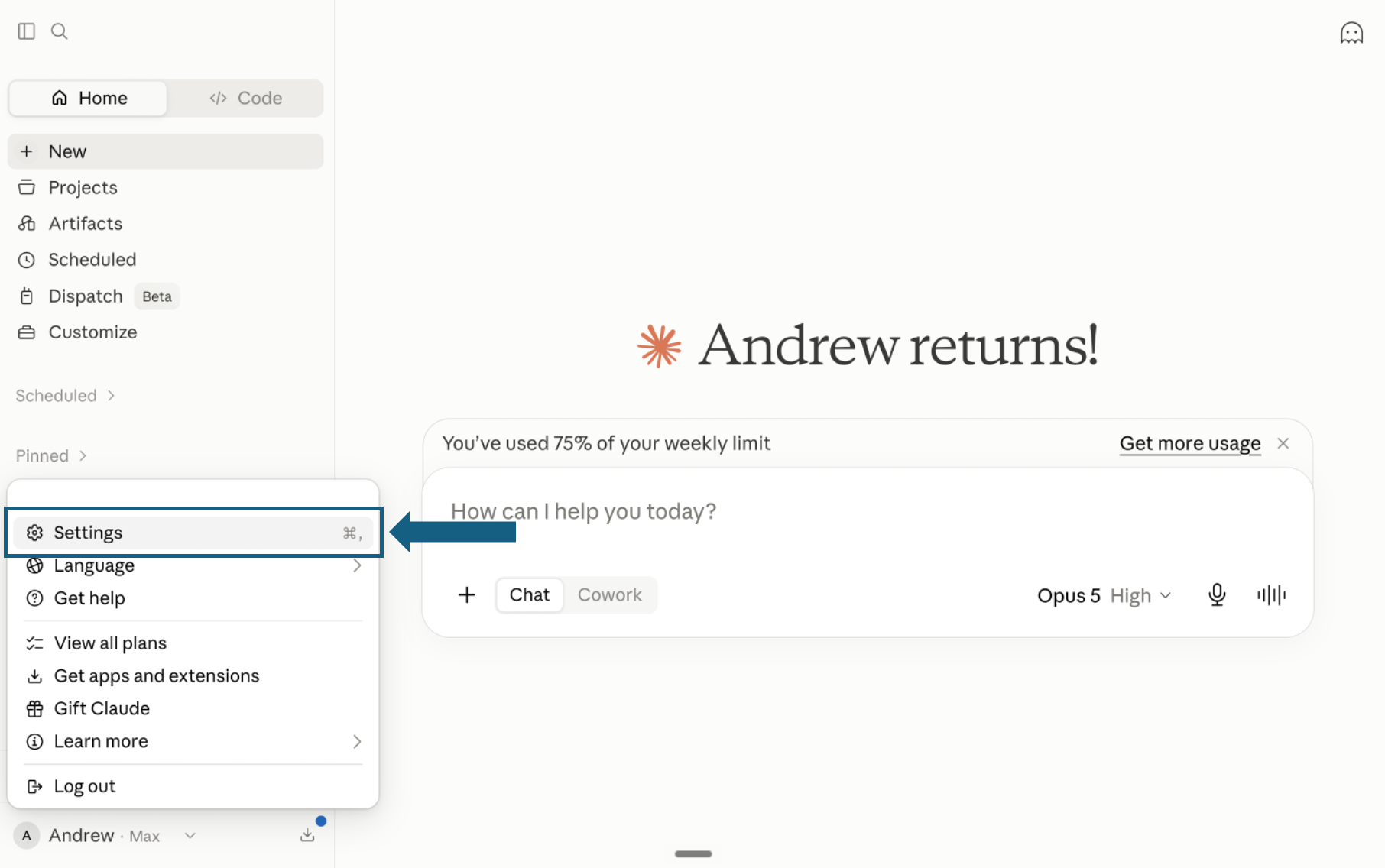
Download the skill and open Settings
Download and unzip the single skill bundle. It contains one top-level SKILL.md and eight supporting files in references/. In Claude, open your profile menu and select Settings.
Open the screenshot to view it full size. - Step 2
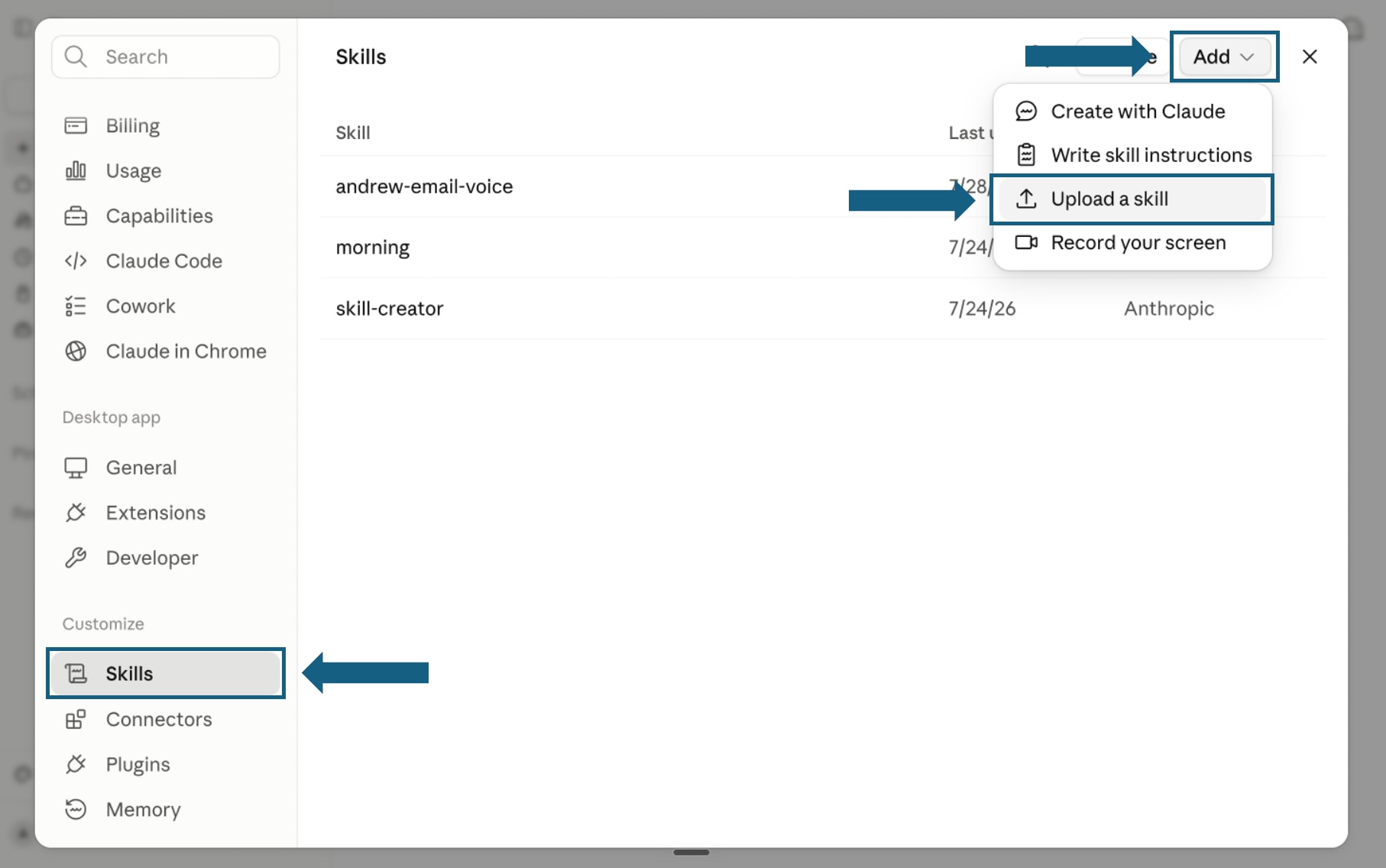
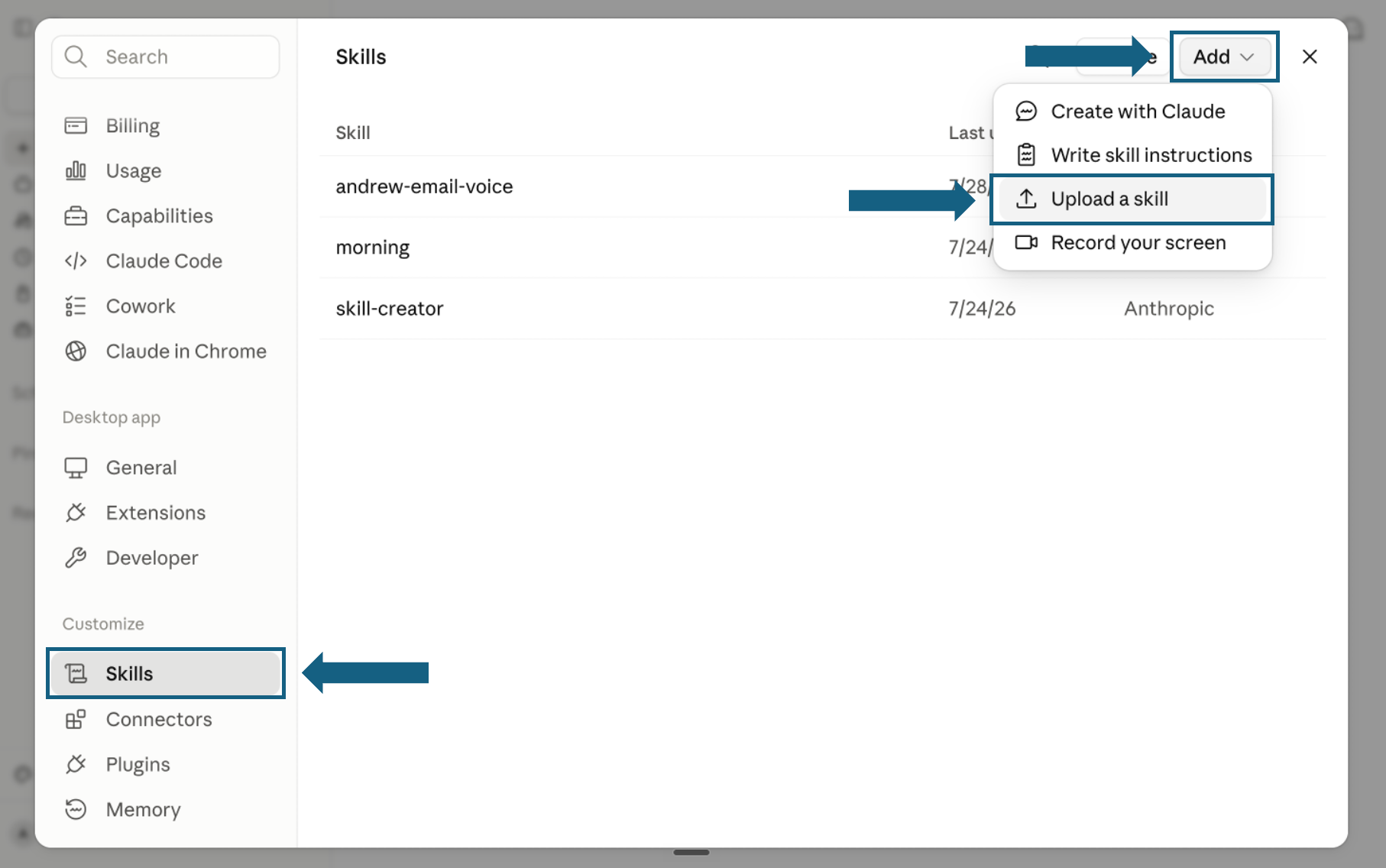
Open Skills and start an upload
Skills are available on Claude's Free, Pro, Max, Team, and Enterprise plans, but they need Code execution turned on first, under Settings, then Capabilities. With that on, select Skills under Customize. Open Add and choose Upload a skill.
Open the screenshot to view it full size. - Step 3
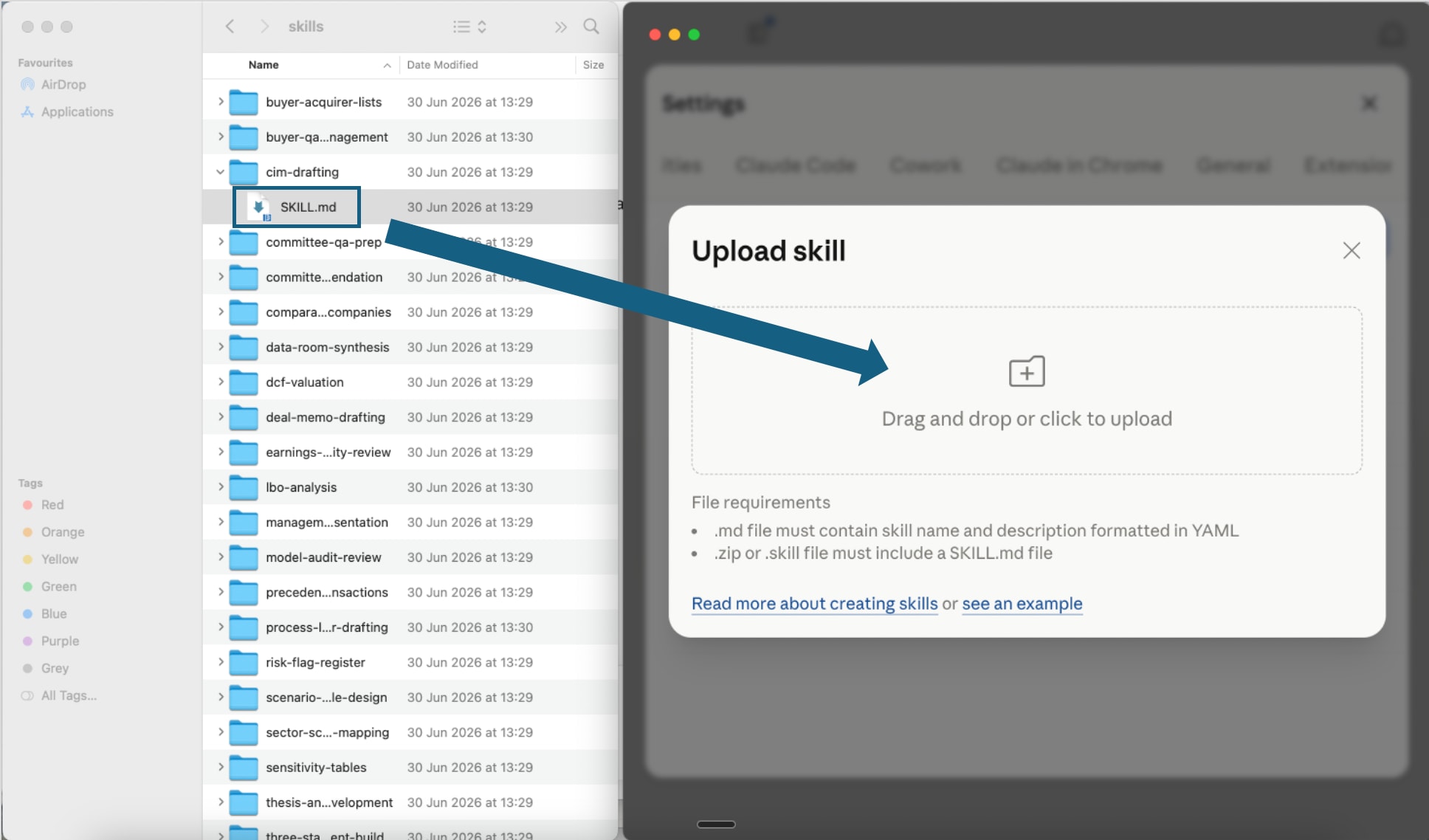
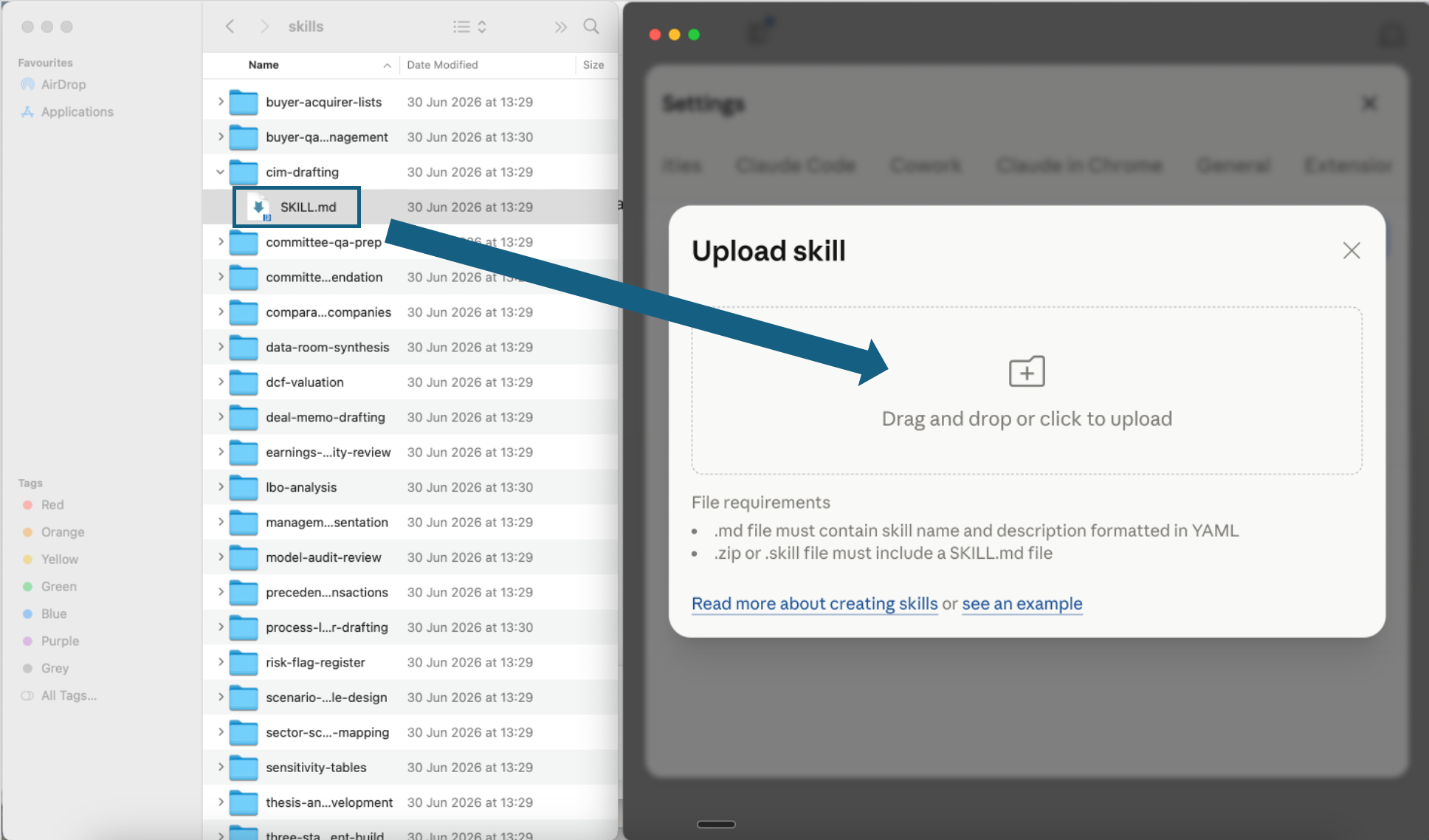
Upload the skill file
Drag the extracted top-level SKILL.md into the upload window, or use the file picker. Keep the downloaded references/ folder because it contains the full ordered method for Claude Code.
Open the screenshot to view it full size. - Step 4
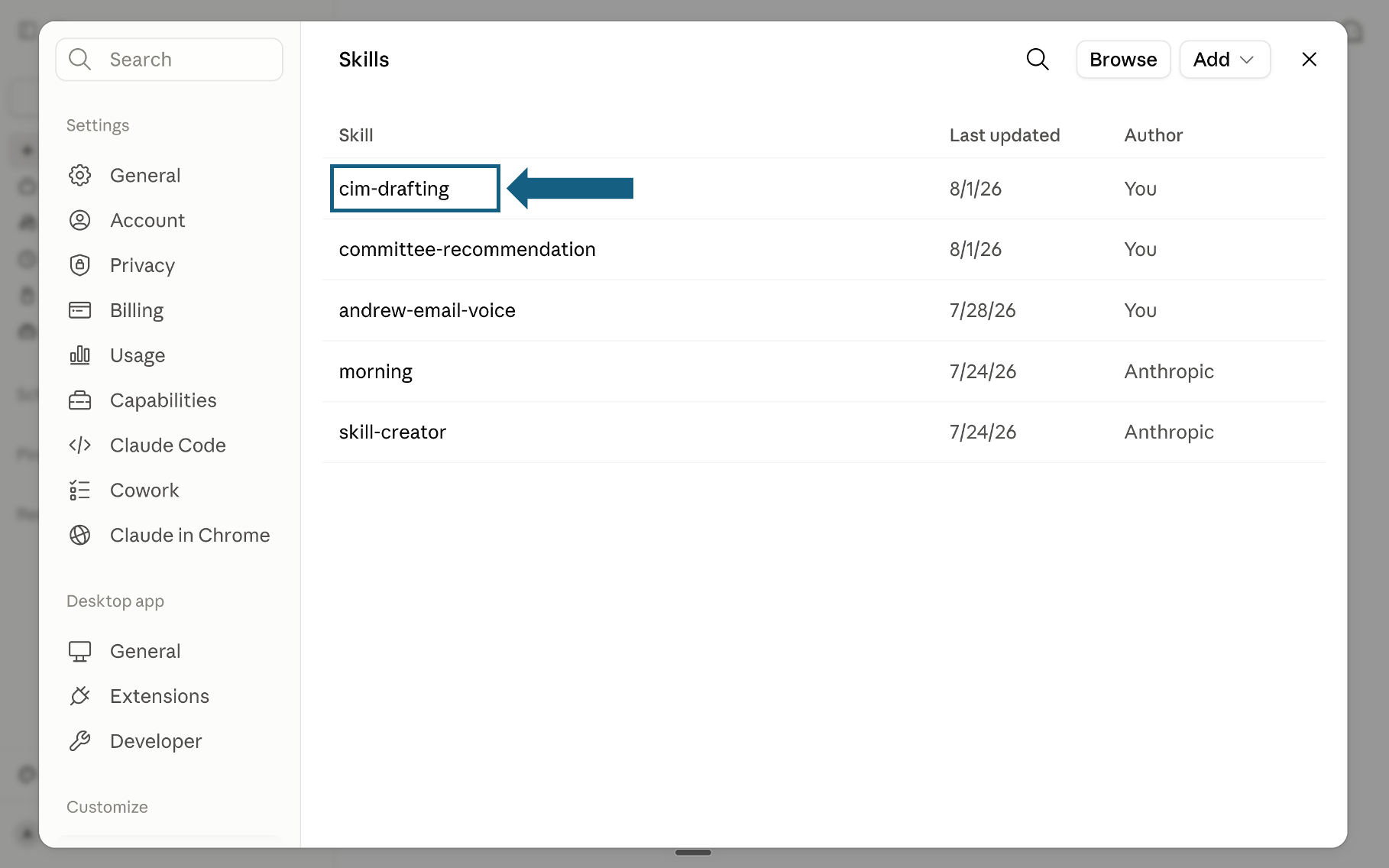
Confirm the skill was added
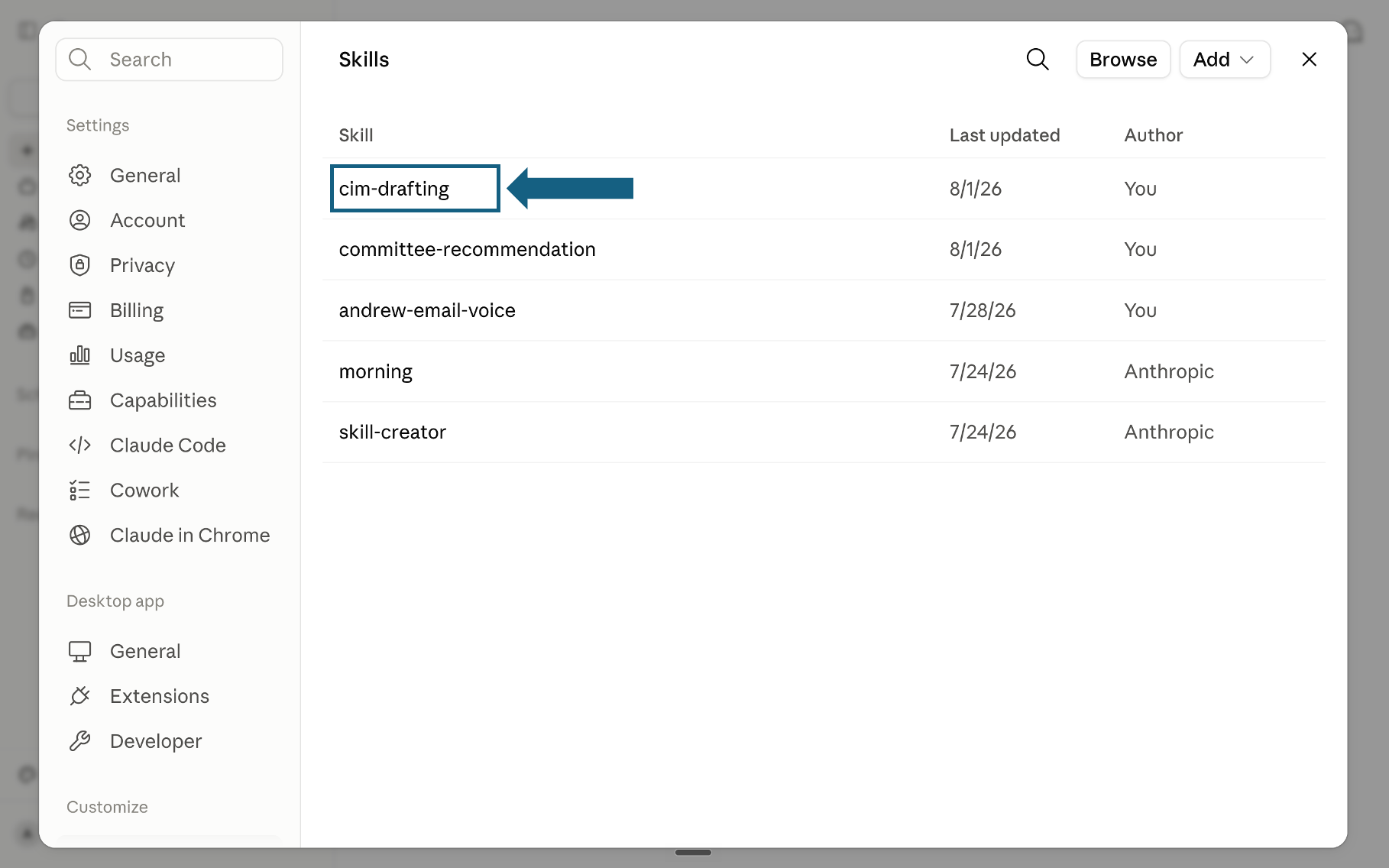
Return to the Skills list and check that the problem-solving skill appears. Select its name to open it.
Open the screenshot to view it full size. - Step 5
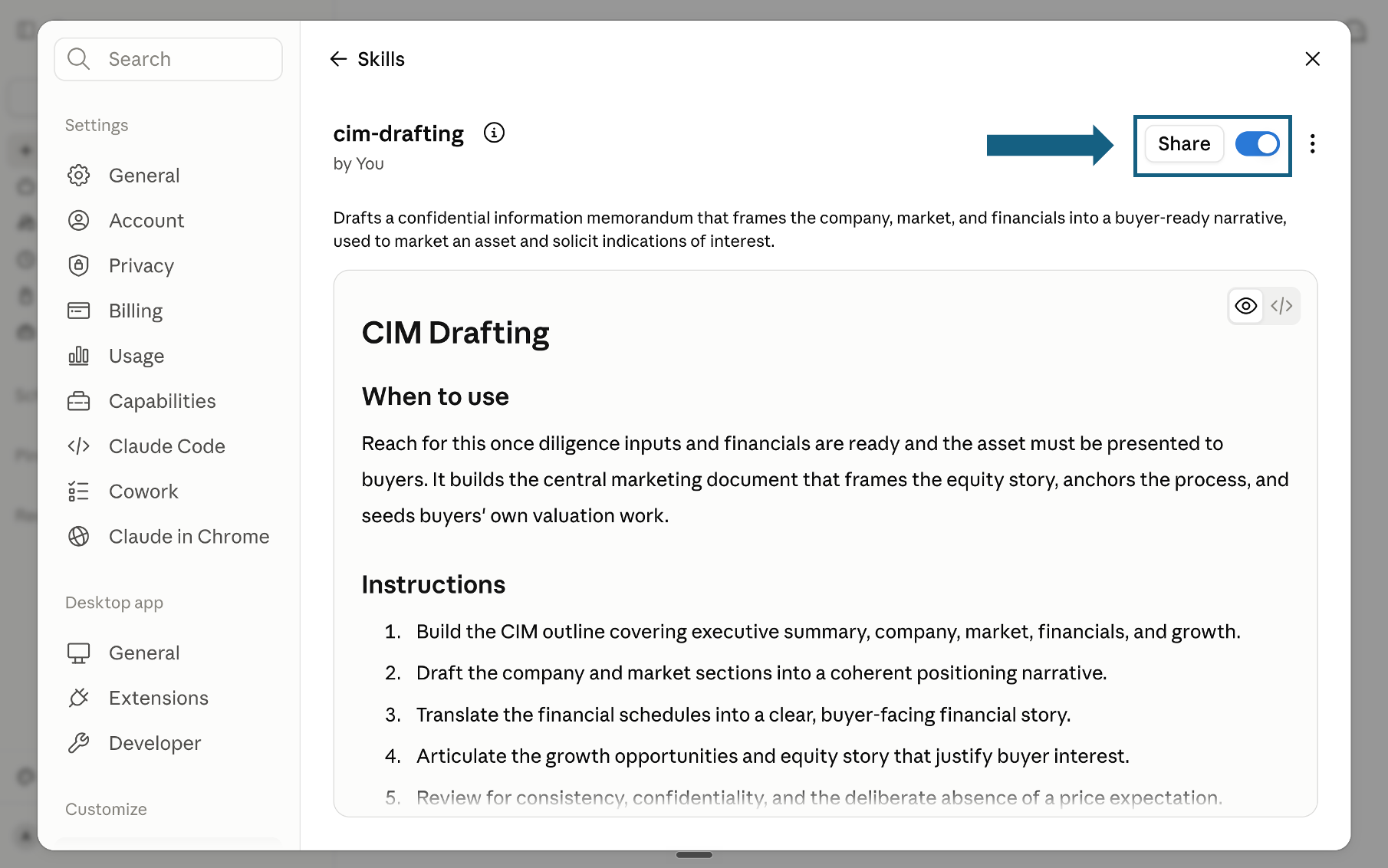
Review and turn on the skill
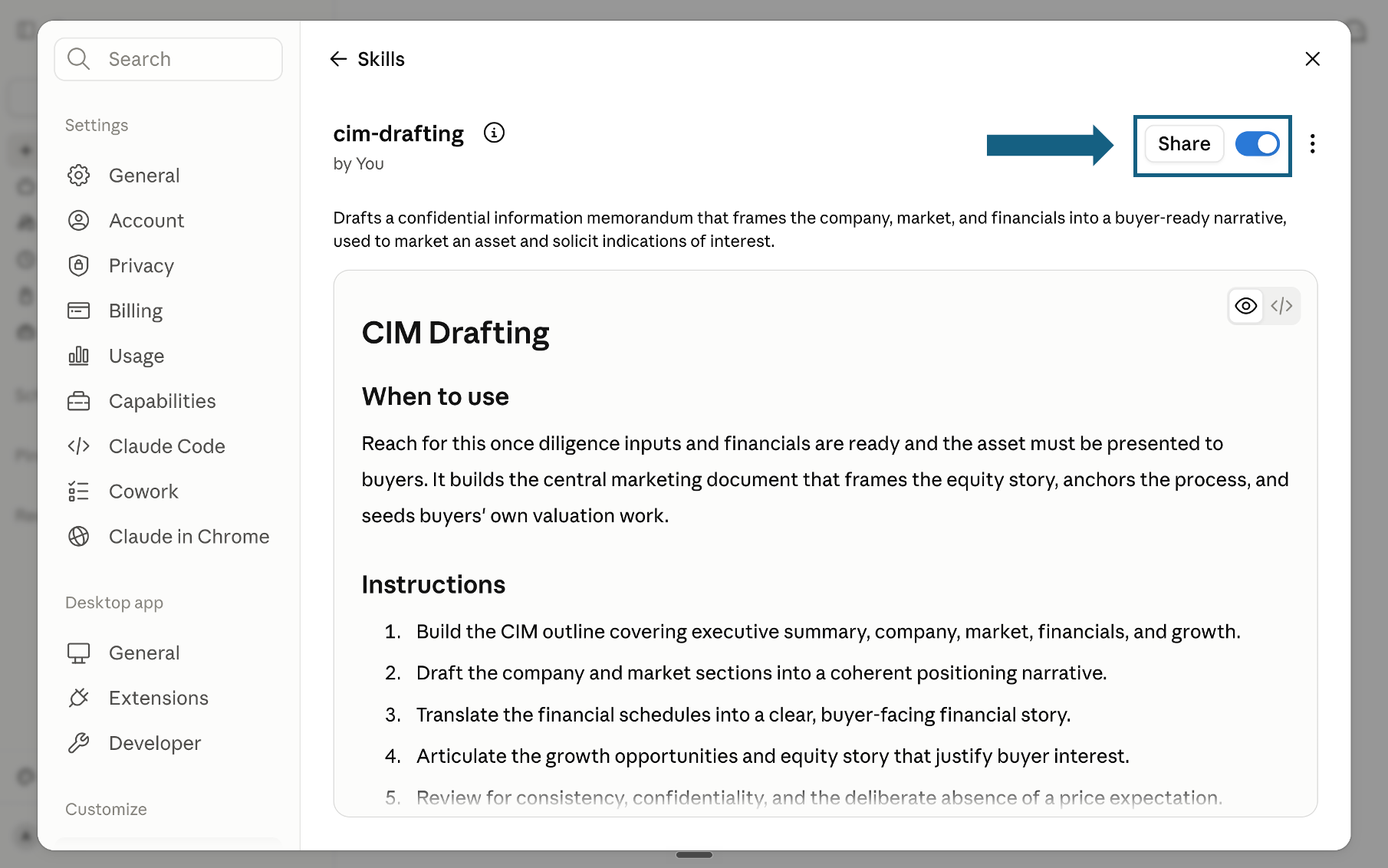
Review the skill name, description, and instructions, then make sure its switch is on. A blue switch means the skill is enabled; sharing it is optional.
Open the screenshot to view it full size.
Keep the complete eight-stage bundle in Claude Code
For the full reference-driven workflow, keep SKILL.md and references/ together inside one named folder under .claude/skills/ in the repository, or ~/.claude/skills/ for use across repositories.
Try the skill
Give Claude the business question and available context, then approve or revise each stage before it continues.
- "Use the problem-solving skill to frame why enterprise churn is rising. Start with the decision question and wait at every review gate."
- "Run Stage 2 and build a MECE issue tree for our margin-compression question."
- "Run Stage 5 on these workstream findings and label the confidence behind each conclusion."
- "Run Stage 7 and turn the integrated answer into actions, economics, risks, and owners."
Why it works
1. Partner-led by design
You stay in control of direction and judgment. Claude structures, drafts, tests, and revises, but never bypasses you. Every stage has two gates: an input gate where you provide context, constraints, and preferences, and a review gate where you approve or revise the deliverable before the workflow continues.
Use whenever you need the analyst hours of a junior associate without losing the judgment of a partner.
2. Consulting-style logic baked in
The workflow uses MECE decomposition, hypothesis-led analysis, issue trees, and 80/20 prioritization end to end. It starts with a decision question, breaks it into testable branches, writes hypotheses before any analysis runs, and focuses effort on the work that can actually change the answer.
Run on any business question where you need the answer to be defensible to a sceptical executive room.
3. Built-in challenge review
Before final content is drafted, an independent reviewer stress-tests the storyline, evidence, logic, and recommendation. Weak claims get flagged, missing branches get surfaced, and the recommendation has to survive hostile questioning before it leaves the workflow.
Run before any partner review, steerco, or board update where you can't afford an obvious hole in the argument.
4. Builder-ready final content
The skill separates thinking from rendering. It decides what to say, structures the logic, and writes the approved content, then hands off visual design and file rendering to downstream builder skills, so the same content can be reused across slides, memos, and reports without rework.
Pair the approved content with the appropriate downstream builder when it needs to become a deck, memo, or report.
The principles under the hood
Every stage is grounded in a specific working principle. No generic "think strategically" prompts. Each principle is named, applied at the right gate, and traceable from the recommendation back to the original question.
Frequently asked questions
What is the Claude Skill for Problem Solving?
A free, downloadable Claude Skill built from one top-level SKILL.md plus eight reference files, one per stage. It runs Claude through an eight-stage, partner-and-associate workflow that turns an ambiguous business question, one with no clean answer yet, into a board-ready recommendation. The method uses MECE issue trees, hypothesis-led analysis, 80/20 prioritization, and a built-in challenge stage, and it stops at approved written content rather than a rendered file.
Is this the same as the MECE Issue Tree skill for Claude?
No. This skill covers all eight stages, from framing the original question to packaging the final recommendation for a builder to render. The MECE Issue Tree skill for Claude is narrower by design: it only builds and stress-tests the issue tree itself, which is Stage 2 of this method, for someone who has already framed the decision question and does not need the stages that come after it.
Which Claude plan do I need to use Skills?
Skills are available on Claude's Free, Pro, Max, Team, and Enterprise plans, according to Anthropic's own support documentation. Every plan shares one prerequisite: code execution has to be turned on in Settings, under Capabilities, before Skills will run at all. Team and Enterprise organizations can also provision and manage skills centrally for every user, rather than each person uploading the zip individually.
Can ChatGPT run this skill too?
The file format follows Anthropic's own open Agent Skills standard, so in principle any tool that also supports that standard, and a growing list do, could load a SKILL.md file. In practice, the setup steps on this page, and the Skills toggle they describe, are written specifically for Claude's interface, so running it anywhere else means adapting those steps yourself.
Does this skill also build the PowerPoint slides?
No, and that is deliberate. The skill stops at approved written content: a recommendation, a storyline, and the supporting analysis behind it. Turning that content into an actual slide, with a layout, a template, and native PowerPoint objects, is a separate step. Pair the finished Stage 8 output with a downstream builder skill, or with a tool like Oria, rather than expecting this skill to render anything itself.
How long does the full eight-stage workflow take?
It depends on how much you gate at each review step, not on the skill itself. Someone who already knows the business context, and reviews quickly at each gate, can move through all eight stages in a matter of hours to a couple of days. Someone starting from scratch, gathering underlying facts as they go, or reviewing carefully at every stage, should plan for meaningfully longer.
Is the skill actually free?
Yes. The zip containing the top-level SKILL.md and the eight-file references folder is a free, direct download from this page, with no signup and no email capture. The only prerequisite is a Claude plan that supports Skills with code execution turned on, which includes the Free plan under Anthropic's current policy, not just the paid tiers.