

How to build a RACI matrix slide in PowerPoint
To build a RACI matrix slide in PowerPoint, lay out a grid where rows are tasks or deliverables and columns are roles or people. In each cell place a single letter: R for Responsible, A for Accountable, C for Consulted, or I for Informed. Color-code the four letters, leave exactly one Accountable per row, add a small legend, and write an action title that states the ownership decision. Oria can render the whole grid as an editable native slide from one line of text.
This guide walks the manual build and its real gotchas, gives you the exact prompts to draft the grid and assign each letter, and shows the faster one-prompt route. Everything you need is here. You will not have to leave to get the substance.
What a RACI matrix is and when to use it
A RACI matrix is a roles by tasks responsibility grid. Tasks or deliverables run down the rows, roles or people run across the columns, and each cell carries one letter that says how that person relates to that task. The grid turns a vague conversation about who owns what into a single picture the whole team can read at a glance.
Reach for it whenever ownership is unclear or contested. Transformation programs, product launches, PMO workstreams, and new operating models all live or die on clear accountability. The RACI matrix slide is the workhorse for that moment in a deck, because it forces a single owner onto every task and surfaces the gaps before they cause a problem. For the reporting structure behind those roles, an org chart slide is the companion view; use RACI when the message is who does what, not who reports to whom.
What R, A, C, and I mean
Four letters carry the whole grid. Get the definitions right and the slide reads itself.
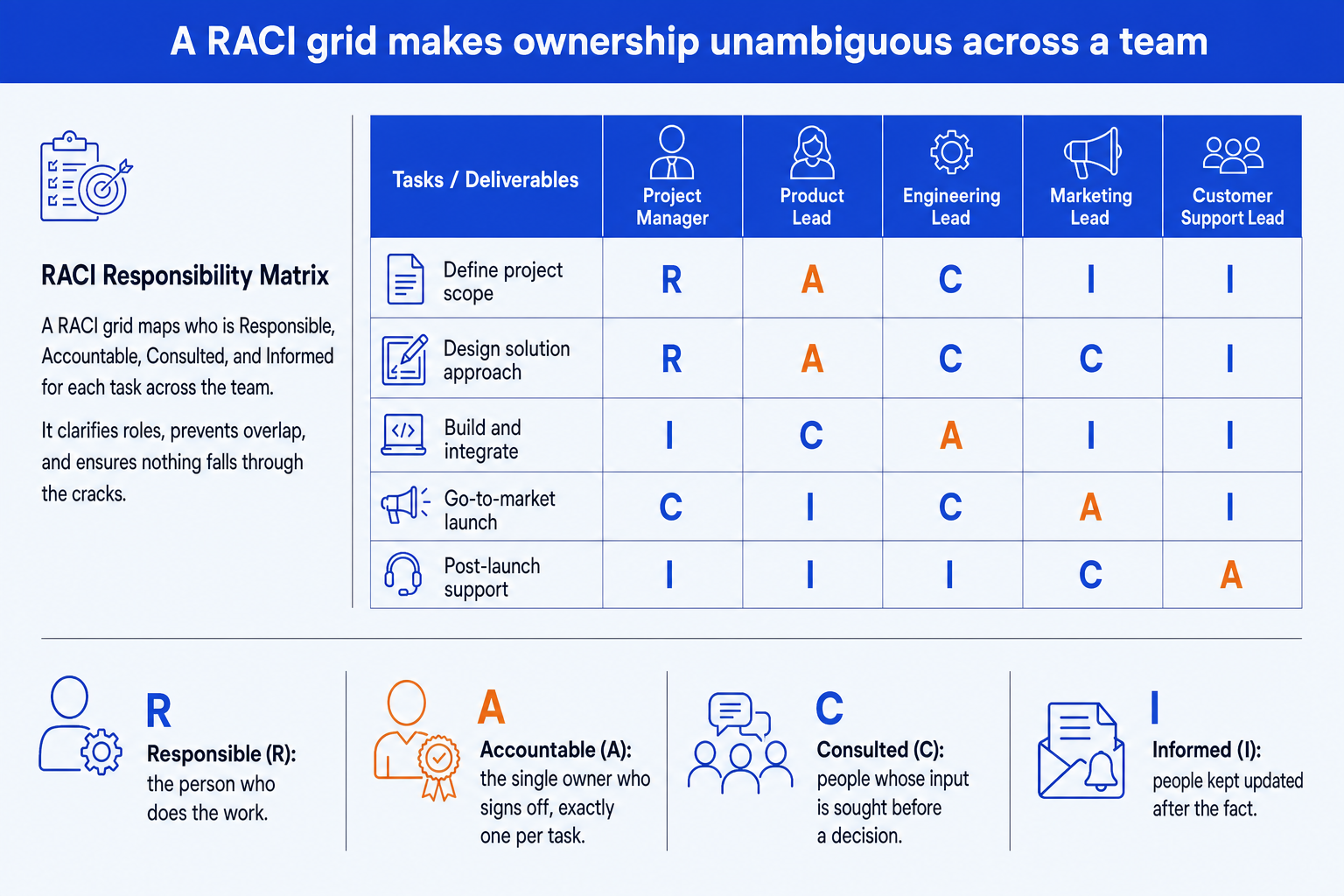
Responsible (R). The person who does the work to complete the task. A row can have more than one R when the work is shared across people.
Accountable (A). The single owner who signs off the outcome and answers for it. There must be exactly one A per row, never two.
Consulted (C). People whose input is sought before a decision, in a two-way conversation. Their views shape the work but they do not own it.
Informed (I). People kept updated after the fact, one-way. They need to know the outcome but are not part of the decision.
Read across a single row and the grid looks like this. One owner, one or more doers, the people consulted, and the people simply informed.
The step-by-step manual build, with the real gotchas
The classic method builds the grid from PowerPoint shapes rather than a table, so every cell stays on-brand and movable. The order below keeps the alignment clean and the color logic consistent.
List the tasks and the roles. Write the deliverables down the left as row labels and the roles or people across the top as column headers. Keep tasks to action phrases and roles to titles, not individual names where you can.
Draw the grid from aligned shapes. Lay out a row of header cells and a column of task cells, then fill the body with equal cells. Use PowerPoint align and distribute so every cell is the same size and the grid lines up perfectly.
Place one letter in every cell. Walk each task across its row and assign R, A, C, or I to each role. Every cell gets exactly one letter, and every row gets exactly one A.
Color-code the four letters. Give each letter a consistent fill or text color so the eye groups them instantly. Reserve the emphasis color for the single Accountable cell so ownership jumps out of the grid.
Add a compact legend. Put a small four-line key on the slide that spells out R, A, C, and I, so a reader who does not know the model can still read the grid without a verbal explainer.
Write the action title. Replace the topic label with a full-sentence so-what, such as the one decision the grid settles. The title is the slide; the grid is the proof.
Gotcha
Every row must have exactly one Accountable. Two A letters in a row means ownership is split, and the task stalls the moment something goes wrong. Scan every row before you ship and confirm a single A. Multiple R, C, or I letters are fine; multiple A letters are not.
How to clean up an existing RACI grid
Most RACI slides do not start from a blank page. They arrive as a rough working-session table, an inherited slide, or a spreadsheet paste. If the tasks and assignments are already correct, keep that source content and use Improve Design for the visual pass instead of recreating the matrix cell by cell. If the grid still has governance gaps, separate proposed assignment changes from the visual cleanup and approve them with the relevant owners.
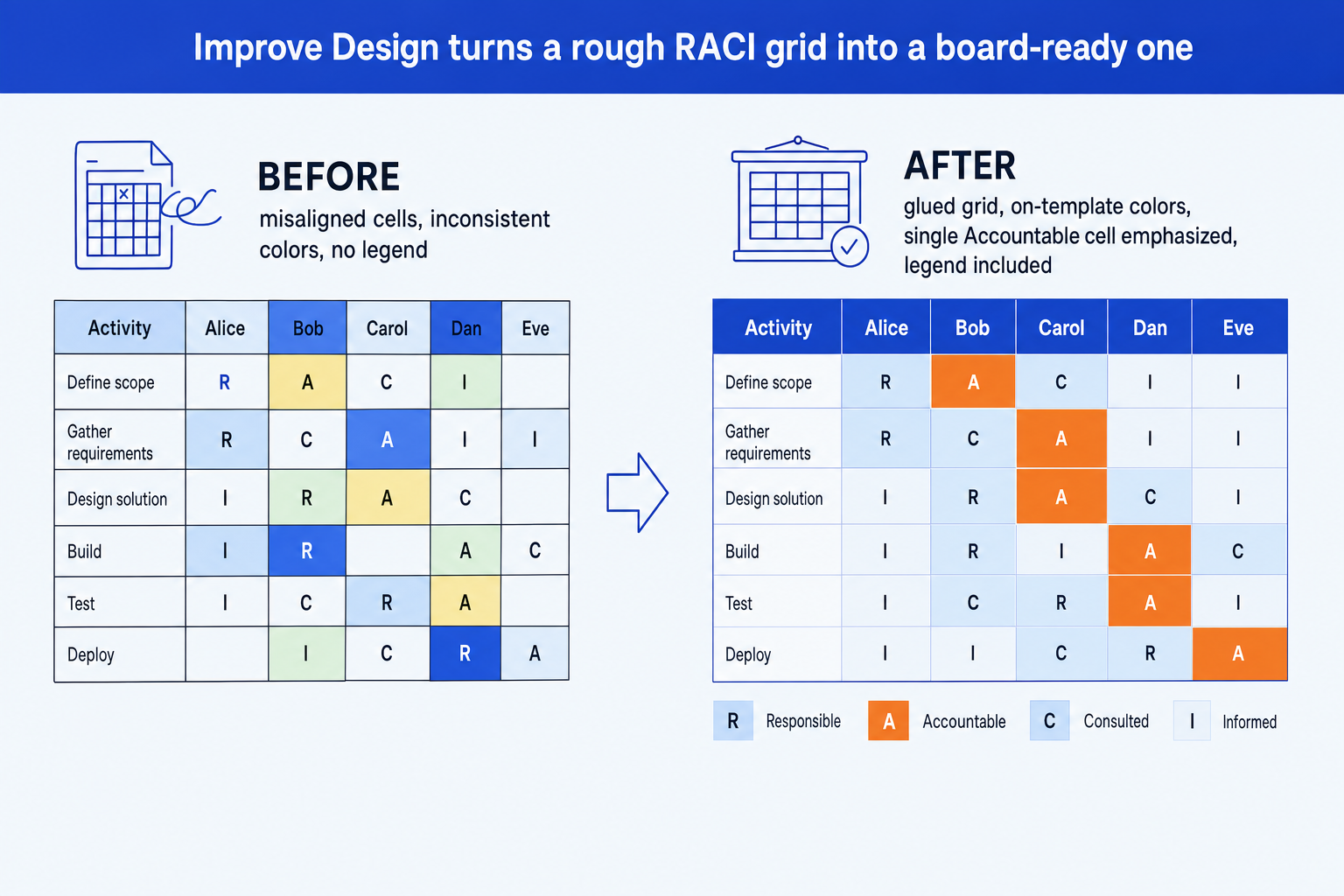
The illustrated refinement pass proposes several missing Informed assignments. Treat those letters as ownership recommendations that require review; a visual-only pass should leave every assignment unchanged.
Resolve the logic first. Scan for rows with two Accountable owners or none at all. Improve Design fixes presentation, not an unresolved ownership decision.
Keep the grid editable. Use a native PowerPoint table or shapes rather than a screenshot, so the cells, labels, and assignments can be aligned and restyled.
Verify the result. After a visual-only pass, confirm that every task, role, and letter survived intact. Review any proposed assignment changes separately, then add a missing legend or title emphasis with a follow-up prompt.
Improve Design prompt for a rough RACI grid
The one-prompt route: describe the grid, get an editable slide
Aligning dozens of cells and recoloring them by hand is exactly the kind of mechanical work that eats an evening. Oria removes it. It is an AI add-in that runs in the PowerPoint task pane and produces fully editable native PowerPoint elements, including shapes and grids, in your corporate template. You describe the matrix in one line and Oria renders the RACI matrix slide for you.
Because the output is native, every cell, label, and color stays editable afterward. You can reassign a letter, rename a task, or add a role without rebuilding the grid. The same approach works for any complex layout, from a responsibility grid to a process flow, which is why Oria suits the dense decks consultants and bankers actually ship. See the Claude skill for slide design for the storyline side of the workflow.
One-line RACI prompt for Oria
The prompts that make the RACI matrix slide sharp
These are the exact copy-paste prompts we use to draft the grid, assign each letter, and set the color emphasis. The first three are for Oria inside PowerPoint; the last two are for drafting the assignments in Claude before you build. Replace the bracketed parts with your own tasks and roles.
Build the grid in Oria
Spec the RACI grid and assignments
Color-code and emphasize the owner
Write the action title on the slide
Draft the RACI in Claude first
Draft the assignments from a task list
Stress-test the ownership
Tip
Draft and stress-test the assignments in Claude, then hand the clean tasks, roles, and letters straight to Oria. For the wider end-to-end method, see the consultant's guide to Claude.
Common mistakes to avoid
For the wider habits that make AI-built slides look board-ready rather than generic, the consultant's guide to Claude covers the end-to-end method from analysis to deck.
Frequently asked questions
What is a RACI matrix slide used for?
A RACI matrix slide makes ownership unambiguous across a team. It is a grid where rows are tasks or deliverables and columns are roles or people, and each cell holds a single letter: R, A, C, or I. Strategy, transformation, and PMO teams use it to assign accountability for a workstream, a launch plan, or an operating model so no task is left without a clear owner.
What does RACI stand for?
RACI stands for Responsible, Accountable, Consulted, and Informed. Responsible is the person who does the work. Accountable is the single owner who signs off, and there should be exactly one per task. Consulted are the people whose input is sought in a two-way conversation before a decision. Informed are the people kept updated after the fact.
How many people should be Accountable for one task?
Exactly one. The Accountable role is the single owner who answers for the outcome and signs off the work. If a row shows two A letters, ownership is split and the task will stall when something goes wrong. Multiple people can be Responsible, Consulted, or Informed, but only one can be Accountable per row.
What is the difference between Responsible and Accountable?
Responsible is the person who does the actual work to complete the task. Accountable is the one owner who is answerable for the outcome and signs it off. The same person can hold both on a small task, but on a larger one the doer and the sign-off are usually different people, which is exactly what a RACI matrix slide is built to show.
What is the fastest way to build a RACI matrix slide?
Describe the grid in one line and let Oria render it. You give the list of tasks, the list of roles, and which letter sits in each cell, and Oria builds a fully editable native PowerPoint grid in your template, color-coded with the single Accountable cell emphasized. You skip the manual cell-by-cell formatting and alignment entirely.
Can I clean up an existing RACI matrix instead of rebuilding it?
Yes. Keep the rough grid as a native PowerPoint table or set of shapes, resolve any ownership conflicts, and run Oria's Improve Design. It aligns and groups the cells, applies your corporate template, and adds visual hierarchy while preserving every task, role, and RACI assignment for you to verify afterward.