

Oria vs OneSlides: Which AI for Consulting Slide Decks?
Oria vs OneSlides comes down to one question for consulting decks: do you want a slide that stays fully editable inside PowerPoint and on your template, or a fast first draft generated in a web app? Here is the fair, technical breakdown.
Oria vs OneSlides: the bottom line
Oria and OneSlides solve the same surface problem, turning rough input into slides, but through different technical approaches and in different places. Oria is an AI add-in that lives inside PowerPoint and produces fully editable, on-brand, boardroom-ready slides for consultants, bankers, and strategy teams. OneSlides, like most web-based AI deck generators, builds presentations in its own browser application from a prompt.
Oria is for
The heavy PowerPoint user who builds dense, bespoke, brand-controlled decks and needs output they can edit natively and keep on a strict corporate template.
OneSlides is for
The user who wants a fast first-draft deck in the browser and is comfortable refining it afterward, typically on cleaner, more standard layouts.
If your decks pass a partner review and a brand-compliance check, editability inside PowerPoint and fidelity to your template are the criteria that decide the tool. That is the lens this comparison uses throughout.
Oria vs OneSlides at a glance
The grid below compares the two on the dimensions that decide whether a slide is usable in a professional setting. Oria facts are drawn from its product documentation. OneSlides is characterized generally and fairly as a web-based AI deck generator, without claiming specific features it may or may not offer.
Oria claims are documented product facts. OneSlides is framed as a representative web-based generator, not with invented specifics.
The three approaches behind every AI slide tool
The Oria vs OneSlides question is really a question about technical approach. Serious AI slide tools fall into three buckets, and the bucket determines the output quality far more than the brand name does. The exhibit below lays them out.
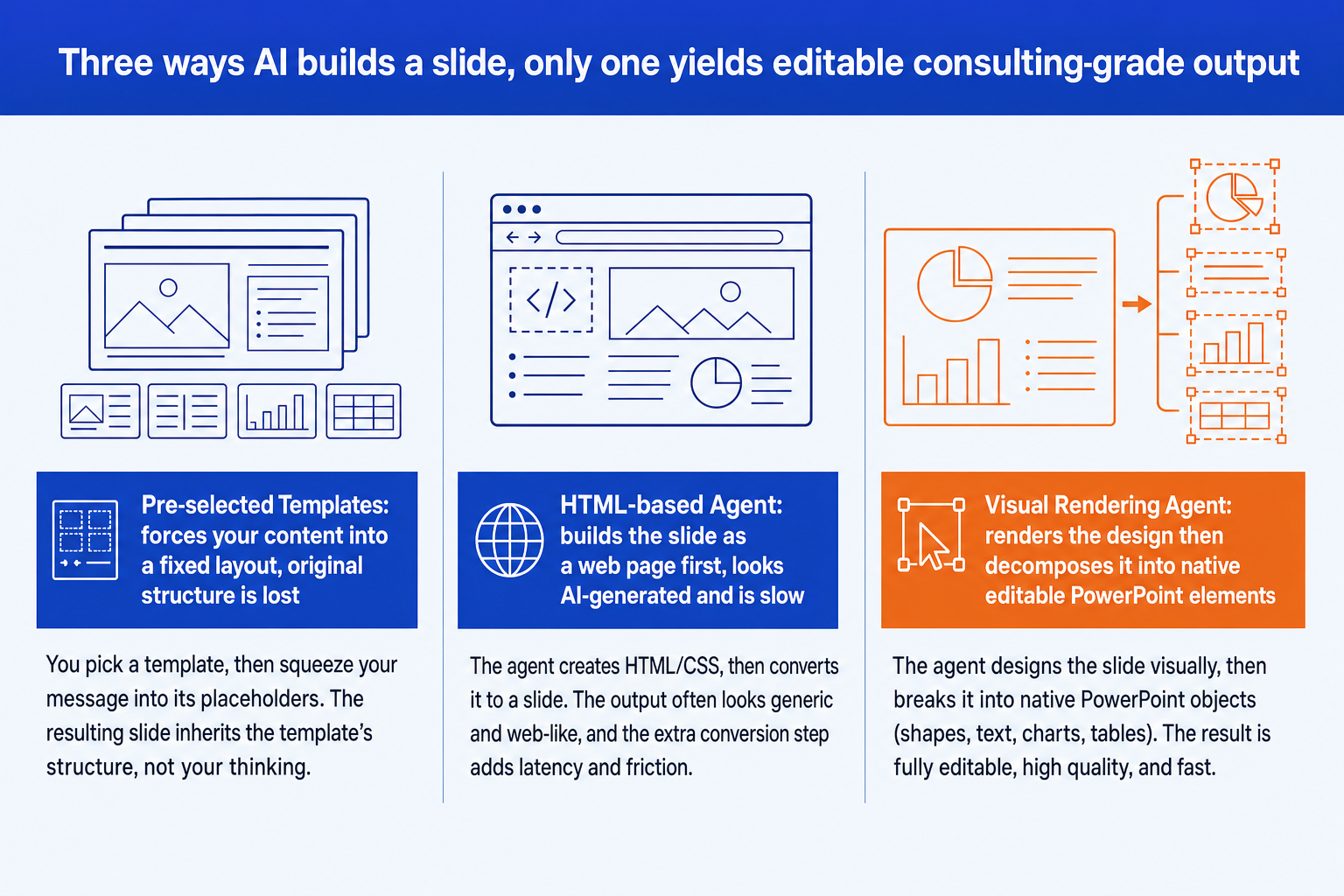
Pre-selected templates. The tool picks a fixed layout and forces your content into it. The original structure is lost, and a large share of the original content is dropped or rephrased. The slide can look tidy while failing to say what you wrote.
HTML-based agent. The slide is built as a web page first and then converted to PowerPoint. It keeps more content, but it tends to look AI-generated, runs slow, and struggles with consistent spacing, typography, and a strict corporate template. Most web-based generators sit here.
Visual rendering agent. Oria renders the slide as a complete design, the way a human designer would, then decomposes that render into native, editable PowerPoint elements with a patent-pending engine. This is the approach that yields editable, consulting-grade output.
For the full explainer, read our breakdown of the three approaches to AI slide generation. It is the single most useful lens for choosing any AI slide tool.
Where Oria wins for consulting decks
Oria is positioned as AI for complex professional slides, built for the dense, brand-controlled work that consultants and bankers produce. Its advantages are grounded in its approach and where it runs.
It lives inside PowerPoint. Oria loads in the task pane as a Microsoft 365 add-in on Windows, macOS, and the browser. There is no switching apps, exporting, or copy-pasting between a web tool and your deck.
Output is fully editable. Every shape, text box, icon, line, and chart is native PowerPoint. You can move, retype, recolor, and restyle anything after generation without breaking the layout.
It holds your brand. Upload your corporate template and Oria maintains fonts, colors, logos, and layout patterns across slides, which matters when a deck must pass brand-compliance review.
It handles complex layouts. Multi-step process flows, frameworks, customer journeys, and data-heavy slides are where Oria's edge shows, the bespoke layouts most generators struggle with.
It offers multiple design options. For each input, Oria produces several design variations so you choose the visual direction, rather than accepting a single output.
Where OneSlides fits as a web-based generator
We characterize OneSlides fairly and generally here, in the category it belongs to, rather than claiming specific features, pricing, or metrics we cannot verify. Like most web-based AI deck generators, OneSlides tends to start from a prompt in its own browser application and produce a presentation quickly.
That category has real strengths. Web-based generators are fast to a first draft, easy to reach from any browser, and convenient when you want a clean, standard deck without opening PowerPoint. For a light internal update or a straightforward narrative presentation, that speed can be exactly what you need.
The trade-offs are the ones shared by the approach, not specific to any one tool. Working in a separate web app means a hand-off back into your own template and workflow. Web-based generators generally match a color palette and theme rather than a strict corporate master, and they are stronger on cleaner layouts than on the multi-element frameworks that fill a consulting deck. For a fair head-to-head across the wider field, see our guide to the best AI for PowerPoint.
When to pick Oria and when to pick OneSlides
Pick Oria when
- You build decks inside PowerPoint all day
- Output must stay fully editable and native
- A strict corporate template is non-negotiable
- Slides are dense, bespoke, framework-heavy
- The deck must pass a partner or board review
Consider OneSlides when
- You want a quick first draft in the browser
- The deck is cleaner and more standard
- You are comfortable refining the output after
- You do not need a strict corporate master
- You prefer working in a web app over PowerPoint
For the consulting and finance audience this site serves, the deciding factors usually point one way. If you want to understand the broader workflow of taking analysis to a board-ready deck, our consultant's guide to Claude walks the full path from thinking to slides.
Frequently asked questions
What is the core difference between Oria and OneSlides?
The difference is the technical approach and where it runs. Oria is a Visual Rendering Agent that works inside PowerPoint as an add-in: it renders the slide as a design, then decomposes it into native, editable PowerPoint elements. OneSlides, like most web-based AI deck generators, builds decks in its own web application from a prompt. For consulting decks, the deciding factors are editability inside PowerPoint and fidelity to a strict corporate template.
Which is better for consulting-style slides?
For dense, bespoke, on-brand consulting slides, the tool that keeps output fully editable in PowerPoint and preserves your corporate template has the structural advantage. Oria is built specifically for that audience: complex layouts, strict templates, and boardroom standards. Web-based generators are generally stronger on cleaner, more standard decks than on the multi-element frameworks consultants build.
Does OneSlides produce editable PowerPoint files?
We do not claim specific OneSlides features here. In general, web-based AI deck generators export or download a file, and how editable that file is inside PowerPoint varies by tool. Oria's defining property is that every element it produces is native PowerPoint, so you can move, retype, recolor, and restyle anything after generation without breaking the layout.
Why does running inside PowerPoint matter?
Consultants and bankers spend their day in PowerPoint, bound by a firm template and a partner review. Oria loads in the task pane, so there is no switching apps, exporting files, or copy-pasting between a web tool and the deck. The slide is generated, refined, and finished in the same place the rest of the deck lives.
Which should I pick?
Pick Oria if you build complex, brand-controlled decks in PowerPoint and need output you can edit natively and keep on template. Consider a web-based generator like OneSlides if you mainly want a quick first-draft deck in the browser for a lighter, more standard presentation. To see how the underlying methods differ, read our explainer on the three approaches to AI slide generation.