

Plus AI vs Oria for Consulting Decks: Full Comparison
Plus AI vs Oria for consulting decks comes down to method, not marketing copy. Plus AI fits your outline into a pre-built layout inside Google Slides or PowerPoint. Oria renders the full design first, then decomposes it into native, editable PowerPoint elements on your template. Here is the fair, practical breakdown for dense, board-ready work.
Plus AI vs Oria for Consulting Decks: The Verdict
Plus AI and Oria are both AI add-ins that build slides inside your slide editor, so this is a closer comparison than an add-in against a browser tool. They split on method. Plus AI's Suggest Layout feature fits your outline into one of its pre-built layouts inside Google Slides or PowerPoint. Oria renders the slide as a whole design first, then a patent-pending engine decomposes it into native, fully editable PowerPoint elements on your firm's template.

Oria is for
Dense, bespoke, brand-controlled consulting decks that must stay fully editable and hold a strict corporate template through a partner or board review.

Plus AI is for
A fast, standard deck built from a template library, for a team that works across both Google Slides and PowerPoint.
If your decks are dense, framework-heavy, and answer to a partner or board, the criteria that decide the tool are editability inside PowerPoint and fidelity to your exact template. That is the lens this comparison uses throughout.
Plus AI vs Oria at a glance
The grid below compares the two on the dimensions that decide whether a slide is usable in a consulting setting. Oria facts are drawn from its product documentation. Plus AI is described fairly as a template-based AI presentation add-on, without claiming specific features, pricing, or metrics.
Oria claims are documented product facts. Plus AI is framed by its category as a template-based generator, not with invented specifics.
Same outline, two different slides
The clearest way to read Plus AI vs Oria for consulting decks is to feed both the same rough outline and ask what comes back. A template-based add-in fits that outline into a layout it already has. A visual rendering add-in designs the slide as a whole first, then rebuilds it as native, separately editable elements. The exhibit below walks both paths from the same 5-step outline.
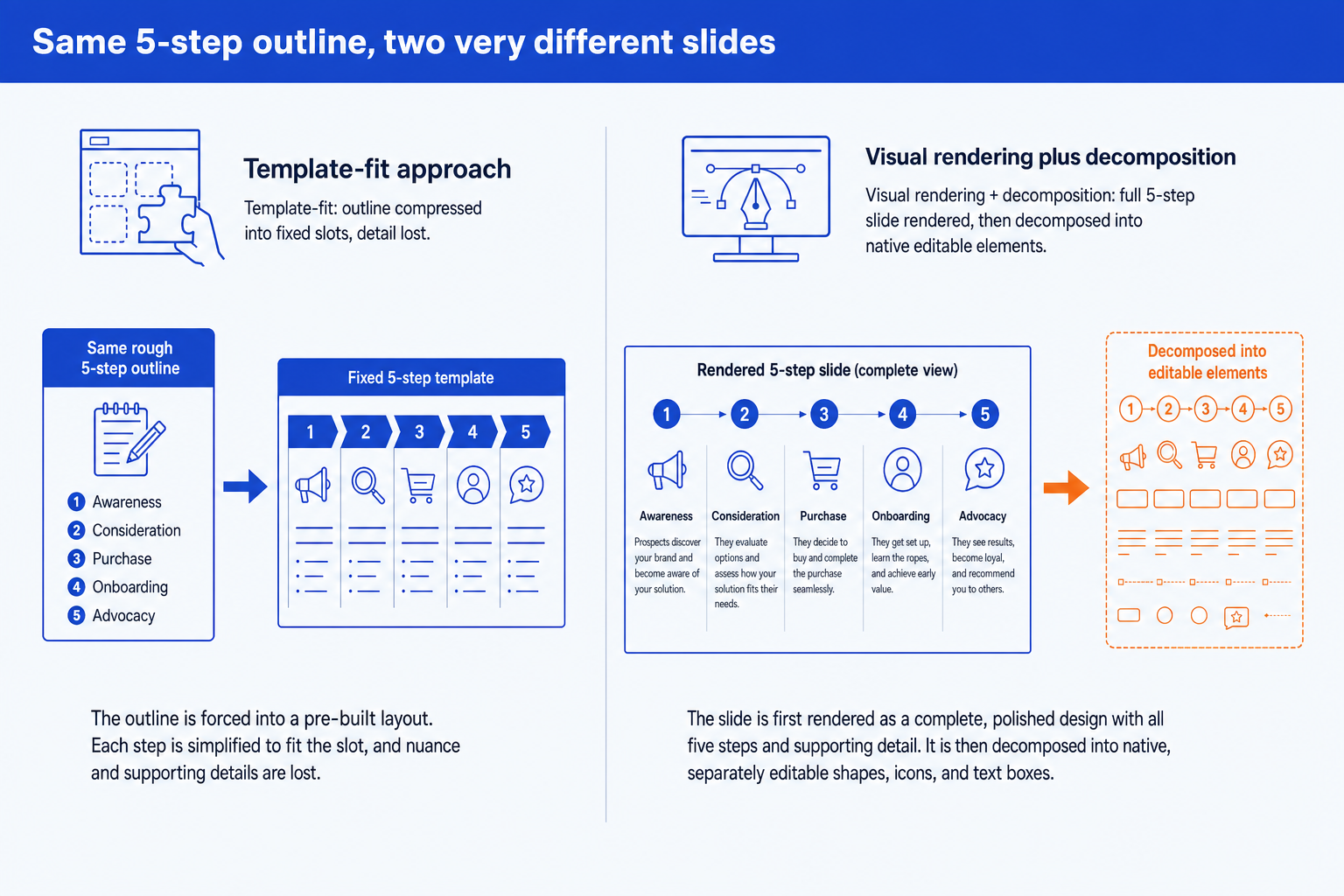
Template-fit. The outline is poured into a fixed layout with one slot per step. Wording gets compressed to fit each slot, and the deeper supporting detail behind each step is the first thing to go.
Rendered, then decomposed. The full slide, all five steps with their supporting detail, is designed as one complete composition. A patent-pending engine then decomposes that render into native shapes, icons, and text boxes you can edit individually.
This is a difference in technical approach, and the approach decides output quality more than the brand name does. For the full explainer, read our breakdown of the three approaches to AI slide generation. It is the single most useful lens for choosing between any two AI slide add-ins.
How each handles common consulting slide types
A comparison is more useful slide type by slide type than in the abstract. Here is how Plus AI's layout library and Oria's rendering engine tend to handle the structures that show up most in consulting and board decks.
The pattern across all six is the same. A template-based add-in is fast when your content already matches one of its layouts. A rendering-then-decomposition engine is built for the slide types consulting work actually produces: dense, bespoke, and rarely a clean fit for a generic template.
Where Plus AI fits as a template-based add-in
Plus AI is a genuinely useful product, and it is fair to say so. It installs as an add-on for both Google Slides and Microsoft PowerPoint, so a first draft happens inside whichever app a team already uses. Its Suggest Layout feature draws from a library of pre-built layouts and themes, which makes a fast first pass on a standard slide shape genuinely quick.
That speed is the point for a recurring status update, a sales narrative, or a standard business deck where a clean default layout carries the slide. The trade-off shows up once content stops matching the template. Pouring a dense, multi-step framework into a fixed layout can reset the structure you started with, and a strict, bespoke corporate master is harder to hold across a one-off consulting exhibit than across a repeatable status slide.
For a deeper, standalone look at this same match-up, see our Oria vs Plus AI comparison, which walks the two add-ins head to head in more detail.
Where Oria wins for consulting decks
Oria is positioned as AI for complex professional slides, built for the dense, brand-controlled work that consultants, bankers, and strategy teams produce. Its advantages trace directly back to its rendering-then-decomposition approach.
It renders, then makes it native. Oria designs the slide as a whole and decomposes it into native PowerPoint elements, so dense and bespoke layouts survive instead of being fitted into a stock template.
Output is fully editable. Every shape, text box, icon, line, and chart is native PowerPoint. You can move, retype, recolor, and restyle anything after generation without breaking the layout.
It holds your exact template. Upload your corporate template and Oria maintains fonts, colors, logos, and layout patterns across slides, which is what a brand-compliance review actually checks.
It handles the slide types Plus AI struggles with. Market sizing funnels, competitive landscape grids, and RACI matrices are where Oria's edge shows, because each slide is designed around its own structure.
It offers multiple design options. For each input, Oria produces two to five design variations in roughly 30 to 40 seconds, so you choose the visual direction rather than accepting one templated result.
If you want to see how this fits the wider workflow of taking analysis to a board-ready deck, our guide to the best AI for PowerPoint places both tools against the wider field.
When to pick Plus AI and when to pick Oria
Pick Oria when
- You build decks inside PowerPoint all day
- Output must stay fully editable and native
- A strict corporate template is non-negotiable
- Slides are dense, bespoke, framework-heavy
- The deck must pass a partner or board review
Consider Plus AI when
- You want a fast, standard draft from a template
- You move between Google Slides and PowerPoint
- The deck is cleaner and more standard
- You do not need a strict corporate master
- It is a status update, sales, or marketing deck
For the consulting audience this comparison is written for, the deciding factors usually point to Oria. Where they do not, Plus AI's template library and dual Google Slides and PowerPoint support are the honest reasons to pick it instead.
Frequently asked questions
Does Plus AI work inside PowerPoint, or only Google Slides?
Plus AI runs as an add-on for both Google Slides and Microsoft PowerPoint, so teams that split work across the two apps get one consistent workflow. For consulting decks that live entirely in PowerPoint, that flexibility matters less than what happens to a dense, bespoke layout once it goes through the tool's suggested-layout step.
What happens to a 2x2 matrix or customer journey map in Plus AI?
Plus AI fits the content into one of its pre-built layouts, which works cleanly for short, generic labels. A framework with several steps or supporting detail per element can get compressed or simplified to fit the chosen template, because the layout exists before your content does.
Does Plus AI keep my firm's exact PowerPoint template?
Plus AI supports themes and custom templates with strong default styling. Holding a strict, bespoke corporate master, the exact fonts, colors, logos, and layout rules a partner or brand team enforces, across dense, one-off consulting slides is a lighter capability than Oria's brand-template handling.
Is Oria better for market sizing or competitive landscape slides?
For those slide types, yes. Oria renders the funnel, grid, or matrix as one designed exhibit first, then decomposes it into native PowerPoint elements you can still edit. Plus AI's layout library is not built around those specific structures, so they typically need manual formatting once the draft lands.
Which should I pick for a consulting deck due tomorrow?
Pick Oria if the deck is dense, bespoke, and must hold your firm's exact template through a partner review. Pick Plus AI if you want a fast, standard draft and move between Google Slides and PowerPoint. For the technical reason the two approaches diverge, read our explainer on the three approaches to AI slide generation.