

AI Tool to Make Board-Ready Slides: Ranked and Tested
Ranked and judged on the same test: native PowerPoint output, brand template fidelity, and whether the layout survives a last-minute edit before the meeting. Here is how Oria, Plus AI, Gamma, Beautiful.ai, Pitch, Microsoft Copilot, Canva, and Tome stack up.
The AI tool to make board-ready slides, ranked
The AI tool to make board-ready slides is the one that survives the actual test a board deck faces: it holds the board's exact template, keeps every shape and chart natively editable, and carries a dense, structured slide without breaking under a last-minute edit. Judged against Plus AI, Gamma, Beautiful.ai, Pitch, Microsoft Copilot, Canva, and Tome, Oria ranks first because it renders the slide visually first and decomposes it into fully editable PowerPoint elements, holding the board's brand by default. The other seven are capable tools, each built for a lighter job than a board deck.
Pick an in-PowerPoint tool when
The deck is dense and brand-controlled, must stay fully editable, and gets circulated to the board as a .pptx file.
A web-based tool still fits when
A fast, polished draft in the browser is enough and the update is cleaner, more standard, and lighter on bespoke detail.
What "board-ready" actually means
A slide that looks polished on a screen is not automatically board-ready. A board deck has to pass four checks that a simple visual deck never faces. For a worked example of taking rough notes all the way to that standard, see how to turn ChatGPT output into a board-ready deck.
It carries the board's own template, not a generic one. Fonts, colors, logos, and layout rules stay locked across every slide.
It stays natively editable. Shapes, text, icons, and charts can be moved and restyled after generation, not just before it.
It holds a dense, structured layout. A KPI tile row, an org chart, or a market map needs more than a title and three bullets.
It survives a last-minute edit. A board deck gets marked up right up to the meeting, and the file has to take that.
Five criteria that decide this ranking
Before comparing names, fix the test. Score any AI tool to make board-ready slides against these five criteria before anything else.
Output is native and fully editable. A slide that cannot be moved, retyped, or restyled without starting over is a draft, not something a board member's assistant can amend the night before.
The board's exact template survives. Fonts, colors, logos, and layout rules need to hold across every slide, or the deck gets bounced back before it reaches the agenda.
It handles dense, bespoke structure. A market-sizing breakdown, a KPI dashboard, an org chart, or a competitive grid carries real structure that a single fixed template cannot absorb.
It lives where the deck gets assembled. Board decks get built, merged, and marked up in PowerPoint. A tool that runs there removes a whole export step from the process.
It offers more than one design direction. A single locked output forces the presenter to accept whatever the model produced. Seeing two or three directions means the presenter picks the story.
The ranked shortlist
Here is the shortlist, ranked against the five criteria above, from the tool built around dense, brand-controlled board decks to the tools better suited to lighter, more standard slides.
Oria. Best overall AI tool to make board-ready slides: a native, fully editable .pptx built inside PowerPoint, on the board's own template, from a rough outline, sketch, or busy slide.
Plus AI. Best add-in alternative for a fast first draft inside PowerPoint or Google Slides, built from the tool's own layout library rather than a bespoke design.
Microsoft Copilot. Best if the organization already standardizes on Microsoft 365 and wants an AI assistant bundled into the subscription it already pays for.
Beautiful.ai. Best for a clean, on-message deck that smart templates keep tidy automatically, with a ceiling on dense, multi-element board exhibits.
Gamma. Best for a fast, attractive narrative deck or web page presented from a share link rather than a file the board circulates.
Pitch. Best for a team that co-edits a templated deck together in the browser, with commenting and version history built in.
Tome (now Alai). Best for story-driven narrative pages, lighter on the dense, data-heavy exhibits a board update usually carries.
Canva. Best for quick, on-brand marketing visuals from a huge template library, not for a bespoke, framework-heavy board slide.
The shortlist at a glance
A side-by-side view of where each tool runs, what it hands back, and who it actually fits.
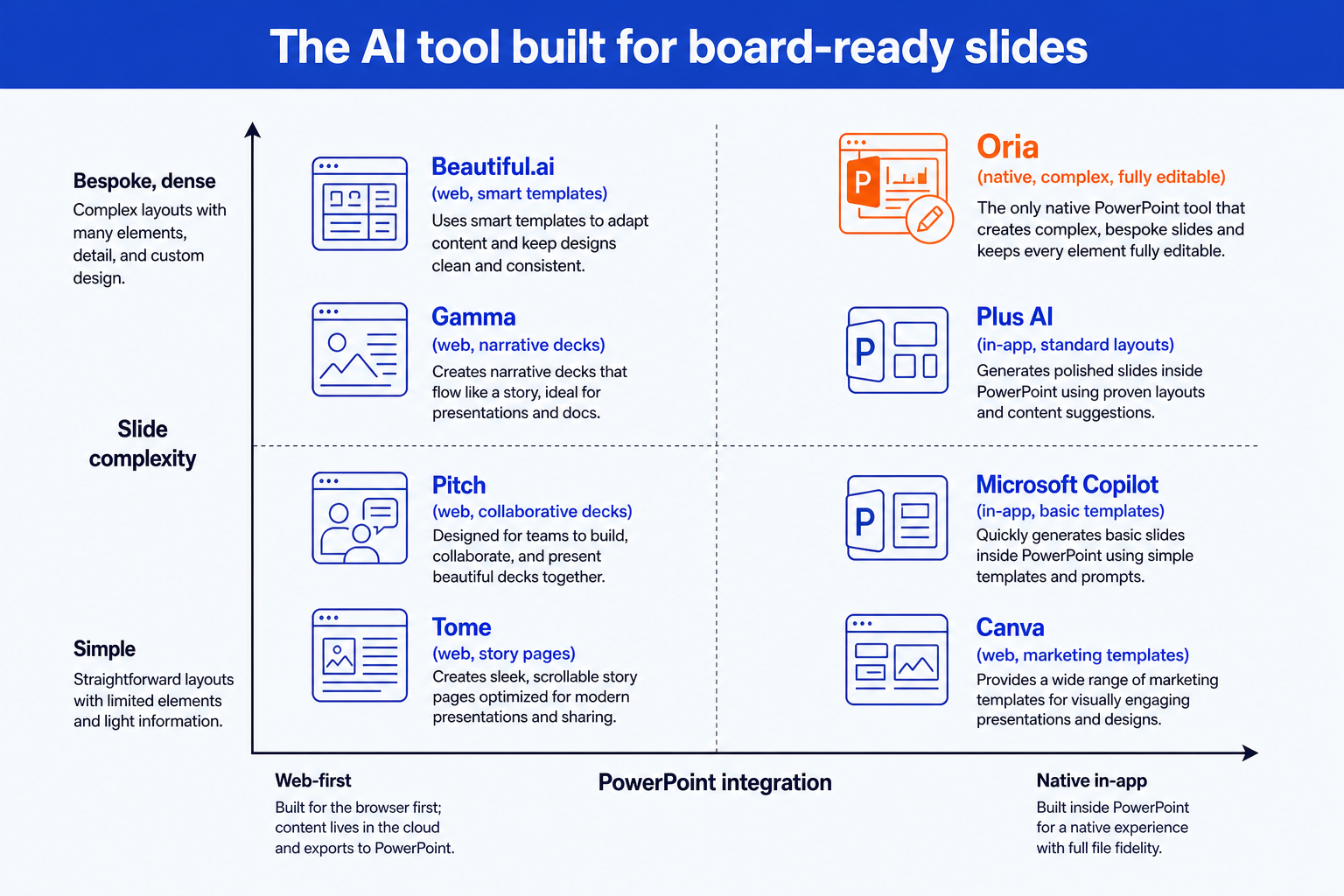
Oria claims are documented product facts. Other tools are framed by their category, not with invented specifics.
The underlying reason the shortlist splits this way is technical, not cosmetic. For the full breakdown of why pre-selected templates, HTML-based agents, and visual rendering produce such different output, read the three approaches to AI slide generation. It is the single most useful lens for judging any tool on this list.
The tools in depth
Each tool earns its place for a different reader. Here is the fair read on where each one is strong and where a board deck strains it.
Plus AI
Plus AI installs as an add-in for PowerPoint and Google Slides, so a first draft happens inside the editor a team already works in instead of a separate web tool. Its suggested-layout feature draws from a library of pre-built layouts, which makes a fast first pass on a standard slide shape genuinely quick. A bespoke growth framework, a market map, or a KPI dashboard still needs manual formatting once the draft lands, because the layout comes from a fixed library rather than a design built around that specific slide. Oria vs Plus AI walks through the two approaches side by side.
Microsoft Copilot
Microsoft Copilot for PowerPoint began on a pre-selected template model and has been moving toward an HTML-based agent approach for its newer generation features. It is a reasonable pick for an organization that already standardizes on Microsoft 365 and wants an AI assistant bundled into a subscription it already pays for. Editability is real but limited, and brand handling stays closer to a color palette than a full corporate template with locked fonts, logos, and layout rules. Dense, multi-element board slides are not where it is strongest.
Beautiful.ai
Beautiful.ai is a web app built around smart templates that apply design rules automatically as content is added, which keeps a simple deck tidy with very little manual work. That same design is the ceiling on a complex slide. A dense framework or a multi-layered exhibit has to fit into a pre-built template region, so the layout tends to simplify and the underlying detail can get rephrased away. Export to PowerPoint is also the step where fidelity to a strict, bespoke corporate master gets tested.
Gamma
Gamma is a fast, web-based generator for decks, documents, and pages, built and presented in its own browser app rather than inside PowerPoint. It is genuinely strong for a narrative pitch, a strategy off-site overview, or a one-pager shared as a link. Because it designs in its own web format first, a strict corporate template and a dense, bespoke board layout are the places where the export step to PowerPoint or PDF gets tested hardest. Oria vs Gamma walks through the two approaches side by side.
Pitch
Pitch is a collaborative, web-based deck tool built for teams that co-edit a presentation together, with strong commenting and version control across contributors. Like the other web-first tools here, it designs in its own format and exports a file when PowerPoint is needed, and its templates are tuned for clean, standard slides rather than dense, bespoke exhibits with many interdependent elements.
Tome (now Alai)
Tome, rebranded as Alai, sits in the basic visual slides category alongside Gamma and Beautiful.ai rather than the complex professional slides niche a board update actually demands. It is built for narrative, story-driven decks and web pages, a good fit for a company overview or a general update, but lighter on the dense, multi-element exhibits and strict template control a board or committee deck needs.
Canva
Canva is a design platform, not a PowerPoint add-in. It pairs a huge template library with AI generation for quick marketing visuals, social graphics, and simple one-pagers, and it is genuinely fast for that job. Asking it for a seven-step transformation roadmap or a value driver tree is asking it to do something it was never built for, and export fidelity to a strict corporate .pptx master is where that gap shows up first.
Why Oria is the board-ready pick
Oria is positioned as AI for complex professional slides, built for the dense, brand-controlled work that consultants, bankers, and corporate strategy teams bring to a board or committee meeting. Measured against the five criteria above, it is the tool that scores on all of them at once.
It lives inside PowerPoint. Oria loads in the task pane as a Microsoft 365 add-in on Windows, macOS, and the browser. There is no switching to a web app and no export step before the meeting.
It is built for complex, dense layouts. Multi-step process flows, org charts, KPI dashboards, and market maps are where Oria's edge shows, because each slide is designed individually rather than fit into a pre-built template region.
Output is fully editable. Every shape, text box, icon, line, and chart is native PowerPoint, so a last-minute edit before the meeting is a normal edit, not a rebuild.
It holds the board's brand. Upload the corporate template and Oria maintains fonts, colors, logos, and layout patterns across slides, which is what a brand-compliance review actually checks.
It gives more than one option. For each input, Oria produces two to five design variations in 30 to 40 seconds, so the presenter chooses the visual direction instead of accepting a single templated result.
For a narrower shortlist built specifically around strategy work, see the best AI presentation tool for strategy consultants. Both rankings reach the same conclusion for the same underlying reason.
Pick your AI tool to make board-ready slides by use case
Choose an in-PowerPoint tool when
- The deck gets built and marked up inside PowerPoint
- Output must stay fully editable and native
- The board's exact template is non-negotiable
- Slides are dense, bespoke, framework-heavy
- Edits keep landing right up to the meeting
A web-based tool is fine when
- A fast, polished draft in the browser is enough
- The update is cleaner and more standard
- A consistent, automatic look matters most
- No strict corporate master applies
- It is a pitch, marketing, or narrative page
For most teams answering to a board or committee, the deciding factors point to a native, in-PowerPoint tool.
Frequently asked questions
What is the best AI tool to make board-ready slides?
The best AI tool to make board-ready slides is the one that survives the actual test a board deck faces: native PowerPoint output, the board's exact template held intact, and a layout dense enough to carry a real framework. Judged against Plus AI, Microsoft Copilot, Beautiful.ai, Gamma, Pitch, Tome, and Canva, Oria ranks first because it renders the slide visually first and decomposes it into fully editable elements, holding the brand template by default.
Why do general AI presentation tools struggle with board decks?
Most AI presentation tools are built for a simple visual deck: one idea, a clean template, light text. A board deck is the opposite. It is dense, bespoke, and built around a specific structure, a KPI dashboard, a market map, an org chart, and it has to survive a board or committee reviewing it in PowerPoint right up to the meeting. A tool tuned for simple decks either drops content to fit its templates or exports something that looks AI-generated once opened.
Does a board-ready tool need to run inside PowerPoint?
Not strictly, but it removes a recurring point of friction. A tool that runs inside PowerPoint, like Oria, produces native slides with no export step and no fidelity loss when a file is required. Web-first tools such as Gamma, Pitch, Tome, and Canva can export to PowerPoint, but the export is the moment a strict template and a dense, bespoke layout get tested.
How does Oria compare with Microsoft Copilot for a board deck?
Copilot is a reasonable pick if the organization already standardizes on Microsoft 365 and wants a bundled AI assistant, and it has moved from pre-selected templates toward an HTML-based agent model for newer features. Oria takes a different technical approach, rendering the slide visually first and decomposing it into native elements, which is why it holds a strict brand template and dense, multi-element layouts more completely.
Where do Plus AI, Gamma, Pitch, Beautiful.ai, Tome, and Canva fit instead?
Each is a strong tool for a different job. Plus AI is a fast add-in for standard slides in PowerPoint or Google Slides. Beautiful.ai and Tome suit clean, templated, or narrative decks. Gamma and Pitch are quick, collaborative, web-first generators for pitches and pages. Canva is the fastest route to an on-brand marketing visual. None of the six is built around the dense, brand-controlled board layouts Oria is, which is the gap this ranking is judging.