

Best AI PowerPoint Add-in for Consultants
A criteria-led comparison of the four AI tools that install inside PowerPoint itself, judged on price, native editable .pptx, board-ready layouts, brand fidelity, and what each vendor will actually put in writing about your data. Prices checked September 2026.
Choosing an AI PowerPoint add-in is not really a choice between design engines. It is a choice about where the deck lives while you build it, who is allowed to read it on the way, and what you can still change at eleven at night before a steering committee.
Consulting work imposes three constraints that most presentation tools were never designed around. The file has to stay a .pptx that a partner can open and mark up. The layout has to survive a firm template that somebody audits. And the content is usually commercially sensitive long before it is ever presented. A tool that fails any one of those is not a slower option, it is the wrong category.
This comparison covers the four tools that install into PowerPoint itself: Copilot, Deckary, Oria, and Plus AI, listed alphabetically throughout. Every price and every security claim below was checked against the vendor's own live pages in September 2026, and where a rival is the better buy we say so and send you there.
Quick answer: which AI PowerPoint add-in should consultants buy?
There is no single winner here, and any roundup that hands you one is selling something. The four add-ins optimise for four different things: unit price, breadth of Office coverage, chart depth, and procurement simplicity. Here is the short version, at September 2026 list prices taken from each vendor's own page.
For consultants choosing an AI PowerPoint add-in in 2026, four tools install directly into PowerPoint. Plus AI is the cheapest credible entry at 10 dollars per user per month billed annually, and the only one that also covers Google Slides. Oria starts at 19 dollars a month and is built for dense, bespoke consulting layouts held to a corporate template. Deckary is 19 dollars a month for the plan that includes its AI PowerPoint agent, and is strongest on Excel-linked consulting charts. Microsoft 365 Copilot is 30 dollars per user per month on an annual commitment, on top of a qualifying Microsoft 365 licence, and wins on procurement and compliance rather than on slide craft.
 Copilot
 Oria
Oria Plus AI
How we chose these AI PowerPoint add-ins
Five tests, applied the same way to each tool.
It has to install into PowerPoint
Task pane, ribbon, or tenant licence. A tool that builds the deck on its own canvas and hands you a download is a different product, so Gamma, Beautiful.ai, Canva, and Tome are out of scope here.
Output has to survive editing, not just arrive editable
Can you delete one step from a seven-step journey and have the rest re-space, or does the whole slide have to be regenerated?
Price is the vendor's own published list price
Read off each public pricing page in September 2026, per user per month, both billing cycles. No negotiated discounts and no expiring promotional rates.
Security is what the vendor publishes, not what sales says
Retention policy, training policy, and certifications on the vendor's own site. A claim that exists only in a sales call is recorded here as absent.
Brand fidelity is tested on a template, not a palette
Fonts, title block, footer, and layout patterns, and the price tier at which serious template work is unlocked.
We ignored template library size, stock image generation, the number of underlying models a vendor advertises, and vendor-supplied case studies. Security disclosure is weighted heavily because the base rate of things going wrong is rising: Stanford HAI's 2026 AI Index Report puts organisational AI adoption at 88 percent and documented AI incidents at 362 for the year, up from 233 in 2024.
Key takeaways
Price tells you less than what the price gates. Plus AI is the cheapest credible seat at 10 dollars a month billed annually, Copilot the dearest at 30 plus a base licence. Oria starts at 19 and Deckary's AI agent at 19. Read what each cheap tier withholds before you price the pilot.
Editable output is the criterion, not a feature. All four now claim native PowerPoint output, so the question has moved on. Ask whether the structure survives editing: delete the fourth step of a seven-step journey and see whether the other six re-space or the slide has to be regenerated.
Dense layouts separate the field faster than anything else. Every tool handles a title-and-bullet slide competently. Test each on a driver tree, a Mekko, or a journey with a callout rail instead. That is the slide a partner sends back, and where the real differences show.
Brand fidelity means the template, not the palette. Matching a hex code is trivial. Holding a firm template means the right fonts, title block, footer, and layout patterns. Two of the four gate serious brand work behind an enterprise tier, so price that in before you pilot.
Published assurance beats claimed assurance. For board material, what matters is what the vendor will put in writing. Microsoft publishes the most and Plus AI holds a SOC 2 Type II. Oria publishes a plan-by-plan retention policy and a no-training commitment, and deploys into a private cloud on Enterprise. Deckary publishes nothing public.
AI PowerPoint add-in for consultants: comparison grid
The five rows are the five decision rules above, in the same order. Tools are in alphabetical order, not rank order. Prices and security statements were read off each vendor's own pricing and security pages in September 2026.
Sources: plusai.com pricing and security pages, deckary.com pricing, Microsoft's Microsoft 365 Copilot enterprise pricing page and the Microsoft Learn data, privacy and security documentation, and oria.one pricing and privacy pages, all read in September 2026. Vendor pricing changes often. Verify before you buy.
One thing is true of all four, and it shapes how you should read the blocks below. Microsoft's 2026 Work Trend Index, a survey of 20,000 knowledge workers across ten markets run by Edelman Data x Intelligence between February and April 2026, found that 86 percent of AI users treat AI output as a starting point rather than a final answer, while 66 percent say AI lets them spend more time on high-value work. None of these tools finishes a consulting deck. They change how long the first eighty percent takes.
Nancy Duarte, in MIT Sloan Management Review, 28 July 2025
"AI can help speed up your work by writing your scripts and automating your slide layouts. But what it can't do is replace your ability to read a room."
Deckary: who is it built for?
Deckary is built for the analyst who lives in exhibits rather than bullets. It ships three ways: a PowerPoint add-in from Microsoft AppSource, a browser builder, and a Model Context Protocol connection you can drive from Claude Code, Codex, or Cursor. That third route is unusual in this category, and it matters if your team already works in an agent rather than a task pane.
Its strongest published claim is chart coverage. Deckary lists waterfall, Mekko, and Gantt charts that are linked to Excel, styled to your brand, and still editable in PowerPoint, plus a consistency pass that audits fonts, colours, and spacing across a finished deck. For a due diligence pack or an operating model review, that is much closer to the real job than another template gallery.
Pricing on deckary.com in September 2026: Starter at 15 dollars a month buys the non-AI tooling only. The AI PowerPoint agent sits on Premium at 19 dollars a month, and Team is 29 per seat per month with a five-seat minimum, adding an admin dashboard and IT security documentation. There is a 14-day free trial with no card required.
The weak spot is disclosure. Deckary publishes no public security page. Retention, training, and certification questions are answered with a briefing document you have to request, which is a slow answer to hand a risk committee mid-engagement.
The trade-off: the best consulting chart coverage of the four, sitting behind the thinnest public security disclosure.
Microsoft 365 Copilot: who is it built for?
Copilot is built for the firm that has already decided, at tenant level, which AI it is allowed to use. It is not really an add-in you install, it is a licence you assign: 30 dollars per user per month on an annual subscription, on top of a qualifying Microsoft 365 plan, per Microsoft's own enterprise pricing page. That makes it the most expensive seat in this comparison and by far the cheapest to get through procurement, because there is no new vendor, no new data processing agreement, and no new data flow to explain.
Its documentation is also the most complete of the four by a wide margin. Microsoft states plainly that "Prompts, responses, and data accessed through Microsoft Graph aren't used to train foundation LLMs", and lists GDPR, the EU Data Boundary, ISO 27001, HIPAA, and the ISO 42001 standard for AI management systems. If your engagement letter constrains where client material may be processed, that is a very short conversation to have.
Where it is weak is the slide itself. Copilot is good at turning a document into a clean title-and-bullet deck and at rewriting what is already on the canvas. Put it on a seven-step journey, a driver tree, or a Mekko and it produces something legible and obviously machine-made, which is precisely the thing a partner review sends back. If that is your situation, our guide to converting Copilot slides into brand decks covers the repair route.
The trade-off: the easiest tool here to get approved, and the hardest to get a board-grade slide out of.
Oria: who is the Oria PowerPoint add-in built for?
Oria is built for corporate and consulting documents: multi-step frameworks, customer journeys, operating models, board packs, diligence exhibits, data exhibits with a callout rail down one side. Of the four tools here it is the one aimed specifically at the output a tier-one consulting firm produces, and that focus explains both what it is good at and where it is not the answer. It runs two ways: in the PowerPoint task pane on Windows, macOS, and PowerPoint for the web, and as a connector for Claude and ChatGPT over MCP, so the slide can be built from the chat you are already working in. The approach is to render the slide as a finished design first and then rebuild that design as native PowerPoint objects, so shapes, icons, text, lines, charts, and tables all stay editable, and to offer several distinct design options rather than a single default draft.
Pricing from oria.one in September 2026: Starter at 19 dollars a month for 60 tokens, Professional at 59 for 200 tokens, Team at 399, and Enterprise by agreement with private cloud deployment and custom LLM integration.
The limits follow from the focus. Oria is tuned for the corporate environment and not for visual-first work: a fundraising or pitch deck, a campaign deck, a student presentation, a marketing one-pager. Where the job is visual impact rather than defensible content, a design-led tool will beat it and look better doing it. It is also PowerPoint-only, so a mixed Google Slides and PowerPoint team needs a second tool, and it does not support the perpetual Office 2016, 2019, and 2021 builds still running in some client environments. On plain bullet decks it is over-engineered, and you will not see the difference.
The trade-off: the most layout-capable option for corporate and consulting slides held to a firm template, and the wrong one for visual-first decks.
Plus AI: who is it built for?
Plus AI is built for the team that lives in both Google Slides and PowerPoint and wants one tool for both. It installs as a native PowerPoint add-in and as a Google Workspace add-on, and the vendor states it writes native PPTX through its own Open XML renderer rather than exporting images or converting HTML, so the output is editable in whichever app you opened.
It is also the cheapest credible seat in this comparison. On plusai.com in September 2026: Basic at 10 dollars per user per month billed annually or 15 monthly, Pro at 20 annually or 25 monthly, Team at 30, Max at 200, and Enterprise on request, with a 7-day free trial. Plans are priced per user and the whole organisation moves together, so you cannot put one analyst on Pro and leave everyone else on Basic.
On assurance it is ahead of every independent here: Plus states it has completed an independent SOC 2 Type II audit and encrypts data in transit and at rest. What its security page does not state is a retention period, a training policy, or a subprocessor list, so a thorough review will still be sending questions.
The limit is layout ambition. Plus AI is very good at clean, standard decks and at rewriting existing slides. A dense bespoke framework is the weaker case, and serious brand work including white-glove template conversion is gated to the enterprise tier. The head-to-head detail sits in Oria vs Plus AI.
The trade-off: the best price and the best-evidenced security of the independents, with the least appetite for non-standard layouts.
How do the security features of these PowerPoint add-ins compare for board-ready reports?
Board material is the hardest case: unreleased numbers, named people, and a distribution list that is legally sensitive. Three questions decide it, and all three should be answerable from a public page rather than a sales call.
Is my content used to train models?
Microsoft states prompts, responses, and Microsoft Graph data are not used to train foundation LLMs. Oria's privacy policy states it does not use slide content, prompts, or reference materials to train AI models. Plus AI and Deckary do not answer this on a public page.
How long is my content kept, and on which plan?
This is the question that catches teams out, because the answer is usually tier-dependent. Oria does not train on customer content, and Professional and Team do not persist presentation content after delivery. Copilot stores interaction history inside your tenant, governed by Purview retention policies you control. Plus AI and Deckary publish no retention period.
Is there an independent audit I can send to risk?
Plus AI publishes a completed SOC 2 Type II. Microsoft carries the full enterprise compliance set including ISO 27001 and ISO 42001 for AI management systems. Oria meets this with private cloud deployment and custom LLM integration on Enterprise rather than a public audit. Deckary supplies IT security documentation on request with the Team plan.
Ranked on published audit documents alone, Copilot and Plus AI are ahead of the two specialists, and that is a different ranking from the one you get on slide quality. Where the binding constraint is that client material stays inside your own boundary, Oria's Enterprise tier answers it with private cloud deployment and custom LLM integration. If board security is the binding constraint and the slides are simple, take Copilot and stop reading.
Which AI PowerPoint add-in is right for your constraint?
Most shortlists collapse once you name the one constraint that actually binds. Find yours on the left.
If your shortlist is wider than add-ins, the best AI for PowerPoint hub covers web apps too, and the best AI presentation tool for strategy consultants takes the same question from the engagement side rather than the software side.
Add-in vs web app: why consultants stay in PowerPoint
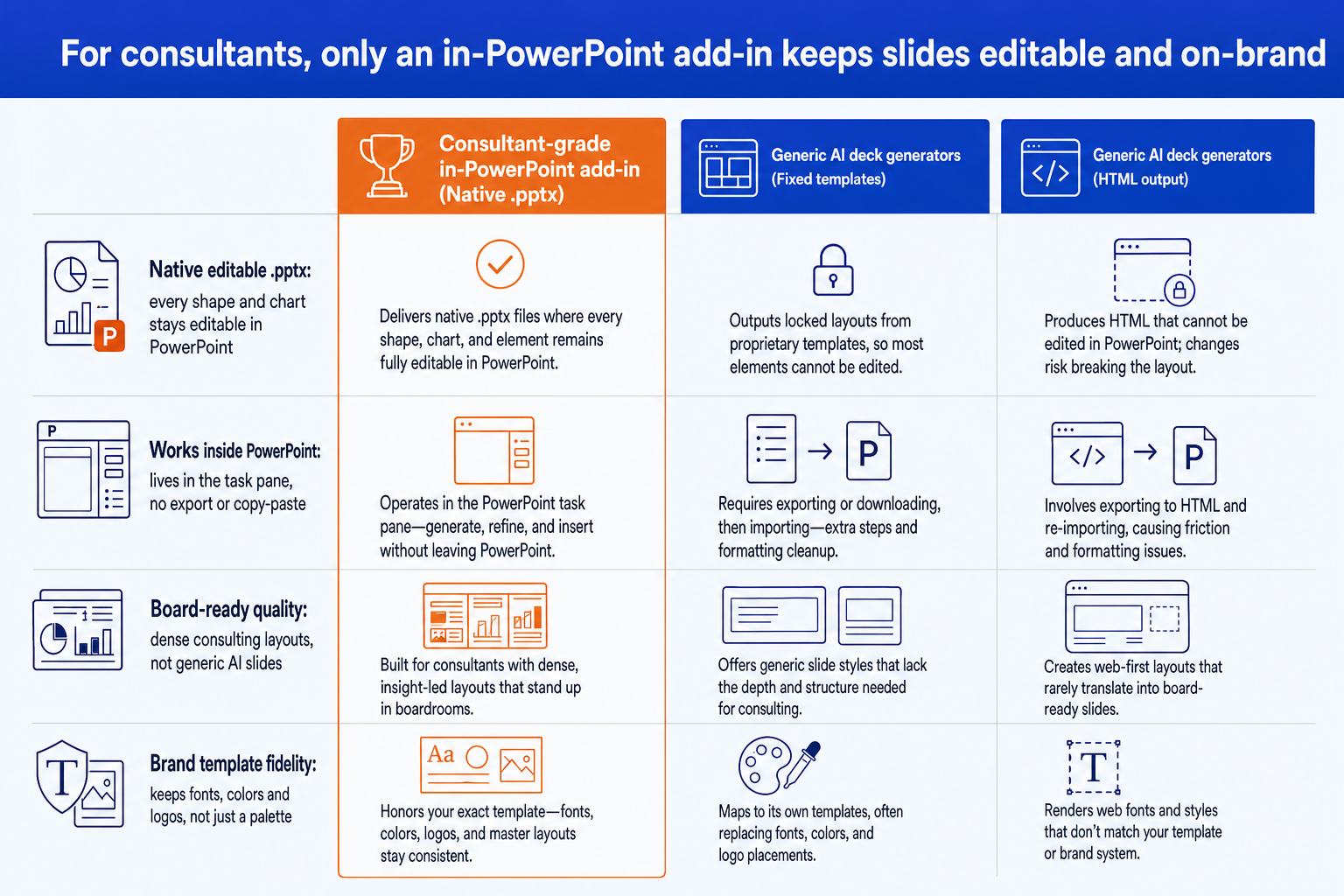
The category split matters more than any single feature. An add-in loads in the PowerPoint task pane and writes straight into your open .pptx, so there is no export and no reformatting round trip. A web app builds the deck on its own platform and then asks you to download or paste the result into PowerPoint, which is where a strict template tends to break.
This is not a quality judgement on the web apps. Gamma and Beautiful.ai are genuinely better than anything in this comparison at web-style, marketing, and fundraising decks, and they are faster to a good-looking first draft. They are the wrong tool when the artefact has to be a .pptx on a firm template that somebody else will edit. If that is your case, read the Gamma alternative guide for consulting decks and Oria vs Beautiful.ai, and the full trade-off list is in 12 PowerPoint add-ins tested.

 Web apps, a different category. Better for web-style decks, wrong for in-template board materials.
How to choose: a consultant's checklist
Tip
Test each tool on your worst real slide, not a clean demo. A dense framework with a chart and your firm template is where template-led tools break, and it is the only test that predicts how the tool behaves at 11pm on a Thursday. Run the same prompt through all four in one sitting, and time how long the cleanup takes rather than how long the generation takes.
The Oria one-prompt route
If you landed here looking for Oria specifically, this is what using it looks like. Once the add-in is in your task pane, a single descriptive prompt produces a board-ready slide with several design options to choose between. You pick the variant, refine it in plain English, and everything stays editable in your template. Here is a real prompt for a dense consulting slide.
One-prompt: a customer-journey initiative slide
Type the prompt in the Oria task pane and generate. You get several distinct design options rather than one default draft.
Pick the variant whose layout best carries the message, then refine in plain English ("make the summary a callout box, swap the icons for line icons").
Finish in PowerPoint: every shape, icon, and chart is native and editable, on your template.
If you build slides like this every week, the workflow in The Consultant's Guide to Claude pairs well with the add-in: think and structure with Claude, then render the deck in PowerPoint. If you are weighing the two assistants against each other first, see Claude vs Copilot for business presentations.
Frequently asked questions
What is the best AI PowerPoint add-in for consultants?
There is no single answer, because the four add-ins optimise for different constraints. Plus AI is the best value and the only one that also covers Google Slides. Microsoft 365 Copilot is the easiest to approve and has the strongest published security posture. Deckary has the best Excel-linked consulting charts. Oria is the most capable on dense, bespoke layouts held to a corporate template. Decide on which constraint binds hardest in your firm, not on a ranking.
Is there a PowerPoint add-in under 50 dollars per month for strategy consulting?
Yes, three of the four. On September 2026 list prices, Plus AI Basic is 10 dollars per user per month billed annually and Pro is 20, Oria Starter is 19 and Deckary Premium is 19. Microsoft 365 Copilot is the exception at 30 per user per month plus a qualifying Microsoft 365 licence, which puts the all-in figure well above 50. Under 50 dollars the real question is which tool matches the kind of document you produce: corporate and consulting work, or visual-first decks.
Which PowerPoint add-ins are compatible with high-stakes consulting workflows?
A high-stakes workflow means the deck stays a .pptx the whole way, holds the firm template, survives partner edits at short notice, and can be explained to a risk committee. All four tools here meet the first test. Copilot and Plus AI lead on published audit documents; Oria is built specifically for corporate and consulting documents and deploys into a private cloud on Enterprise. Very few teams get everything from one vendor, which is why pairing a cheap generalist with one specialist is common.
How secure are AI PowerPoint add-ins for board-ready reports?
It varies more than the marketing suggests. Microsoft publishes the most detail, stating that prompts, responses, and Microsoft Graph data are not used to train its foundation models, alongside GDPR, EU Data Boundary, ISO 27001, and ISO 42001 coverage. Plus AI publishes an independent SOC 2 Type II. Oria publishes a plan-by-plan retention policy and a no-training commitment, and offers private cloud deployment with custom LLM integration on Enterprise. Deckary publishes nothing public and supplies documents on request.
Is Microsoft Copilot enough for consulting slides?
For simple decks, yes, and it is already paid for in most Microsoft 365 tenants. It is weaker on the slides consultants actually argue over: multi-step frameworks, customer journeys, driver trees, and data exhibits. The output is legible but reads as machine-made, which is what a partner review catches. A common pattern is Copilot for first drafts and summarisation, and a layout-focused add-in for the twenty slides that go in front of a client.
What is Oria, and how does the Oria PowerPoint add-in work?
Oria, at oria.one, is an AI add-in that runs in the PowerPoint task pane on Windows, macOS, and PowerPoint for the web. You describe the slide in plain English, Oria renders it as a finished design, then rebuilds that design as native PowerPoint elements so shapes, icons, text, charts, and tables stay editable. It offers several distinct design options rather than one default draft, and applies a saved corporate style. Paid plans start at 19 dollars a month.
Why use an add-in instead of a web-app slide generator?
Consultants work inside PowerPoint and to a strict corporate template. An add-in runs in the task pane and writes straight into the open .pptx, so there is no export, no copy-paste, and no reformatting round trip. Web apps such as Gamma and Beautiful.ai are genuinely better for web-style and marketing decks, but they pull you out of the file your firm reviews in and rarely match a strict template beyond colours.