

The Claude Code Agent Pack for AI Insiders Who Orchestrate
Most people prompt Claude and hope for the best. The Claude Code agent pack for AI insiders is 6 Claude skills that instead split a build into planning, coding, review, and test subagents, hand a shared context file between every hop, and self-correct before anything ships. Download it once, then rerun the same pattern on the next project.
What the Claude Code agent pack is
A single chat window turns a build into a demo. Six Claude Code subagents, each with a scoped job and a written hand-off contract, turn the same build into something you can ship. That is the entire premise behind the Claude Code agent pack for AI insiders: stop asking one model to plan, write, review, and test a feature in one breath, and start giving each of those jobs to a subagent that only does its part.
Insiders already running Claude Code this way know the trick. One prompt gets you a toy. A system of subagents, planning first, coding in parallel, reviewing adversarially, testing before anyone claims done, gets you production. This pack turns that pattern into 6 Claude skills you can drop into any repo instead of re-deriving the orchestration from memory every time you start a new build.
Each run of the pack does four things. It splits the build into planning, coding, review, and test subagent briefs that can run in parallel. It keeps a shared context file so no decision gets lost between hops. It runs a review subagent that flags weak code before it ships, not after. And it packages the whole workflow so you can rerun it on the next project without rebuilding it from memory.
What comes out the other end is not a longer prompt. It is a small, named orchestration pattern, plan, ledger, dispatch, review, test, package, that closes tickets a single chat window would have left open for weeks.
Download all 6 skills
One zip, one folder per skill. Free, no signup.
The 6 skills in the Claude Code agent pack
The pack runs in the order a real orchestrated build actually needs, plan first, package last, but every skill is also useful on its own for a targeted step.
Stage 1 · 1 skill
Plan the Build Into Subagent Briefs
One prompt asks a single model to hold the whole build in its head at once. This stage forces the split instead: a scoped brief for a planning pass, a coding pass, a review pass, and a test pass, written down before anyone touches a file.
Build Planning Brief
Use when: You have a build request and one prompt would either return a toy or a wall of code nobody scoped
Output: A one-page plan naming each subagent's job, its inputs, and the exact hand-off artifact it owes the next subagent
Stage 2 · 1 skill
Keep a Shared Context Ledger
A build that spans more than one subagent session loses decisions the moment memory runs out. This stage creates one context file every subagent reads first and appends to last, so a decision made in hop one survives to hop five.
Shared Context Ledger
Use when: A build runs across more than one subagent session and prior decisions keep getting silently re-litigated
Output: A living context file (decisions made, open questions, file map, current state) every subagent reads and updates
Stage 3 · 1 skill
Dispatch Coding Subagents in Parallel
A scoped plan with more than one independent workstream does not need to run one task at a time. This stage carves the plan into coding tasks with non-overlapping file scopes so several subagents can build at once.
Parallel Build Dispatch
Use when: The plan has more than one independent workstream and running them one at a time would waste the afternoon
Output: A dispatch list of parallel coding tasks, each with a non-overlapping file scope and a definition of done
Stage 4 · 1 skill
Run a Self-Correcting Code Review
A coding subagent grading its own diff has no reason to find its own mistakes. This stage hands the diff to a fresh review subagent in a separate context, one whose only job is to find what should not ship.
Self-Correcting Code Review
Use when: A coding subagent has produced a diff and you want an adversarial second look before it merges
Output: A review verdict (ship, fix, reject) with the specific lines at fault and the exact fix requested
Stage 5 · 1 skill
Verify With a Test Subagent
Review on paper is not proof the feature works. This stage hands the change to a subagent whose only job is to run it end to end and report what actually happened, not what the diff claims.
Test Subagent Verification
Use when: A change has passed review on paper and you need proof it behaves correctly before you call it done
Output: A test log of what was run, what passed, what failed, and any regression found in adjacent features
Stage 6 · 1 skill
Package the Workflow for Reuse
An orchestration pattern that only lives in one chat session gets rebuilt from memory, slightly worse, on the next project. This stage saves the roles, the hand-off contract, and the context format as one named pattern.
Workflow Repackaging
Use when: An orchestration run closed real tickets and you do not want to reinvent the subagent setup from memory next time
Output: A saved, named orchestration pattern (roles, hand-off contract, shared context format) ready to invoke on the next repo
Setup Guide
- Step 1Download all 6 skills (.zip)
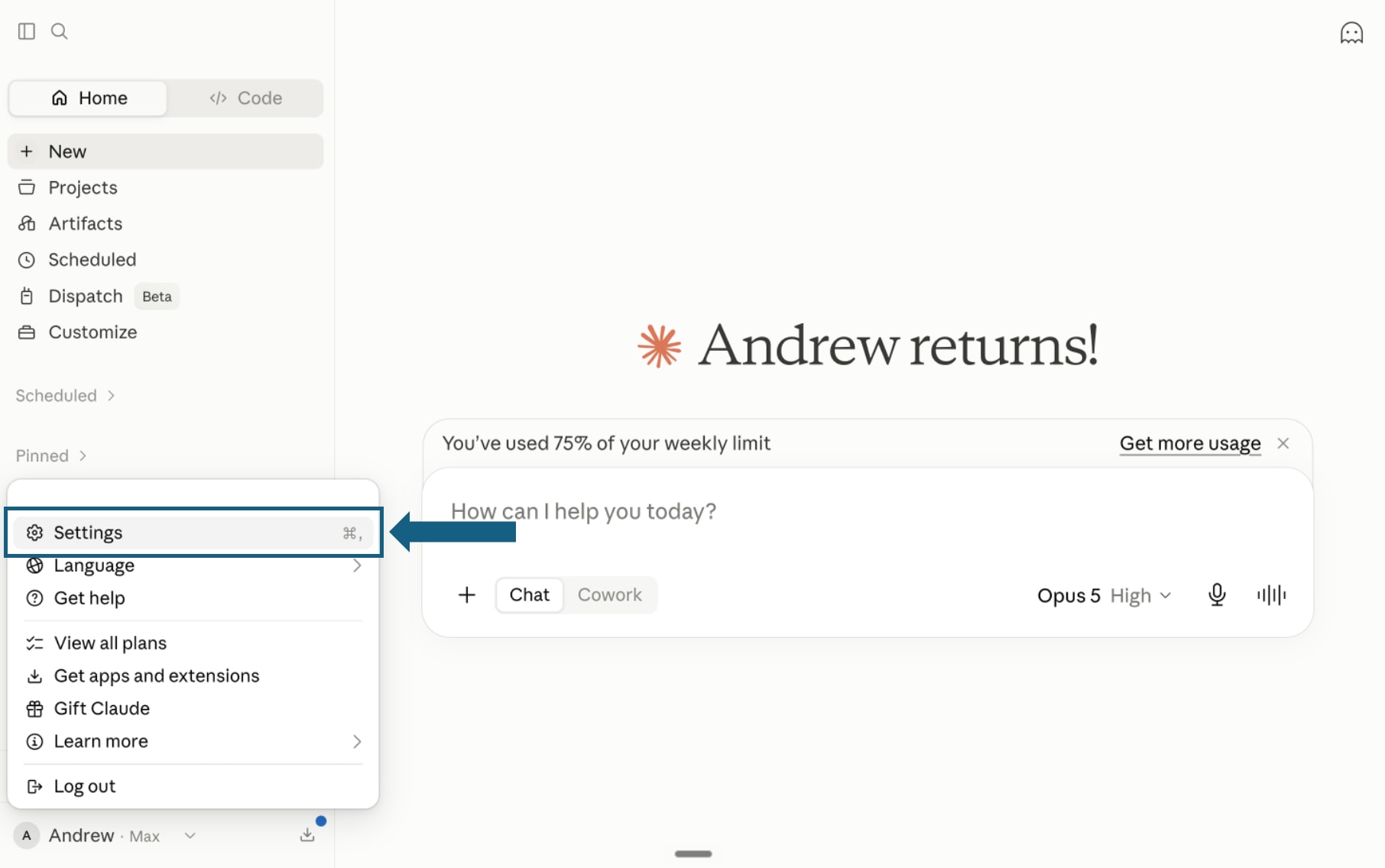
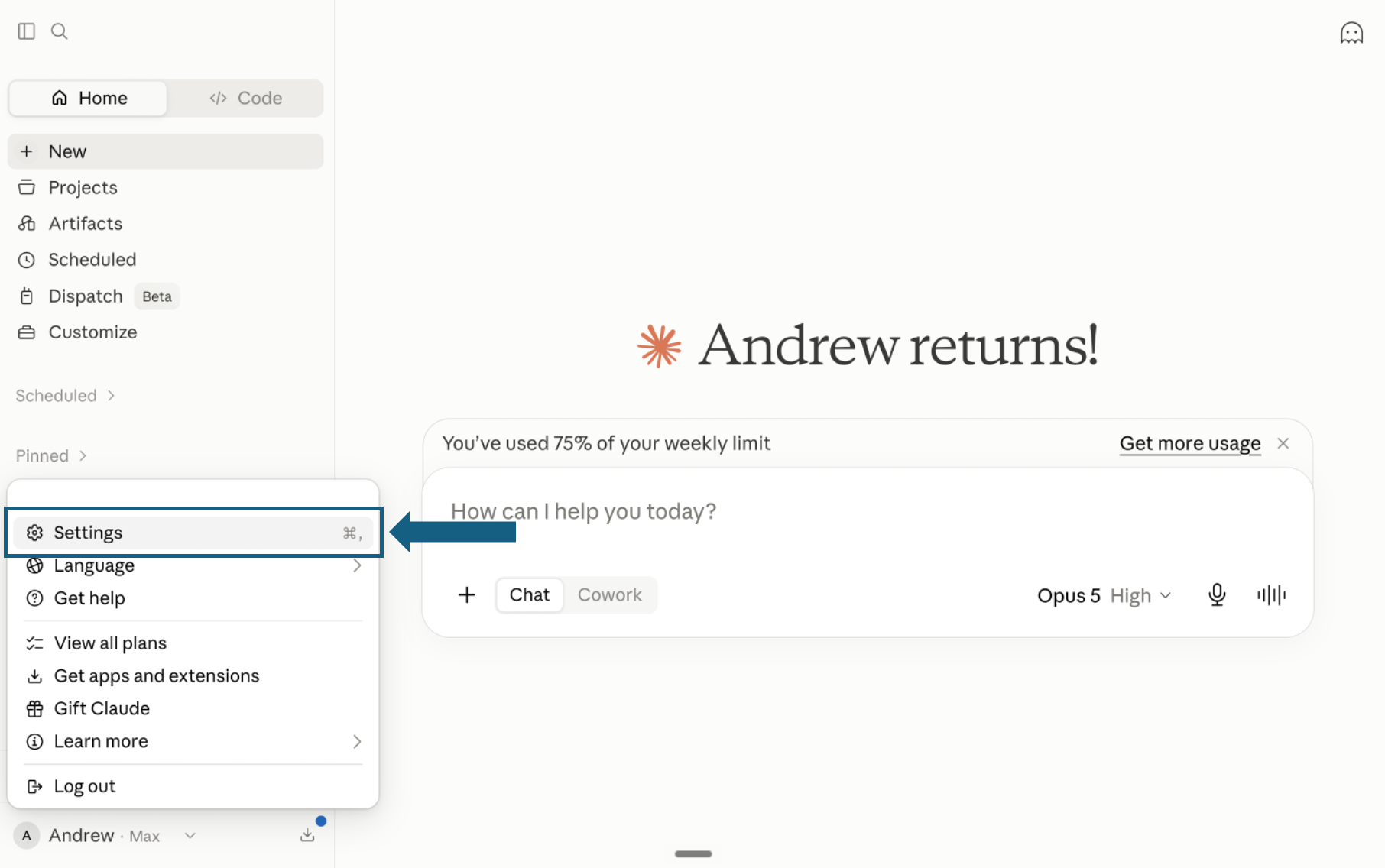
Download the pack and open Settings
Download and unzip the pack so each of the 6 skills remains in its own folder with a SKILL.md file. In Claude, open your profile menu and select Settings.
Open the screenshot to view it full size. - Step 2
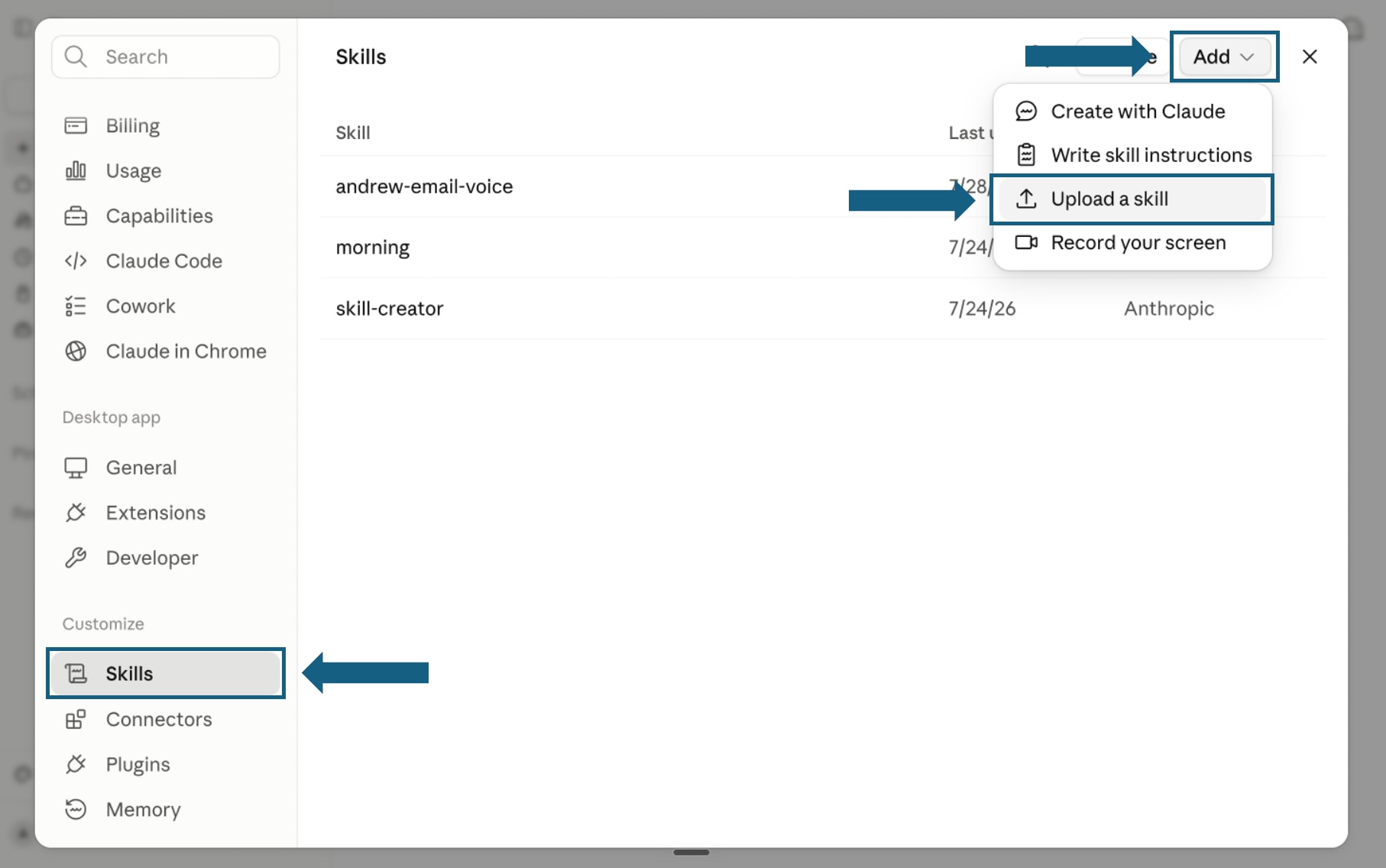
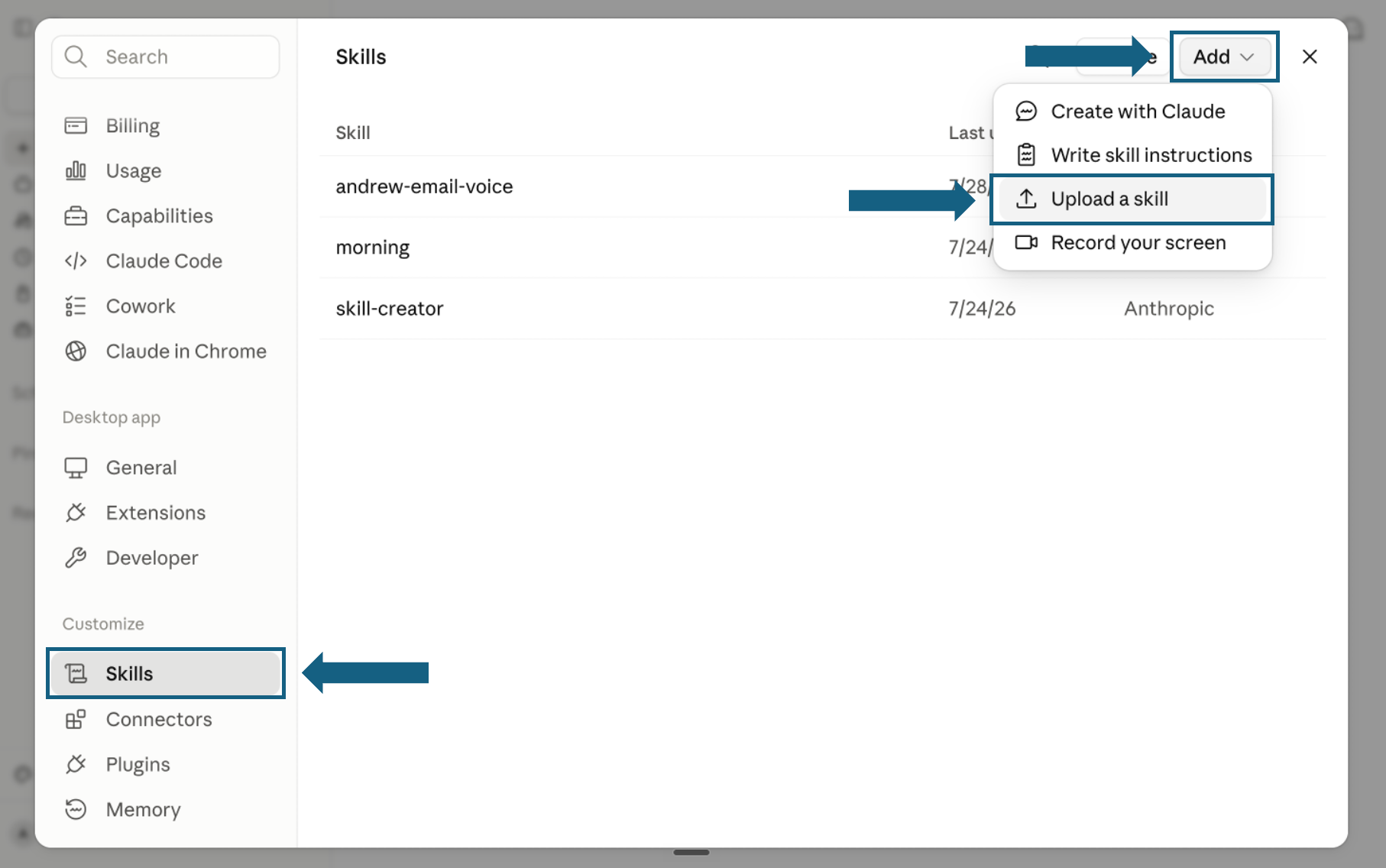
Open Skills and start an upload
In Settings, select Skills under Customize. Open Add and choose Upload a skill.
Open the screenshot to view it full size. - Step 3
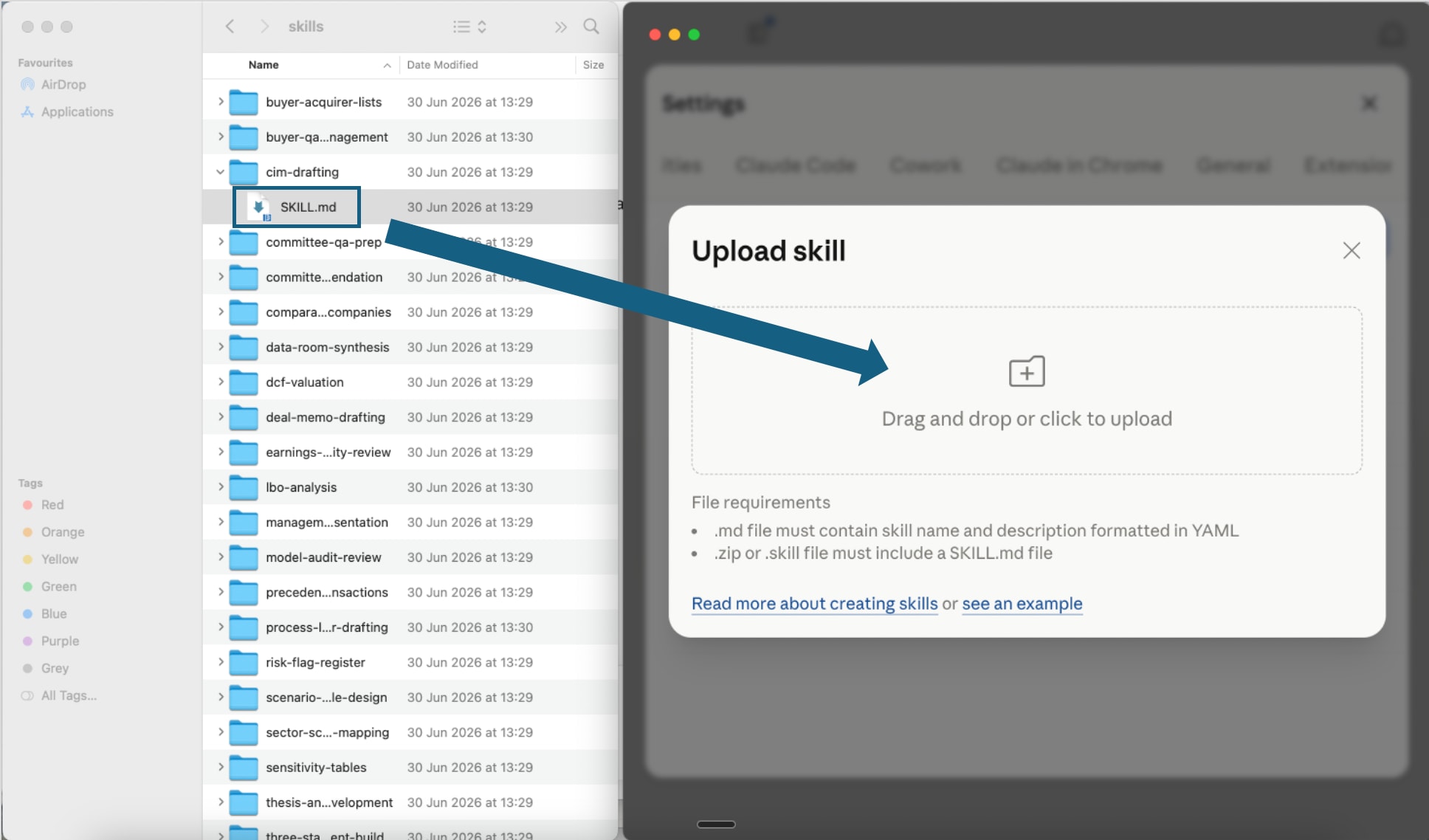
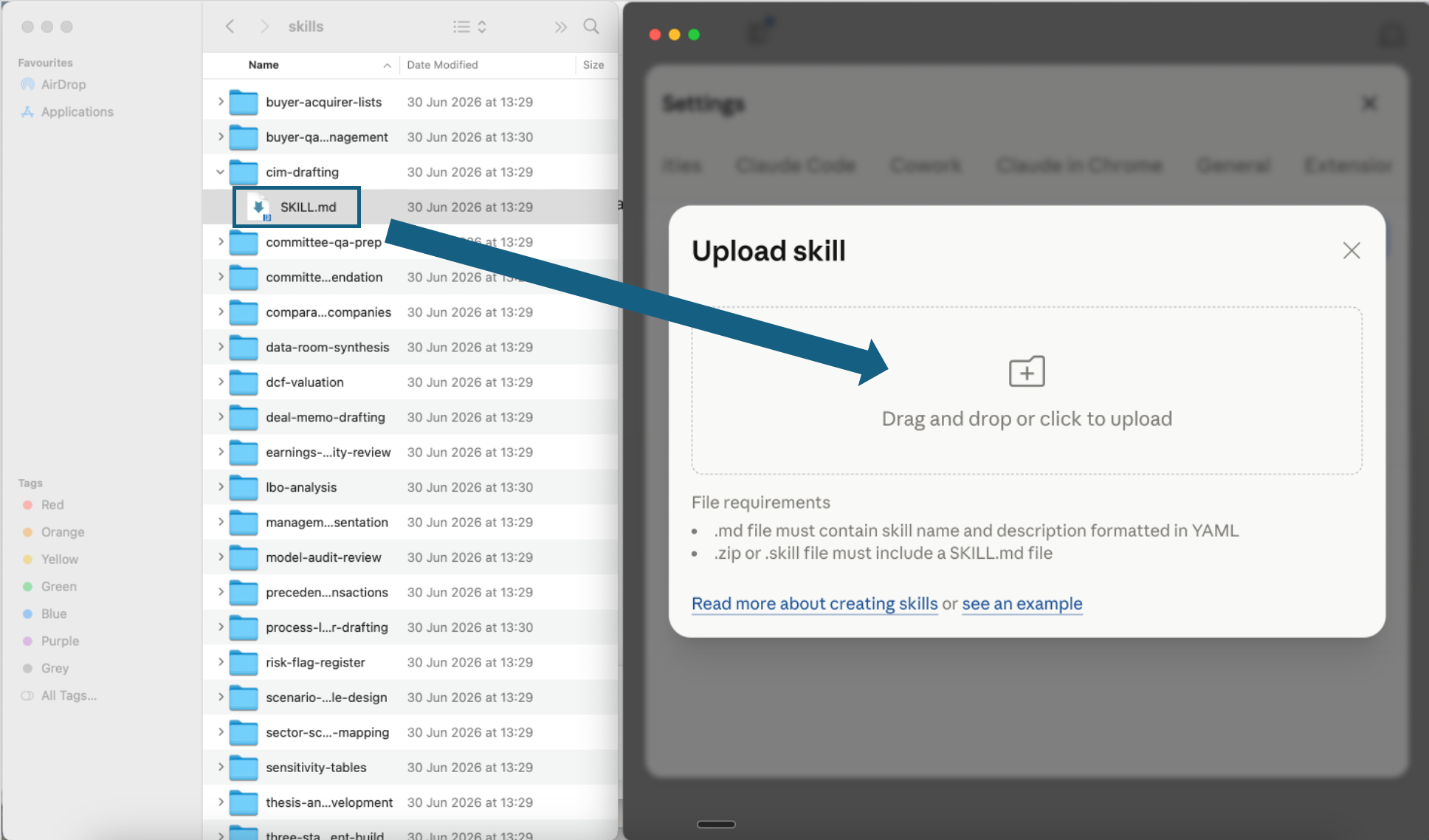
Upload one skill file
Open one extracted skill folder and drag its SKILL.md file into the upload window, or use the file picker. Repeat for any other agent-pack skill you want to add.
Open the screenshot to view it full size. - Step 4
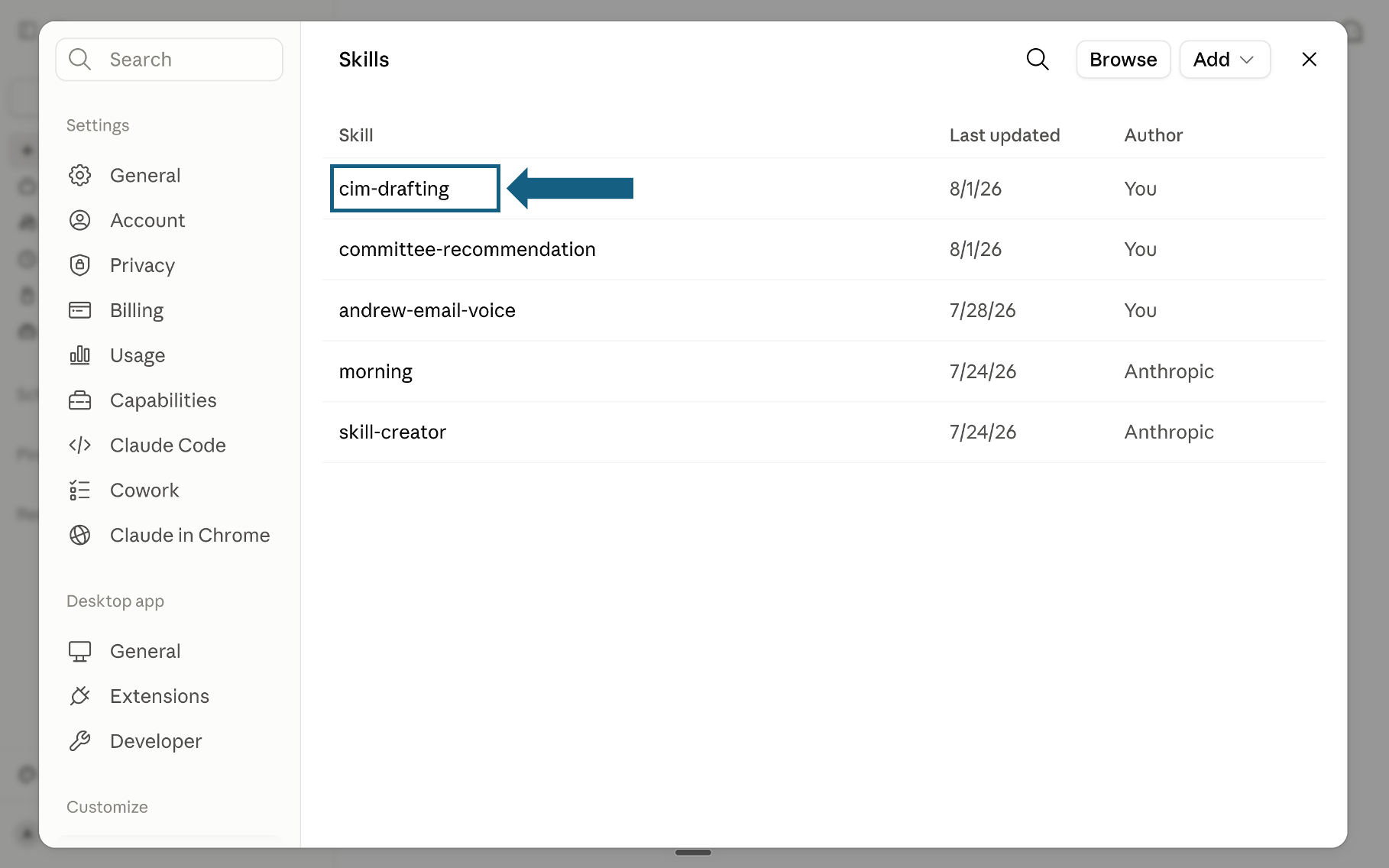
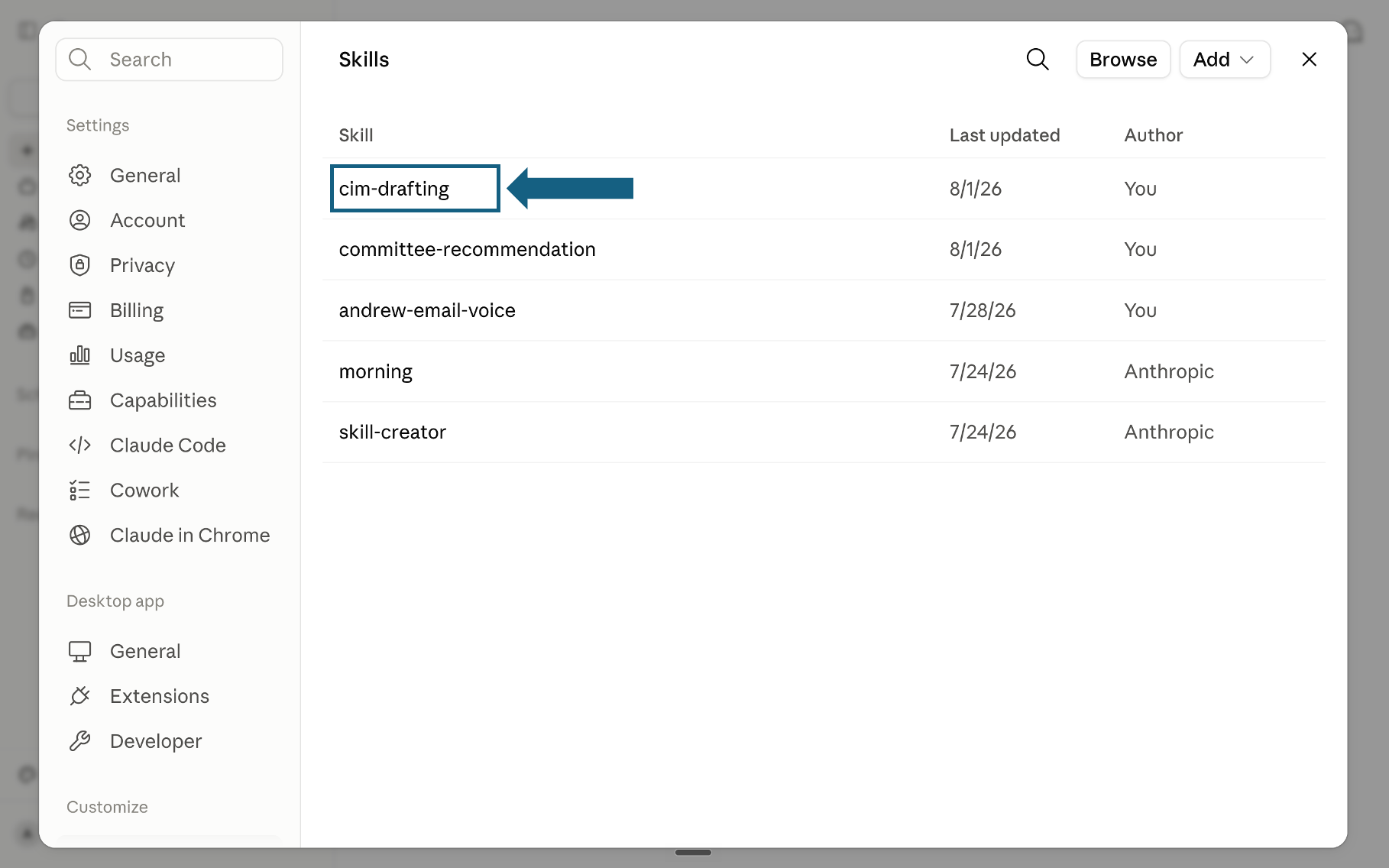
Confirm the skill was added
Return to the Skills list and check that the skill appears. Select its name to open it.
Open the screenshot to view it full size. - Step 5
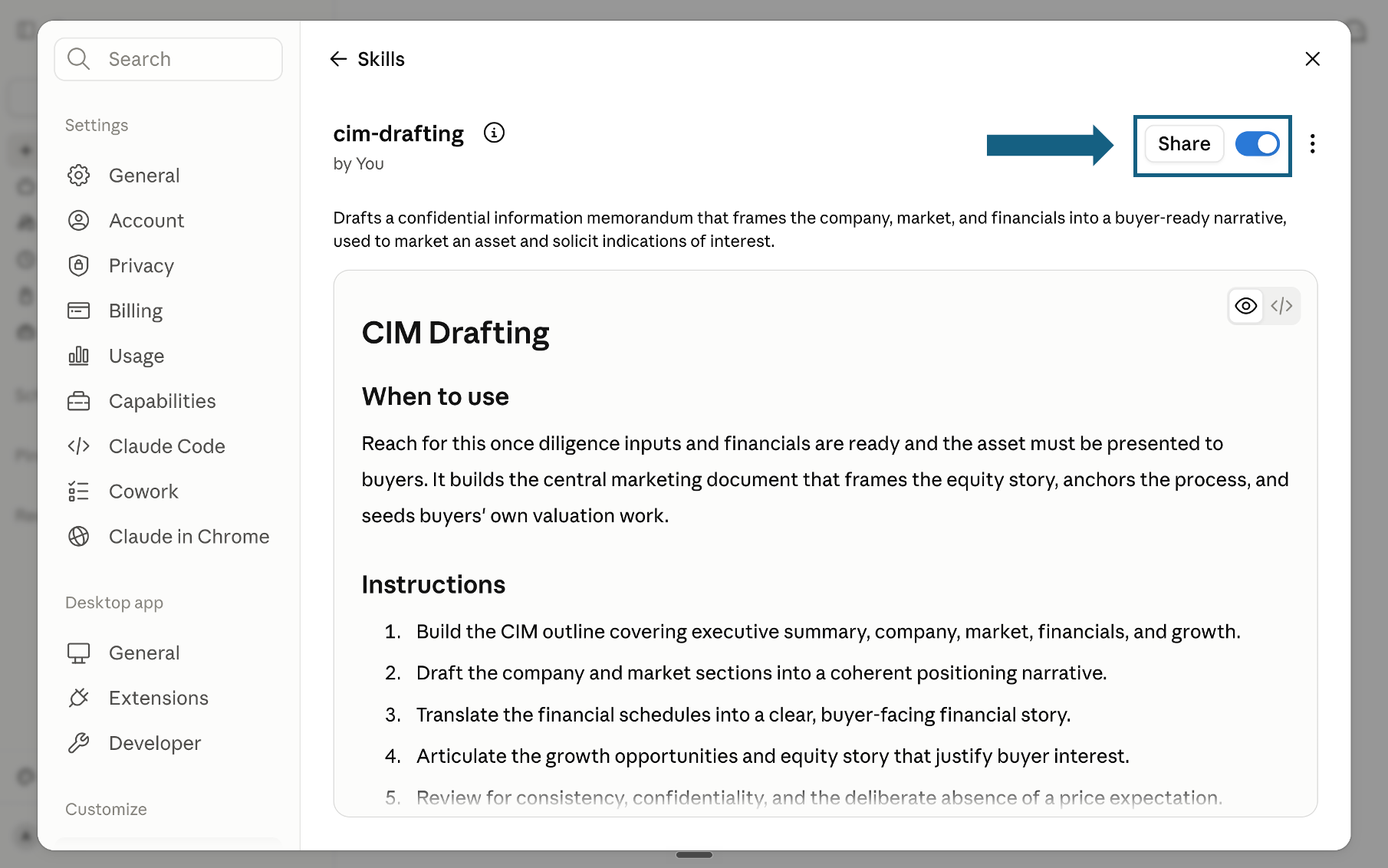
Review and turn on the skill
Review the skill name, description, and instructions, then make sure its switch is on. A blue switch means the skill is enabled; sharing it is optional.
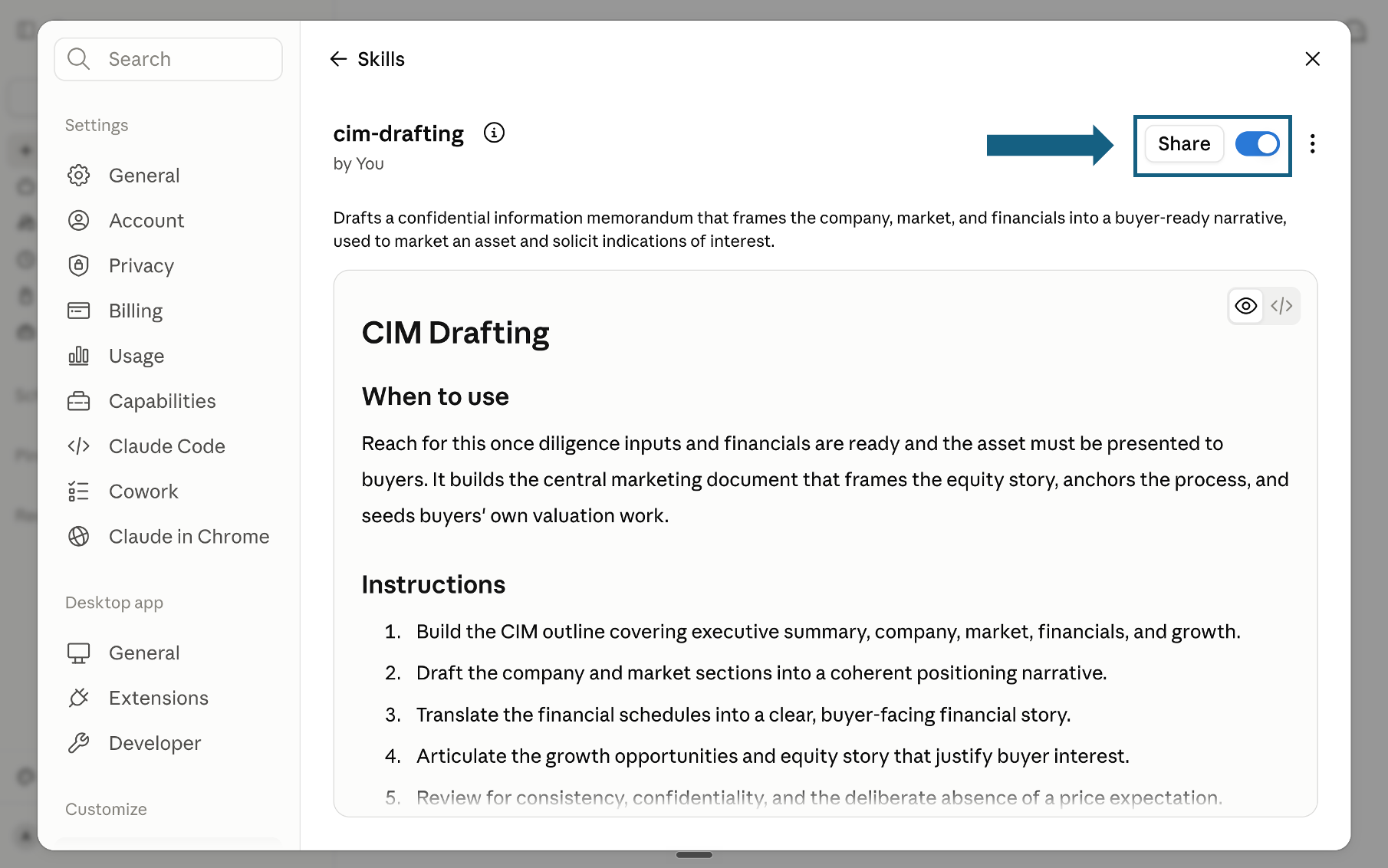
Open the screenshot to view it full size.
Use the pack in Claude Code
For repository-aware orchestration, copy each extracted skill folder into .claude/skills/ inside the repository, or into ~/.claude/skills/ for use across repositories. Keep each SKILL.md inside its named folder, then open Claude Code in the repository and name the skill you want it to run.
Try a skill
Name the skill and provide the repository, outcome, and constraints. Review every hand-off before continuing.
- "Use the build-planning-brief skill on this repo and split the CSV import into scoped subagent briefs."
- "Use the shared-context-ledger skill to record decisions before another subagent starts."
- "Use the parallel-build-dispatch skill to create non-overlapping coding tasks."
- "Use the self-correcting-code-review skill on this diff before it merges."
How to choose a skill from the Claude Code agent pack
Match your immediate situation to the skill that answers it. For the method to design a custom skill from scratch, see our Claude Skill Factory for Strategy, and for a broader set of ready-made prompts and skills, see our Claude workflows for strategy.
The quality bar
Every skill in the Claude Code agent pack is checked against this bar, so an orchestrated build holds up under real review, not just a single self-reported pass.
Frequently asked questions
What is the Claude Code agent pack for AI insiders, exactly?
It is six Claude skills that turn Claude Code from a single chat window into a small team of subagents. One plans the build, one maintains a shared context file, one dispatches parallel coding tasks, one reviews adversarially, one tests end to end, and one packages the pattern for reuse.
Do I need Claude Code specifically, or does this work in a Claude Project too?
The pack is built for Claude Code's skills directory, since that is where a subagent can actually read a repo and hand off files between hops. The same SKILL.md files also work in a Claude Project for the planning and review stages, though a project chat cannot dispatch a coding subagent against your files directly.
How is this different from just writing a longer system prompt?
A long system prompt asks one model to hold the entire job in its head at once: plan, code, review, and test, with no hand-off and no adversarial check. This pack splits that job into named subagents with a written contract between them, so quality does not depend on one context window staying coherent for the whole build.
Do I need to run all six skills on every build?
No. A small fix might only need the planning brief and the review skill. Reserve the full sequence, plan, ledger, dispatch, review, test, package, for builds large enough that losing context between hops would actually cost you time.
Can the output feed into a status update or a slide deck?
Yes. The test subagent's log and workflow summary are structured enough to reuse in a build recap, status update, memo, or slide deck without reconstructing the work from chat history.