

The Claude Skill Factory: Build Your Own Strategy Skill
Most people solve a recurring strategic problem by writing a better prompt, then writing it again next month, slightly differently, with the same generic result. Before you download another pack from this site, the decision worth making first is upstream of that: is this task actually recurring, does an existing pack already cover it, and if not, is it worth an afternoon to build a skill of your own. The Claude Skill Factory for Strategy is not a skill itself and not another list to install. It is the method for answering that question, then building the SKILL.md file that fixes your method once, in writing, across 8 meta-skills spanning five stages.
Quick answer
The right choice depends on whether the task in front of you is a one-off, a common enough problem, or something specific to your team. Building a skill only pays off in that last case.
For a recurring strategy task nobody has pre-packaged, build a custom Claude skill through five stages: diagnose the real failure pattern, design the skill's mandate and output shape, author the SKILL.md file, stress-test the draft against messy input, then package and version it for a team. Anthropic's own authoring guidance recommends at least three test evaluations and checking the draft against Claude Haiku, Sonnet, and Opus before sharing it. For a true one-off question, skip the build and prompt Claude directly. For a common strategy task, install an existing pack, such as 21 strategy skills for Claude, instead of building your own.
How we built the factory
- We built five stages because that is the actual sequence a usable skill goes through: diagnose, design, author, validate, deploy. Skipping straight to writing the SKILL.md is the single most common way a homemade skill ends up generic.
- We tested each meta-skill against real, messy material: a pile of past Claude outputs that all felt slightly off, a half-written mandate, a SKILL.md draft that had never faced adversarial input. A meta-skill that only worked on a tidy example did not ship.
- We checked the Author and Validate stages against Anthropic's own published authoring guidance: a SKILL.md body under 500 lines, a name field under 64 characters, and a description under 1,024 characters written in the third person so Claude can pick the right skill from a hundred others.
- We ignored anything needing a build step, an API key, or code execution. Every meta-skill here is one SKILL.md file uploaded through Claude Settings, because the factory is for a team building its own skill, not shipping a developer tool.
- We ignored one-off tasks entirely. If you would not run the same analysis again next quarter, the Diagnose stage is built to say so and send you back to a normal prompt instead of a build.
Download all 8 skills
One zip, one folder per skill. Free, no signup.
Key takeaways
- Build only for a task you would run again next quarter. A one-off does not earn back the afternoon a proper skill costs, and the factory's first stage is built to talk you out of it.
- If a ready-made pack already covers your domain, install that first. Building your own only pays off for the specific, oddly shaped recurring task nobody has pre-packaged for you yet.
- A skill does not make Claude smarter. It fixes the method once, in writing, so the tenth use holds the same standard as the first instead of depending on your memory that afternoon.
- A draft is not done until it survives input built to break it. Anthropic recommends at least three evaluations and testing across models before anyone downstream relies on a skill you built.
- Version and name a skill like software. An unversioned SKILL.md sitting in a downloads folder goes stale silently the first time the underlying task changes, and nobody notices until a client does.
Compare the four ways to get a strategy skill
Five columns, matching the five decision rules above. Read the last column first: it names the case where each approach quietly produces the wrong thing.
If a ready-made pack already covers your domain, start with 21 strategy skills for Claude instead, it is the stronger page on this site for browsing a library rather than building one file. Come back here once you have confirmed nothing in that library matches the task you keep re-prompting for.
Ad Hoc Prompting: Who Is It Built For?
Ad hoc prompting is the right tool for exactly one situation: a question you are asking once. You need a rough market sizing for a call in twenty minutes, a first pass at three possible framings for a problem you have not lived with yet, a quick sanity check on a number someone handed you. None of that justifies stopping to diagnose a failure pattern, write a mandate, or test a draft against adversarial input. Prompt Claude directly, take the answer, move on.
The trouble starts when the same request comes back next month, then the month after, each time re-explained from memory, under time pressure, slightly differently. A prompt has no state between sessions: it does not remember what a reviewer struck out last time, what evidence counted, what shape the output had to take. Anthropic's own Skills documentation exists because enough teams hit this same wall, doing the same recurring task as a fresh prompt every time and getting a fresh, slightly different quality of answer every time.
The trade-off: prompting costs nothing to start and nothing to maintain, but the quality of the tenth answer depends entirely on how well you happen to remember and phrase the request that day.
A Ready-Made Skill Pack: Who Is It Built For?
A ready-made pack is the right call when your recurring task is not actually unique, it just feels that way because nobody handed you the file. Market sizing, competitive intelligence, MECE issue framing, operating-model design, and value governance are common enough strategy problems that this site already ships tested SKILL.md files for them: 21 strategy skills for Claude for a broad library organized by domain, 50 tier-one strategy skills or the enterprise strategy set for depth across a full engagement, and a five-stage engagement sequence if you want the stages without the meta-work of building them yourself.
Installing one of these takes minutes: download the zip, upload the SKILL.md file through Claude Settings, and the method is fixed in writing from the first run. There is no diagnosis stage to sit through and no draft to stress-test, because someone already did that work and shipped the result.
The trade-off: a pack only covers the task it was scoped for. The moment your recurring problem is oddly shaped, specific to your team's reporting format or your firm's particular blind spot, a general pack starts producing the same generic near-miss a prompt does, just with better formatting.
The Claude Skill Factory: Who Is It Built For?
The factory is built for the task in between: genuinely recurring, but specific enough that nobody has packaged it. The quarterly board narrative that has to follow your company's particular structure. The vendor risk screen your procurement team always asks for in the same shape. The competitive readout your CEO expects with the same five questions answered every time. If a ready-made pack already covers it, use the pack instead; the factory is for the case where none does.
What you get for the afternoon it takes is a small, testable instrument rather than a better prompt. Agent Skills, the format the factory produces, is no longer a niche idea: Anthropic's public skills repository has passed 177,000 stars on GitHub, and the format is now used by teams well beyond Anthropic itself. Box's Head of AI, Yashodha Bhavnani, described the pattern plainly: "Skills teaches Claude how to work with Box content. Users can transform stored files into PowerPoint presentations, Excel spreadsheets, and Word documents that follow their organization's standards." That is the exact mechanism this factory builds for a strategy task instead of a document type: a method that enforces your standard, not Claude's default guess at one.
The trade-off: the discipline is on you. Skip the diagnosis stage and you get a skill that encodes the wrong problem. Skip validation and you ship something that only ever worked on the one clean example you tested it against.
Oria: Who Is It Built For?
None of the three options above produces a slide, and for a lot of strategy work that is the step that actually costs the weekend. Oria is the tool we build, and it is aimed at one narrow job: corporate documents and consulting presentations. Board packs, steering committee decks, diligence exhibits, operating-model slides, dense frameworks held to an enforced corporate template. That is the whole design.
It reaches you two ways: as a PowerPoint add-in running in the task pane on Windows, macOS, and PowerPoint for the web, and as a connector for Claude and ChatGPT over MCP, so a slide can be built from the chat you are already in without opening PowerPoint. That second route is the one that pairs with a skill you built through this factory: run your custom skill, then ask for the output as a slide in the same conversation. On security, Oria does not train on customer content; Professional and Team do not persist presentation content after delivery; Enterprise adds private cloud deployment and custom LLM integration.
The trade-off: Oria is built for the corporate environment only, so it loses on highly visual work. A founder pitch deck, a launch deck, a campaign one-pager: where the job is visual impact rather than defensible content, a design-led tool like Gamma, Canva, Pitch, or Beautiful.ai will beat it, and will look better doing it.
Inside the factory: the 8 meta-skills
The factory runs in the order a real skill gets built, diagnose first, deploy last, but every meta-skill is also useful on its own for a targeted task.
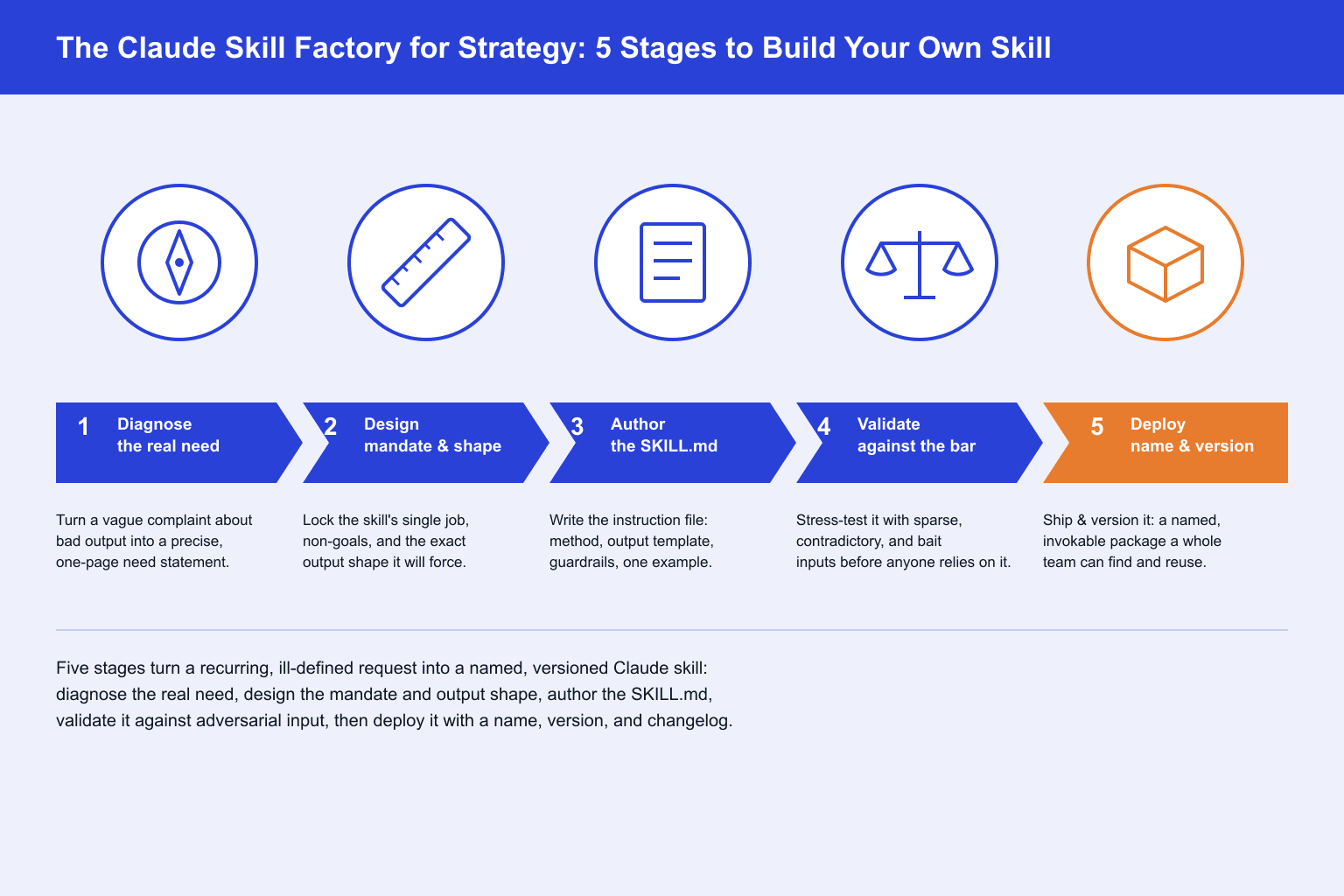
Stage 1 · 2 skills
Diagnose the Real Recurring Need
Most requests for a custom Claude skill start as a complaint about bad output, not a scoped brief. This stage forces the translation from Claude's answers always being generic into a precise statement of the decision the skill needs to serve, who reviews the output, and exactly how the current ad hoc approach fails.
Strategic Need Diagnosis
Use when: You have a recurring task you keep re-prompting for, and you can feel the output is off but haven't pinned down why
Output: A one-page need statement naming the recurring decision, the real audience/reviewer, and the specific failure pattern in current attempts
Failure Mode Autopsy
Use when: You have three or more past Claude outputs for this task and want to know exactly what a reviewer would strike out, rather than guessing
Output: A ranked list of concrete failure patterns tied to specific lines in the sample outputs
Stage 2 · 2 skills
Design the Skill's Mandate and Method
This is where you decide what the skill actually enforces, not what Claude should say, but what Claude must do to earn the right to say it. A skill's value comes almost entirely from the method and structure locked in here.
Skill Mandate Specification
Use when: You know the failure mode and need to convert it into a design brief before anyone writes a line of instruction text
Output: A mandate document defining the skill's single job, its non-goals, its required inputs, and the analytical method it will force
Output Blueprint Design
Use when: You have a mandate but the eventual output could still take five different shapes, and you need to lock one before writing instructions
Output: A literal section-by-section template every future run must fill exactly, with placeholder content showing what belongs in each section
Stage 3 · 1 skill
Author the SKILL.md Instruction File
This stage turns the mandate and blueprint into the actual file Claude reads. The discipline here is compression and precision: a skill that rambles is a skill Claude will selectively ignore under token pressure.
SKILL.md Drafting
Use when: You have a finished mandate and output blueprint and need to turn them into a properly formatted instruction file with a name Claude can be told to invoke directly
Output: A complete, ready-to-save SKILL.md: role statement, numbered method, exact output template, explicit guardrails, and one worked example
Stage 4 · 2 skills
Stress-Test the Draft Against a Quality Bar
A skill that only works on the tidy example you wrote it against is not a skill, it's a demo. This stage runs the draft against messy, sparse, and adversarial inputs on purpose, then checks the result against an objective bar.
Adversarial Input Testing
Use when: The SKILL.md draft exists and has only ever been tested on clean input, and you need to know what it does when the input is thin, contradictory, or trying to trick it into inventing content
Output: A test log of deliberately bad inputs paired with what the skill produced and whether it correctly flagged the gap
Skill Quality Audit
Use when: The draft has passed adversarial testing and you need an objective pass/fail check against a fixed bar before anyone downstream relies on it
Output: A scored checklist verdict (pass/revise/reject) against the eight quality-bar criteria, with the specific line cited for any failing criterion
Stage 5 · 1 skill
Package, Name, and Version the Skill
A validated SKILL.md that lives in a random folder with no version number and no invocation instructions will be forgotten in a month. This stage turns a passed draft into something a whole team can find, invoke by name, and safely revise later.
Skill Packaging and Versioning
Use when: The skill has passed the quality audit and you need to finalize its folder structure, name, invocation instructions, and version number
Output: A finalized skill package (SKILL.md plus a one-line changelog entry and invocation instructions) at version 1.0, with a defined rule for when a future edit becomes a minor vs major version
Setup Guide
- Step 1Download all 8 skills (.zip)
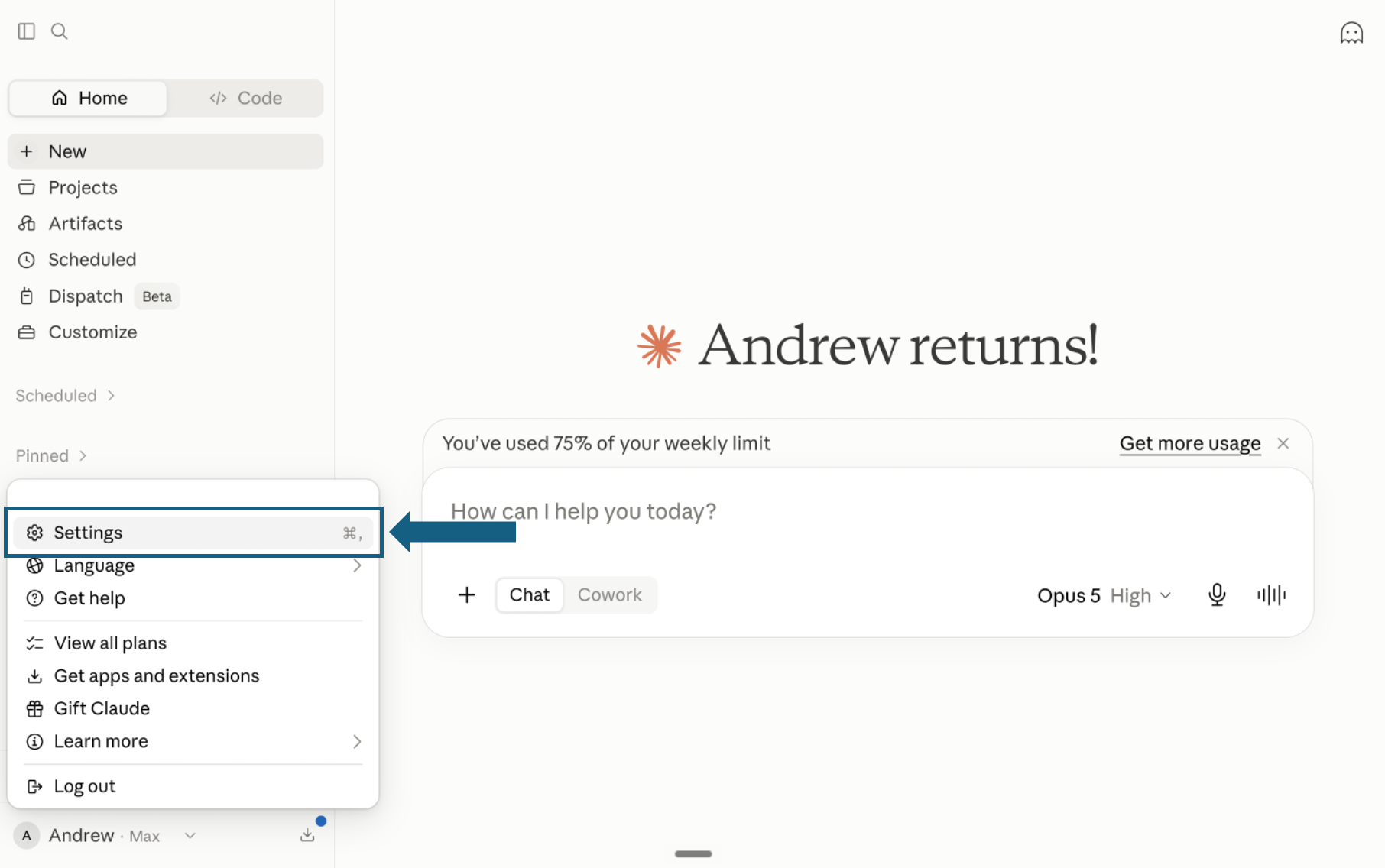
Download the pack and open Settings
Download and unzip the pack so each of the 8 meta-skills remains in its own folder with a SKILL.md file. In Claude, open your profile menu and select Settings.
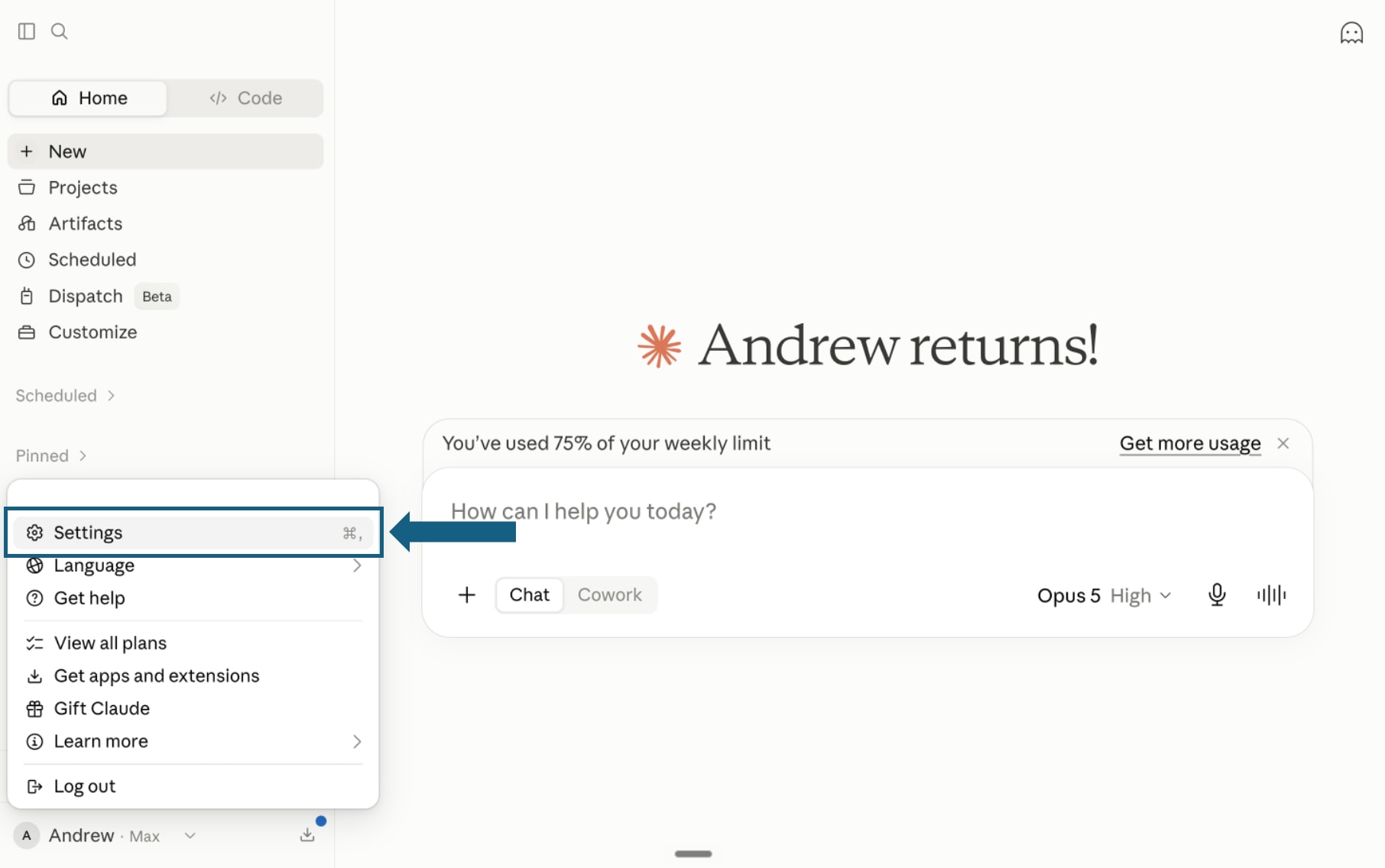
Open the screenshot to view it full size. - Step 2
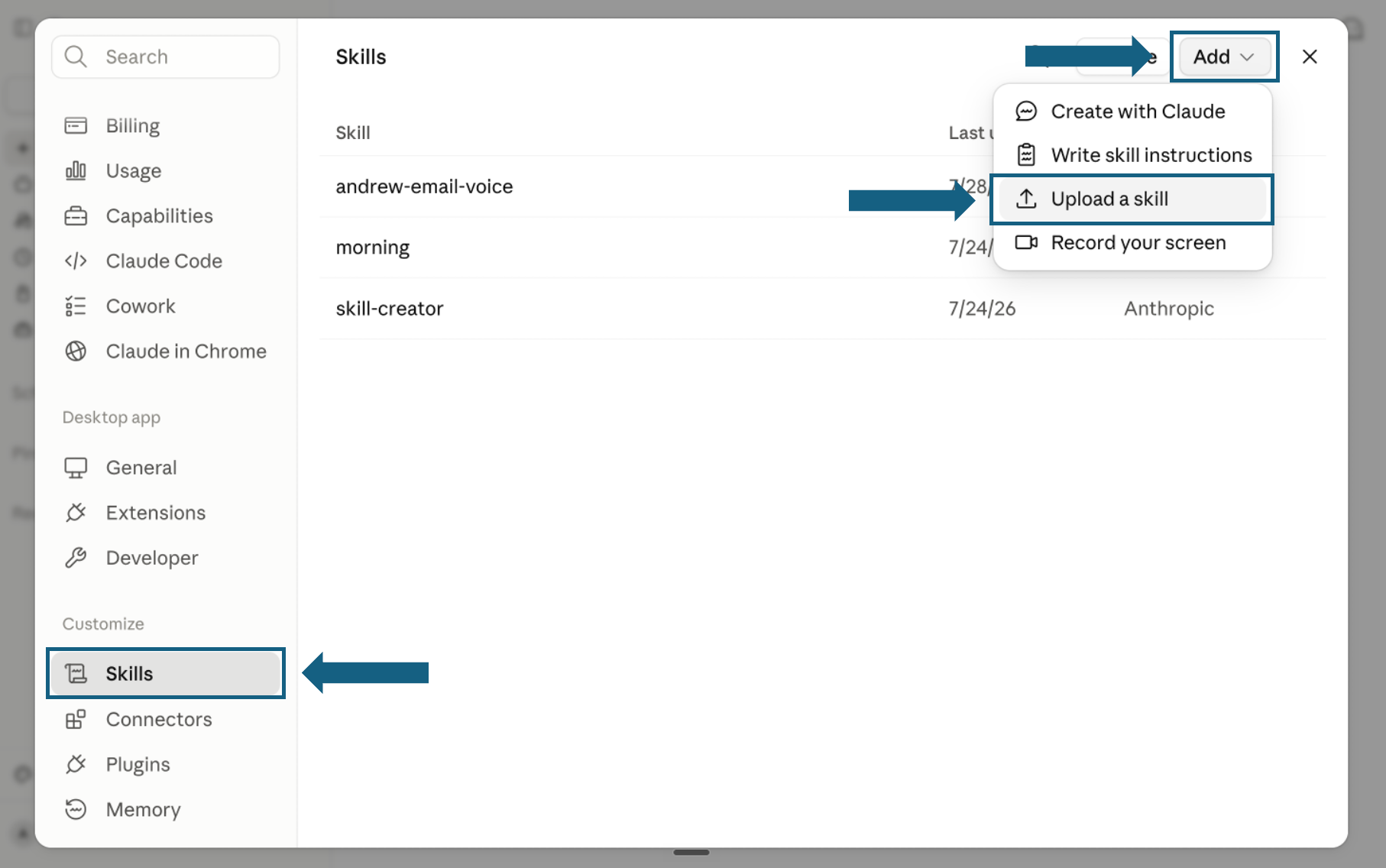
Open Skills and start an upload
In Settings, select Skills under Customize. Open Add and choose Upload a skill.
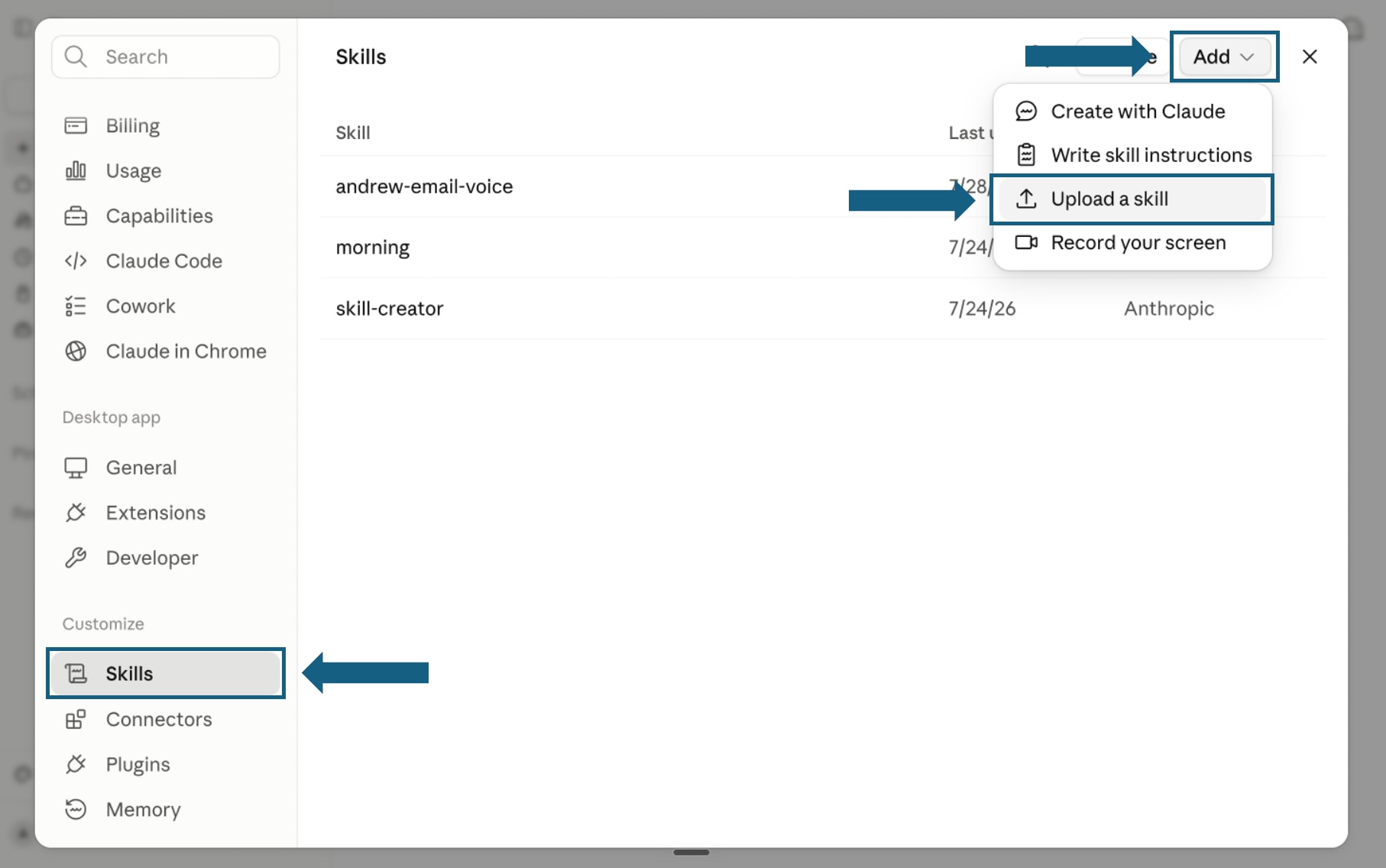
Open the screenshot to view it full size. - Step 3
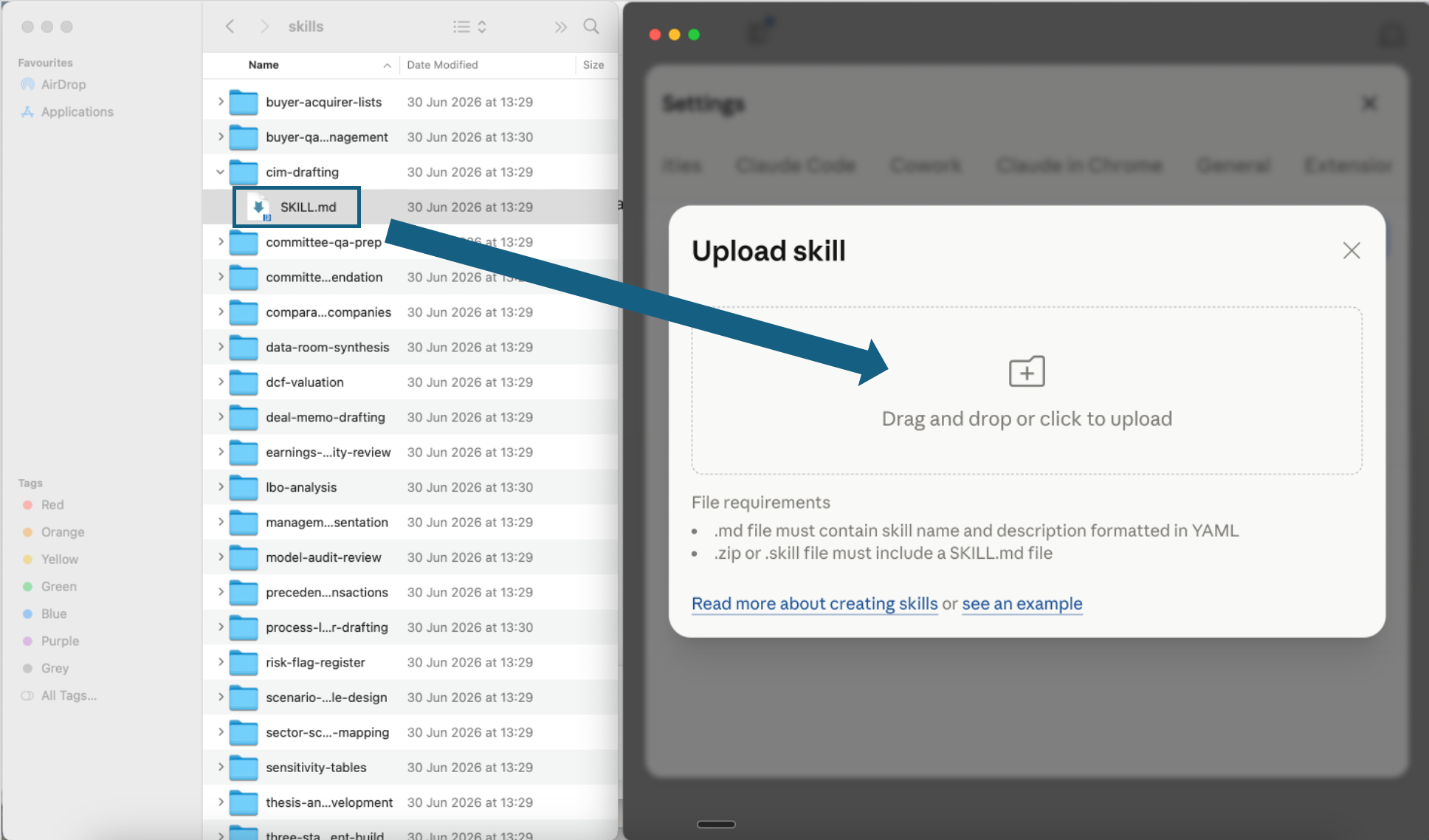
Upload one skill file
Open one extracted meta-skill folder and drag its SKILL.md file into the upload window, or use the file picker. Repeat for any other factory skill you want to add.
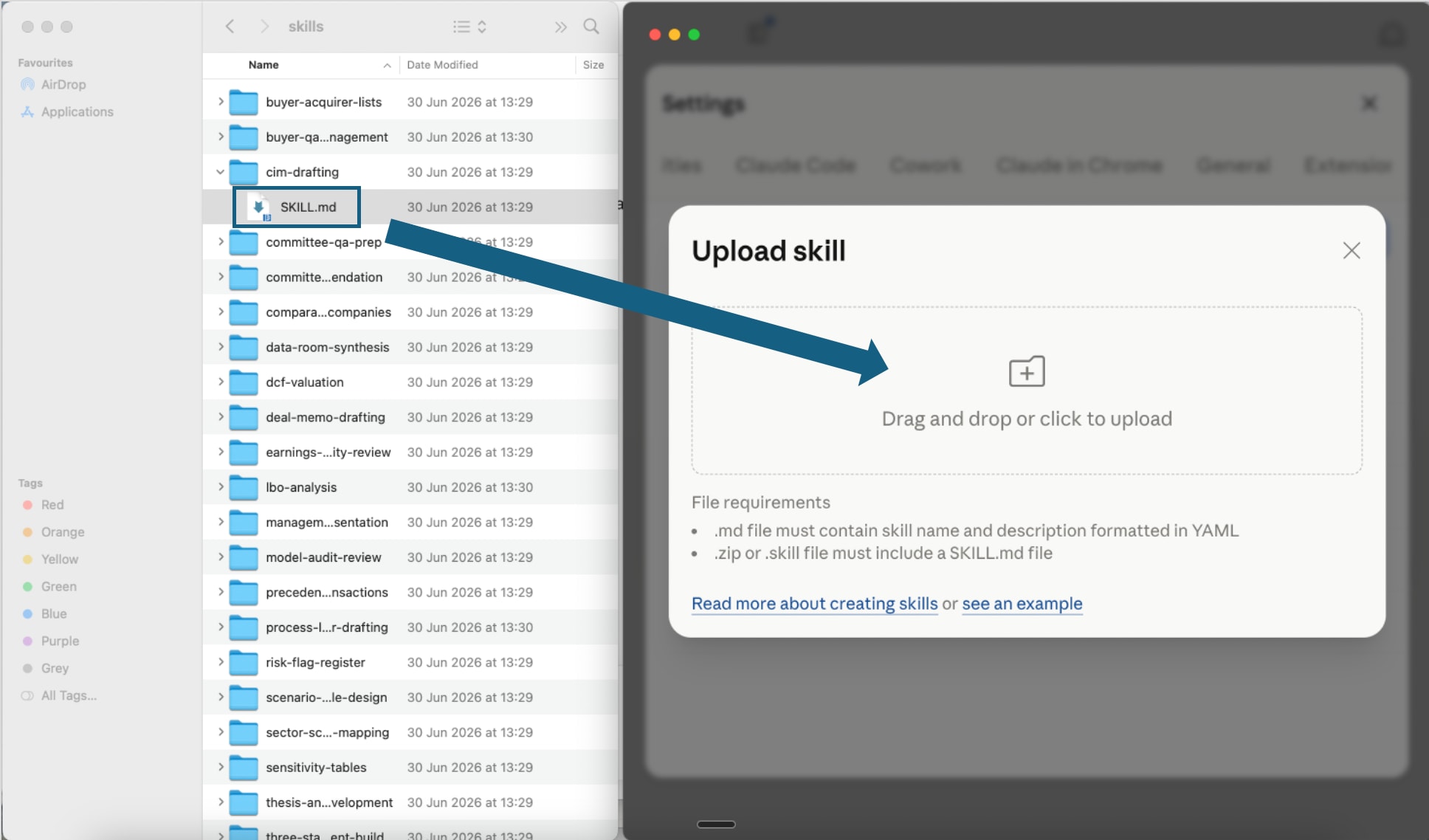
Open the screenshot to view it full size. - Step 4
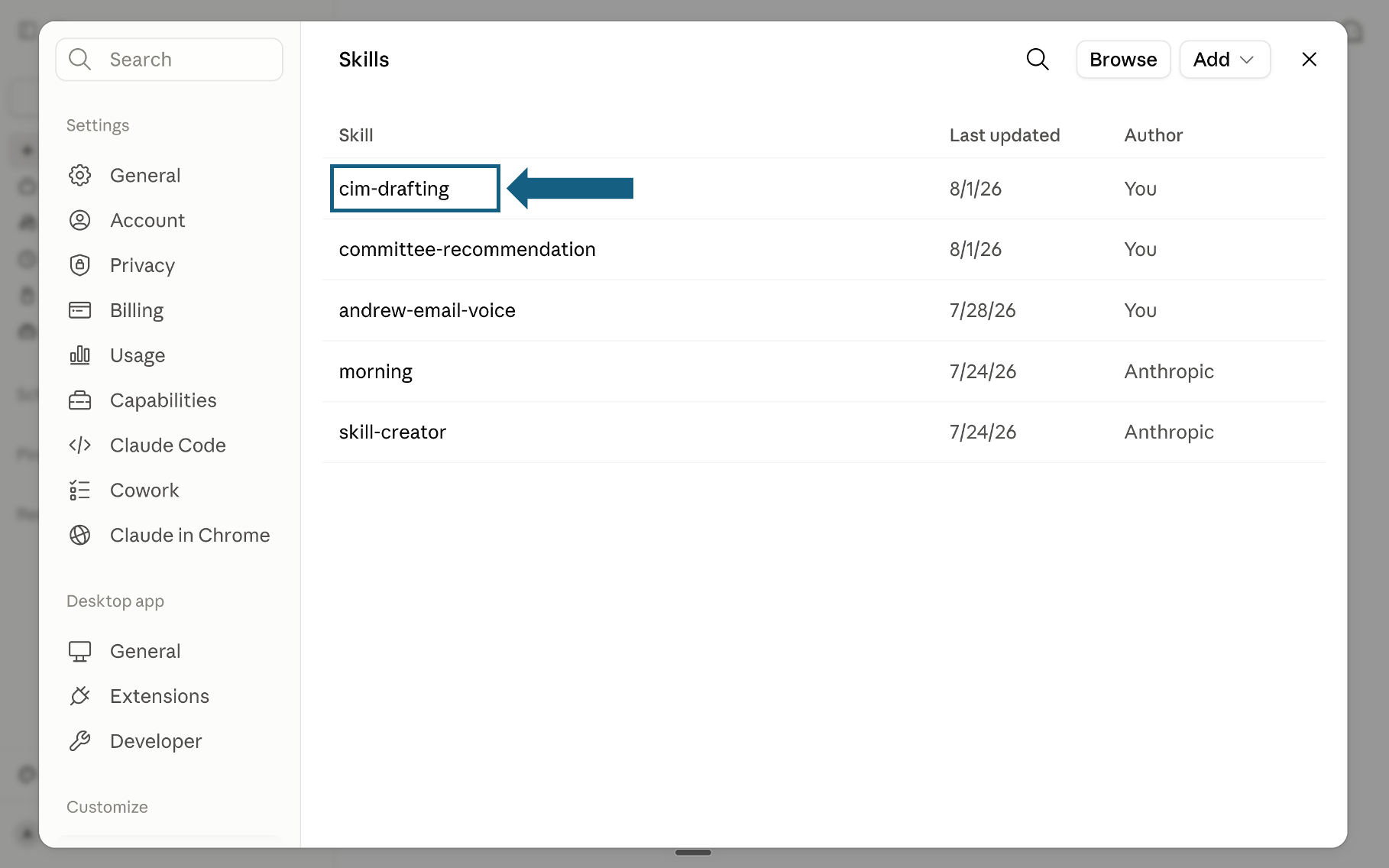
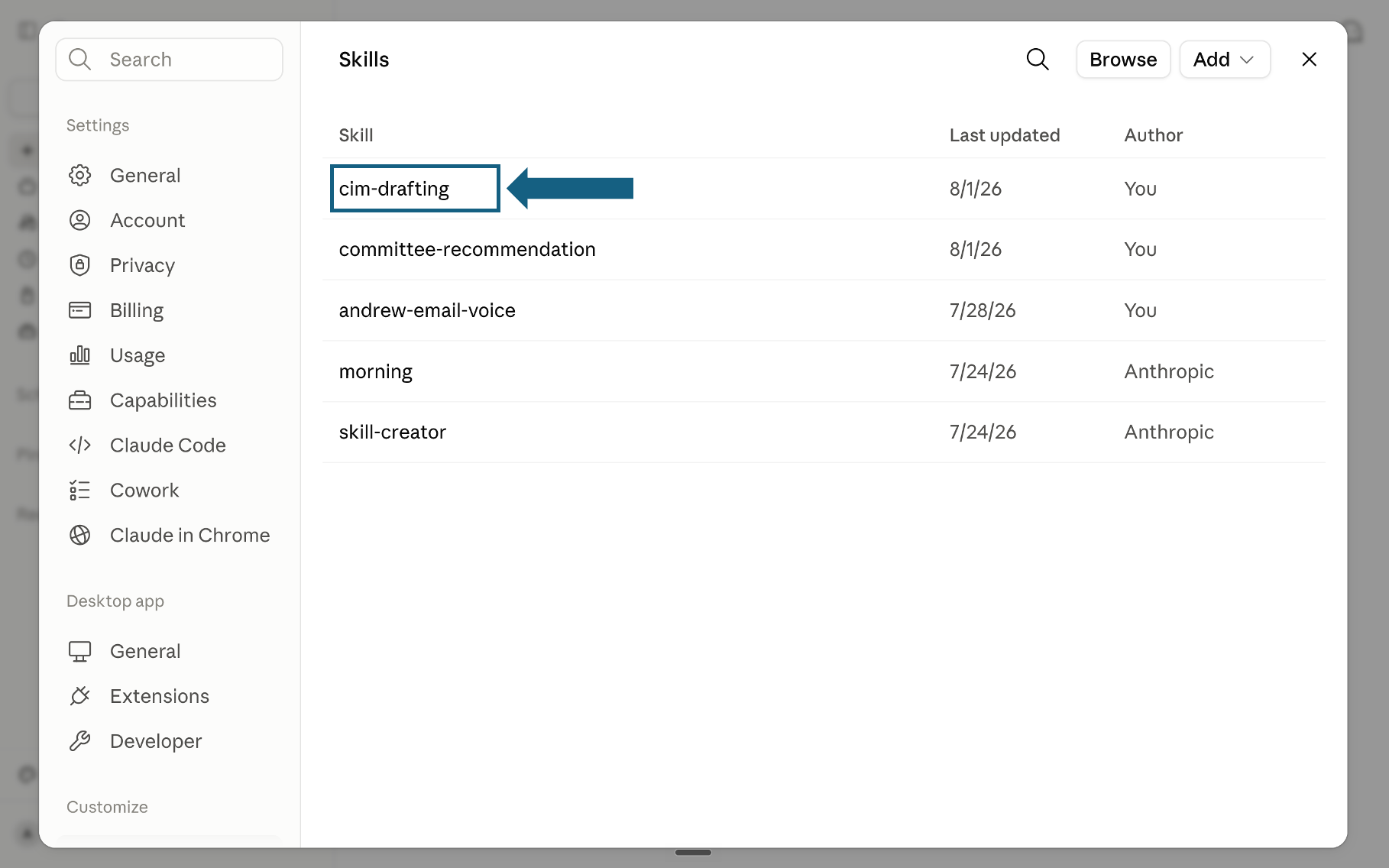
Confirm the skill was added
Return to the Skills list and check that the meta-skill appears. Select its name to open it.
Open the screenshot to view it full size. - Step 5
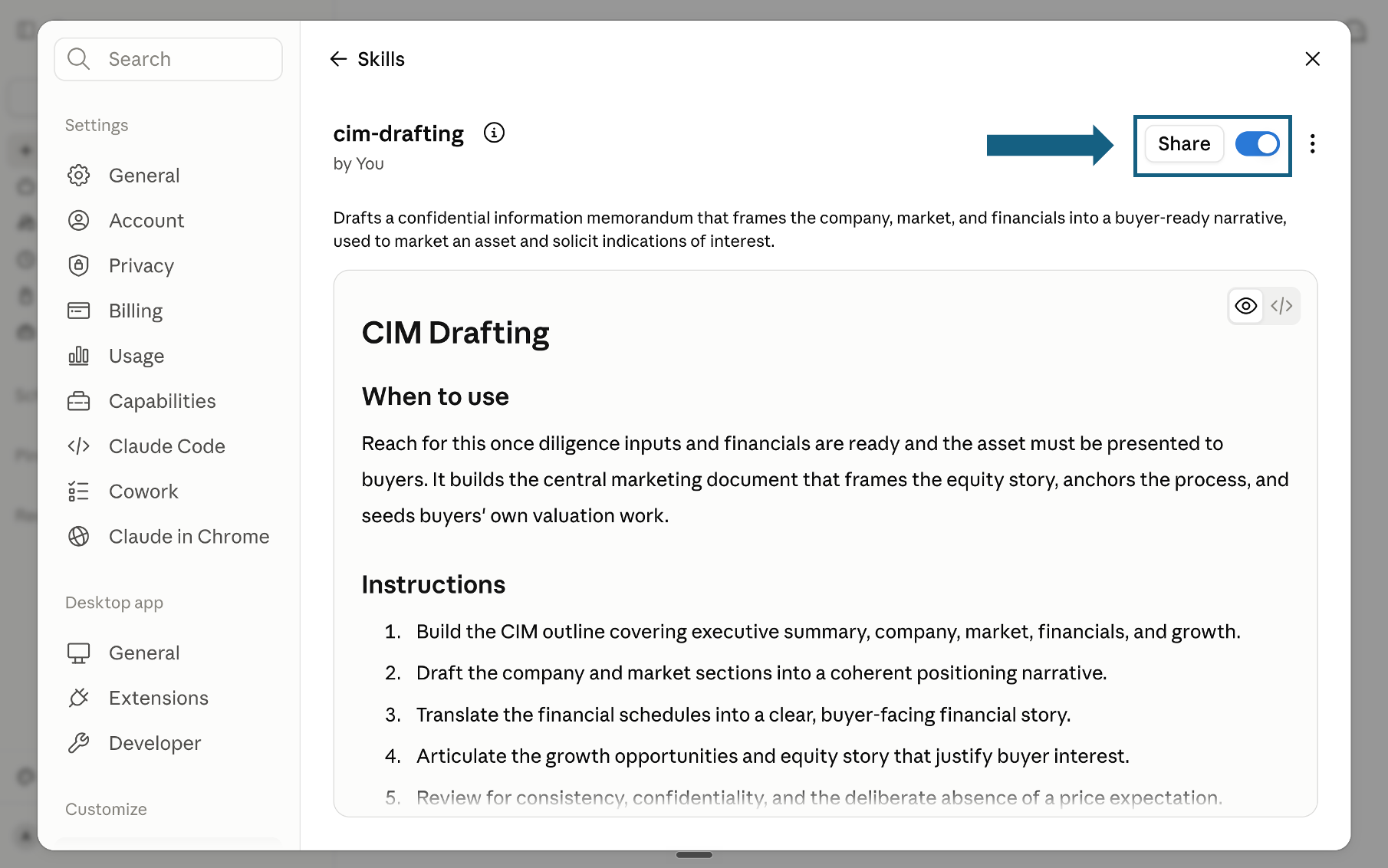
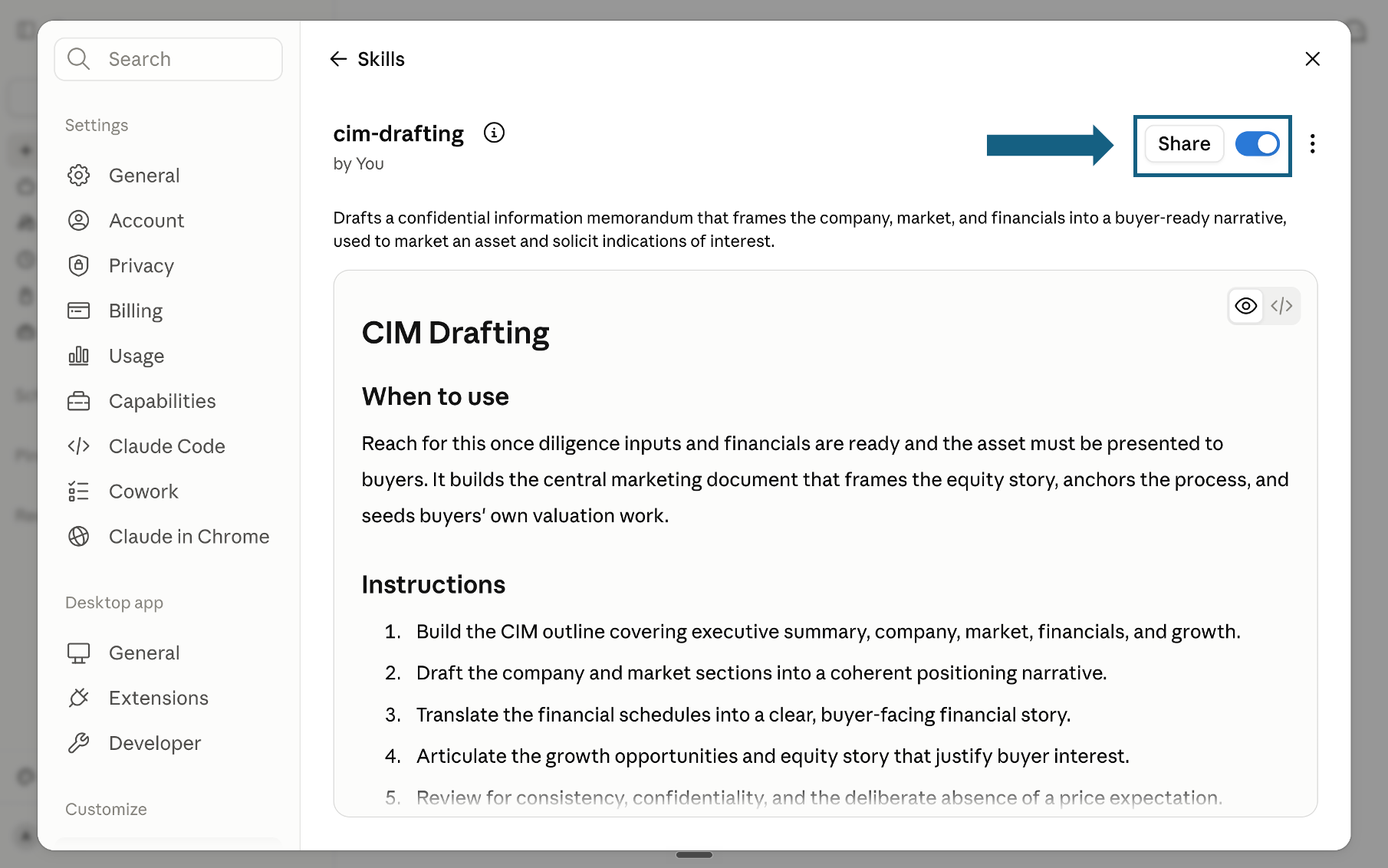
Review and turn on the skill
Review the skill name, description, and instructions, then make sure its switch is on. A blue switch means the skill is enabled; sharing it is optional.
Open the screenshot to view it full size.
Try a skill
Name the factory skill and provide the recurring task, evidence, constraints, and required output. Review the draft before packaging it.
- "Use the strategic-need-diagnosis skill to define the recurring decision this custom skill must serve."
- "Use the output-blueprint-design skill to specify the exact sections and evidence the output must contain."
- "Use the adversarial-input-testing skill to test this draft against sparse and contradictory inputs."
- "Use the skill-packaging-and-versioning skill to prepare the approved skill for reuse."
How to choose a skill from The Claude Skill Factory for Strategy
Match your immediate situation to the skill that answers it. For a wider set of standalone strategy skills beyond this pack, see our strategy skills for Claude Fable 5, and for the wider path from skills to reusable workflows, see our consultant's guide to Claude.
If this is not your page, go here
This page is narrow on purpose: one method, for the specific case where nothing else on this site already fits. Most readers who land here actually want one of the pages below, and it is faster to say so than to argue you into a build.
The quality bar
Every skill built through The Claude Skill Factory for Strategy is checked against this bar before it ships, so it holds up in a partner or board review, not a generic best-practice summary.
Frequently asked questions
What is the Claude Skill Factory for Strategy, exactly?
It is a repeatable, staged method, delivered as eight meta-skills, for designing, writing, testing, and shipping your own custom Claude skill for a recurring strategy task you have. It does not do strategy work itself, it produces the tool that does. Think of it as a small production line for skills rather than a single skill you install and run.
How is this different from downloading a ready-made skill pack?
A ready-made pack, such as 21 strategy skills for Claude, already encodes a method for a common strategy task: market sizing, issue framing, competitive scans. The factory is for the task that is not in any pack, because it is specific to your team's format or your firm's particular blind spot. If a pack already fits, install it instead.
Do I need to run every stage every time?
For a first skill, yes, skipping diagnosis or validation is exactly how homemade instructions end up generic. For a minor revision to an existing, already-validated skill, you can often re-enter at the Author or Validate stage directly, as long as the mandate itself has not changed since the last version shipped.
What do I actually need to use this?
Any Claude plan, since Skills are available on Free, Pro, Max, Team and Enterprise with code execution switched on, plus at least one real example of the recurring task you are building the skill for. Diagnosis and validation both depend on having actual material to test against.
Do Claude skills work on the free plan?
Yes. Anthropic makes Skills available on the Free, Pro, Max, Team and Enterprise plans, uploaded through Customize then Skills, with code execution switched on first. Skills are also usable through the Claude API and Claude Code on a developer account, which is how some teams run them at volume instead.
Can the output of a skill I build this way feed into other deliverables?
Yes. A skill that produces a structured verdict, ranked analysis, or decision memo creates a clean input for a deck, report, status update, or other downstream deliverable. Pairing it with Oria's Claude connector turns that structured output into a slide in the same conversation.