

Run a Full Strategy Engagement on Fable 5.1 Instead of a Retainer
A tier-one strategy engagement runs through the same five phases every time: diagnose, map, choose, execute, communicate. This pack turns each phase into six plug-and-play Claude skills, 30 in total, so you can run the engagement yourself first and decide afterward whether you still need to pay for one.
Run a full strategy engagement on Fable 5.1 instead of a retainer
Run a full strategy engagement on Fable 5.1 instead of a retainer, and the usual scope of work behind a tier-one strategy firm's board deck collapses into 30 focused Claude skills you run yourself: diagnose the question, map the market, choose the path, build the roadmap, and write the memo. Each skill is a single markdown file that teaches Claude a named, repeatable method instead of a vague instruction to "do some strategy work," and every skill ships with example prompts. Running all 30 end to end is roughly a 50-agent workflow across 150 prompts, with each phase synthesized before it feeds the next. You still own every decision the skills inform; they remove the hours it used to take to reach the point where a decision was even possible.
Download all 30 skills
One zip, one folder per skill, 5 phases. Free, no signup.
Quick answer: should you run this yourself?
Use the 30-skill pack when the deliverable is a board pack, diligence exhibit, or operating-model deck built to a corporate template, and someone on your own team has the standing to review the analysis. Skip it when the job is winning money or attention rather than defending a number.
For a genuine strategy engagement, three routes actually work. A tier-one or boutique strategy firm still wins when the board needs to hear the recommendation from an outside name. This Claude skills pack, free, 30 skills across 5 phases, wins when the work is corporate analysis and an internal team already has the judgment to review the output. A design-led tool such as Gamma or Canva wins when the deliverable is a fundraising pitch or a launch deck, where visual impact matters more than a defensible framework. Pick based on who has to sign off, not on price.
How we chose the 30 skills
The pack is built around the shape of a real engagement, not a wish list of prompts. Before a skill made the cut, it had to clear four tests, and a lot of plausible ideas failed at least one of them.
- Maps to one phase of a real engagement. Every skill sits inside Diagnose, Map, Choose, Execute, or Communicate. Generic prompts like "brainstorm ideas" did not make it in.
- Teaches one named, checkable method. A MECE issue tree, a weighted scoring matrix, a base/upside/downside scenario set, not an open-ended instruction to "analyze this."
- Works from what you paste in, on purpose. Every skill was tested against notes, transcripts, and figures typed into the chat. We deliberately left out anything that needs a live market-data or CRM connection; that is a different build.
- Leaves the sign-off with a person. Skills draft, score, and structure; none of them are written to output a final recommendation that skips a human review before it moves to the next phase.
- Tested end to end, not skill by skill. The handoff between phases, Diagnose into Map, Choose into Execute, had to actually carry context forward, not just work in isolated demos.
Half of employed Americans now use AI in their job at least a few times a year, up from 46% the previous quarter, according to Gallup's Q1 2026 workplace survey. The open question for a strategy team is no longer whether to use AI; it is whether to use it as an unstructured chat window or as a set of tested methods.
Key takeaways
- Structure beats speed on a board-level call. A tier-one firm or boutique consultant brings a tested method and an outside name; a skills pack brings the structure without the name. Pay for the outside name only when the room needs to hear it from someone other than your own team.
- First draft in hours, not weeks. A Claude skills pack turns around a first issue tree, market-sizing pass, or roadmap draft in one session; a retainer engagement is typically scoped and staffed for days to weeks before the first real output appears.
- Judgment never leaves the building. Every route still needs a person who owns the final call. A retainer adds an outside set of eyes; a skills pack assumes your own team plays that role, so it only works where that reviewer already exists in-house. That matches how Claude gets used generally: Anthropic's own Economic Index classifies most Claude.ai conversations as augmenting a task rather than fully automating it, not the other way around.
- Cost scales with who does the thinking. A tier-one or boutique engagement is priced in the six to seven figures for a focused, multi-week scope; a free skills pack shifts that cost to the hours your own team spends running and reviewing it instead.
- Analysis and visual design are different jobs. A skills pack, like a firm, is built to defend a number in a room. It is the wrong tool for a fundraising deck or a launch page, where a design-led tool wins on look before anyone reads the content.
How the routes compare
Five ways to get a strategy engagement done, scored on the same five questions. None of them wins on every row, including this pack.
Cost bands are directional, not quoted prices. Global technology consulting alone is on pace to cross $400 billion in revenue in 2026, according to Source Global Research, a reminder that "bring in outside help" is still the default reflex for most of the market despite the cost.
A Retainer With a Strategy Firm: Who Is It Built For?
Built for a board or investment committee that needs to hear the recommendation from a name outside the building, a decision large enough that being wrong is genuinely expensive, or a team with no internal capacity to run the analysis at all. A tier-one or boutique strategy firm brings a tested method, a partner willing to defend the number in the room, and staffing that flexes to the deadline.
The trade-off: you are paying six to seven figures largely for the outside name and the staffing flex, not for a method your own team could not learn, and the engagement still needs your team's context to land, so the work never fully leaves the building anyway.
A Boutique or Independent Consultant: Who Is It Built For?
Built for a company that wants an outside perspective and a tested method but does not need, or cannot justify, a full firm's staffing and overhead. A former in-house strategist or a small boutique shop can run the same five phases at a fraction of a tier-one firm's cost, often faster, because there is no internal review layer to clear before something reaches you.
The trade-off: quality now depends entirely on one person or a small team instead of a firm's training and quality-control system, and if that person is unavailable, there is no bench behind them.
Generic AI Prompting: Who Is It Built For?
Built for a single quick question, a one-off summary, or a first pass at something small, where getting a workable answer on one try matters more than method. Typing "help me think through our market entry" into a chat window works fine for scoping a conversation.
The trade-off: without a named method behind the prompt, the output is only as structured as the person asking, so the same question asked twice can produce two different frameworks and no way for a reviewer to tell which one to trust. Closing that gap is exactly what a skills pack like this one is for.
The 30-Skill Claude Pack: Who Is It Built For?
Built for a team that already has the judgment to review a strategy analysis and needs the hours back, not the outside name. Corporate documents and consulting-style presentations, board packs, steering-committee decks, diligence exhibits, operating-model slides, are the design center: each skill produces one defensible, checkable piece of a real engagement that a reviewer can accept, edit, or reject line by line. As Wharton professor Ethan Mollick puts it, the point is "using AI as a way to free ourselves from drudgery, allowing us to focus on what matters," not skipping the judgment call itself.
The trade-off: it is built for the analysis and the memo, not for making something look designed. There is no outside name attached to the recommendation, so it is the wrong tool when a board specifically needs to hear from someone other than your own team, and it will not produce a good-looking pitch deck: for founder fundraising, launch decks, or anything where visual impact matters more than a defensible framework, a design-led tool wins.
Doing It Fully In-House, Unaided: Who Is It Built For?
Built for a team with the time, the seniority, and the muscle memory to run a structured engagement from memory, with no outside tool or firm involved at all. Some functions genuinely have this in-house.
The trade-off: most do not, and the failure mode is not a bad answer, it is a slow one. 62% of workers say they lose too much time simply searching for and synthesizing information before the real analysis even starts, per Microsoft's Work Trend Index survey of 31,000 workers. That is the two weeks a from-scratch engagement usually loses before anyone sees a first draft.
The 30 skills behind the engagement
5 phases, 30 skills, 6 in each phase. Every one is a standalone SKILL.md file that teaches Claude a named method for one specific part of a strategy engagement, not a generic prompt to analyze something. Between them the skills carry 150 example prompts, and running the full engagement is roughly a 50-agent workflow. Install every phase, or pull out just the skill you need.
The five-phase strategy engagement
Phase 1 of 5 · 6 skills
Diagnose
Frame the question and read the current state before anyone builds a slide. Turn a vague executive worry into one testable question, a MECE issue tree, an early hypothesis set, and a time-boxed workplan.
Problem Framing
problem-framing
What it does: Turn a vague executive concern into one sharp, testable strategic question with a clear decision owner
Situation Assessment
situation-assessment
What it does: Build a fast current-state picture of the business, its performance, and the forces pressing on it
Stakeholder Mapping
stakeholder-mapping
What it does: Map who decides, who influences, and who blocks, then plan how to win each of them
Issue Tree Builder
issue-tree-builder
What it does: Decompose the core question into a MECE issue tree of sub-questions you can actually answer
Hypothesis Generation
hypothesis-generation
What it does: Draft an early answer-first hypothesis set so the engagement chases evidence, not everything
Workplan Design
workplan-design
What it does: Convert the issue tree into a time-boxed analysis plan with owners, methods, and deliverables
Phase 2 of 5 · 6 skills
Map
Build the evidence base. Decide what data is decision-grade, size the market two ways, profile the competition, cut the customer base into real segments, and turn raw interviews into ranked findings.
Data Gathering Plan
data-gathering-plan
What it does: Decide exactly what data you need, where to get it, and how to make it decision-grade
Market Sizing
market-sizing
What it does: Size the market top-down and bottom-up with transparent assumptions and a sanity-checked range
Competitor Mapping
competitor-mapping
What it does: Profile the competitive field, positioning, and moves to find where the white space is
Customer Segmentation
customer-segmentation
What it does: Cut the customer base into segments that differ in needs, value, and how to serve them
Interview Synthesis
interview-synthesis
What it does: Turn raw interview and call notes into ranked, evidence-backed findings and quotes
Value Chain Analysis
value-chain-analysis
What it does: Map the value chain and cost-to-serve to expose where margin and leverage really sit
Phase 3 of 5 · 6 skills
Choose
Force a real decision. Generate genuinely distinct options, model the scenarios and the economics of each, score them against weighted criteria, and compress everything into one defensible recommendation.
Option Generation
option-generation
What it does: Generate a genuinely distinct set of strategic options, not three flavors of the same idea
Scenario Modeling
scenario-modeling
What it does: Build base, upside, and downside scenarios with named drivers and tipping points
Financial Modeling
financial-modeling
What it does: Model the P and L, cash, and returns of each option so the numbers can be compared
Prioritization Scoring
prioritization-scoring
What it does: Score options against weighted criteria to force a defensible, transparent ranking
Business Case Builder
business-case-builder
What it does: Assemble the recommended option into a full business case a board can actually approve
Recommendation Synthesis
recommendation-synthesis
What it does: Compress all the analysis into one clear recommendation with the reasoning behind it
Phase 4 of 5 · 6 skills
Execute
Turn the choice into a plan that survives the calendar. Sequence the roadmap, design the operating model, charter each initiative, surface the risks, define the KPIs, and plan the people side of the change.
Roadmap Design
roadmap-design
What it does: Sequence the chosen strategy into phased workstreams, milestones, and dependencies
Operating Model Design
operating-model-design
What it does: Design the org, roles, and decision rights needed to actually run the new strategy
Initiative Charter
initiative-charter
What it does: Charter each major initiative with scope, owner, success metrics, and resourcing
Risk Assessment
risk-assessment
What it does: Surface the risks that could sink the plan and pair each with a concrete mitigation
KPI Dashboard Design
kpi-dashboard-design
What it does: Define the leading and lagging KPIs and the dashboard that tracks whether it is working
Change Management Plan
change-management-plan
What it does: Plan the people side of the change so the strategy lands instead of stalling
Phase 5 of 5 · 6 skills
Communicate
Make the recommendation survive the room. Write the answer-first summary and board memo, build the slide narrative, draft the slides, pre-empt the hard questions, and run the decision meeting to a commitment.
Executive Summary
executive-summary
What it does: Write the one-page answer-first summary a busy executive reads before anything else
Board Memo
board-memo
What it does: Draft the board-ready memo that frames the decision, options, and the ask
Presentation Narrative
presentation-narrative
What it does: Build the storyline and slide flow that carries an audience from problem to decision
Slide Drafting
slide-drafting
What it does: Turn each storyline point into a single-message slide with a real action title
Objection Handling
objection-handling
What it does: Pre-empt the hardest questions and rehearse crisp, evidence-backed answers
Readout Facilitation
readout-facilitation
What it does: Plan and run the decision meeting so the room leaves aligned on a commitment
Setup Guide
- Step 1Download all 30 skills (.zip)
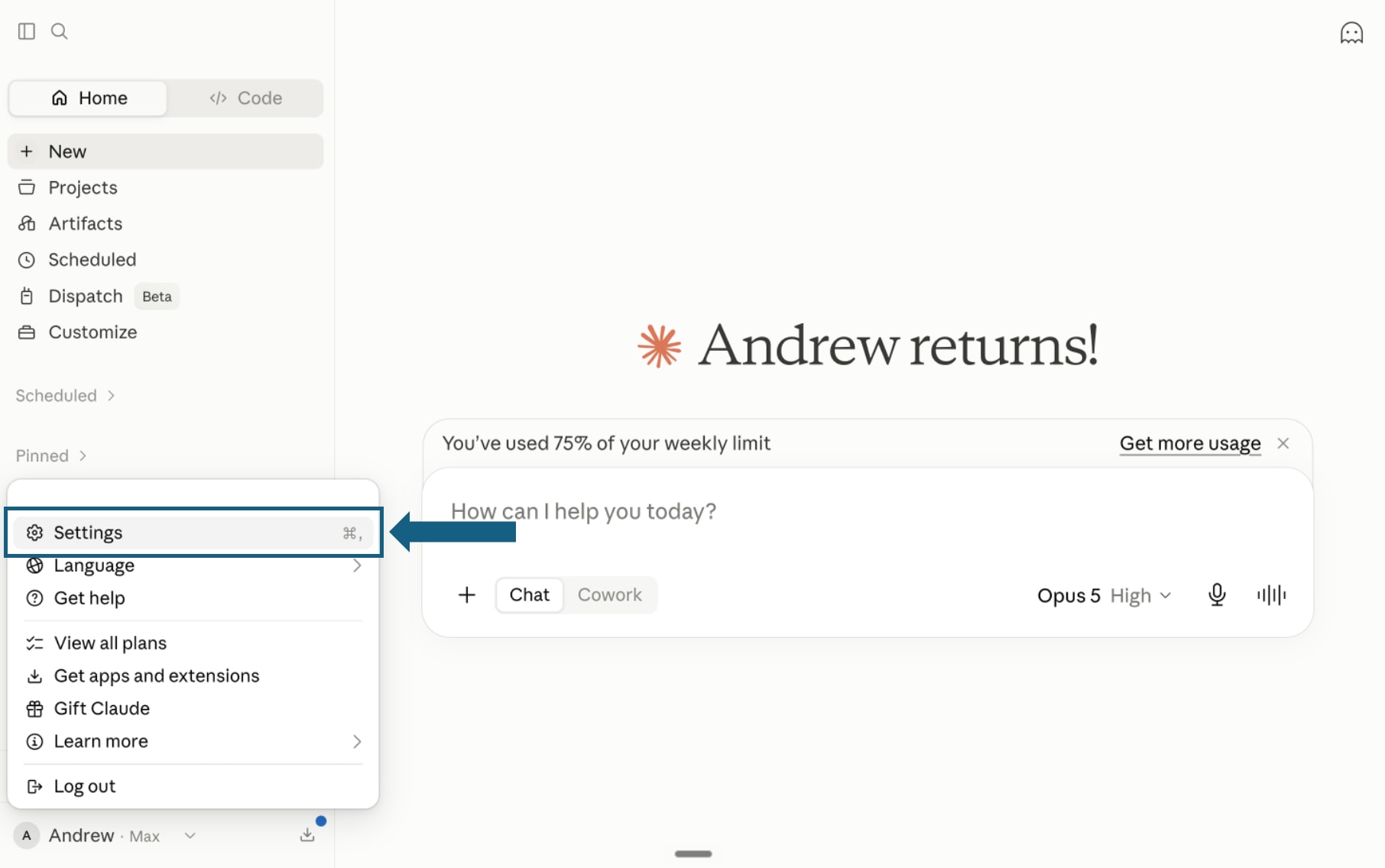
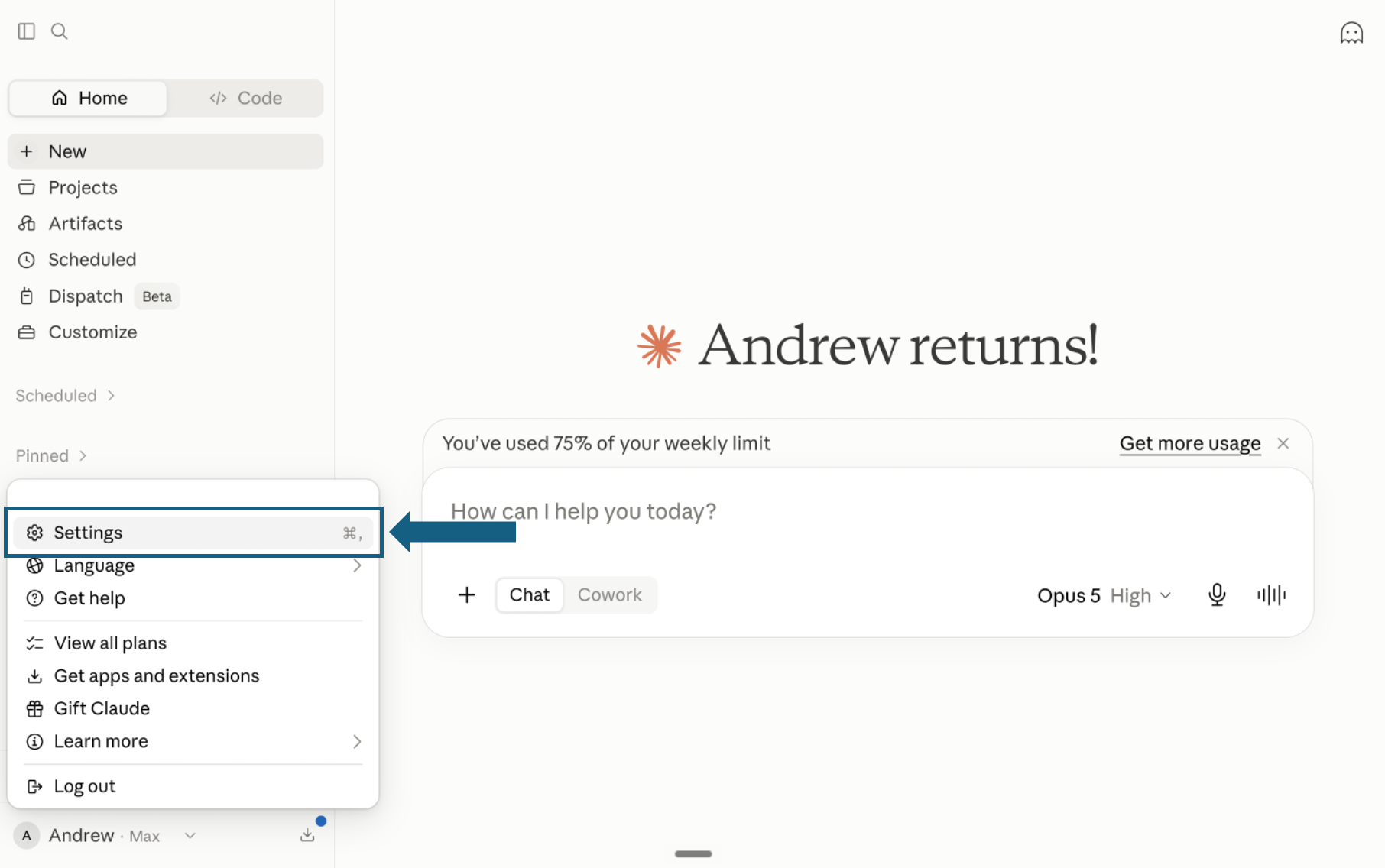
Download the pack and open Settings
Download and unzip the pack, keeping each of the 30 skills in its own folder with its SKILL.md file. In Claude, open your profile menu and select Settings.
Open the screenshot to view it full size. - Step 2
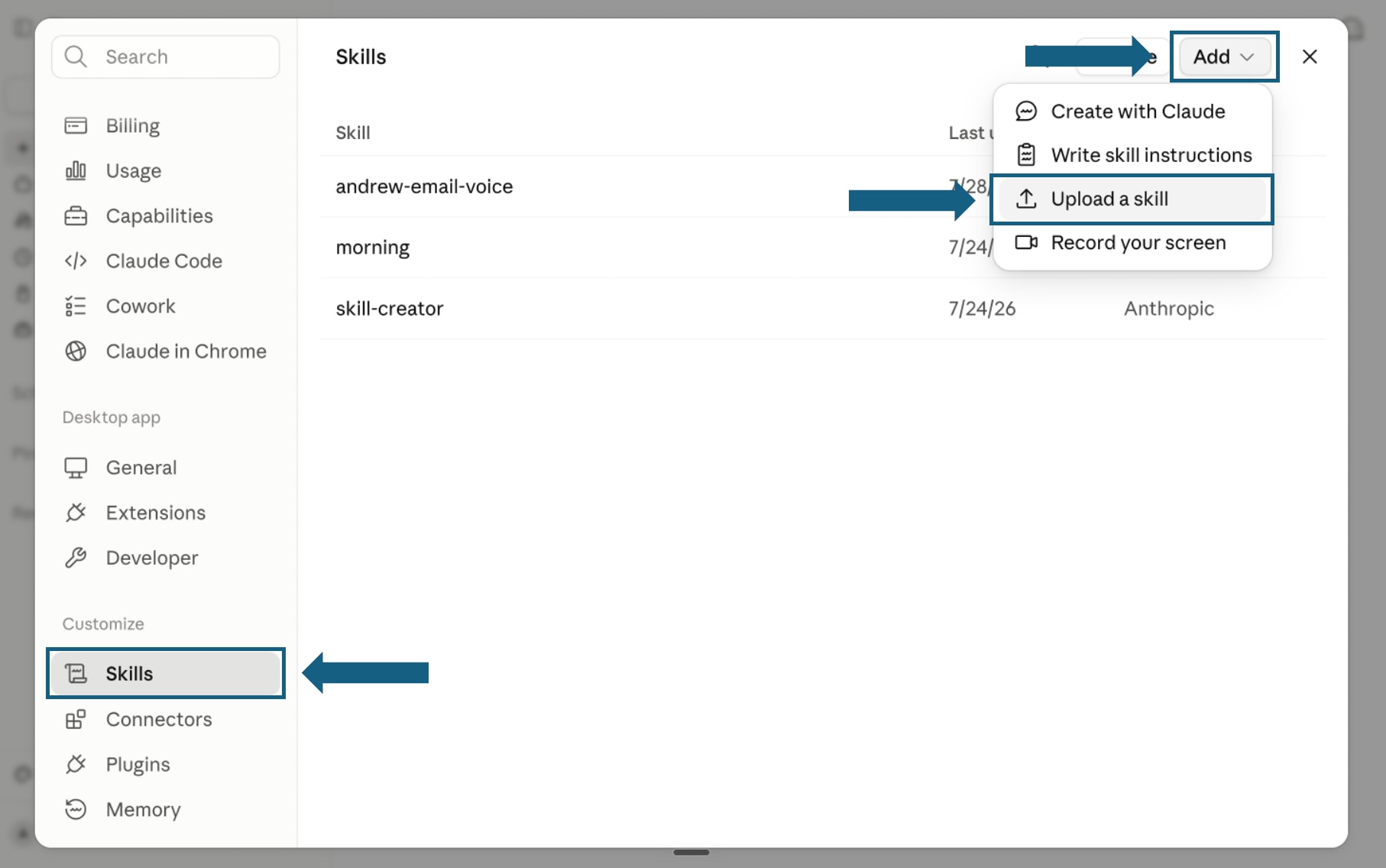
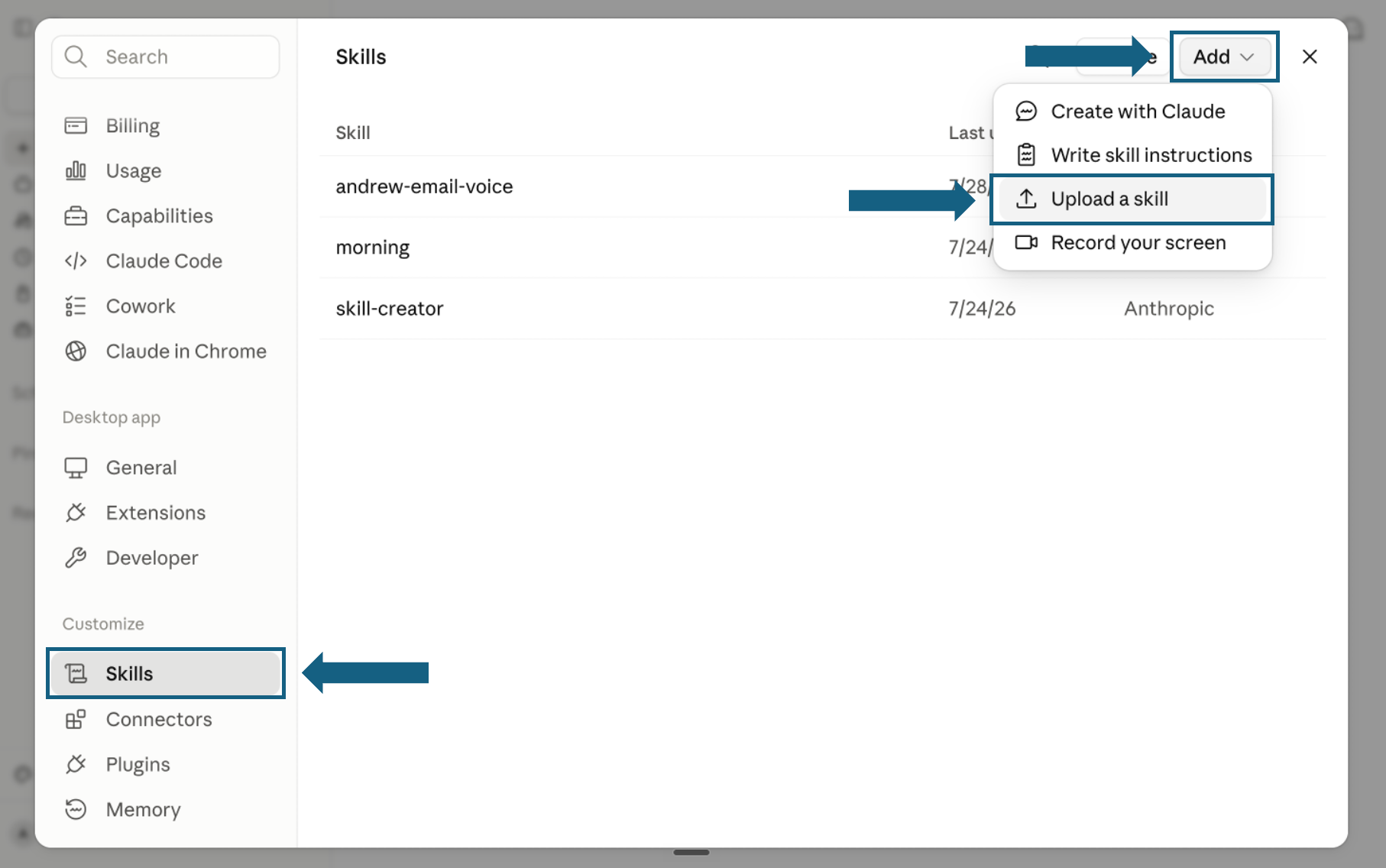
Open Skills and start an upload
In Settings, select Skills under Customize. Open Add and choose Upload a skill.
Open the screenshot to view it full size. - Step 3
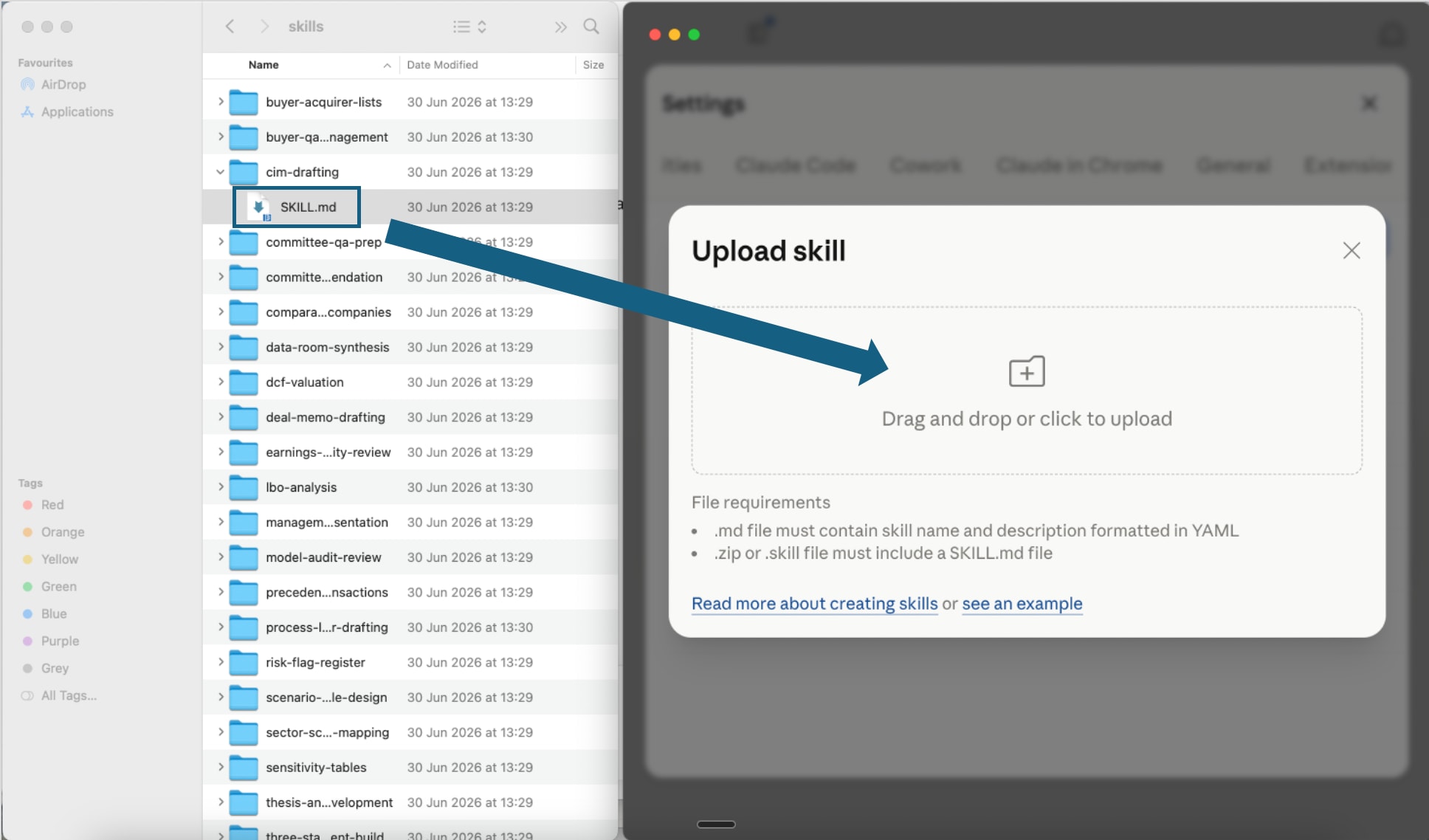
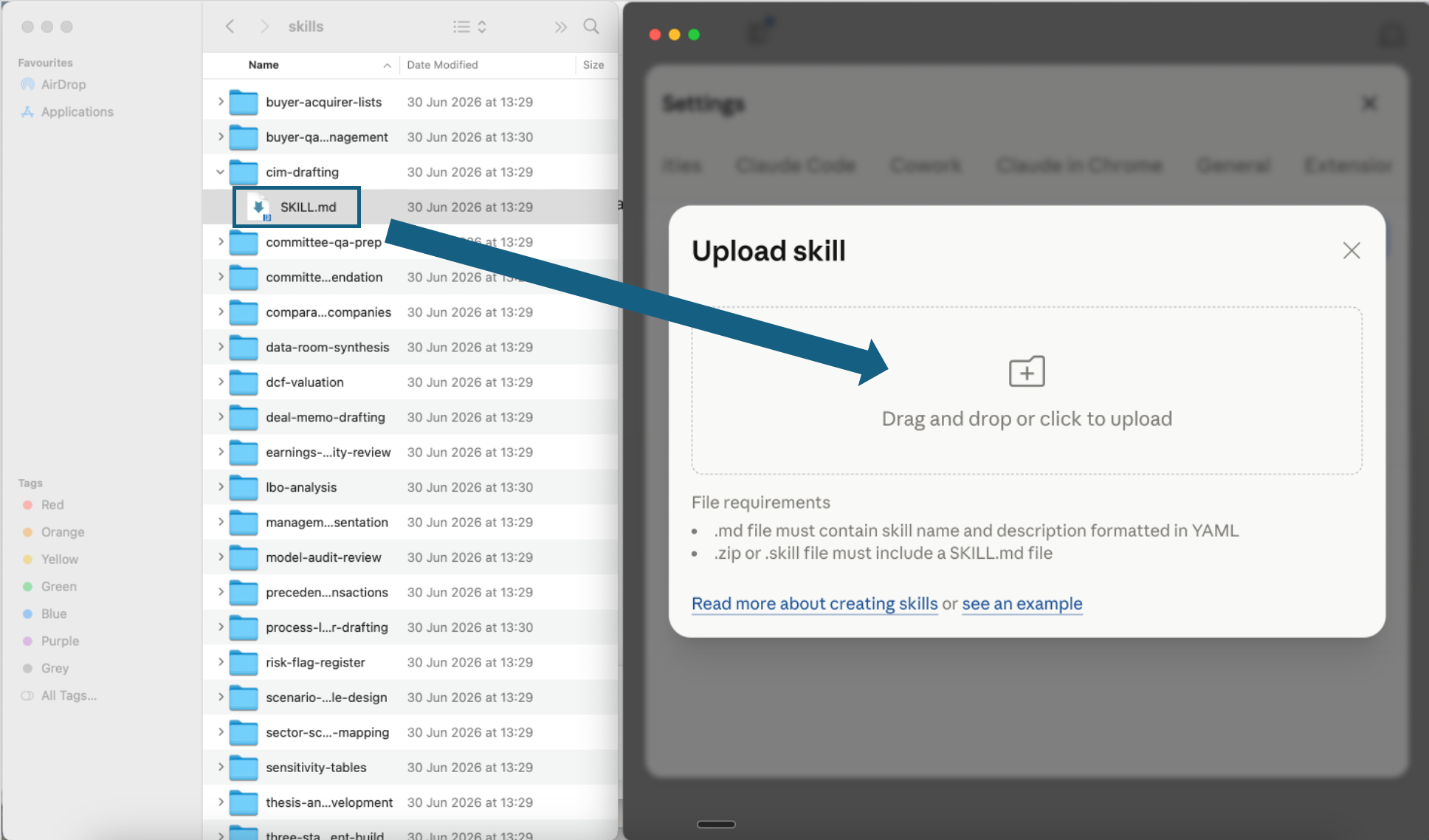
Upload one skill file
Open one extracted skill folder and drag its SKILL.md file into the upload window, or use the file picker. Repeat for each skill or phase you want to add.
Open the screenshot to view it full size. - Step 4
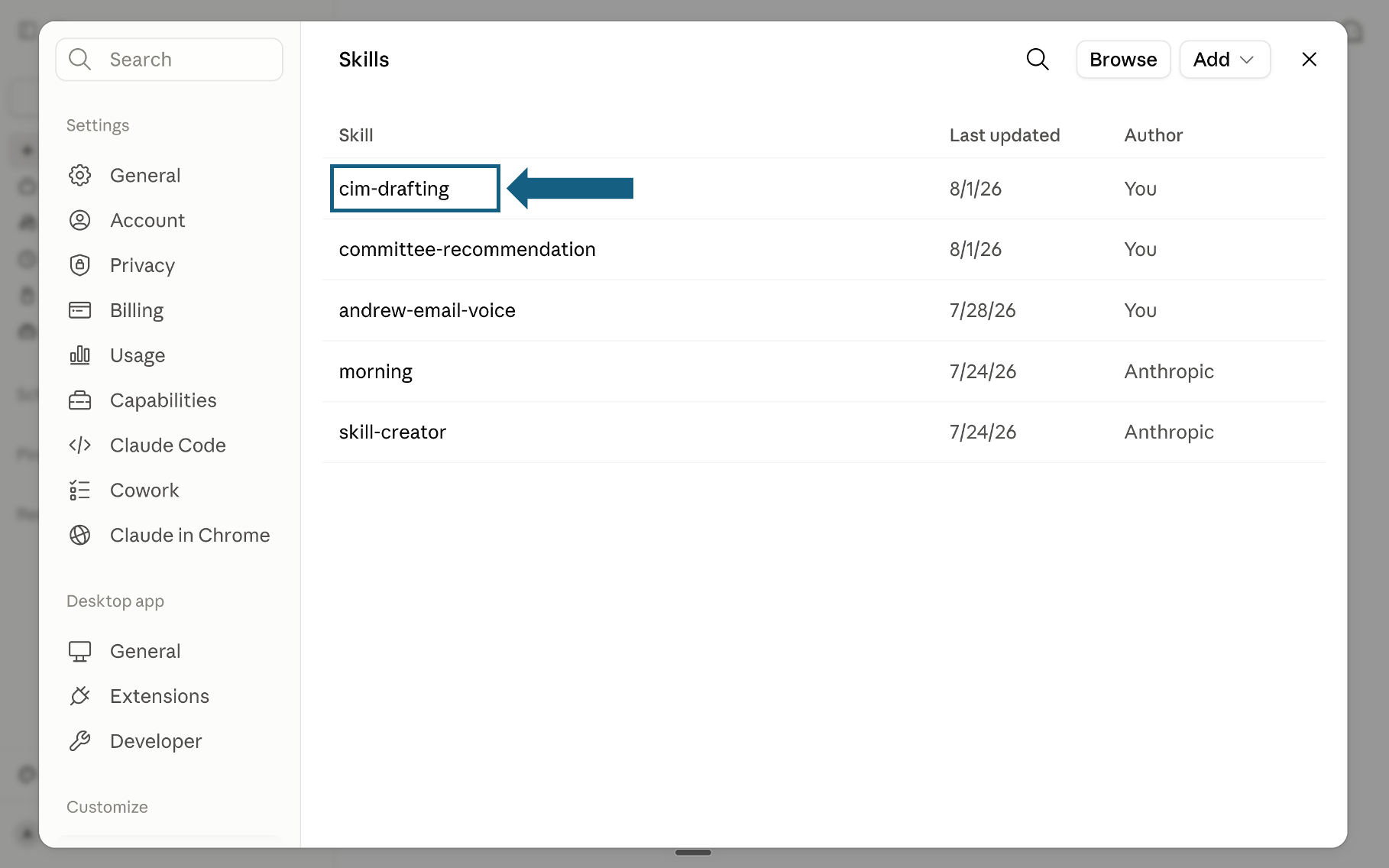
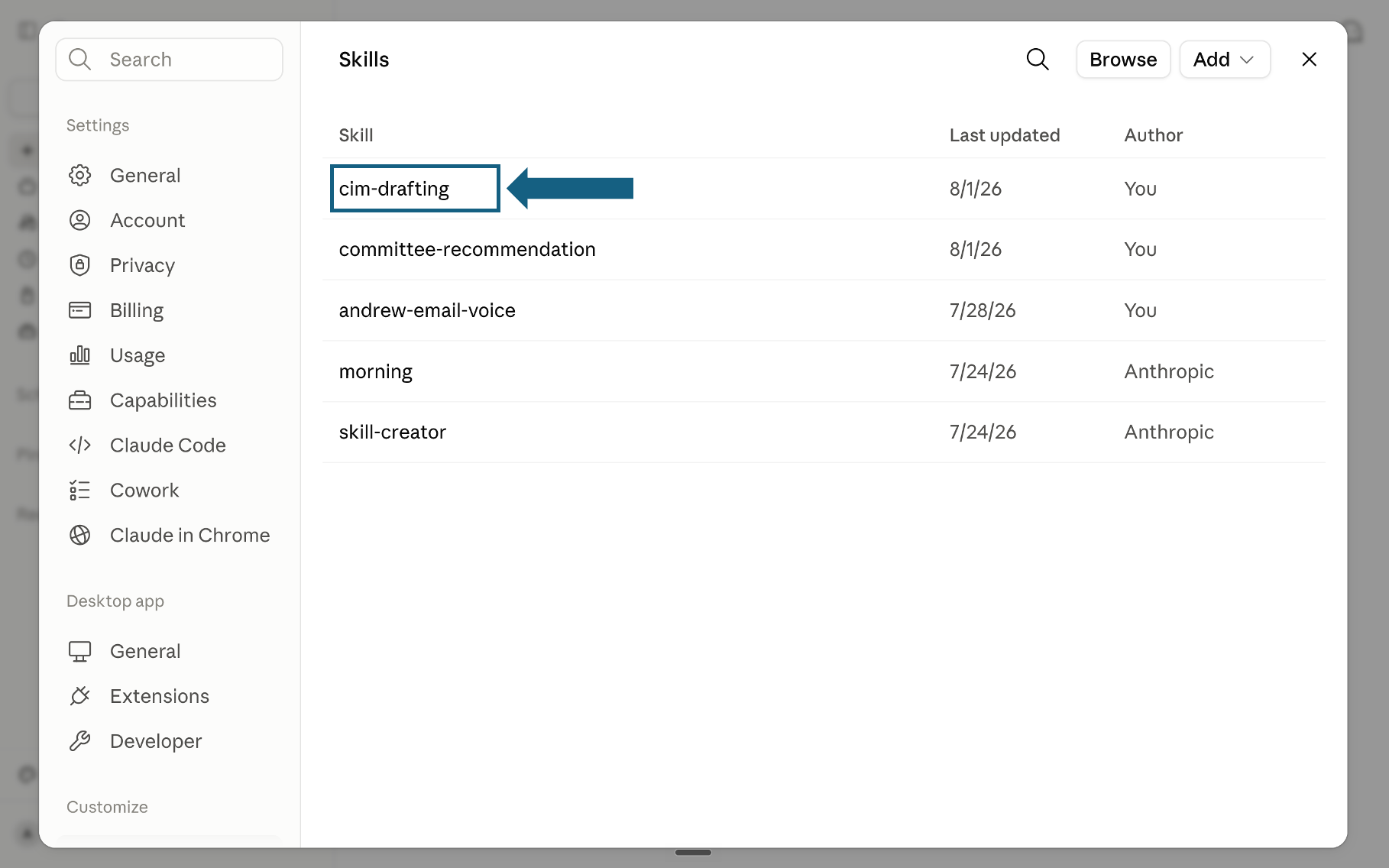
Confirm the skill was added
Return to the Skills list and check that the skill appears. Select its name to open it.
Open the screenshot to view it full size. - Step 5
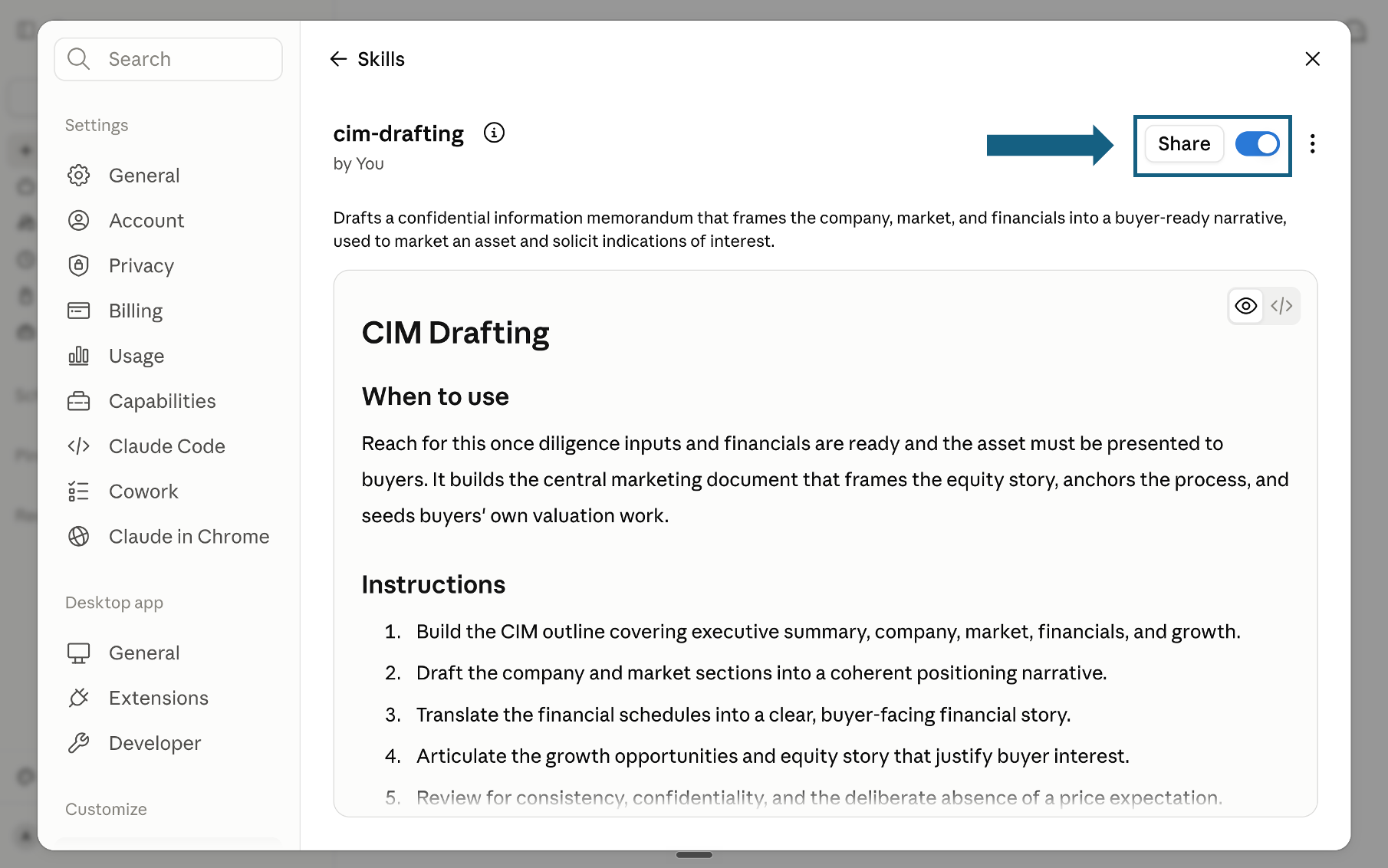
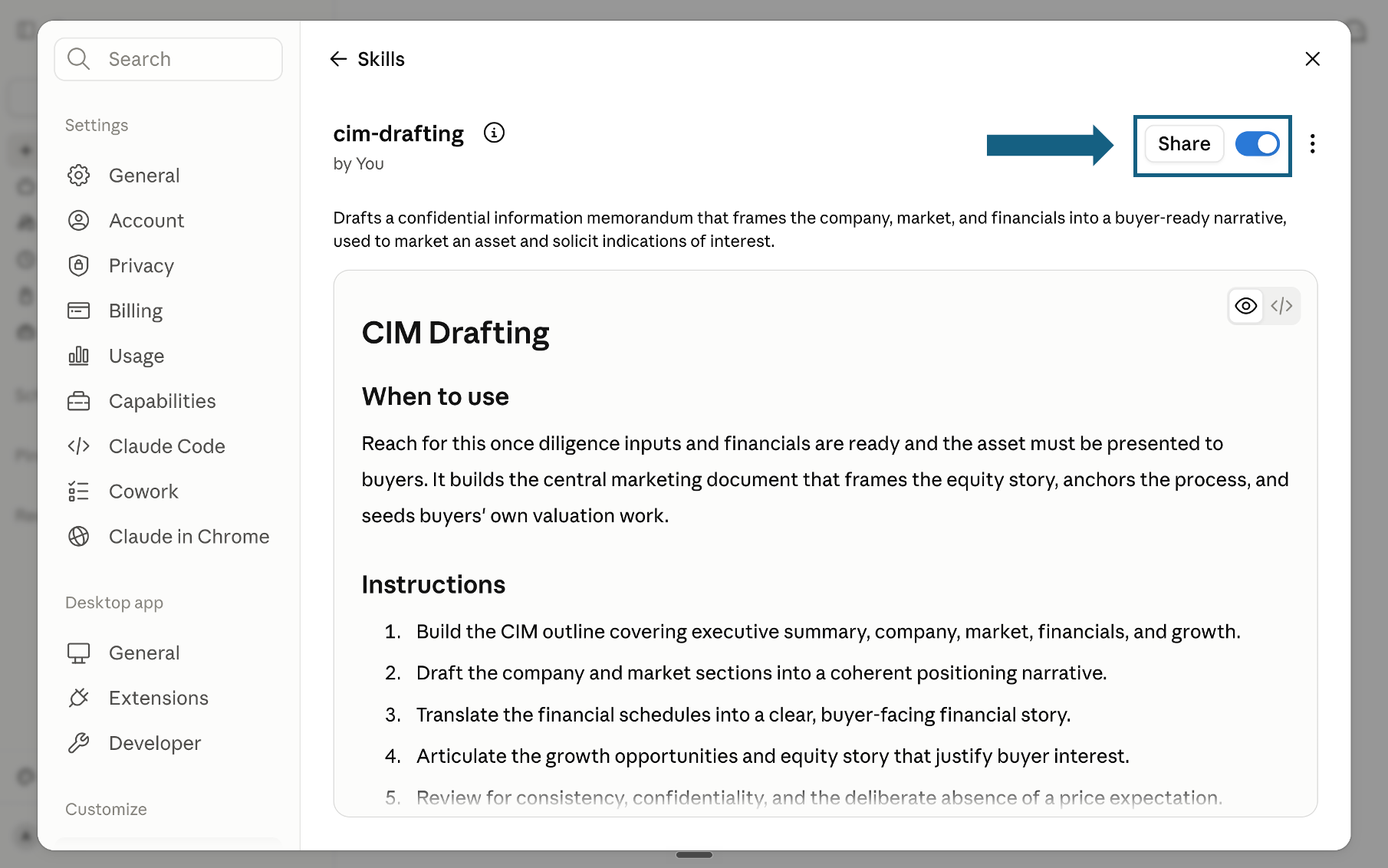
Review and turn on the skill
Review the skill's name, description, and instructions, then make sure the switch beside Share is on. A blue switch means the skill is turned on; sharing it is optional.
Open the screenshot to view it full size.
Try a skill
Name the skill you want Claude to use and provide the relevant brief, evidence, and constraints. Review every output before it feeds the next phase.
- "Use problem-framing on this brief: our board wants 15% growth next year and nobody agrees on how."
- "Use market-sizing to size the market for mid-market payroll software in the region."
- "Run option-generation now that we have the market read for entering the segment."
- "Use board-memo to turn this roadmap into a two-page memo for Thursday's board meeting."
How to choose a skill
Match your immediate question to the skill that answers it. The table below picks one skill per question, but the pack ships 30 in total across 5 phases. For the same ground organized by function instead of by phase, see our Claude Skills for Consulting: 21 Strategy Skills.
Where to go if this is not the right fit
Being objective means routing you somewhere else when something else genuinely fits better. Here is where that is true.
The quality bar
Every skill is designed to hold output to the standard a senior reviewer would apply before a recommendation leaves the room.
Frequently asked questions
What is this Claude skills pack for running a strategy engagement?
It is 30 standalone Claude skills organized into the 5 phases of a full strategy engagement: Diagnose, Map, Choose, Execute, and Communicate, with 6 skills in each phase. Each skill is a single markdown file that teaches Claude a named, repeatable method for one job, and ships with example prompts. Across the pack that is 150 example prompts, and running the whole engagement end to end is roughly a 50-agent workflow, with each phase synthesized before it feeds the next.
How do I install these Claude skills?
Download and unzip the pack, open Settings in Claude, select Skills under Customize, and use Add, then Upload a skill. Upload the SKILL.md file from each skill folder you want to use, confirm it appears in the list, and make sure it is turned on. The five-step flow is shown below.
Does this pack require Fable 5.1, or does it work with other Claude models?
The skills are plain SKILL.md files with no model lock-in, so any current Claude model with Skills support can run them, including Sonnet 5, Opus 5, Fable 5.1, and Haiku 4.5. A stronger reasoning model such as Fable 5.1 or Opus 5 tends to help most on the judgment-heavy Choose and Communicate steps, while a faster, lower-cost model is usually enough for the more mechanical Diagnose and Map steps.
Does this replace hiring a strategy firm?
Not always. It replaces the assembly work behind a full-scope engagement: framing the question, building the market read, comparing options, drafting the roadmap and the memo. When a board needs to hear the recommendation from an outside name, a tier-one or boutique firm still wins that specific job. The judgment, the outside credibility where it is needed, and the final call stay outside this pack.
Can I run just a few of the 30 skills instead of the whole engagement?
Yes. Each skill is a standalone SKILL.md file, so you can upload only the ones you need, such as issue-tree-builder or market-sizing, and skip the rest. The full 5-phase sequence matters most when the phases actually hand off to each other; a single skill works fine on its own for a narrower question.
How does this connect to AI Academy for Professionals?
The pack gives Claude reusable methods for a full strategy engagement. AI Academy for Professionals teaches the broader AI workflows and operating habits that help professionals use tools like these consistently, review their output, and build repeatable ways of working across a team. Use the pack for the engagement itself and the Academy to deepen the surrounding workflow.