

Claude Deck Skills: 25 Skills for Boardroom Strategy Decks
25 standalone Claude skills for building boardroom strategy decks. Framing the mandate, diagnostics, strategic choices, execution planning, and narrative communication. Built for strategy teams and operators who present to boards and executive committees.
What this is
25 standalone Claude skills covering the full path of building boardroom strategy decks. Each skill is a small, uploadable file that teaches Claude how to run one high-value step of the work with a repeatable, named method, from framing the mandate to the final narrative on the slide.
The skills are grouped into five stages: frame the mandate, run the diagnostics and build the evidence, make the strategic choices, plan execution, and shape the narrative and communication. Use them in sequence on a full deck or pull individual skills for a specific slide or section.
Each skill is one folder with a SKILL.md file. Add it to a Claude Project as Project Knowledge and Claude will apply the method whenever you name it in a prompt. The board-ready deck skills are the pack on this page. If you want the upstream consulting toolkit that feeds them, see our 21 strategy skills for Claude, and for the design side of the same deck, our Claude skills for consulting slide design.
Download all 25 skills
One zip, one folder per skill. Free, no signup.
The 25 Claude skills for boardroom strategy decks
The collection follows the order of building a real strategy deck: frame the mandate first, then diagnose, choose, plan execution, and finally shape the narrative. Every skill is also useful on its own for a single slide or section.
The strategy deck workflow
Stage 1 · 5 skills
Framing the Mandate
Start here. These five skills turn an ambiguous executive ask into a sharp, agreed problem definition with a single governing question, scope, audience read, and a working answer. They lock the foundation before any analysis or slide is built.
Define Governing Question
Use when: At kickoff when the ask is vague, multi-part, or stated as a topic rather than a decision
Output: Governing question, decision to be made, success criteria, out-of-scope list
Audience Stakeholder Map
Use when: Before structuring the storyline, when you need to tailor altitude and emphasis to who is in the room
Output: Stakeholder grid, decision-makers vs influencers, each stakeholder's question and likely objection
SCQA Situation Frame
Use when: When opening the deck and you need to establish shared context that lands on the central question
Output: Situation, complication, question, drafted opening frame
Working Hypothesis Answer
Use when: Early, when you want an answer-first direction to steer analysis instead of boiling the ocean
Output: Governing thought, top-line answer, supporting pillars, key assumptions to test
Storyline Skeleton Map
Use when: Once the hypothesis is set, to lay out the horizontal logic of the whole deck before building any slide
Output: Ordered slide-title outline, narrative spine, logic flow check
Stage 2 · 5 skills
Diagnostics and Evidence
Break the problem into testable parts and build the fact base that proves or disproves the hypothesis. These five skills cover structured decomposition, root-cause analysis, quantification, benchmarking, and synthesis of so-whats.
Issue Tree Decomposition
Use when: When the problem is too big to analyze whole and needs structured, non-overlapping breakdown
Output: Issue tree, MECE branches, prioritized branches to analyze
Root Cause Driver Tree
Use when: When a metric is moving and you need to isolate the underlying drivers, not the symptoms
Output: Driver tree, quantified contribution by driver, identified root causes
Quantify the Gap
Use when: When you need to size a problem or opportunity in hard numbers to justify action
Output: Baseline vs target, sized gap, value at stake, calculation assumptions
Benchmark and Compare
Use when: When performance only has meaning relative to peers, history, or best practice
Output: Comparison set, benchmark view, position vs reference, outlier insights
Synthesize So-Whats
Use when: After analysis, when you have findings but need to convert them into insights that drive the argument
Output: Grouped findings, distilled insights, governing so-what, evidence-to-message links
Stage 3 · 5 skills
Strategic Choices
Move from diagnosis to a defensible recommendation by generating options, weighing them against criteria and scenarios, and committing to a clear bet. These five skills cover option generation, prioritization, scenario testing, trade-off analysis, and the recommendation itself.
Generate Strategic Options
Use when: When a decision needs a genuine set of distinct choices, not a single foregone conclusion
Output: Option set, description per option, distinctiveness check, do-nothing baseline
Prioritization Matrix
Use when: When you must rank options or initiatives against two decisive dimensions like value and effort
Output: Scored options, 2x2 placement, prioritized shortlist, rationale
Scenario Stress Test
Use when: When the future is uncertain and the chosen option must hold up across more than one world
Output: Scenario set, option performance per scenario, robust vs fragile options
Tradeoff Analysis
Use when: When the leading options each win on different criteria and the choice hinges on what you give up
Output: Weighted criteria, option scorecard, explicit trade-offs, recommended balance
Recommendation Statement
Use when: When the analysis is done and the deck needs to commit to one clear, defensible recommendation
Output: Recommendation sentence, rationale, the ask, conditions and confidence
Stage 4 · 5 skills
Execution Planning
Make the recommendation real with a credible path to value, owners, economics, risks, and metrics. These five skills turn a decision into a plan the board can fund and hold someone accountable to.
Implementation Roadmap
Use when: When a recommendation is approved in principle and the board needs to see how it gets done over time
Output: Phased roadmap, milestones, dependencies, owners, timeline
Resource and Investment Plan
Use when: When the board needs to know what the recommendation costs and what it returns before funding it
Output: Cost build-up, investment ask, expected return, payback and phasing
Risk and Mitigation Register
Use when: When you need to show the board the recommendation's downside is understood and managed
Output: Risk register, likelihood and impact, mitigations, owners and triggers
Operating Model and Owners
Use when: When delivery requires clarity on who does what, decision rights, and governance
Output: Accountability map, decision rights, governance cadence, capability gaps
Metrics and Milestones
Use when: When the board needs to know how success will be measured and tracked over time
Output: Success metrics, targets and baselines, leading indicators, review checkpoints
Stage 5 · 5 skills
Narrative and Communication
Package the argument so it lands in the boardroom through sharp action titles, clear data callouts, a decision-ready executive summary, visual hierarchy, and rigorous objection and Q&A prep. These five skills make the deck persuasive and presentation-ready.
Action Title Writing
Use when: When every slide needs a one-line takeaway headline that carries the argument
Output: Action titles per slide, spine read-through, insight check
Data Callout Design
Use when: When a chart needs to point the eye to the one number that proves the title
Output: Chart callouts, highlight choices, annotation text, chart-to-title link
Executive Summary Slide
Use when: When the deck needs a single slide that delivers the whole argument and the ask up front
Output: Recommendation line, supporting pillars, the ask, one-slide summary
Visual Hierarchy Cleanup
Use when: When slides feel cluttered or busy and the message is competing with decoration
Output: Layout fixes, emphasis hierarchy, decluttered slide, consistency rules
Objection and QA Prep
Use when: Before presenting, to anticipate the hard questions and pre-empt the deal-breaking objections
Output: Anticipated questions, crisp answers, pre-empt vs Q&A split, backup material
Setup guide
Download the skills pack
The zip contains all 25 skills, one folder per skill. Each skill is a single SKILL.md file. Unzip it anywhere. Keep the whole set or pull out only the folders relevant to the stage you are working on.
Create a Claude Project
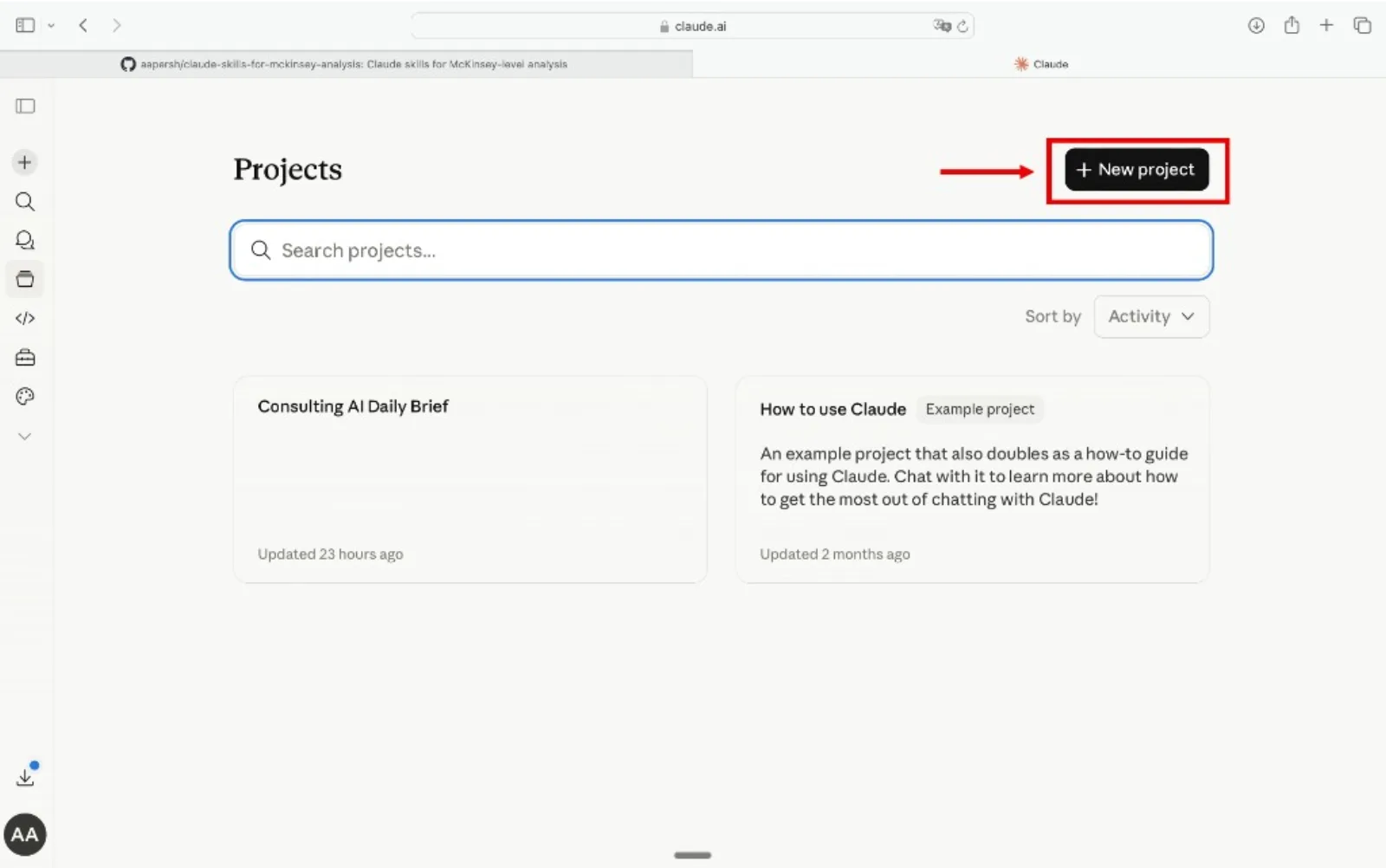
Go to claude.ai, open the left sidebar, click Projects, then Create Project. Name it something like "Board Strategy Deck" or "Executive Committee Deck" so you can reuse it across engagements.
Add the skills as Project Knowledge
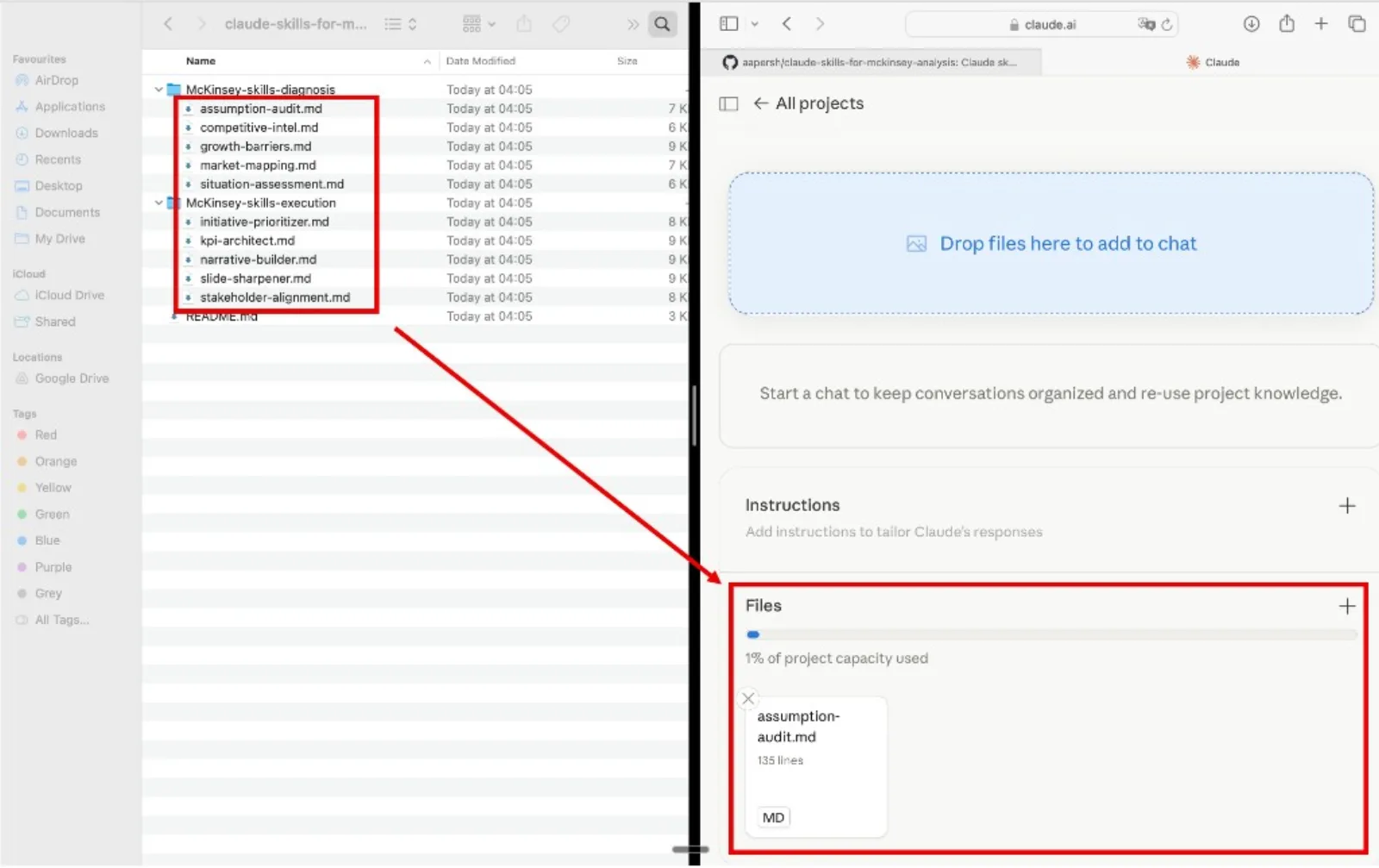
Inside your project, open Project Knowledge, click Add Content, and upload the .md files. Add the skills relevant to the stage you are working on. Claude will reference them automatically in every conversation inside that project.
Start using the skills
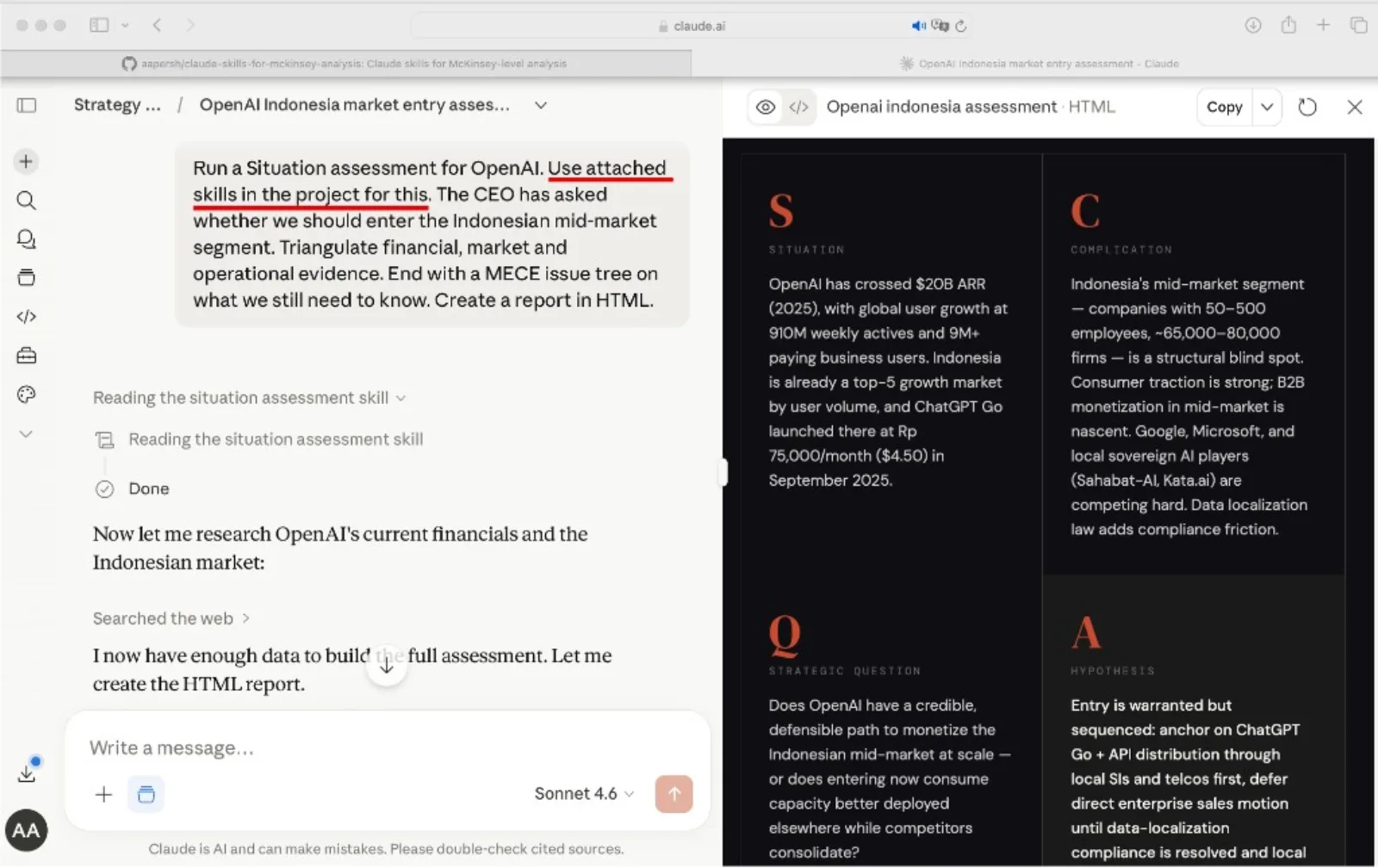
Open a new conversation inside the project, paste in your data, and name the skill you want Claude to run. Claude reads it from project knowledge and applies the framework to your inputs.
Tip
Name the skill in your prompt. Phrases like "Use the define-governing-question skill" or "Run the action-title-writing skill" tell Claude which framework to load instead of letting it guess.
Example prompts
- "Use the define-governing-question skill to turn this CEO ask for a 'growth strategy' into one decision-forcing question."
- "Use the issue-tree-decomposition skill to break down why our margins are falling into MECE branches."
- "Use the recommendation-statement skill to turn this analysis into one committed recommendation and a precise board ask."
- "Use the action-title-writing skill to rewrite these label headings as takeaway titles that read as a narrative spine."
How to choose a skill
Match your immediate question to the right skill. Each one maps to a specific step a board-facing strategy deck typically moves through.
The quality bar
Every skill is designed to push Claude toward outputs that hold up in a board or executive committee review. Each uses a named method where one exists: MECE issue trees, driver-tree decomposition, value-at-stake sizing, weighted trade-off scoring, or action-title logic. No invented statistics, no vague recommendations.
Frequently asked questions
What does this pack help me build?
It helps you build a complete boardroom strategy deck in PowerPoint, from framing the mandate through to the narrative on the final slide. The 25 skills walk Claude through framing, diagnostics, strategic choices, execution planning, and communication, so the deck argues one decision-ready story.
Do I have to use all 25 skills on every deck?
No. Each skill is standalone. Run them in sequence for a full strategy deck, or pull a single skill when you only need one slide or section, such as an action title pass or a risk register for an executive committee update.
How do the skills get into Claude?
Each skill is one folder with a single SKILL.md file. Add the ones you need to a Claude Project as Project Knowledge, then name the skill in your prompt and Claude applies that method to your inputs.
Will the output feel AI-generated to a board?
The skills push Claude toward named methods rather than filler: MECE issue trees, driver-tree decomposition, value-at-stake sizing, weighted trade-off scoring, and action-title logic. The result is structured, assumption-explicit, and decision-forcing, the way a board or executive committee expects.
How do I turn the analysis into actual slides?
Draft each section in Claude with these skills, then build the deck in Oria so the slides come out board-ready and do not feel AI-generated. The skills shape the argument; Oria turns it into the PowerPoint.

Andrew Persh
Founder, Oria
Former top-tier strategy consultant turned product builder. Andrew founded Oria to help professionals create boardroom-ready presentations without the formatting overhead.