

Claude Excel Skills: Which Ones to Install for Strategy Work
Claude Excel skills now run in three places: the official Excel add-in, the Claude chat window, and Claude Code. This page weighs the 21 Excel-inspired strategy skills in this pack against the built-in options, and says plainly where you do not need a skill at all.
What Claude Excel skills are, and what they change
A Claude Excel skill is a folder with a SKILL.md file in it: a written procedure Claude loads when the task matches, so it follows your method instead of improvising one. That definition is simple. The decision underneath it is not.
The real question is not which files to download. It is which of several overlapping routes your spreadsheet work should take, because Anthropic now ships an official Excel add-in that covers a large part of what people install skills for. Skills and the add-in are not competing products, and most of the confusion on this topic comes from treating them as a choice.
Get the call wrong in one direction and you install twenty-one files to solve something the add-in handled on the day you switched it on. Get it wrong in the other and you hand a blank sidebar a question that needed a structure before it needed a formula. The 21 skills here govern how the analysis is framed, structured, stress-tested and reported, which is the part the add-in leaves to you. For the frameworks themselves, see 21 consulting-style strategy skills for Claude, and for the end-to-end workflow around them, our consultant's guide to Claude.
Download all 21 skills
One zip, one folder per skill. Free, no signup.
Which Claude Excel skills should you install first?
It depends on whether your bottleneck is the workbook or the thinking that goes into it. Most people searching for Claude Excel skills have the second problem and buy tools for the first.
If the job is reading, fixing or extending a workbook that already exists, start with the official Claude for Excel add-in and install nothing: Anthropic's documentation lists it as generally available on Pro, Max, Team and Enterprise plans, and it reads the open workbook directly with cell-level citations. If the job is building a named financial model from scratch, use a model-builder skill, the DCF, LBO, comps or returns-waterfall kind, which writes a real .xlsx file with live formulas. If the job is deciding what to analyse before any of that, use framing and governance skills: a MECE issue tree, an inputs-calcs-outputs design, an assumption registry. The 21 skills on this page are the third kind.
How we chose what goes in this pack
These are not the twenty-one most impressive things Claude can do with a spreadsheet. They are the ones that survived four filters, plus a fifth that removed more candidates than the other four put together.
- A written procedure had to beat an unwritten one. If Claude already does the job well from a one-line prompt, a skill file adds ceremony and nothing else. Formula explanation and error tracing were cut on exactly this test.
- Each one was tested against the add-in, not an empty chat. A skill that only wins when Claude for Excel is unavailable is a workaround rather than a skill. Where the built-in behaviour is already enough, the blocks below say so.
- The output had to be auditable. Every skill ends in something a reviewer can check line by line: a tab inventory, a formula spec, a scored grid, an assumption register. Narrative summaries of a model were cut.
- Macros and VBA were ruled out from the start. Anthropic lists macros and VBA operations, along with data tables, as unsupported in Claude for Excel, so nothing in the pack depends on them.
- What we ignored on purpose. Round numbers, model benchmark scores, prompt-library length and anything that duplicated the model-building pack. Four candidates were cut for overlap.
Key takeaways before you install anything
- Decide what you want out of the other end. A finished workbook, a written spec you build yourself, and an answer typed into the sheet you already have are three different products. Nearly every complaint about Claude Excel skills is a mismatch here.
- Check where the work actually happens. The add-in works inside the open workbook, chat skills work on files you upload and download, and Claude Code works on files on disk. Only the first sees your live formula relationships while you edit them.
- Check the gate before you plan around it. Claude for Excel is generally available on Pro, Max, Team and Enterprise, and Anthropic lists Excel 2016 and 2019 perpetual licences, iPad and Android as unsupported. Skills used in chat carry none of those platform limits.
- Prefer the route that leaves a trail. A skill that hands you a tab inventory and an assumption register can be reviewed by someone who was not in the room. A workbook that simply appeared in one turn usually cannot.
- Skip the skill where the built-in behaviour already covers it. Debugging a formula, tracing how a number was derived, and flexing an assumption while keeping dependents intact are documented add-in features. Installing a skill for those is the same work twice.
Claude Excel skills compared, route by route
Seven routes, one row each, against the five rules above. Oria is in the table because the model output almost always ends up in a pack, not because it belongs in a spreadsheet. Read the last column first. It is the one that tells you when a route is the wrong one, and on this topic picking the wrong route costs far more than picking the wrong tool inside it.
| Route | What it produces | Where it runs | Plan and platform gate | Auditability | Skip it when |
|---|---|---|---|---|---|
| Claude for Excel add-in | Edits and answers inside the open workbook, with cell-level citations | In Excel: web, Windows, Mac | Pro, Max, Team, Enterprise. Not on Excel 2016 or 2019 perpetual, iPad or Android | High: every answer points at the cell it came from | There is no workbook yet |
| File creation in Claude chat | A finished .xlsx you download | Claude.ai and the desktop app | Paid plans | Medium: the file is inspectable, the reasoning sits in the transcript | The workbook is already open in front of you |
| The 21 Excel-inspired strategy skills | Specs, structures, trees and registers, not workbooks | Anywhere Claude runs, including inside the add-in | Free to download, no signup | High by design: every output is a checklist or a register | You already know the structure and just need it built |
| The 25 Excel model builders | A real .xlsx model with live formulas | Chat, or the add-in | Free to download, no signup | Medium to high: the formulas are inspectable | You do not yet know which model answers the question |
| Oria | Board-ready slides built from the model output | PowerPoint add-in, plus Claude and ChatGPT over MCP | Paid, Professional upward | High on template compliance, not on the numbers | The deck has to look designed rather than governed |
| Copilot in Excel | Edits, charts and PivotTables in the workbook | Windows, Mac, web, iPad, iPhone, Android | An eligible Microsoft 365 licence | Medium: edits keep editable links to source data | You need the procedure written down and reusable |
| Claude Code and the API | A repeatable script that runs over many files | Your machine or your pipeline | Developer setup required | Highest: the procedure is version-controlled | The job is a one-off |
None of these routes is accurate enough to leave unsupervised, which is the part that vendor pages skip. Vals AI runs a Finance Agent benchmark of 537 questions written with Stanford researchers, a global systemically important bank and industry experts, scoring models on the work an entry-level financial analyst does. On its public leaderboard in September 2026 the leading model, Claude Opus 4.7, answers 64.37% of them correctly, with Claude Sonnet 4.6 just behind on 63.33%. That is a strong score, and it is also more than a third of the questions wrong. Anthropic's own documentation arrives at the same place from the other direction: it says Claude for Excel is not recommended for final client deliverables without human review or for audit-critical calculations without verification.
Claude Excel Skills in the Official Add-In: Who Is It For?
This is the route most people should try before downloading anything. Claude for Excel puts Claude in a sidebar beside the open workbook. Anthropic's documentation describes it as generally available to Pro, Max, Team and Enterprise plans, running on Excel on the web, on Excel for Windows with a Microsoft 365 subscription from build 16.0.13127.20296 or later, and on Excel for Mac from version 16.46. You install it from Microsoft AppSource, or an admin deploys it organisation-wide.
It belongs in an article about skills because skills are not separate from it. The documentation states that Skills you have enabled in your Claude settings are available in all the Claude for Microsoft 365 add-ins, that Claude applies relevant ones automatically, and that you can invoke one by typing a forward slash in the sidebar.
What the add-in already does with no skill at all is the honest part of this page. It answers questions about the workbook with cell-level citations you can click through. It updates values while keeping formula relationships intact so dependents recompute. It traces the root cause of a #REF! or a #DIV/0! error, populates templates, and sorts, filters and edits pivot tables on request. It pulls external context through connectors including S&P Global, LSEG and Daloopa. If that describes your problem, the correct number of skills to install is zero.
The trade-off: the add-in is bounded by where it runs and what it will touch. Anthropic lists data tables and macro and VBA operations as unsupported, and rules out Excel 2016 and 2019 perpetual licences, iPad and Android entirely. It also carries a standing warning to use it only with trusted spreadsheets, because an external file can carry hidden instructions.
Claude Spreadsheet Skills in Chat: Who Are They For?
The second route needs no add-in and no Excel window at all. Anthropic's file-creation feature, announced in September 2025 and made generally available for paid plans on 21 October 2025, states that Claude can create and edit Excel spreadsheets, documents, PowerPoint slide decks and PDFs directly in Claude.ai and the desktop app. You upload the data, describe what you need, and download the file.
This is the route for everyone the add-in does not reach, and that list is longer than it looks: an Excel 2016 or 2019 perpetual licence, a locked-down environment where the Office Store is switched off, an iPad, an Android phone, or an organisation whose admin has simply not deployed the add-in yet. It is also the right route when you want a file produced rather than an open workbook edited, which is what most people actually mean when they ask for a Claude Excel skill that builds something.
Skills behave identically here. The same SKILL.md folder you enable in settings is the one the add-in picks up, so there is no separate chat version to maintain and no risk of two copies of a procedure drifting apart. That portability is the strongest practical argument for writing a procedure as a skill rather than keeping it in a prompt library.
The trade-off: Claude cannot see a workbook it has not been handed. Working this way means passing files back and forth, and the live formula graph in the file open on your screen is invisible until you upload that file. For interrogating a model somebody else built, the add-in wins by a distance.
The 21 Excel-Inspired Strategy Skills: Who Are They For?
This pack is for the work that happens before a formula exists and after the model is finished: framing the problem, designing the data structure, choosing the analysis, stress-testing it, and reporting it to people who will never open the workbook. The seven domains further down run in that order.
The phrase Excel-inspired is doing specific work. These skills take the disciplines that make a spreadsheet auditable, separating inputs from calculations, one formula per row, every assumption explicit and registered, tie-out checks built in, and apply them to strategy analysis, where those disciplines are usually absent. A market sizing built to that standard can be argued with, line by line. One written as prose can only be believed or not.
That matters more than it sounds. Raymond R. Panko of the Shidler College of Business at the University of Hawai'i reviewed 85 operational spreadsheets that had been through intensive inspection, most of it by commercial auditing firms, and reported in his 2015 paper for the European Spreadsheet Risks Interest Group that collectively those studies found errors in 94% of the spreadsheets studied. His explanation for why that keeps happening is blunter than the number itself: spreadsheet developers and corporations, he writes, are "highly overconfident in the accuracy of their spreadsheets". A model produced in a single conversational turn inherits that overconfidence and adds a new one on top.
The trade-off: these skills produce specs, structures and registers, not finished workbooks. The DCF Structure Builder hands you the free cash flow build, the equity bridge, the WACC formula and the two-variable sensitivity table to construct; it does not hand you the .xlsx. If the file is what you wanted, the next block is where to go.
The 25 Excel Model Builders: Who Are They For?
If the model does not exist yet and you already know which model you need, this is the wrong pack and its sibling is the right one. The 25 Claude skills for Excel modelling cover DCF, trading comps, precedent transactions, sum of the parts and the football field on the valuation side; three-statement, LBO, debt schedule, accretion and dilution and sources and uses on the deal side; the private equity returns waterfall, value creation bridge, fund model and the IRR and MOIC calculator on the returns side; and market sizing, revenue build, unit economics and pricing on the strategy side, with sensitivity tables, a scenario manager and Monte Carlo to pressure-test them.
The difference between the two packs is the artefact. Those skills write a real workbook with live formulas rather than hardcoded numbers, recalculate it, and check for formula errors before handing the file over. This pack writes the thinking that decides whether the model is the right one and whether anybody will be able to audit it in three months.
In practice the two run in sequence rather than as alternatives. Frame the question with an issue tree, design the tab structure, then build. Teams that skip the first half produce immaculate models of the wrong question, which is almost impossible to spot from the outside.
The trade-off: a model builder assumes you already know which model answers the question. That assumption is safe on a valuation and unsafe on most of what gets called strategy work, where choosing the analysis is the analysis.
Oria: Who Is It For?
Every route above ends in a number that somebody has to present. Oria is built for that last step, and for the corporate end of it specifically: board packs, steering committee decks, diligence exhibits, operating-model slides and dense frameworks held to an enforced corporate template. It is aimed at the kind of output a tier-one consulting firm produces, and the whole design follows from that one decision.
It reaches users through two surfaces. There is a PowerPoint add-in that runs in the task pane on Windows, macOS and PowerPoint for the web, and there is a connector for Claude and ChatGPT over MCP, so a slide can be built from the chat you are already in without opening PowerPoint at all. If your sensitivity table has just finished in a Claude conversation, the second route is the shorter one. Our setup guide for Claude and ChatGPT covers both.
On data handling, the position is straightforward and worth stating plainly because readers of a finance page ask: Oria does not train on customer content, Professional and Team do not persist presentation content after delivery, and Enterprise adds private cloud deployment and custom LLM integration.
The trade-off: Oria is built for the corporate environment only, so it loses on highly visual work. Founder fundraising and pitch decks, launch and campaign decks, student presentations and marketing one-pagers are all jobs where visual impact matters more than template compliance, and a design-led tool such as Gamma, Canva, Pitch or Beautiful.ai will beat it and look better doing it. If that is the deck you are making, go there instead and do not fight the tool.
Copilot in Excel: Who Is It For?
If your organisation has blocked the Office Store, routes everything through Microsoft licensing, or simply already pays for Copilot, the honest recommendation is to start there rather than fight procurement for a second sidebar. A tool that is approved and installed beats a better tool that is neither.
Microsoft's documentation describes Copilot in Excel as building and editing workbooks using Excel's own tools: adding, renaming and deleting worksheets, inserting and modifying cell values and ranges, generating data from prompts, performing calculations and applying formulas, creating charts and PivotTables with editable links to source data, and applying sorting, filtering and conditional formatting. It also retrieves data from other workbooks saved to OneDrive or SharePoint.
It has one advantage the Claude add-in does not, and it is decisive for some readers. Microsoft lists Copilot in Excel as available on Windows, Mac, the web, iPad, iPhone and Android, with full edit mode on Windows, Mac and the web and chat on mobile. Claude for Excel does not run on iPad or Android at all. If the person who reviews the model does it on a tablet on a train, that settles the question before any capability comparison begins.
The trade-off: Copilot works on the workbook rather than on the method. There is no portable equivalent of a SKILL.md folder you write once and hand to a colleague, so the procedure tends to live in whatever the last person happened to type. If what you want is a repeatable house standard for how a model gets built, that is the gap.
Claude Code and the API: Who Is It For?
The fourth Claude route is about repetition rather than analysis. If the same transformation runs across forty workbooks every month, the right artefact is a script a reviewer can read, not a chat transcript nobody can. The skill file works here unchanged, because a SKILL.md folder is plain text: the same procedure that governs a sidebar conversation can govern a batch job.
The failure mode this route prevents is silent, and there is a well-documented instance of it. In October 2020 Public Health England reported that 15,841 positive coronavirus test results between 25 September and 2 October had been left out of the daily case figures, because the lab results were being collated in the old .xls format, which stops at 65,536 rows. As The Register reported at the time, nothing raised an error: rows past the ceiling were simply dropped. A scripted pipeline with a row-count assertion would have caught it on the first run. A person eyeballing a workbook did not catch it for a week.
That is the argument for writing the procedure down rather than repeating it. Panko's own prescription points the same way: his paper argues that the biggest need, on the empirical evidence, is massively more testing than anyone currently does. A checked-in script is inspectable. A conversation is not.
The trade-off: this is engineering, not analysis. It pays back on work that recurs on a schedule and costs more than it saves on anything you will do once, which is most strategy work by definition.
If you need X, go to Y
A good share of the people who search for Claude Excel skills want something this pack does not provide. Here is where each of those needs is actually served, including the rows that lead somewhere other than us. Pointing you at the tool that fits is cheaper for everyone than watching you install 21 files and conclude that Claude Excel skills do not work.
| If you need | Go to | Why |
|---|---|---|
| To install the add-in and see what it will not touch | Claude for Excel add-in: setup and real limits | The install path plus the honest boundaries: macros, links and external data |
| A finished DCF, LBO or returns waterfall as a workbook | 25 Claude skills for Excel modelling | Those skills write a live .xlsx; the ones here write the spec behind it |
| Charts and exhibits built from the model output | Claude skills for data visualisation | Chart choice and exhibit construction as their own discipline |
| Runway and fundraising models for a startup | Claude skills for startup financial modelling | Different question, different assumptions, different set of skills |
| The whole consulting workflow around the model | The consultant's guide to Claude | End to end, from framing the problem to the final pack |
| Spreadsheet help on an iPad or an Android phone | Copilot in Excel | Microsoft lists both platforms; Claude for Excel supports neither |
| A deck that has to look designed rather than governed | Gamma, Canva, Pitch or Beautiful.ai | Visual impact is their job, and it is not what Oria is built for |
| The board pack the finished model turns into | Oria, in Claude and ChatGPT | The PowerPoint add-in, or the MCP connector if you never leave the chat |
The 21 Excel-inspired skills you get
The collection is grouped into seven analytical domains. They run in the order a real engagement does, frame the problem first and govern the model last, but every skill is also useful on its own, and each one is a standalone SKILL.md file you upload through Claude's Skills settings. Read the Use when column first: it is the fastest way to work out which three you actually want.
The Excel-inspired strategy skill set
Domain 1 · 3 skills
Problem Framing
Use these before any analysis begins. A MECE issue tree, a hypothesis-first brief, and a modular workplan are the three structural tools that determine whether the work answers the right question.
MECE Issue Tree Builder
Use when: A problem statement exists but lacks analytical structure
Output: Nested MECE issue tree plus flat Excel workplan with one row per sub-issue
Hypothesis-First Brief
Use when: Analysis needs structuring around a leading hypothesis before data work begins
Output: Pyramid Principle brief with governing thought, 3-5 MECE proof points, and minimum evidence set
Problem to Workplan
Use when: Framed issue tree needs converting into an Excel tracker for a multi-week engagement
Output: Full Excel workplan spec with tab inventory, Gantt logic, status formulas, and data validation lists
Domain 2 · 3 skills
Data Architecture
Use these before writing a single formula. The three structural disciplines, model blueprint, lookup layer, and input-calc-output separation, prevent the compounding errors that make models unauditable.
Excel Data Model Blueprint
Use when: Starting a new multi-tab model and need a clean structural foundation before any formulas
Output: Full tab inventory, color-coding standard, data-flow diagram, and conventions checklist
Lookup and Reference Layer
Use when: Model needs reference tables or lookup formulas that do not break when columns move
Output: Lookup tab design, named range registry, INDEX-MATCH and XLOOKUP templates, and robustness tests
Inputs-Calcs-Outputs Design
Use when: Model mixes assumptions with formulas and needs separation for auditability
Output: Three-tab design spec with Inputs layout, Calc row structure, Outputs grid, and compliance checklist
Domain 3 · 3 skills
Financial Modelling
Use these for the three most common analytical builds: a DCF, a sensitivity table, and a waterfall bridge. Each skill produces a formula-level spec you can build in Excel without guessing the structure.
DCF Structure Builder
Use when: A company or asset needs intrinsic valuation using discounted cash flow analysis
Output: FCF build table, DCF engine, equity bridge, WACC formula, and two-variable sensitivity table
Sensitivity Matrix Builder
Use when: Base case model is complete and needs to show robustness across a range of assumptions
Output: Data Table setup, input range definitions, conditional formatting rules, and base case highlight guide
Bridge and Waterfall Constructor
Use when: A financial change between two periods needs decomposing into its component drivers
Output: Balanced bridge items table, Excel stacked-bar data structure, and chart formatting instructions
Domain 4 · 3 skills
Strategic Analysis
Use these for the three canonical strategy models: market sizing, competitive benchmarking, and portfolio prioritization. Each produces a structured, auditable Excel output rather than a narrative.
TAM-SAM-SOM Sizing Model
Use when: A business needs a credible, auditable market size estimate for a strategy or investor presentation
Output: Dual-method model (top-down and bottom-up) with driver trees, triangulation summary, and SOM range
Competitive Benchmarking Grid
Use when: A strategy engagement requires a structured multi-dimensional comparison of 5-8 competitors
Output: Normalized scoring grid with heat-map formatting, weighted overall score, and radar chart specification
Portfolio Prioritization Matrix
Use when: Leadership needs to rank competing initiatives against a constrained resource budget
Output: Weighted scoring model, 2x2 scatter plot spec, tier assignments, and cumulative resource allocation check
Domain 5 · 3 skills
Scenario and Risk
Use these after the base case is built. A three-scenario toggle, a tornado chart, and a risk-adjusted expected value are the three tools that convert a point estimate into a defensible range.
Three-Scenario Model
Use when: A model needs to reflect a range of outcomes across Base, Bull, and Bear assumptions
Output: Scenario Inputs tab design, INDEX-MATCH selector formula, and scenario comparison table with deltas
Sensitivity Tornado
Use when: A completed model needs to reveal which assumptions drive the most output uncertainty
Output: Ranked tornado data table, horizontal bar chart structure, and top-3 critical assumption summary
Risk-Adjusted Value
Use when: A decision requires a single probability-weighted number from multiple scenario outcomes
Output: EV calculation, scenario contribution table, P_Bull vs P_Bear sensitivity, and break-even probability
Domain 6 · 3 skills
Executive Reporting
Use these to convert a completed model into a board-ready output. A print-ready summary tab, a recurring KPI dashboard, and an SCQA narrative brief are the three reporting tools a senior audience expects.
Output Summary Tab
Use when: A completed model needs a print-ready single-page executive summary for a board pack
Output: Zone layout, KPI tile designs, narrative block structure, sensitivity summary, and assumption log
KPI Dashboard Structurer
Use when: A leadership team needs a recurring monthly performance tracker in pure Excel, no macros
Output: 8-12 KPI column structure, RAG formulas, INDEX-MATCH period selector, and sparkline setup instructions
SCQA Narrative Wrapper
Use when: Model findings need translating into a structured brief for a senior audience
Output: One-page SCQA brief with Situation, Complication, Question, Answer, supporting points, and next steps
Domain 7 · 3 skills
Modelling OS
Use these to build the invisible infrastructure that makes every model consistent, auditable, and hand-off ready. Architecture, audit, and assumption registry are the three governance tools that separate professional models from analyst spreadsheets.
Model Architecture Template
Use when: Starting any new model and needing a consistent structural shell before content is added
Output: Full tab inventory, color-coding table, number format standards, Checks tab design, and startup checklist
Formula Audit Checker
Use when: An inherited or completed model must be reviewed for errors before sign-off or client presentation
Output: 12-step audit checklist with Excel navigation paths, hardcode detection steps, and audit log structure
Assumption Registry Builder
Use when: A model needs formal documentation of every material assumption for handover or investment approval
Output: Full register column structure, sensitivity rank formula, source quality guide, and sign-off process
Categories 1 to 3 frame the problem, design the data structure, and build the core model. Categories 4 to 6 run the analysis, test the scenarios, and produce the executive output. Category 7 governs the model infrastructure.
How to choose a Claude Excel skill
Skip the directory hunt. Each of these Claude Excel skills maps to one specific analytical need, so pick the row that matches what you are trying to do and use that skill. If your need is not on this list, it probably belongs to one of the other routes above, and the routing table will be quicker than scanning here. For a wider walkthrough of working this way, see our consultant's guide to Claude.
Setup Guide
- Step 1Download all 21 skills (.zip)
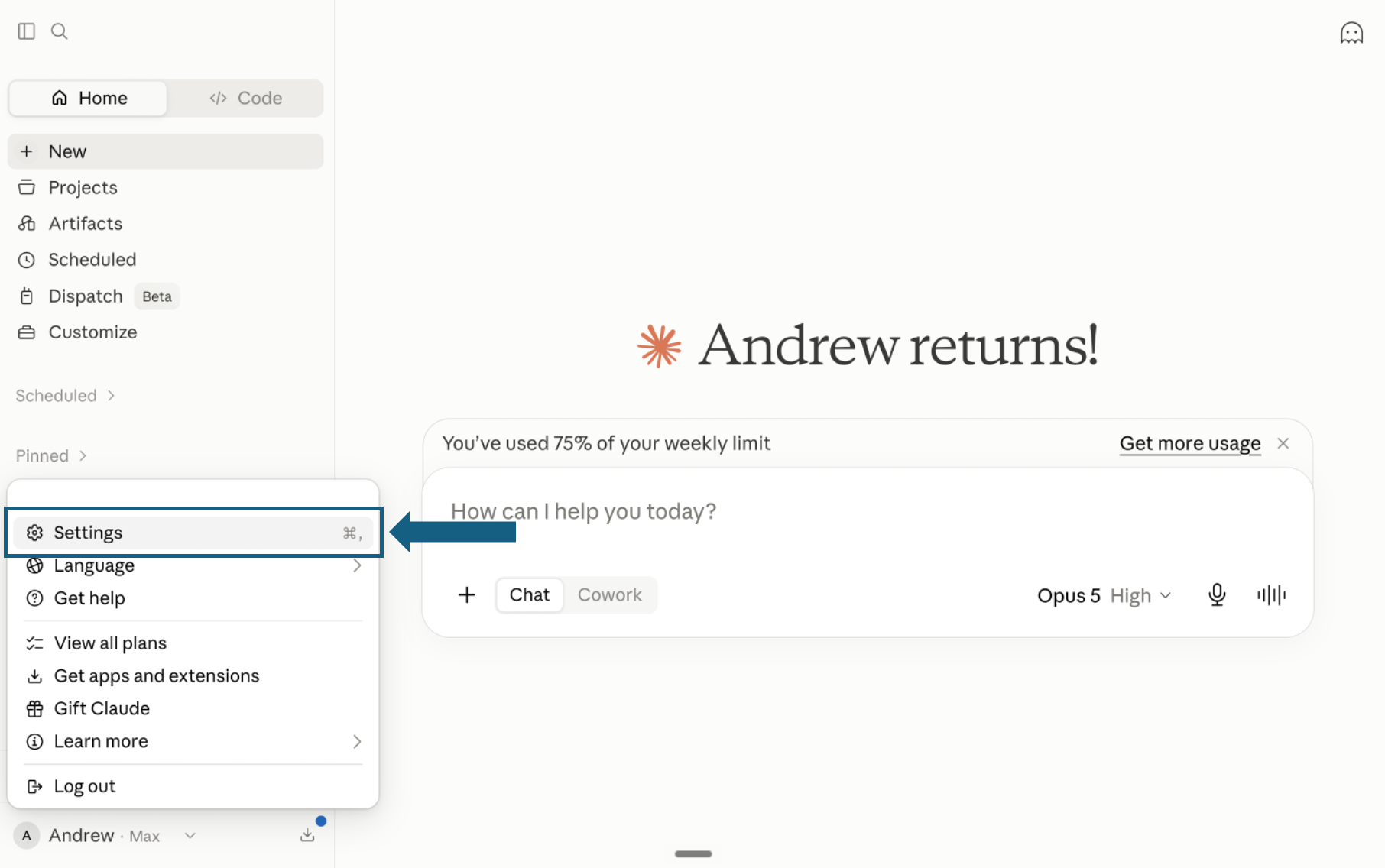
Download the pack and open Settings
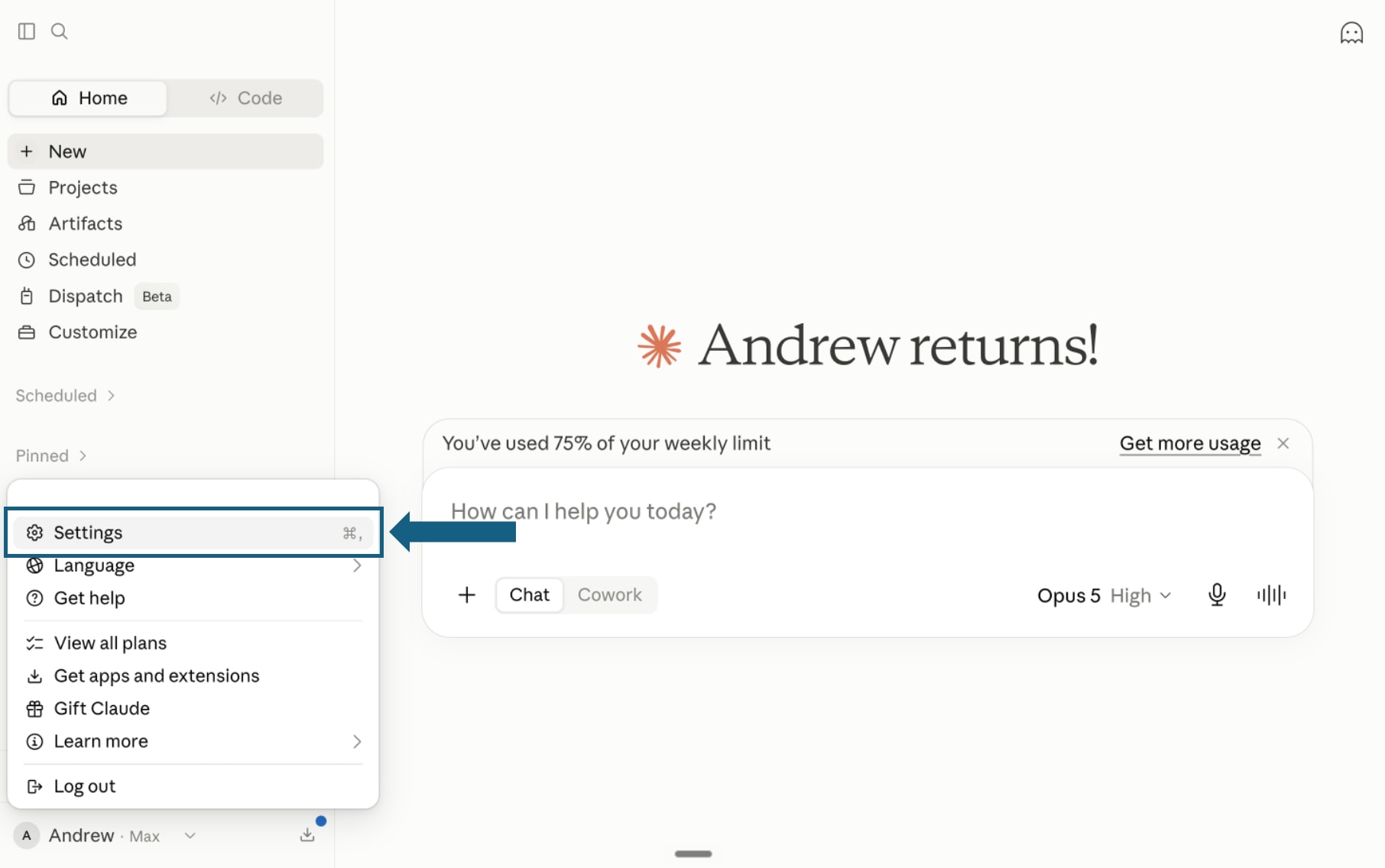
Download the pack and unzip it so each skill remains in its own folder with its SKILL.md file. In Claude, open your profile menu and select Settings.
Open the screenshot to view it full size. - Step 2
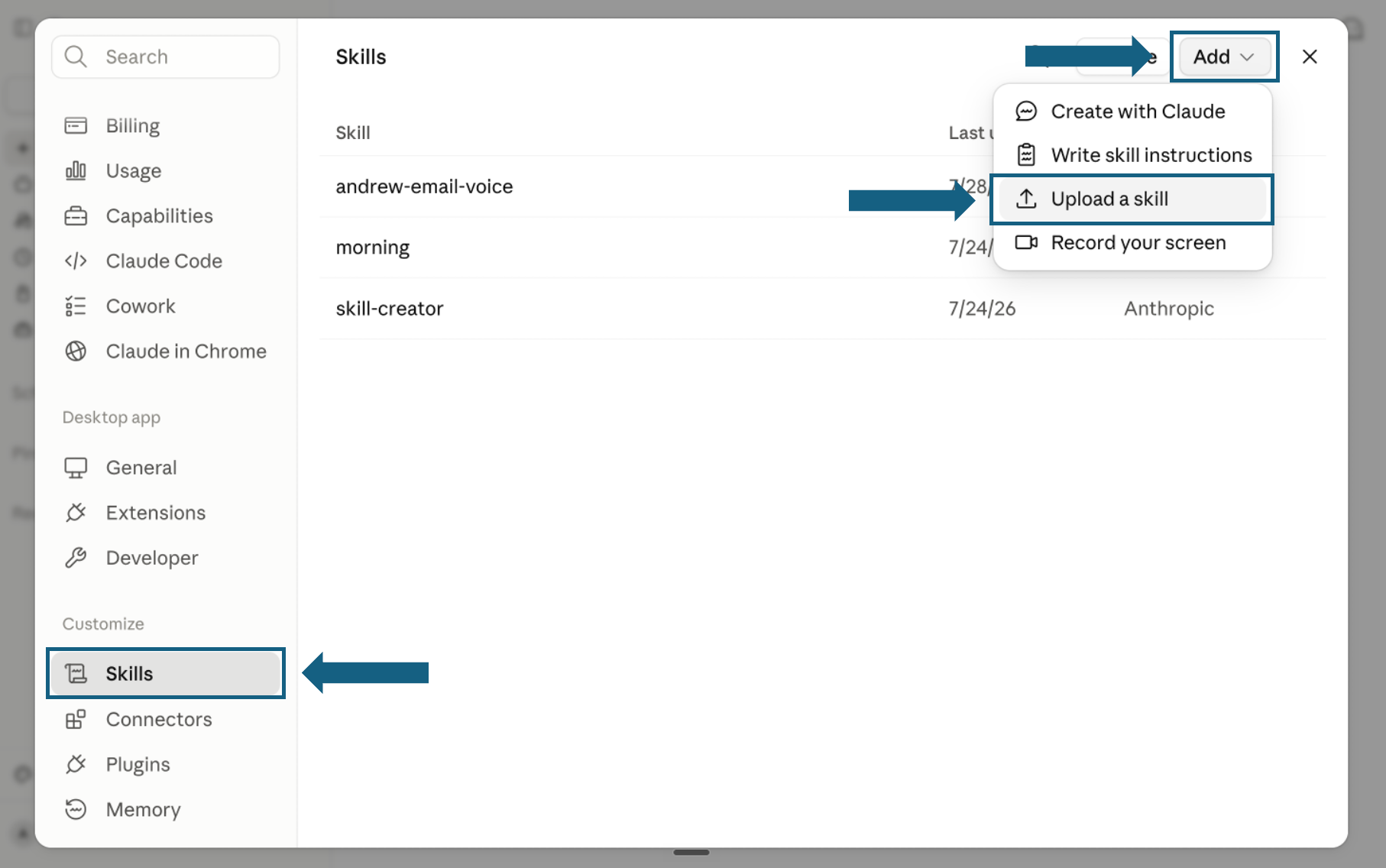
Open Skills and start an upload
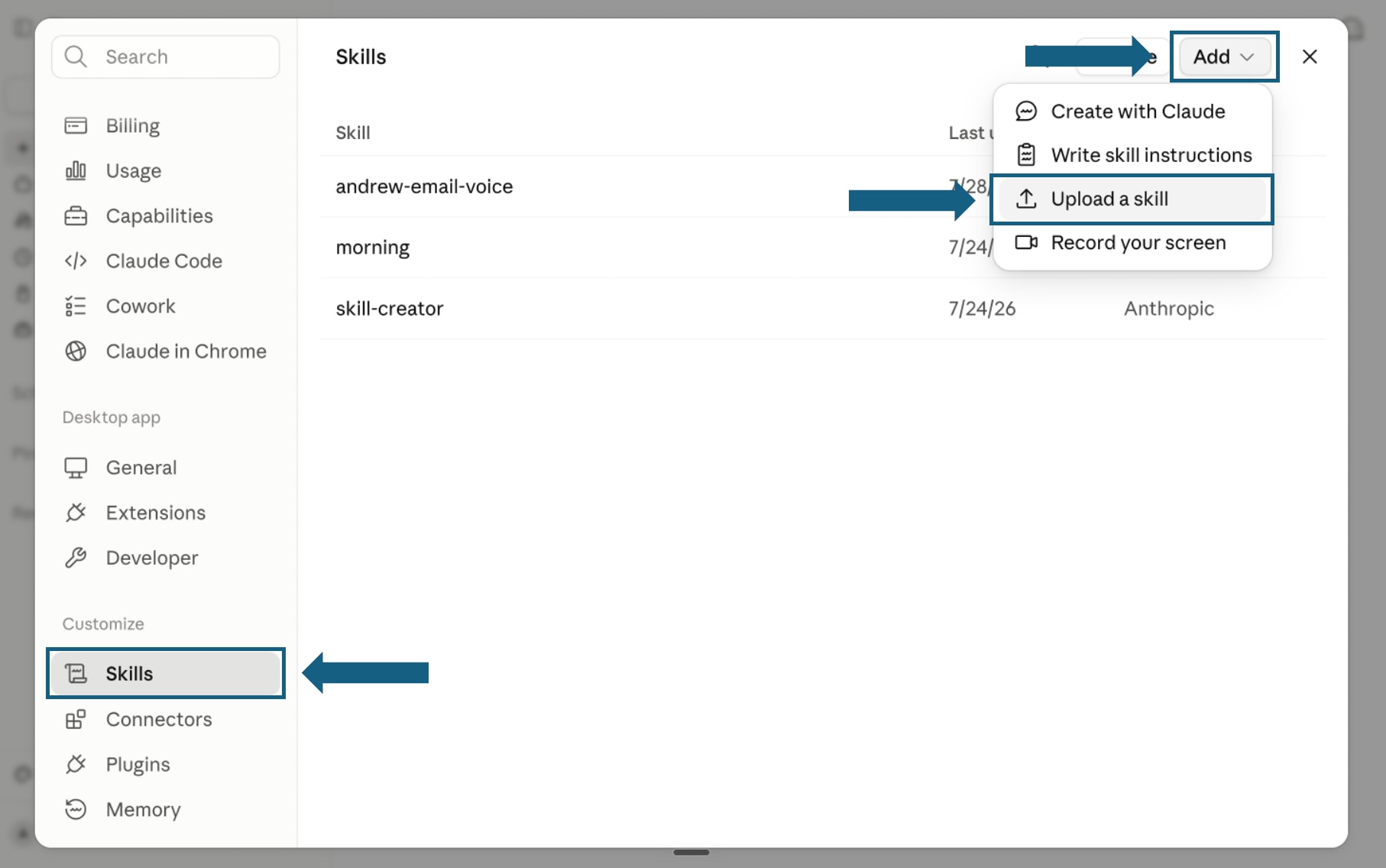
In Settings, select Skills under Customize. Open Add and choose Upload a skill.
Open the screenshot to view it full size. - Step 3
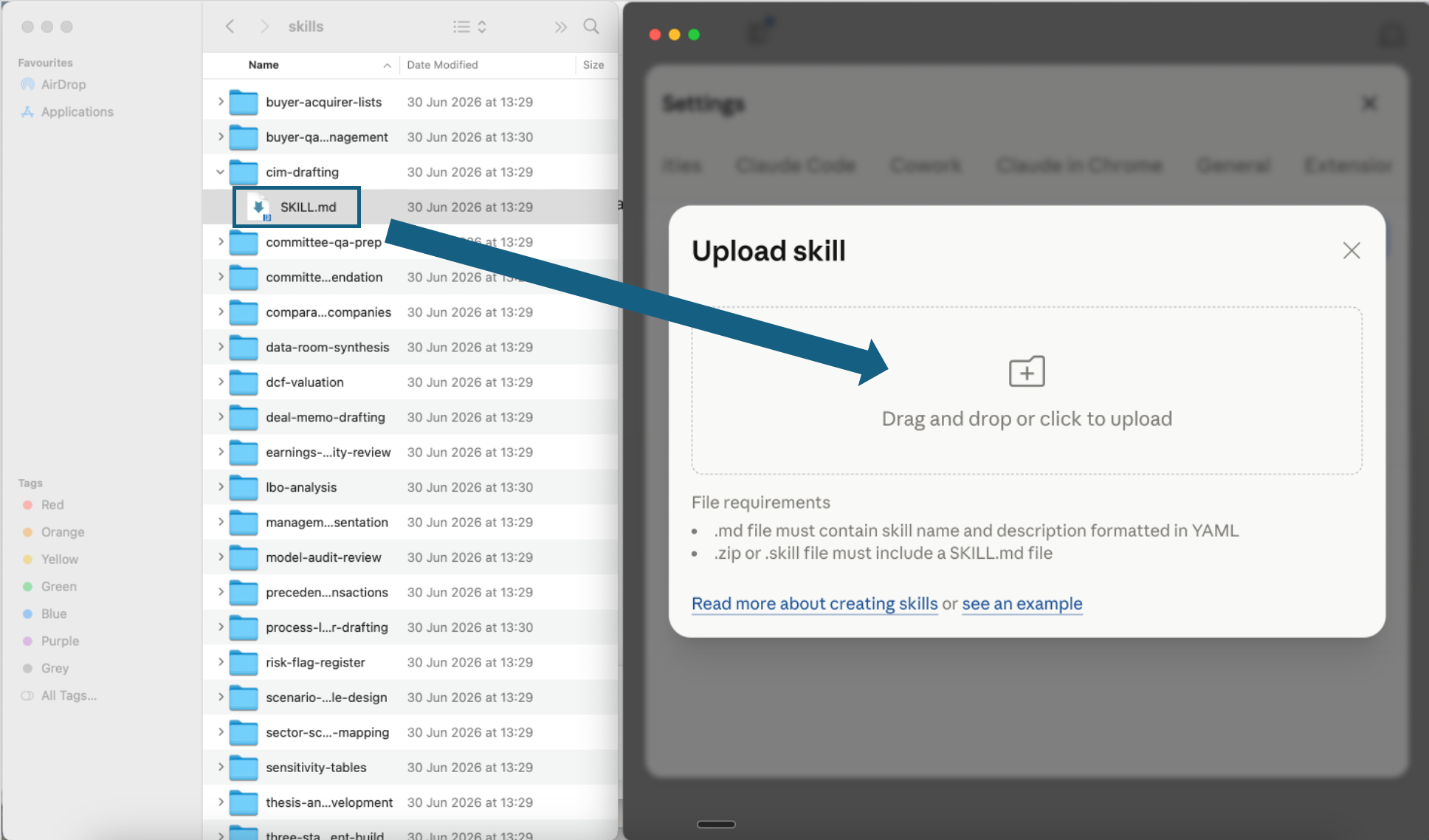
Upload one skill file
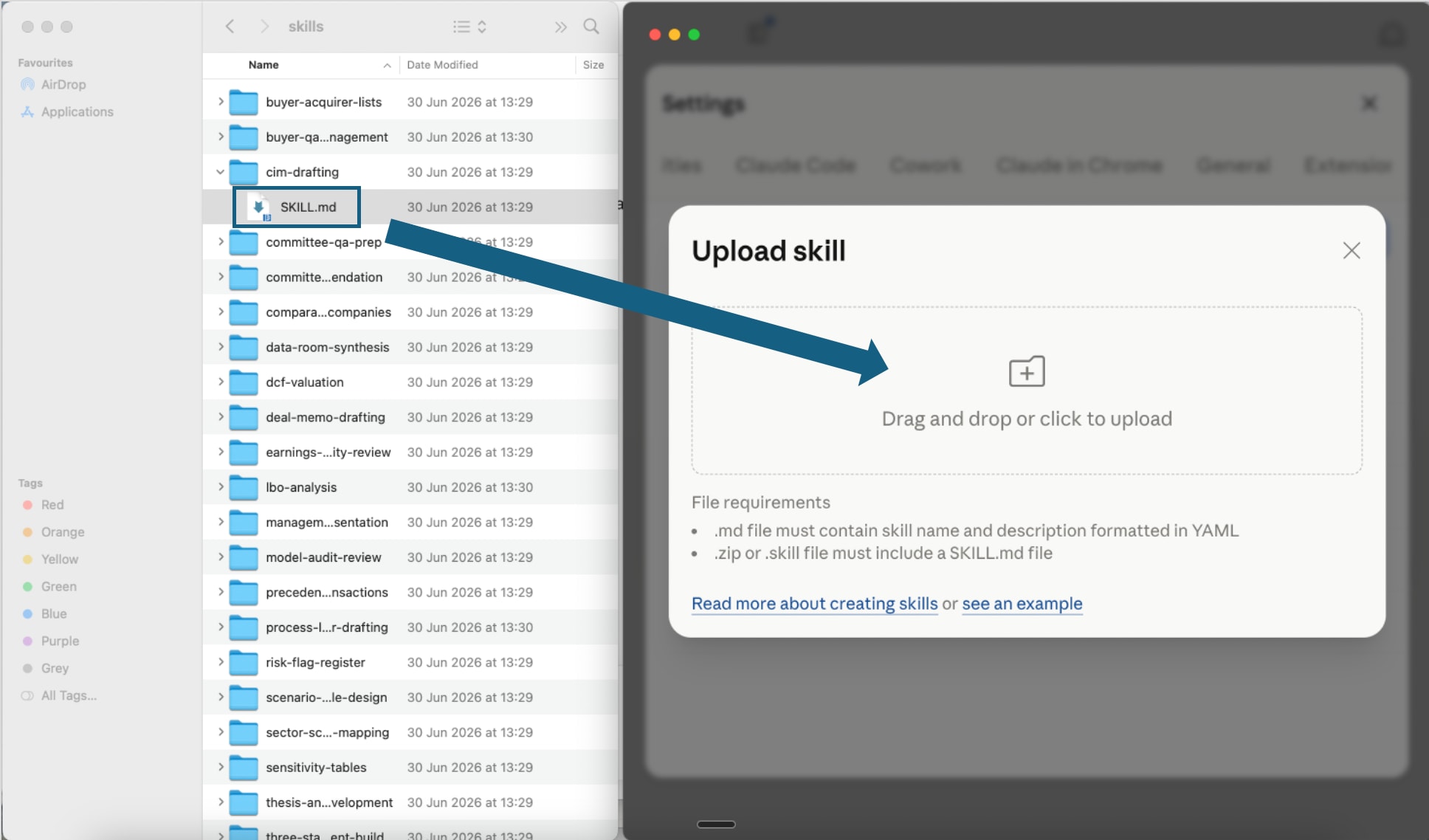
Open one extracted skill folder and drag its SKILL.md file into the upload window, or click the upload area to choose it. Repeat for each skill you want to add.
Open the screenshot to view it full size. - Step 4
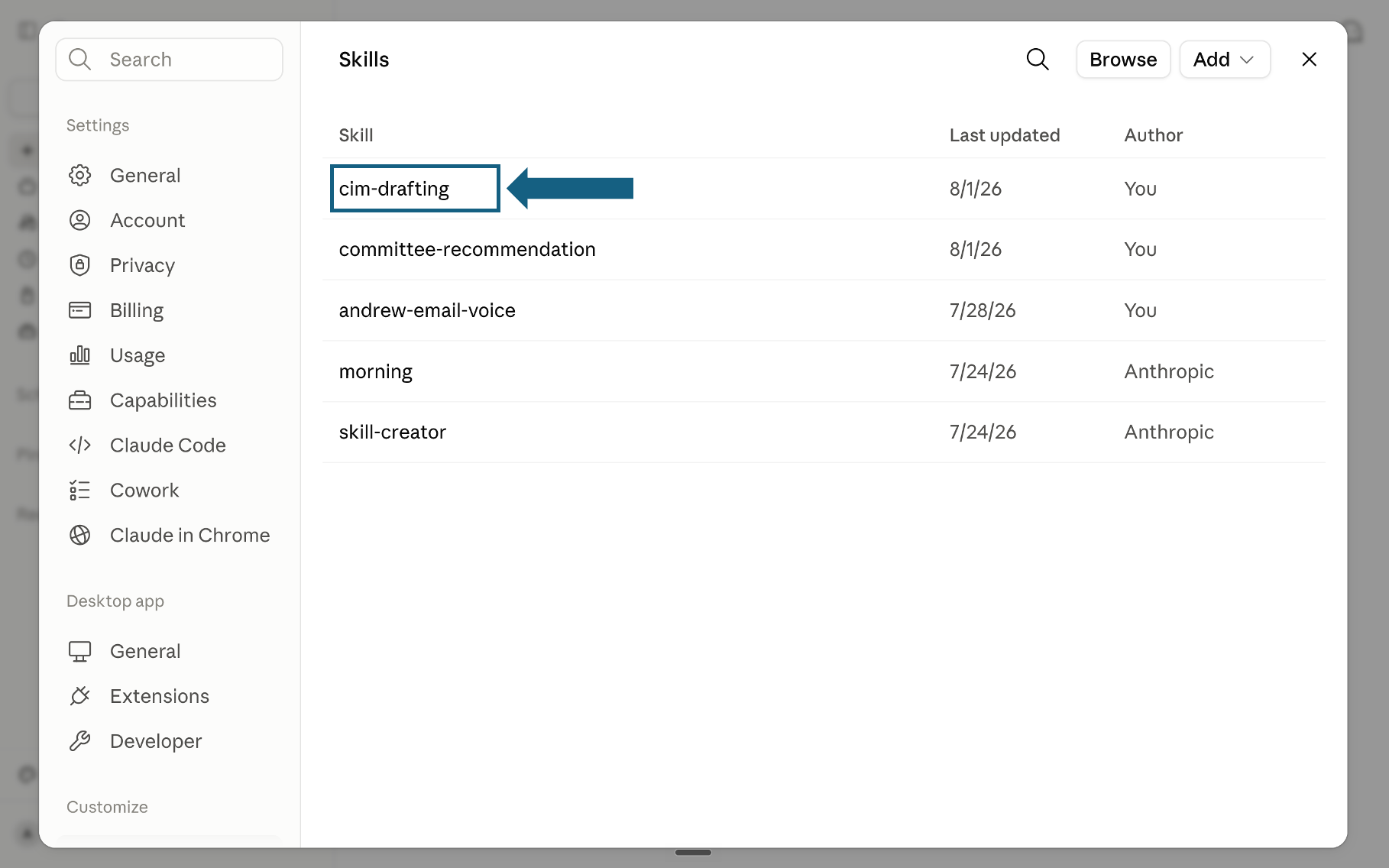
Confirm the skill was added
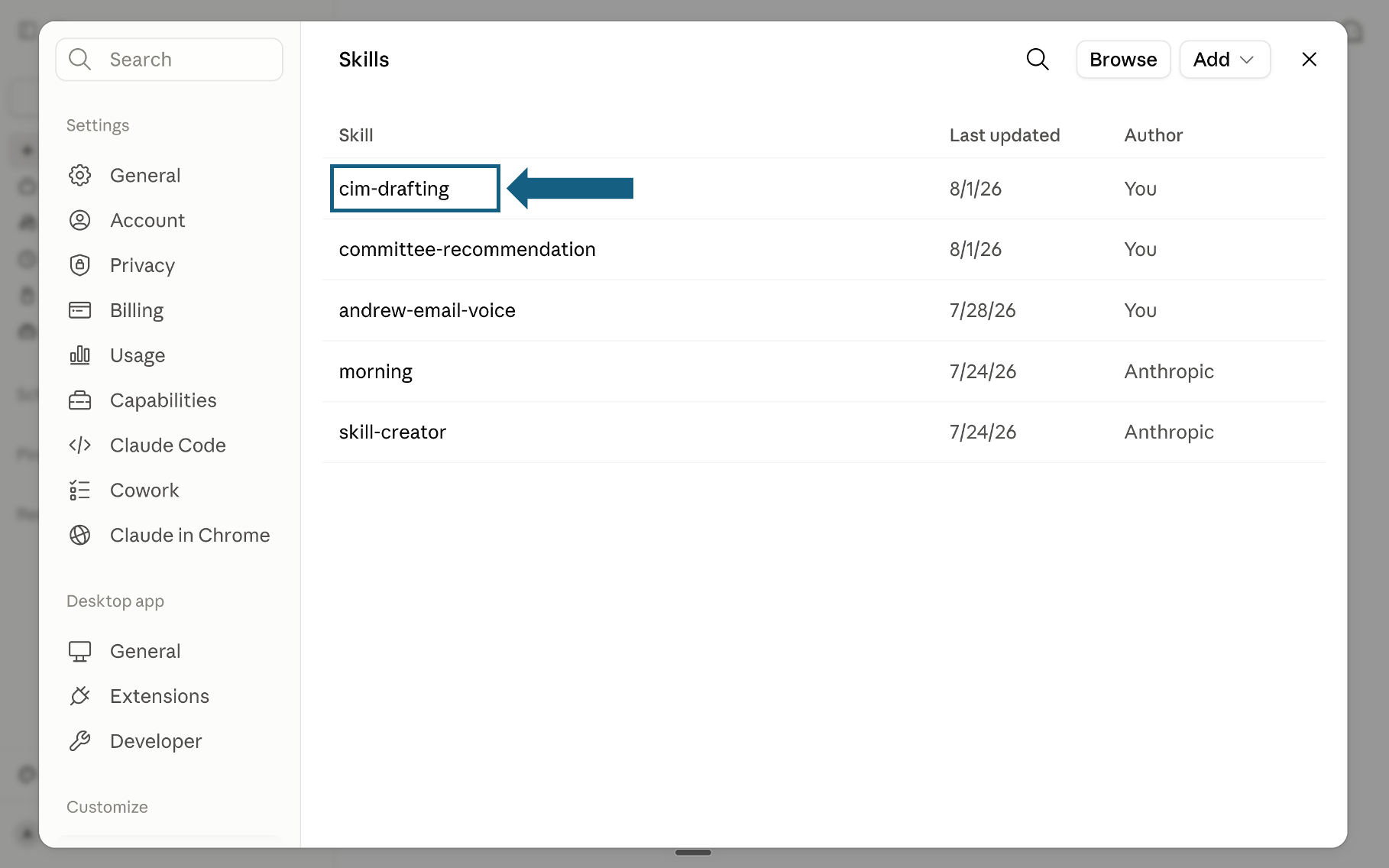
Return to the Skills list and check that the skill appears. Select its name to open it.
Open the screenshot to view it full size. - Step 5
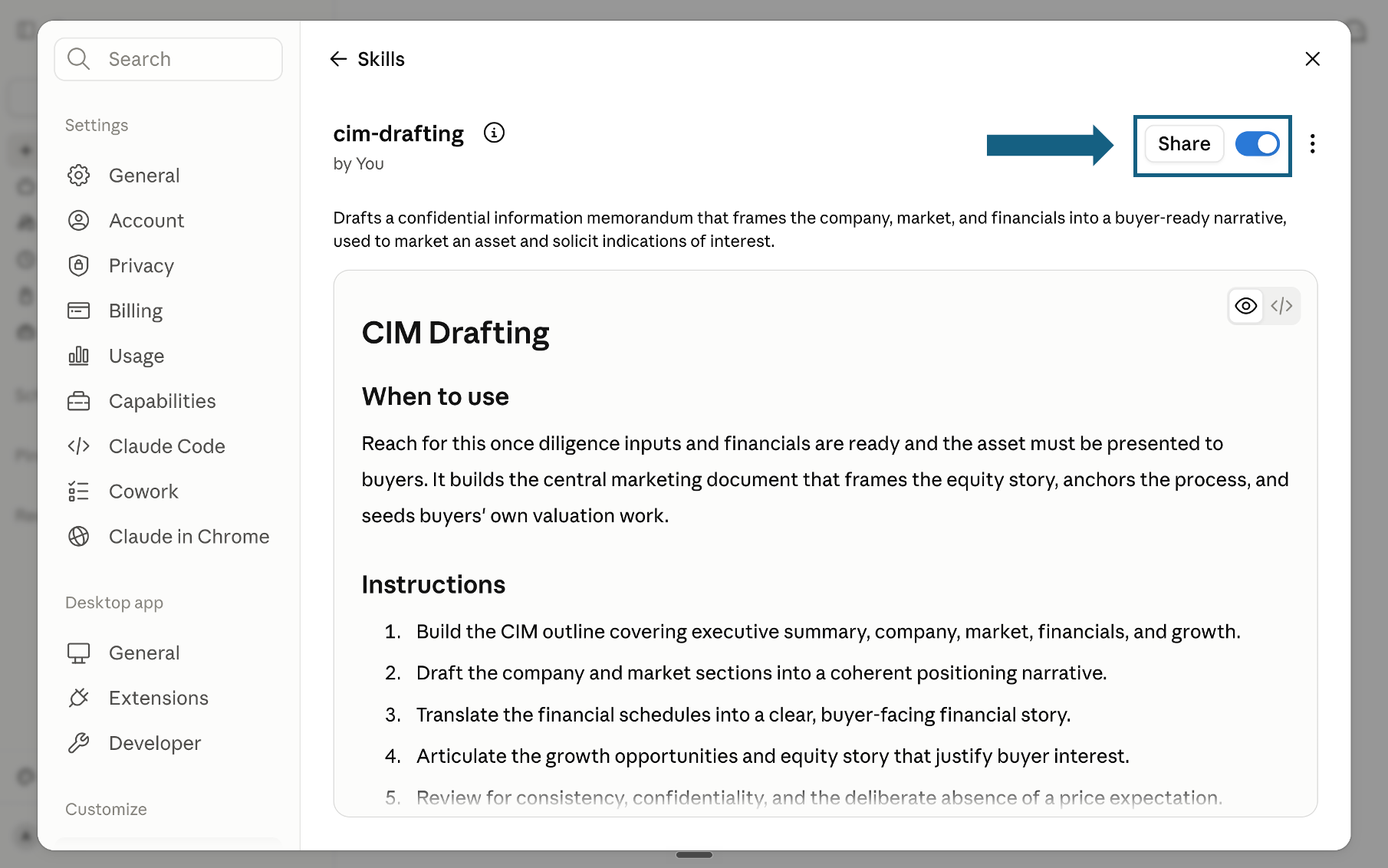
Review and turn on the skill
Review the skill's name, description, and instructions, then make sure the switch beside Share is on. A blue switch means the skill is turned on; sharing it is optional.
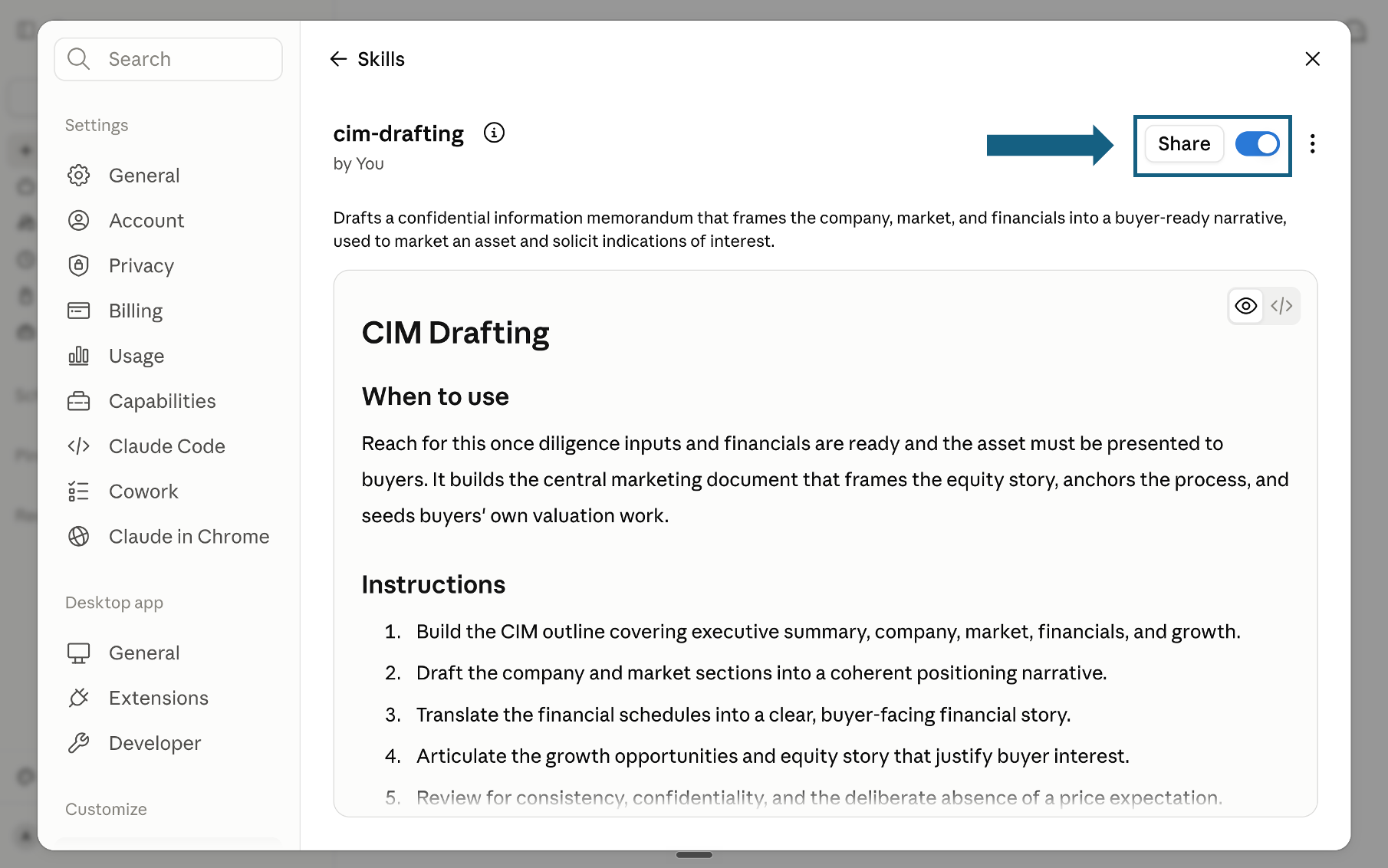
Open the screenshot to view it full size.
Try a skill
Tell Claude which skill to use and provide the relevant files or context. Review every output before sharing it.
- "Use the mece-issue-tree-builder skill to decompose this strategy problem."
- "Use the dcf-structure-builder skill to build a DCF for this business."
- "Use the three-scenario-model skill to stress-test our revenue assumptions."
- "Use the scqa-narrative-wrapper skill to structure these findings for the board."
The quality bar
Every skill is designed to push Claude toward outputs that meet the same partner-grade quality bar, the standard a senior associate would hold each deliverable to before it leaves the room.
Frequently asked questions
What are Claude Excel skills?
A Claude Excel skill is a folder containing a SKILL.md file: a written procedure Claude loads when the task matches, so it follows a set method instead of improvising one. Anthropic's documentation says Skills enabled in your Claude settings are available in all the Claude for Microsoft 365 add-ins, that Claude applies relevant ones automatically based on what you are doing, and that you can invoke one directly by typing a forward slash in the sidebar. The same file works in chat, in the Excel add-in and in Claude Code.
Is Claude for Excel free?
No. Anthropic's documentation lists Claude for Excel as generally available to Pro, Max, Team and Enterprise plans, so it needs a paid Claude subscription, and use of it counts against that account's existing usage limits. The skills are a separate matter: a SKILL.md file is a text file, and the 21 on this page are free to download with no signup. What you pay for is the model that runs them, not the procedure itself.
Are Claude Excel skills the same thing as the Claude for Excel add-in?
No, and the confusion costs people time. The add-in is where Claude runs: a sidebar inside Excel that reads the open workbook, cites cells and edits values while preserving formula relationships. A skill is what Claude follows once it is running. You can use the add-in with no skills installed, and you can use skills with no add-in at all by working in Claude.ai. Most people who think they need skills need the add-in first.
How do I add a Claude Excel skill?
Download the pack and unzip it so each skill keeps its own folder and SKILL.md file. In Claude, open your profile menu, choose Settings, select Skills under Customize, open Add and choose Upload a skill. Drag the SKILL.md file into the upload window, check that the skill appears in the list, then open it and make sure the toggle beside Share is on. The five-step walkthrough with screenshots is further up this page.
What is the best Claude skill for Excel?
There is no single best one, because the three common jobs need different things. To interrogate or repair a workbook that already exists, use no skill at all and open the add-in. To build a named financial model, use a model-builder skill such as the DCF or LBO one. To decide what to analyse before any of that, start with the MECE Issue Tree Builder and the Inputs-Calcs-Outputs Design from this pack. Pick by the job, not by the download count.
Can Claude write Excel macros or VBA?
Not in the add-in. Anthropic's documentation lists macros and VBA operations as unsupported capabilities in Claude for Excel, alongside data tables. Claude can discuss VBA and write code outside the workbook, but the add-in will not create or run it for you. If a workflow depends on macros, either keep that part manual or move it to a scripted route such as Claude Code, where the automation lives outside Excel and can be reviewed like any other code.
Does Claude for Excel work on Mac?
Yes. Anthropic lists Excel on Mac from version 16.46, build 21011600 or later, alongside Excel on the web and Excel on Windows with a Microsoft 365 subscription from build 16.0.13127.20296 or later. Excel 2016 and 2019 perpetual or volume licences are not supported on either platform, and neither is Excel on iPad or Excel on Android. On Mac you activate the add-in from Tools, then Add-ins, and sign in with your Claude account.