

Full-Compute Claude Prompt Pack for Serious AI Insiders
Most people run Claude at a fraction of its ceiling and wonder why it feels slow. This full-compute Claude prompt pack is 6 Claude skills built to spend compute the way it was meant to be spent: deep, parallel, and relentless. Download it once, then reload the pattern on any task instead of babysitting the chat window.
What the full-compute Claude prompt pack is
A shallow prompt gets a shallow answer, no matter how capable the model is behind it. Six Claude skills, each with a scoped job, turn a one-line ask into a request that actually spends the compute Claude has on offer: explicit depth, multiple angles held at once, a critique pass before anything ships, and a stated output format instead of a guess.
Insiders who get more out of Claude are not writing longer prompts for the sake of length. They are structuring the ask: rewrite it to state scope, explore several angles in parallel, chain a draft into a critique and a final pass, tune the output for density, save the pattern as a template, and hand off the whole brief so Claude runs it end to end.
Each run of the pack does four things. It rewrites a shallow ask into one with stated depth and format. It surfaces more than one angle in a single pass instead of committing early. It forces a critique stage before a result is called final. And it packages the whole pattern so you reload it on the next task instead of re-deriving it from memory.
Each skill is one folder with a SKILL.md file. Add it to a Claude Project or a Claude Code skills directory and Claude applies the method whenever you name it in a prompt.
Download all 6 skills
One zip, one folder per skill. Free, no signup.
The 6 skills in the full-compute Claude prompt pack
The pack runs in the order a full-depth request actually needs, rewrite first, hand off last, but every skill is also useful on its own for a targeted step.
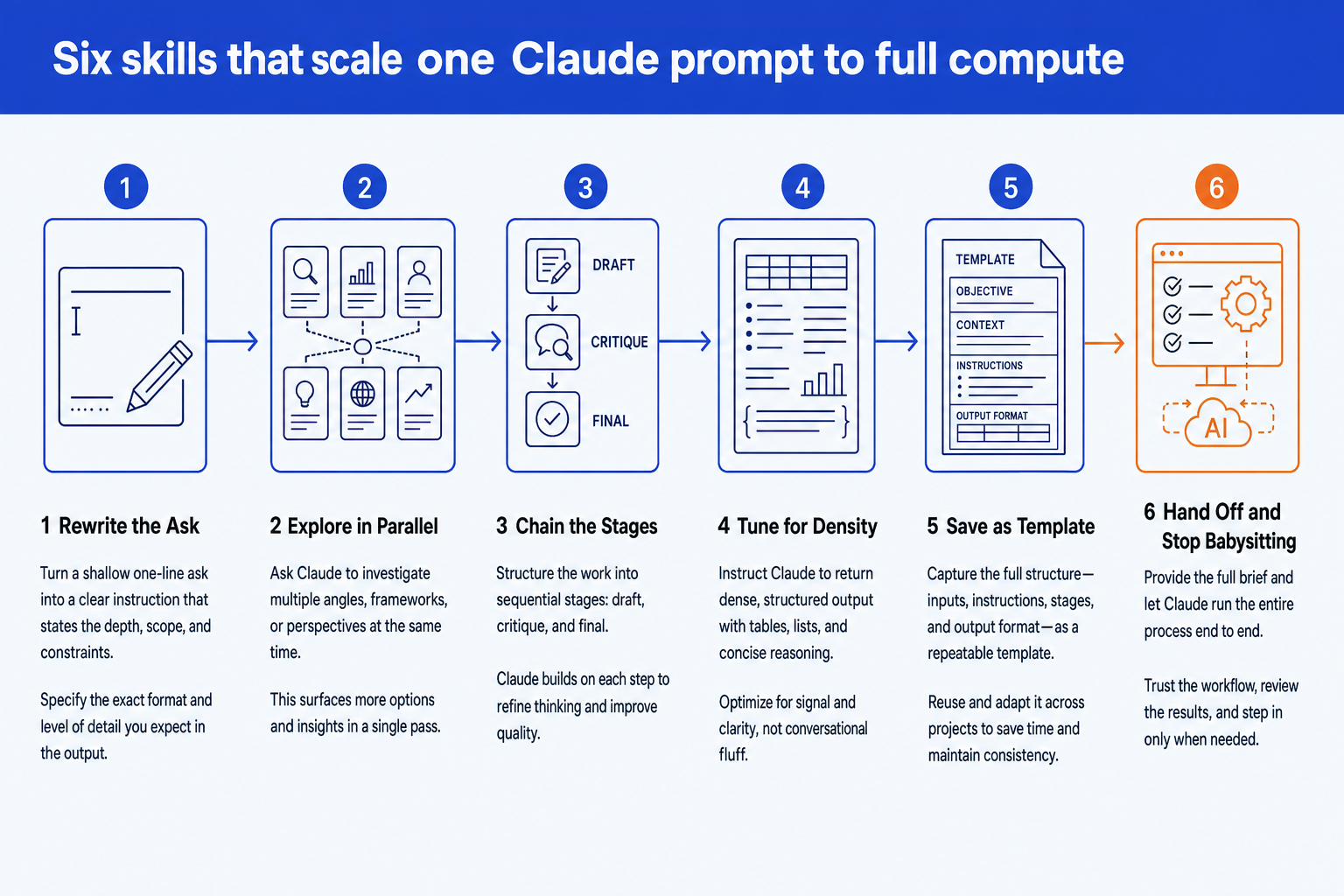
Stage 1 · 1 skill
Rewrite the Ask
Most Claude sessions run at a fraction of the model's ceiling because the prompt never asks for more. This stage turns a shallow one-line request into an instruction that states exactly how deep, how wide, and in what format the answer should come back.
Prompt Ceiling Rewrite
Use when: You have a one-line ask and want Claude to run it at full depth instead of guessing at scope
Output: A rewritten prompt with explicit depth, scope, and output-format instructions attached
Stage 2 · 1 skill
Explore in Parallel
A single pass through a question surfaces one answer. This stage asks Claude to hold multiple angles, frameworks, or hypotheses in mind at once inside the same response, so you see the tradeoffs before committing to one path.
Parallel Angle Exploration
Use when: A question has more than one legitimate framework or angle and a single-pass answer would miss real options
Output: A side-by-side comparison of each angle explored, with a recommended path and the reasoning behind it
Stage 3 · 1 skill
Chain the Stages
A first draft is rarely the best draft. This stage structures the work into sequential stages inside one prompt: a draft, a critique against a stated bar, and a final version that fixes what the critique found.
Draft-Critique-Final Chain
Use when: The deliverable is complex enough that a first pass will not be the best pass
Output: A draft, a self-critique against a stated bar, and a final version that resolves every flagged issue
Stage 4 · 1 skill
Tune for Density
Claude defaults to conversational padding unless told otherwise. This stage rewrites the response instruction so the output comes back as dense, structured sections, lists, and tables instead of chatty prose.
Token Density Tuning
Use when: Claude's answer reads like chat filler instead of a dense, structured deliverable
Output: A rewritten response instruction that forces structured sections and lists instead of prose padding
Stage 5 · 1 skill
Save as Template
A prompt pattern that only lives in one chat gets rebuilt from memory, slightly worse, next time. This stage saves the objective, context, instructions, and output format as one reusable template you reload for the next task.
Reusable Task Template
Use when: A prompt pattern worked well once and you do not want to rebuild it from memory next time
Output: A saved template with placeholders for objective, context, instructions, and output format
Stage 6 · 1 skill
Hand Off and Stop Babysitting
Babysitting the chat window wastes the exact compute this pack is trying to capture. This stage writes the full brief once, decisions and all, so Claude runs the entire task end to end and reports back only when it is done.
Autonomous Handoff Brief
Use when: You want to state the outcome once and let Claude run the whole task without a back-and-forth
Output: A single brief with every decision pre-specified and a built-in self-check before Claude reports done
Setup guide
Download the prompt pack
The zip contains all 6 skills, one folder per skill, each with a single SKILL.md file. Unzip it anywhere. Keep the whole set, or pull out just the stage you need.
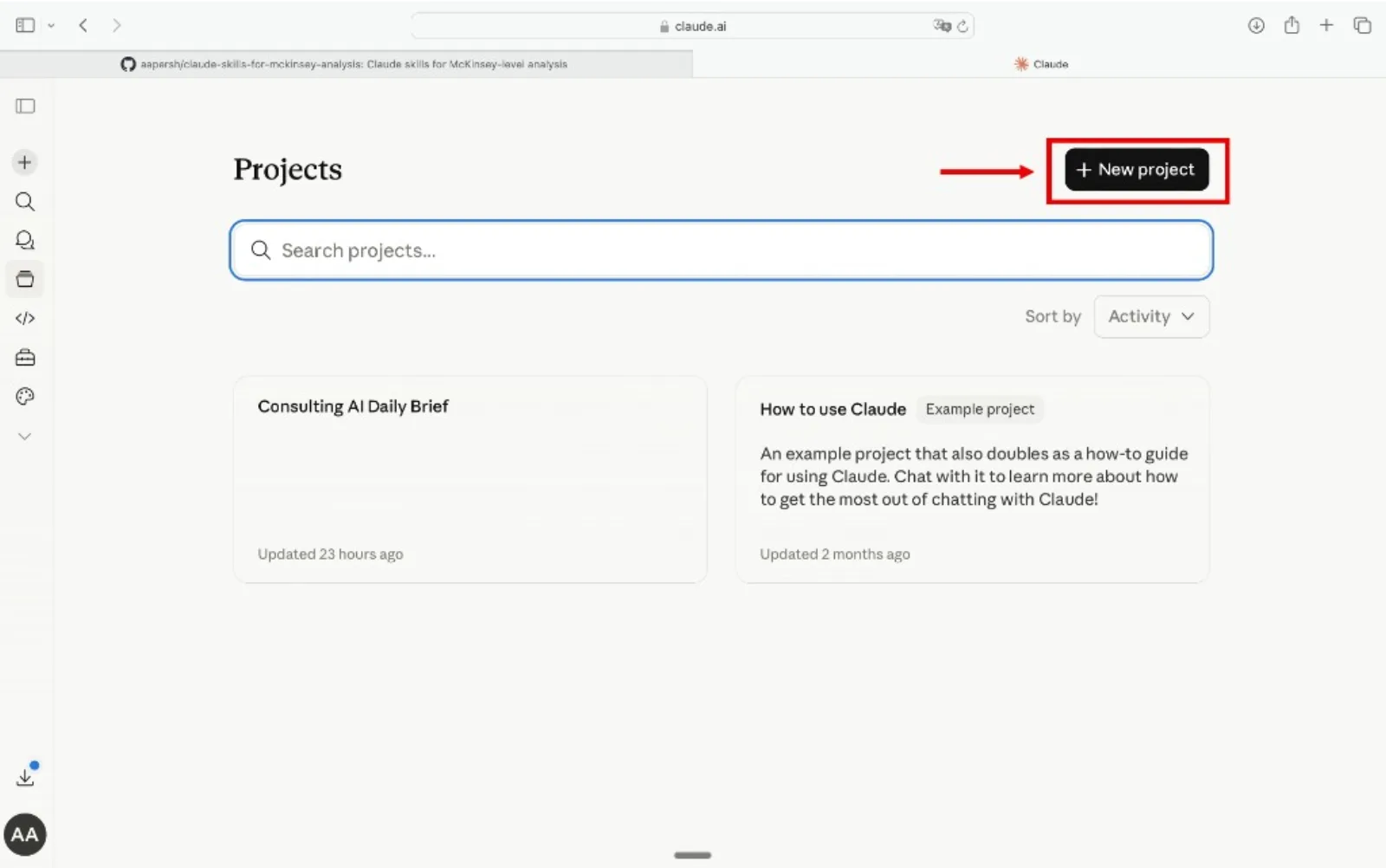
Create a Claude Project
Go to claude.ai, open the left sidebar, click Projects, then Create Project. Name it something like "Full-Compute Prompts" so you can reuse it across tasks. Working in Claude Code instead? Copy the unzipped skills/ folder into your Claude Code skills directory and skip to Step 4.
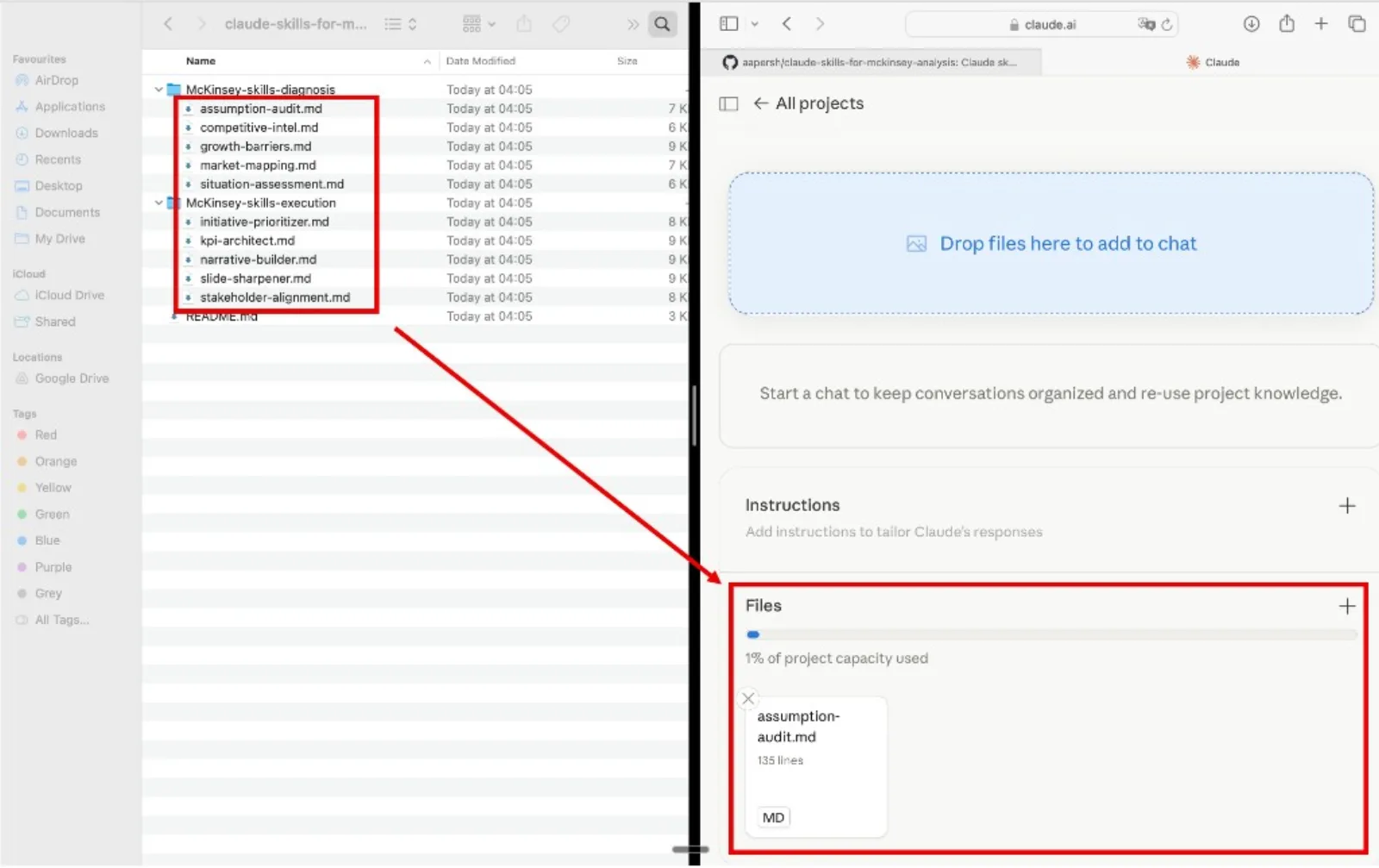
Add the skills as project knowledge
Inside your project, open Project Knowledge, click Add Content, and upload the .md files. Add one stage or all 6 skills. Claude references them automatically in every conversation inside that project.
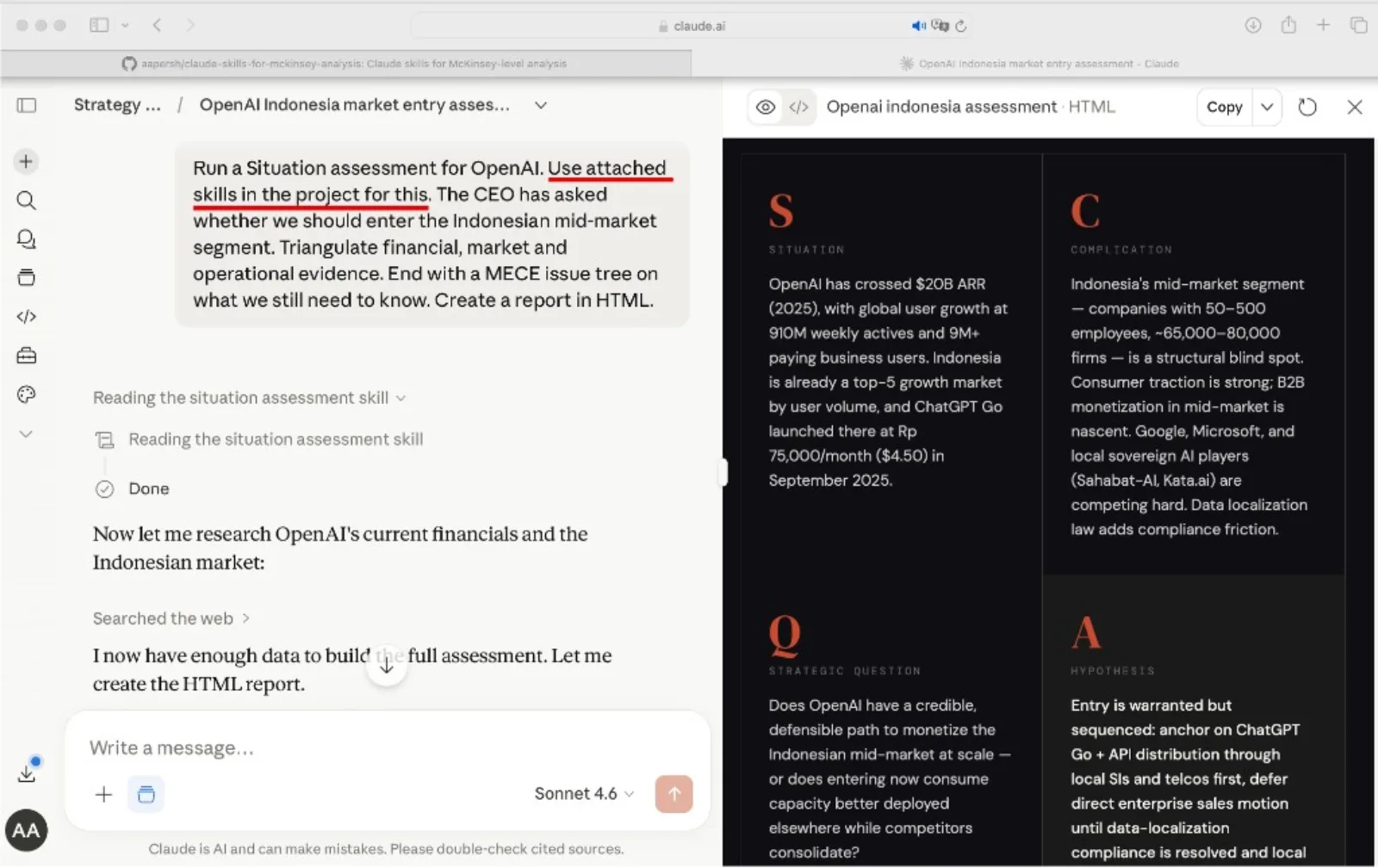
Name the skill and state the outcome
Open a new conversation, name the skill you want Claude to run, and state the outcome you want, not the steps. Claude reads the skill from project knowledge and applies it to your input.
Example prompts
- "Use the prompt-ceiling-rewrite skill on this one-line ask before you answer it, then run the rewritten version."
- "Use the parallel-angle-exploration skill to compare three ways to frame this problem before we pick one."
- "Use the draft-critique-final-chain skill on this deliverable. Do not stop at the first draft."
- "Use the autonomous-handoff-brief skill to turn this outcome into a brief you can run end to end without me checking in."
Tip
Name the skill explicitly in your prompt instead of describing what you want loosely. "Use the token-density-tuning skill" tells Claude exactly which method to load instead of letting it guess.
How to choose a skill from the pack
Match your immediate situation to the skill that answers it. For a method to build a custom skill from scratch, see our Claude Skill Factory for Strategy, and if your task is a multi-step build rather than a single deep answer, see the Claude Code agent pack for AI insiders.
The quality bar
Every skill in the pack is checked against this bar, so a full-compute run holds up under real review instead of just reading longer.
Frequently asked questions
What is the full-compute Claude prompt pack, exactly?
It is six Claude skills that turn a shallow one-line ask into a full-depth request. One rewrites the ask itself, one explores multiple angles in parallel, one chains a draft into a critique and a final version, one tunes the output for density, one saves the pattern as a template, and one writes the full autonomous handoff brief.
Does this work with any Claude plan, or only the highest tier?
The skills are prompt patterns, not a specific model tier. They push whichever Claude model you have access to closer to its own ceiling. A model with a larger context window and deeper reasoning shows the biggest gains from the parallel-exploration and chaining skills.
How is full compute different from just writing a longer prompt?
A longer prompt that just adds words does not change what Claude is asked to do. These skills change the structure of the ask itself: explicit depth, multiple angles held at once, a critique stage, and a stated output format, so the extra length buys more thinking, not more filler.
Do I need to run all six skills on every task?
No. A quick question might only need the prompt-ceiling rewrite. Reserve the full sequence, rewrite, explore, chain, tune, template, hand off, for asks big enough that a shallow single pass would leave real value on the table.
Can the output feed into a deliverable like a report or a deck?
Yes. The chained draft-critique-final output and the density-tuned structure are both built to be dense and section-based, which is a clean input for turning into slides, since Oria works from structured content rather than freeform prose.