

Competitive Landscape: The Positioning Map, With Examples
You are not deciding whether to research your rivals. You are deciding how to put them on one slide so a board, an investor or a steering committee can see who competes, how each is positioned, and where the white space is, in about eight seconds. A competitive landscape is the exhibit built for exactly that: two axes, a bubble per rival sized by share, your own company picked out in the accent color. Below: what it is, four real variants and when each wins, a full worked build, and where a different tool or a different exhibit serves the argument better.
Independent and unaffiliated. The skills, prompts, and frameworks referenced on this page are not created by, endorsed by, or affiliated with any consulting or financial-services firm whose methods may be referenced here. They are built on publicly available frameworks and ways of working, and are inspired by how such approaches are used to tackle complex business problems.
Quick answer: what is a competitive landscape?
Name two dimensions that actually separate the players, plot each competitor as a bubble placed by its read on both axes, size every bubble to relative market share, highlight your own company in the accent color, and add a legend plus an action title that states where you sit.
A competitive landscape is a single exhibit that maps every company competing for the same customer, positioned on two dimensions that matter in that market and sized by relative share, so a reader sees at a glance who competes, how each player is positioned, and where the unclaimed space sits. Teams build one before a market entry decision, a fundraising round, or a due diligence read, because the picture answers three questions a list of names cannot: who clusters together, who stands alone, and where the home company sits relative to everyone else. The two axes must move independently of each other, or every bubble lands on the same diagonal and the map stops sorting anyone.
When a competitive landscape is the right exhibit
Reach for a competitive landscape only when the message is the shape of the whole market. Five checks, including the one that routes you somewhere else entirely:
The audience needs relative positioning across a market, not a single head-to-head. If the story is your product against one named rival, a versus comparison serves it better than a market-wide map.
You can defend two dimensions that genuinely separate the players and move independently of each other. If every candidate axis pair tracks the same underlying variable, the map will not sort anyone, regardless of which tool draws it.
Between five and roughly twelve players belong on the field. Fewer than that, a written paragraph does the job faster; more than that, clusters have to replace names or the chart turns into noise.
You have, or can credibly estimate, relative share for the sizing. Without a defensible number, use a share-ranked list instead of a bubble map, so the shape of the chart never overstates precision you do not have.
The question on the table is the market's shape, not its size. When the point is how big the opportunity is rather than who competes for it, a market sizing slide is the right exhibit, not this one.
On that last point: when the question is total addressable market rather than who competes inside it, use a market sizing slide instead. The two exhibits get confused constantly and answer opposite questions.
Key takeaways
- Pick the variant by dimension count first. Two independent axes point to a positioning map or a 2x2; three or more criteria, or a checklist buyers will ask about by name, point to a capability grid instead.
- Only size bubbles by share you can defend in the room. A bubble map invites a where-did-that-number-come-from challenge that a share-ranked list or an unsized 2x2 never has to answer.
- Cap the field at five to twelve named players. Below five, write a paragraph; above twelve, group the long tail into one labelled cluster rather than crowding every name onto the same field.
- Match the variant to what the audience does next. A board wants the map for a five-second read; a diligence team wants the grid, because it needs a specific per-criterion answer, not a general impression.
- Treat the exhibit as perishable. Share estimates and positioning both drift within a quarter or two, and a landscape built once and never revisited is worse than none, because people keep citing it as current.
The four competitive landscape variants, compared
"Competitive landscape" is a family, not one chart. These four cover almost every version that ships in a real deck.
| Variant | Dimensions | Needs defendable share data | Player capacity | Best for | Refresh cost |
|---|---|---|---|---|---|
| Bubble-positioning map | 2 independent axes | Yes, sizing is the point | 5 to 10 bubbles before crowding | Board and market-entry narrative on where the whitespace sits | Medium, share estimates age fast |
| Positioning 2x2 | 2 axes, no sizing | No | 6 to 12 labelled players | Sorting a fixed set into four named groups, e.g. challengers vs incumbents | Low |
| Capability grid | 3 or more criteria as columns | No, uses ratings or checkmarks | Up to about 10 rows before it needs to split | Diligence reads and feature-by-feature arguments | High, a release cycle can touch every cell |
| Share-ranked landscape | 1 dimension plus a tier label | Yes, but only rank order | Any count, tiering absorbs the tail | Telling a concentration or fragmentation story | Low |
What is a competitive positioning map?
The positioning map is the default competitive landscape: two labeled axes, one bubble per rival placed by its read on both, bubble size carrying relative share, and the home company picked out in the accent color.
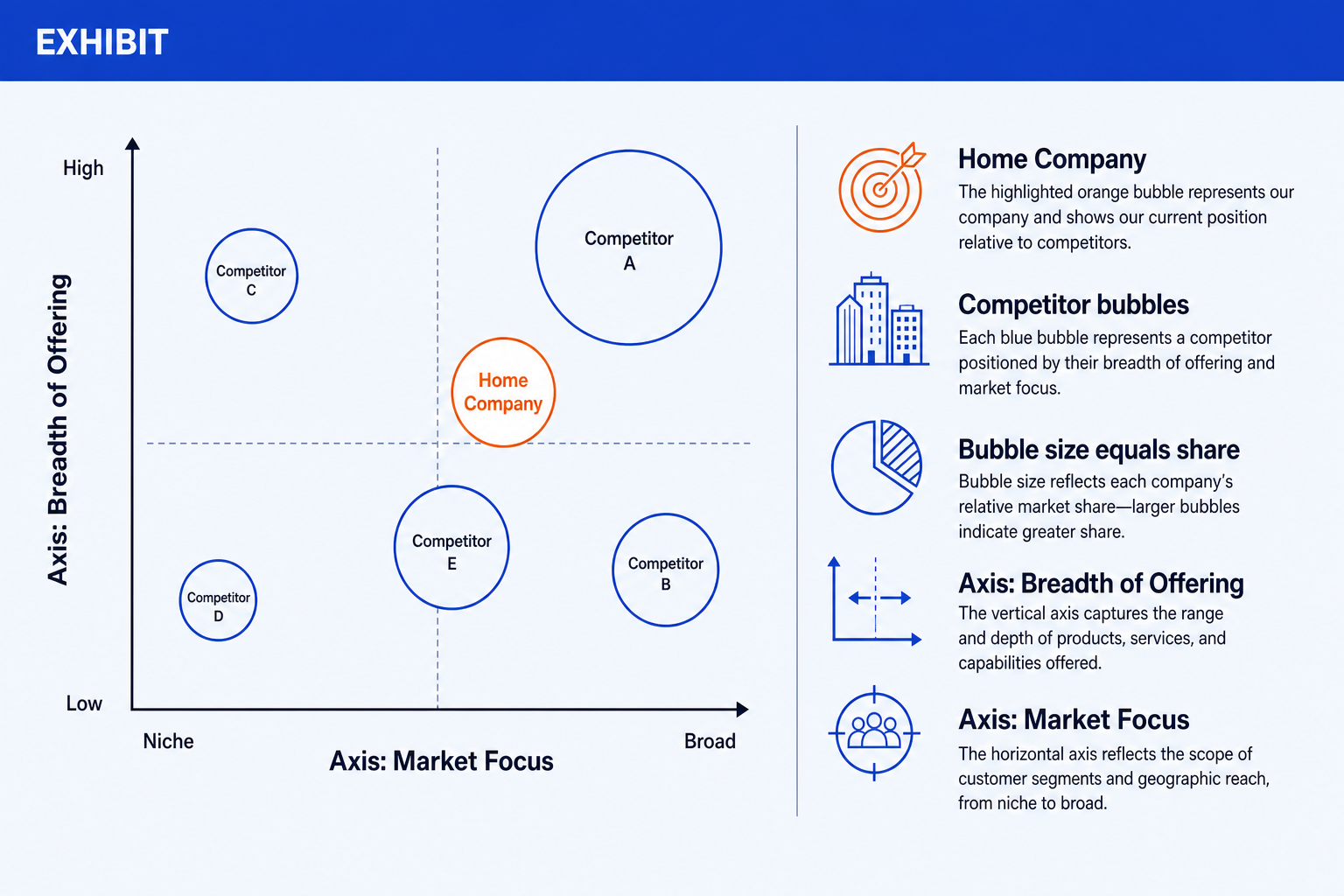
Two axes. Dimensions that separate the players, for example breadth of offering and market focus. Name them in plain words so the reader knows what each end means.
Competitor bubbles. One bubble per player, placed by its read on both axes. A neutral labeled bubble reads cleaner than a logo and avoids brand and trademark questions.
Bubble size as share. Diameter carries relative market share, so the big players read as big without a second chart. Keep the scaling consistent and note it in the legend.
Highlighted home company. Your own bubble in the accent color so the eye lands on where you sit relative to everyone else. This is the one bubble that should stand out.
Legend and title. A short legend decoding the axes and the sizing, plus an action title that states the takeaway instead of a topic label.
The map earns its place because it compresses three questions, who clusters, who stands alone, who sits closest to you, into one picture a reader takes in without narration. Michael E. Porter put the underlying job plainly, writing in Harvard Business Review: "In essence, the job of the strategist is to understand and cope with competition." A positioning map is the fastest way to put that understanding on a slide.
The trade-off: it is also the easiest variant to fake. A wrong axis pair or a gut-feel bubble size produces something that looks authoritative and sorts nobody, and nothing in the format stops you shipping that version.
When should you use a 2x2 instead of a bubble map?
Drop the bubble sizing and the landscape becomes a 2x2: the same two axes, but every player is a labeled dot of identical size, sorted into four named quadrants rather than scattered freely across the field. It is the right call when the message is a clean four-way sort, challengers versus incumbents, or fast movers versus the field, rather than a precise reading of relative scale.
The 2x2 also survives a room better than a bubble map does. A quadrant name, such as Challengers or Niche Players, is a claim the audience can argue with directly, which is usually the point of showing it; a bubble's exact diameter invites an argument about the number instead of the position. When the argument you want is about where the market is heading rather than how big anyone currently is, that is the better argument to have. The full build, including how to name quadrants by the play rather than the axis reads, is in the guide to the 2x2 positioning matrix slide.
The trade-off: dropping the size dimension loses real information. If a rival's tiny bubble would have told the whole story, meaning they are a rounding error on share despite dominating the conversation, the 2x2 hides exactly the fact the room needed to see.
What is a competitive capability grid used for?
A capability grid turns the landscape sideways: rows are competitors, columns are the capabilities or criteria that matter, for example pricing model, integration depth, or service model, and every cell carries a rating rather than a position on a chart. It wins whenever the audience needs a specific per-criterion answer rather than a general impression of where someone sits, which is most of the time in due diligence and in a feature-by-feature sell.
Build it as glued grid cards or a real comparison table, never a spreadsheet screenshot, and rate cells on a consistent scale rather than a free-text note that forces the reader to parse prose in every box. The five-level filled circle is the usual notation, and four ways to build it in PowerPoint are written up separately, including a free set of editable shapes.
Many decks run both variants together: the positioning map up front as the five-second summary, the capability grid behind it for the reader who wants to check one specific claim. That combination is also the honest answer to a diligence team that has read the summary slide and wants to know why.
The trade-off: a grid with more than about ten rows or eight columns stops reading at projector distance, and cramming the whole competitive set into one table to avoid making an editorial call is worse than a shorter grid with an honest note naming how many smaller players were left off.
How do you build a competitive landscape slide in PowerPoint?
PowerPoint has no landscape chart type, bubble or otherwise. Build it from an XY bubble chart for a data-driven version, or crossed axes plus plotted shapes for a label-only one. Six steps, in this order, produce the version a steering committee can read without narration.
Gather the data before you touch a layout. Pull each competitor's revenue, funding, seat count, or another share proxy, from a source you can name in the appendix, a filing, a funding database, a market report, not a guess dressed as a number. Write the source next to each figure now; you will need it the first time someone asks.
Pick two differentiating dimensions for the axes. Choose the two that actually separate the players in this market, write each as a low-to-high scale, and confirm the pair is independent by testing it on three or four known competitors before you commit.
Plot the competitors as bubbles. Place each player by its read on both axes, label every bubble with the company name in plain text, and keep the placement honest rather than dramatic.
Set bubble size to relative share, and make the numbers tie. If the shares you are plotting are meant to represent the whole market, they should sum close to a stated total, or you should say plainly that they cover the top players shown and the rest are not plotted. Sizes that do not tie to any number are the fastest way to lose the room.
Highlight your own company and add the legend. Recolor your bubble in the accent so it reads first, keep every other bubble one neutral color, and add a small legend decoding the axes and the sizing rule.
Replace the topic label with an action title. "Competitive landscape" describes the slide. "We lead on breadth but trail on share" states the takeaway. Write the second one.
Gotcha
Two mistakes read as amateur faster than anything else on this exhibit: bubble sizes that do not correspond to any number you could produce if asked, and axes that move together so every bubble lines up on the diagonal. Either one takes a reader about four seconds to spot, and both undo the credibility the rest of the slide worked to build.
The slowest part of this build is rarely the chart, it is turning scattered research into a clean list of axis reads and share numbers. Settling that in Claude first, then handing the finished list to Oria, is usually the faster route.
Turn a research memo into the slide inputs
Can Oria build the competitive landscape slide for you?
Yes, and that is the narrow thing it is built for. Oria is aimed at corporate documents and consulting-style presentations: board packs, steering committee decks, diligence exhibits, dense frameworks held to an enforced corporate template. It reaches you two ways, a PowerPoint add-in that runs in the task pane on Windows, macOS and PowerPoint for the web, and a connector for Claude and ChatGPT over MCP, so the slide can be built from the chat you are already in without opening PowerPoint at all. Either way the output is native PowerPoint objects on your master, so every axis label, bubble and legend entry stays editable after it lands.
Name the two axes and list each competitor with its position and share, and Oria plots the map, highlights your company, and places the legend.
One-block landscape prompt for Oria
The trade-off: Oria is built for the corporate environment and loses on highly visual work. Founder fundraising decks, launch and campaign decks, student presentations and marketing one-pagers want visual impact more than defensible content, and a design-led tool such as Gamma, Canva, Pitch or Beautiful.ai will beat it there and look better doing it. It also will not tell you which of the four variants above your question needs, which is the judgment this page is for.
Which tool should you use for a competitive landscape?
It depends what the exhibit has to do after you draw it.
| If you need | Use | Why |
|---|---|---|
| To gather the underlying competitor data first | A research tool such as Crunchbase, SimilarWeb or SEMrush | Positioning and share are text and research problems before they are chart problems. Settle the reads, then render once. |
| To argue the axes live, with the room still disagreeing | Miro or Mural | An infinite canvas and sticky notes beat a slide while positions are still being contested. |
| A map that has to look designed for an external, visual-first audience | Canva, Pitch or Gamma | Where the job is visual impact rather than defensible content, a design-led tool will beat a corporate template and look better doing it. |
| The map inside your firm template, as native editable shapes | Oria | Built for board packs and diligence exhibits: the axes, the bubbles and the legend come out as real PowerPoint objects on your master. |
| The size of the whole opportunity, not who competes for it | A market sizing slide | A different question, with a different build. See the market sizing guide. |
| Waterfalls, Harvey balls and the rest of the exhibit pack, on a team licence | think-cell | A mature add-in with an established enterprise footprint. It does not plot a competitive landscape, but it owns the rest of the deck. |
Common mistakes to avoid
The mistakes above are craft errors. The bigger one is treating the exhibit as a one-off. Crayon's 2026 State of Competitive Intelligence report found that 70 percent of teams say at least half their sales opportunities are now competitive, yet the average team rates its own competitive readiness at just 6.3 out of 10, and teams that update their competitive intelligence weekly or faster are 1.7 times more likely to show measurable revenue impact, 83 percent versus 49 percent, than teams updating monthly or slower. SCIP's State of Competitive Intelligence survey found that 62 percent of companies plan to increase competitive-intelligence spending in the year ahead. None of that is about the slide. It is about the fact that a landscape built once for a single meeting and never revisited is already the stale kind by the time the next one gets scheduled.
Frequently asked questions
What is a competitive landscape?
A competitive landscape is an exhibit that maps every company competing for the same customer on the dimensions that matter in that market, typically sized by relative share. Strategy teams, founders and corporate development groups use it in market entry decks, fundraising materials, and board reviews to show where the home company sits and where the white space is. The point is the positioning story, not a list of logos.
What is a competitive landscape analysis?
Competitive landscape analysis is the research behind the slide: identifying who competes for the same customer, gathering a defensible read on each one's positioning and relative share, and testing candidate axis pairs until two of them genuinely separate the players. The slide is the output of that work, not a substitute for it. Guessing the placements instead of researching them is the most common reason a landscape slide fails in review.
What goes on a competitive landscape slide?
The core is a positioning chart with two labeled axes that capture the dimensions that matter in the market. Each competitor is a bubble placed by its read on both axes, with bubble size set to relative share. Your own company is highlighted in the accent color. A short legend explains what the axes and the bubble size mean, and an action title states the takeaway.
How do I choose the two axes?
Pick two dimensions that genuinely separate the players and that vary independently of each other, for example breadth of offering versus market focus, or price point versus service model. If the two axes move together, every bubble lands on a diagonal and the chart stops sorting anyone. Test the pair on three or four known competitors before you commit to it.
Should I use real competitor logos on the slide?
On an internal strategy or positioning slide, neutral labeled bubbles read more cleanly and avoid brand and trademark questions. Reserve real logos for a genuine head-to-head product comparison page where fair-use context is clear. For a landscape view, a labeled bubble per competitor with your own company in the accent color is the house-style choice.
How many competitors should be on a competitive landscape?
Between five and twelve named players reads cleanly on one slide. Fewer than five is usually better as a paragraph, and past twelve the clusters disappear into noise, especially on a bubble map where the shapes start to overlap. If the researched list runs longer, group the tail into one labelled cluster, such as other regional players, rather than plotting every name.
What is the difference between a competitive landscape and a 2x2 matrix?
A competitive landscape plots real market players against axes that describe positioning, typically sized by share. A 2x2 positioning matrix uses the same two-axis geometry to sort a fixed set of options, competitors or otherwise, into four named quadrants, with no size dimension. Use the landscape when the story is the shape of the whole market; use the 2x2 when the story is a clean four-way sort.