

How to Build a Porter's Five Forces Slide in PowerPoint
What the five competitive forces are, the step-by-step manual build with the real gotchas, the prompts that make it sharp, and the one-line route that renders an editable native diagram for you.
How to build a Porter's Five Forces slide in PowerPoint
To build a Porter's Five Forces slide in PowerPoint, place a central box for Competitive Rivalry, then arrange four boxes around it: Threat of New Entrants on top, Supplier Power on the left, Buyer Power on the right, and Threat of Substitutes on the bottom. Draw an arrow from each outer force pointing into the center, rate each force High, Medium, or Low with one reason, and write an action title that states whether the industry is attractive. Oria can render the whole diagram as an editable native slide from one line of text.
This guide walks the manual build and its real gotchas, gives you the exact prompts to rate the forces and write the title, and shows the faster one-prompt route. Everything you need is here. You will not have to leave to get the substance.
What Porter's Five Forces is and when to use it
Porter's Five Forces is a framework for judging the competitive structure of an industry. It looks at five structural pressures that together set how much profit the players in a market can keep. The harder the forces press, the thinner the margins for everyone. It is a tool for assessing the industry, not a single company.
Reach for it whenever the question is whether a market is worth playing in. Market entry decisions. Commercial due diligence on a target. A strategy review that asks why margins are eroding. It is a staple of consulting and investment decks because it turns a messy industry into one structured verdict. For judging how a single company is positioned, a SWOT analysis slide is the better fit; use Five Forces for the market around the company.
The five forces on a Porter's Five Forces slide
Five forces carry the whole slide. Get the layout and the ratings right and the diagram reads itself.
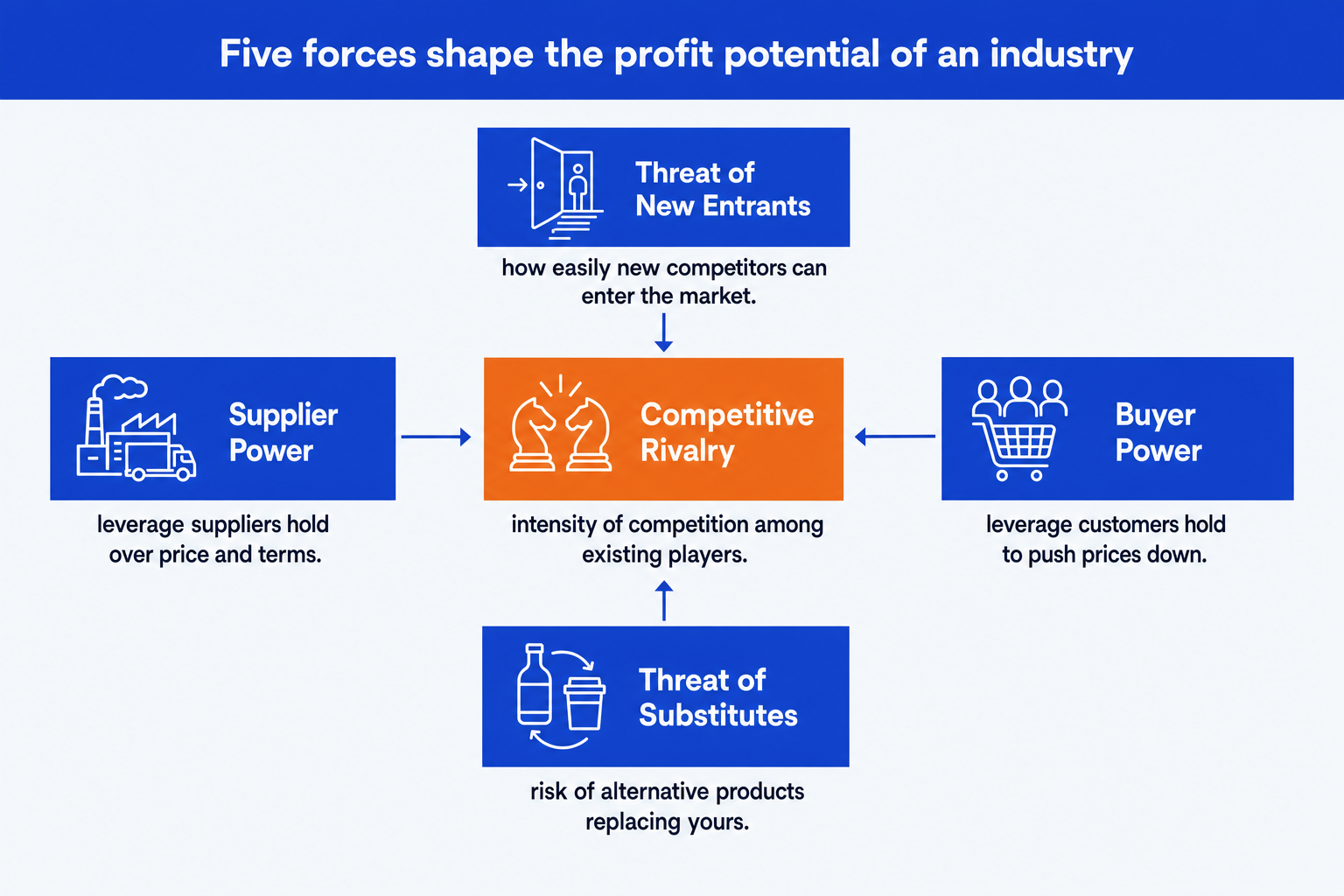
Competitive Rivalry (center). The intensity of competition among existing players. High when rivals are many, growth is slow, products look alike, and price wars are common. This is the box every other force pushes on.
Threat of New Entrants (top). How easily new competitors can enter. High when capital needs are low and there is no brand, patent, or regulation to keep newcomers out. Low when barriers to entry are steep.
Bargaining Power of Suppliers (left). The leverage suppliers hold over price and terms. High when a few suppliers control a critical input or switching costs are large. It squeezes margins from the input side.
Bargaining Power of Buyers (right). The leverage customers hold to push prices down. High when buyers are large, concentrated, or can switch easily. It squeezes margins from the demand side.
Threat of Substitutes (bottom). The risk that an alternative product replaces yours. High when a different solution does the same job cheaper or better, capping how much you can charge before buyers defect.
Worked example: an EV-charging market-entry decision
A rating is more useful when its evidence and implication travel with it. Consider a strategy team evaluating entry into electric-vehicle charging networks, where infrastructure is capital intensive, hardware supply is concentrated, and site hosts can work with several networks.
Competitive Rivalry: High. Networks compete for the same site hosts and drivers, while per-kWh pricing is easy to compare across apps, keeping pressure on margins.
Threat of New Entrants: Medium. Hardware and site agreements require capital, but utility partnerships and public incentives can lower the barrier to entry.
Supplier Power: High. A limited set of hardware manufacturers controls core equipment, while utilities control grid interconnection, leaving networks with constrained negotiating power.
Buyer Power: Medium. Site hosts can list multiple charging brands and drivers can switch through aggregator apps, limiting any one network's pricing power.
Threat of Substitutes: Medium. Home charging covers most daily use, although travel and multi-unit housing preserve demand for public charging.
The conclusion is not that every force is equally difficult. Rivalry and supplier power are the two high-pressure forces, so the action title should say the market is structurally tough on margin and name those two drivers. That turns the diagram from a framework checklist into evidence for a decision.
The step-by-step manual build, with the real gotchas
The classic build uses five shapes and five arrows on a blank layout. It is simple in principle and fiddly in practice, because the alignment and the arrow angles are what make it look professional rather than homemade.
Place the central rivalry box. Insert a rectangle in the middle of the slide and label it Competitive Rivalry. This is the anchor everything else points to, so center it precisely on the slide.
Add the four surrounding forces. Insert four boxes around the center: Threat of New Entrants on top, Supplier Power on the left, Buyer Power on the right, and Threat of Substitutes on the bottom. Keep all four the same size.
Align and distribute the boxes. Use the Align tools so the top and bottom boxes share a vertical axis and the left and right boxes share a horizontal one. Even spacing is what separates a clean diagram from a crooked one.
Draw the inward arrows. Add an arrow from each of the four outer boxes pointing into the central rivalry box. They show that every force presses on the competition at the center, which is the whole logic of the framework.
Rate each force and color it. Write High, Medium, or Low on each force with one concrete reason. Use one emphasis color for the high-pressure forces so the reader sees the threats in one glance.
Write the action title. Replace the topic label with a full-sentence so-what, like whether the industry is attractive and which force matters most. The title is the slide; the diagram is the proof.
Gotcha
The slide is a verdict, not a checklist. A reader should see at a glance whether the industry is attractive and which forces drive that. If all five boxes read Medium with no color emphasis, the slide says nothing. Rate honestly, color the high-pressure forces, and let the title state the conclusion.
The one-prompt route: describe the forces, get an editable diagram
Aligning five boxes and angling four arrows is exactly the kind of mechanical work that eats an evening. Oria removes it. It is an AI add-in that runs in the PowerPoint task pane and produces fully editable native PowerPoint elements, real shapes, text, and arrows, in your corporate template. You describe the five forces in one line and Oria renders the Porter's Five Forces slide for you.
Because the output is native, every box, rating, and arrow stays editable afterward. You can change a rating, rename a force, or recolor the emphasis without rebuilding anything. The same approach works for any framework slide, from Five Forces to a 2x2 matrix, which is why Oria suits the dense decks consultants and bankers actually ship. See the Claude skill for slide design for the storyline side of the workflow.
One-line Porter's Five Forces prompt for Oria
The prompts that make the Porter's Five Forces slide sharp
These are the exact copy-paste prompts we use to build the diagram, rate the forces, and write the title. The first three are for Oria inside PowerPoint; the last two are for drafting the analysis in Claude before you build. Replace the bracketed parts with your own industry.
Build the slide in Oria
Lay out the five forces and ratings
Choose the color emphasis
Create a dense board version and a light appendix version
Write the action title on the slide
Draft the analysis in Claude first
Rate the five forces from your notes
Sharpen the action title
Tip
Draft the ratings and evidence in Claude, then hand the clean five forces and the title straight to Oria. For the full analysis-to-deck pattern, see the consultant's guide to Claude.
Common mistakes to avoid
For a numeric bridge slide rather than a framework, the waterfall chart slide guide walks the same build-and-prompt method for a different chart type.
Frequently asked questions
What is a Porter's Five Forces slide used for?
A Porter's Five Forces slide assesses the competitive structure of an industry and how much profit potential it holds. Strategy teams, consultants, and bankers use it in market entry decks, due diligence reads, and strategy reviews to show why an industry is attractive or hostile. The point of the slide is the verdict, whether the forces add up to an attractive market or a tough one, not the five boxes alone.
What are the five forces in order?
Competitive Rivalry sits in the center. Around it sit four forces: Threat of New Entrants, Bargaining Power of Suppliers, Bargaining Power of Buyers, and Threat of Substitutes. Each of the four pushes on the central rivalry. Together they determine how much of the value created in an industry the existing players can keep.
How do you rate each force on the slide?
Rate each force High, Medium, or Low and give one concrete reason per rating. High supplier power means a few suppliers control a critical input. Low threat of new entrants means capital, regulation, or brand keep newcomers out. Keep the ratings consistent and let the color carry the signal so a reader sees the pressure points in one glance.
What is the difference between Five Forces and SWOT?
Five Forces analyzes the industry around a company: the structural pressures that set profit potential for everyone in the market. SWOT analyzes one company: its internal strengths and weaknesses against external opportunities and threats. Use Five Forces to judge whether a market is worth playing in, and a SWOT to judge how one player is positioned within it.
What is the fastest way to build a Porter's Five Forces slide?
Describe the five forces in one line and let Oria render it. You give the industry, the rating for each force, and the one reason behind each, and Oria builds a fully editable native PowerPoint diagram in your template, with the central rivalry box, the four surrounding forces, and the inward arrows. You skip the manual shape alignment and arrow drawing entirely.