

How to Build a Strategy Roadmap Slide in PowerPoint
How to phase initiatives across horizons, the step-by-step manual build with the real gotchas, the prompts that make it sharp, and the one-line route that renders an editable native roadmap for you.
How to build a strategy roadmap slide in PowerPoint
To build a strategy roadmap slide in PowerPoint, set a few time horizons across the top, such as Now, Next, and Later. Run two or three workstream lanes down the left. Draw each initiative as a bar spanning the horizons it covers, add diamond markers for the milestones the room cares about, and link dependent initiatives with thin arrows. Write an action title that states the sequence, and Oria can render the whole roadmap as an editable native slide from one line of text.
This guide walks the manual build and its real gotchas, gives you the exact prompts to phase the plan and write the title, and shows the faster one-prompt route. Everything you need is here. You will not have to leave to get the substance.
What a strategy roadmap slide is and when to use it
A strategy roadmap phases a plan into a sequence: it shows which initiatives start now, which follow next, and which sit further out, and how they connect. It has four ingredients: time horizons across the top, workstream lanes down the side, initiative bars spanning the horizons they cover, and milestone markers for the few dates that matter. The eye reads it left to right as a story of what happens when.
Reach for it when the message is sequencing, not status. A transformation plan over the next eighteen months. The order a set of strategic bets should launch in. The path from where the business is today to a stated ambition. It is the executive cousin of a project plan: fewer rows, named horizons instead of exact dates, and only the milestones a board will ask about. When the message is a structure rather than a sequence, an org chart slide or a 2x2 is the better fit; use the roadmap when you are explaining a path through time.
The anatomy of a strategy roadmap slide
Four parts carry the whole slide. Get these right and the roadmap reads itself.
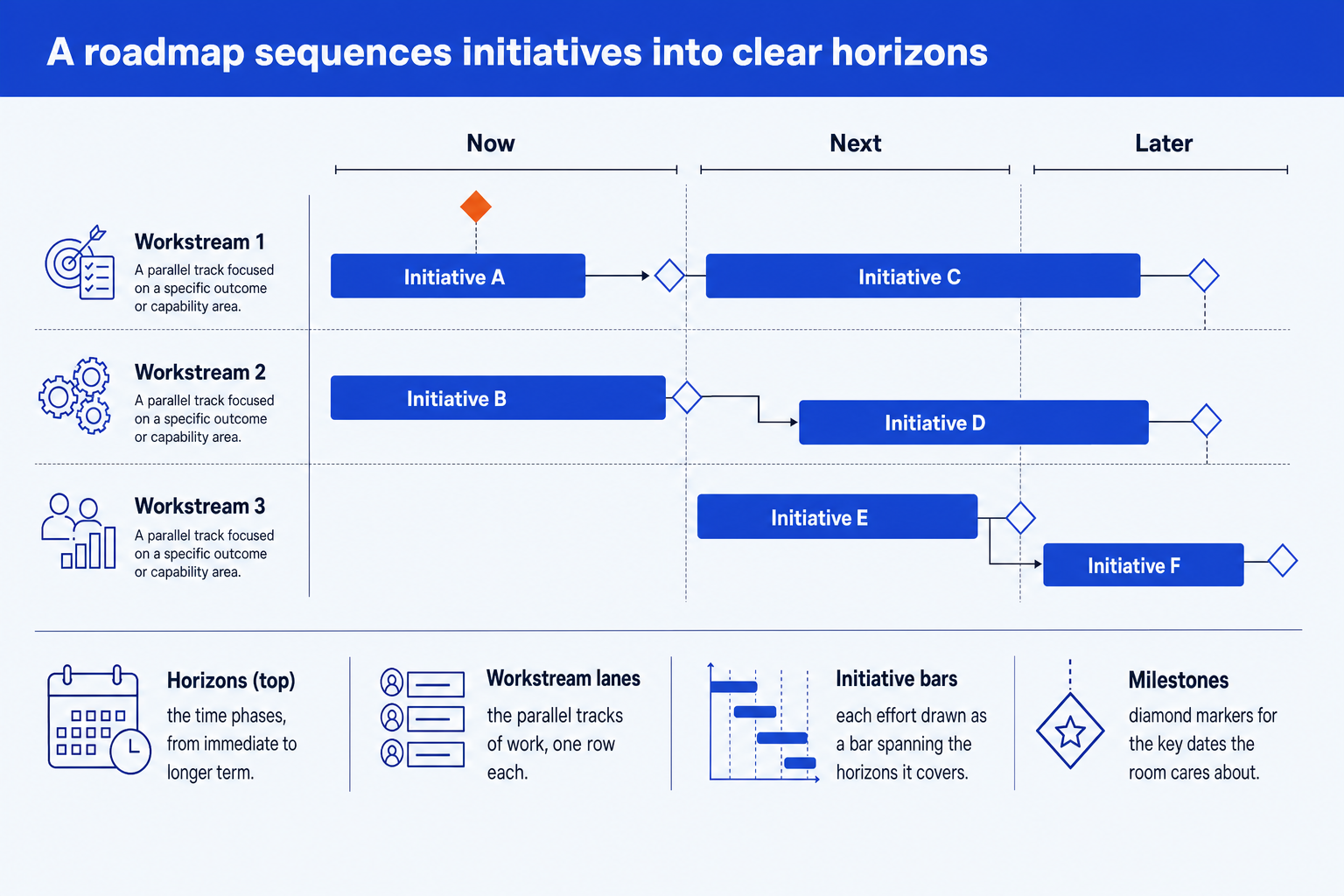
Horizons. The time phases across the top, such as Now, Next, and Later, or named periods. Keep them to three or four so the eye groups the work instead of reading a calendar.
Workstream lanes. The parallel tracks of work, one row each, so each initiative sits in the function or theme that owns it. Order the lanes by priority, not alphabetically.
Initiative bars. Each effort drawn as a bar that spans the horizons it covers. Length signals duration; the left edge signals when it starts. Hold them to one consistent color.
Milestones. Diamond markers for the few decision points or deliverables the room cares about. Give the nearest, most important one the emphasis color so the slide lands on what is next.
Choose between a dated grid and strategy horizons
Use a quarter or month grid when timing has been approved and the audience needs to inspect exact delivery windows. It works well for an operating review because initiatives across different lanes that line up vertically are genuinely happening at the same time. Keep the same scale across every lane and place milestone diamonds at their actual dates.
Use Now, Next, and Later when the sequence is agreed but dates remain uncertain. That keeps the slide strategic and prevents a tentative quarter from being read as a commitment. In either version, sequence initiatives by dependency first; the time labels should describe the plan, not manufacture confidence the plan does not have.
The step-by-step manual build, with the real gotchas
The classic method uses aligned shapes on a grid: lane rows, horizon columns, bars, and diamonds. There is no native roadmap object in PowerPoint, so the work is layout and alignment. Build it once cleanly and reuse the grid.
Set the horizons across the top. Add a thin header band and split it into three or four columns labeled by phase, for example Now, Next, and Later. Phase by horizon, not by exact dates, so the slide reads as strategy rather than a schedule.
Draw the workstream lanes down the side. Add one row per track, labeled on the left, ordered by priority. Keep the row heights equal and use a hairline between lanes so the grid stays quiet.
Place the initiative bars. Draw each initiative as a bar starting in the horizon it begins and ending where it finishes, so its position and length carry the timing. Align the left and right edges to the horizon column boundaries.
Add the milestone markers. Drop a diamond on the bar at each key decision point or deliverable. Mark only the few the audience will ask about, not every task, or the slide turns into a project plan.
Draw the dependency arrows. Where one initiative must finish before another starts, add a thin arrow from the first to the second. Sequence by dependency, not wishful dates, so the order survives a challenge.
Write the action title. Replace the topic label with a full-sentence so-what, such as the sequence the plan follows and the outcome it builds toward. The title is the slide; the roadmap is the proof.
Gotcha
Sequence by dependency, not by wishful dates. If an initiative relies on another, it has to start later, and the arrow has to show it. Start from the outcome, work backward to what must be true first, and let that order set the horizons. A roadmap that ignores dependencies is the one that gets picked apart in the room.
The one-prompt route: describe the plan, get an editable roadmap
Aligning lanes, bars, and diamonds by hand is exactly the kind of mechanical work that eats an evening. Oria removes it. It is an AI add-in that runs in the PowerPoint task pane and produces fully editable native PowerPoint elements, in your corporate template. You describe the plan in one line and Oria renders the strategy roadmap slide for you, lanes, bars, milestones, and all.
Because the output is native shapes, every lane, bar, and marker stays editable afterward. You can move an initiative to a later horizon, rename a workstream, or recolor the emphasis without rebuilding the grid. The same approach works for any complex slide, from a roadmap to a process flow, which is why Oria suits the dense decks consultants and bankers actually ship. See the Claude skill for slide design for the storyline side of the workflow.
One-line strategy roadmap prompt for Oria
The prompts that make the strategy roadmap slide sharp
These are the exact copy-paste prompts we use to phase the plan, lay out the lanes, place the milestones, and write the title. The first three are for Oria inside PowerPoint; the last two are for drafting the phasing in Claude before you build. Replace the bracketed parts with your own plan.
Build the roadmap in Oria
Phase the plan into horizons and lanes
Place the milestones and dependencies
Turn a dated outline into a swimlane roadmap
Rebuild after a milestone slips
Write the action title on the slide
Draft the phasing in Claude first
Sequence the initiatives by dependency
Pick the milestones that matter
Tip
Draft the phasing in Claude, then hand the clean horizons, lanes, and milestones straight to Oria. For the full draft-to-deck pattern under deadline, see the fastest way to build a 15-slide deck.
Common mistakes to avoid
For the wider habits that make AI-built slides look board-ready rather than generic, the consultant's guide to Claude covers the end-to-end method from analysis to deck. For a numeric bridge between two totals, see how to build a waterfall chart slide.
Frequently asked questions
What is a strategy roadmap slide used for?
A strategy roadmap slide phases a set of initiatives over time so a leadership team can see what happens when and in what order. Strategy and transformation teams use it to turn a plan into a sequence: which efforts start now, which follow next, and which sit further out. The point of the slide is the sequencing and the dependencies, not a precise calendar.
What is the difference between a roadmap and a Gantt chart?
A Gantt chart is a project-management view with exact start and end dates, percent-complete, and task-level detail. A strategy roadmap is an executive view: it groups work into a few time horizons such as Now, Next, and Later, shows initiatives as bars across those horizons, and marks only the milestones the room cares about. Use the roadmap for a board or steering committee, the Gantt for the delivery team.
How many phases should a strategy roadmap have?
Three is the workhorse. Now, Next, and Later reads cleanly and avoids the false precision of dated quarters that will slip anyway. If your audience needs a longer view you can use named horizons or fiscal years, but keep it to three or four columns so the eye can group the work. More than that and the slide becomes a schedule, not a strategy.
How should I order initiatives on a roadmap?
Sequence by dependency, not by wishful dates. An initiative that another effort relies on must sit earlier in the timeline, with a thin arrow showing the link. Start from the outcome you are building toward, work backward to what must be true first, and let that order set the horizons. Dates that ignore dependencies are the most common reason a roadmap slide gets challenged.
What is the fastest way to build a strategy roadmap slide?
Describe the plan in one line and let Oria render it. You give the horizons, the workstream lanes, each initiative and the horizons it spans, and the key milestones, and Oria builds a fully editable native PowerPoint roadmap in your template, including the lanes, bars, and milestone markers. You skip the manual alignment of dozens of shapes entirely.