

How We Replaced Finance Busywork with a Claude Fable 5 Department
Five standalone Claude skills, one per finance desk: FP&A, Valuation, Risk and Compliance, Treasury, and Reporting. Download the pack and run the same setup that replaced our finance busywork with a structured Claude workflow.
How we replaced finance busywork with a Claude Fable 5 department
Last quarter we stopped hiring for parts of our finance function. Not because the work stopped mattering, but because most of it was never the judgment call. It was the assembly: pulling the numbers, reconciling the sources, redrafting the memo the moment an assumption changed. We replaced that busywork with a Claude Fable 5 department: one Claude skill for each of five desks, FP&A, Valuation, Risk and Compliance, Treasury, and Reporting.
This page is the writeup and the download. Five standalone Claude skills, one per desk, each teaching Claude a specific, repeatable finance workflow instead of a vague instruction to analyze something. The variance lands decomposed before the meeting. The valuation range rebuilds itself when an assumption moves, instead of waiting on someone to redo the model by hand. The compliance check flags anything closing in on a breach. The cash position stays current. The board memo arrives as a structured first draft, not a blank page at eleven at night.
Our people still own every decision the skills inform. The skills just remove the hours it used to take to reach the point where a decision was possible. For a broader finance skill set across FP&A, treasury, and reporting, see our CFO guide to Claude.
Download all 5 skills
One zip, one folder per skill. Free, no signup.
The 5 skills behind the Claude Fable 5 finance department
Five desks, five skills. Each one is a standalone SKILL.md file that teaches Claude a named method for one recurring task, not a generic prompt to summarize a spreadsheet. Install the whole department or pull out just the desk you need.
The five-desk finance department
Desk 1 of 5 · FP&A
Variance lands before the meeting, not during it
The FP&A desk used to spend the day before every review pulling actuals against budget by hand, then guessing at why a line had moved. This skill decomposes the movement into volume, rate, and mix effects, ranks the three drivers that matter most, and flags anything the data cannot explain instead of inventing a story for it.
variance-analysis-before-the-meeting
Use when: Actuals just closed for the period and a line item needs explaining before the review.
Output: A ranked variance table split into volume, rate, and mix effects, a three-driver summary, and a flagged list of anything unexplained.
Claude prompt
Desk 2 of 5 · Valuation
The range rebuilds itself when an assumption moves
A valuation range used to go stale the moment someone challenged an assumption, and rebuilding it by hand cost an afternoon. This skill takes the prior DCF and comparable range, holds every other input constant, recalculates against the one thing that changed, and explains the movement in two sentences instead of a fresh deck of assumptions.
self-updating-valuation-model
Use when: A single input changes on a valuation that already exists: growth, discount rate, or the peer set.
Output: An updated DCF and comparable-company range, a before-and-after comparison, and a short explanation tied to what changed.
Claude prompt
Desk 3 of 5 · Risk & Compliance
Every threshold is checked before someone else checks it
Covenant and policy checks used to live in a spreadsheet nobody opened until quarter end, by which point a breach was already a surprise. This skill checks the current figures against every defined threshold, calculates headroom, and flags anything closing in on a breach before it becomes one.
covenant-and-policy-compliance-monitor
Use when: New financials, a credit agreement, or an internal policy needs a compliance check before sign-off.
Output: A scorecard of every covenant or policy threshold with current value, headroom, and status, plus the one metric closest to breach.
Claude prompt
Desk 4 of 5 · Treasury
The cash position stays current, not two weeks stale
The treasury desk used to rebuild the 13-week cash view by hand every time a receipt slipped or a facility renewed. This skill builds the rolling position period by period, adds undrawn facilities to available liquidity, and flags any period where the cushion gets thin before it turns into a funding conversation.
cash-and-liquidity-position-tracker
Use when: The recurring cash reporting cycle, or before a funding, investment, or debt decision.
Output: A period-by-period cash and liquidity table, a flagged list of tight periods, and a note on the largest single swing.
Claude prompt
Desk 5 of 5 · Reporting
The board memo arrives as a first draft, not a blank page
Whatever the other four desks produce, a variance result, an updated range, a compliance scorecard, a cash position, still has to reach a decision-maker in writing. This skill turns that output into a one-page memo with the recommendation on the first line, so what lands is a draft worth editing, not a blank document at eleven at night.
board-memo-first-draft
Use when: Analysis from another desk is finished and needs to become a memo, board paper, or committee note.
Output: A one-page memo with the recommendation first, a situation and analysis section, a risk section, and a clear ask.
Claude prompt
Setup Guide
- Step 1Download from GitHub
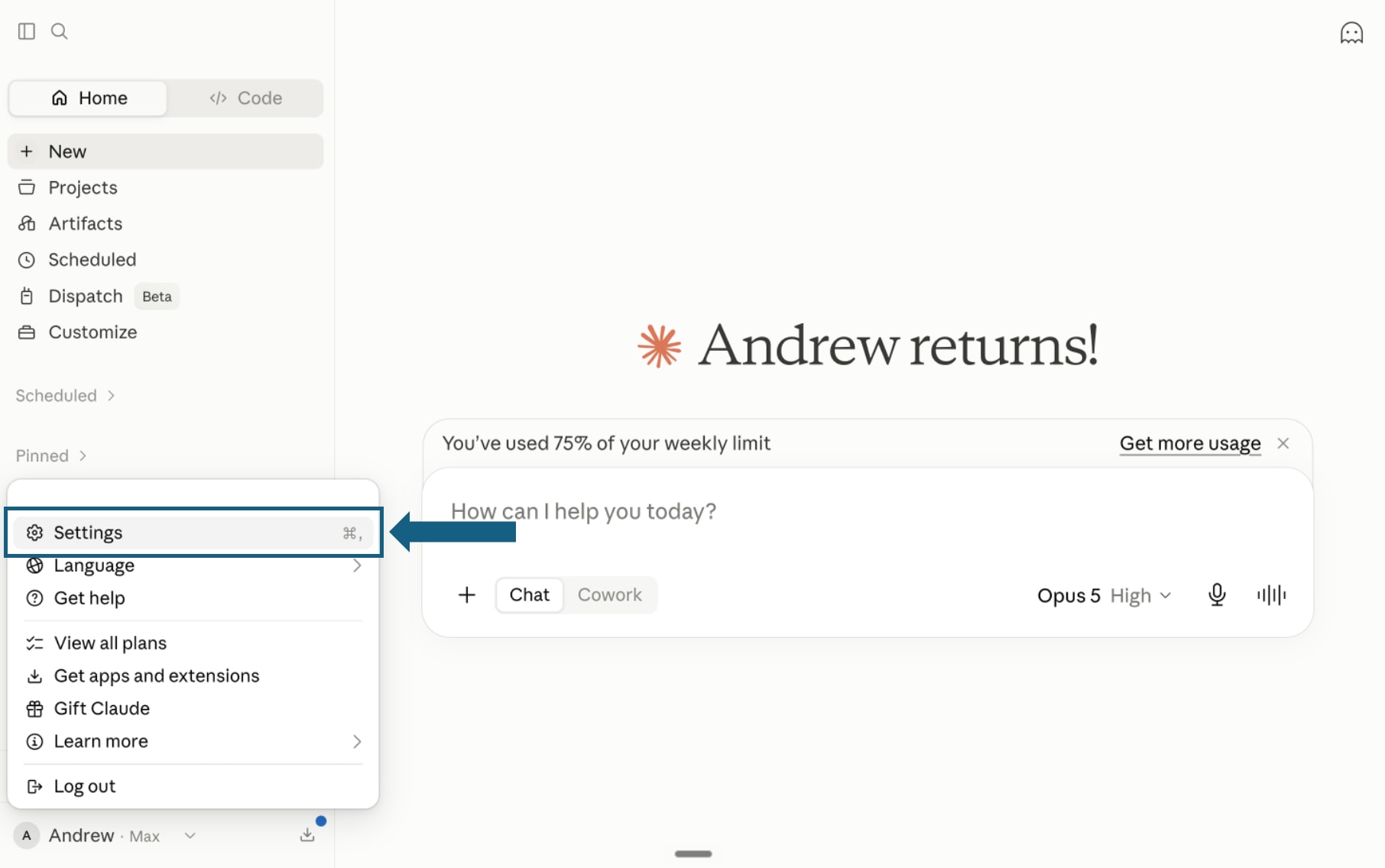
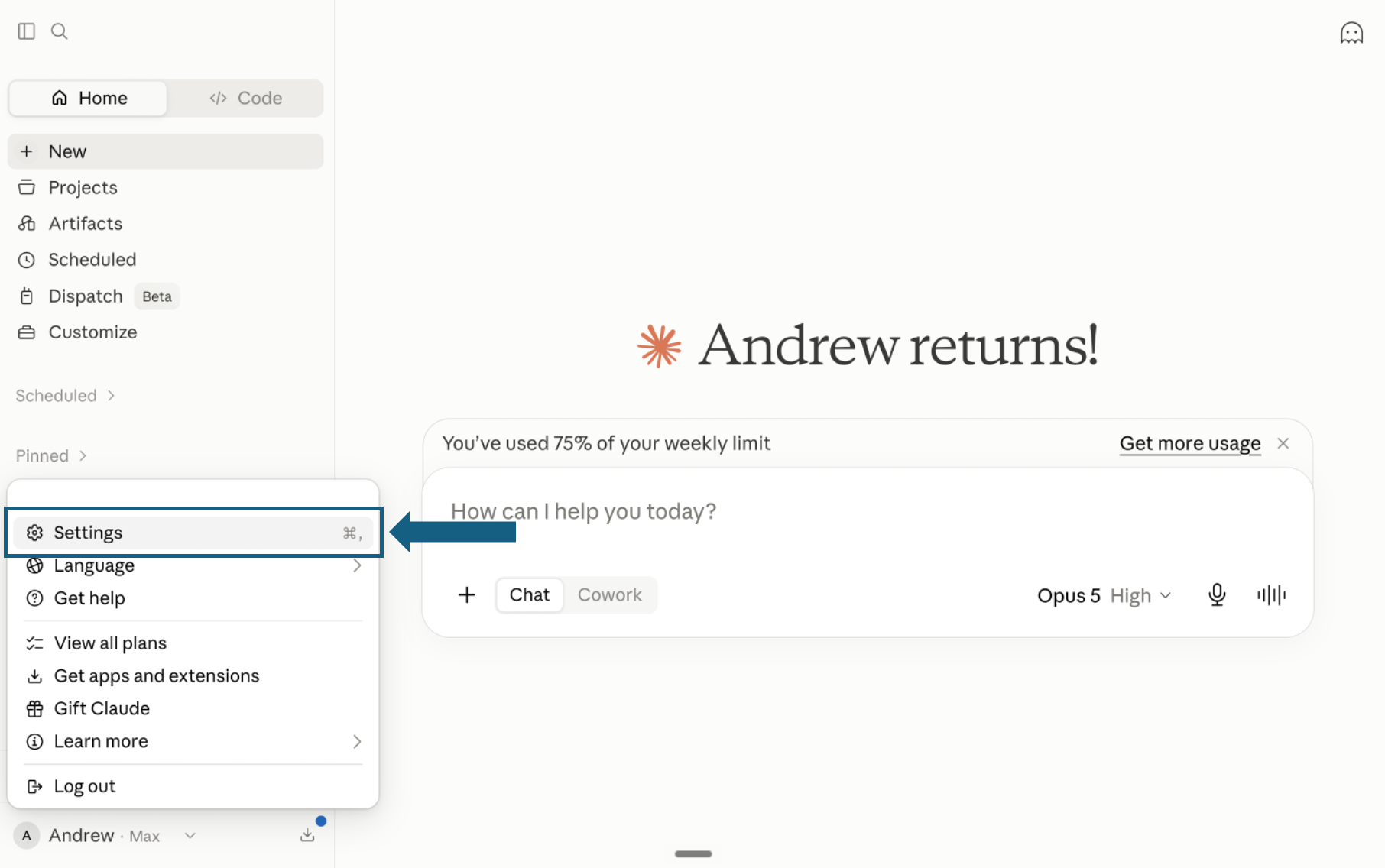
Download the pack and open Settings
Download and unzip the pack so each finance desk remains in its own folder with its SKILL.md file. In Claude, open your profile menu and select Settings.
Open the screenshot to view it full size. - Step 2
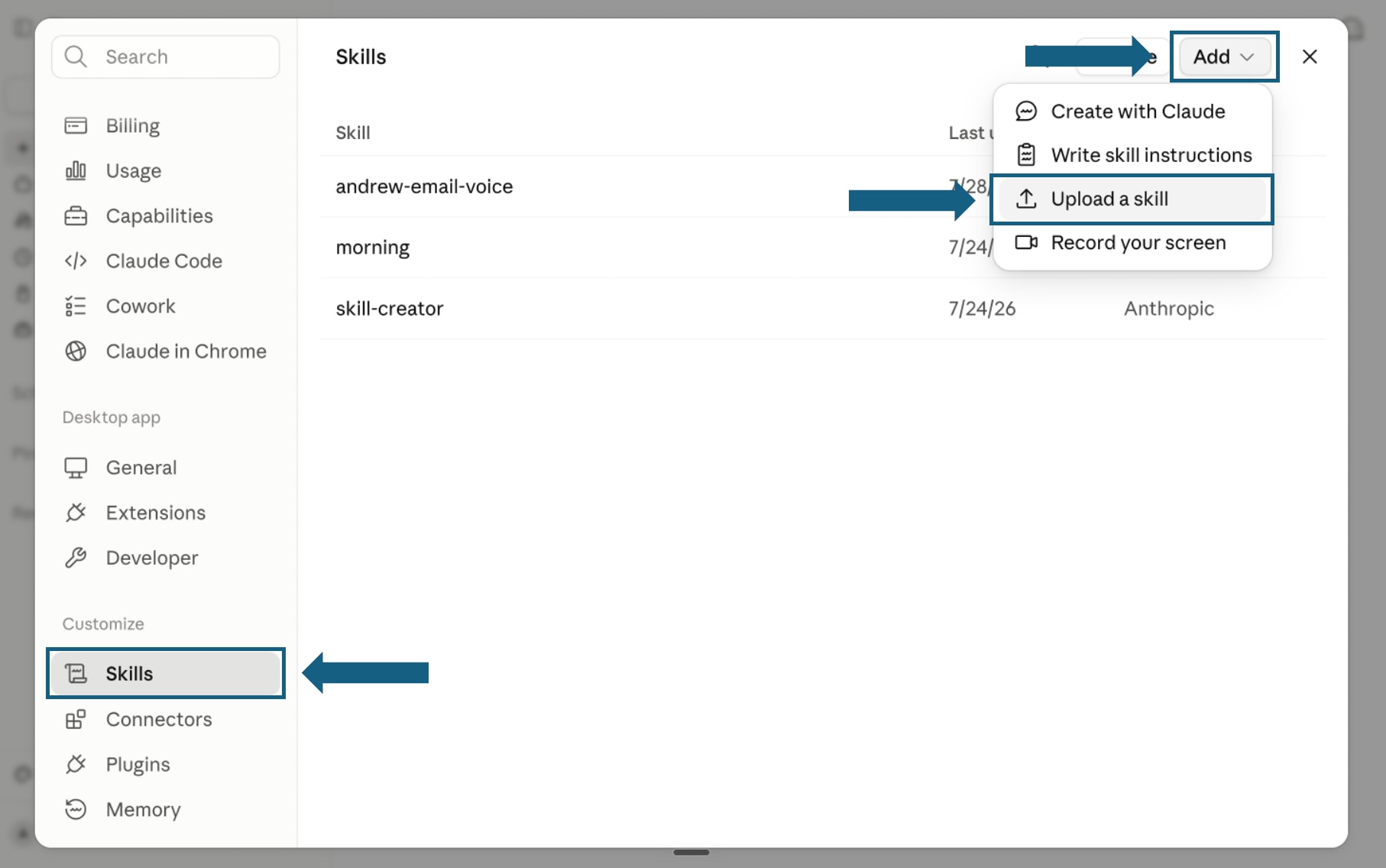
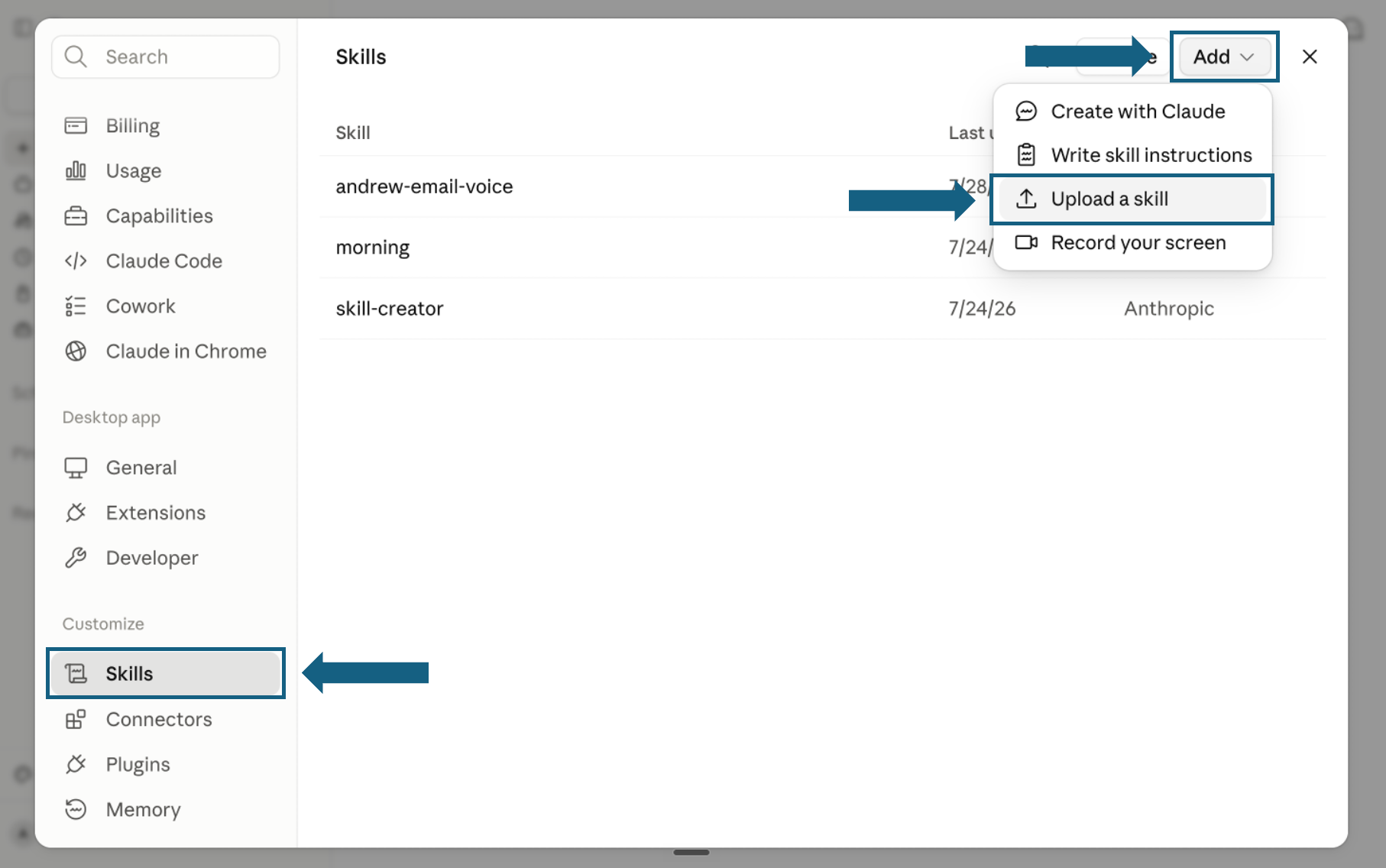
Open Skills and start an upload
In Settings, select Skills under Customize. Open Add and choose Upload a skill.
Open the screenshot to view it full size. - Step 3
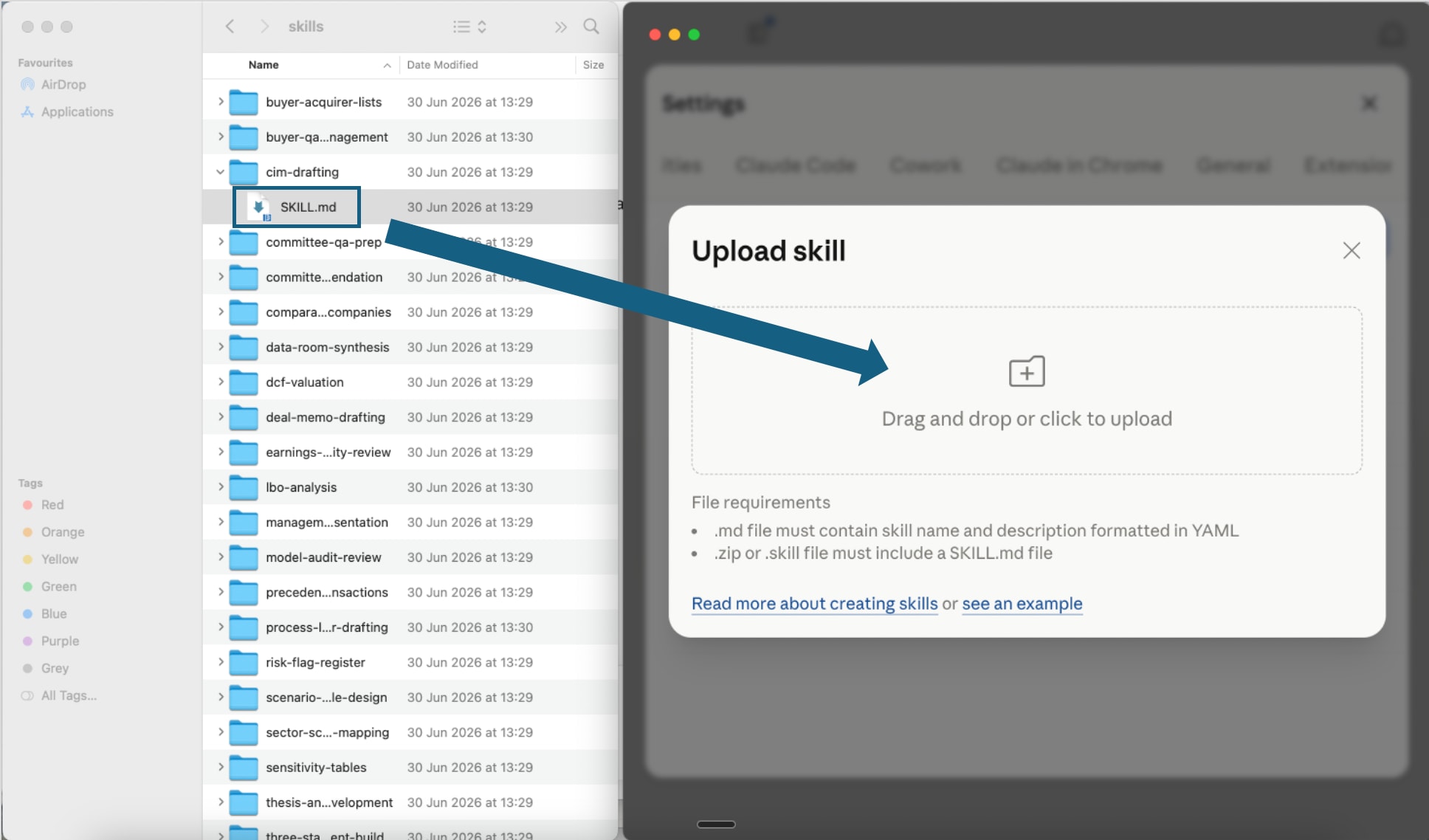
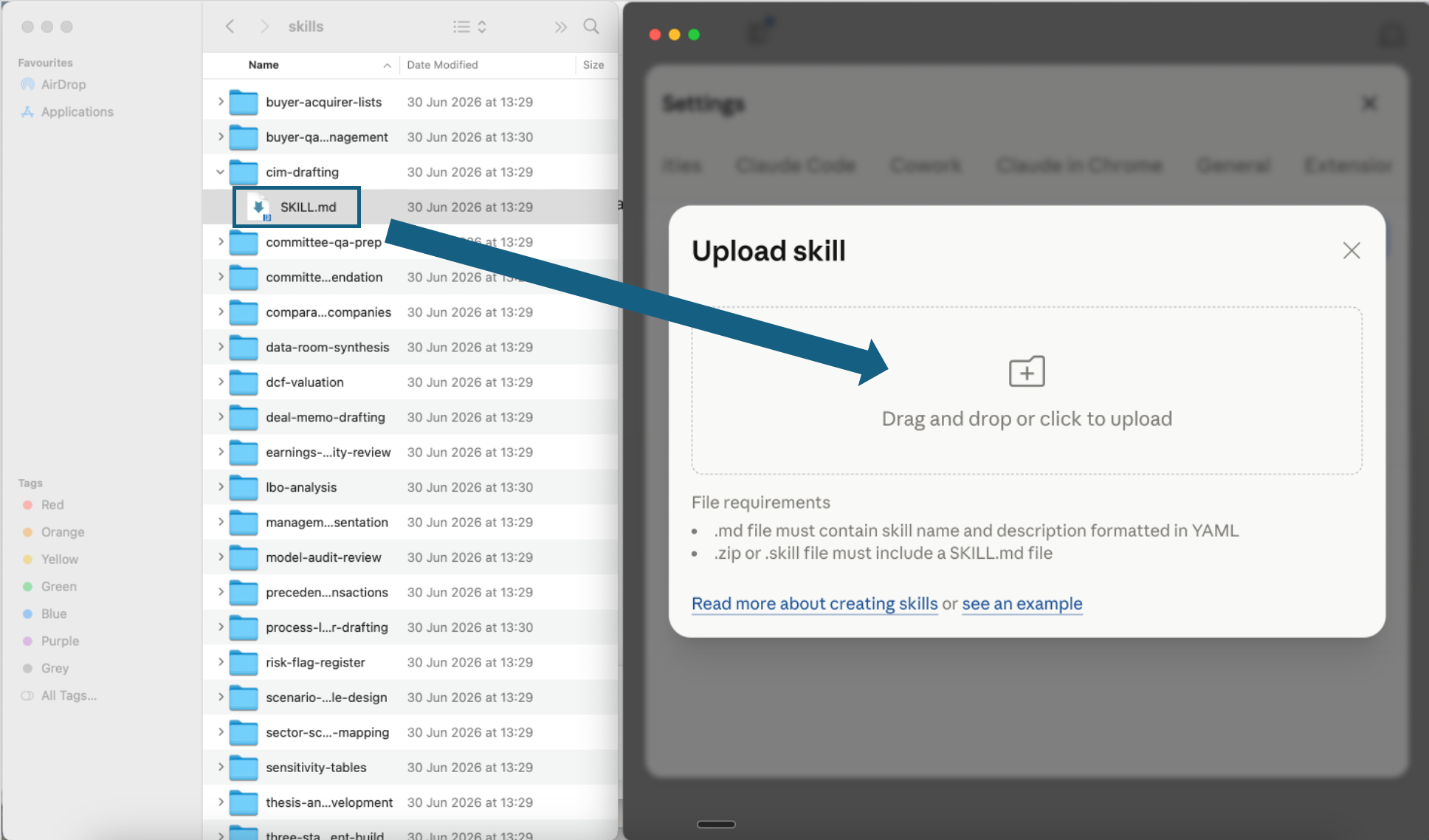
Upload one skill file
Open one extracted desk folder and drag its SKILL.md file into the upload window, or use the file picker. Repeat for each finance skill you want to add.
Open the screenshot to view it full size. - Step 4
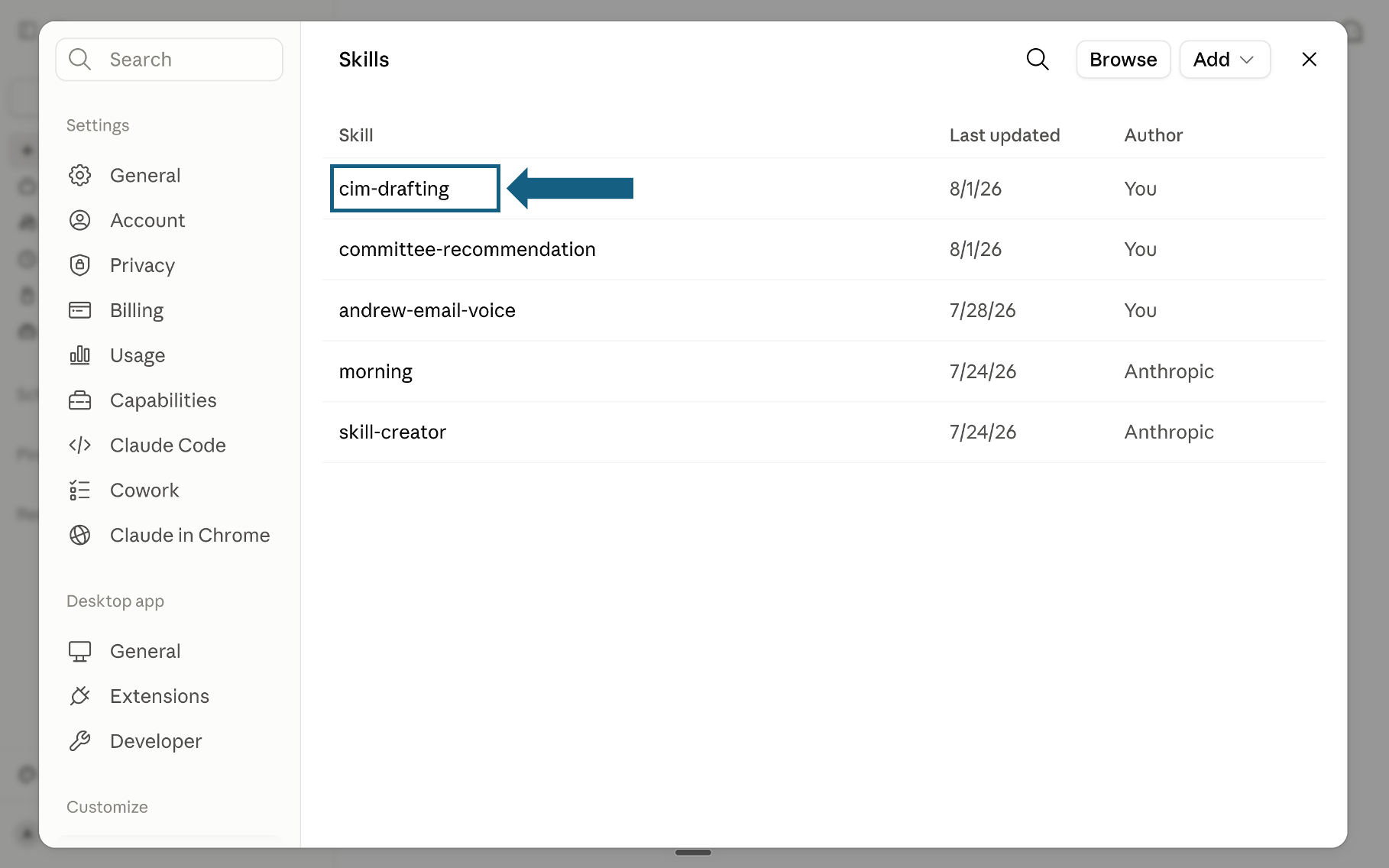
Confirm the skill was added
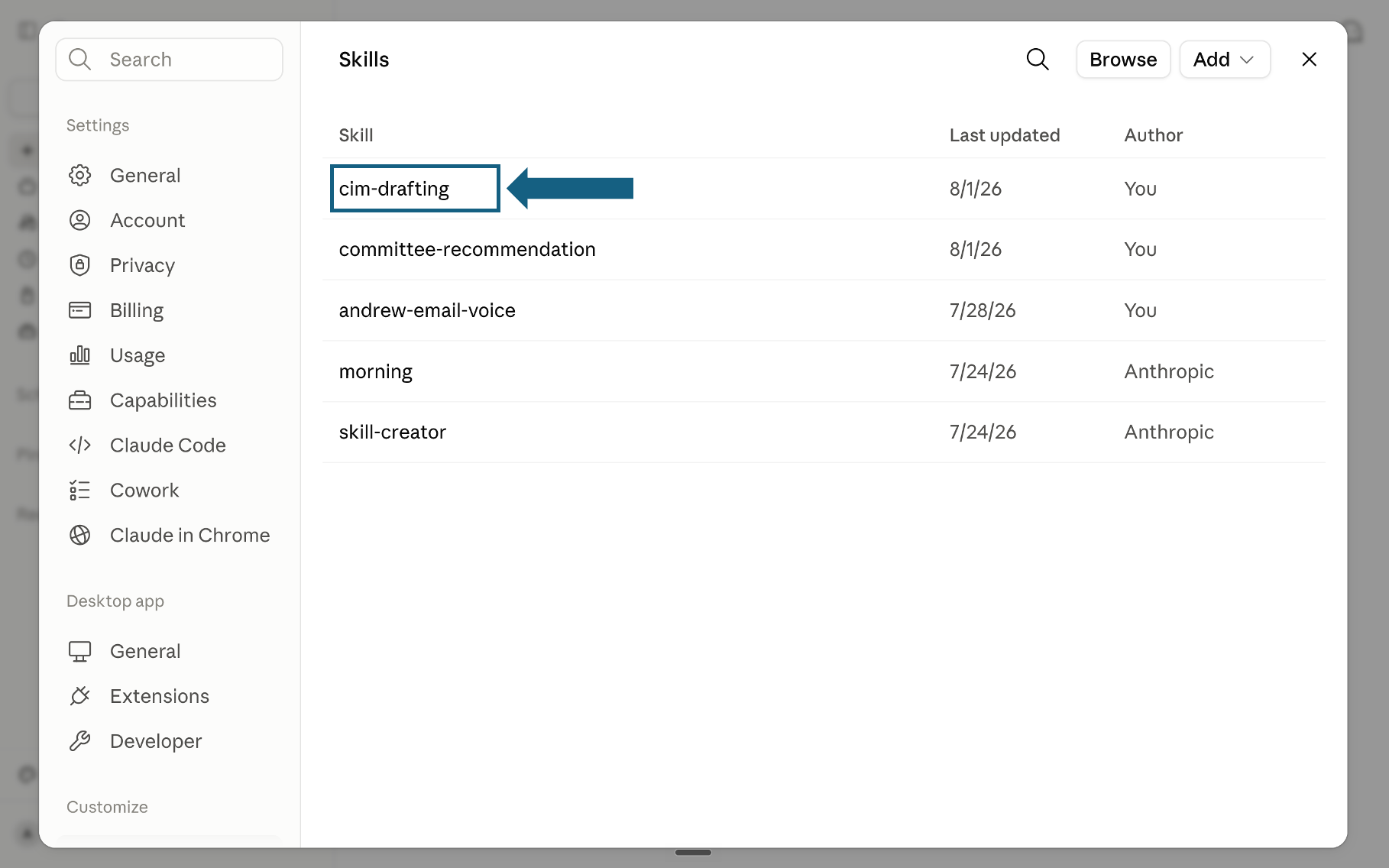
Return to the Skills list and confirm that the uploaded skill appears. Select its name to open it.
Open the screenshot to view it full size. - Step 5
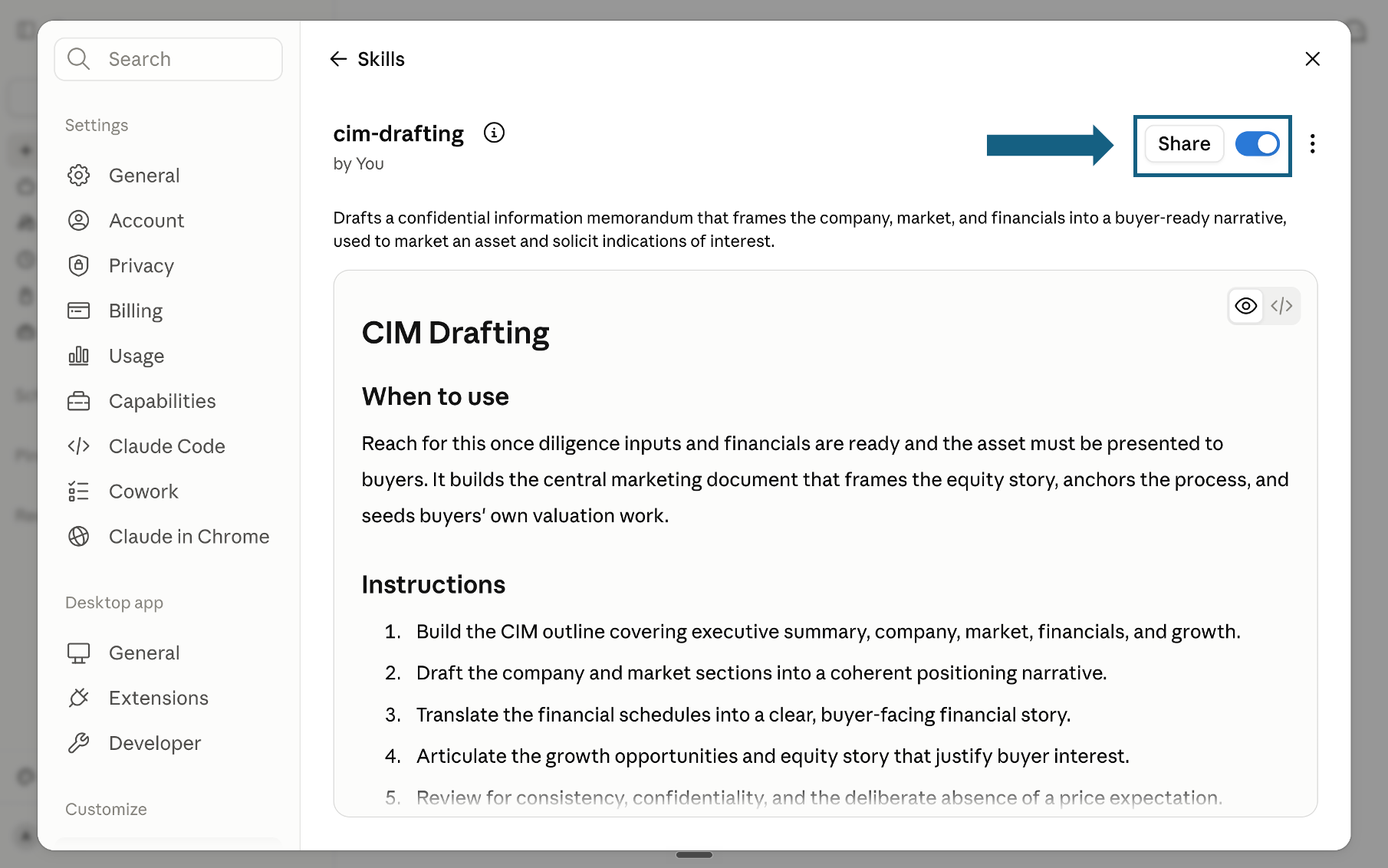
Review and turn on the skill
Review the skill's name, description, and instructions, then confirm its switch is on. Sharing the skill is optional.
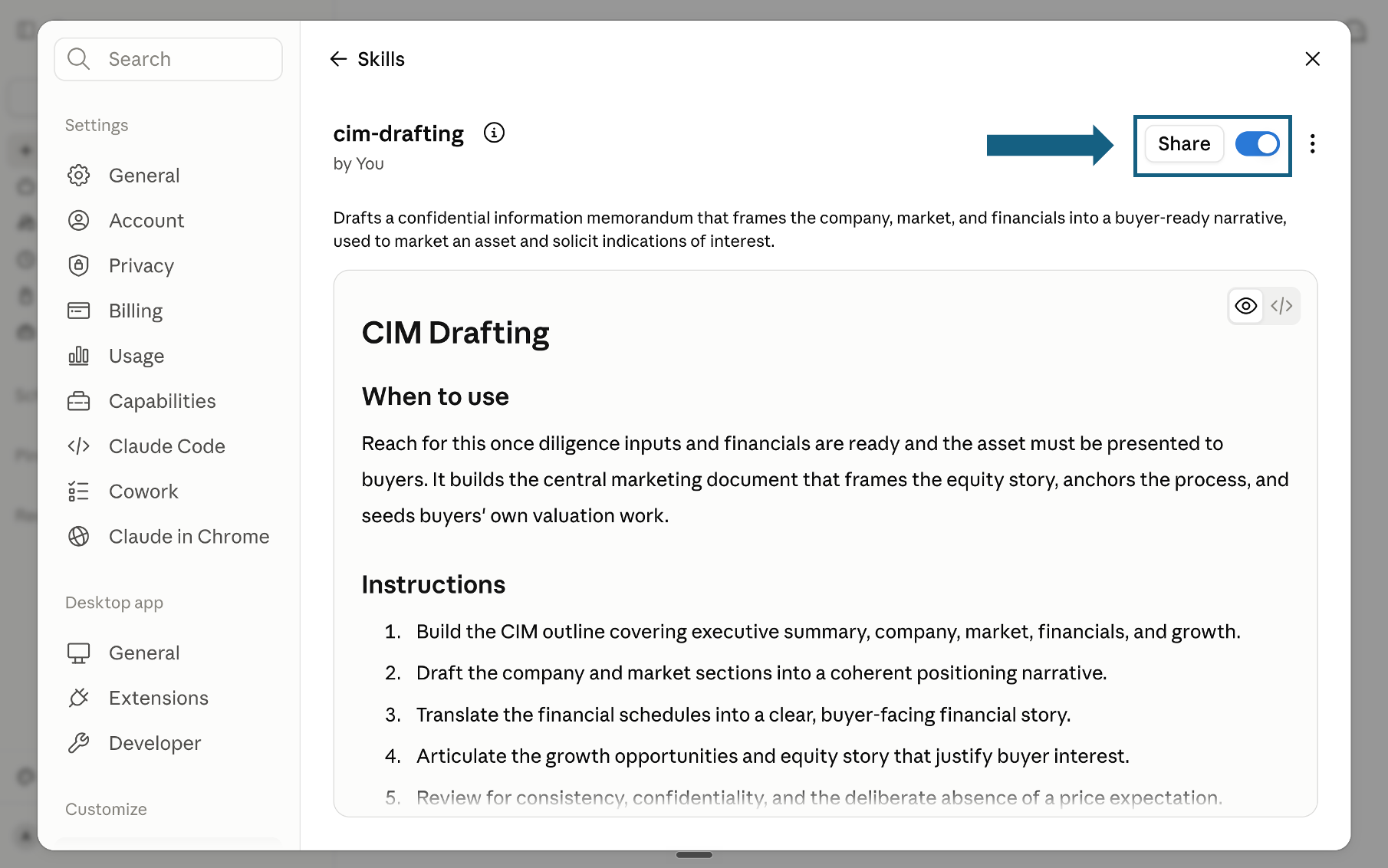
Open the screenshot to view it full size.
Try a skill
Tell Claude which finance skill to use and provide the relevant files or context. Review every output before sharing it.
- "Use the variance-analysis-before-the-meeting skill on this month's actuals versus budget for marketing and COGS."
- "Use the self-updating-valuation-model skill now that the growth assumption changed from 8% to 6%."
- "Use the covenant-and-policy-compliance-monitor skill to check this quarter's figures against our four covenants."
- "Use the board-memo-first-draft skill to turn this valuation update into a one-page memo."
How to choose a desk
Match your immediate question to the desk that answers it. For the fuller finance analysis backbone this department sits inside, see our six-stage finance operating system and the 18 institutional-grade Claude skills for finance.
The quality bar
Every skill is designed to hold output to the standard a senior finance reviewer would apply before it leaves the desk.
Frequently asked questions
What is the Claude Fable 5 finance department pack?
It is five standalone Claude skills, one for each desk of a lean finance function: FP&A, Valuation, Risk and Compliance, Treasury, and Reporting. Each skill is a single markdown file that teaches Claude a repeatable method for one recurring piece of finance busywork, instead of a generic instruction to summarize or analyze.
How do I install these Claude skills?
Download and unzip the pack, then open Settings in Claude, select Skills under Customize, choose Add and Upload a skill, and upload one SKILL.md file at a time. The five-step setup guide below shows the full flow.
Can I install all five skills in Claude?
Yes. Upload each SKILL.md file through Claude's Skills settings and keep the skills you want enabled. Name the relevant skill in each prompt, and pass the output of one desk into the next when you want a connected finance workflow.
Does this replace a finance team?
No. The skills replace the assembly work: pulling numbers, reconciling sources, redrafting a memo when an assumption changes. The judgment, the sign-off, and the relationship with stakeholders stay with the team. The skills exist so people spend their time on the decision, not on the road to the decision.
How does this connect to Oria?
These skills provide the repeatable finance workflows. Oria Claude Academy teaches professionals how to use Claude with stronger context, review standards, and operating habits so the analysis remains useful, accurate, and ready for a senior finance review.