

The CFO Guide to Claude
The complete guide to running finance with Claude. 24 standalone skills for the office of the CFO, across research, planning, budgeting, the balance sheet, performance, cash flow, automation, and modeling.
AI Academy for Professionals





The CFO guide to Claude
24 standalone Claude skills for the office of the CFO. Each skill teaches Claude to perform one finance task and produce a concrete deliverable, a forecast, a variance bridge, a 13-week cash flow, a covenant check, a board pack, with the real method and formulas a finance professional would use.
They span the eight domains of the modern finance function: research and intelligence, strategy and planning, budgeting and forecasting, balance sheet analysis, performance and ROI, cash flow planning, automation and workflows, and financial modeling. The skills are built for running and reporting the business, FP&A, treasury, and controllership, and are kept distinct from deal-valuation modeling.
Mechanically, each skill is one folder with a SKILL.md file. Install just the ones you need, or load the full set. Building models in spreadsheets? See our Claude skills for Excel. New to working this way? Start with the consultant's guide to Claude.
Download all 24 skills
One zip, one folder per skill. Free, no signup.

Be the person your team asks about AI
Learn it once, then set the standard the rest of the team follows
Go to AcademyThe 24 CFO skills you get
The collection is grouped into eight finance domains. They run in the order a real engagement does, diagnose first, communicate last, but every skill is also useful on its own.
The CFO operating system in Claude
Domain 1 · 3 skills
Financial Research & Intelligence
Use these when a decision needs outside truth: how you compare to peers, what a filing or transcript really says, and how big the market is. Every figure traces to a source.
Peer Benchmarking Analyzer
Use when: You need to benchmark against peers
Output: Benchmarking table vs peer medians and quartiles
Earnings and Filings Teardown
Use when: You need the signal from a filing or transcript
Output: Sourced brief: KPIs, guidance, segments, risks
Market Intelligence Brief
Use when: You need a sized market and competitive read
Output: Market brief: TAM, SAM, SOM, and the landscape
Domain 2 · 3 skills
Strategy & Planning
Use these when targets must become a plan: the annual operating plan, where capital should go, and how the plan holds up across scenarios.
Annual Operating Plan Builder
Use when: You are building the annual operating plan
Output: AOP with a top-down vs bottom-up reconciliation
Capital Allocation Advisor
Use when: You must rank competing uses of capital
Output: Ranked allocation by ROIC versus WACC
Scenario Planning Engine
Use when: You need base, bull, and bear scenarios
Output: Scenario table, sensitivities, downside playbook
Domain 3 · 3 skills
Budgeting & Forecasting
Use these to build and maintain the numbers: a driver-based budget, a rolling re-forecast, and a zero-based reset when spend needs justifying.
Driver-Based Budget Builder
Use when: You are building the annual budget
Output: Driver-based budget by department, phased monthly
Rolling Forecast Builder
Use when: You need a continuous re-forecast
Output: 12 to 18 month rolling forecast and budget bridge
Zero-Based Budget Planner
Use when: You need to justify spend from zero
Output: Decision packages, ranked funding, savings
Domain 4 · 3 skills
Balance Sheet Analysis
Use these to read the balance sheet: free up working capital, judge liquidity and leverage, and keep covenant headroom in view.
Working Capital Optimizer
Use when: You need to free up working capital
Output: Cash conversion cycle and ranked cash levers
Liquidity and Solvency Analyzer
Use when: You need a balance-sheet health read
Output: Ratio dashboard, trends, red flags, verdict
Covenant Monitor
Use when: You need covenant headroom and warnings
Output: Covenant table, headroom, pass, watch, or fail
Domain 5 · 3 skills
Performance & ROI Analysis
Use these to explain performance and prove returns: variance bridges that reconcile, margin and profitability decomposition, and capex ROI against the hurdle.
Variance Bridge Analyzer
Use when: You need budget versus actual explained
Output: Price, volume, and mix bridge that reconciles
Margin and Profitability Analyzer
Use when: You need to decompose margin and profit
Output: Margin bridge and segment profitability ranking
Investment ROI Evaluator
Use when: You are evaluating a capex project or initiative
Output: Business case: NPV, IRR, payback, ROIC vs hurdle

Become Dangerously Productive with AI
For consultants, bankers and investors who want a compounding edge
Go to AcademyDomain 6 · 3 skills
Cash Flow Planning
Use these to manage cash: a 13-week direct-method forecast, runway and breakeven, and a liquidity stress test with mitigations.
Thirteen-Week Cash Forecast
Use when: You need short-term cash visibility
Output: 13-week direct-method cash forecast vs minimum
Cash Runway and Burn Analyzer
Use when: You need runway and breakeven
Output: Runway model to the zero-cash date, breakeven
Liquidity Stress Tester
Use when: You need to stress short-term liquidity
Output: Stress trough by scenario, ranked mitigations
Domain 7 · 3 skills
Automation & Workflows
Use these for the recurring grind: reconciliations, the month-end close, and scheduled reporting packs. Outputs are review-ready and never posted without a human.
Account Reconciliation Runner
Use when: You need a reconciliation done
Output: Reconciliation that ties to zero and exceptions
Month-End Close Accelerator
Use when: You are running the month-end close
Output: Close checklist, proposed entries, flux analysis
Recurring Report Automator
Use when: You need a recurring reporting pack
Output: Reusable template plus this period's report
Domain 8 · 3 skills
Financial Modeling
Use these to build the models and the pack: an integrated operating model that balances, a treasury debt schedule, and the board reporting pack.
Three-Statement Operating Model Builder
Use when: You need an integrated planning model
Output: IS, BS, and CF operating model that balances
Debt Schedule Modeler
Use when: You need a treasury debt schedule
Output: Debt schedule, revolver mechanics, leverage and coverage
Board Reporting Pack Builder
Use when: You are assembling the board pack
Output: Board pack: KPIs, financials, variance, outlook
Domains 1 to 3 set the direction: research, plan, and budget. Domains 4 to 6 control the balance sheet, performance, and cash. Domains 7 to 8 automate the work and build the board pack.

You Bought Claude
Now Learn How to
10X Your Work
For consultants, bankers and investors who want a compounding edge
Go to AcademySetup Guide
- Step 1Download all 24 skills (.zip)
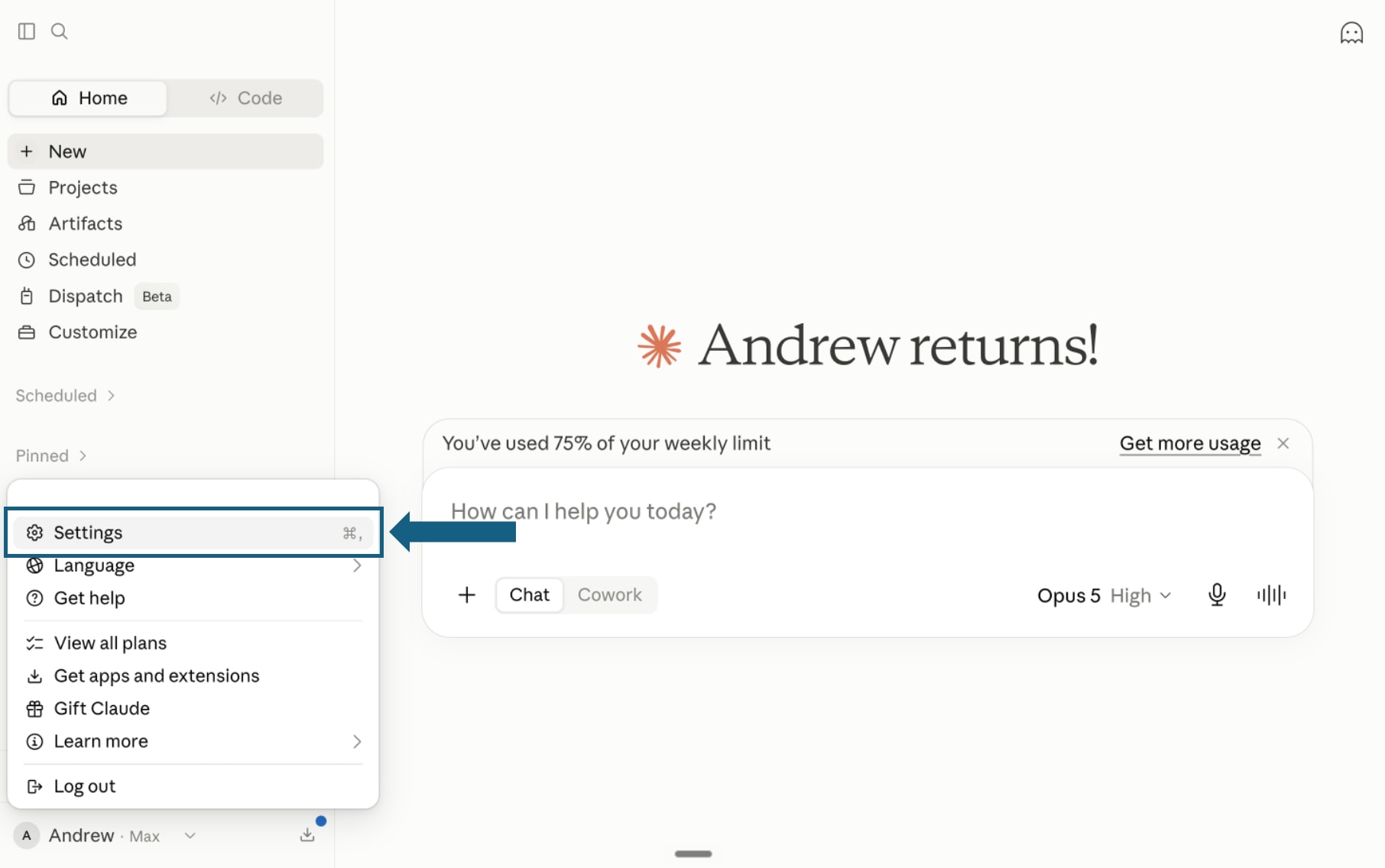
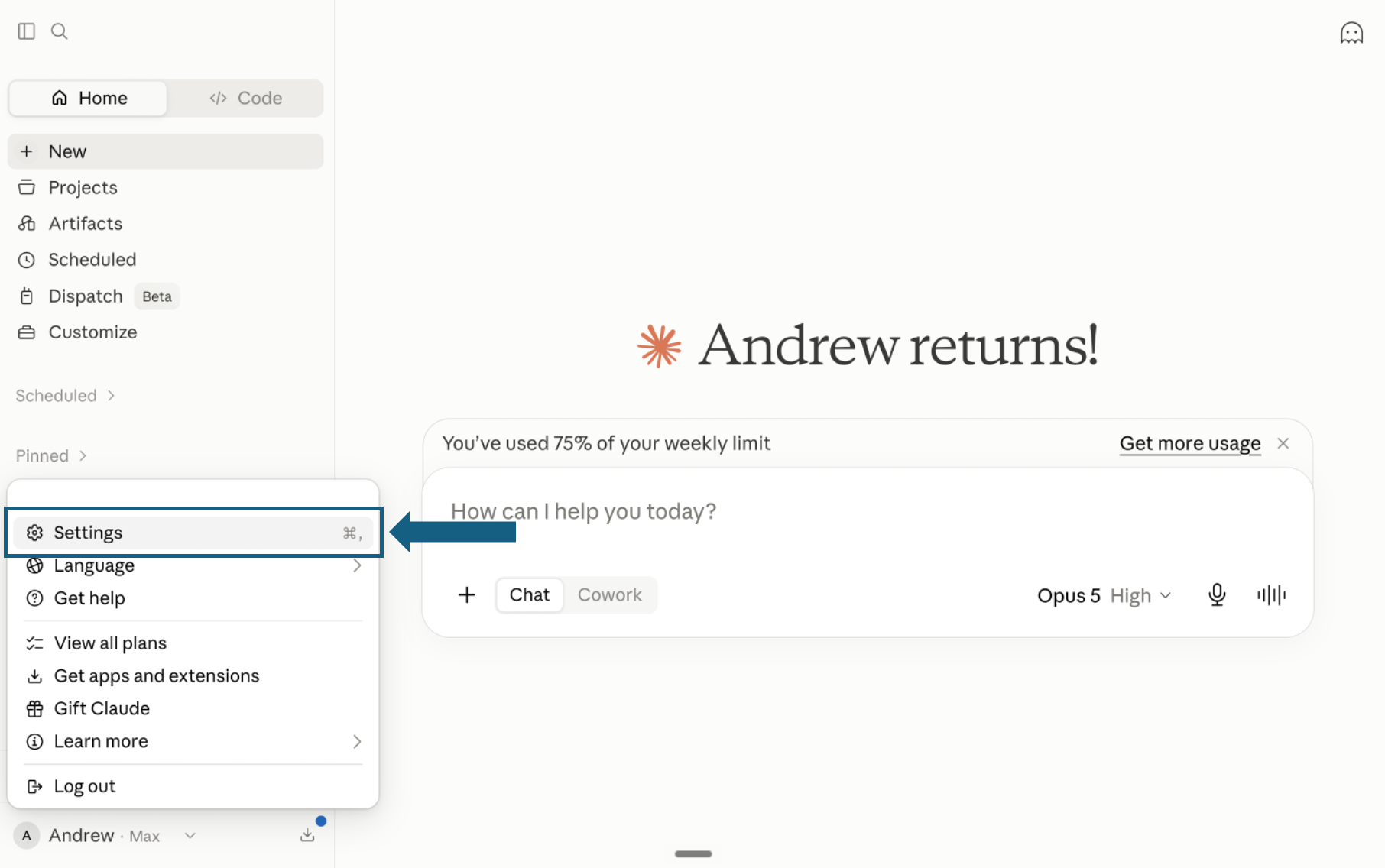
Download the pack and open Settings
Download the pack and unzip it so each skill remains in its own folder with its SKILL.md file. In Claude, open your profile menu and select Settings.
Open the screenshot to view it full size. - Step 2
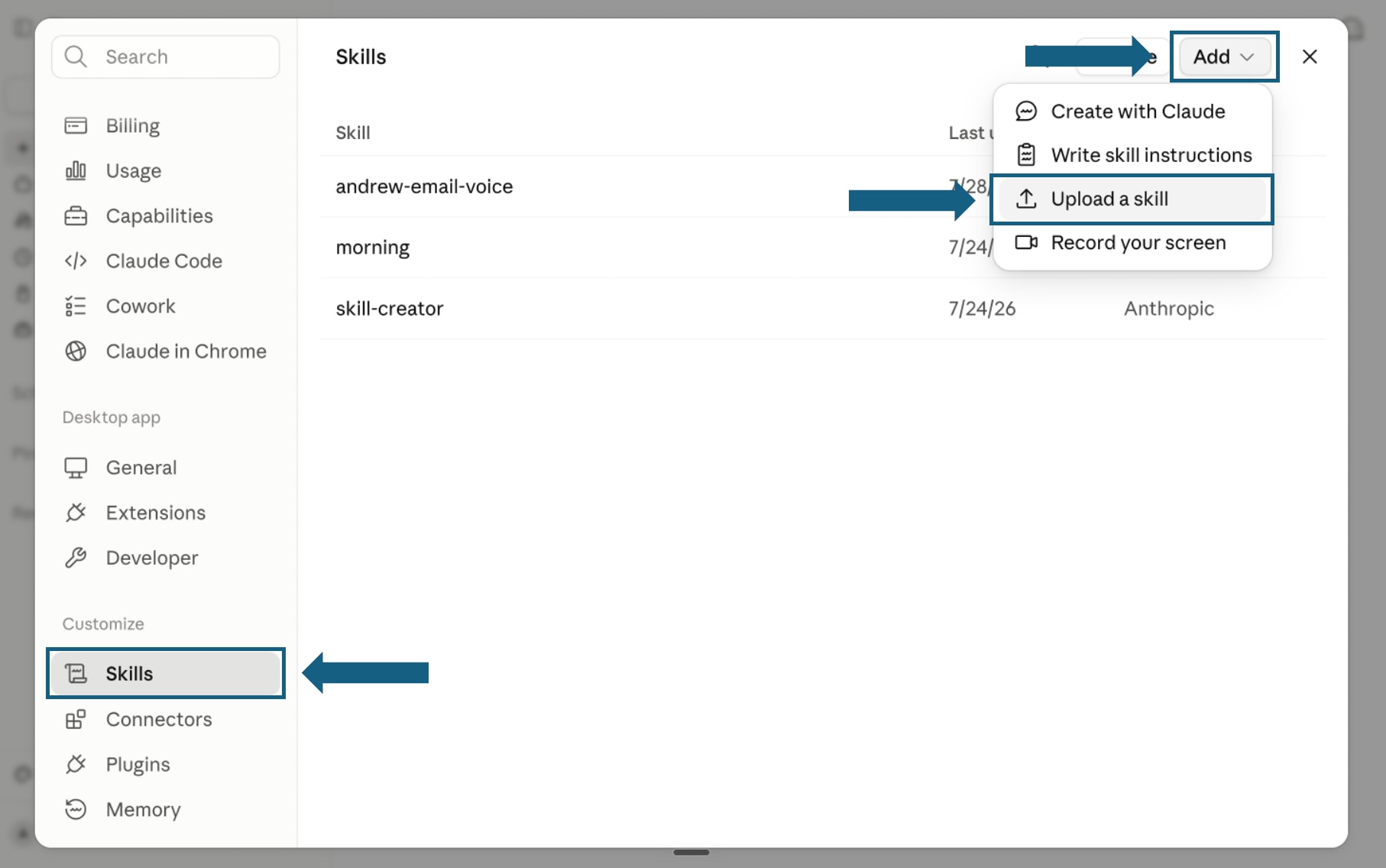
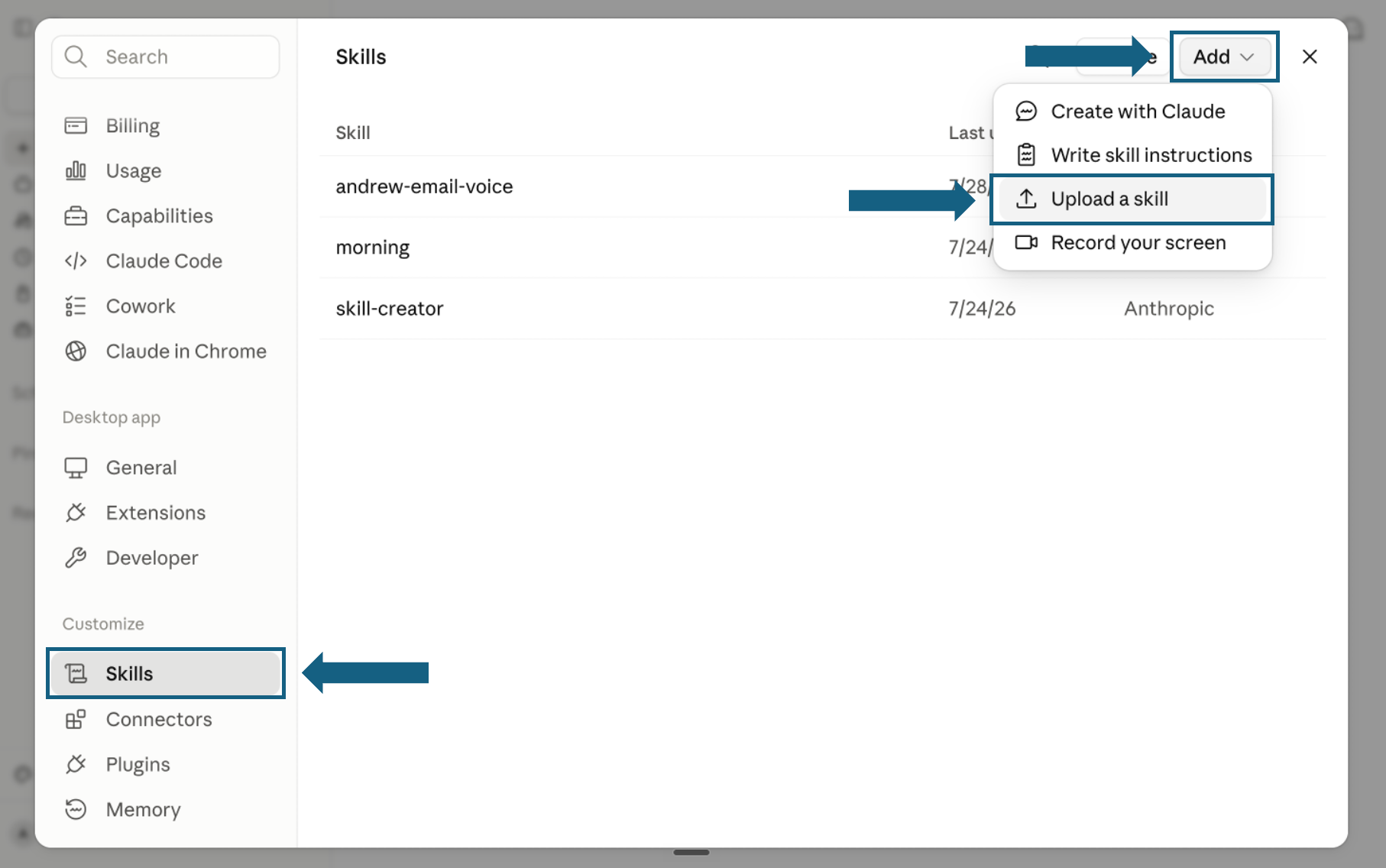
Open Skills and start an upload
In Settings, select Skills under Customize. Open Add and choose Upload a skill.
Open the screenshot to view it full size. - Step 3
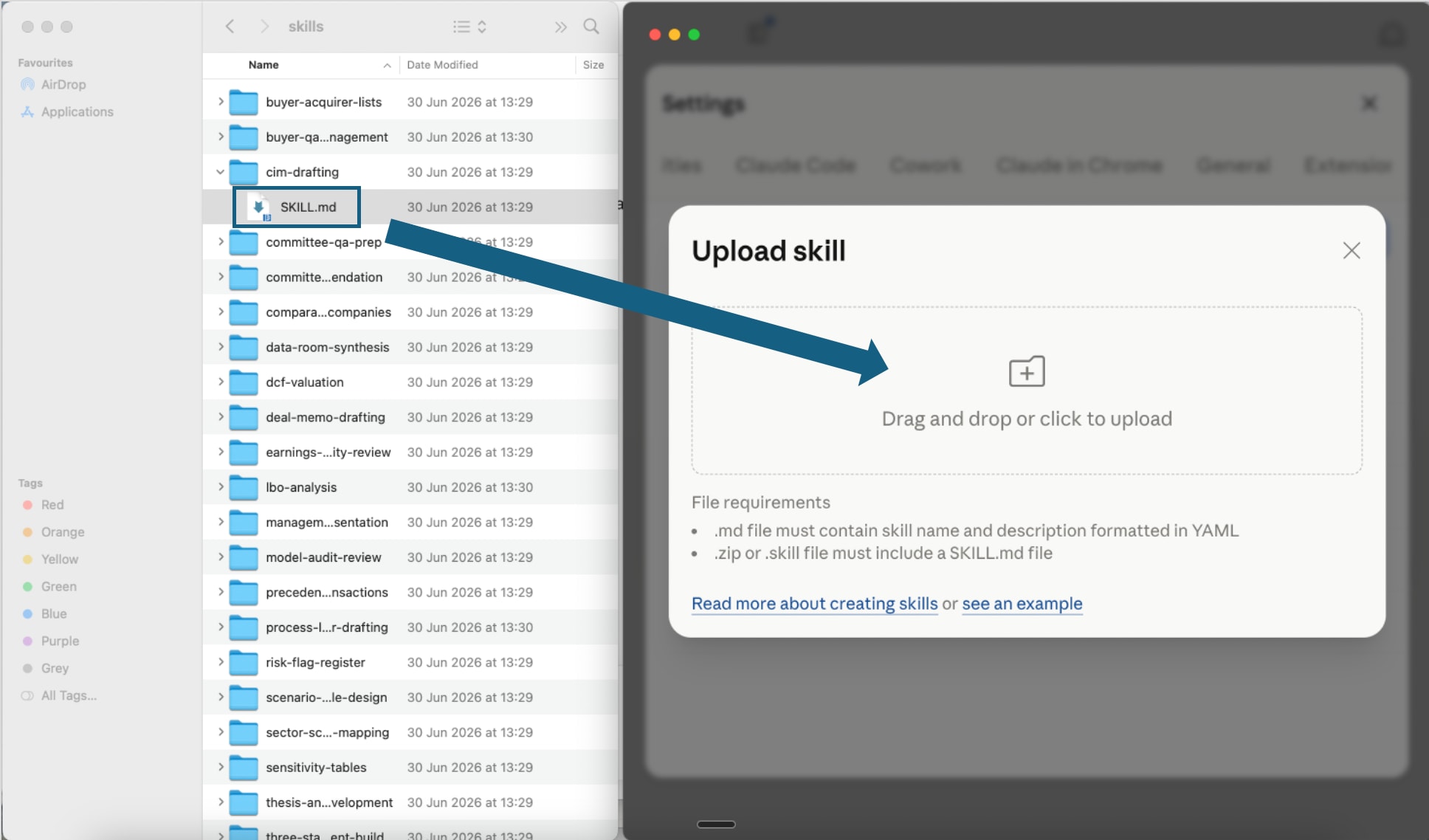
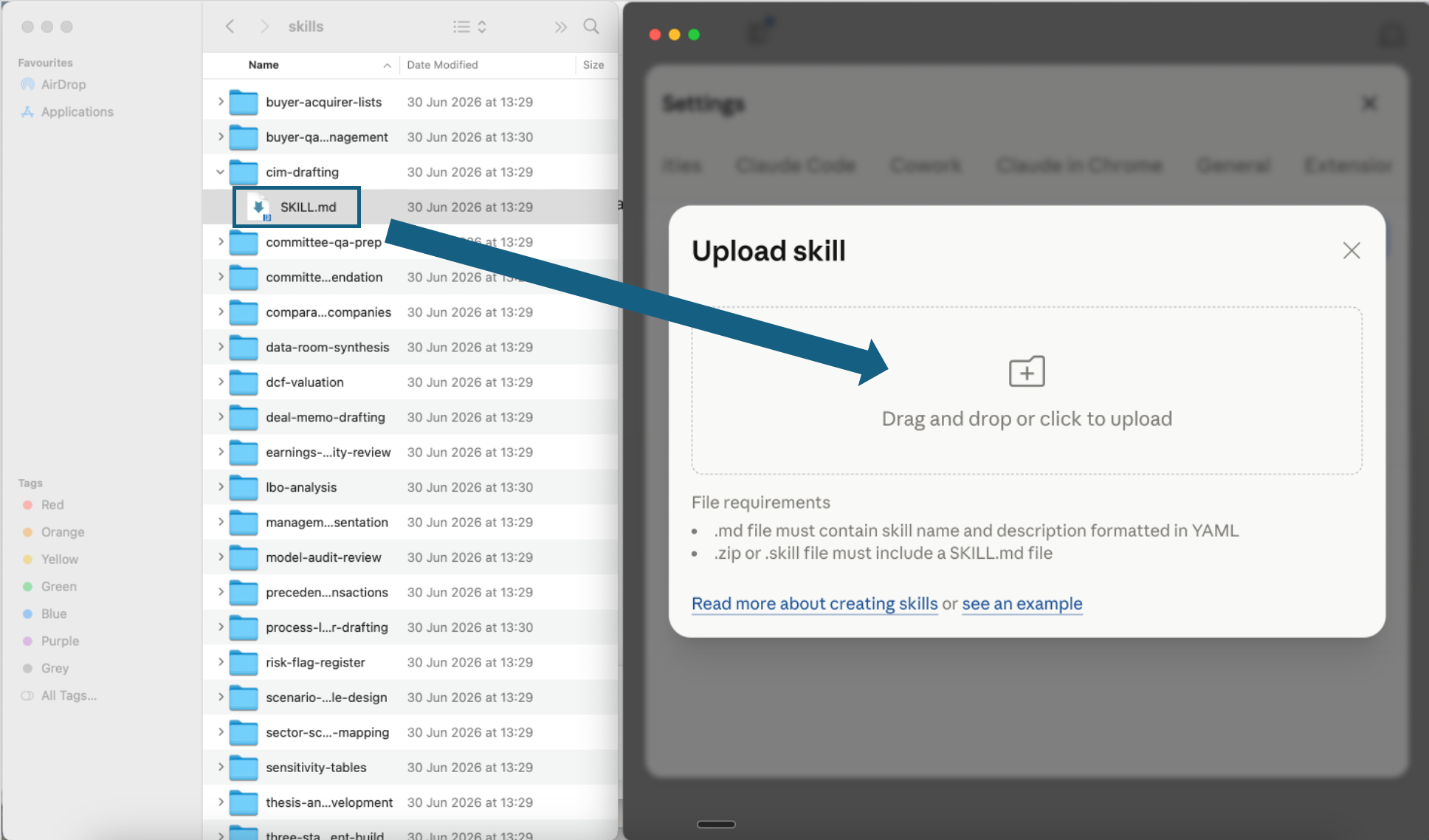
Upload one skill file
Open one extracted skill folder and drag its SKILL.md file into the upload window, or click the upload area to choose it. Repeat this step for each CFO skill you want to add.
Open the screenshot to view it full size. - Step 4
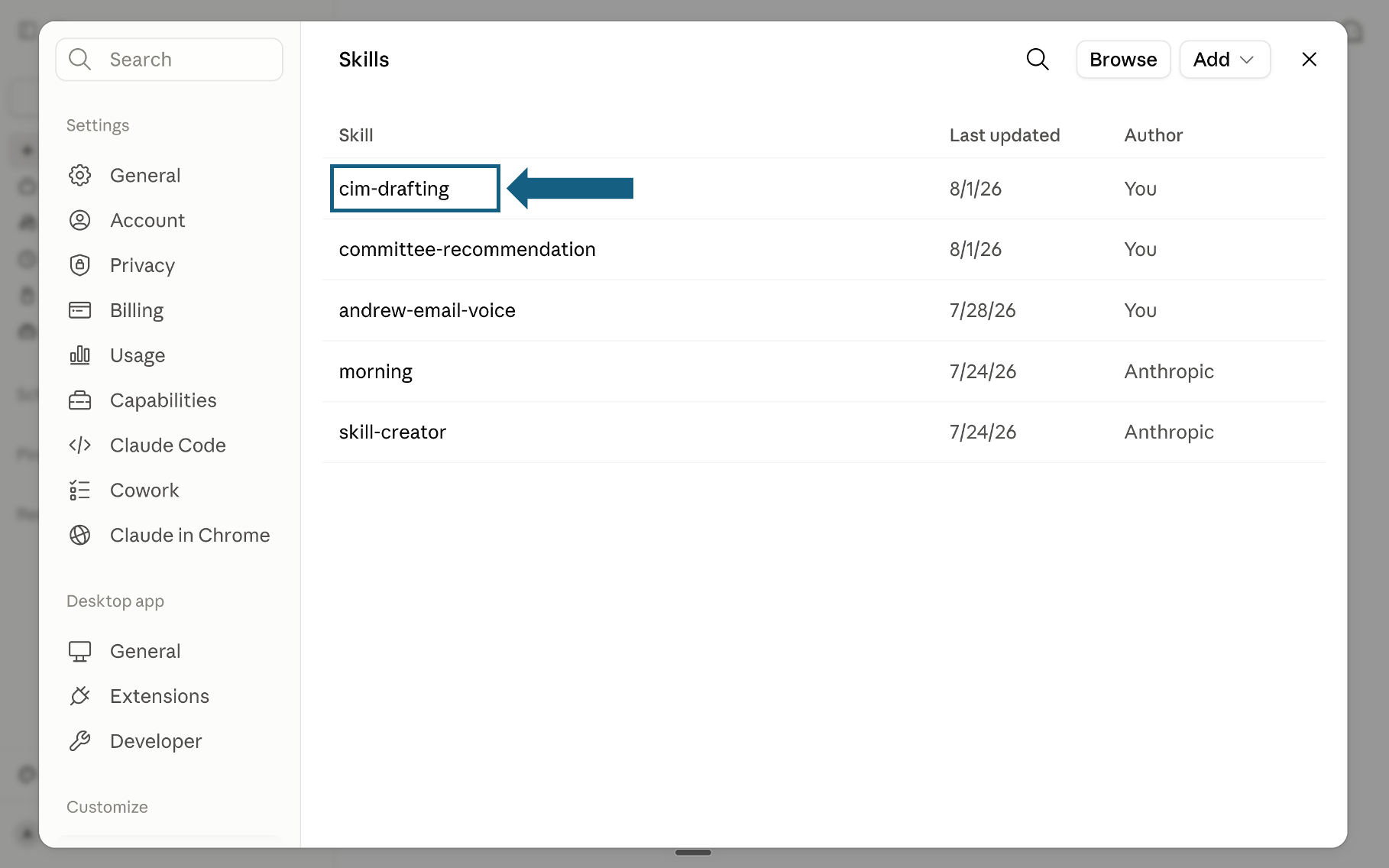
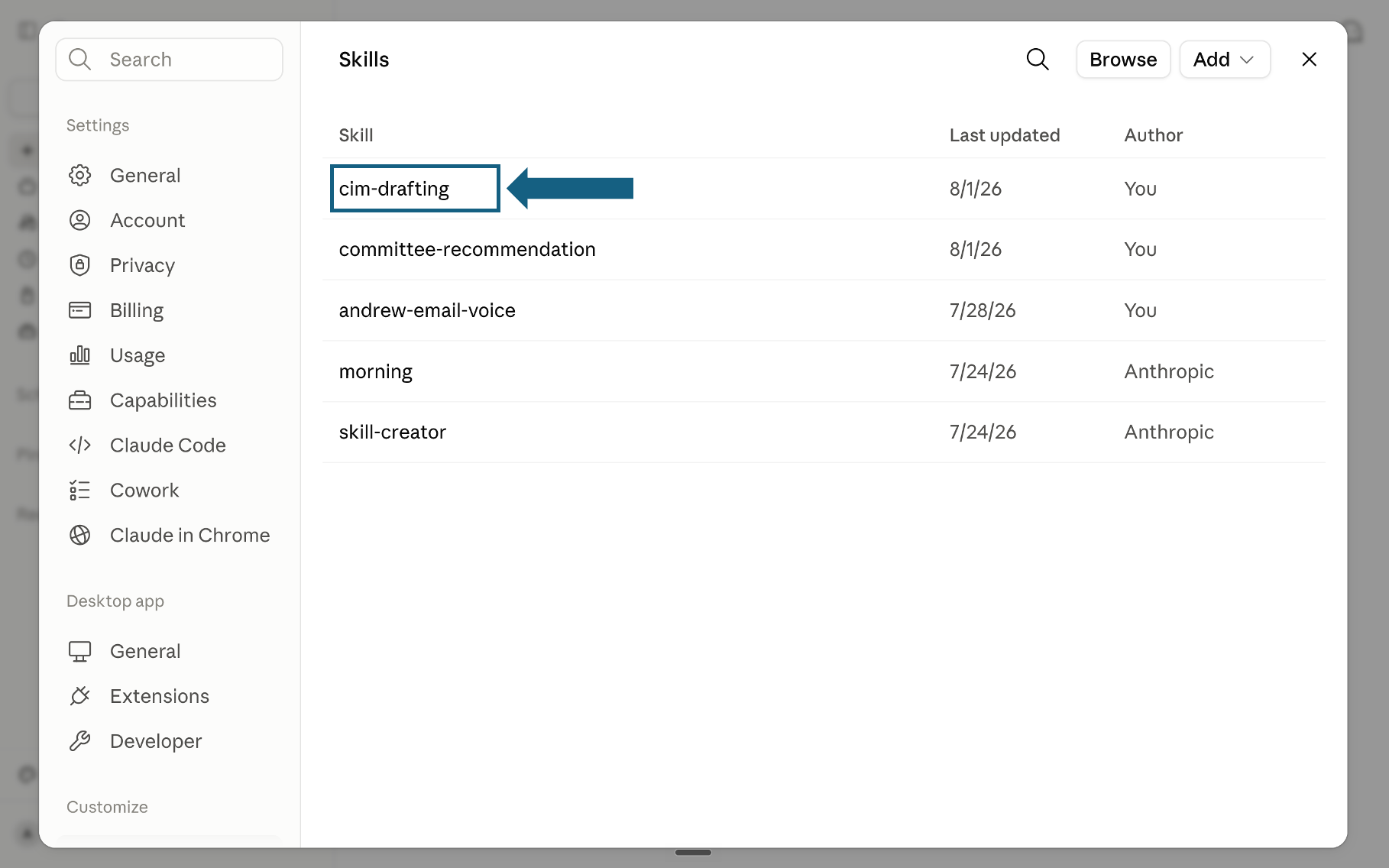
Confirm the skill was added
Return to the Skills list and check that the skill appears. Select its name to open it.
Open the screenshot to view it full size. - Step 5
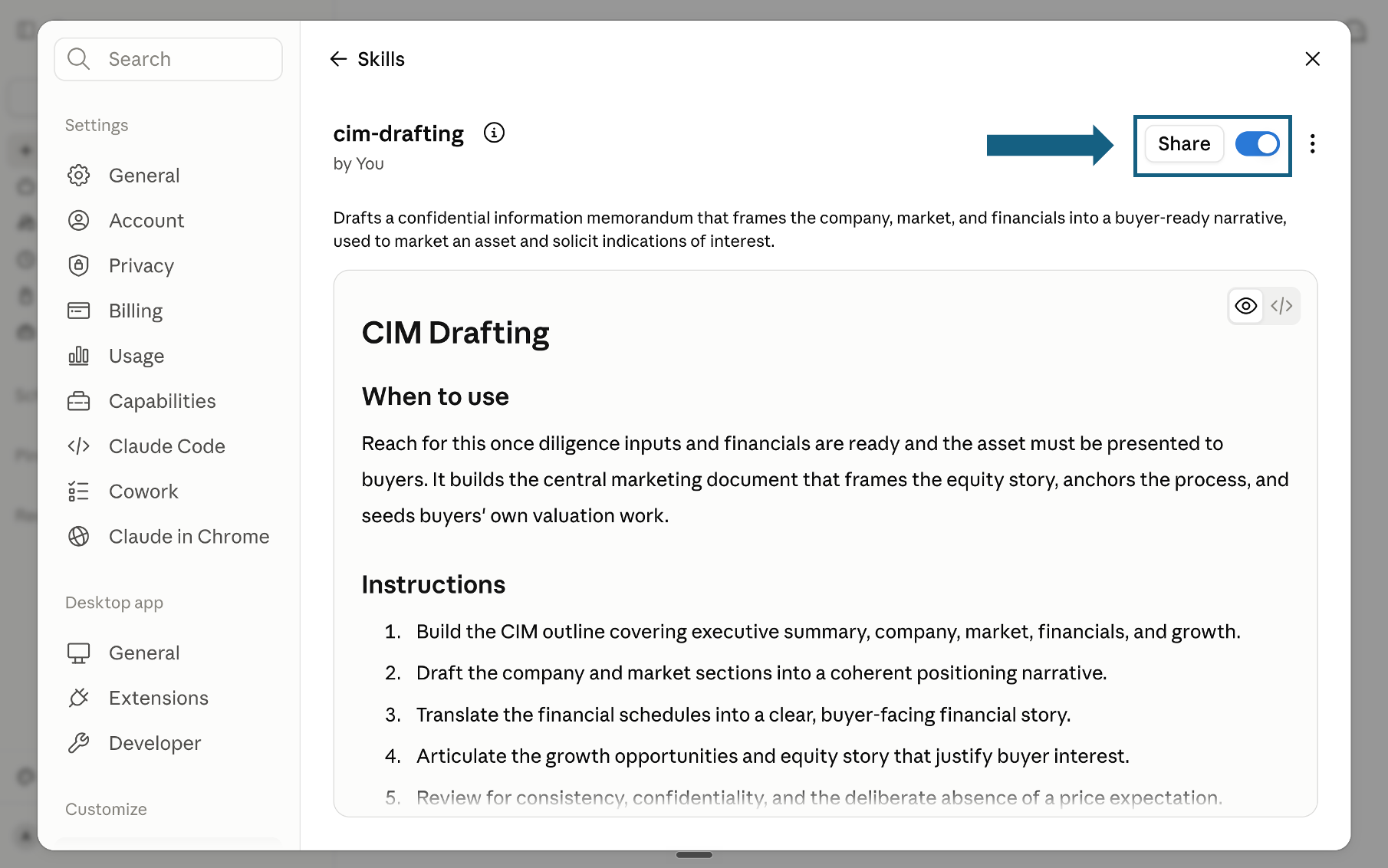
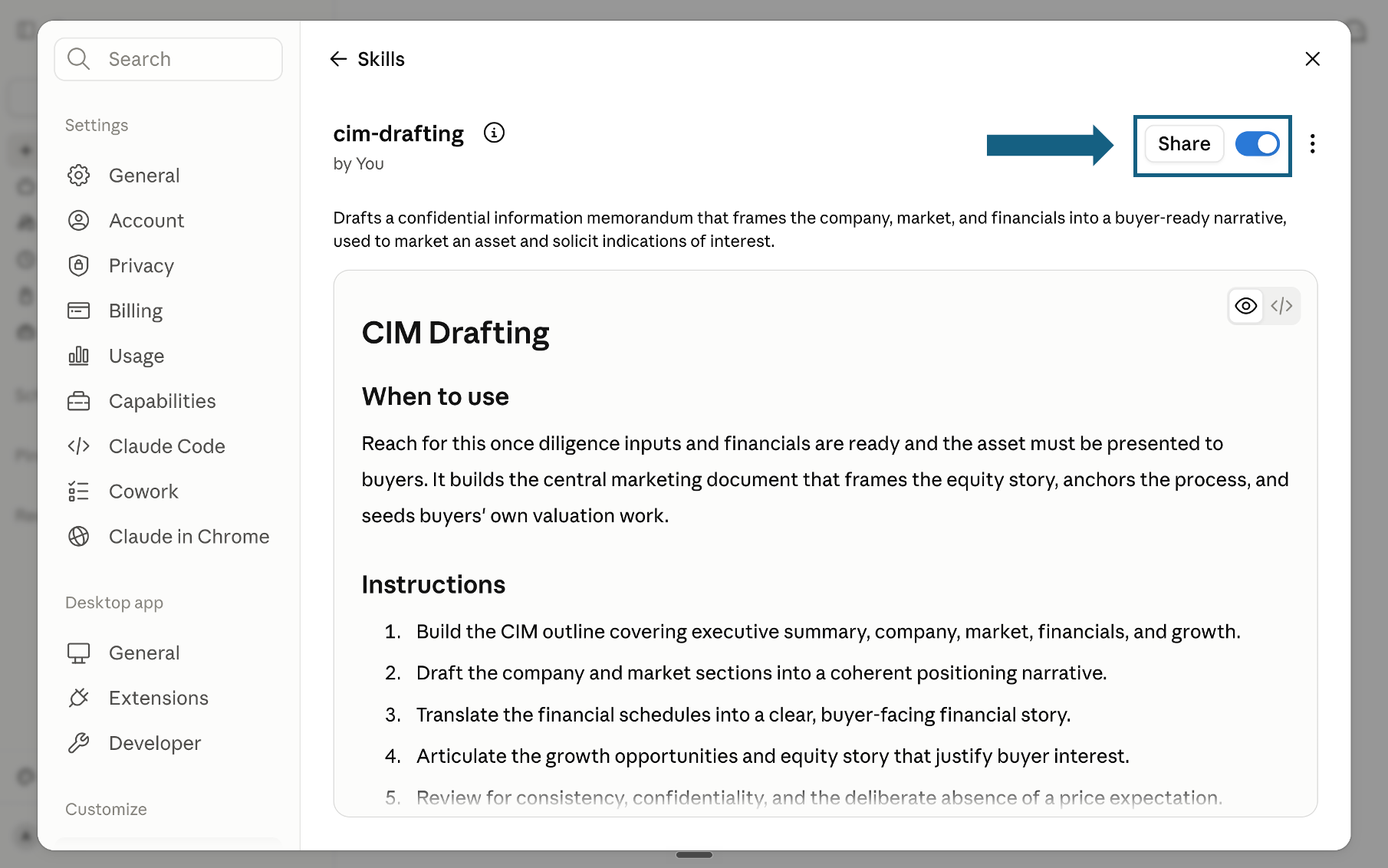
Review and turn on the skill
Review the skill's name, description, and instructions, then make sure the switch beside Share is on. A blue switch means the skill is turned on; sharing it is optional.
Open the screenshot to view it full size.
Try a skill
Tell Claude which skill to use and provide the relevant files or context. Review every output before sharing it.
- "Use the thirteen-week-cash-forecast skill to build a 13-week cash forecast from this AR and AP."
- "Use the variance-bridge-analyzer skill to bridge budget to actual for Q2 by price, volume, and mix."
- "Use the covenant-monitor skill to test our leverage and coverage covenants this quarter."
- "Use the board-reporting-pack-builder skill to assemble this month's board pack."
How to choose a CFO Claude skill
Skip the directory hunt. Each of these CFO Claude skills maps to a specific finance task, so pick the row that matches what you need and use that skill. For a wider walkthrough of working this way, see our consultant's guide to Claude.
The quality bar
Every skill is designed to push Claude toward outputs that meet the same partner-grade quality bar, the standard a senior associate would hold each deliverable to before it leaves the room.