

Best AI Presentation Tool for Consultants: 9 Tools Tested
We gave 9 AI presentation tools the same brief, a dense three-step operating model slide and one corporate template, then scored the results on template fidelity, editing freedom, and speed. Here is the best AI presentation tool for consultants, and how the rest of the field held up.
The best AI presentation tool for consultants, tested
We ran the same test brief, a dense three-step operating model slide with a KPI callout, plus the same one-page corporate template, through 9 AI presentation tools. Oria came out as the best AI presentation tool for consultants because it held the uploaded template exactly, kept every element from the brief editable, and did it in under 3 minutes. Plus AI, Microsoft Copilot, Slidely AI, Beautiful.ai, Gamma, Pitch, Tome, and Canva are each genuinely strong tools, built for a lighter job than the one this brief asked for.
Pick an in-PowerPoint tool when
The deck is dense and brand-controlled, must stay fully editable, and gets reviewed and circulated as a .pptx by a team.
A web-based tool still fits when
A fast, polished draft in the browser is enough and the slides are cleaner, more standard, and lighter on bespoke detail.
How we tested 9 AI presentation tools for consultants
A general "best AI presentation tool" test uses a light, simple slide. Consultants do not build light, simple slides, so we used a brief that matches the real job instead.
The same test brief. A rough outline for a three-step operating model slide with one KPI callout on the right, the kind of dense, bespoke layout a strategy deck actually carries.
The same corporate template. A logo, two brand colors, and one font pair, uploaded or applied identically wherever the tool allowed it.
Three scoring criteria. Template fidelity, how freely the result could be edited afterward, and how long it took to reach a slide a consultant could actually use.
The scorecard: template fidelity, editing, speed
The map below plots where each tool landed on template fidelity against editing freedom, followed by the full scorecard.
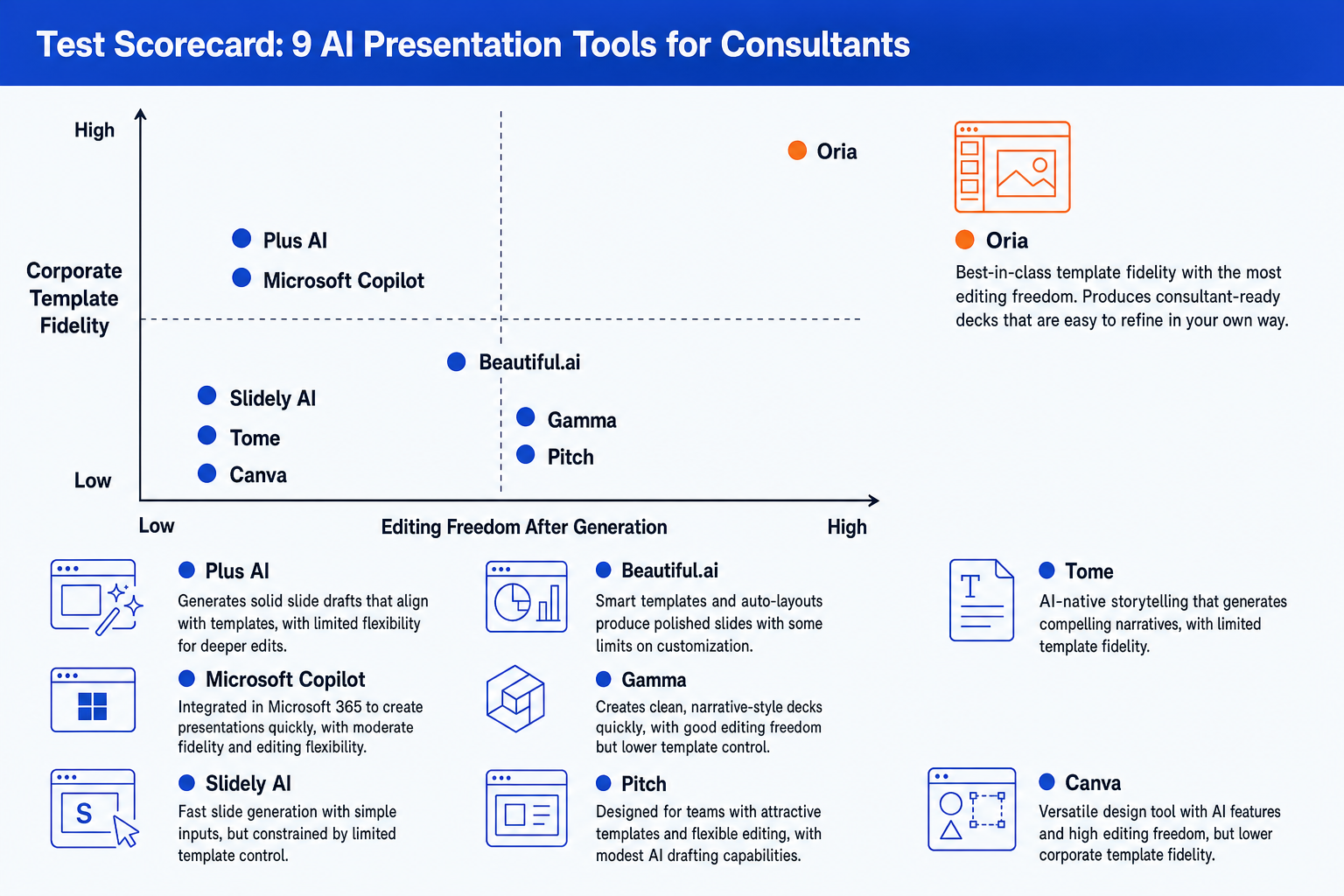
Oria figures are documented product facts. The other tools are scored on what our test brief produced, framed by category rather than invented specifics.
The pattern behind the scorecard is technical, not cosmetic. For the full breakdown of why pre-selected templates, HTML-based agents, and visual rendering produce such different results, read the three approaches to AI slide generation. It is the single most useful lens for judging any tool on this list.
Test notes by tool
What happened when each tool ran the same three-step operating model brief on the same corporate template.
Oria
We opened the add-in in the PowerPoint task pane, pasted the outline, and uploaded the same one-page template. Oria returned four design options in under 40 seconds and a final, fully editable slide in under 3 minutes, on the uploaded fonts, colors, and logo. Every shape, text box, and connector on the slide could be moved and restyled afterward without breaking the layout.
Plus AI
Plus AI's suggested-layout feature drafted a first pass quickly inside PowerPoint, which is a genuine strength for a standard slide. The three-step operating model, however, had to be squeezed into one of its pre-built layout shapes, and getting the KPI callout to sit where the brief asked for took manual reformatting after the draft landed.
Microsoft Copilot
Copilot generated a usable slide inside the Microsoft 365 suite a firm may already standardize on. Brand handling stayed close to a color match rather than a full template, and the dense, three-step layout came back simplified, with the KPI callout dropped to a smaller supporting line rather than a distinct element.
Slidely AI
Slidely AI, an HTML-based agent, produced a slide that looked reasonable on first open but showed uneven spacing once we tried to nudge elements to match the template's margins. Editing was possible but fiddly, the kind of fragility that shows up once a slide has more than a title and a few bullets.
Beautiful.ai
Beautiful.ai's smart templates kept the test slide tidy with almost no manual work, which is exactly the point of that design. The three-step structure simplified toward the tool's own layout region, and getting a bespoke KPI callout to sit in a nonstandard spot needed us to fight the automatic layout rules rather than work with them.
Gamma
Gamma built an attractive web-native version of the slide fast, styled in one of its themes rather than the uploaded template. Presenting it from a link worked well. Exporting it to PowerPoint for the brand-compliance check was the step where the corporate template stopped matching cleanly.
Pitch
Pitch's collaborative editor made it easy to comment on the draft with a second reviewer, a real advantage for a team deck. Its templates are clean and standard rather than a strict brand master, so the same template-matching gap showed up at export as it did with the other web-first tools.
Tome (now Alai)
Tome, rebranded as Alai, turned the outline into a well-written narrative page quickly, better suited to a story-first overview than a dense operating-model slide. The three-step structure and the KPI callout came through as text more than as a distinct visual layout, and template control stayed light.
Canva
Canva produced a clean, on-brand visual fast from its template library, genuinely strong for a simple graphic. Asking it to hold a bespoke three-step operating model with a KPI callout in a specific spot is asking it to do a job outside its template-first design, and export fidelity to the strict .pptx master varied.
Why Oria won this test
Oria is positioned as AI for complex professional slides, built for the dense, brand-controlled work consultants, bankers, and strategy teams produce. On our test brief, that positioning held up on every criterion at once.
It lives inside PowerPoint. Oria loads in the task pane as a Microsoft 365 add-in on Windows, macOS, and the browser. The test slide was native from the first second, with no export step.
It held the template exactly. The uploaded logo, brand colors, and font pair carried across every design option, which is what a brand-compliance review actually checks.
It kept the three-step structure intact. The operating model and the KPI callout came back as a bespoke layout designed for that specific brief, not squeezed into a pre-built template region.
Every element stayed editable. Shapes, text boxes, icons, lines, and the callout are native PowerPoint, so a consultant can move, retype, recolor, and restyle anything after generation.
It offered more than one option. Oria returned several design directions in 30 to 40 seconds, so the choice of visual direction stayed with the consultant, not the model.
For a wider field of AI tools for PowerPoint beyond this test, see our guide to the best AI for PowerPoint, and for one head-to-head from this list read Oria vs Plus AI.
Pick your AI presentation tool by use case
Choose an in-PowerPoint tool when
- The team builds slides inside PowerPoint all day
- Output must stay fully editable and native
- A strict corporate template is non-negotiable
- Slides are dense, bespoke, framework-heavy
- The deck must pass a partner or board review
A web-based tool is fine when
- A fast, polished draft in the browser is enough
- The deck is cleaner and more standard
- A consistent, automatic look matters most
- No strict corporate master applies
- It is a pitch, marketing, or web-style narrative
For most consultants answering to a partner or board, the test brief points to a native, in-PowerPoint tool. For the fuller workflow from analysis to a board-ready deck, the consultant's guide to Claude walks the whole path.
Frequently asked questions
What is the best AI presentation tool for consultants?
Across the same test brief, Oria came out as the best AI presentation tool for consultants because it held the uploaded corporate template exactly, returned a fully editable native slide, and reproduced the three-step structure without simplifying it. Plus AI, Microsoft Copilot, Slidely AI, Beautiful.ai, Gamma, Pitch, Tome, and Canva are each strong at a lighter job, but none matched Oria on template fidelity and editability together.
How did you test these AI presentation tools?
We gave all 9 tools the same brief: a rough three-step operating model outline with one KPI callout, plus the same one-page corporate template (a logo, two brand colors, and one font pair). We scored each result on template fidelity, how freely the output could be edited afterward, and how long it took to reach a usable draft.
Does the best AI presentation tool for consultants need to run inside PowerPoint?
Not strictly, but it removes a real point of friction. Oria runs inside PowerPoint as an add-in, so the test slide was native from the first second, with no export step. Gamma, Pitch, Tome, and Canva are web-first and export to PowerPoint or PDF when a file is needed, which is exactly the step where template fidelity got tested hardest in our brief.
How does Oria compare with Microsoft Copilot on the same test?
Copilot is a reasonable pick for a firm already standardized on Microsoft 365 that wants an AI assistant bundled into a subscription it already pays for. On our test brief, its brand handling stayed close to a color match and the dense three-step layout came back simplified. Oria held the full template and kept every element from the brief intact.
Where do Beautiful.ai, Gamma, Pitch, Tome, and Canva fit for consultants?
Each earns its place for a different job. Beautiful.ai keeps a simple, standard deck tidy automatically. Gamma and Pitch are fast, collaborative, web-first generators for pitches and pages. Tome suits a story-first narrative overview. Canva is the fastest route to an on-brand marketing visual. None of the five is built around the dense, bespoke, brand-controlled slide our test brief used, which is the gap Oria closed.