

15 Claude Skills for Executive Summary Writing
You have the analysis. Someone still has to turn it into an executive summary that leads with the answer and survives the room, and the real decision is not whether AI helps, it is which route earns the time: a raw prompt, a pack of 15 Claude skills built for exactly this writing job, or Oria once the text is already done. This page covers the middle route: what each skill does, how they chain, and where a skill actually beats a raw prompt.
Quick answer
Match the skill to where the draft is actually stuck, not to how many are in the pack. A blank page needs a different skill than a draft that already has an answer but reads as a list of findings, and a draft heading to a partner or board needs one more pass that neither of those catches.
For most executive summaries, run three of the 15 skills in this pack: Governing Thought to fix the single answer before you write a line, Pyramid Builder to turn that answer into a top-down structure with MECE support, and Hostile Q&A to pressure-test the draft before a partner or board sees it. A raw prompt can approximate any one of these if you describe the method in full each time, but it will not chain the three together or apply them the same way twice. The setup guide below installs all 15 in one pass.
How we chose these 15
One named method per skill. Every skill maps to a method that already has a name and a literature behind it: the Pyramid Principle, SCR and SCQA, MECE. None are described as vague "best practice" a vendor could claim without being checked.
The writing job only, not the slide. This pack stays on structuring and drafting the summary itself. Turning that text into a slide on a locked corporate template is a separate step, and we routed it to the tool built for it instead of stretching this pack to cover both.
Where a skill actually beats a raw prompt. We tested chaining (one skill's output feeding the next) and repeatability (the same method applied the same way by different people), not raw output quality on a single request, which a good prompt can often match.
Every comparison route checked against its own documentation. The plan requirements and capabilities for Claude Skills, custom GPTs, and the AI presentation generators below are checked against each vendor's own published material, not marketing copy.
What we ignored on purpose. Any speed or quality benchmark none of the routes below publish, and visual design polish, which rewards a different tool entirely and is covered in the routing table further down.
Each skill is one folder with a single SKILL.md file. Install the ones you need, or load the full set.
Key takeaways
- Method enforcement. A skill applies the same named method, governing thought, SCR, MECE, every time it runs. A raw prompt only applies a method if you describe it correctly in that message, which is why one analyst's output varies week to week.
- Chaining. These 15 skills hand off: Governing Thought feeds Pyramid Builder, which feeds Action Title Writer, then Hostile Q&A. A single saved prompt or custom GPT cannot hold four disciplines at once without blurring them into generic advice.
- Access and cost. Skills are free on every plan, including Free, once code execution is turned on in Settings. Team and Enterprise owners can also provision a skill organization-wide, or turn off user-created skills entirely.
- Destination. None of the writing routes below finish the slide. A template-bound deck still needs a slide tool, or a person in PowerPoint, once the summary text itself is right.
- Best fit. This pack is built for dense, defensible corporate writing headed for a partner or a board. A founder pitch or launch narrative rewards visual impact over method transparency, and a design-led tool wins that job instead.
Five ways to write the summary, compared
Scored against the five decision rules above. Oria is in this table because readers ask about it here, but read its row for what it actually says: it does not write the summary at all, that is a separate job. For the highest-polish visual write-and-design pass, Gamma is the category leader, and the comparison below is about which route gets the text itself right, not which one looks best doing it.
| Approach | Enforces a method? | Chains across steps? | Plan required | Finishes the slide? | Best fit |
|---|---|---|---|---|---|
| Raw prompt (Claude or ChatGPT) | Only if you describe one correctly, every time | No, one-shot unless you feed outputs back in by hand | Any free or paid plan | No, text only | A fast first cut when method does not matter yet |
| This skills pack (15 skills) | Yes, one named skill per step | Yes, each skill's output feeds the next | Free on every plan, once code execution is turned on | No, text and structure only | A dense summary that has to survive review before it becomes a slide |
| Saved prompt or custom GPT | Partially, one instruction set covering several disciplines at once | No, a single pass rather than a sequence of steps | ChatGPT Plus or Team, or a saved Claude Project prompt | No | A personal habit, not a repeatable team method |
| AI presentation generators | No consulting method; optimizes for visual narrative | Partially, drafts text and design together | Free tier plus paid plans | Yes, but not on a locked corporate template | A founder pitch, launch deck, or other visual-impact presentation |
| Oria | No, Oria does not write the summary | Not applicable, it is the last step, not a writing step | Professional, Team, or Enterprise | Yes, on the firm's own PowerPoint template | Turning an already-written summary into the board-ready slide |
For the visual-first route, Gamma is worth trying directly rather than taking our word for it. See our breakdown of the same trade-off in Oria vs Beautiful.ai for how it plays out on an actual slide.
Raw Prompting: Who Is It Built For?
Someone who needs one summary today and already knows roughly how to ask for it. A July 2025 Gartner survey of 2,986 employees found that 62% already say AI has saved them time, with those in AI-relevant roles saving an average of 1.5 hours a day, so the question for an executive summary is rarely whether to involve Claude or ChatGPT. It is whether the prompt carries a method. Type "write an executive summary of this analysis" and you get prose: organized, readable, and structurally arbitrary, because nothing told the model to lead with a governing thought, keep the support MECE, or write action titles instead of topic labels.
Describe the full method in the prompt itself and the output improves, but you are retyping or pasting that method every time, and the analyst two desks over is describing it slightly differently. That inconsistency is invisible until two summaries from the same team read like they came from different firms.
The trade-off: the right call for a single, low-stakes summary or a first, throwaway pass. The wrong call the moment the same method needs to run the same way across more than one person or more than one week.
This Skills Pack: Who Is It Built For?
Anyone who writes more than one executive summary a quarter and wants the Pyramid Principle applied the same way every time, without retyping it. Anthropic launched Skills on October 16, 2025 as a folder holding one SKILL.md file that Claude loads only when it is relevant, available on every plan including Free once code execution is turned on in Settings. Install Governing Thought, SCR Builder, Pyramid Builder, MECE Grouping, and the rest once, and every conversation in that project can call on the same method, run the same way, by whoever opens it.
Barbara Minto, whose Pyramid Principle underlies the structure skills, put the reasoning behind the whole approach in one sentence: "The mind automatically sorts information into distinctive pyramidal groupings in order to comprehend it." A skill exists to apply that sorting on demand instead of leaving it to whoever is typing. Anthropic's own read on enterprise adoption backs the consistency case: Mahesh Murag, a product manager at the company, told VentureBeat in December 2025 that "the feedback has been positive because skills let them personalize Claude to how they actually work and get to high-quality output faster."
The trade-off: a skill still needs real analysis behind it. Governing Thought cannot invent a conclusion your data does not support, and nothing in this pack checks whether your numbers are right. It enforces structure, not judgment.
A Saved Prompt or Custom GPT: Who Is It Built For?
Someone who has written one good executive-summary prompt and pasted it into a custom GPT or a saved Claude Project instruction so it does not have to be retyped. This is a real step up from a blank prompt: the method persists between sessions, and Claude or ChatGPT applies whatever structure was baked into the original instructions.
Where it runs out of road is coverage. A governing thought, an SCR opener, a MECE check, an action-title pass, and a hostile Q&A read are five different disciplines, and one instruction block trying to hold all five tends to blur into generic "sound more like a consultant" guidance rather than applying any one method rigorously. A large custom-GPT knowledge file can get closer, but it is still one instruction set, not a chain of specialized steps that hand off to one another.
The trade-off: a reasonable choice for one person's personal habit. A weaker foundation than a skills pack for a team that needs the same method applied by more than one person.
AI Presentation Generators: Who Is It Built For?
The founder or marketer who needs a visually polished deck fast and is writing the narrative and designing the slide in the same pass. Tools such as Gamma, Beautiful.ai, and Tome generate the text and the layout together, which is exactly right for a pitch deck, a launch narrative, or a one-pager where impact carries more weight than an enforced argument structure.
What they are not built to do is apply Pyramid Principle discipline: a governing thought that survives a hostile question, MECE support with no gaps or overlaps, an SCR opener that frames the tension before the resolution. The output reads well and looks better, but a partner or investment committee reading for the argument underneath the design will find it thinner than the slide suggests.
The trade-off: the right tool for a founder pitch, a launch deck, or any presentation where visual impact matters more than a defensible argument. The wrong tool for a board pack or a diligence exhibit that has to survive a skeptical read.
Oria: Who Is It Built For?
Anyone who has the executive summary written, from this pack, a saved prompt, or a person, and now needs it as a slide that holds a corporate template under review. None of the 15 skills above touch a slide; that is Oria's whole job, and it is a narrow one by design: board packs, steering committee decks, diligence exhibits, operating-model slides, dense frameworks held to an enforced corporate template.
It reaches you two ways: as a PowerPoint add-in running in the task pane on Windows, macOS, and PowerPoint for the web, or as a connector for Claude and ChatGPT over MCP, so the slide can be built from the same chat where the summary was just drafted, without opening PowerPoint first. On security, Oria does not train on customer content; Professional and Team plans do not persist presentation content after delivery, and Enterprise adds private cloud deployment and custom LLM integration.
The trade-off: Oria is built for the corporate environment only, so it loses on highly visual work. A founder pitch deck, a launch or campaign deck, a student presentation, or a marketing one-pager rewards visual impact over defensible structure, and a design-led tool such as Gamma, Canva, Pitch, or Beautiful.ai will beat it there, and look better doing it. If that is your deck, start there instead of here.
The 15 Skills You Get
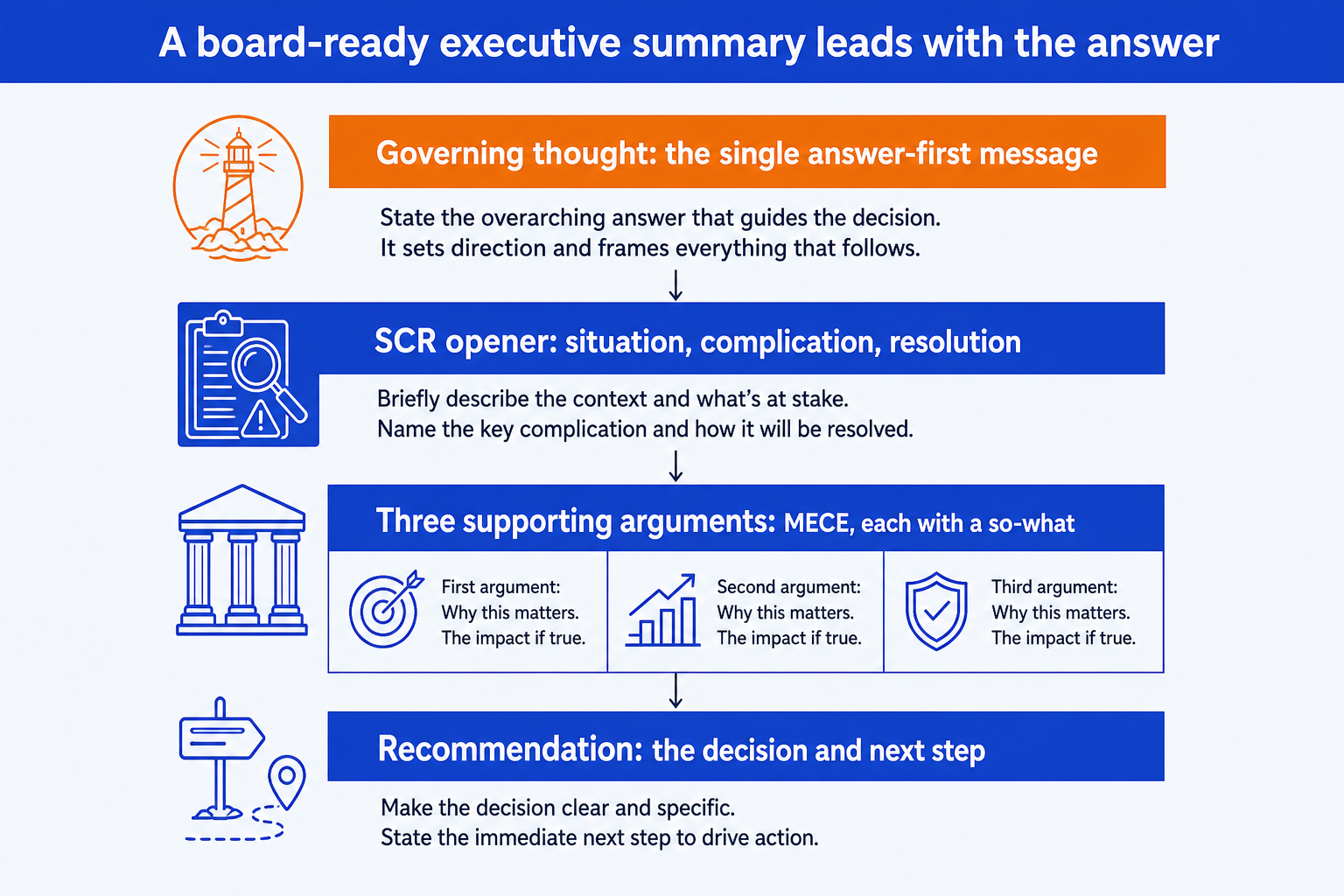
The pack is grouped into four domains that map to how a summary is built: find the message, structure the argument, write the page, then tailor and pressure-test it. Every skill is also useful on its own. For the method behind the structure skills, see our guide to the executive summary slide ; for worked examples with the exact wording on real slides, see 8 executive summary slide examples.
Download all 15 skills
One zip, one folder per skill. Free, no signup.
From message to a board-ready summary
Domain 1 · 3 skills
Find the Message
Use these before you write a line. Fix the single answer, frame the tension that makes it necessary, and turn observations into so-whats, so the summary argues a conclusion instead of reporting findings.
Governing Thought
Use when: You have analysis but no single answer
Output: One-sentence governing thought plus supporting logic
SCR Builder
Use when: You need a gripping opener
Output: Situation / Complication / Resolution opener
So-What Sharpener
Use when: Findings read as observations, not implications
Output: Each finding rewritten as a decision-relevant so-what
Domain 2 · 4 skills
Structure the Argument
Use these to turn the message into a hierarchy. Build the pyramid, make the support MECE, write action titles that carry the so-what, and sequence it into a storyline that builds.
Pyramid Builder
Use when: The argument is a flat list
Output: Top-down structure: governing thought, key lines, support
MECE Grouping
Use when: Supporting points overlap or leave gaps
Output: MECE groupings with an overlap and gap check
Action Title Writer
Use when: Slide titles are topic labels, not messages
Output: Headline action titles that state the so-what
Storyline Sequencer
Use when: The points are right but the order is wrong
Output: Sequenced storyline, deductive or inductive, with transitions
Domain 3 · 4 skills
Write the Page
Use these to produce the deliverable. The one-page summary, the board-ready summary slide, the written recommendation, and the discipline to frame every number with a baseline and a so-what.
One-Page Summary
Use when: A whole engagement must fit one page
Output: A single-page executive summary
Exec Summary Slide
Use when: You need the board-ready summary slide
Output: Slide layout: governing thought, three columns, recommendation
Recommendation Memo
Use when: A decision needs a written recommendation
Output: A decision memo: options, recommendation, next steps
Number Framer
Use when: Key metrics are presented without context
Output: Each number reframed with baseline, delta, and so-what
Domain 4 · 4 skills
Tailor and Pressure-Test
Use these before it leaves your hands. Calibrate the summary to each reader, cut it to half, surface the hardest questions, and strip the jargon and hedging so it survives a tough room.
Audience Calibration
Use when: The same summary must serve different readers
Output: Reader-specific framing: CEO / CFO / board / investor
Brevity Editor
Use when: The draft is twice as long as it should be
Output: A cut-to-half rewrite preserving meaning
Hostile Q&A
Use when: The summary faces a tough room
Output: The 8 to 10 hardest questions with crisp answers
Clarity Audit
Use when: The prose hedges or hides behind jargon
Output: A clarity pass removing jargon, hedging, passive voice
Domains 1 and 2 find the message and structure the argument. Domain 3 writes the deliverable. Domain 4 tailors it to the reader and pressure-tests it before the room. Run the governing-thought skill first to fix the answer, then build each part with its matching skill.
Setup Guide
Download the skills pack
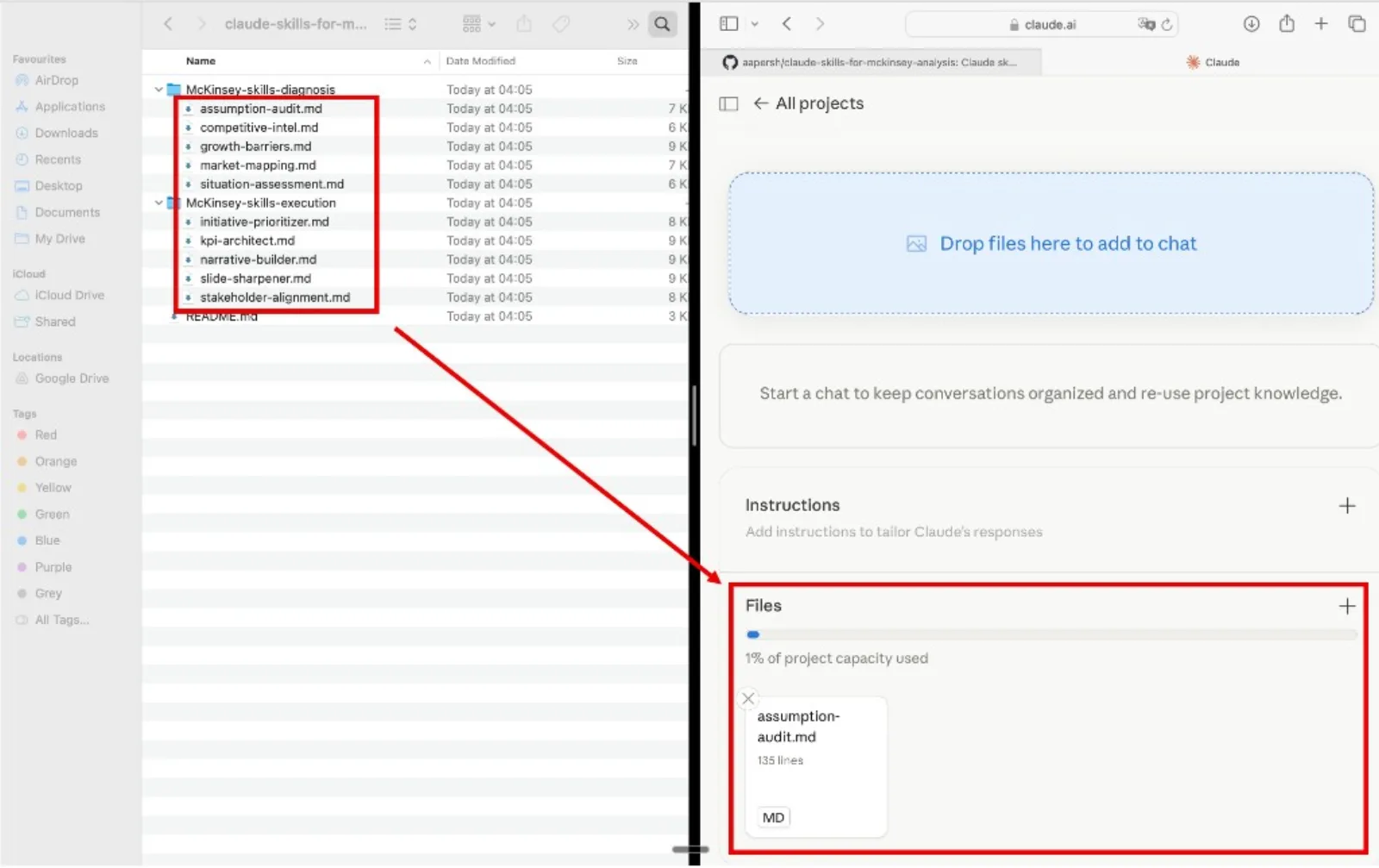
The zip contains all 15 skills, one folder per skill. Each skill is a single SKILL.md file. Unzip it anywhere. Keep the whole set, or pull out just the folders you need.
Create a Claude Project
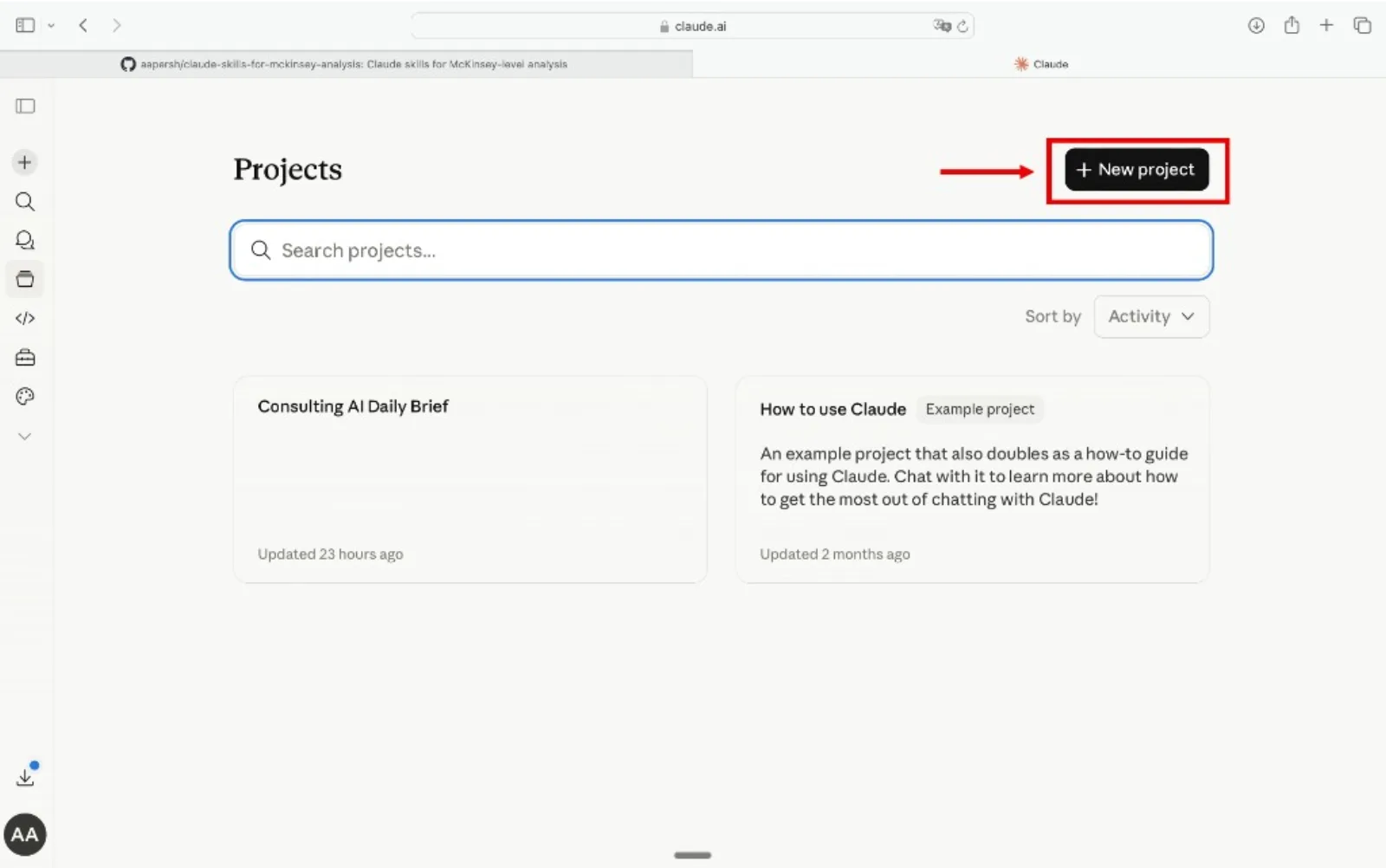
Go to claude.ai, open the left sidebar, click Projects, then Create Project. Name it something like "Exec Summary" or "Board Writing" so you can reuse it across engagements.
Add the skills as Project Knowledge
Inside your project, open Project Knowledge, click Add Content, and upload the .md files. Add as many as you want, one skill, one domain, or all 15. Claude references them automatically in every conversation inside that project.
Write the summary
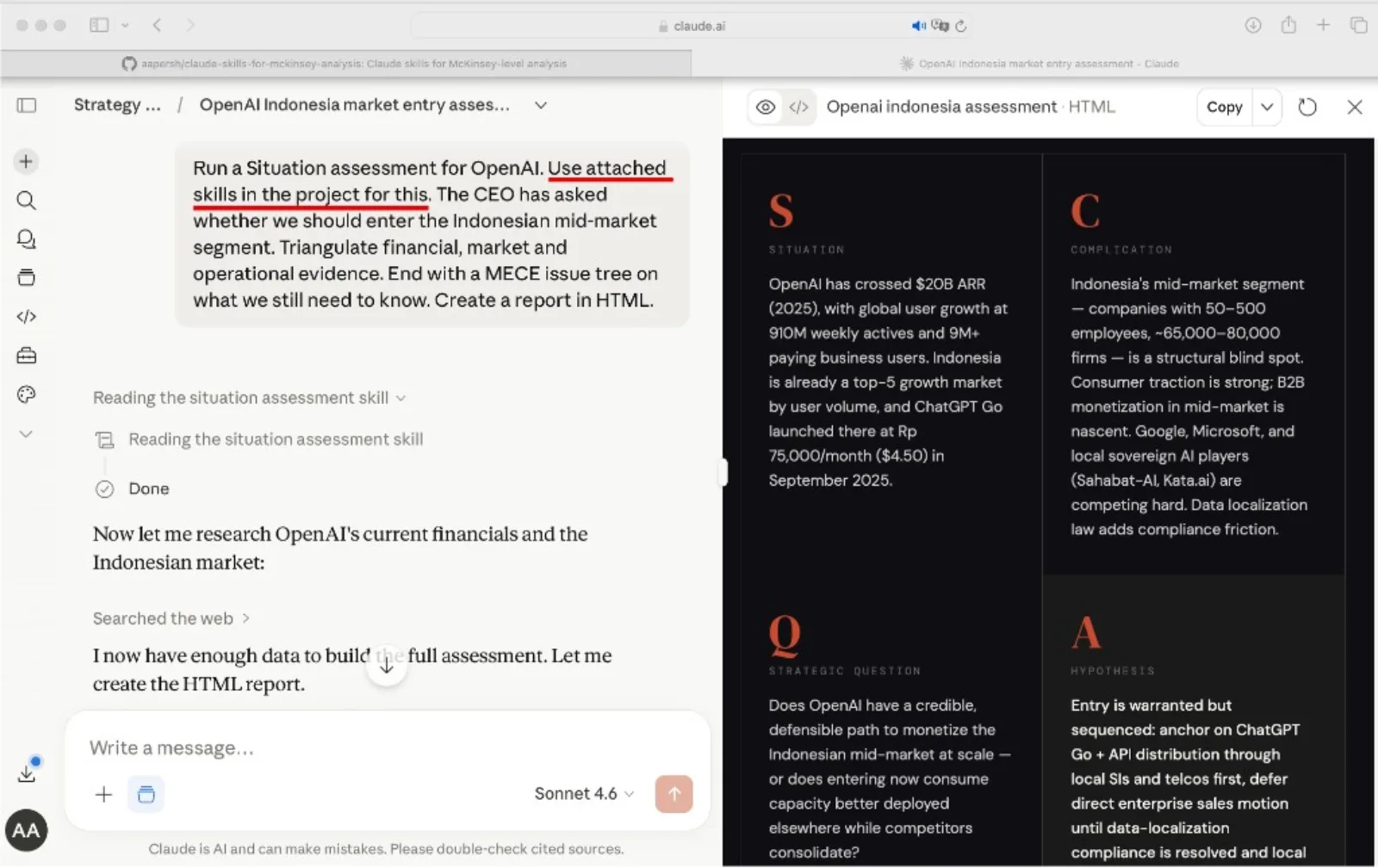
Run the governing-thought skill first to fix the single answer. Then open a conversation, paste your analysis, and name the skill for the step you are on. Claude reads the method and drafts the part with the framework already loaded.
Tip
Refer to the skill by name in your prompt. Phrases like "Use the governing-thought skill" or "Run the hostile-qa skill" point Claude at the right method instead of leaving it to guess.
Example prompts
- "Use the governing-thought skill to find the single answer in this analysis."
- "Use the action-title-writer skill to rewrite these slide titles as action titles."
- "Use the exec-summary-slide skill to lay out the board-ready summary slide."
- "Use the hostile-qa skill to find the hardest questions this summary will face."
How to choose a skill
Each skill maps to one step of writing the summary. Pick the row that matches where you are stuck and use that skill. For the wider workflow, see our consultant's guide to Claude.
If you need X, go to Y
This pack is narrow on purpose: writing and structuring the summary text, nothing else. Most readers who land here for something adjacent want one of the pages or tools below instead, including two we do not sell.
The quality bar
Every skill pushes Claude toward a summary that meets the standard a partner holds each page to before it goes in front of the board.
Frequently asked questions
What are Claude skills for executive summary writing?
A Claude skill is a folder holding one SKILL.md file: plain-English instructions that teach Claude a repeatable writing method, loaded only when your request matches its description. This pack has 15 of them across four domains, from fixing the governing thought through to a hostile Q&A pass. Anthropic makes Skills available on every plan, including Free, once code execution is turned on in Settings.
How many Claude skills are actually in this pack?
Fifteen, confirmed against the shipped zip file rather than the folder count anyone claims. Three find the message (governing thought, SCR opener, so-what sharpener), four structure the argument (pyramid, MECE, action titles, storyline), four write the page (one-pager, summary slide, memo, number framing), and four tailor and pressure-test it (audience calibration, brevity, hostile Q&A, clarity).
Can I just ask Claude to write an executive summary without these skills?
Yes, and for a single low-stakes summary that is often enough. The gap shows up on the second and third summary: nothing forces the same governing-thought discipline, MECE check, or hostile-Q&A pass to run the same way twice, so quality drifts with whoever is typing that day. A skill fixes the method once so it does not have to be retyped or re-explained.
Do Claude skills work on the free plan?
Yes. Skills are available on Free, Pro, Max, Team, and Enterprise plans; the only requirement is turning on code execution in Settings, under Capabilities. Team and Enterprise owners enable it organization-wide instead, and can additionally provision a skill for every user or turn off user-created skills. The skills also work through the Claude API and Claude Code on a developer account.
Which Claude skill should I run first?
Governing Thought. It forces the single, one-sentence answer before anything else gets written, and every other skill in the pack, the SCR opener, the pyramid structure, the action titles, exists to support that one sentence. Skipping it is the single most common reason a Claude-drafted summary reads as a list of findings instead of an argument.
Can Oria write the executive summary for me?
No. Oria turns an already-written, structured executive summary into a slide on your firm's PowerPoint template; it does not draft the argument itself. Write the summary with this skill pack or a well-specified prompt first, then hand the finished text to Oria, either the PowerPoint add-in or the connector for Claude and ChatGPT over MCP, to build the slide.