

Claude Slides: What It Makes and What It Cannot Do Yet
Claude Slides is Anthropic's presentation feature inside the Claude chat. You ask for a deck in conversation, edit and present it from Claude, and download it as PowerPoint or PDF. It produces a web-native deck, not a file built inside PowerPoint.
The decision behind a search for Claude Slides is rarely curiosity. It is whether the deck due on Friday can come out of the chat you already have open, or whether it still needs a separate tool. Anthropic announced the feature on 16 September 2026, together with Claude Docs, as part of folding its Cowork agent into the main chat. Coverage since then has mixed three different products under one name, so this page separates them and then says plainly what the feature makes and where it stops.
Quick answer: what Claude Slides makes
It makes a first draft of a deck from a conversation, and it is good at plain narrative slides built from text, tables and pictures. It is weaker where a consulting deck is strongest: charts that stay editable, diagram shapes, and a guaranteed corporate template.
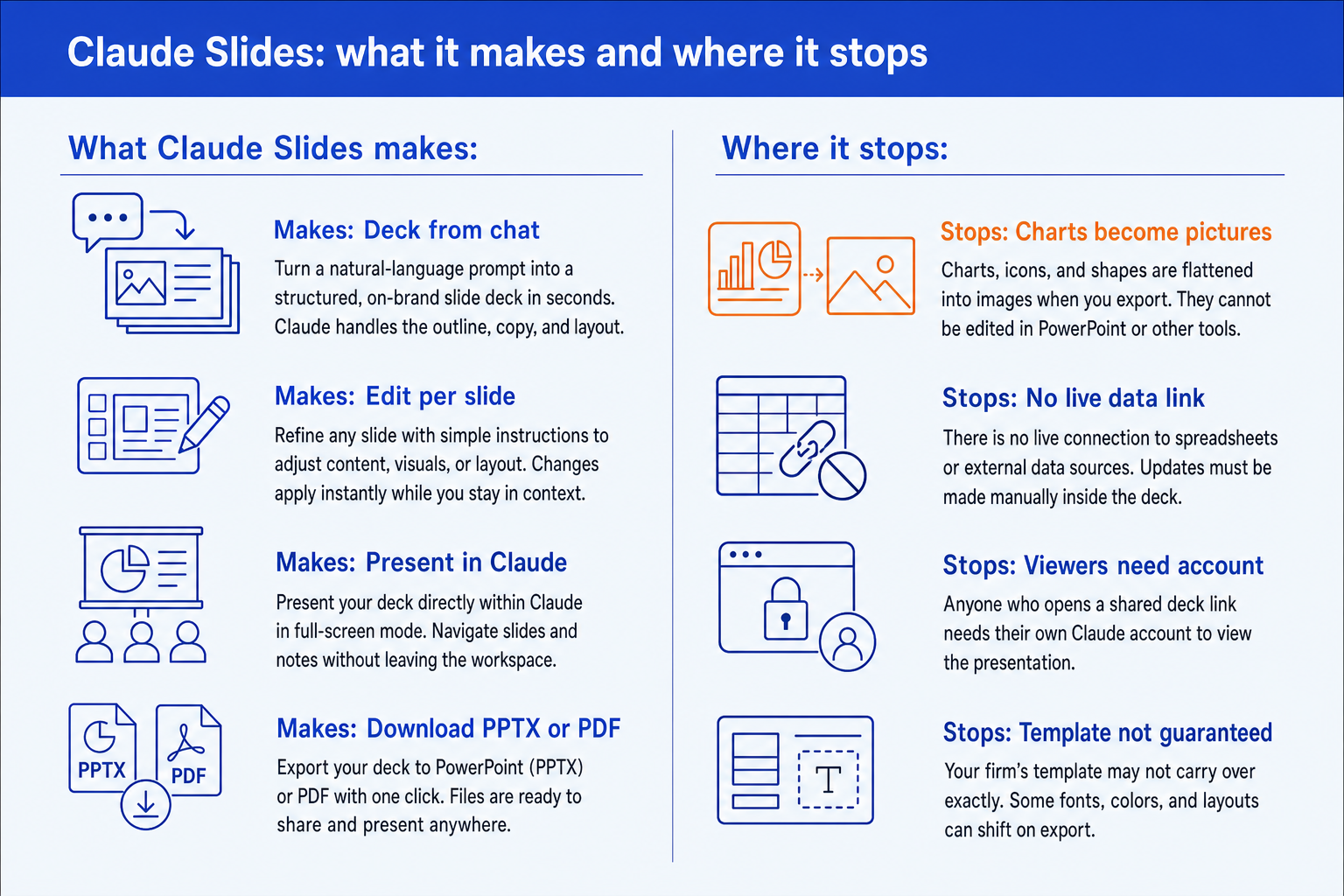
Claude Slides is a presentation builder inside Claude. You describe the deck, Claude asks clarifying questions and drafts it, and you edit slides by hand, by comment or by prompt. You can present from Claude and share the deck by link. Download is available as PowerPoint or PDF, and independent reviewers report that the .pptx keeps text, tables and pictures editable while charts, icons and shapes become pictures. Viewers need a Claude account. Charts are snapshots with no live link to a spreadsheet. It is a different product from Claude for PowerPoint, the add-in.
How we assessed Claude Slides
This page rests on Anthropic's statements as reported at launch and on independent write-ups of the help documentation. We did not run a controlled test of the feature, and the sources say where they did not either. These are the criteria that decided what we included.
What the output is
We looked at what Anthropic and independent reviewers say lands in the file: native text, tables and pictures, or flattened images.
What survives the PowerPoint export
A deck that cannot be edited after download is a draft, not a deliverable. Export behaviour decides whether the work continues in PowerPoint.
How the deck is shared and presented
Link sharing, viewer accounts and presenting from inside Claude matter more to a steering committee than a slide count.
Whether a firm template holds
Consulting and finance decks live on an enforced master. We checked what is documented about brand and template handling.
We did not rank visual polish, the number of themes, or speed to first draft. Those are the first things a demo shows and the last things a board pack depends on. We also did not test every plan tier, because plan access has changed since launch.
Key takeaways
- Claude Slides is a chat feature first. You ask for a deck in an ordinary Claude conversation, Claude may ask clarifying questions, and the deck comes back next to any related document. It is not an add-in and it is not the same product as Claude for PowerPoint.
- The PowerPoint file is an export, not the home of the deck. Reviewers report that text, tables, pictures and speaker notes stay editable while charts, icons and shapes become pictures. Plan to finish in Claude, or accept rework in PowerPoint.
- Charts are snapshots. There is no live link to a spreadsheet, so a changed number means asking for a new chart and exporting again. Any deck that is refreshed monthly pays that cost every month.
- Sharing is web-native. People you invite need a Claude account, and mobile is for reading rather than heavy editing. Plan the distribution list before you promise a link.
- Template fidelity is the open question. Claude can match a design system or an attached brand file, but nothing published says the export is built on your own slide master. Open View, then Slide Master, on the first export before you trust it.
What Claude Slides can do, feature by feature
There is no acronym to unpack here, but there are six working parts. Each one has a concrete behaviour and a caveat worth knowing before you commit a deadline to it.
| Part | What it does | Caveat |
|---|---|---|
| Build from a chat prompt | A full deck, drafted from one request and any attached source | Claude asks clarifying questions, then works while you are away |
| Per-slide editing | Changes to one slide by hand, by comment or by prompt | Edit and present without leaving Claude |
| Presenting | A full-screen run from the shared deck | Web and desktop; mobile is read-focused |
| Sharing | A single shareable link, like a shared document | Invitees need a Claude account |
| Export | PowerPoint and PDF, per Anthropic's statement to VentureBeat | Charts, icons and shapes reported to become pictures in the .pptx |
| Scheduled reruns | A recurring report rebuilt as a short deck on a schedule | Numbers are rebuilt from the source at run time, not live in the file |
The scheduling part deserves a note. VentureBeat's launch report gives a weekly pipeline report turned into five slides as its example, which can be set to rerun each week. That is a real saving for a recurring internal update. It is also a rebuild from source each time, not a deck that stays connected to the data.
The trade-off: everything above happens in a browser-first workflow. The further a deck is from a plain update, the more of the finishing lands back on you in PowerPoint.
Worked example: a weekly pipeline update, end to end
Take the case Anthropic itself uses: a weekly pipeline report turned into five slides. Here is how the job runs, and where each step succeeds or needs you.
The request, typed into a normal Claude chat
Clarify. Claude asks which stages to show and what the target is. This is where a wrong assumption is cheapest to fix. Answer fully.
Draft. The deck comes back with the table, the movers and the risks. The table is native and editable. If it also drew a stage chart, that chart is a snapshot of this week's data.
Edit. Comment on slide 4 to change owners, or ask Claude to shorten the headline. You stay in Claude for this.
Share or export. Internal colleagues with accounts open the link. For anyone outside, download the PDF. If you download PowerPoint, the table and text edit normally and the chart does not.
Rerun. Next Monday the deck rebuilds from the new export. Check the figures against the source each time, because nothing in the file is live.
The conclusion: for a five-slide internal update this is the right instrument, and the cost of the limits is close to zero. Change the brief to a steering committee pack with a waterfall, a Harvey ball table and a firm master, and every limit in the next sections starts to bite.
What survives the Claude Slides PowerPoint export
Anthropic told VentureBeat that Slides can be downloaded as PowerPoint or PDF and that more export destinations are planned. The detail of what lands in the .pptx comes from Deckary, a vendor that sells a competing PowerPoint add-in and states it did not test the feature itself, so treat it as a guide to verify, not a finding. Its account matches the pattern below.
| Element | In the .pptx | What it means |
|---|---|---|
| Text boxes | Stay editable | Edit titles and body directly |
| Tables | Stay editable | Cells remain native |
| Pictures and backgrounds | Stay as images | Fine, as they were images already |
| Speaker notes | Carried across | Check them on a sample slide |
| Charts | Become pictures | No edit in PowerPoint, no data behind them |
| Icons and shapes | Become pictures | Diagrams and frameworks flatten |
| Transitions and skipped slides | Left out | Rebuild them in PowerPoint |
Five of the seven rows are fine for a narrative deck. The two that matter for finance and strategy work are the picture rows. A waterfall, a bridge or a 2x2 is made of exactly the chart and shape objects that flatten. If you plan a consulting-style page, see how a Claude add-in inside PowerPoint handles the same job, since it works on the native file.
The trade-off: flat pictures are safe for display and unusable for revision. If the next person to touch the deck needs to change a number on a chart, the export is a dead end.
When to use Claude Slides
Reach for it when the deck is an extension of a conversation you are already having. Internal updates, a first-pass outline of a long document, a recurring report, a short brief for a colleague with a Claude account. In each, the speed of starting from the chat beats the rework, and a flat chart costs little.
It also suits the draft stage of a bigger deck. Use it to get a storyline and slide titles on the page, then move the content to a tool built for the finishing. Our Claude versus ChatGPT deck comparison covers how the models compare on that storyline step.
Where Claude Slides misleads you
The failure mode is the polished first draft. A deck that looks finished invites you to present it, and three things hide behind that finish.
Charts are pictures of one moment. A chart built last Tuesday does not update when the model changes. Nothing marks it as stale, and in PowerPoint you cannot open it to see the data.
The figures are Claude's reading of your source. Deckary's own caution is that figures need checking against the source before presenting. A confident slide with a transposed number is the most expensive kind.
A template match is not a template guarantee. Matching a brand file by look is different from building on your slide master. Placeholders, footers and layout names are what a corporate rollout enforces, and an export that merely looks right will drift the first time someone adds a slide.
Analysts read the launch the same way. Arun Chandrasekaran, a distinguished vice president analyst at Gartner, told Computerworld that "strategically, this signals Claude moving from an AI assistant into an agentic platform." That is a statement about direction, not about finished-deck quality, and the gap between the two is the gap this page describes. Jack Gold of J. Gold Associates added that it is unclear how many users who already have productivity suites will choose to move to other tools.
Can Oria finish what Claude Slides starts?
For corporate work, yes, and that is the narrow thing it is for. Oria is built for corporate documents and consulting presentations: board packs, steering committee decks, diligence exhibits and dense frameworks held to an enforced template. It reaches you two ways. There is a PowerPoint add-in in the task pane on Windows, macOS and PowerPoint for the web, and a connector for Claude and ChatGPT over MCP, so the slide can be built from the chat you are already in. The output is native PowerPoint objects on your master, so charts and shapes stay editable.
Oria does not train on customer content, and Professional and Team plans do not persist presentation content after delivery. Setup for the Claude connector is in our guide to installing Oria in Claude and ChatGPT.
The same pipeline update, asked of Oria from the chat
The trade-off: Oria is built for the corporate environment and loses on highly visual work. Founder fundraising and pitch decks, launch and campaign decks, student presentations and marketing one-pagers want visual impact more than defensible content, and a design-led tool such as Gamma, Canva, Pitch or Beautiful.ai will beat it there and look better doing it. For a plain five-slide internal update, Claude Slides is the lighter route.
Which tool for which deck?
It depends on what the deck has to do after you have built it. For the wider field, our roundup of AI for PowerPoint compares the options head to head.
| If you need | Use | Why |
|---|---|---|
| A quick internal update, drafted from a chat | Claude Slides | It is in the conversation you already have, and nothing needs to be a template. |
| A visual deck for fundraising, a launch or a class | Gamma, Canva, Pitch or Beautiful.ai | Where the job is visual impact, a design-led tool will beat a corporate one and look better doing it. |
| Editing inside the PowerPoint you already own | Claude for PowerPoint | It works in the task pane on the open file. See our guide to the add-in. |
| Native, template-bound consulting slides built from the chat | Oria | Built for board packs and steering committee decks, as native PowerPoint objects on your master. |
| Charts that must stay live or editable | think-cell, or Excel pasted into PowerPoint | A snapshot picture cannot be re-pointed at a new number. |
Common Claude Slides mistakes
How to get a Claude Slides deck into a board pack
Three steps. Draft the storyline and slide titles in Claude Slides. Export and open View, then Slide Master, to see whether your template held. Then rebuild charts and frameworks as native objects, by hand, with a charting add-in, or through the connector described above. Check every figure against the source on the way.
Frequently asked questions
What is Claude Slides?
Claude Slides is Anthropic's presentation feature inside Claude, launched in beta on 16 September 2026 alongside Claude Docs. You request a deck in a normal conversation, edit slides, present from Claude, and download PowerPoint or PDF. It is separate from Claude for PowerPoint, the add-in that works inside Microsoft PowerPoint.
Can Claude make PowerPoint slides?
Yes, in two ways. Claude Slides builds a deck in the chat and exports a .pptx. Claude for PowerPoint, the add-in, edits slides inside an open PowerPoint file. Reviewers report that Slides exports keep text, tables and pictures editable but turn charts, icons and shapes into pictures.
Is Claude Slides free?
Launch coverage said Slides rolled out to paid Pro and Max plans first, with Team and Free following, and was off by default on Enterprise. One later guide says it is on every plan including Free. Plan access has changed since launch, so check Anthropic's Help Center for your plan today.
Can I edit Claude Slides in PowerPoint?
Partly. The downloaded file keeps text boxes, tables, pictures and speaker notes editable, but reviewers report that charts, icons and shapes arrive as pictures. If the deck relies on diagrams or charts, edit them in Claude before you export, or rebuild them in PowerPoint.
Does Claude Slides use my company template?
Claude can follow a design system set up in Claude, or match a deck or brand file you attach. Nothing we found confirms that the PowerPoint export is built on your own slide master and layouts. Open View, then Slide Master, on the first export and check before you rely on it.
What is the difference between Claude Slides and Claude for PowerPoint?
Claude Slides lives in the Claude chat and produces a web-native deck you export. Claude for PowerPoint is an add-in that runs inside PowerPoint and edits the file you have open. The first starts from a conversation. The second starts from a file.
Can people open a shared Claude Slides deck without an account?
Not according to the help documentation as summarised by independent reviewers. People you invite need a Claude account to open a shared deck, even with the link. For an external client, send the PDF or PowerPoint export instead.