

Claude vs ChatGPT for Consulting Decks: 2026 Comparison
Both assistants now build slides inside PowerPoint. Anthropic's add-in reached general availability on 7 May 2026 and OpenAI's launched on 21 May. For anyone who drafts client work for a living, the difference that matters is no longer the prose. It is what each one does to your firm's slide master.
Most Claude vs ChatGPT comparisons are written for programmers and writers. They score coding benchmarks, context windows and tone of voice. None of that decides a consulting deck. A deck is judged in a steering committee on whether the argument holds, whether the numbers tie, and whether every slide sits on the master so cleanly that nobody asks how it was made.
So this page asks a narrower question. If you build decks for clients or for a board, which assistant should you draft them in this quarter, and at what point does neither one finish the job? Every capability below comes from the vendors' own documentation as of 29 September 2026. Where the honest answer is "it depends on your licence", the page says so rather than picking a winner for you.
Quick answer: Claude or ChatGPT for consulting decks?
The answer turns on one documented difference rather than on which model writes better. Both vendors now put an assistant inside PowerPoint, and both can hand you a .pptx file from the chat window, so capability alone no longer separates them.
For consulting decks in 2026, Claude is the stronger default. Anthropic documents that Claude for PowerPoint reads the slide master, layouts, fonts and colour scheme of the open deck and keeps its edits inside that template, while OpenAI states that its ChatGPT for PowerPoint add-in may not yet support complex formatting such as template or font handling. Choose ChatGPT when your firm has standardised on ChatGPT Business or Enterprise, when colleagues need the add-in on a free plan, or when you need generated images. Neither tool reliably builds dense exhibits, such as operating models or value driver trees, on an enforced corporate master.
Pick Claude if
Your slides must land on a client or firm master, you edit inside long decks more than you generate new ones, and you or your team already hold a Pro, Max, Team or Enterprise seat.
Pick ChatGPT if
Your firm already governs ChatGPT Business or Enterprise, some colleagues work on free plans, or the deck needs generated images more than it needs strict template fidelity.
How we compared Claude and ChatGPT for slide work
Oria sells a tool that works alongside both assistants, so the method matters more than the verdict. These are the five things we checked.
What each vendor documents, in its own words
Every capability on this page comes from the vendor's own material: Anthropic's Claude for PowerPoint documentation and pricing page, and OpenAI's help centre and release notes for ChatGPT for PowerPoint. Where a vendor states a limit, the limit is quoted rather than paraphrased.
The slide-master test, weighted above everything else
A consulting deck is built on a client or firm master. Whether a draft ships or gets rebuilt depends on whether the tool writes into real layouts, theme fonts and theme colours, so this criterion carries the most weight.
Where the work actually starts
Decks begin in research, in a conversation, or in an open file. Both vendors now have a surface for each, so we compared surface with surface: chat with chat, add-in with add-in.
What one consultant pays, and what a firm has to switch on
Plan gating decides who on a team can use the add-in at all. We read the published plan lists and the admin deployment steps, not only the headline price.
Data terms, stated for both
Client material goes into these tools. Default training settings by plan, retention and audit coverage are stated plainly for each vendor.
What we ignored on purpose: coding benchmarks, context window sizes, model version numbers that change every few weeks, voice mode, and the single-prompt "which deck looks nicer" screenshot test. That last one is the most common test in this search and the least useful for a consultant, because a one-shot deck on a blank template says nothing about how a tool behaves on your master.
Key takeaways
- The template is the decision. Anthropic documents that its add-in reads your slide master, layouts, fonts and colours; OpenAI says template or font handling may not be supported yet. If every slide must land on a firm master, that one sentence outweighs any benchmark.
- Both vendors now have two routes to a deck: one in the chat window and one inside PowerPoint. Compare the chat route with the chat route and the add-in with the add-in, because the brand name tells you almost nothing about either.
- Access differs by plan. ChatGPT for PowerPoint reached free and paid users at launch, while Claude for PowerPoint needs a Pro, Max, Team or Enterprise seat. On a team where not everyone holds a paid seat, that gap is practical rather than cosmetic.
- Your firm's licence usually decides before you do. If IT has standardised on ChatGPT Enterprise, that add-in is the one that gets deployed and governed. Push back only when template rework is costing real hours on every deck.
- Neither assistant reliably drafts the dense exhibit. Operating model maps, value driver trees and multi-level frameworks on an enforced master are shape work. Add a design layer for those slides and keep whichever assistant you already use for the storyline.
Claude vs ChatGPT for presentations, side by side
Each row maps to one of the decision rules above. The exhibit shows the three rows that matter most for a consultant; the table carries the rest. Where a vendor states its own limit, that limit is in the row.
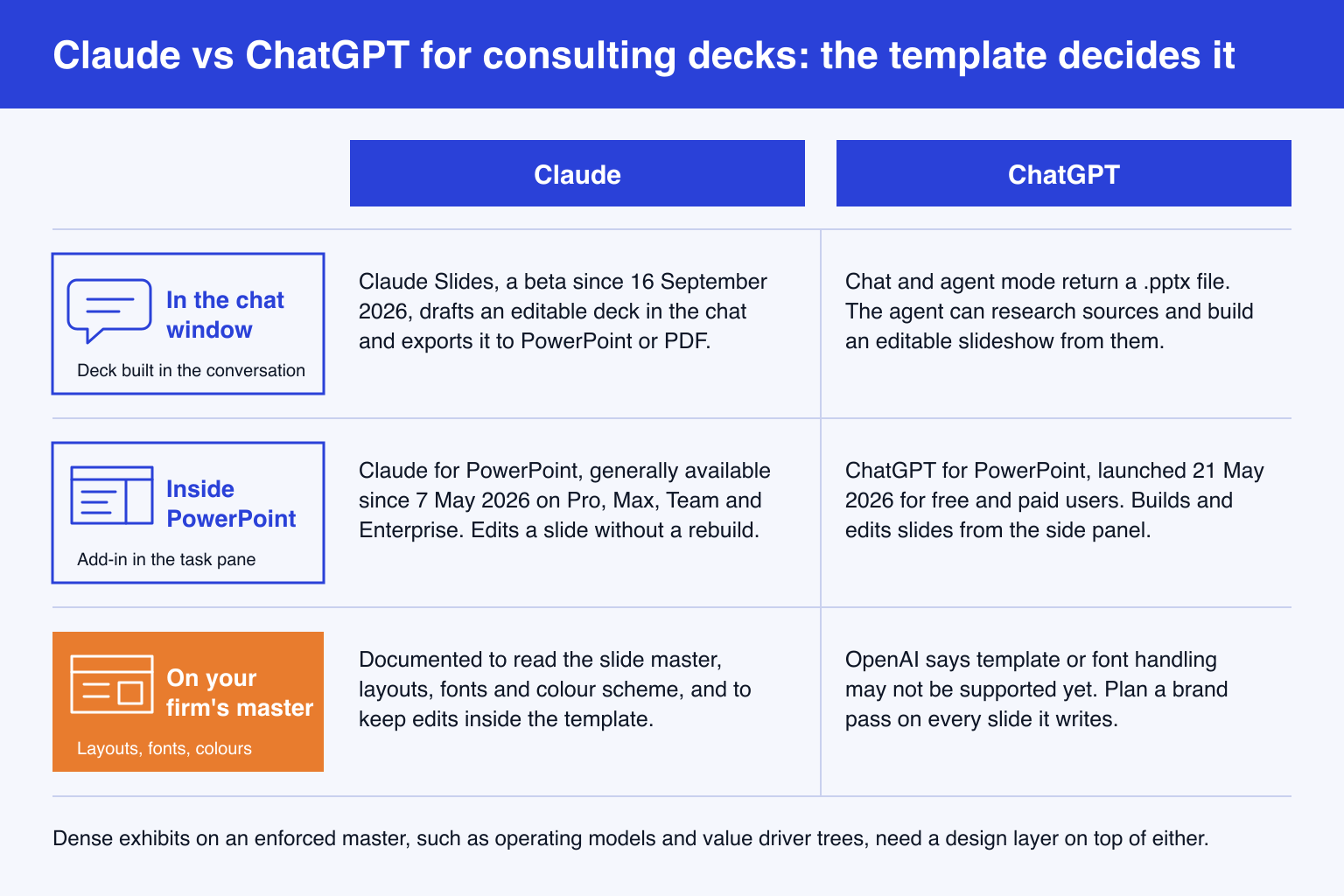
| Criterion | Claude | ChatGPT |
|---|---|---|
| Inside PowerPoint | Claude for PowerPoint, generally available since 7 May 2026. Runs on PowerPoint for the web, on Windows with a Microsoft 365 subscription, and on Mac 16.46 or later. | ChatGPT for PowerPoint, launched in beta on 21 May 2026 and generally available for ChatGPT Business workspaces since 6 July 2026. Installed from Home, then Add-ins. |
| Your slide master | Anthropic states that Claude reads the slide master, layouts, fonts and colour scheme of the deck and aims to maintain template compliance without introducing off-brand elements. | OpenAI states that some advanced PowerPoint capabilities may not be supported yet, including complex formatting like template or font handling. |
| A deck built in the chat | Claude Slides, a beta since 16 September 2026, rolling out to Pro and Max first. It drafts an editable deck in the conversation and downloads as PowerPoint or PDF. | Chat and agent mode return a downloadable .pptx. The agent can browse, research and assemble an editable slideshow from what it finds. |
| Charts and diagrams | Converts bullets into diagrams, process flows and editable native PowerPoint charts rather than static images. | Builds and edits slides from uploaded documents and existing decks, and supports image generation inside the add-in. |
| Who gets the add-in | Pro, Max, Team and Enterprise. Not the Free plan. | Free and paid ChatGPT users at launch. On Business, usage draws on the workspace credit pool after included usage. |
| Price for one consultant | Claude Pro at 20 dollars a month, or 17 dollars a month billed annually. The add-in costs nothing extra. | ChatGPT Plus at 20 dollars a month. The add-in costs nothing extra. |
| Default model training | Team and Enterprise run under commercial terms and are not used for training. Free, Pro and Max users choose in their privacy settings. | Business, Enterprise and Edu data is not used to improve models by default. Consumer plans carry their own data control setting. |
| The vendor's own caveat | Not recommended for final client deliverables without human review. | Review what changed, and keep a copy of important decks before letting the add-in edit them. |
Sources: Anthropic's Claude for PowerPoint documentation and plans page; OpenAI's ChatGPT for PowerPoint help article and ChatGPT Business release notes; Anthropic's September 2025 consumer terms update; launch coverage of Claude Slides from 16 September 2026.
Is Claude good for making PowerPoint presentations?
Inside an existing deck, it is the better documented of the two. Claude for PowerPoint left preview and became generally available on 7 May 2026 for the Pro, Max, Team and Enterprise plans. Anthropic describes the job it is built for in terms a consultant will recognise: build new slides using an existing client or corporate template, make pinpoint edits to specific slides without regenerating the deck, convert bullets into diagrams and native PowerPoint charts, and iterate on feedback while preserving template compliance.
The template behaviour is the reason it leads here. Anthropic states that Claude reads the slide master, layouts, fonts and colour scheme in your deck and uses them when generating or editing, and its own best practice is to open the template first and prompt second. Three smaller features matter more to consultants than the launch coverage suggested. An Instructions field holds house rules such as one-line bullets or a fixed accent colour. Connectors and Skills pull in outside context and repeatable recipes. And the add-in shares context with Claude for Excel, Word and Outlook, so a model built in a workbook can be carried into the deck in the same conversation. Our setup guide for the Claude PowerPoint add-in covers installation and admin deployment.
Outside PowerPoint, Claude Slides launched in beta on 16 September 2026, rolling out to Pro and Max first. It drafts an editable deck in the conversation, presents it from Claude, and downloads as PowerPoint or PDF. Nothing in the launch material we read says it applies a firm's slide master, so treat it as a drafting surface and do the template work in the add-in.
Ethan Mollick, the Wharton professor who writes One Useful Thing, singled out this product line in his February 2026 guide to which AI to use: "Claude for Excel and Powerpoint are examples of specific harnesses inside of applications. Both of them provide very impressive extensions to these programs." Anthropic is more cautious about its own product than most reviewers. Its documentation lists what the add-in is not recommended for, and the first item is final client deliverables without human review. It also notes that the add-in does not inherit an organisation's custom retention settings and that its activity is not in Enterprise audit logs, although sessions are covered by the Compliance API, which is in public beta.
The trade-off: the strongest documented template handling in either product, in exchange for a paid seat for every user and a vendor that tells you, in writing, to review everything before a client sees it.
Can ChatGPT make a PowerPoint like Claude?
It can make one, by more routes than most comparisons admit. OpenAI launched ChatGPT for PowerPoint on 21 May 2026 as a beta for free and paid users, and made it generally available for ChatGPT Business workspaces on 6 July 2026. You install it from Home, then Add-ins, sign in with an OpenAI account, and build or edit slides from a side panel. You can upload documents or an existing deck as source material, generate images, and use apps you have connected to ChatGPT.
Outside PowerPoint, ChatGPT's chat and agent mode return a downloadable .pptx, and the agent can browse the web, gather sources and assemble an editable slideshow from them. Mollick's test in the same February guide found that asking a similar question got working spreadsheets and PowerPoints from both ChatGPT and Claude, with citations he could follow up. For research-heavy first drafts, the two are closer than the template row suggests. Our walkthrough of every OpenAI route to a finished deck compares the add-in, the .pptx download and image renders in detail.
Reach is ChatGPT's real advantage. On 27 February 2026 OpenAI said ChatGPT had passed 900 million weekly active users and more than 9 million paying business users. In practice that means your client, your partner and the analyst who joined last week probably already have it, and the add-in works for them even on a free plan.
The weakness is the one that matters most in this job, and OpenAI states it itself: some advanced PowerPoint capabilities may not be supported yet, including complex formatting like template or font handling. Its guidance is to be specific, review what changed and keep a copy of important decks. On Business, usage now draws on the workspace credit pool after included usage, which is worth knowing before a team of twenty starts regenerating decks.
The trade-off: the widest reach, free access and built-in image generation, bought with the weakest documented template story of the two, which on a consulting deck means a brand pass on every slide it touches.
Which one holds your firm's slide master?
Do not take either vendor's word for it, ours included. Documentation tells you what a tool aims to do; twenty minutes on your own master tells you what it does. Save a copy of a real client or firm deck, open it in PowerPoint with the template applied, and run the same four prompts through each add-in.
1.New section on real layouts
Using only the layouts in this deck's slide master, add a three-slide market sizing section: TAM, SAM and SOM, one slide each. Put the source line in the footer placeholder, not in a new text box.
2.Bullets to a process flow
On slide 4, turn the five bullets into a five-step process flow. Keep the existing title placeholder and do not add any text boxes outside the layout.
3.A native chart in theme colours
Add a clustered bar chart comparing revenue by region for 2024 and 2025 from the table below. Use the theme colours only and make it a native, editable PowerPoint chart.

[paste a six-row table]
4.Action titles without collateral damage
Rewrite every slide title in sections 2 and 3 as a full-sentence action title of no more than 15 words. Change nothing else on any slide.
Then score each tool on four checks. None of them needs a designer.
Layouts: click each new slide and open Home, then Layout. A real layout name means the tool used your master. A blank slide covered in text boxes means it did not.
Fonts and colours: select the body text. Theme fonts and theme colours will change when the template changes. Hard-coded ones will not, and they are the ones that fail a brand check.
The chart: double-click it. A native chart opens its data sheet. An image does not, and it cannot be updated when the numbers move.
Collateral damage: compare the untouched slides with your saved copy. Prompt four is a trap on purpose, because a tool that also rewrites body text has ignored the instruction that mattered.
A tool that passes all four is safe for first drafts on that master. A tool that fails the layout or font check will cost you the time you hoped to save, because rebuilding a slide onto the right layout is slower than building it there in the first place. If prompt one is your daily work, our guide to structuring a market sizing slide shows what the finished TAM, SAM and SOM pages should contain before you judge either tool's draft.
Which assistant will your firm standardise on?
For many consultants this question is answered above their pay grade, so it is worth knowing which way enterprise buying is moving. Menlo Ventures' 2025 State of Generative AI in the Enterprise report, published in December 2025, estimated that companies spent 37 billion dollars on generative AI in 2025. The same report put Anthropic at 40% of enterprise LLM API spend, up from 12% in 2023, and OpenAI at 27%, down from 50% over the same period.
Read that carefully before you use it in a procurement argument. It measures API spend by companies building on the models, much of it for coding, not seats in a chat app. On seats and daily users, ChatGPT is far larger. The fair summary is that Anthropic has momentum with enterprise builders and OpenAI has reach with end users, and a firm can reasonably land on either.
Mollick's own advice on the general question is disarmingly simple: "for most people, just selecting the one they like best will suffice." For general work that is right. For decks it is not quite right, because the slide master turns a matter of taste into a matter of rework hours. If your firm has standardised on one assistant, use it for research and storyline, and judge the add-in by the four-prompt test rather than by loyalty. Readers also weighing the Microsoft option will find the same test applied in our Claude and Copilot comparison for business presentations.
Where do Claude and ChatGPT both stop on a consulting deck?
They stop at the dense exhibit. A title, three bullets and a bar chart are well within either add-in. An operating model map with twelve boxes and swimlanes, a value driver tree four levels deep, a steering committee dashboard or a diligence page with a chart, a table and a callout on one slide are shape work, and shape work on an enforced master is where both assistants produce drafts that need rebuilding. Anthropic's own list of what its add-in should not replace includes your judgement on design and narrative flow.
This is the gap Oria is built for. It targets corporate documents and consulting presentations: board packs, steering committee decks, diligence exhibits, operating-model slides and dense frameworks held to an enforced corporate template. It renders the slide as a complete design and then rebuilds it as native, editable PowerPoint shapes, text and charts on your master. It reaches you two ways: as a task pane add-in for PowerPoint on Windows, macOS and the web, and as a connector for Claude and ChatGPT over MCP, so the exhibit can be built from the chat you are already in without opening PowerPoint. That second surface means you do not have to choose a side in this comparison; the connector setup for both assistants takes a few minutes.
On data: Oria does not train models on customer content, the Professional and Team plans carry zero data retention, and Enterprise adds private cloud deployment and custom LLM integration. Plans start at 19 dollars a month for Starter, which includes the Claude and ChatGPT MCP connector.
The limit is the same as the focus. Oria is built for the corporate environment only, so it loses on highly visual work: founder fundraising and pitch decks, launch and campaign decks, student presentations and marketing one-pagers. Where the job is visual impact rather than defensible content, a design-led tool such as Gamma, Canva, Pitch or Beautiful.ai will beat it and look better doing it. Our notes on when Gamma is the right call draw that line in more detail.
The trade-off: the densest corporate exhibits on an enforced master, from either assistant, in exchange for a third subscription and a tool that is the wrong choice the moment a brief is design-led rather than content-led.
If you need X, use Y
Nine common jobs, routed to the tool that fits each one best. Three of them go to tools that are neither Claude nor ChatGPT, and only one of those is Oria. For the wider field of add-ins and design tools, see our overview of AI tools for PowerPoint.
| If you need | Use | Why |
|---|---|---|
| A first draft of a client deck on your firm's master, inside PowerPoint | Claude for PowerPoint | The only add-in of the two that documents reading your slide master and keeping edits inside it. |
| One slide fixed in a 60-slide deck without touching the rest | Claude for PowerPoint | Pinpoint edits to specific slides without regenerating the deck are a documented feature, not a side effect. |
| A deck assembled from fresh web research, with sources | ChatGPT agent mode, or Claude in the chat | Both return working PowerPoint files with citations you can follow up. Pick the one your team already pays for. |
| Colleagues who do not hold a paid seat | ChatGPT for PowerPoint | It reached free users at launch. Claude's add-in starts at Pro. |
| A firm that has standardised on ChatGPT Enterprise | ChatGPT for PowerPoint, plus a brand pass | Governance and deployment follow the licence. Budget a template check on every slide until OpenAI's caveat is lifted. |
| Illustrations, cover art or a generated image on a slide | ChatGPT | Image generation is built in. Claude does not offer native image generation. |
| A deck built from files already in Microsoft 365, with a central brand lock | Microsoft 365 Copilot | It sits next to the source files and lets a brand manager lock the template for everyone. |
| A dense exhibit on an enforced master: operating model, value driver tree, diligence page | Oria, from the add-in or over MCP | Renders the full slide and rebuilds it as native, editable PowerPoint on your master, from whichever chat you already use. |
| A pitch deck, a launch deck or anything judged on visual impact | Gamma, Canva, Pitch or Beautiful.ai | Design-led tools beat every option on this page when the deck needs to look striking rather than defensible. |
Frequently asked questions
Is Claude better than ChatGPT for presentations?
For consulting and corporate presentations built on a firm template, yes, on current documentation. Anthropic states that Claude for PowerPoint reads the slide master, layouts, fonts and colour scheme and keeps edits inside the template, while OpenAI says its PowerPoint add-in may not yet support template or font handling. ChatGPT is the better pick when you need generated images, when colleagues are on free plans, or when your firm has standardised on ChatGPT Enterprise.
Is Claude good for making PowerPoint presentations?
Yes, particularly inside an existing deck. Claude for PowerPoint has been generally available since 7 May 2026 on the Pro, Max, Team and Enterprise plans. It builds slides on the layouts in your master, edits a single slide without regenerating the deck, and turns bullets into native editable charts and diagrams. Anthropic itself says it is not recommended for final client deliverables without human review, so treat it as a drafting tool.
Can ChatGPT make a PPT like Claude?
It can make one, by two routes. ChatGPT for PowerPoint, launched on 21 May 2026, builds and edits slides inside PowerPoint, and ChatGPT's chat and agent mode return a downloadable .pptx. The difference is the template. OpenAI states that complex formatting like template or font handling may not be supported yet, so expect a brand pass on slides that must sit on a corporate master.
Does ChatGPT for PowerPoint use my company template?
Partly, and OpenAI is candid about it. The add-in works inside the presentation you have open, but OpenAI's own help documentation says that some advanced PowerPoint capabilities may not be supported yet, including complex formatting like template or font handling. Test it on your real master with the four prompts on this page before rolling it out to a team that ships client work.
Which AI is best for presentation slides?
It depends on the slide. For storyline and first drafts on a corporate master, Claude for PowerPoint is the strongest documented option. For decks built from Microsoft 365 files with a central brand lock, Microsoft 365 Copilot. For visually striking pitch or launch decks, a design-led tool such as Gamma or Canva. For dense consulting exhibits on an enforced template, a design layer such as Oria.
Is Claude or ChatGPT safer for confidential client data?
On business plans the defaults are similar. Claude Team and Enterprise run under commercial terms that exclude training, and OpenAI states that ChatGPT Business, Enterprise and Edu data is not used to improve its models by default. On consumer plans, both give the user a training setting. Note that Claude for PowerPoint does not inherit custom retention settings and is not in Enterprise audit logs, though it is covered by the Compliance API beta.
Do I need both Claude and ChatGPT for slides?
Rarely. One assistant for research and storyline is enough for most consultants, and the right one is usually the one your firm already licenses. What people add is not a second assistant but a tool for the slides neither handles well: a design-led tool for visual decks, or a design layer for dense exhibits on a corporate master.