

Football Field Valuation Chart: How to Build One
You are not picking a chart type. You are deciding how many independent ways to defend a number before you put it in front of a board, a special committee, or the other side of a negotiation. A football field valuation chart stacks several valuation methods, each with its own low-to-high range, on one shared axis so the audience sees instantly where the methods agree and where they pull apart. Global M&A deal value hit $4.6 trillion in 2025, up 49% from 2024, according to LSEG, and most of those deals ran on some version of this exhibit before anyone signed anything. Below: the four variants worth telling apart, the real PowerPoint build with its gotchas, and the one-line route that renders an editable native version for you.
Quick answer: what is a football field valuation chart?
To build a football field valuation chart, list every credible valuation method as a row, draw each one as a horizontal bar spanning its low-to-high value on a single shared axis, add a thin reference line at the offer or current price if a real one exists, and shade the range where the credible methods overlap.
A football field valuation chart, also called a football field graph or a valuation football field, is the exhibit bankers and corporate development teams use to summarize what a company is worth across several independent methods at once. Each method, typically a discounted cash flow, a comparable public companies analysis, and a precedent transactions analysis, becomes a floating horizontal bar spanning its low-to-high estimate, stacked on a shared value axis so the audience sees where the methods cluster and where they diverge. The name comes from the resemblance to yard markings on an American football field. Use it whenever a decision maker needs to see a value defended by more than one method, rather than asserted as a single number.
When is a football field the right exhibit?
Reach for it in some situations and reach for something else in others. Both calls matter as much as the build itself.
- More than one valuation method is genuinely credible for this target. A Duff and Phelps review of more than 3,000 SEC-filed fairness opinions over ten years found that 91% used more than one methodology and 75% used three or more, so a single-method chart is already outside how the profession works in practice.
- The audience needs a defended range rather than an asserted number: a board, a special committee, or the other side of a negotiation, where the real question is why this number, not what is the number.
- A real market price exists to anchor the picture, a public target's trading range or a live offer on the table, which earns the chart a 52-week range or an offer-price line.
- The message is the size of an opportunity rather than the worth of a business. That is a market sizing slide's job, not a football field's.
- Only one method is genuinely credible, such as a pre-revenue company with no comparable public peers and no precedent deals. A single-method sensitivity table beats a football field padded with weak methods just to fill rows.
Key takeaways
- Match the method set to what is actually credible for this target, not to habit. A private company with no analyst coverage does not get a 52-week range or an analyst-target row just to make the chart look fuller; an empty row signals padding, not rigor.
- Only draw a market-price reference line when a real, quotable price exists: a public target's trading price or an actual offer on the table. Inventing one to look precise is the fastest way to lose the room before you reach the number.
- A football field with no shaded, concluded range is a set of bars, not a recommendation. The range is the answer the slide exists to give, and skipping it turns a valuation exhibit into a data dump.
- Match the rigor to the reader. A board or special committee expects every method's assumptions defended; an internal working session between analysts can run with a thinner, faster build.
- Treat rebuild cadence as a decision made on day one. A chart built with a locked axis and separate low and width columns updates in minutes when a comp set moves; one built by eyeballing bar positions has to be rebuilt from scratch.
The four football field variants, compared
Not every football field carries the same rows or the same weight of evidence. The table sorts the four variants that come up in practice by the five rules above.
| Variant | Methods on the chart | Market-price line? | Concluded range shown? | Typical audience | Rebuild cadence |
|---|---|---|---|---|---|
| Standard sell-side (public or well-benchmarked private target) | DCF, comparable companies, precedent transactions, sometimes an LBO | Yes, the offer or current price | Yes, shaded and emphasized | Board or special committee | Each round of bids |
| Public-company / fairness-opinion | The standard set, plus a 52-week trading range and analyst price targets | Yes, current price and offer | Yes | Board fairness review, proxy readers | Each merger-proxy draft |
| Private company, no market price | DCF, comparable companies, precedent transactions only | Only if a live offer exists | Yes | PE investment committee | Each diligence round |
| Early-look / screening | A quick DCF and comparable companies only | No | Loosely, a wide band rather than a tight range | Target management in an early pitch | Weekly as data firms up |
What goes into a standard sell-side football field?
The standard version is the one most people mean by the word: a discounted cash flow, a comparable public companies analysis, a precedent transactions analysis, and sometimes a leveraged buyout analysis, each drawn as a floating bar on one shared axis. Five parts carry the whole slide.
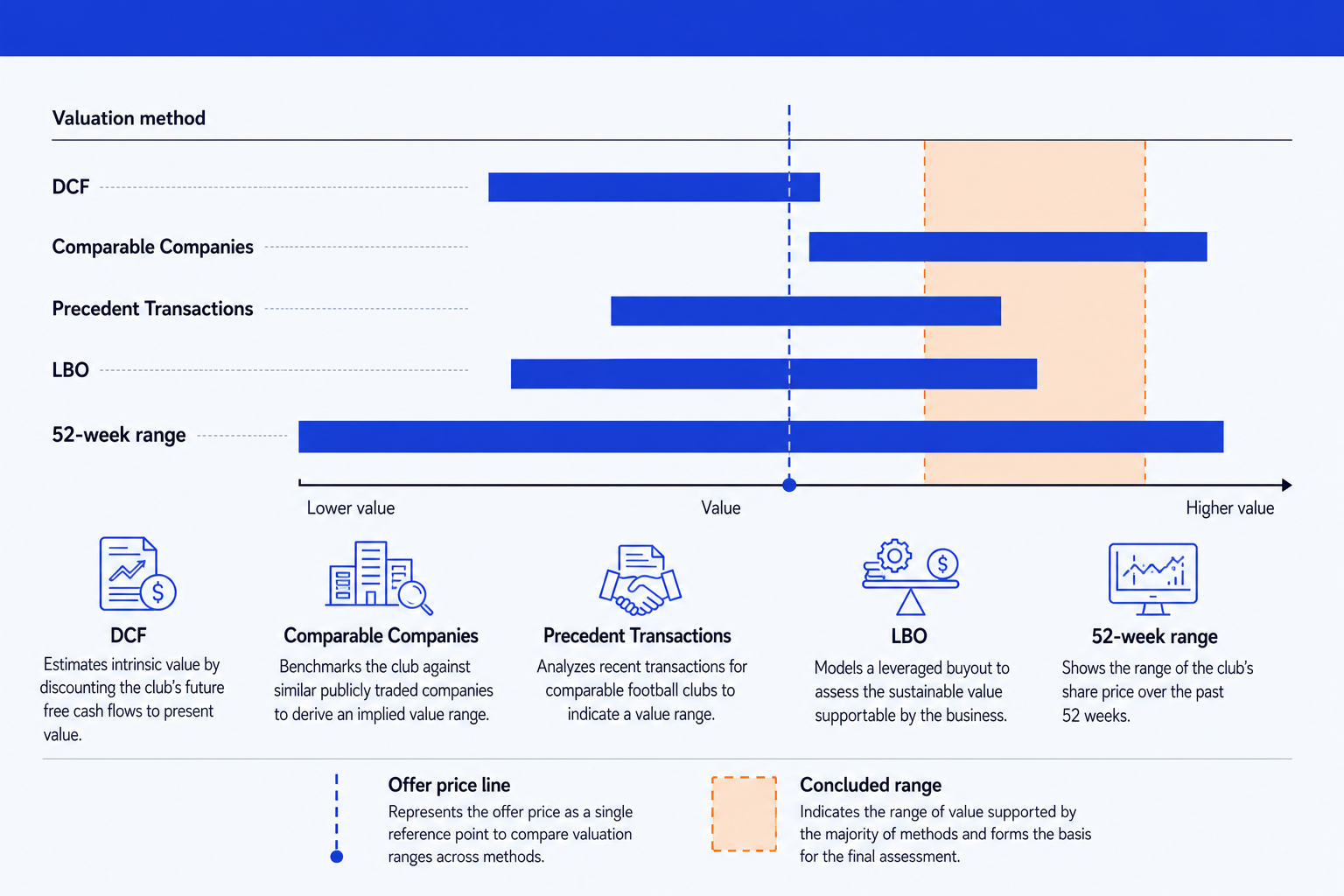
Method rows. One row per valuation method, ordered top to bottom in a consistent sequence so the audience always knows where to look.
Floating range bars. Each method's low-to-high value drawn as a horizontal bar across the shared axis. The width is the uncertainty in that method, and the position is where it lands relative to the others.
Shared value axis. A single horizontal scale that every bar sits on, so the methods are directly comparable. Hold one axis for all rows rather than rescaling per method.
Offer price line. A thin vertical reference line dropped across all the bars at the offer or current price, so the audience sees instantly which methods support it.
Concluded range. A shaded vertical band over the value range you are recommending, where the credible methods overlap. It is the answer the slide builds to.
This triangulation is not a banking habit invented to look thorough. Vice Chancellor Donald Parsons of the Delaware Court of Chancery made the same point from the bench. Ruling in Merion Capital, L.P. v. 3M Cogent, Inc. in 2013, he wrote that "it is preferable to take the more robust approach involving multiple techniques to triangulate a value range," because a DCF, a comparable transactions analysis, and a comparable companies analysis each carry their own limitations on their own. A football field is that standard rendered as a slide.
The trade-off: with three or more methods on one chart, a viewer who does not know the assumptions behind each bar can mistake agreement for certainty. The ranges converging does not mean the methods are independent; it can mean every one of them was built on the same set of consensus estimates.
How is a football field different for a public company?
Add two rows that only exist because a ticker exists: the 52-week trading range, which shows where the market has actually priced the stock, and analyst price targets, which show where sell-side coverage sits as of the analysis date. Both anchor the chart against a real, observable price rather than only against modeled ones, and a board will ask where the offer sits relative to both before it asks about a single method's assumptions.
The 52-week range also carries the takeover premium into the room without a separate slide. Measure the offer against the unaffected trading price, not the day-of price, and the resulting premium becomes part of the story the chart tells.
The trade-off: the 52-week range and analyst targets both move every trading day, so freeze the data date and print it on the slide, or the exhibit is stale before the meeting starts.
How do you build a football field when there's no market price?
A private target has no ticker, so drop the 52-week range and the analyst-target row entirely rather than leaving them empty or faking a placeholder. The remaining methods, typically a discounted cash flow, comparable public companies, and precedent transactions, carry the whole argument, and the DCF bar usually ends up the widest one on the chart.
That width is not a flaw. NYU Stern finance professor Aswath Damodaran has shown that terminal value typically accounts for 60 to 80 percent of a mature company's total DCF value, so a small change in the discount rate or the terminal growth assumption swings the whole bar. As he puts it, "it is when it does not account for the bulk of the value that you should be wary of a DCF." Widen the DCF bar honestly rather than narrowing it to look more certain than the model actually is.
Some private-company football fields add a book value or net asset value floor as a fifth row when the target holds real collateral, such as real estate or equipment. Skip it for an asset-light business, where it adds a row without adding information.
The trade-off: without a market check, the whole chart rests on assumptions rather than a quoted price, so keep the discount-rate and growth sensitivity available in the appendix, even if it never makes this slide, or the range looks more solid than it is.
When do you add an LBO analysis to a football field?
Add it when a financial sponsor is a plausible buyer, not as a default fifth row. An LBO analysis works backward from what a sponsor needs, a required return over a hold period and the leverage available from the debt markets at the time, rather than forward from cash flows or peer multiples the way the other methods do.
That different direction of travel is exactly why the LBO bar often lands lowest on the chart and moves the most between drafts. It tracks financing terms and required returns, not the target's own operating performance, so a change in debt pricing can shift it without a single assumption about the business changing. For the analysis behind that math, see the Claude skills for an investment banking deal engine.
The trade-off: an LBO bar answers what a financial sponsor could afford to pay, not what the business is worth, so label it plainly. Put it on the same axis as an intrinsic method like the DCF without saying so, and the chart invites confusion between price and value.
How do you actually build a football field chart in PowerPoint?
PowerPoint has no football field chart type, so you build it from a stacked bar chart and a trick that hides half of it. Get the data right before you open PowerPoint at all, because the build cannot fix a numbers problem.
Get every method onto the same basis first. Low and high values for every row need to be in the same currency and the same equity-value or enterprise-value basis. Mixing the two without adjusting for net debt is the single most common defect in a football field, and it is invisible on the finished slide.
List the methods as rows, in the order you want them read, top to bottom, keeping only the methods that are genuinely credible for this target.
Add a low column and a width column (the high value minus the low) for each method, then insert a horizontal stacked bar chart on the labels, the low column, and the width column.
Make the low-value series invisible: no fill, no border. The visible bars now float at the right position on the axis, which is the whole trick of the chart.
Lock the axis minimum and maximum so every method shares one scale. Letting PowerPoint auto-scale per series is the fastest way to make the methods stop being comparable.
Add the offer-price reference line only if a real price exists, as a thin dashed vertical line across every bar, labeled once. Shade the concluded range where the credible methods overlap, and write an action title that states the conclusion, not the topic.
Gotcha
The basis mismatch in step one is the mistake that survives review. An enterprise-value DCF bar sitting next to an equity-value comparable-companies bar looks perfectly fine on the slide and is wrong by the exact amount of the target's net debt. Check the basis of every row before you check anything else.
Can Oria build the football field valuation chart for you?
Yes, and that is the narrow thing it is built for. Oria is aimed at corporate documents and consulting presentations: board packs, steering committee decks, diligence exhibits, dense frameworks held to an enforced corporate template. It reaches you two ways, a PowerPoint add-in running in the task pane on Windows, macOS, and PowerPoint for the web, and a connector for Claude and ChatGPT over MCP, so the slide can be built from the chat you are already in. Either way the output is native PowerPoint objects on your master, so every bar, label, and the reference line stay editable after they land.
One-line football field prompt for Oria
The same route covers the analysis behind the chart. See the Claude skills for investment banking for the modeling and diligence side of the workflow, and the consultant's guide to Claude for the end-to-end method from analysis to deck.
The trade-off: Oria is built for the corporate environment and loses on highly visual work. Founder fundraising decks, launch decks, and marketing one-pagers want visual impact more than defensible content, and a design-led tool such as Gamma, Canva, Pitch, or Beautiful.ai will beat it there and look better doing it. It also will not tell you which variant your deal needs, which is the judgment this page is about.
Which tool should you use to build a football field?
It depends what has to happen before and after the chart.
| If you need | Use | Why |
|---|---|---|
| To build the DCF, comps, and precedent-transaction models behind the chart | Excel, with a modeling walkthrough from Wall Street Prep or Macabacus | Oria renders the exhibit; it does not build the financial model behind it. |
| To size a market opportunity rather than value an existing business | A market sizing slide | Different question entirely: how big the prize is, not what a business is worth. |
| To show a bridge from one number to another, such as a synergy walk | A synergy bridge or waterfall chart slide | Different geometry: a bridge connects two numbers step by step; a football field compares several independent estimates of one number. |
| A visually distinctive fundraising or pitch deck rather than a defensible banking exhibit | Gamma, Canva, Pitch, or Beautiful.ai | Where the job is visual impact rather than defensible content, a design-led tool will beat a corporate template and look better doing it. |
| The exhibit inside your firm's PowerPoint template, as native editable shapes | Oria | Built for board packs and diligence exhibits: the bars, axis, and reference line come out as real PowerPoint objects on your master. |
| To sanity-check the implied multiples or draft the range from a memo before you draw anything | Claude | Classification and arithmetic are a text problem. Settle the numbers first, then render once. |
Common football field mistakes to avoid
None of these mistakes are visible from a distance, projected on a screen. All of them are visible to the one person in the room who opens the workbook, and that is usually the person deciding whether to trust the rest of the deck.
Frequently asked questions
What is a football field valuation chart?
A football field valuation chart is the one-page summary bankers and corporate development teams use to show what a company is worth across several methods at once. Each method, such as a discounted cash flow or a comparable companies analysis, becomes a horizontal floating bar spanning its low-to-high value, and the bars stack on a shared value axis so the audience sees where the methods agree, where they diverge, and where the concluded range sits. The name comes from the resemblance to yard markings on an American football field.
How many valuation methods should a football field include?
Enough that the range reflects real triangulation, not one opinion dressed up as several. A Duff and Phelps review of more than 3,000 SEC-filed fairness opinions over ten years found that 91% used more than one methodology and 75% used three or more, with a discounted cash flow paired with comparable companies and precedent transactions the most common combination. Include the methods that are genuinely credible for the target and leave the rest off, rather than padding the chart to look thorough.
Why is it called a football field chart?
Because the stacked horizontal range bars resemble the yard markings on an American football field, with the shared value axis running along the bottom like the length of the field and each method's bar a band laid across it. It is industry shorthand in investment banking and private equity, so a managing director asking for the football field means this exact valuation summary exhibit.
What does the offer price line mean on a football field chart?
It is a thin, usually dashed, vertical line drawn across every bar at the current or offer price, letting the audience see instantly which methods support that price and which sit above or below it. It only belongs on the chart when a real, quotable price exists, a public target's trading price or an actual bid, never as a placeholder for a number that has not been offered yet.
Why do the valuation ranges from different methods disagree?
Because each method is sensitive to a different assumption. A discounted cash flow's terminal value typically makes up 60 to 80 percent of its total value, according to NYU Stern finance professor Aswath Damodaran, so a small change in the discount rate or the terminal growth rate can shift the whole bar. A comparable companies bar moves with which peer set you pick, and a precedent transactions bar carries whatever control premium was paid in deals that may be years old. Disagreement between bars is information, not an error to hide.
What is the fastest way to build a football field valuation chart?
Describe the methods and their ranges in one line and let Oria render it. List each method with its low and high value, the offer price for the reference line if one exists, and the concluded range, and Oria builds a fully editable native PowerPoint exhibit in your template, with the bars aligned on a shared axis. You skip the invisible base-series trick and the hand-placed reference line entirely.