

How to Build a McKinsey 7S Framework Slide in PowerPoint
The seven elements, the step-by-step manual build with the real gotchas, the prompts that make it sharp, and the one-line route that renders an editable native diagram for you.
Free skills and prompts for Claude and strategy work
Templates for Claude, ChatGPT and Perplexity — from diagnostics to board-ready decks.
Independent and unaffiliated. The skills and frameworks referenced on this page are not created by, endorsed by, or affiliated with McKinsey. They are built on publicly available frameworks and ways of working McKinsey is known for, and are inspired by how those approaches are used to tackle complex business problems.
How to build a McKinsey 7S slide in PowerPoint
To build a McKinsey 7S slide in PowerPoint, place Shared Values at the center, then arrange the other six elements around it: Strategy, Structure, and Systems as the three hard elements, and Style, Staff, and Skills as the three remaining soft elements. Join every node to the center with connecting lines so the diagram reads as one interdependent system, write a one-line definition under each element, then add an action title that states the alignment problem. Oria can render the whole diagram as editable native shapes from one line of text.
This guide walks the manual build and its real gotchas, gives you the exact prompts to draft the seven elements and the title, and shows the faster one-prompt route. Everything you need is here. You will not have to leave to get the substance.
What the 7S framework is and when to use it
The 7S framework is a model for organizational alignment. It holds that an organization performs only when seven elements pull in the same direction. Three are the hard elements, easier to name and to change: Strategy, the plan to win. Structure, how the organization is arranged. Systems, the processes and tools that run the work. Four are the soft elements, harder to pin down but just as decisive: Shared Values, the core beliefs at the center. Style, how leaders actually behave. Staff, the people and how they are developed. Skills, what the organization is genuinely good at.
Reach for it when the question is internal: why a sound strategy stalls in execution, what must change after a merger, or where a transformation will break. It is a diagnostic of fit, not a comparison grid, so use a Porter's Five Forces slide when the question is competitive pressure, and a 2x2 positioning matrix slide when you are sorting options along two axes. The 7S earns its place when alignment is the problem.
The seven elements, hard and soft
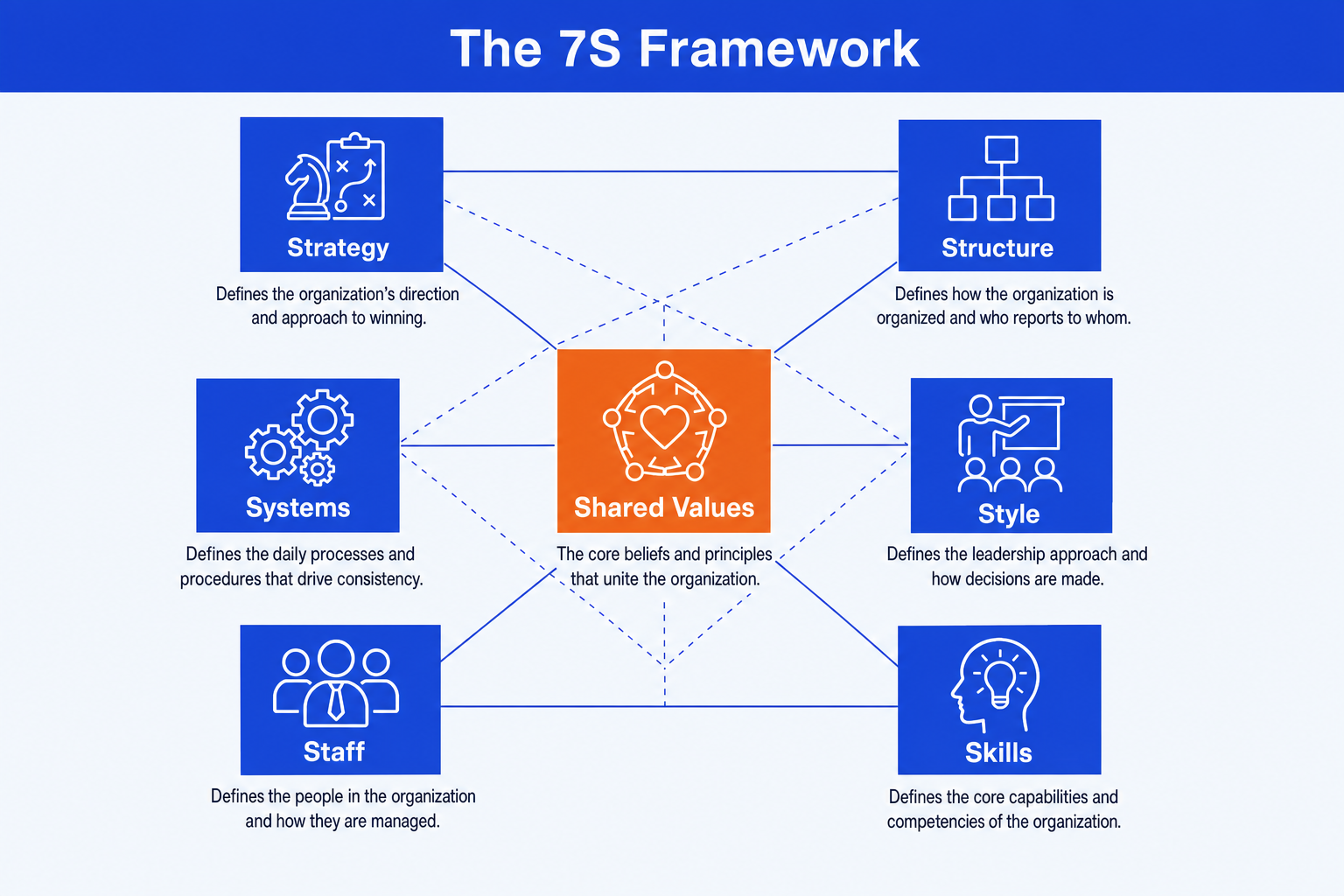
Seven elements carry the whole diagram, with Shared Values at the center because every other element connects to it. Get the fit between them right and the slide diagnoses the organization on its own.
The three hard elements
Strategy. The plan to build and sustain a competitive advantage, including how the organization intends to win in its market.
Structure. How the organization is divided and coordinated: reporting lines, business units, and who is accountable for what.
Systems. The day-to-day processes, tools, and procedures that get the work done, from planning cycles to IT to incentives.
The four soft elements
Shared Values. The center block. The core beliefs and norms the organization actually lives by, which every other element should reinforce.
Style. How leaders and managers behave in practice: what they reward, how they make decisions, and the culture they model.
Staff. The people: how the organization recruits, develops, and retains the talent the strategy requires.
Skills. The distinctive capabilities of the organization as a whole, the things it does notably better than rivals.
The step-by-step manual build, with the real gotchas
PowerPoint has no native 7S layout, so the manual method builds a center hub and six surrounding nodes joined by lines. The trick is even spacing: the six outer nodes sit on a ring around the center so the diagram looks deliberate, not scattered. Build it once as a reusable layout and you can refill it for any organization.
Place Shared Values at the center. Draw a circle or rounded node in the middle of the slide and label it Shared Values. This is the anchor every other element connects to, so give it the visual weight to match.
Arrange the other six around it. Position Strategy, Structure, Systems, Style, Staff, and Skills evenly around the center, roughly on a circle. Use align and distribute so the six nodes are spaced evenly rather than eyeballed.
Draw the connecting lines. Join each outer node to the center, and add the cross-links between elements that the model implies, so the slide shows interdependence rather than a hub with six unrelated spokes.
Write a one-line definition per element. Put a short phrase under or inside each node, never a paragraph. The reader should grasp each element in a second, then see how they fit together.
Align, glue, and group. Use align and distribute so the ring is symmetric and the connectors land cleanly, then group the whole diagram so it moves as one object when you resize the slide.
Write the action title. Replace the topic label with a full-sentence so-what that states the alignment problem, like which elements are out of step and what must change. The title frames the slide; the diagram is the proof.
Gotcha
The 7S has no top or bottom. There is no hierarchy among the seven, so do not stack them as a list or imply that Strategy outranks Skills. The whole point is mutual dependence, which is why the center-and-ring layout beats a column of seven boxes.
The one-prompt route: describe the seven elements, get an editable diagram
Drawing a center hub, six evenly spaced nodes, and a web of connecting lines by hand is exactly the kind of mechanical work that eats an evening. Oria removes it. It is an AI add-in that runs in the PowerPoint task pane and produces fully editable native PowerPoint elements in your corporate template. You describe the seven elements in one line and Oria renders the 7S diagram for you.
Because the output is native shapes and text, every node stays editable afterward. You can rename an element, recolor the center, or move a phrase without rebuilding the ring. The same approach works for any complex framework slide, which is why Oria suits the dense decks consultants and strategy teams actually ship. See the complete guide to McKinsey-style presentations with Claude for the storyline side of the workflow.
One-line 7S prompt for Oria
The prompts that make the 7S slide sharp
These are the exact copy-paste prompts we use to draft the seven elements, lay out the diagram, and write the title. The first three are for Oria inside PowerPoint; the last two are for drafting and converting in Claude before you build. Replace the bracketed parts with your own organization.
Build the slide in Oria
Lay out the center-and-ring diagram
Fill the elements from notes
Emphasize the center and write the title
Draft the seven elements in Claude first
Draft each S for a company
Convert a 7S memo into the slide
Tip
Draft and stress-test the seven elements in Claude, then hand the clean labels straight to Oria to render. For the full analysis-to-deck pattern, see The Consultant's Guide to Claude: Skills, Prompts, Slides.
Common mistakes to avoid
For a different framework slide built the same disciplined way, see how to build a Business Model Canvas slide, which maps a whole business model across nine blocks.
Frequently asked questions
What is the McKinsey 7S framework?
The 7S framework is a model for organizational alignment built from seven interdependent elements: Strategy, Structure, Systems, Shared Values, Style, Staff, and Skills. The first three are the hard elements that are easier to define and change. The last four are the soft elements that are harder to pin down but just as decisive. The point of the model is that no element stands alone, so a change to one forces the others to adjust.
What are the seven elements of the 7S model?
Strategy, Structure, and Systems are the three hard elements. Shared Values, Style, Staff, and Skills are the four soft elements. Shared Values sits at the center because every other element connects to it. On a slide you place Shared Values in the middle and arrange the other six around it, joined by connecting lines, so the reader sees the interdependence rather than a flat list of seven boxes.
Does PowerPoint have a built-in 7S template?
PowerPoint does not ship a native 7S layout, so most people build it by hand from a center circle and six surrounding nodes joined by lines, or download a third-party template. The manual build in this guide gives you full control over the spacing and the connectors. Oria can render the whole 7S diagram as editable native shapes from one line of text, in your corporate template.
When should you use a 7S slide instead of another framework?
Use a 7S slide when the question is internal alignment: whether your strategy, structure, systems, people, and culture pull in the same direction. Reach for a different layout when the question is external. A Porter's Five Forces slide maps competitive pressure, and a 2x2 positioning matrix sorts options along two axes. The 7S is the right tool for diagnosing why a strategy stalls inside the organization.
What is the fastest way to build a McKinsey 7S slide?
Describe the seven elements in one line and let Oria render the diagram. You give a short note for Strategy, Structure, Systems, Shared Values, Style, Staff, and Skills, and Oria builds a fully editable native PowerPoint layout in your template, with Shared Values emphasized at the center. You skip drawing the hub, the six nodes, and every connecting line by hand.