

Stakeholder Map: The Power-Interest Grid, With Examples
You are not choosing a diagram. You are deciding who gets an hour of the sponsor's week and who gets a monthly email, and getting that wrong is expensive in a way the slide never shows. A stakeholder map is the 2x2 that forces the call: power up the side, interest along the bottom, every name in one of four boxes, and an action written against each box. The framework is the easy part. The honest placement is not, because the most powerful name on the org chart is often the one with the least interest in your programme, and the person who can quietly stall it sits two levels down. Below: the four quadrants, four worked maps, where a RACI matrix answers a question a stakeholder map cannot, and the slide build.
Quick answer: what is a stakeholder map?
Build one in four moves: list everyone the programme touches, rate each name low or high on power and on interest, place it in the quadrant those two reads produce, then write one engagement action against each quadrant.
A stakeholder map is a two-by-two grid that sorts the people affected by a project by how much power they hold over it and how much interest they take in it. High power and high interest is Manage Closely, the group you involve in decisions rather than update afterwards. High power and low interest is Keep Satisfied: brief them, and never let them hear something first from somebody else. Low power and high interest is Keep Informed, your cheapest advocates. Low power and low interest is Monitor. The grid traces back to A. L. Mendelow, whose 1981 ICIS paper crossed stakeholder power with environmental dynamism; the power-and-interest version almost everyone draws today was popularised by Gerry Johnson and Kevan Scholes in Exploring Corporate Strategy.
How we compared the stakeholder frameworks
Each model below was cut against the same list: a fourteen-name stakeholder register from a mid-size finance system replacement, re-sorted under each framework and then drawn as a single slide.
What question it actually answers
Every one of these models sorts people, but they answer different questions. We scored each on whether its output tells you what to do on Monday morning, or only what is true.
Whether it survives a committee
A framework that collapses the first time someone asks why the finance director is in that box is a diagram, not a framework. We tested each placement against a plausible objection.
Whether the axes are observable
Power and interest can be argued from behaviour: who has signed off budget, who turns up to the working group. Models asking for judgements nobody can source lost marks.
How it reads at six metres
Fourteen names on a 16:9 slide, projected, read by a steering committee in about eight seconds. Anything that needs a legend or a second pass failed this test.
What a re-cut costs
Positions move. We scored what a quarterly refresh costs, because the model you can update in ten minutes is the one that still exists in month six.
What we ignored: software feature lists, template galleries, the number of stakeholder categories a model claims to support, and colour schemes, which are the first thing a room argues about and the last thing that changes a decision.
Key takeaways
- Sort by leverage, not by seniority. The working test for power is whether this person can stop the programme, or unblock it, inside the current quarter. A senior title with no budget and no veto belongs in Keep Satisfied, not Manage Closely.
- Two dimensions is the ceiling for one slide. If the argument needs a third, such as how legitimate or how urgent a claim is, you have outgrown the grid and want the salience model on its own page rather than a crowded 2x2.
- A quadrant with no action is decoration. Write the cadence, the channel and the depth against each box. That is the line between a map that describes the programme and a map that commits named people to a rhythm.
- Match the artifact to the question being asked. Who do we engage and how hard is a stakeholder map. Who signs this off and who merely gets told is a RACI matrix. They are not substitutes, and most programmes need both.
- Treat the map as perishable. Interest spikes the week a change lands on someone's team, and power moves at every reorganisation. A map older than a quarter is a record of who used to matter, not a plan.
The five stakeholder frameworks, compared
| Framework | What it sorts | Dimensions | What it drives | When it wins | Re-cut cost |
|---|---|---|---|---|---|
| Power-interest grid (the stakeholder map) | People, by leverage | Power, interest | An engagement cadence per quadrant | Kickoff, and aligning a steering committee | Low: a quarterly re-plot |
| Influence-impact grid | People, by leverage and exposure | Influence, impact | Who to consult against who to protect | When the most affected are not the most powerful | Low |
| Salience model (Mitchell, Agle and Wood) | Claims, by standing | Power, legitimacy, urgency | Which claim gets heard first | Contested programmes with external stakeholders | High: urgency moves weekly |
| RACI matrix | Work, by accountability | Deliverables against roles | Who decides, who does, who is merely told | Once the plan has named deliverables | High: every scope change touches it |
| Engagement assessment matrix | People, by attitude | Current support against required support | Where to spend persuasion | Mid-programme, when resistance is real | Medium: reassess each phase |
What are the four quadrants of a stakeholder map?
Each quadrant is one combination of power and interest, and each carries a different engagement strategy. Name the boxes by the play, not the axis reads, so the slide states the action instead of restating the position.
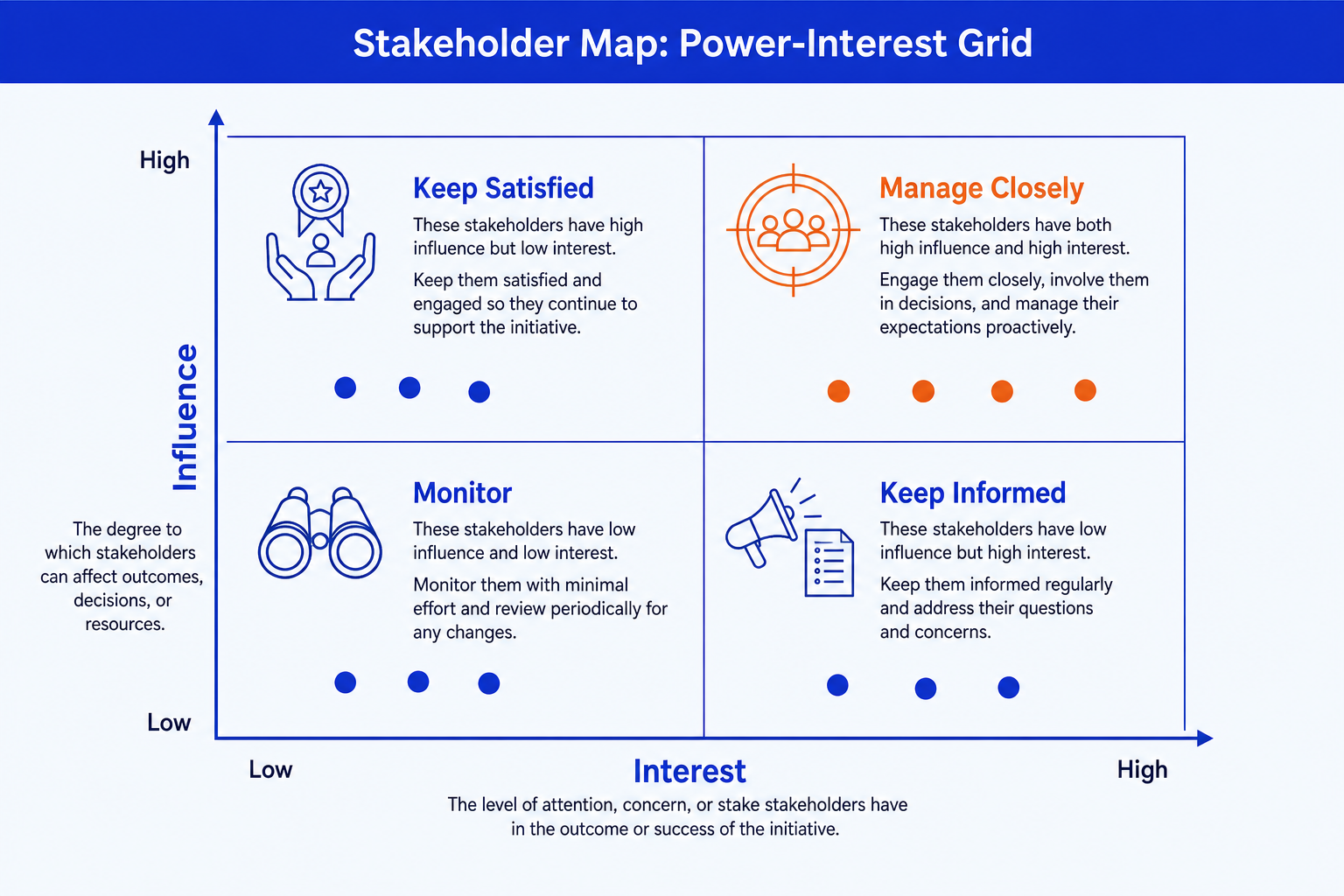
Manage Closely. High power, high interest. Top right. They can stop you and they are paying attention, so involve them in the decision rather than reporting it afterwards. Fortnightly contact at minimum, in a room, with a decision on the table. Give this quadrant the accent colour.
Keep Satisfied. High power, low interest. Top left. They can shape the outcome but are not following the detail, so the failure mode here is surprise. A short monthly brief carrying the two or three things they would hate to hear first from somebody else.
Keep Informed. Low power, high interest. Bottom right. They care more than they can control, which makes them the cheapest advocates you will get. Give them regular detail and something to carry back into their own teams.
Monitor. Low power, low interest. Bottom left. A light touch and a standing update. Watch only for movement: a reorganisation or a scope change can lift someone out of this box overnight.
The top-right box is the one the evidence keeps pointing at. Prosci's Best Practices in Change Management, eleventh edition, reports that 73 percent of projects with extremely effective sponsors met or exceeded their objectives against 29 percent of those with very ineffective ones, and that in 11 out of 11 of its benchmarking studies active and visible sponsorship came out as the top contributor to success, beating the runner-up by a four to one margin. The Project Management Institute reached the same place from a different direction: in its 2021 Pulse of the Profession, a survey of 3,950 project professionals, active project sponsorship was the number-one driver of project success globally.
The trade-off: the power-interest grid is the fastest framework to explain and the easiest to fake. Nothing in the method stops you placing people where it is comfortable rather than where they are, and a map drawn to avoid an argument in week two hands you that same argument in month five, at a worse moment.
Stakeholder map examples: what does one look like on a real programme?
Generic maps put the sponsor top-right and stop. Useful ones are specific enough to be wrong, which is the only way anyone corrects them. Four worked grids follow, each ending with the placement that took longest to agree.
A systems implementation: replacing the finance ERP
Manage Closely
The CFO, who owns the outcome and the budget. The finance transformation lead. The controller whose month-end close breaks if cutover slips.
Keep Satisfied
The CIO, who has power over the platform but is running five other programmes. The audit committee chair, who cares intensely for one meeting a year.
Keep Informed
Accounts payable and receivable team leads, who live inside the old system and whose objections are usually the accurate ones. Free advocates.
Monitor
Adjacent business units not in scope for phase one, and the procurement function once the vendor contract is signed.
The call: the CFO and the finance transformation lead go in Manage Closely together, and the map is drawn to show that the programme is a finance decision the technology function is delivering, not the other way round.
A reorganisation: merging two regional operating units
Manage Closely
The group COO who commissioned it. The country head who gains headcount and the country head who loses it, for opposite reasons.
Keep Satisfied
The HR director, who holds the consultation process and can halt the timetable on procedural grounds alone. Works councils where they exist.
Keep Informed
Middle managers in both units, who hold the line in conversations you are not in the room for.
Monitor
Support functions with no reporting change, and customers, until there is something true to tell them.
The call: the two country heads sit in different quadrants and both of them know it, so the map is the private working version. What goes to the town hall is the engagement plan, not the grid.
A post-merger integration: the first hundred days
Manage Closely
The integration management office lead. The two functional heads being merged into one role, whose behaviour sets the tone for everyone below them.
Keep Satisfied
The acquirer's board and the deal sponsor, who care about synergy capture against the model and very little about the sequencing.
Keep Informed
Key retained talent in the acquired business, reading silence as bad news and taking recruiter calls this week.
Monitor
Suppliers on standard terms, and product teams untouched until the second wave.
The call: legacy loyalty is the hidden axis. Two people with identical formal power sit in different quadrants because one has the acquired organisation's trust and the other does not.
A regulatory programme: implementing a new reporting obligation
Manage Closely
The accountable executive named on the filing, the head of compliance, and the data owner whose systems produce the numbers.
Keep Satisfied
Legal counsel, who has veto power over interpretation and no appetite for weekly status. The external auditor.
Keep Informed
Front-line teams whose process changes, and internal audit, which will test what you built about a year later.
Monitor
Commercial teams, unless the obligation changes what can be sold, in which case they move up two boxes.
The call: the regulator is on the map but it is not a stakeholder you engage, it is a constraint you satisfy. Put it on the slide as a boundary rather than a dot, or the map invites the wrong conversation.
The systems example is the one where the cost of a bad map is measurable. Bent Flyvbjerg and Alexander Budzier, writing in Harvard Business Review in September 2011, studied 1,471 IT projects and found an average cost overrun of 27 percent, which sounds survivable until you look at the tail: one in six of the projects was what they called a black swan, with a cost overrun averaging 200 percent and a schedule overrun of almost 70 percent. Those are not projects that drifted. They are projects where someone with the power to stop a bad decision was in the wrong box on somebody's map, or on no map at all.
The trade-off: worked examples make the method concrete and tempting to copy. Your controller is not the controller above. Use these to see the shape of the argument, then re-run both reads against people you have watched make decisions.
How do you build a stakeholder map in PowerPoint?
PowerPoint has no stakeholder map chart type. You build it from two crossed lines and plotted shapes. The five steps below produce the version a steering committee can read in seconds.
Draw the 2x2. Two lines crossing at the centre, inside a light outer frame so the field is contained. Label the vertical axis Power, or Influence, low to high, and the horizontal axis Interest, low to high.
Name the quadrants by their play. Manage Closely top right, Keep Satisfied top left, Keep Informed bottom right, Monitor bottom left, set in a lighter weight than the names so they frame the field rather than compete with it.
Plot the names as dots. One size, one colour, every dot labelled. Position inside a quadrant carries no meaning, so do not let anyone read significance into sitting slightly higher than a colleague. If two labels collide, nudge the label, not the dot.
Write the engagement action beside each quadrant: cadence, channel, depth, in one line. This is the step that converts a picture into a plan, and the step most decks skip.
Emphasise and title. Accent colour on Manage Closely, neutral greys elsewhere, and an action title in place of the topic label: Engage the CFO and the controller weekly through cutover.
Gotcha
Do not show the raw map to the people on it. Placement is a working judgement, and there is no version of Monitor that reads as a compliment. What leaves the room is the engagement plan it produced: cadence, channel, owner. The grid stays in the internal pack. The same discipline applies when workshop notes become slides, covered in the guide to turning meeting notes into editable slides.
What is a RACI matrix, and when does it beat a stakeholder map?
A RACI matrix is a responsibility assignment grid. Deliverables and decisions run down the left as rows, roles run across the top as columns, and each cell carries one letter saying how that role relates to that row. It answers a question the stakeholder map cannot touch: not who matters, but who signs.
R, Responsible. Does the work. More than one person can be Responsible for the same row, and on a real plan several usually are.
A, Accountable. Owns the outcome and signs it off. Exactly one A per row, always. Two accountable names is the most common defect in a RACI and it is the one that causes the delay.
C, Consulted. Gives input before the work is finished. Two-way, and every C you add lengthens the deliverable. That is the whole cost of the letter.
I, Informed. Told after the fact. One-way. Most of the people who think they are Consulted are Informed, and saying so out loud is half the value of the exercise.
On a slide, use roles rather than people: people change, roles survive a reorganisation. Twelve rows by eight columns is about the limit before the grid stops reading at projector distance; past that, split by workstream and carry a summary row. Put letters in the cells and nothing else, and shade only the accountable cells so the eye finds ownership first. If a row has two As you have found the problem the exercise exists to find, and it belongs on the slide rather than quietly resolved in the file.
Sequence matters more than preference. The map runs at kickoff, before the plan has named deliverables, and produces a communication rhythm. The RACI runs once the workstreams exist, and produces sign-off. A project charter usually carries both: the map in the governance section, the RACI against the deliverable list. Where the argument is about handoffs between teams rather than about accountability for outputs, a swimlane process flow shows the same information along a timeline and usually shows it better.
The trade-off: a RACI is precise and goes stale faster than anything else in the pack. Every scope change touches it, and an out-of-date matrix is worse than none because people cite it. Build it when the deliverable list is stable and own the refresh, or do not build it.
Stakeholder analysis vs stakeholder mapping: what is the difference?
Stakeholder analysis is the assessment work: identifying who has a stake, establishing what each of them wants, judging what they can do about it, and deciding the strategy that follows. Stakeholder mapping is the placement step inside it, the moment the assessment becomes a picture. Analysis without mapping never reaches a slide. Mapping without analysis is two lines and some guessing.
When the analysis runs past what two axes can hold, the usual next model is the salience model from Ronald Mitchell, Bradley Agle and Donna Wood, published in the Academy of Management Review in 1997, which sorts stakeholders by three attributes rather than two: power, legitimacy and urgency. It is the better instrument where the question is whose claim deserves a hearing, typically on programmes with communities, regulators or campaign groups. It is a worse instrument for a slide, because three overlapping circles and seven classes do not survive a projector. Run the salience analysis in the document, put the grid on the page.
The trade-off: the extra dimension buys accuracy on contested programmes and costs you the audience. If a committee cannot restate the framework in one sentence, it will not use it after the meeting.
Can Oria build the stakeholder map slide for you?
Yes, and that is the narrow thing it is for. Oria is built for corporate documents and consulting presentations: board packs, steering committee decks, diligence exhibits, dense frameworks held to an enforced corporate template. It reaches you two ways: a PowerPoint add-in running in the task pane on Windows, macOS and PowerPoint for the web, and a connector for Claude and ChatGPT over MCP, so the slide can be built from the chat you are already in. Either way the output is native PowerPoint objects on your master, so every axis label, quadrant name and plotted dot stays editable after it lands.
One-line stakeholder map prompt
The same route covers the neighbouring exhibits, from an org chart slide to a 2x2 positioning matrix, which is the same geometry doing an entirely different job: options plotted against chosen axes to force a choice, rather than people plotted to allocate attention.
The trade-off: Oria is built for the corporate environment and loses on highly visual work. Founder fundraising and pitch decks, launch and campaign decks, student presentations and marketing one-pagers want visual impact more than defensible content, and a design-led tool such as Gamma, Canva, Pitch or Beautiful.ai will beat it there and look better doing it. It also will not tell you which framework your question needs, which is the judgement this page is about.
Which tool should you use for a stakeholder map?
It depends what the map has to do after you draw it.
| If you need | Use | Why |
|---|---|---|
| To run the mapping live, with the team in the room | Miro or Mural | An infinite canvas and sticky notes beat a slide while positions are still being argued. |
| A map that has to look designed for an external audience | Canva or Pitch | Where the job is visual impact rather than defensible content, a design-led tool will beat a corporate template and look better doing it. |
| The map inside your firm template, as native editable shapes | Oria | Built for board packs and steering committee decks: the axes, quadrant labels and plotted dots come out as real PowerPoint objects on your master. |
| A living stakeholder register with contact history | A stakeholder engagement platform | Tools such as Simply Stakeholders or Tractivity hold the log and the audit trail. A slide is a snapshot of that, not a substitute for it. |
| Charts, waterfalls and Harvey balls in the same deck on a team licence | think-cell | A mature add-in with an established enterprise footprint. It does not plot a stakeholder map, but it owns the rest of the exhibit pack. |
| To sort a long list before you draw anything | A spreadsheet, or Claude | Classification is a text problem. Settle the reads first, then render once. |
Common stakeholder map mistakes to avoid
One thing not on that list is the number you have probably been handed in a workshop: that 70 percent of change programmes fail. Mark Hughes of the University of Brighton went looking for its source, reviewed five separate published instances of the claim in the Journal of Change Management in 2011, and concluded that while the popular narrative exists, "there is no valid and reliable empirical evidence to support such a narrative." The honest version is duller and more useful. In PMI's 2021 Pulse of the Profession, 35 percent of projects experienced scope creep and 12 percent were deemed outright failures, and avoiding scope creep ranked in the top three drivers of success in every industry PMI analysed. Stakeholder work does not rescue a doomed majority. It buys you the person who can say no to the scope change before it lands.
Frequently asked questions
What are the four quadrants of a stakeholder map?
High power and high interest is Manage Closely: involve them in decisions, fortnightly at minimum. High power and low interest is Keep Satisfied: a short brief, no surprises. Low power and high interest is Keep Informed: regular detail, and they carry the message into their own teams. Low power and low interest is Monitor: a light touch, watching only for movement. The quadrant dictates the cadence, which is the whole output.
How do you do stakeholder mapping?
List everyone the programme touches, including the people who can only say no. Rate each name low or high on power, meaning can they stop or unblock this quarter, and low or high on interest, meaning are they paying attention. Place each name in the quadrant those two reads produce, then write one engagement action per quadrant: cadence, channel, depth. Re-cut it every quarter, because positions move.
What are the two axes on a power interest grid?
Power, sometimes labelled influence, runs low to high up the vertical axis: how much a stakeholder can shape or stop the outcome. Interest runs low to high along the horizontal: how closely they are following. Crossing the two at the midpoint gives the four quadrants. Both axes should be arguable from observed behaviour, not from the org chart.
What is the difference between a stakeholder map and a RACI matrix?
A stakeholder map answers who to engage and how hard, sorting people by power and interest into four quadrants. A RACI matrix answers who does what on named deliverables, assigning Responsible, Accountable, Consulted and Informed against each row. The map runs first, at kickoff, and drives communication. The RACI runs once the plan has deliverables, and drives sign-off. Most programmes carry both, on different slides.
What is a stakeholder map used for?
It sets the engagement plan. Programme leads, consultants and change managers use it at kickoff to align a steering committee on who matters, to surface the quiet blocker who holds real power without attending anything, and to justify where scarce engagement time goes. It is a planning artifact, not a data chart, so the value sits in honest placement and a named action per quadrant.
How many stakeholders should be on a stakeholder map?
Eight to fifteen names on the slide. Below eight you have probably merged groups that behave differently; above fifteen the quadrants stop reading at projector distance. Keep the full register in a spreadsheet and put only the names a steering committee would recognise on the grid, grouping the rest as one labelled dot such as regional finance teams.
Who invented the power interest grid?
The lineage runs back to A. L. Mendelow, whose 1981 ICIS paper crossed stakeholder power with the dynamism of the environment. The version almost everyone draws today, with interest on the second axis, was popularised by Gerry Johnson and Kevan Scholes in Exploring Corporate Strategy. It is still called the Mendelow matrix, which is why the two versions get confused.