

How to structure a board pack
A board pack should run in seven sections: cover and agenda, executive summary, financial performance, strategic and operational update, risk and compliance, decisions requested, and an appendix. Put the recommendation in the executive summary, not buried at the back, and state every resolution in the decisions requested section in the exact words the board will vote on. Everything before that section builds the case. Everything after it is back-up detail a director can reach for if they want to challenge the recommendation.
This guide walks each section, what goes in it, the mistakes that erode a board's trust in the pack, a working template you can copy slide by slide, and the prompts that build it fast. Everything you need is here. You will not have to leave to get the substance.
What a board pack is and when it goes out
A board pack is the set of slides and documents circulated to directors ahead of a board meeting. It gives every director the same starting point: the financial results, the strategic and risk position, and the specific decisions on the agenda. A good pack lets a director arrive prepared. A poor one forces the room to read cold, which slows the meeting and weakens the decisions it produces.
Most boards expect the pack a week or so before the meeting, long enough for directors to read it and raise questions in advance. The executive summary carries the same SCR logic, situation, complication, resolution, used in an executive summary slide. The rest of the pack exists to support that one page.
The structure of a board pack
Seven sections carry a board pack from context to decision, in that order. Get the order right and a director can read only the first two sections and still know what is being asked of them.
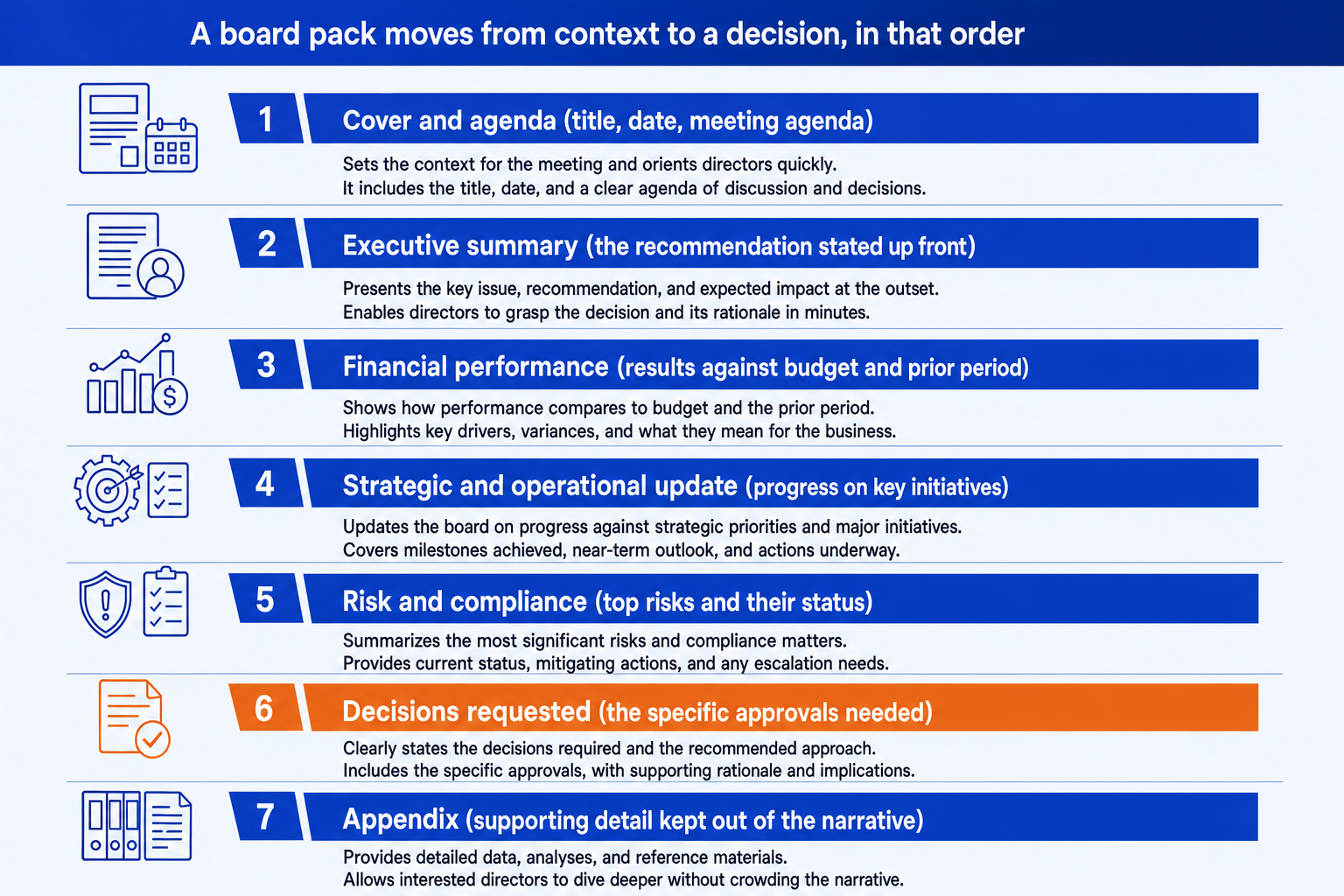
1. Cover and agenda. Meeting title, date, and the pack's version number.
2. Executive summary. The single recommendation the board is being asked to consider.
3. Financial performance. Results against budget and against the prior period.
4. Strategic and operational update. Progress on the two or three initiatives the board is tracking.
5. Risk and compliance. The top risks, ranked, with an owner and a trend arrow.
6. Decisions requested. The exact wording of each resolution the board will vote on.
7. Appendix. Detailed tables, models, and back-up analysis.
What goes in each section: the contents checklist
Use this as a build checklist. For each section, confirm the three items below are present before the pack goes out. If one is missing, that is usually the gap a director will ask about first.
Cover and agenda
Executive summary
Financial performance
Strategic and operational update
Risk and compliance
Decisions requested
Appendix
For the decisions requested and risk sections specifically, our Claude skills for board-ready decks include a risk heatmap and a decision-page skill that map directly onto sections 5 and 6 above.
Common mistakes to avoid
Most of these come down to one habit: writing the pack in the order the work happened instead of the order the board needs to read it. Lead with the decision, then support it.
The one-prompt route: turn your numbers into board pack slides
Formatting a financial bridge, a risk heatmap, and a decisions requested slide by hand, on a strict corporate template, is exactly the kind of mechanical work that eats an evening before a board meeting. Oria removes it. It is an AI add-in that runs in the PowerPoint task pane and produces fully editable native PowerPoint elements in your template. You describe each slide in a line and Oria renders it.
Because the output is native, every tile, bar, and label stays editable afterward. You can update a number, reword a resolution, or recolor a risk flag the night before the meeting without rebuilding the slide.
One-line executive summary prompt for Oria
The prompts that build the board pack
These are the exact copy-paste prompts we use to build the highest-stakes slides in a board pack and to draft the narrative behind them. The first three are for Oria inside PowerPoint; the last two are for drafting content in Claude before you build. Replace the bracketed parts with your own numbers and decisions.
Build the slides in Oria
Build the financial performance bridge
Build the risk register slide
Build the decisions requested slide
Draft the narrative in Claude first
Turn raw findings into an SCR narrative
Summarize risk changes since the last pack
Tip
Draft the SCR narrative and the resolution wording in Claude, then hand the clean lines straight to Oria. For the wider method from analysis to a finished deck, our finance agents for Claude include a board-reporting agent built for exactly this handoff.
A working board pack template you can copy
Nine slides cover a routine board pack. Copy this order, then add appendix pages behind slide nine for whatever the current cycle needs to support.
Cover slide. Meeting title, date, and pack version, nothing else.
Agenda slide. The items in discussion order with time allocated to each.
Executive summary slide. The SCR recommendation and three KPI tiles, one slide, no more.
Financial performance slide. Actuals versus budget and prior period, with a bridge chart for the gap.
Cash and liquidity slide. Cash position, headroom, and any covenant flags, only if material this cycle.
Strategic initiatives slide. A status row per initiative: on track, at risk, or off track, with the one-line reason.
Risk register slide. The top five risks ranked by severity, each with an owner and a trend arrow.
Decisions requested slide. Each resolution stated in the exact words the board will vote on.
Appendix divider slide. A single page marking where the back-up detail begins.
A pack carrying a major approval, a financing round or an acquisition, will need more appendix pages, but the first nine slides above stay the same regardless of what the board is being asked to decide.
Frequently asked questions
What is a board pack?
A board pack is the set of documents and slides sent to directors ahead of a board meeting. It gives them the financial results, strategic updates, risk position, and the specific decisions they are being asked to approve. A well-built pack lets a director arrive prepared rather than reading it cold in the room.
What sections should a board pack include?
Seven sections cover most board packs: cover and agenda, executive summary, financial performance, strategic and operational update, risk and compliance, decisions requested, and an appendix. Smaller boards can compress these into fewer slides, but the order, context first, then evidence, then the decision, should stay the same.
How long should a board pack be?
Long enough to support the decisions on the agenda, and no longer. A pack for a routine quarterly update might run 15 to 20 pages. A pack carrying a major approval, an acquisition or a refinancing, will run longer because the appendix has to support the recommendation. The executive summary should always fit on one page regardless of how long the appendix gets.
What is the difference between a board pack and board minutes?
A board pack goes out before the meeting and contains the information directors need to prepare and decide. Board minutes are the record produced after the meeting, capturing what was discussed, who attended, and what was resolved. The pack informs the decision. The minutes record it.
What is the fastest way to build a board pack?
Draft the narrative first: the recommendation, the financial bridge, the risk changes, and the exact resolutions. Then describe each slide in one line and let Oria render it. You get a fully editable native PowerPoint deck in your corporate template, with the executive summary, KPI tiles, and decisions requested slide already laid out. You skip the manual formatting entirely.