

What a Now/Next/Later roadmap is
A Now/Next/Later roadmap sorts initiatives into three columns, what is being worked on now, what is committed next, and what is under consideration later, instead of plotting them against exact dates. It communicates priority and sequence without the false precision of a Gantt chart, which is why it is the better slide whenever the later work genuinely has not been scheduled yet.
This guide covers when to reach for it instead of a Gantt chart slide, the manual build with the real gotchas, the exact prompts, and the faster one-prompt route. Everything you need is here.
When a Now/Next/Later roadmap beats a Gantt chart
A Gantt chart is honest about a plan with fixed deliverables, real dependencies, and a hard deadline: a system migration, an integration, a regulatory filing. Its bars are a claim about exact dates, and that claim is only useful when it is true. A product or strategy roadmap rarely works that way. Later-stage items shift every planning cycle as priorities change, and a Gantt bar drawn against a quarter you have not actually committed to reads as a promise you will be held to later. A Now/Next/Later roadmap communicates the same priority and sequence without that false precision, which is why it is the default board slide for most product, strategy, and portfolio roadmaps.
Reach for a strategy roadmap slide or a Gantt when the audience needs to see a schedule and a critical path. Reach for Now/Next/Later when the audience needs to see priority and the fact that Later is not yet a promise.
The anatomy of a Now/Next/Later roadmap slide
Three columns carry the whole board. The exhibit below shows a clean Now/Next/Later roadmap with a handful of initiatives in each.
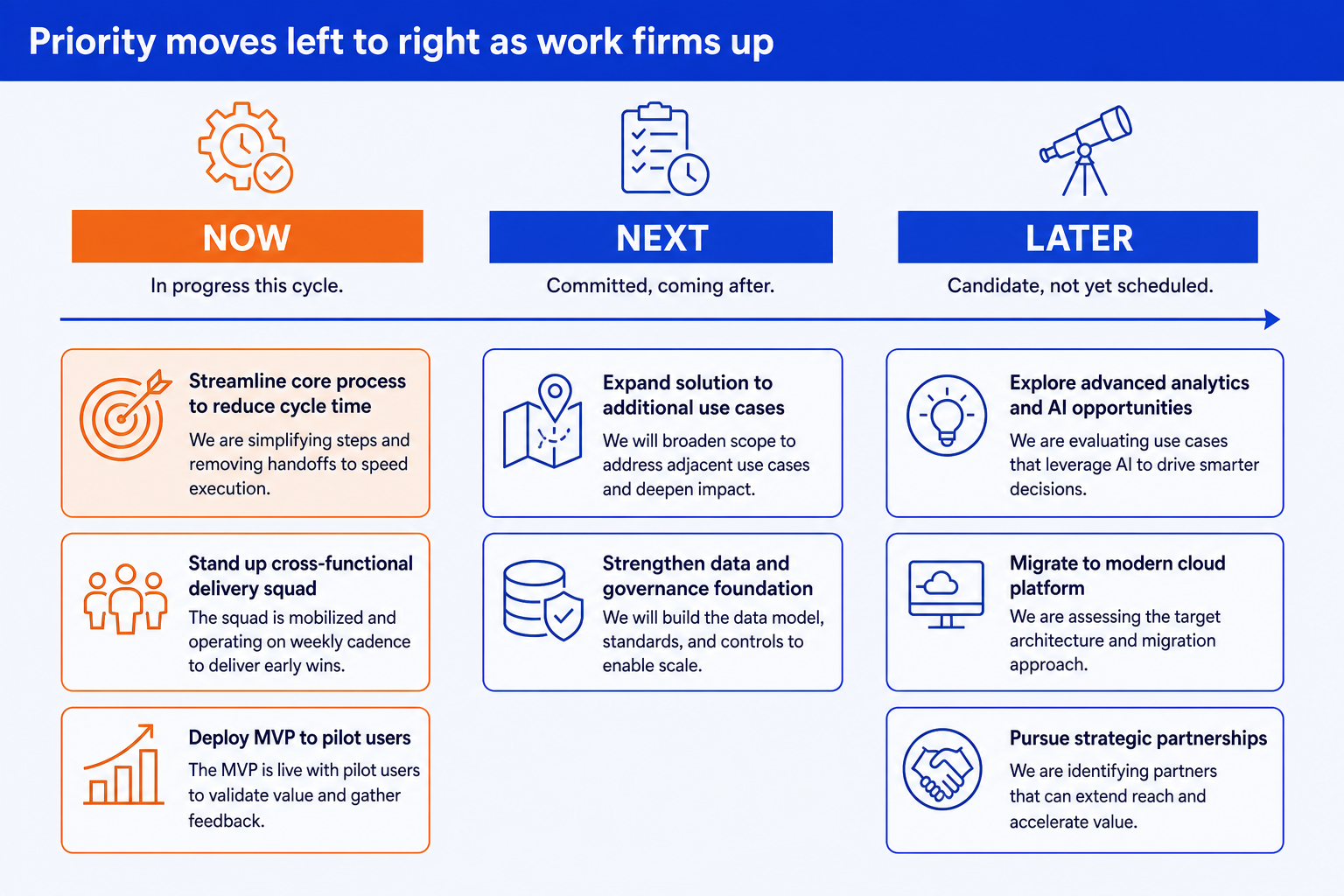
Now. The three to five items the team is actively working on this cycle. Nothing sits here that does not genuinely have people on it today.
Next. What is committed and coming after Now, without a locked date. This column is the shortest-range promise on the board.
Later. Candidate initiatives under consideration but not yet scheduled. No dates here at all, only the fact that the idea is on the radar.
Column labels, not a time axis. There is no scale to misread and no bar length to compare, which is the whole point: priority reads instantly, and nothing implies a date.
The step-by-step manual build, with the real gotchas
Build the board from three glued columns of cards rather than a table, so it stays on brand and fully editable, and every card can move without breaking the layout.
Sort every initiative into exactly one column. Now for what has people on it today, Next for what is committed after, Later for what is still a candidate. If an item does not clearly fit one column, it is probably not ready for the roadmap yet.
Cap Now at three to five items. A crowded Now column means the audience cannot tell what is actually in flight this cycle, which defeats the purpose of the board.
Write each card as an outcome, not a task. "Faster onboarding" reads as priority, "Rewrite onboarding flow" reads as a ticket. Keep the wording consistent in level across all three columns.
Never write a date inside a card, especially in Later. The moment a date appears, the card is a Gantt bar wearing a different layout, and it invites the same commitment argument you built this slide to avoid.
Add a one-line definition of what moves an item between columns, if the audience is new to the format. A short caption under the board heading is enough; it does not need its own slide.
Write the action title. Replace a leftover topic label with a full-sentence so-what, such as the one priority shift this cycle's board makes. The title is the slide; the board is the proof.
Gotcha
The board only earns trust if items actually move. An initiative that sits in Now for three planning cycles in a row, or a Later column that never empties into Next, tells the audience the roadmap is decorative rather than a working plan.
The one-prompt route: list your priorities, get an editable board
Aligning three columns of cards by hand and rebalancing them every planning cycle is exactly the kind of mechanical work that eats an evening. Oria removes it. It is an AI add-in that runs in the PowerPoint task pane and produces fully editable native PowerPoint elements, including roadmap and priority boards, in your corporate template. You describe the columns and items in one line, and Oria renders the Now/Next/Later roadmap slide for you.
Because the output is native, every card and column stays editable afterward. You can move an item from Later to Next, rename a card, or rebalance Now without rebuilding the board. See the consultant's guide to Claude for how this fits the wider path from analysis to a board-ready deck.
One-line Now/Next/Later prompt for Oria
The prompts that make the Now/Next/Later roadmap sharp
These are the exact copy-paste prompts we use to build the board, sort a raw backlog into columns, and set the action title. The first three are for Oria inside PowerPoint; the last two are for sorting the raw list in Claude before you build. Replace the bracketed parts with your own initiatives.
Build the board in Oria
Spec the three columns from a sorted list
Add column captions and emphasis
Rebalance the board for a new planning cycle
Sort the backlog in Claude first
Turn a raw backlog into Now/Next/Later columns
Sharpen the action title
Tip
Sort the backlog in Claude, then hand the clean three-column list straight to Oria. If the work genuinely is scheduled and the room needs the dates, see our PowerPoint timeline templates guide instead.
Common mistakes to avoid
For the wider habits that make AI-built slides look board-ready rather than generic, the consultant's guide to Claude covers the end-to-end method from analysis to deck.
Quick reference: pick the right board for the audience
Use Now/Next/Later when
- Later-stage items are not yet scheduled
- You need priority to be visible, not a date
- The board gets rebuilt every planning cycle
- A firm date would be a promise you cannot keep
Use a Gantt chart when
- Deliverables and dates are actually fixed
- Real dependencies drive a critical path
- The audience needs to see a schedule
- A hard deadline anchors the whole plan
Frequently asked questions
What is a Now/Next/Later roadmap?
A Now/Next/Later roadmap sorts initiatives into three columns instead of plotting them on a calendar: Now for what the team is actively working on, Next for what is committed and coming after, and Later for what is under consideration but not yet scheduled. It communicates priority and sequence without promising exact dates.
Is a Now/Next/Later roadmap better than a Gantt chart?
Neither wins outright, they answer different questions. A Gantt chart is the right tool when a plan has fixed deliverables, real dependencies, and a hard deadline, like a system migration or a regulatory filing. A Now/Next/Later roadmap is the better fit when the work is still being prioritized and a firm date would be a promise you cannot actually keep, which describes most product and strategy roadmaps.
How many items should go in each column?
Keep Now to what genuinely has people working on it this cycle, usually three to five items. Next can hold a few more since it is a shorter commitment window than a full roadmap. Later is the loosest column and can hold more candidate items, since nothing there is a promise yet. If a column grows past what fits on one slide, the roadmap has stopped communicating priority.
How often should a Now/Next/Later roadmap be updated?
Refresh it every planning cycle, whether that is a sprint, a quarter, or a board cadence. Items graduate from Later to Next as they firm up, and from Next to Now once work actually starts. That steady movement is the point: the board should look slightly different every time stakeholders see it, which is a feature, not a sign of a plan in chaos.
What is the fastest way to build a Now/Next/Later roadmap slide?
List your initiatives and which of the three columns each belongs in, then let Oria render the board. You describe the columns and items in one line, and Oria builds a clean, editable native slide in your corporate template, with no manual alignment of cards or columns.