

How to Build a Strategy on a Page Slide for Executives
A strategy on a page slide is a high-stakes executive exhibit: one dense view of the whole plan, built for a board or committee that will not read past slide one. Here is how to build it with Text to Slide and Multiple Design Options.
How to build a strategy on a page slide
To build a strategy on a page slide, structure your plan into five blocks, an ambition statement, where to play, how to win, the key initiatives, and the success metrics, then describe that structure in one paragraph and hand it to Oria's Text to Slide. Oria designs a bespoke multi-quadrant layout around your content and returns two to five design options in 30 to 40 seconds, so you can pick the density and hierarchy that reads best before finishing the slide.
Strategy-on-a-page is a high-stakes executive slide because it is often the one page a board actually reads closely. This guide covers what belongs on it, the build workflow with Text to Slide, the exact prompts, and the mistakes that turn a sharp one-pager into a cramped wall of text.
Why strategy on a page slides carry so much weight
Most strategy decks run 15 to 30 slides deep, and most readers never make it past the first few. A strategy on a page slide exists to solve that problem: it puts the ambition, the choices, and the proof of progress on one dense exhibit so a reader who only sees this page still leaves with the whole plan.
Reach for it at the front of a board pack, an executive committee readout, or a town hall, anywhere the audience needs the entire strategy in one look rather than a slide-by-slide walkthrough. For the timeline view of the same plan, phased across quarters, see how to build a strategy roadmap slide. For the narrative cover slide that leads into it, see how to build an executive summary slide.
What goes into a strategy on a page slide
Five blocks carry the whole page. The exhibit below shows how they sit together: one ambition statement anchoring the top, four supporting quadrants below it.
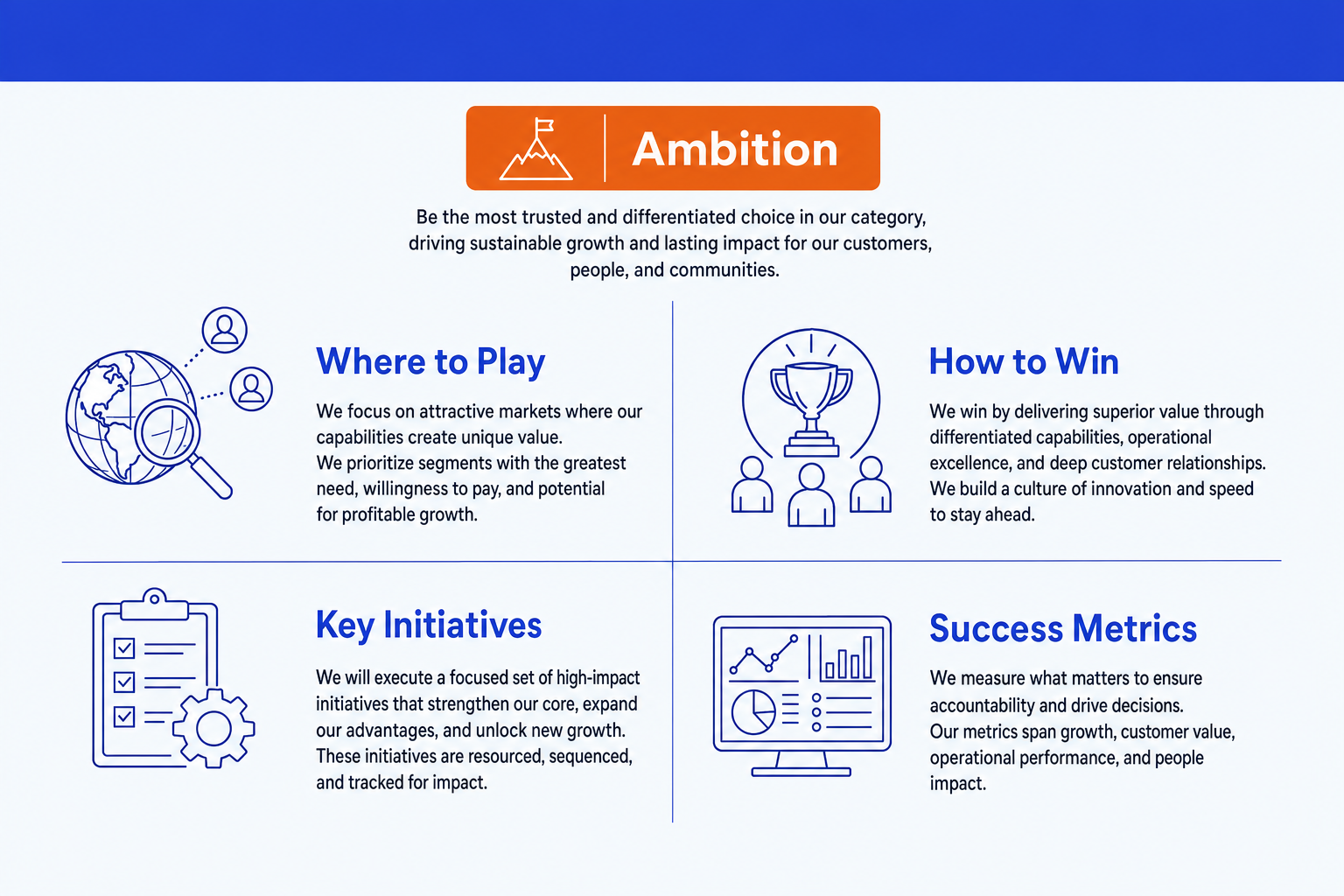
Ambition. One full sentence stating what the organization is trying to become, not a topic label. Everything below the page should trace back to it.
Where to play. The markets, segments, or product lines in scope, and just as importantly, what is out of scope. This is a choice, not a list of everything possible.
How to win. The source of advantage in that space: the capability, cost position, or relationship that lets the plan actually win where it plays.
Key initiatives. A short, prioritized list of the moves that carry the plan, five or six at most. More than that and the block stops reading as a plan and starts reading as a backlog.
Success metrics. The handful of numbers that prove the plan is on track, each with an owner and a time frame. This is what turns intent into accountability.
How to build a strategy on a page slide with Text to Slide
Text to Slide works from a structured brief, not a single line. The tighter your paragraph, the closer the first design option lands to something you can ship.
Draft the five blocks in plain text first. Write the ambition as one sentence, then bullet the where-to-play scope, the how-to-win advantage, the key initiatives, and the success metrics. Keep the initiatives list to five or six items.
Turn that draft into one structured paragraph for the prompt. Name each block explicitly, in order, so Oria knows which content belongs in which quadrant of the layout.
Generate with Text to Slide and review all the design options. Oria returns two to five variants in roughly 30 to 40 seconds. Check each one for whether the ambition reads as the clear anchor and whether the initiatives block feels crowded.
Pick the variant with the best density and finish it. Selecting a variant and completing it as a fully editable native slide takes about two to three minutes from there.
Prompt for targeted fixes rather than regenerating. If the metrics block is too sparse or an initiative needs an icon, a follow-up prompt in the same session adjusts just that element.
Apply your corporate template. Upload your template once and Oria carries its fonts, colors, and logo across every option, so the finished slide is on-brand without a separate formatting pass.
Gotcha
A strategy on a page slide fails on density, not on design polish. If you feed Text to Slide ten initiatives and eight metrics, no layout engine makes that readable on one page. Cut the list before you generate, not after.
Why Text to Slide and Multiple Design Options fit this slide
A strategy on a page slide is exactly the kind of dense, bespoke layout Oria is built for. It is an AI add-in that runs inside the PowerPoint task pane, and Text to Slide designs each slide individually around what you actually wrote instead of forcing your content into one of a handful of fixed templates. A five-block page gets a five-block layout, sized to how much you wrote in each block.
Multiple Design Options matters even more here than on a simple slide, because density is subjective. One variant might lead with a large ambition banner and compact quadrants; another might balance all five blocks evenly. Reviewing two to five options before you commit is the fastest way to find the reading order that fits your audience. The output is native PowerPoint throughout, so every text box, divider line, and icon stays editable after generation.
Text to Slide prompt for a strategy on a page slide
The prompts that make the strategy on a page slide sharp
These are the exact copy-paste prompts we use to structure a rough plan, generate the slide, and tighten it. The first three run inside Oria in PowerPoint; the last two run in Claude before you ever open Text to Slide. Replace the bracketed parts with your own content.
Generate and refine with Text to Slide in Oria
Adjust density after reviewing the design options
Add a summary callout for the board version
Apply the corporate template
Structure the plan in Claude first
Compress a long strategy document into the five blocks
Pressure-test the ambition sentence before you build the slide
Tip
Structure and pressure-test the plan in Claude first, then hand the finished five-block brief to Text to Slide. The slide only gets sharper than the input you feed it. For the axes-and-quadrant version of this layout when you are plotting items instead of blocks, see how to build a 2x2 positioning matrix slide.
Common mistakes to avoid
For the wider method behind turning analysis into board-ready slides, the consultant's guide to Claude covers the end-to-end workflow from raw findings to finished deck.
Frequently asked questions
What is a strategy on a page slide?
A strategy on a page slide is a single, dense exhibit that condenses an entire strategic plan, the ambition, the choices, the initiatives, and the metrics, into one board-ready view. It exists so an executive committee or a board can see the whole plan at a glance instead of paging through a 20-slide deck to find the through-line.
What goes on a strategy on a page slide?
Most versions carry five blocks: the ambition stated as one sentence, where to play (the markets or segments in scope), how to win (the source of advantage), the key initiatives that carry the plan, and the metrics that prove it is working. Some teams trim this to four blocks or rename them, but the shape, one page, one ambition, a short list of choices and proof points, stays consistent.
How is this different from a strategy roadmap slide?
A strategy on a page slide is a snapshot of the whole plan at one point in time. A strategy roadmap slide phases that same plan across a timeline, showing when each initiative starts and lands. Many decks carry both: the on-a-page view up front to anchor the narrative, then the roadmap later to show sequencing. See our guide on how to build a strategy roadmap slide for the timeline version.
Can Oria fit all five blocks without the slide feeling cramped?
Yes, this is the exact kind of dense, multi-element layout Oria's Text to Slide is built for. Describe the five blocks and their content in one structured prompt, and Oria designs a layout tailored to that content rather than forcing it into a generic template. Multiple Design Options then gives you two to five variants so you can pick the density and hierarchy that reads best.
How long does it take to generate a strategy on a page slide in Oria?
Oria returns two to five design options for a single slide in roughly 30 to 40 seconds, so you can see the layout directions before committing. Picking a variant and finishing it as a fully editable slide takes about two to three minutes from there.