

Monthly Business Review (MBR) Deck: Agenda and Template
A monthly business review deck needs seven sections to keep a monthly cadence honest: the verdict, the action item tracker, the KPI trend, the budget variance, function updates, risks, and next month's priorities. This guide walks each one, gives a ready slide-by-slide template, and includes the exact prompts to build it fast.
What to Include in a Monthly Business Review Deck
A monthly business review deck needs seven sections: a headline verdict, an action item tracker, a KPI trend scorecard, a budget and plan variance, function flash updates, risks and escalations, and next month's priorities. Each one answers a question the room is quietly asking, and skipping any of them leaves a gap someone will notice by the next review.
This guide walks each section, gives a ready slide-by-slide template you can copy, the common mistakes that make an MBR deck feel like wasted time, and the exact prompts to draft the content and build the slides fast.
What a Monthly Business Review Deck Is and Who Reads It
A monthly business review, or MBR, is the recurring internal meeting where a team or function reports execution against plan for the month just closed. The deck is not a strategy pitch. It is a short-cycle accountability check: here is what we said we would do last month, here is what actually happened, and here is what changes next month because of it.
That short cycle is what separates an MBR from a QBR deck. A quarterly review has room for a goals recap and a roadmap narrative because the room reconvenes in three months. A monthly review does not. It leans harder on the action item tracker and the trend line, because the same room reconvenes in four weeks and expects to see last month's commitments closed out, not restated.
The 7 Things Every MBR Deck Template Must Include
Each section below carries its own job. Cut one and the monthly cadence starts to feel like a status email that happens to have slides.
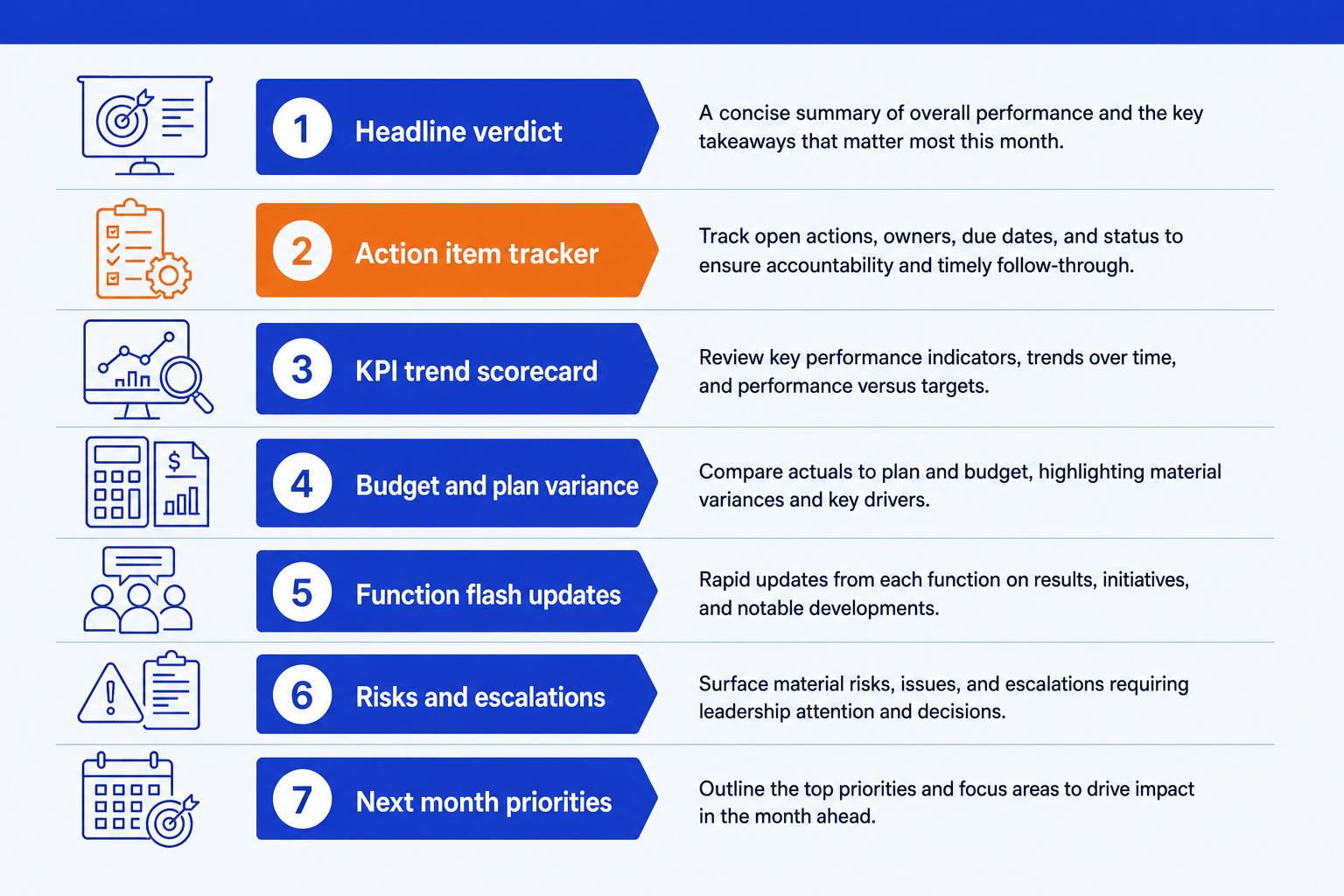
Headline verdict. The one-line status on the month, stated before any chart. Say whether the month landed on plan, and name the single thing the room needs to remember if it reads nothing else.
Action item tracker. Every commitment from last month's review, marked closed, open, or slipped, each with the owner's name. This is the slide that makes a monthly cadence worth running. Skip it and nothing carries accountability from one month to the next.
KPI trend scorecard. The metrics that matter, plotted as a trailing three to six month line against target, not a single-month snapshot. A trend line catches drift while it is still cheap to fix.
Budget and plan variance. Actual results against budget or forecast for the month, with the driver named in one line per variance. A number with no driver just restarts the same debate next month.
Function flash updates. A compact, one-line-per-team status grid, expanded into a full slide only for whichever function is at risk. Equal airtime for every team is how a monthly meeting runs long.
Risks and escalations. Anything that needs a decision above the room's authority, flagged now rather than surfacing as a surprise at the next review. State the decision needed, not just the concern.
Next month priorities. Three to five items that matter most going into next month, each with a named owner and a date. Fewer than three looks thin, more than five stops reading as a priority list.
Tip
Build the KPI trend scorecard as a real trend line, not a single-column table. See our guide to executive summary slides with KPI tiles for the tile layout, deltas, and sparklines that make drift visible at a glance.
The Monthly Business Review Deck Template, Slide by Slide
This is the nine-slide skeleton the checklist above maps onto. Copy it as your outline, then fill each slide with your own numbers before you touch layout.
Nine slides is the right length for the main flow. A monthly cadence rewards a tight deck. If it runs past 30 to 40 minutes, the function flash updates are usually going too deep for a status meeting. Push full data tables and supporting detail to the appendix so the main flow stays readable in one sitting.
Common Mistakes to Avoid
Build the MBR Deck Fast: the One-Prompt Route
Once the seven sections are drafted as plain text, the slide build is the part that eats an evening every single month: reformatting the same tracker, redrawing the same trend line, matching the template again. Oria removes that repetition. It is an AI add-in that runs in the PowerPoint task pane and turns a text description into a fully editable native slide, on your corporate template, in two to three minutes.
Because the output is native PowerPoint, every tile, bar, and tracker row stays editable afterward. Next month, you swap the numbers and reuse the same prompt instead of rebuilding the slide from scratch. For the slide that usually opens the deck, see how to build an executive summary slide.
One-line prompt for the executive summary slide
The Prompts That Build a Monthly Business Review Deck
These are the exact copy-paste prompts we use to draft MBR content in Claude and build the slides in Oria. Replace the bracketed parts with your own numbers and context.
Draft the content in Claude
Draft the action item tracker from a raw list
Turn a variance table into driver commentary
Build the slides in Oria
Build the KPI trend scorecard slide
Build the action item tracker slide
Build the budget variance slide
Build the next month priorities slide
Pattern
Draft the numbers and the commentary in Claude first, then hand the clean content to Oria one slide at a time. Between the agenda template above and these prompts the whole review is covered, agenda section by agenda section, variance commentary included.
Frequently Asked Questions
What is a monthly business review (MBR) deck?
A monthly business review, or MBR, is the recurring internal meeting where a team or function reports execution against plan for the month just closed. The deck that supports it states the verdict, tracks whether last month's action items got done, shows the KPI trend, explains the budget variance, and closes with named priorities for the coming month.
What's the difference between an MBR deck and a QBR deck?
An MBR is operational and short-cycle: it leans on the action item tracker and month-over-month trend, since the same room reconvenes in four weeks. A QBR is a strategic checkpoint for a longer cycle, with more room for a goals recap and a roadmap update. See the QBR deck template for the quarterly version. Many teams run both: MBRs to track execution monthly, and a QBR every third month to step back and reset direction.
What agenda should a monthly business review follow?
Open with the headline verdict, then the action item tracker so the room sees whether last month's commitments landed. Follow with the KPI trend, the budget variance with drivers, brief function flash updates, any risks needing escalation, and close with next month's priorities and owners. That order keeps accountability first and strategy debate out of a meeting built for execution.
How long should an MBR deck be?
Seven to nine slides for the main flow, plus an appendix for backup data. The template in this guide maps to nine slides: a title slide, the seven core sections, and an appendix. A monthly cadence rewards a tight deck. If it takes longer than 30 to 40 minutes to present, the function updates are probably going too deep.
What's the fastest way to build an MBR deck every month?
Keep the section order fixed month to month and only replace the numbers and commentary, using the structure in this guide as the template. Then hand the content to Oria one slide at a time. Oria is an AI add-in that runs in the PowerPoint task pane and turns a text description into a fully editable native slide on your template, so the mechanical layout work never repeats.