

QBR Deck: Format, Examples and a Slide-by-Slide Template
The running order a quarterly business review deck follows, three worked QBR deck examples with their full slide sequences, and an honest comparison of the routes to a finished file: last quarter's deck, a bought template, your customer success platform, an AI build, or a designer.
The quarter closed on Friday and the review is on Thursday. Somebody has to turn a data export, a half-finished roadmap and three uncomfortable misses into something a room will accept.
The decision is not what a QBR deck contains. That list has been stable for years and it is a page further down. The two decisions that actually change the outcome are which review you are building, because a customer-facing review, an internal business-unit review and an agency retainer review share a contents page and behave nothing alike in the room, and how you get the file built by Thursday. This page covers the format, three worked examples with their real slide sequences, and what each build route costs you in time, accuracy and rework.
QBR deck: what to include, and in what order
Two questions hide inside one. What belongs in the deck is close to settled and has been for a decade. What order it runs in, and which sections get pushed hardest, depends entirely on who is sitting across the table.
Quick answer
A QBR deck runs eight core sections in a fixed order: an executive summary stating the verdict on the quarter in one line, a recap of last quarter's commitments against what happened, a KPI dashboard scored against target, wins tied back to those commitments, misses with their root causes, a roadmap or initiative update, next-quarter priorities with named owners, and a closing slide of risks and asks. Ten slides including a title slide and an appendix is the working length. Customer-facing reviews push the outcomes and the ask hardest; internal reviews push the dashboard, the commitments recap and the roadmap.
How we compared the routes to a finished QBR deck
One real internal review went through every route: eleven metrics, four initiatives at different stages, two misses that needed explaining and a budget ask at the end, on a corporate template with a locked master and a legal footer. Five tests, applied the same way each time.
Time to a deck you can send
Measured from having the numbers to having a file in somebody's inbox, not from opening the tool. Routes that are fast to start and slow to finish score badly here, and most of them are.
Whether the numbers stay current
A quarter's figures move after the export. We asked whether the deck refreshes from a system of record, or whether a human retypes values that changed on Tuesday and will change again on Wednesday.
Whether it holds your template
Locked slide master, approved fonts and colours, the legal footer. Either the output lands inside the corporate template or somebody spends an evening putting it back.
Whether it survives being sent as a file
Most reviews are read before the meeting, offline, by someone who was not on the call. A native PowerPoint file clears that bar. A share link, a flattened PDF or a picture of a slide does not.
What it costs, including the setup nobody counts
List price plus the configuration work. A route that is cheap per deck and expensive to stand up is a different proposition for one account than it is for eighty.
We ignored template library size, stock imagery, which model sits underneath a tool, vendor case studies, and every demo that used invented data rather than a real quarter.
Key takeaways
Decide the audience before the structure. The sections of a quarterly review barely change between a customer meeting, an internal unit review and an agency retainer review. The weighting changes completely, and that is what decides whether the hour lands.
Retyped numbers are the failure mode, not layout. Almost every route asks a person to copy figures from an export into a slide. That is where quarterly reviews actually go wrong: one stale metric in a dashboard costs more credibility than a plain-looking chart ever does.
The template is a gate, not a preference. In a firm with an audited master, a deck that ignores it is rework rather than output. Check what a route does to your fonts, footer and colours before you judge how the slides look in the demo.
Build for the reader who was not in the room. Reviews get forwarded. A deck that only makes sense while somebody narrates it fails the second reading, which is usually the one the budget holder does on a phone the following morning.
Match the spend to what the quarter decides. A routine internal review does not justify a design day rate. A renewal worth more than the fee, or a board quarter that sets next year's budget, quite reasonably does. Price the route against the decision.
Ways to build a QBR deck, compared
The five columns are the five tests above. Routes are ordered by what they cost, cheapest first, which is not the same thing as best first.
Sources: the vendors' own documentation and pricing pages, read September 2026. The customer success platform row assumes you already licence one. For whole-tool comparisons rather than routes, see the best AI for PowerPoint.
What is a QBR deck, and who reads it?
A QBR deck is the presentation that supports a quarterly business review: the recurring meeting where a team accounts for a quarter against the goals it set, to leadership, to a board, or to a customer. It is not a status report. It is an argument with a verdict at the top, evidence underneath it, and a request at the end.
Three audiences read it and none of them read it for the same reason. A customer-facing review is read by somebody deciding whether to keep paying. An internal business-unit review is read by people deciding where next quarter's budget and headcount go. A vendor or agency review is read by a client deciding whether the engagement earned its fee. The sections barely change. The weighting changes completely, and so does the closing slide.
In customer success the practice is close to universal: the TSIA and EverAfter report on scaling customer success found that 89 percent of CSMs run QBRs. That matters more than it sounds, because it means holding the meeting is not the differentiator. The deck is. ChurnZero's 2025 Customer Revenue Leadership Study puts the commercial stake in the open: 74 percent of participants say most of their revenue now comes from existing customers, and companies with a dedicated account management function report a median net revenue retention of 98 percent against 94 percent where there is none. The quarterly review is one of the few scheduled moments where that retention is visibly earned or quietly lost.
The QBR format: what runs in what order
The QBR format is a sequence, and the sequence is doing work. Each slide answers the question the one before it raises. That is why moving the commitments recap to after the wins turns a review into a highlight reel, and why a dashboard shown before the verdict leaves a room triaging numbers instead of hearing an argument.
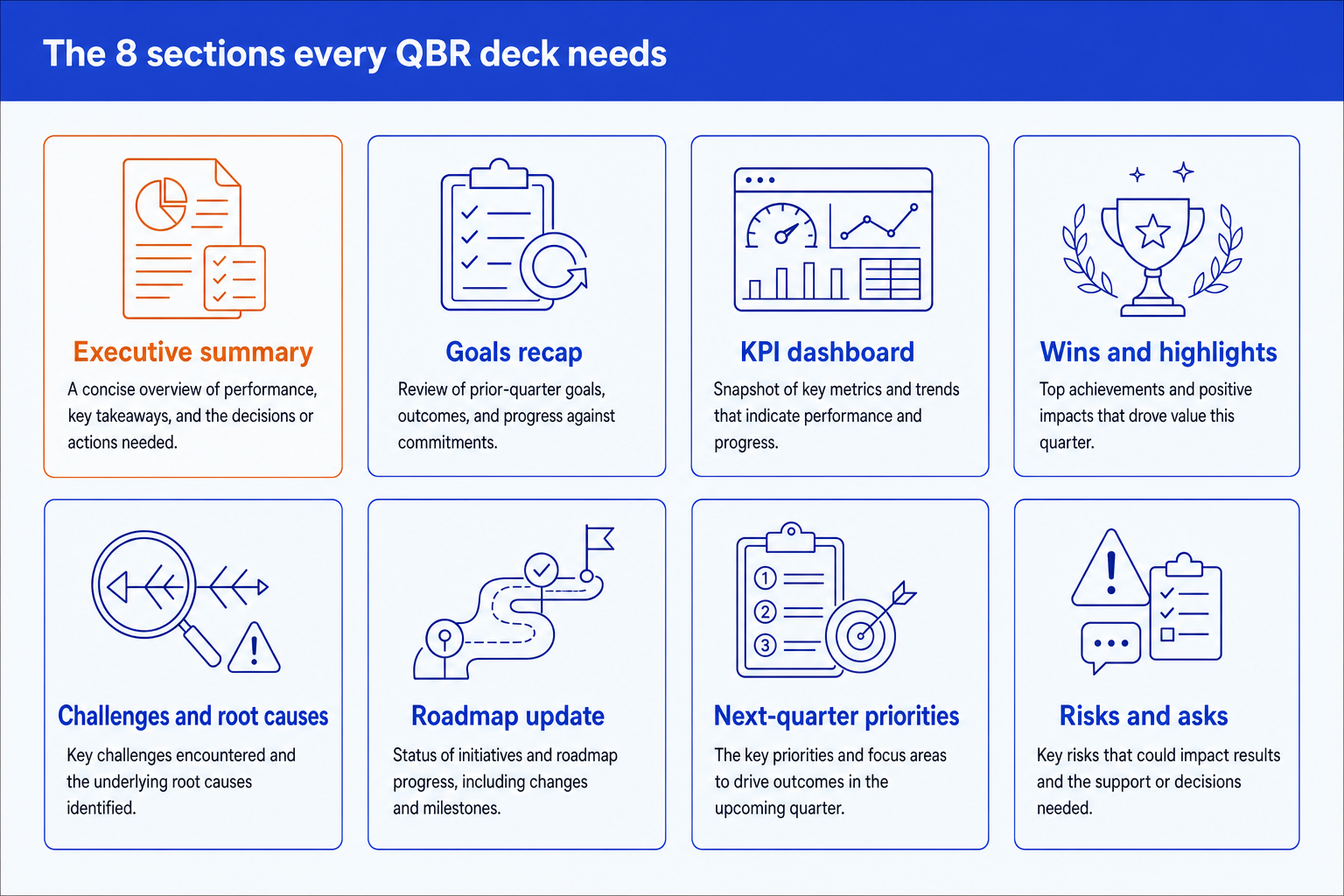
Ten slides is the working length for the main flow, and anything a reader might ask for but will not read live belongs in the appendix. There is a measured case for keeping the presented portion tight: Gong analysed 121,828 web-based sales meetings and found that intro meetings which ended in a closed-won deal spent 9.1 minutes on average sharing a deck, against 11.4 minutes for the ones that lost. A quarterly review is a longer meeting, but the direction holds. The deck is scaffolding for a conversation, not a replacement for one.
It is worth saying that serious companies run these reviews with no deck at all. In Amazon's 2017 letter to shareholders, Jeff Bezos wrote: "We don't do PowerPoint (or any other slide-oriented) presentations at Amazon. Instead, we write narratively structured six-page memos." If your reviews keep collapsing into somebody reading bullets aloud, the memo costs nothing to try for one quarter. Most organisations will not switch, which is why the running order above has to carry the argument on its own.
QBR deck examples: three sequences you can copy
A structure described is not a structure you can use on Thursday. These are three QBR deck examples written out as running orders, one per audience. They share the spine above and diverge where the audience diverges.
A SaaS customer success QBR
A CSM or account team presenting to a customer's executive sponsor
What makes it different: The slide that decides this meeting is the outcomes slide, and it is the one most often filled with the vendor's own telemetry instead of the customer's business result.
An internal business-unit QBR
A unit or function leader presenting to the executive team or a board
What makes it different: This is the densest of the three and the one most likely to face a locked corporate template. The commitments slide is what buys credibility for the asks nine slides later.
An agency or vendor QBR
A delivery lead presenting to the client who pays the retainer
What makes it different: The risks slide is the differentiator. Naming the client-side blockers politely, in writing, every quarter is what stops a retainer quietly ending over something nobody raised.
The test for the first example
Lincoln Murphy, who writes on customer success at Sixteen Ventures, defines the job as "When our customer achieves their Desired Outcome through their Relationship with us, leading them to stay longer, buy more, and advocate for us." Read the outcomes slide of your last customer review against that sentence. If it shows logins, seats and feature adoption rather than the result the customer was trying to buy, the deck is reporting your telemetry back to somebody who did not ask for it.
If your review runs monthly rather than quarterly, the sequence compresses and the roadmap update usually drops out altogether. The monthly business review deck agenda covers that cadence, and the two pair well: keep the monthly tight so the quarterly has something left to say. For the slide that opens all three examples, eight annotated executive summary slide examples show the structures that hold up under an executive read, and how to build an executive summary slide walks the build itself.
Last quarter's file: who is it built for?
For anyone who owns both the template and the account, presenting to a room that saw the last one. It is the fastest route that exists: open, save as, edit. The layout is already approved, the footer is already whatever legal signed off, and the output is a native PowerPoint file that opens on anybody's machine.
What it costs is accuracy and drift. Every figure is retyped by hand, and in practice one or two are not. A deck that has been saved-as eight times also carries a section nobody reads and a chart that stopped being the right chart three quarters ago, because nothing in the process asks whether a slide still earns its place.
The trade-off: the fastest and most template-faithful route on this page, and the one most likely to put a stale number in front of the person whose decision you need.
A bought QBR deck template: who is it built for?
For a team with no house deck and no appetite to design one. A marketplace QBR deck template hands you a sequence and a visual system for a one-off fee, and the better ones ship with the KPI dashboard and roadmap layouts already built, which is exactly where the manual formatting hours go.
The problem surfaces at the worst moment. A bought template holds its own design, not yours. Dropping corporate fonts, colours and a locked master onto somebody else's layout usually breaks the spacing that made it look good in the preview, and you end up rebuilding the slide you paid for. It also does nothing at all about the numbers, which still arrive by copy and paste.
The trade-off: a sound structure cheaply, at the price of a design that will fight your brand template every quarter.
Your CS platform's review export: who is it built for?
For customer success teams running the same review across dozens of accounts. This is the only route on the page where the numbers refresh themselves. Gainsight documents its Success Snapshots feature as letting an administrator upload a customised PowerPoint deck configured with dynamic data points, after which a CSM exports a populated presentation for any account straight from the C360 page. ChurnZero's Dynamic Slides and Totango's business review module work on the same principle.
The catch is that the template is whatever your administrator configured and nothing else, the setup is an admin project rather than a CSM task, and the output is only as good as the parent deck somebody built months ago. It fills slides. It does not decide what the quarter meant or what you are asking for.
The trade-off: the only route where the data cannot go stale, bought with a configuration project and a layout you do not control on the day.
A design-led AI deck builder: who is it built for?
Gamma, Beautiful.ai, Pitch, Plus AI and Canva take a text outline and return a finished, good-looking deck in minutes. For a review presented live over a screen share to an audience that cares more about clarity than corporate conformity, this is a fast and genuinely good answer, and published list prices sit in the region of 10 to 20 dollars a month.
They are built for visual impact rather than for a locked corporate master. Exports to PowerPoint tend to approximate the layout rather than reproduce it, and the deck often wants to live as a link. If your review is read offline, as a file, inside a regulated firm, that is the wrong end of the trade.
The trade-off: the best-looking deck for the least effort, and the weakest fit anywhere a template is audited.
Oria: who is it built for?
Oria is built for corporate documents and consulting presentations, and that is the whole of the design: board packs, steering committee decks, diligence exhibits, operating-model slides, dense frameworks held to a template somebody audits. An internal business-unit QBR is squarely that kind of document. It reaches you two ways: as an add-in in the PowerPoint task pane on Windows, macOS and PowerPoint for the web, and as a connector for Claude and ChatGPT over MCP, so a slide can be built from the chat you are already working in. You describe the slide, Oria designs a layout for it, then writes it back as native shapes, text, icons, charts and tables on your uploaded template, so every tile stays editable.
Pricing on oria.one in September 2026 runs from 19 dollars a month for Starter, which includes the Claude and ChatGPT connector, to 59 for Professional and 399 for a Team pool. Oria does not train on customer content, Professional and Team do not persist presentation content after delivery, and Enterprise adds private cloud deployment and custom LLM integration.
Where it loses is visual work. It is built for the corporate environment only, so on founder fundraising and pitch decks, launch and campaign decks, student presentations and marketing one-pagers a design-led tool will beat it and look better doing it. If that is your deck, use Gamma, Canva, Pitch or Beautiful.ai instead of fighting this one.
Build the KPI dashboard slide
Build the closing risks and asks slide
If the raw material is a page of notes from the planning session rather than a clean outline, turning meeting notes into editable slides covers the grouping step that has to happen first.
The trade-off: template-faithful, natively editable slides for a review that has to look like the rest of the firm's output, from a tool that is deliberately narrow and will feel stiff on anything visual. It does not know your numbers either. You still bring those.
A designer or presentation agency: who is it built for?
For the review that decides something large: a board quarter that sets next year's budget, a renewal worth more than the design fee, an account where the deck is the relationship. A good designer produces the best corporate output on this list and will fix the structure as well as the styling, which no software route does.
It is also the slowest route and the only one with a lead time you cannot compress. Day rates mean a routine quarterly review rarely justifies it, and late numbers are expensive: every change after handover is another round trip through somebody else's calendar.
The trade-off: the best output on the page and the worst fit for a deadline that repeats every ninety days.
Which version of the deck should you build?
Routed first by who is presenting to whom, which settles the sequence, then by what is going wrong, which settles the tool. Several of these send you elsewhere.
Two of those rows have a page of their own. The monthly cadence is in the monthly business review deck agenda and template, and the dashboard row that makes so many reviews look amateur is a formatting problem with a formatting fix: executive summary slides with KPI tiles covers tile hierarchy, deltas and RAG status in detail.
Frequently asked questions
What is a QBR deck?
A QBR deck is the presentation that supports a quarterly business review, the recurring meeting where a team accounts for a quarter against the goals it set. The audience is leadership, a board, or a customer. It states a verdict on the quarter, recaps what was promised last time, shows the metrics against target, explains the misses with their root causes, and closes with next-quarter priorities and a specific ask.
What is the standard QBR format?
Title slide, executive summary, prior-quarter commitments, KPI dashboard, wins, misses with root causes, roadmap or initiative update, next-quarter priorities, risks and asks, appendix. The order matters as much as the contents: each slide answers the question the one before it raises, which is why moving the commitments recap after the wins makes a deck read as a highlight reel.
How long should a QBR deck be?
Ten slides for the main flow, plus an appendix carrying the full data and the method. Longer decks bury the verdict; shorter ones usually drop either the commitments recap or the root causes, which is exactly where the judgment lives. Push anything a reader might ask for but will not read in the meeting into the appendix rather than cutting it.
What is the difference between a QBR and an MBR?
Cadence and depth. A monthly business review is a shorter operational check: what moved this month, what is off track, what gets fixed next. A quarterly review adds the things that only make sense over a quarter, such as the roadmap update, the strategic initiative status and the budget or headcount ask. Teams that run both keep the MBR tight so the QBR has something to say.
Should a QBR deck be sent before the meeting?
Yes, and the deck should be written on the assumption that it will be read cold. Send it at least a day ahead as a file rather than a link, because the person whose decision you need often reads it alone on a phone. If the deck only makes sense while you narrate it, it will fail that reading, which is usually the one that matters.
Who should present the QBR?
The person who owns the commitments being reviewed, not the person who built the slides. For a customer review that is usually the account owner with a product or support colleague on hand for detail. For an internal review it is the unit leader. Ownership in the room is what lets the meeting close on a decision rather than on a promise to follow up.