

Progress Report Template: Sections, Wording, Examples
A progress report template is a fixed set of sections that tells a sponsor where a project stands: overall status, what moved, what happens next, what could go wrong and what you need decided. Used in the same order every period, it lets a reader find the answer in under a minute.
Quick answer: what goes in a progress report template?
You are deciding how much of a project's week the reader should have to spend to understand it. The template below answers that with eight sections in a fixed order, status first, so the verdict comes before the detail and the ask comes before the next meeting.
A progress report template has eight sections: a header, overall status as a green, amber or red colour with the change since last time, a three-sentence summary, progress against plan this period, the plan for the next period with owners, milestones with baseline and forecast dates, the top risks and issues with owners and dates, and the decisions you need from the reader. Keep the order identical every period so readers compare reports instead of re-learning them. A status report and a progress report differ mainly in emphasis, and one page can carry both.
The eight parts of a progress report template
Each section has one job. Every example entry below comes from the same imagined warehouse system rollout, so you can see the eight parts hang together.
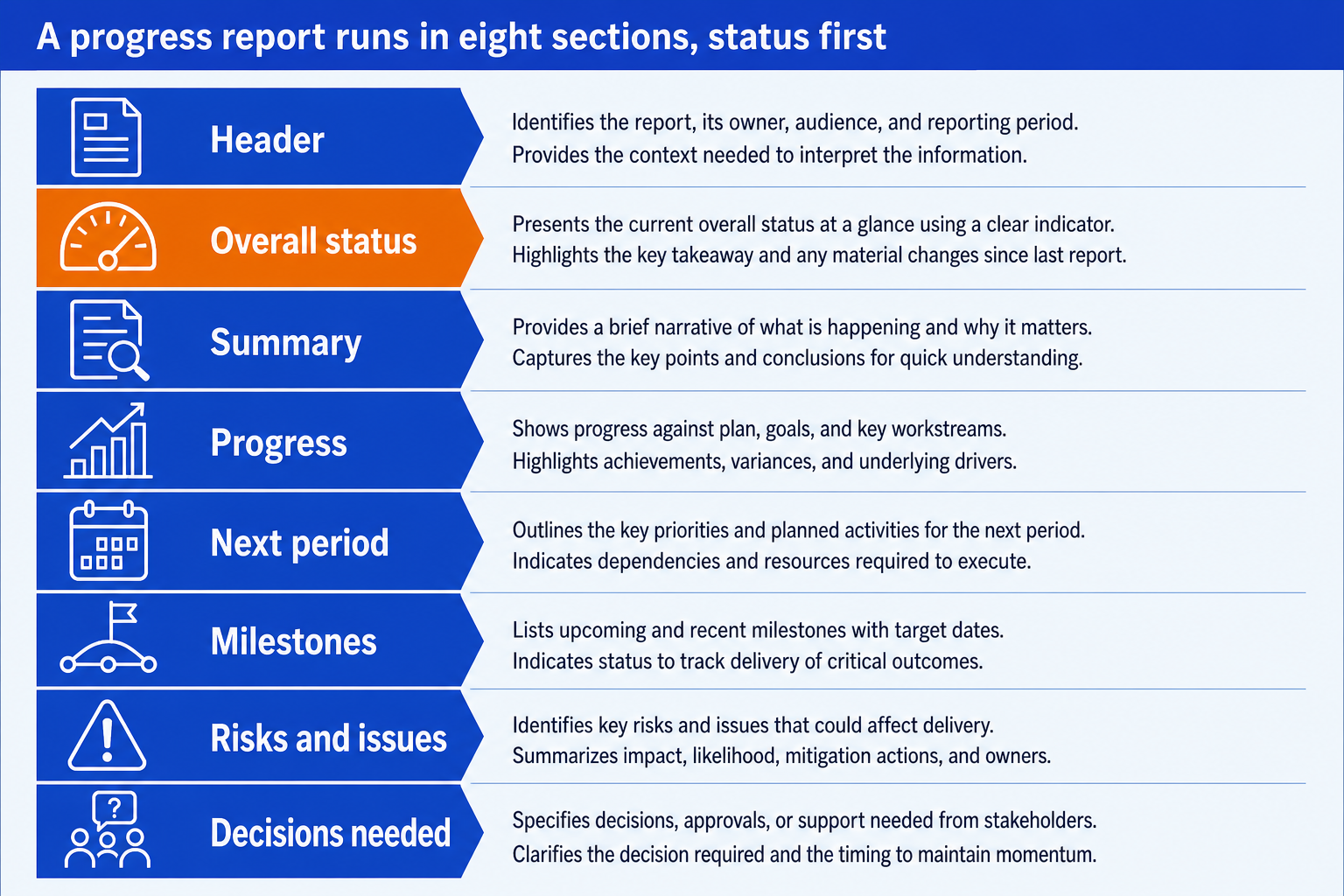
1. Header block. Names the project, the reporting period, the author and the audience. It exists so a report forwarded six weeks later still explains itself. Entry: Warehouse system rollout, weekly report, week 9 (to 14 Nov), author: programme manager, audience: steering committee.
2. Overall status. One colour, one line, and the change since last period. This is the section a sponsor reads when they read nothing else, so it carries the verdict and not a description. Entry: AMBER, unchanged. Go-live forecast is two weeks late; budget within tolerance.
3. Summary. Three sentences at most: what happened, what it means, what you need. It is the part an executive forwards on their own. Entry: Data migration slipped two weeks after a failed reconciliation. Go-live moves from 14 to 28 March unless the data owner is freed up next week. We need that decision on Tuesday.
4. Progress this period. What was completed, stated as outcomes against the plan, not as activity. Three to five lines. Entry: Site A user acceptance testing passed (42 of 42 scripts). Interface build 80 percent complete against 85 planned. Migration rehearsal one failed on stock balances.
5. Plan for next period. What will be done by the next report, written so it can be checked then. Name an owner against each line. Entry: Rerun migration rehearsal by Thursday (data lead). Close the five open interface defects (integration lead). Confirm cutover weekend with the site (programme manager).
6. Milestones. The three to six dates the sponsor cares about, each with baseline, forecast and a status. A slipped date shows the baseline beside the forecast so the slip cannot be missed. Entry: Go-live, baseline 14 March, forecast 28 March, AMBER.
7. Risks and issues. A risk has not happened yet and an issue has. List the top three to five of each with an owner, an action and a date. Entry: Issue: migration reconciliation fails on stock balances, owner data lead, fix by 21 Nov. Risk: site staff unavailable for cutover, owner programme manager, mitigate by booking cover now.
8. Decisions and asks. The reason the report is worth reading. Each line states the decision, who makes it, and the date after which it costs something. Entry: Release the data owner from month-end duties for two weeks. Decision: finance director, by Tuesday 18 Nov, otherwise go-live slips past 28 March.
The order is the argument. Status and summary sit above progress because most readers stop after the first third of the page. Decisions sit last because they are the part that triggers action, and a reader who has just seen the risks is ready to be asked. The evidence on why the ask matters is consistent: Prosci's Best Practices in Change Management, eleventh edition, reports that 73 percent of projects with extremely effective sponsors met or exceeded their objectives, against 29 percent of those with very ineffective ones. A sponsor can only be effective on what the report tells them.
Copy this progress report template
Paste this into an email, a document or a slide, and replace the square brackets. Every line is a prompt for one fact, so a section you cannot fill is a finding in itself. Delete the budget block unless cost is a live concern for this audience.
Progress report template, plain text
Write the status thresholds once, above the first report, and do not change them mid-project. These three work for most programmes:
Green. On plan. No decision needed from the audience. If every report is green for ten weeks, check the thresholds before you trust the colour.
Amber. Behind or over, and recoverable inside the contingency you already hold. The audience should know, and may need to act.
Red. Cannot recover without a decision, money or scope change from someone above the project. A red with no ask attached is a complaint, not a report.
A progress report example, worked end to end
The inputs below are illustrative, not data from a real project. The reasoning is what to copy: how the numbers produce the colour, and how the colour produces the ask. The project is a 20 week warehouse system rollout, reported at week 9.
Step 1. Work out the numbers
Approved budget
1.80m
Spent to date
1.10m
Estimate to complete
0.76m
Forecast at completion
1.10m + 0.76m = 1.86m
Variance to budget
0.06m, which is 3.3 percent over
Variance is 0.06 divided by 1.80, which is 3.3 percent. The threshold says amber up to 5 percent over, so cost is amber. Go-live has moved from 14 March to 28 March, a two week slip that the contingency can absorb, so schedule is amber too. Nothing is red, so the overall colour is amber.
Step 2. Write the report
Warehouse system rollout, weekly report, week 9
The call: the report is amber and still asks for something. That pairing is deliberate. An amber with no ask tells the sponsor to watch, and an amber with a dated ask tells them to act. The line about Site B staying green stays in, because a report that only lists problems teaches readers to skim it.
Notice what the report leaves out: the meeting count, the names of everyone on the working group, and the five weeks of history. Cost matters because overruns compound. Bent Flyvbjerg and Alexander Budzier, writing in Harvard Business Review in September 2011, studied 1,471 IT projects and found an average cost overrun of 27 percent. A 3 percent amber reported early is the cheap version of that problem.
When to use a progress report template
Use it when someone other than the project team has to stay informed on a plan that runs longer than a few weeks: a steering committee, a client, a portfolio office, a lender. It earns its place where the same readers see the report repeatedly, because the fixed order lets them compare this period with the last in seconds.
It is the wrong instrument for a one-off update, a crisis, or a team that already sits in the same stand-up every morning. It also overlaps with other artifacts. A project charter sets the baseline the report measures against, and a RACI chart settles who owns each action line. Where the audience is leadership reviewing a quarter rather than a project, a monthly business review agenda is the better fit.
| Document | What it answers | Time frame | Usual reader | Cadence |
|---|---|---|---|---|
| Progress report | What was achieved against plan | Looks back, then forward one period | Sponsor, steering committee, client | Weekly or monthly |
| Status report | Where the project stands today, by colour | A snapshot, often one page | Sponsor and portfolio office | Weekly, fortnightly or monthly |
| Project closure report | What was delivered and what was learned | Looks back across the whole project | Sponsor and the people who fund the next one | Once, at the end |
| Business review deck | How the business or account performed | Looks at results over a quarter, not a project plan | Leadership and client executives | Monthly or quarterly |
When a progress report template misleads
A template makes a report consistent. It does not make it true. These are the failure modes that turn a tidy page into a false comfort.
The watermelon report. Green on the outside and red inside. It happens when status is the project manager's mood, not a rule. Fix it by writing the colour thresholds above the first report and applying them mechanically.
Activity instead of progress. Held 14 meetings and completed the workshop series reads as busy. It says nothing about whether the plan moved. Every line in Progress should carry a number against a plan figure.
A template that hides bad news. A fixed template makes a missing section visible, but it also invites filling every box. If Decisions and asks is empty for a month while status is amber, nobody is asking for what they need.
One format for every audience. A delivery team needs defect counts and a sponsor needs one decision. Keep one master report and cut the sponsor version from it, rather than sending the working version upward.
Scope is where reports most often hide a problem in plain sight. In the Project Management Institute's 2021 Pulse of the Profession, 35 percent of projects experienced scope creep and 12 percent were deemed outright failures. A progress report that tracks dates and cost but never says what was added to scope will stay green while the project drifts. Add one line under Progress for approved changes, even if it reads none.
The same discipline applies to the claims you repeat. You may have been told that 70 percent of change programmes fail. Mark Hughes of the University of Brighton reviewed five published instances of the claim in the Journal of Change Management in 2011 and concluded that "there is no valid and reliable empirical evidence to support such a narrative." Report your own numbers against your own plan, not an industry folklore figure.
How to turn the progress report template into a slide
Most steering committees want the report as one slide, not a document. The text version above maps onto a single page with status top left, a milestone strip beneath it, risks on the right and the ask boxed at the bottom. Put the verdict in the action title, so the title states the status and the ask, as covered in the guide to the executive summary slide. Where the milestones deserve their own exhibit, a strategy roadmap slide shows baseline against forecast better than a list.
Oria builds that page from a prompt. It reaches you two ways: a PowerPoint add-in in the task pane on Windows, macOS and PowerPoint for the web, and a connector for Claude and ChatGPT over MCP, so the slide can come from the chat you are already in. The output is native PowerPoint on your corporate template, so every status chip and date stays editable.
One-prompt progress report slide
The trade-off: Oria is built for the corporate environment and loses on highly visual work. Founder pitch decks, launch decks, student presentations and marketing one-pagers want visual impact more than defensible content, and a design-led tool such as Gamma, Canva, Pitch or Beautiful.ai will beat it there. It also does not decide your status thresholds. That judgement is yours, and it is the part of this page that matters most. For live tracking across many projects, a work management tool such as Jira or Asana holds the data better than any slide.
Frequently asked questions
What should a progress report include?
Eight things, in this order: a header with project, period, author and audience; overall status as a colour with the change since last report; a three-sentence summary; progress this period against plan; the plan for next period with owners; milestones with baseline and forecast dates; top risks and issues with owners; and the decisions you need. Budget is optional and belongs in the report only when cost is a live concern.
What is the difference between a progress report and a status report?
A progress report looks back at what was achieved against plan and then forward one period. A status report is a snapshot of where the project stands now, usually as a colour per dimension. In practice teams use the words interchangeably, and one page can do both jobs: status at the top, progress underneath. The template on this page is built that way.
How long should a progress report be?
One page for a weekly report and two for a monthly one. If the report runs longer, the detail belongs in an appendix or a separate tracker and the report keeps the verdict, the movement and the asks. A sponsor should be able to find the status in five seconds and finish the page in under two minutes.
How often should you send a progress report?
Match the rhythm of decisions. A project with a steering committee that meets monthly needs a monthly report, plus a short weekly note to the sponsor if the status is amber or red. Reporting more often than decisions are made produces reading and no action. Fixed timing matters more than frequency, because a regular report is read and an irregular one is not.
What do green, amber and red mean in a status report?
Green means on plan with no help needed. Amber means behind or over but recoverable inside the contingency the project holds. Red means the project cannot recover without a decision, money or a scope change from someone above it. Write the thresholds down once, such as amber when forecast cost is up to 5 percent over budget, and apply them the same way every period.
Can I use the same progress report template for a client and for internal reporting?
Use the same eight sections and change what goes in them. A client version states risks neutrally and drops internal staffing detail. An internal version can be blunter about causes. Keep one master and cut the client version from it, so the two never disagree on the dates or the status colour.
Is a progress report the same as a project closure report?
No. A progress report is recurring and compares actual to plan for one period. A closure report is written once at the end and covers what was delivered, the final cost against budget, and what the team learned. Many closure reports reuse the milestone and budget blocks from the progress template.