

Build a Company Brain With Obsidian: A Setup Guide
Build a company brain with Obsidian and years of scattered files stop being storage and start being a coworker. This guide walks the whole path, and it ships with a free downloadable Claude skills pack: a two-layer set of instructions you add in Claude's Skills settings so Claude walks you through the entire build, from installing Obsidian to serving the vault and querying it.
What a company brain actually is
A company brain is one Obsidian vault that holds your organization's notes, memos, research, and decisions as linked markdown files. Every idea becomes a single note, and the links between notes form a graph: a living map of how the company thinks. Build a company brain with Obsidian and the thousands of files sitting across drives, inboxes, and old decks collapse into a single place you can search, navigate, and hand to an AI.
The stakes are higher than a tidy filing cabinet. In a 2018 YouGov survey of 1,001 U.S. employees run for Panopto's Workplace Knowledge Report, 42% of institutional knowledge was unique to the individual holding it and never shared with coworkers, meaning it walks out the door the day they do. Tiago Forte, author of Building a Second Brain, names the underlying problem: "Until it is in some external medium you can't see it objectively, work with it, or improve it." A vault is that external medium, built for a whole company instead of one person.
Scattered files
Documents live in ten drives and a hundred inboxes. Nothing connects, knowledge leaves when people do, and every answer starts with does anyone remember where.
A company brain
Every idea is one linked note in a shared graph. Context compounds, memory survives departures, and one search answers what used to take a meeting.
If you already run structured prompts and skills in Claude, a company brain is the missing input layer underneath them. Pair it with our Claude workflows for strategy and the brain becomes the memory those workflows read from.
Download the company-brain skills pack
6 Claude skills in two layers. One zip, free, no signup. Add the skills in Claude Settings and Claude builds the brain with you.
Quick answer
Match the tool to what you actually need from a company brain: a private, portable file store you fully own, or a hosted workspace your team already lives in. The two rarely deliver the same thing.
For most companies building a true company brain, Obsidian is the strongest starting point: it is free, every note stays a local markdown file you own forever, and its native graph view plus a community MCP plugin let Claude query the vault directly. If your team already lives inside Notion or Confluence, you can approximate a company brain there without switching tools, trading away true file portability and, in Confluence's case, native bidirectional linking. Logseq is the closest free, open-source alternative to Obsidian's model. What matters far more than the brand is that someone owns the daily habit of linking every new note to an old one.
How we chose
A Gartner Digital Worker Survey found that 34% of employees have difficulty finding the information they need at work, cited in Gartner's 2026 Market Guide for Enterprise AI Search. That is the problem a company brain exists to fix, so here is what we actually tested, and what we ignored.
- Local-first files, tested by opening the vault folder in a plain text editor with the app closed. If the notes are not readable markdown without the app running, we did not count it as a real company brain.
- Native bidirectional linking and a visual graph, not just nested pages or one-way mentions. A link that only points forward is a folder; a link that points both ways is a graph.
- Whether the vault can be handed to an AI as-is. We checked for an official or community Model Context Protocol server, not just an API a developer could theoretically build against.
- What it costs at real headcount, not the free personal tier alone. We priced every tool at roughly 25 and 100 seats, because that is where per-seat fees start to bite.
- Access control by role using the tool's own permissions, not a workaround. Client-confidential material and internal-only notes need to sit behind different doors from day one.
We ignored mobile app polish, real-time multiplayer cursors, and built-in video calling. Nice to have, but none of them decide whether a pile of documents becomes a brain.
Key takeaways
- Local files & portability: if the tool stores your notes in its own proprietary format or database, you do not own a company brain, you own a subscription. Obsidian and Logseq pass this test; Notion and Confluence do not.
- Linking & graph depth: bidirectional wikilinks plus a visual graph turn a stack of documents into a network you can navigate. Backlinks alone, without a graph, only tell you what already points at a page.
- AI & MCP access: a tool an AI can query directly, with no developer building custom middleware, is the difference between a brain that answers questions and one that just stores files.
- Cost at real headcount: a free personal tier tells you nothing about the bill at 50 or 200 employees. Price the tool at the size your company will actually be in two years.
- Access control by role: client-confidential notes, internal-only decisions, and company-wide references need separate permission tiers from day one, or the brain becomes something people stop trusting with sensitive material.
Compare the tools
Five dimensions, matching the five decision rules above. Read the first one first: it decides whether you end up owning a brain or renting a subscription.
Obsidian
- Local files
- Yes. Plain markdown files in a folder you control, readable with the app closed.
- Linking & graph
- Native bidirectional wikilinks plus a built-in graph view.
- AI & MCP access
- No official server, but community MCP plugins connect Claude directly; Claude Code can also read the folder with no plugin at all.
- Cost at headcount
- Free for personal use; a commercial license is $50 per user, per year.
- Access control
- File-system permissions only, no built-in roles.
Notion
- Local files
- No. Pages live in Notion's cloud database; export is a manual, lossy step.
- Linking & graph
- Backlinks and mentions, but no native graph view (third-party add-ons only).
- AI & MCP access
- Official hosted MCP server (mcp.notion.com), read and write, via Claude Desktop's Settings → Connectors.
- Cost at headcount
- Free tier is limited; Plus runs roughly $10/user/month, and the AI features require Business, roughly $20/user/month.
- Access control
- Granular page and workspace permissions; private teamspaces on Business and up.
Confluence
- Local files
- No. Pages live in Atlassian's cloud; export to PDF, Word, or XML, not markdown.
- Linking & graph
- Manual page links and a linked-pages widget; no backlinks and no graph.
- AI & MCP access
- Official Atlassian Rovo MCP server (GA February 2026), OAuth-gated with admin approval on first connection.
- Cost at headcount
- Free for up to 10 users; Standard and Premium run roughly $5-$10/user/month.
- Access control
- Space- and page-level permissions, mature and enterprise-grade.
Logseq
- Local files
- Yes. Plain markdown/org-mode files, free and open source, no account required.
- Linking & graph
- Native bidirectional linking, block-based outliner, and a built-in graph view.
- AI & MCP access
- No official server; community MCP servers connect once you enable the local HTTP API in Settings → Advanced.
- Cost at headcount
- Free forever for the app; an optional Sync add-on is $5/month.
- Access control
- File-system permissions only, no built-in roles.
If your company already has hundreds of pages in Confluence or a mature Notion workspace, the migration cost can outweigh what Obsidian buys you. The honest answer is often to link out to your existing tool from inside the vault rather than replace it outright.
Obsidian: Who Is It Built For?
Obsidian is built for anyone willing to trade convenience for ownership. No server, no account, no subscription to start: point the app at a folder, and every note is a plain text file you can back up with any file-syncing tool or hand to an AI a decade from now without asking anyone's permission.
It fits a company whose knowledge work already happens in plain writing, memos, research notes, decision logs, and whose team is disciplined enough to actually link what they write. A two-year-old vault with good linking habits outperforms a two-week-old workspace in a heavier tool on almost every real question.
The free personal tier covers unlimited individual use; step up to the $50-per-user, per-year commercial license once more than one employee is using it for company work.
The trade-off: Obsidian has no built-in permissions system and no real-time collaborative editing, two people cannot see each other's cursor in the same note. If your team needs granular page-level access control out of the box, go to Confluence or Notion instead.
Notion: Who Is It Built For?
Notion is built for a team that wants one flexible workspace for documents, databases, and light project management, rather than a separate app just for notes. Pages nest inside pages, and a single database can turn into a table, a board, or a calendar without re-entering anything.
It fits a company whose team already lives inside Notion for wikis, specs, and trackers, and wants scattered knowledge in the same place rather than a second tool. Notion's official MCP server (mcp.notion.com) gives Claude read and write access to the whole workspace from Claude Desktop's Settings → Connectors, no separate plugin required.
The free tier caps file uploads and version history; Plus (roughly $10/user/month) removes those caps, and Business (roughly $20/user/month) is required for Notion's own AI features and granular permissions.
The trade-off: Notion has backlinks and mentions but no native graph view, and every note lives in Notion's cloud database with no local folder to fall back on if you ever want to leave. If file ownership matters more than workspace convenience, go to Obsidian instead.
Confluence: Who Is It Built For?
Confluence is built for a company that already runs on Atlassian, Jira for tickets, Confluence for the documentation behind them, and wants the company brain to inherit that same permission model and audit trail rather than live somewhere new.
It fits larger, structured organizations: space- and page-level permissions are mature and genuinely enterprise-grade, admins can see who read or edited what, and Atlassian's own Rovo MCP server, generally available since February 2026, connects Claude to Confluence over OAuth with admin approval on first connection.
Free covers up to 10 users; Standard and Premium scale to roughly $5-$10 per user, per month, past that.
The trade-off: Confluence has no backlinks and no graph view, so the connective tissue that makes a vault a brain has to be built by hand, page by page. If your team is not already inside the Atlassian ecosystem, that trade is rarely worth it; go to Obsidian or Logseq instead.
Logseq: Who Is It Built For?
Logseq is the closest free, open-source cousin to Obsidian's model: a local-first, block-based outliner storing every page as plain markdown or org-mode text, with native bidirectional linking and its own graph view built in from the start.
It fits a company that wants everything Obsidian offers at zero cost forever, and prefers short outlined bullets over long-form notes. Logseq's daily-journal-first workflow suits a team that thinks in running logs more than finished documents.
The app is free with no commercial license fee. An optional Sync add-on for cross-device syncing runs $5/month; self-hosted sync over your own file storage costs nothing.
The trade-off: Logseq has no official Claude or ChatGPT connector; community MCP servers exist, but only after enabling Developer Mode and the local HTTP API server in Logseq's own settings, a step most non-technical teams will not take. If the AI connection needs to work out of the box, go to Obsidian or Notion instead.
Oria: Who Is It Built For?
None of the four tools above will produce a single slide, and for a company brain built to feed board packs, steering committee updates, or diligence exhibits, that gap is the whole point of building the brain in the first place. Oria is the tool we build, and it exists for one narrow job: corporate documents and consulting-style presentations, board packs, steering committee decks, diligence exhibits, and dense frameworks held to an enforced corporate template.
It reaches you two ways: as a PowerPoint add-in running in the task pane on Windows, macOS, and PowerPoint for the web, and as a connector for Claude and ChatGPT over MCP, so the slide gets built from the same chat window where you just asked Claude to search the vault, without opening PowerPoint at all. On security, Oria does not train on customer content, Professional and Team plans do not persist presentation content after delivery, and Enterprise adds private cloud deployment and custom LLM integration.
The trade-off: Oria is built for the corporate environment only, so it loses on highly visual work. Founder fundraising decks, launch and campaign decks, student presentations, and marketing one-pagers all reward visual impact over defensible content held to a template, and a design-led tool like Gamma, Canva, Pitch, or Beautiful.ai will beat it, and will look better doing it. If that is your deck, go there instead.
The Claude skills pack: build it with Claude
If Obsidian is your pick, build the brain by hand with the steps further down, or let Claude do it with you. The pack is 6 skills in two layers: add them through Claude Settings, tell the orchestrator to set up your company brain, and it runs the five worker skills in order, confirming at each stage.
Two layers
Layer 1 is the orchestrator, the only skill you normally talk to. Layer 2 is the five worker skills, each owning one stage of the build.
Company Brain Orchestrator
Use when: You want Claude to set up your entire company brain end to end, not one piece at a time.
Output: A guided, staged build. Claude runs the five worker skills in order, confirming prerequisites and checking in with you at each stage.
Set Up Obsidian Vault
Use when: You are starting from nothing and need Obsidian installed and a company vault created.
Output: Obsidian installed, one shared company vault created, and the handful of settings and core plugins that matter switched on.
Ingest Company Files
Use when: Your documents are scattered across drives and inboxes and need to live inside the vault.
Output: Existing material pulled into the vault as markdown notes, with a clean note-per-source intake pattern and a start-small plan.
Structure and Company Taxonomy
Use when: Notes are piling up and you need a shared structure so the whole team files the same way.
Output: A shallow folder scheme that mirrors the company, a naming convention, note templates, and properties: the branding of the brain.
Link and Build the Graph
Use when: You have notes but they are not connected, so nothing compounds into knowledge.
Output: Wikilinks, tags, maps of content, and index notes that turn a folder of files into a navigable, searchable graph.
Serve, Sync and Query
Use when: The brain works on one machine and you need the whole team to reach it and query it.
Output: The vault synced to a server with access by role, and Claude pointed at the markdown to answer, summarize, and surface links.
Setup Guide
- Step 1Download all 6 skills (.zip)
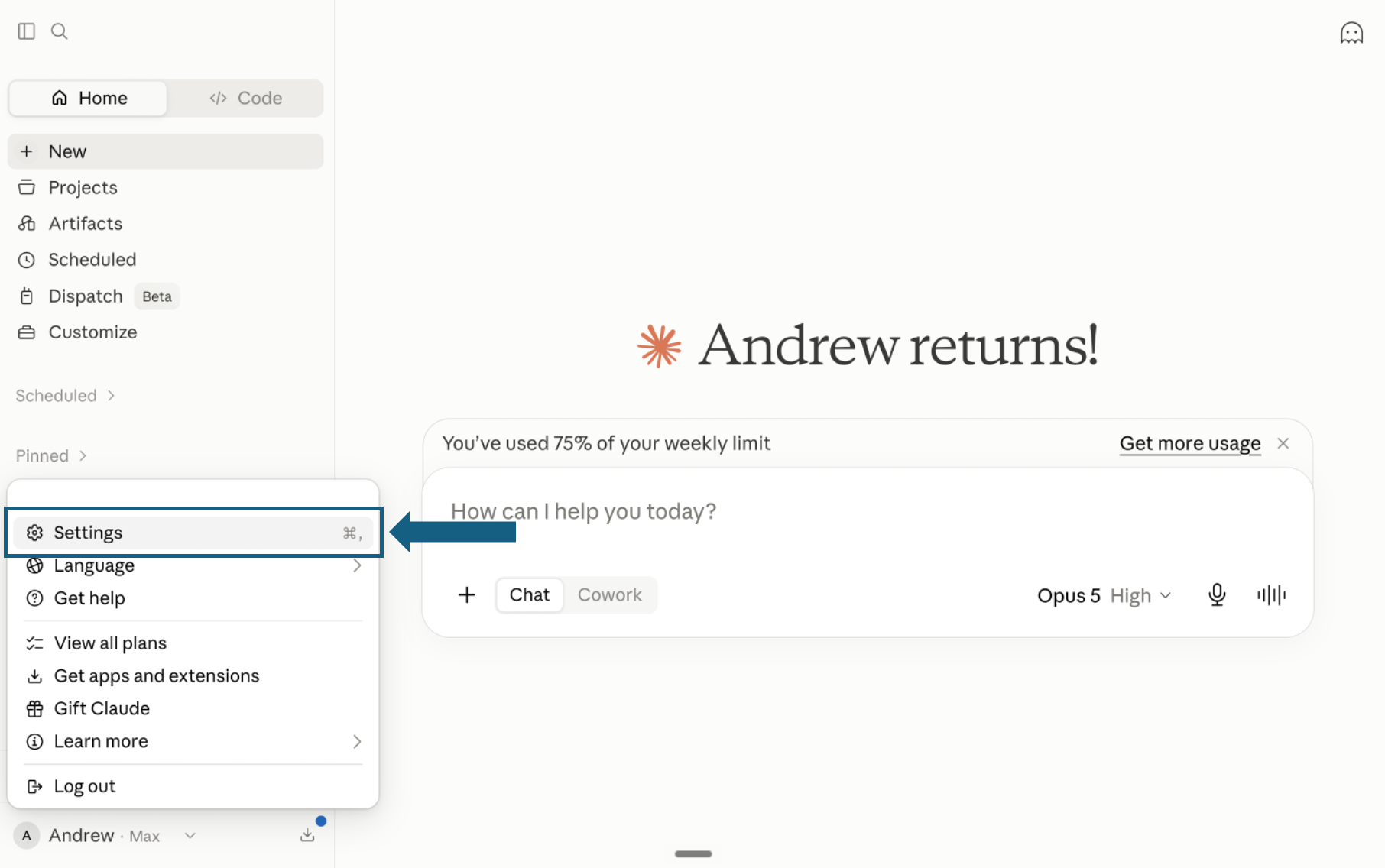
Download the pack and open Settings
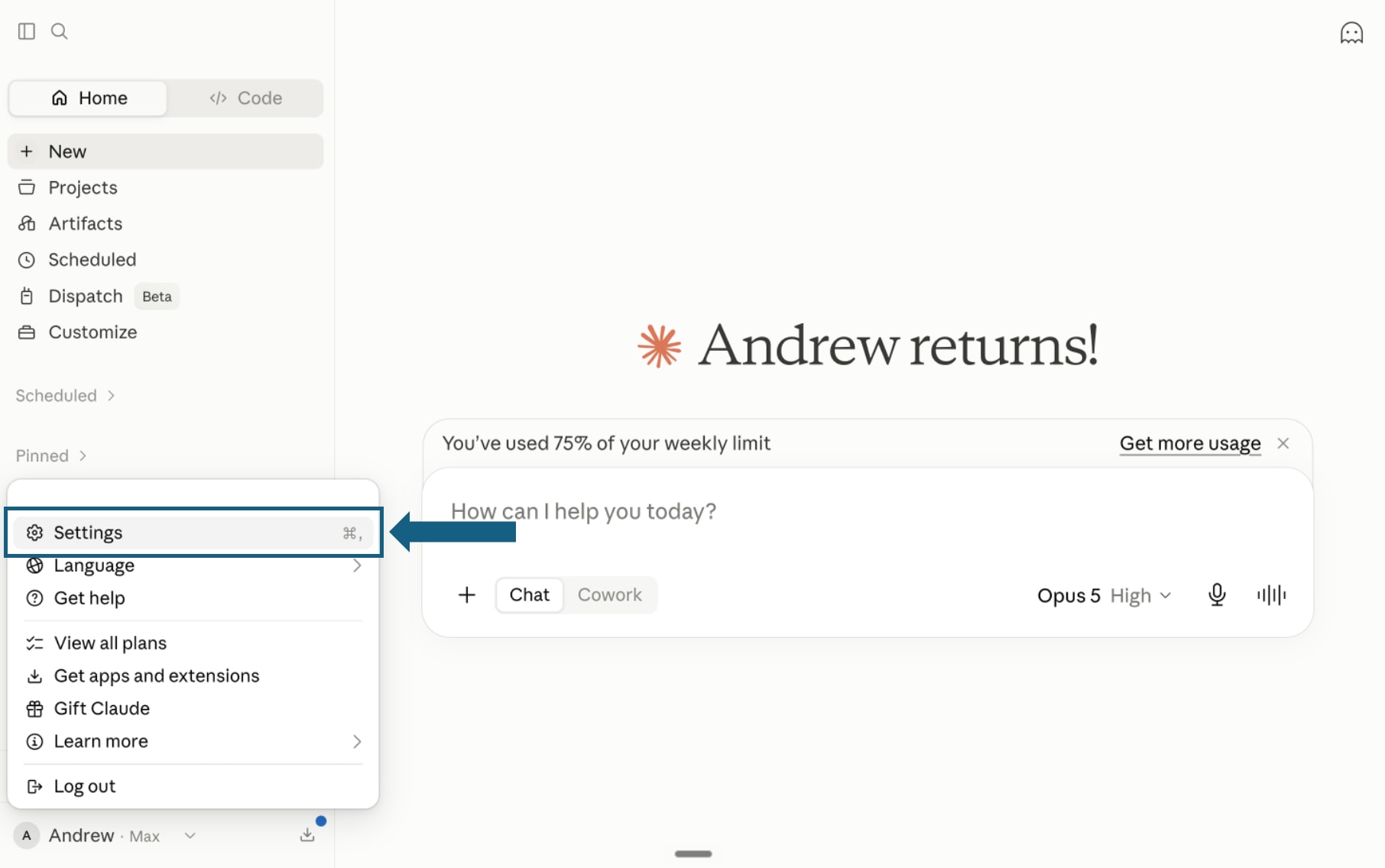
Download and unzip the pack, keeping each skill in its own folder with its SKILL.md file. In Claude, open your profile menu and select Settings.
Open the screenshot to view it full size. - Step 2
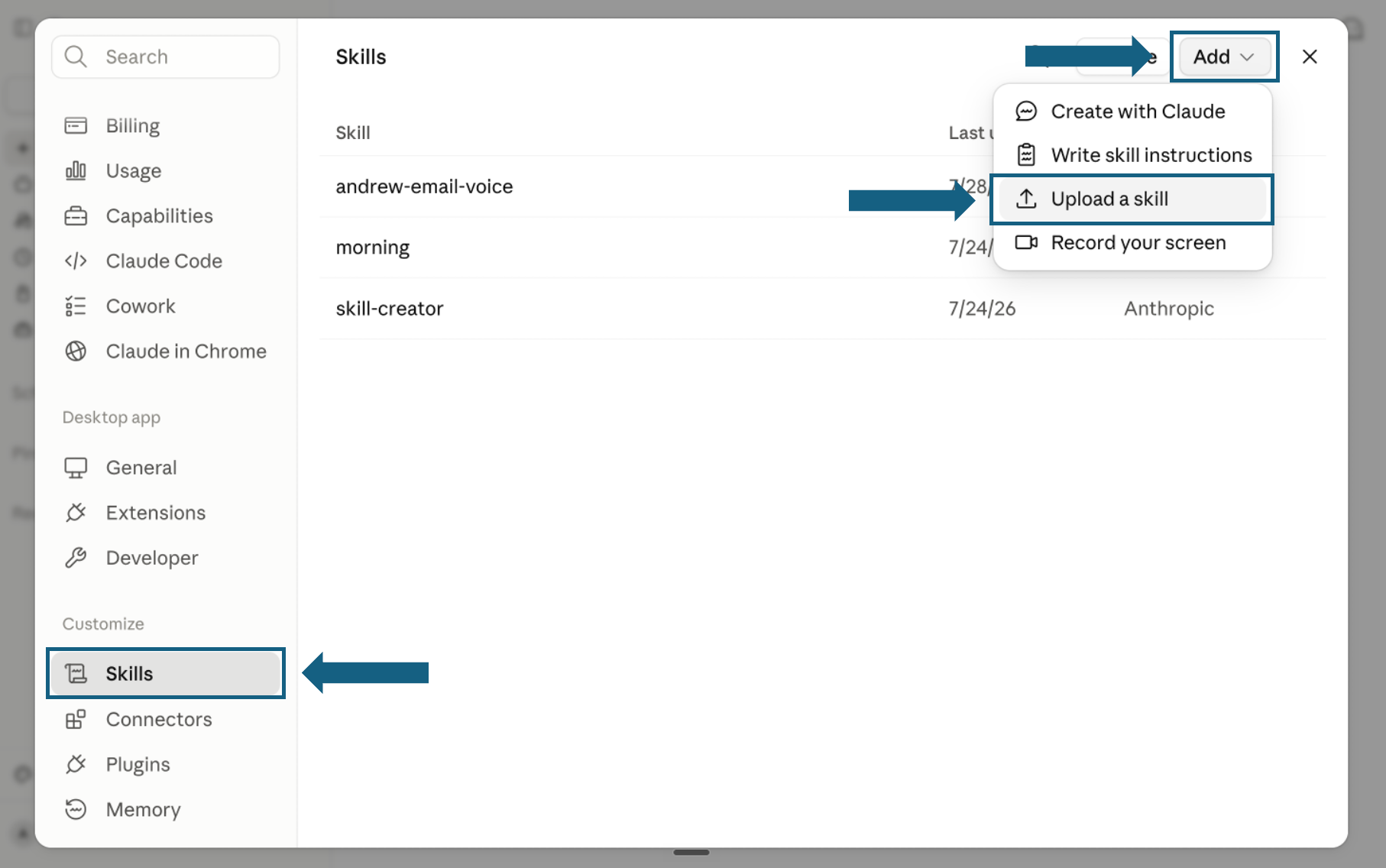
Open Skills and start an upload
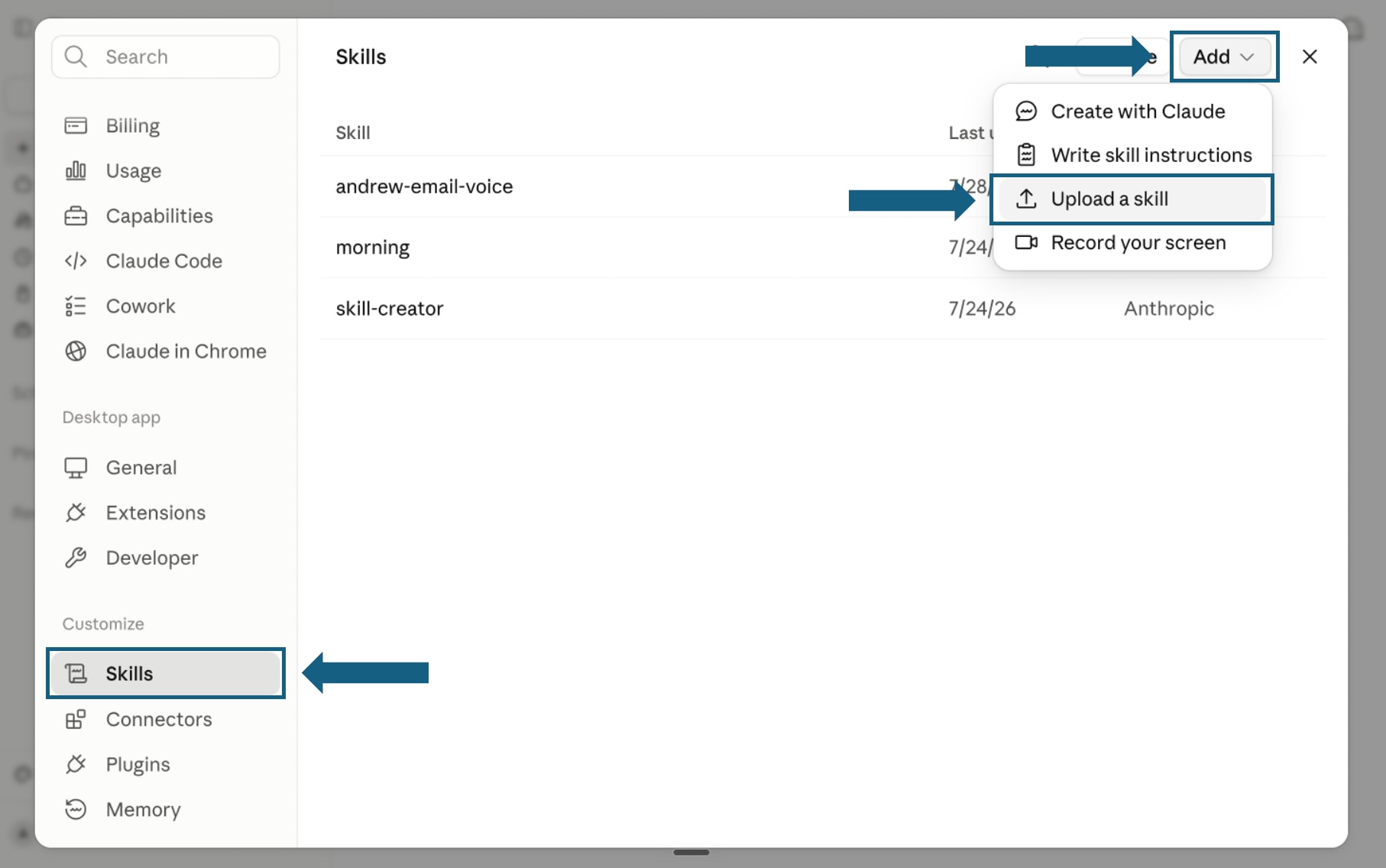
In Settings, select Skills under Customize. Open Add and choose Upload a skill.
Open the screenshot to view it full size. - Step 3
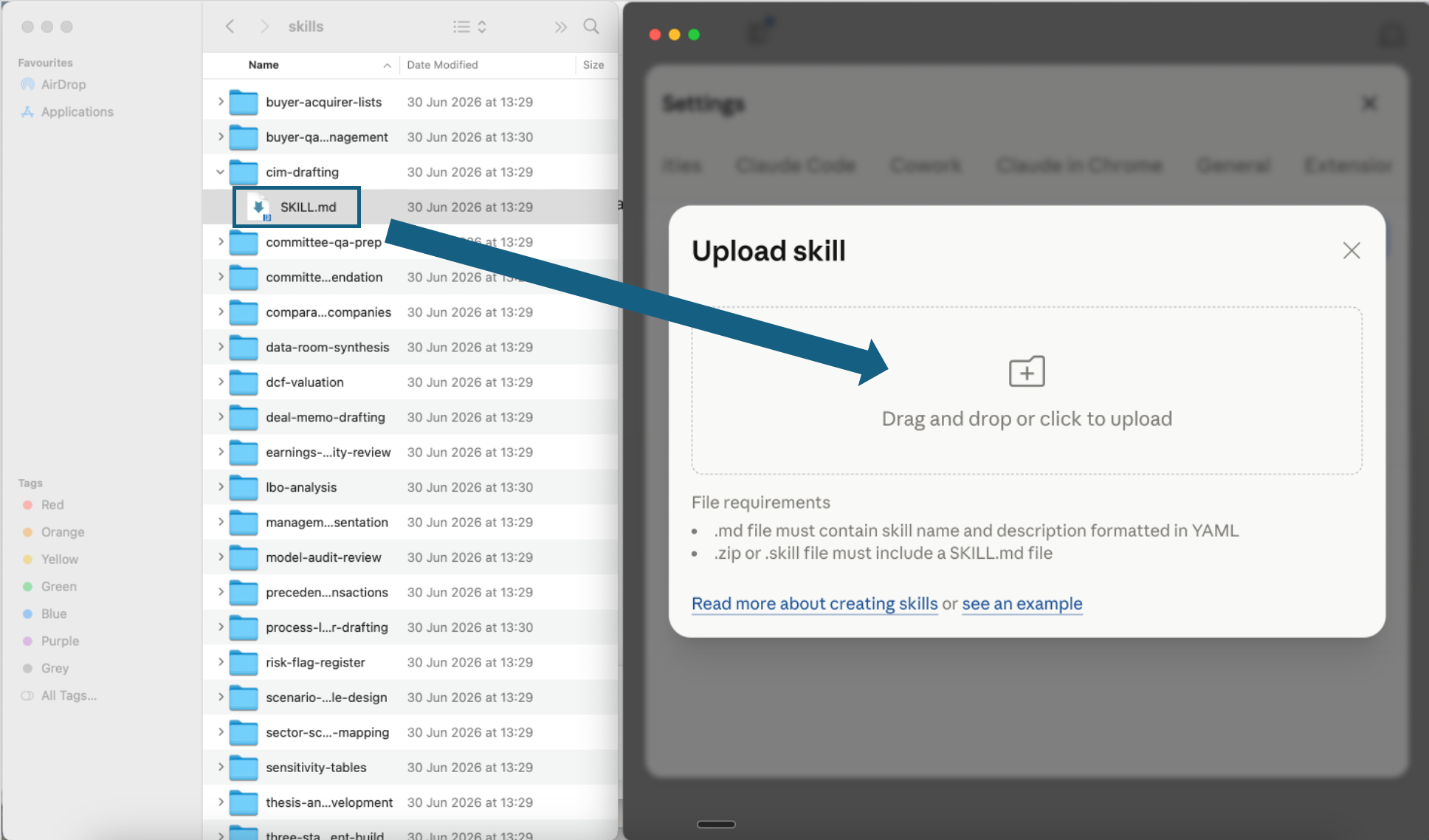
Upload one skill file
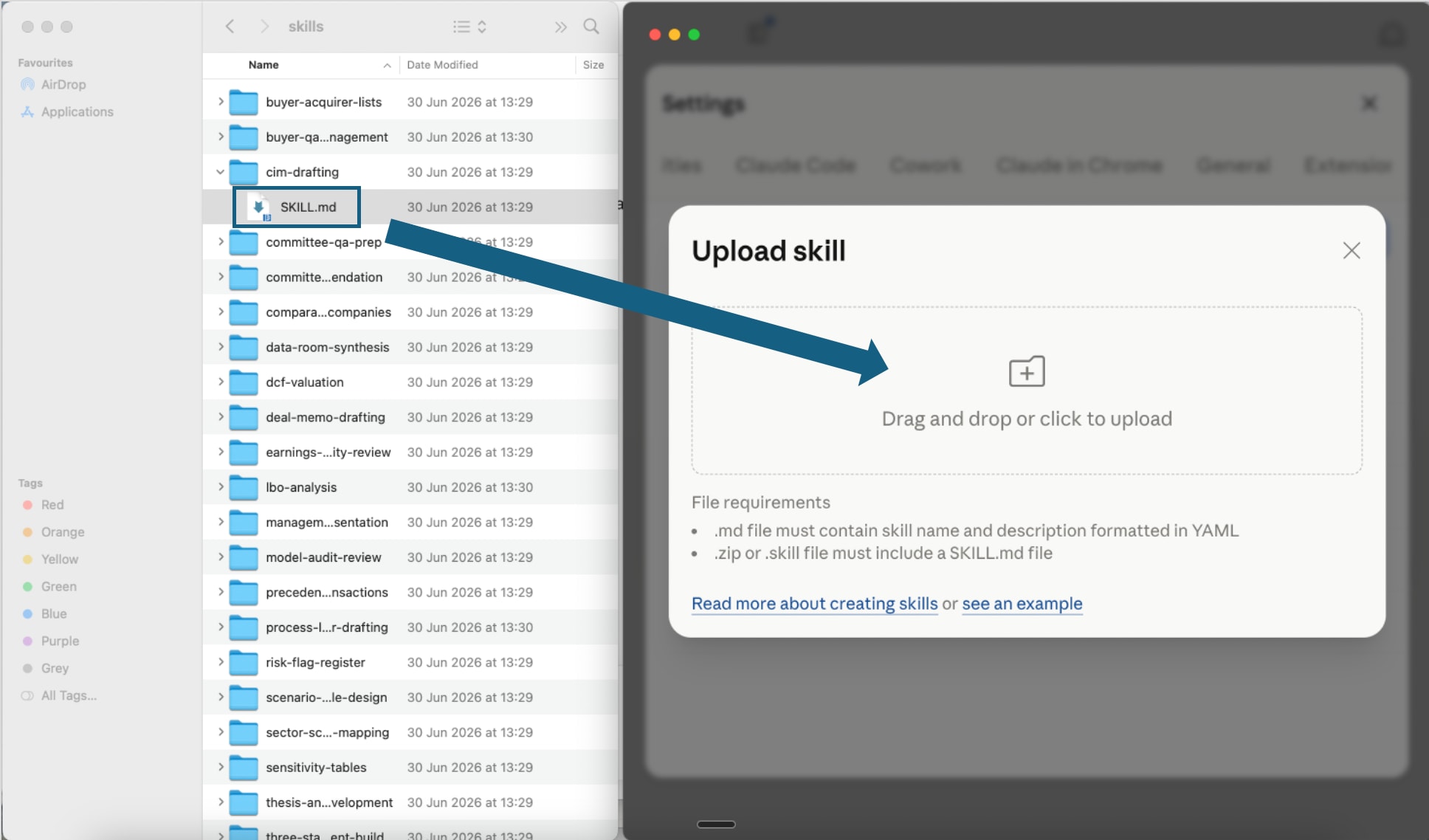
Open one extracted skill folder and drag its SKILL.md file into the upload window, or use the file picker. Repeat for each skill you want to add.
Open the screenshot to view it full size. - Step 4
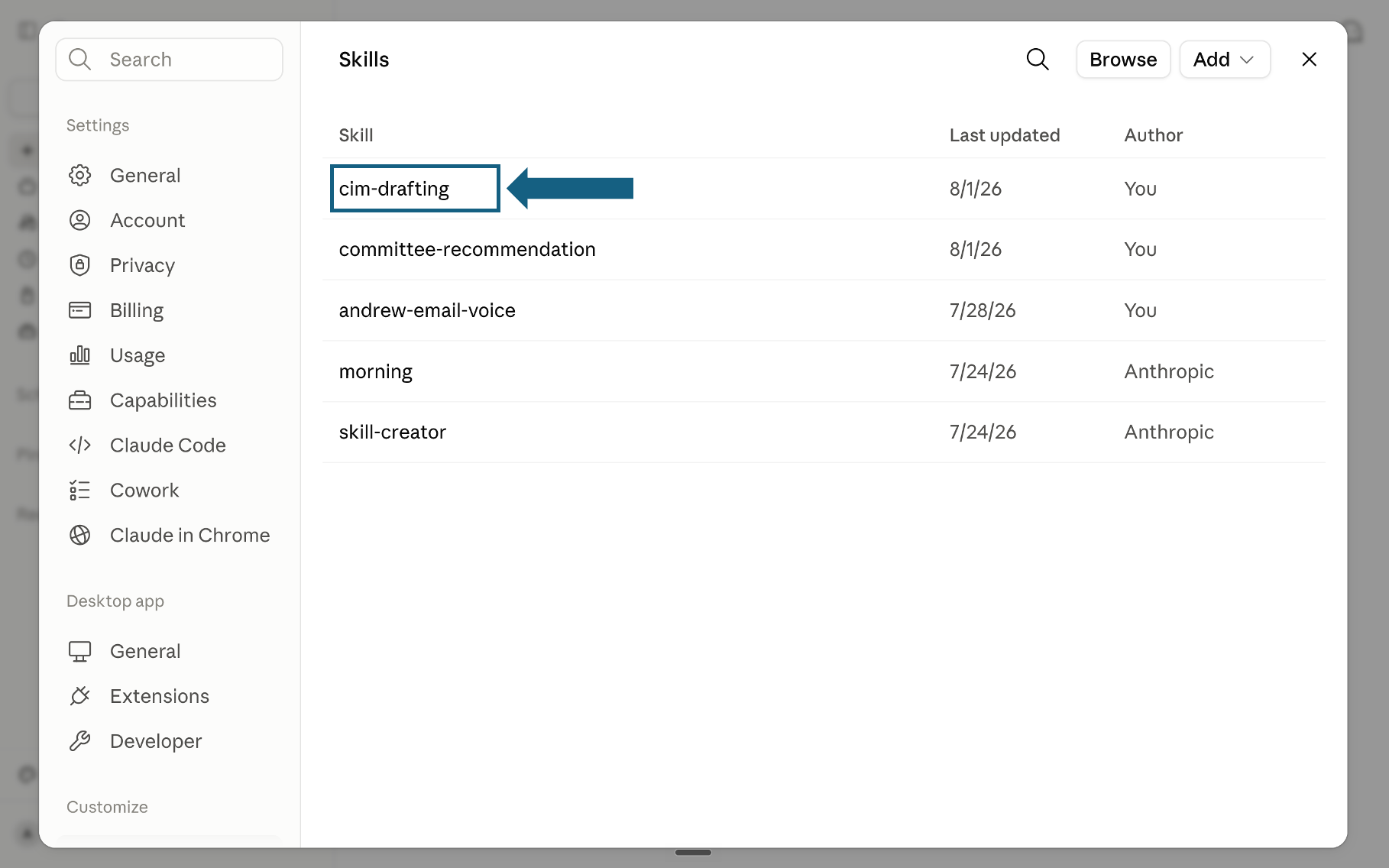
Confirm the skill was added
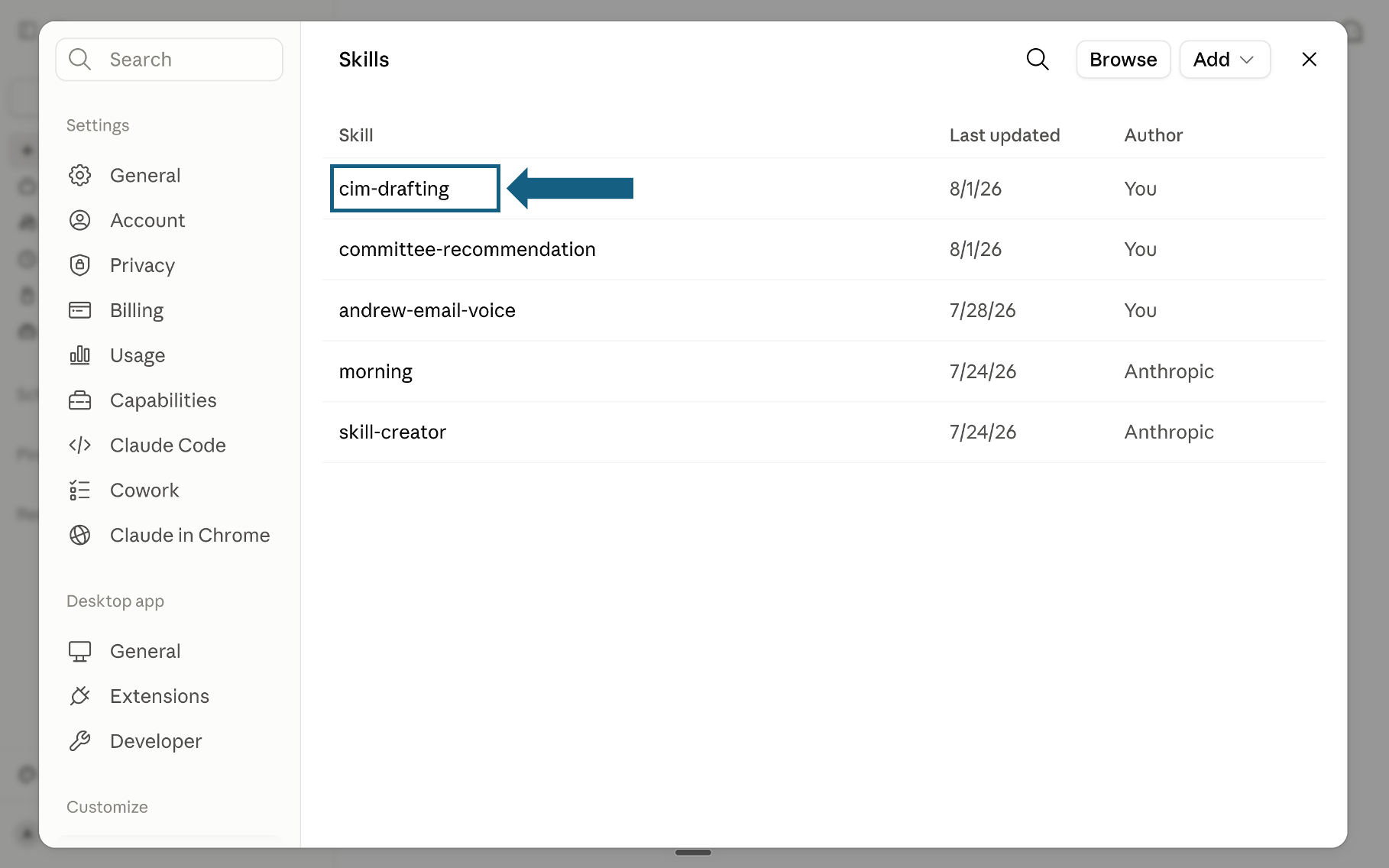
Return to the Skills list and check that the skill appears. Select its name to open it.
Open the screenshot to view it full size. - Step 5
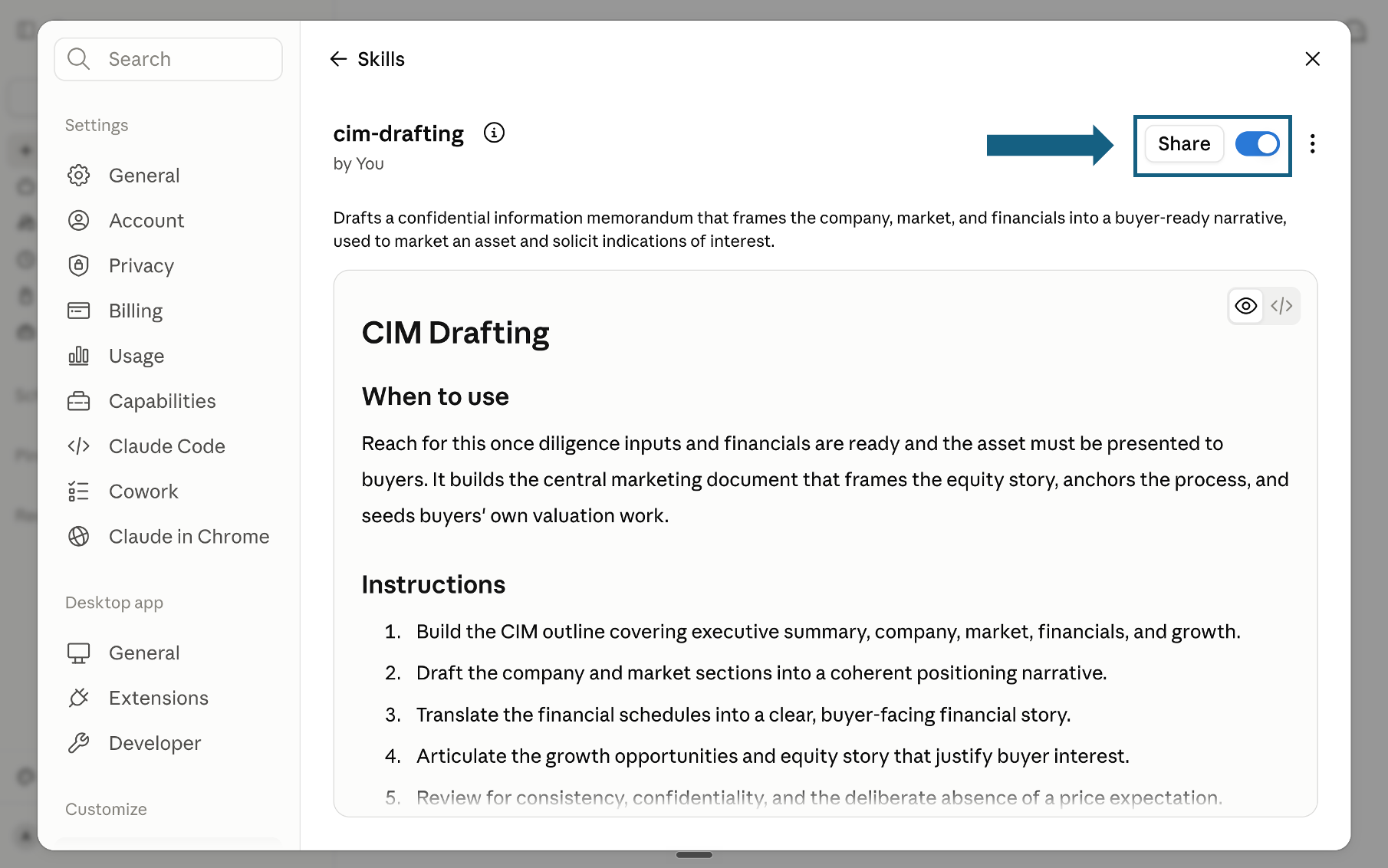
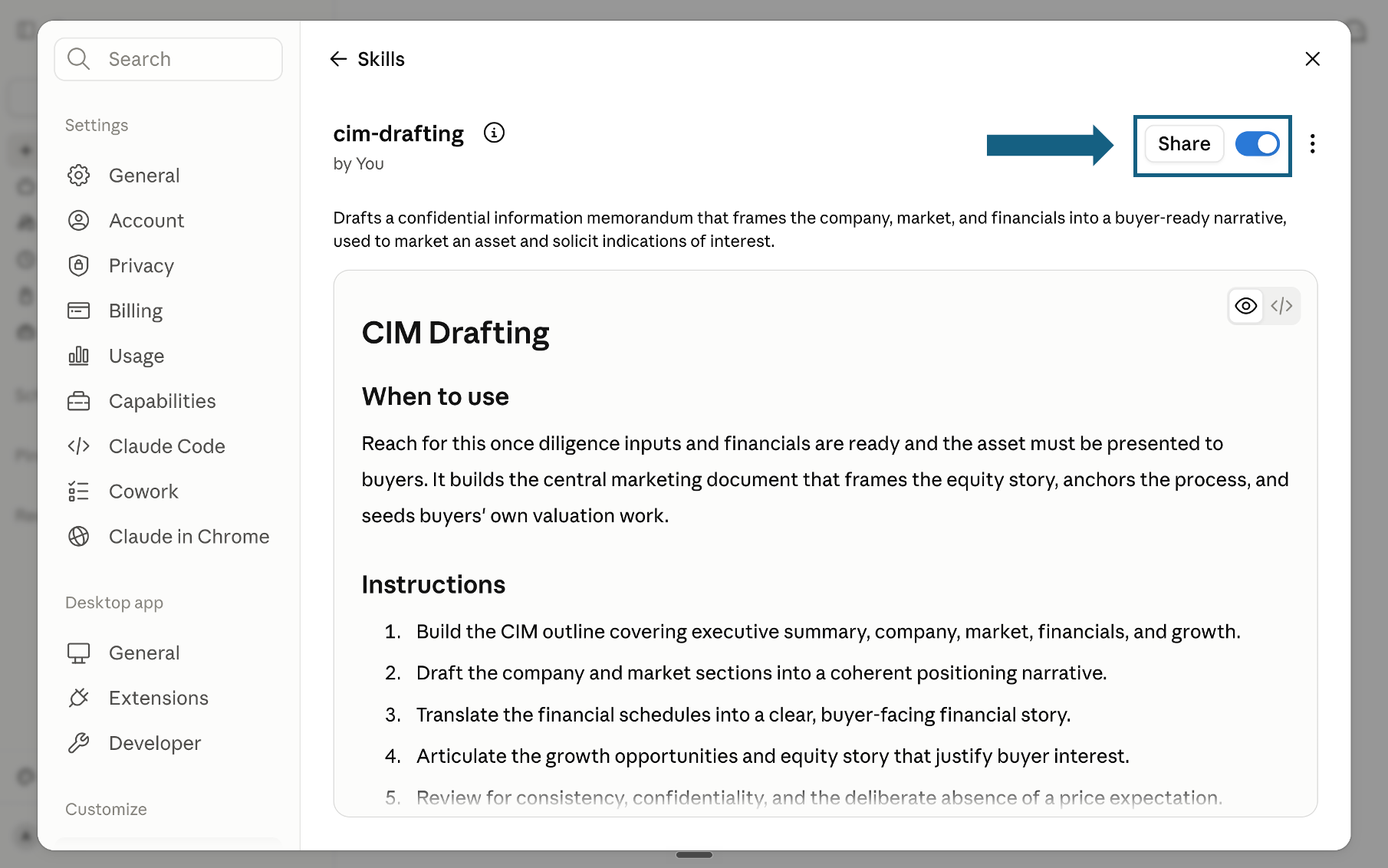
Review and turn on the skill
Review the skill's name, description, and instructions, then make sure the switch beside Share is on. A blue switch means the skill is turned on; sharing it is optional.
Open the screenshot to view it full size.
Try a skill
Name the skill you want Claude to use and provide the relevant files or context. Review every output before applying it to the shared vault.
- "Use the company-brain-orchestrator skill to set up my whole company brain, start to finish."
- "Use structure-and-company-taxonomy to design a shallow vault structure for our operations team."
- "Run link-and-build-the-graph on these notes and propose the hub notes and links we should add."
- "Use serve-sync-and-query to recommend a secure sharing model for this vault."
Build the vault by hand, step by step
Prefer to build it yourself? These are the same eight steps, by hand, no command line or developer tooling required. If you can install an app and organize a folder, you can build this.
Download and install Obsidian
Go to obsidian.md and download the app for Windows, macOS, or Linux. Obsidian is free for personal use; a commercial license for company use is $50 per user, per year, on Obsidian's own pricing page. Install it like any other app and open it once to reach the welcome screen.
Tip
Obsidian is local-first: your notes are plain markdown files in a normal folder on disk, not locked inside a database. That is exactly what makes them safe to version, sync, and hand to an AI later.
Create the company vault
On the welcome screen choose Create new vault, name it something like Company Brain, and pick a folder to hold it. A vault is just a folder Obsidian watches; everything you add becomes part of the brain. Start one vault for the whole company rather than one per person.
Pull in the company files
Copy your existing material into the vault folder: meeting notes, client memos, research, process docs, and the text of past decks. Markdown and plain text drop straight in. For Word, PDF, or spreadsheet files, keep the original and add a short markdown note beside it that summarizes what it is and why it matters, so the brain can reason over it.
Tip
You do not need to migrate everything on day one. Start with one team or one client, prove the value, then widen. A brain with a hundred well-linked notes beats one with ten thousand loose files.
Give it structure
Create a small set of top-level folders that mirror the business: Clients, Sectors, Functions, and Internal is a good starting frame. Resist deep nesting; the links between notes carry more weight than the folder tree, so a shallow structure plus good linking beats a deep hierarchy nobody maintains.
Unite the notes
This is the step that creates the brain. As you write, link related notes with wiki links, add tags for clients and topics, and build a few maps of content: hub notes that link out to everything on one theme. The four methods below are the connective tissue. Every link you add makes the next answer easier to find.
Turn on the graph and search
Open the graph view to see the vault as a living network of connected notes, the closest thing to looking at the company thinking. Use the built-in search and the quick switcher to jump anywhere in seconds. As the links multiply, clusters appear around your busiest clients and themes, and the gaps show you what the company has never written down.
Put it on a server and control access
To make the vault a shared company brain rather than one laptop, sync it. Obsidian Sync is the simplest route, $4 a month per person billed annually, end-to-end encrypted, no server of your own to run. For full control, use a private Git repository (a versioned history of how the company's thinking evolved) or your own file server. Every option is ordinary file hosting, no database migration required.
Tip
Control access the way you already control any sensitive folder: by role. Put client-confidential folders behind their own permissions, keep an internal-only tier, and give read access far more widely than write access so the brain stays clean.
Point an AI at the brain
The final step is what makes it feel alive. Because a vault is just a folder of markdown files, Claude Code can already read and search it directly with no plugin at all. For live read-and-write access from Claude Desktop or ChatGPT without leaving the app, install a community Model Context Protocol plugin, such as Vault as MCP or MCP Server, from Community plugins in Obsidian's settings; Obsidian does not ship an official MCP server of its own. Either way, ask it to find the link between two projects, summarize a client history, or turn a cluster of notes into a first draft. The brain stops being storage and starts being a coworker.
Unite the files: the four ways notes connect
Collecting files gives you a folder. Connecting them gives you a brain. These are the four tools Obsidian gives you to unite thousands of notes into one graph.
Wiki links
Type double brackets around any note title to link two ideas. Every link is bidirectional, so both notes now know about each other and the graph grows.
Tags
Add a hash tag like a client name or a topic to any note. Tags cut across folders, so one memo can belong to a client, a sector, and a workstream at once.
Maps of content
A hub note that links out to everything on one theme. A hub for a client or a market becomes the front door a new hire opens first.
Properties
Structured fields at the top of a note, such as owner, status, or date. They make the vault filterable and let an AI reason over the notes as data, not just text.
A rule of thumb: never save a note without linking it to at least one other. That single habit, kept across a team, is what compounds a pile of documents into a graph dense enough to be useful.
Two community plugins are worth installing early: Templater, for reusable note templates with dynamic fields, and Dataview, which turns your notes' properties into live tables and lists. Dataview alone has passed 4.9 million downloads on Obsidian Stats' public plugin tracker, the most installed plugin in Obsidian's community directory. Since version 1.9, a core plugin called Bases does a simpler version of the same job with no plugin install at all: turn any set of notes into a sortable table straight from their properties.
What company branding means for the brain
Company branding here is not a logo on a note. It is the shared structure that makes ten people's notes read as one company brain instead of a hundred private systems. Four conventions carry your firm's identity into the vault itself.
A shared taxonomy. Agree on the handful of top-level folders that name your business: clients, sectors, functions, internal. Everyone filing the same way is what makes the vault read as one brain, not a hundred private systems.
A naming convention. One rule for note titles, such as client, then topic, then date. Consistent titles make wiki links predictable, so people link as they write instead of hunting for the right file.
Templates. A standard note shape for meetings, client profiles, and decisions, with the same properties every time. Templates encode the company's way of thinking into the brain itself.
A house ontology. A small, shared vocabulary of tags and hubs that reflects how your firm actually sees the world. This structure is the real branding: it carries your identity.
Write these four into a short one-page vault guide and pin it as the first note new hires read. That page is the constitution of the brain, and it is what keeps a fast-growing vault coherent.
What a company brain unlocks
The build pays off the day the brain starts answering questions no filing system could. These are the use cases teams reach first once the vault is linked, served, and queryable.
Instant onboarding
A new hire opens the client hub and reads years of context in an afternoon, instead of scheduling ten catch-up calls.
Proposal reuse
The next proposal starts from the last five. The brain surfaces the passages, pricing logic, and case studies that already won.
Institutional memory
When someone leaves, their thinking stays. SHRM puts the cost of replacing an employee at 50 to 200% of their annual salary in lost productivity alone; linked notes that survive the departure close a real part of that gap.
Cross-project links
The graph connects a lesson from one engagement to a live problem in another, a link no single person would have spotted.
Faster answers
One search across the whole company replaces the group chat that starts with does anyone remember where the numbers for.
Board-ready output
The connection the brain surfaces becomes a slide. Analysis moves to a decision instead of staying stuck in a folder.
If this is not your tool, go here
This guide is opinionated on purpose: Obsidian, for a company willing to own its files. Most readers who land here already committed to something else want one of the rows below instead, and it is faster to say so than to argue you into a migration.
Frequently asked questions
What is a company brain in Obsidian?
A company brain is a single Obsidian vault that holds your organization's notes, memos, research, and decisions as linked markdown files. Instead of documents scattered across drives and inboxes, every idea is one note, and the links between notes form a graph you can search, navigate, and hand to an AI. The result is a shared, queryable memory of how the company thinks.
Why Obsidian instead of a wiki or a shared drive?
A shared drive stores files but never connects them, and a traditional wiki locks your content inside a database. Obsidian keeps every note as a plain markdown file on disk, so the knowledge is portable and future-proof, while its wiki links and graph view turn those files into a connected brain. Plain files are also the easiest possible input for an AI assistant, which matters the moment you want the brain to answer questions.
How do I put an Obsidian vault on a server for the whole team?
Obsidian is local-first, so a shared vault is just a shared folder. The simplest option is the official Obsidian Sync service. For more control, keep the vault in a private Git repository or on your own file server and have each teammate sync against the shared copy. Control access by role using ordinary folder permissions, with read access granted more widely than write access.
How many files can a company brain hold?
Obsidian handles vaults with tens of thousands of notes comfortably, because each note is a small text file. The practical limit is not the file count but the linking. A vault of a few hundred well-linked notes is a far better brain than a dump of ten thousand unconnected ones, so invest in the links, tags, and hub notes rather than sheer volume.
How does a company brain turn knowledge into usable work?
The brain surfaces the connection, client history, or analysis a team needs from the material already in the vault. A teammate can then review that source-backed context and use it to draft a memo, proposal, plan, or briefing. The vault supplies the institutional memory; the team still applies judgment before sharing the result.
Is Obsidian free for company use, or do I need a license?
Obsidian is free to install and use with no feature restrictions. A commercial license becomes appropriate once more than one person at a company is using it for work: $50 per user, per year, on Obsidian's own pricing page. There is no enforcement mechanism in the app, but the license funds continued development of the tool your company brain depends on.
Can Claude read an Obsidian vault directly?
Yes, in two ways. Because a vault is just a folder of markdown files, Claude Code can read and search it directly with no plugin at all. For live read-and-write access from Claude Desktop or ChatGPT, install a community MCP plugin such as Vault as MCP or MCP Server from Community plugins in Obsidian's settings. Obsidian does not ship an official MCP server itself; every option today is community-built.
What is a second brain, and is it the same as a company brain?
A second brain is Tiago Forte's term for a personal system, usually built around his PARA method, that captures one person's notes and ideas outside their own head. A company brain applies the same principle at the scale of an organization: one shared vault instead of one person's notes, with access controlled by role instead of owned by an individual. The linking habits are identical; only the ownership changes.