

18 Claude Skills for Digital Transformation
A digital transformation program forces the same six decisions: current state, strategy, organization, technology, delivery governance, and how the recommendation lands with the people who fund it. The decision this page helps with is narrower: which of those six domains your program is stuck in right now, and which single Claude skill is worth installing today. 18 standalone skills are here, three per domain, each one a single SKILL.md file with a stated case where it breaks. Where the real gap is process mechanics, not a technology-led program, or a single slide, not a skill, this page says so and sends you elsewhere.
Independent and unaffiliated. The skills, prompts, and frameworks referenced on this page are not created by, endorsed by, or affiliated with any consulting or financial-services firm whose methods may be referenced here. They are built on publicly available frameworks and ways of working, and are inspired by how such approaches are used to tackle complex business problems.
Quick answer
Match the domain to where your program is actually stuck, not to how many skills the pack contains. A team with no defensible current state needs a different domain than one with a stalled operating model rollout.
For digital transformation work in Claude, start with Digital Maturity Assessment and Technology Landscape Audit for a numbers-based current state, move to Digital Strategy Framing and the Business Case Builder once ambition needs a funded plan, and use Digital Operating Model Design and the Board Deck Framer to organize delivery and land the recommendation. Run assessment and strategy work on Claude Opus 5, moving to Fable 5.1 once the case or board narrative must survive a contested read. Install by stage, not by volume.
How we chose these 18
- We organized by the shape of a real program, not by skill count: six domains map to six points where a program actually gets stuck.
- We tested every skill against real artifacts, application inventories, cost centre data, org charts, business cases, not clean synthetic prompts.
- We wrote down where each domain breaks and put it on this page. A redesign applied before the diagnosis is confirmed costs more than the domain you never opened.
- We checked output against a steering-committee standard, not a fluency one. Named methods had to be applied correctly, not merely referenced.
- We ignored anything needing an API key, a paid connector, or a build step. Every skill is one SKILL.md file and the pack is a free zip with no signup.
Download all 18 skills
One zip, one folder per skill. Free, no signup.
Key takeaways
- Six domains, one sequence: assess, set strategy, organize, decide the technology, structure delivery, communicate to the board. Install by where the program sits in that sequence, not by how many skills sound useful today.
- Match the trigger, not the label. Leadership wanting more digital calls for Domain 2, not Domain 4, and choosing a cloud platform before the strategy is funded answers the wrong question well.
- Every domain needs real inputs. None of the 18 skills invents an application inventory, a cost driver, or a stakeholder map, and the domains that most disappoint are the ones fed an opinion instead of a document.
- The model changes the output more than the prompt wording does. Anthropic's own guidance starts most workloads on Claude Opus 5 and moves to Claude Fable 5.1 once the analysis has to survive a board-level read.
- Every domain has a named failure mode worth knowing before a steering committee sees the output. A redesign applied to a political problem, or a board deck with no pre-briefing plan, is the pattern behind most bad output.
Compare the six domains
What each domain produces, when to open it, what to bring, which model to run it on, and where it breaks. Read the last column first.
Assessment and Diagnosis
Maturity profile, TIME-labeled portfolio map, readiness scorecard
Strategy and Vision
Transformation thesis, scored use case register, quantified business case
Organization and Change
Operating model recommendation, capability roadmap, change impact plan
Technology and Architecture
Retirement and consolidation plan, data governance model, workload migration waves
Delivery and Measurement
Governance charter, Sprint Zero plan, three-level KPI hierarchy
Communication and Alignment
Narrative spine, stakeholder engagement plan, board deck architecture
Looking for process mechanics instead, bottleneck diagnosis, waste audits, standard work? See 22 Claude skills for operations efficiency, which complements this page: technology and organization here, the process work underneath there.
The 18 Skills You Get
Grouped into six domains. Run them in order for a full program, assess first, communicate last, or pull individual skills for a targeted task. Every block below closes with the case the domain handles badly.
The digital transformation AI toolkit
Domain 1 · 3 skills
Assessment and Diagnosis: Who Is It Built For?
Use these at the start of an engagement to establish the fact base. They answer where the client stands before any direction is set, covering maturity, portfolio health, and organizational readiness.
Built for the person about to scope a program who has no numbers-based view of the current state, and knows the first priority named will be judged against a baseline nobody has written down.
Digital Maturity Assessment scores five domains, technology, data, talent, process, culture, into three ranked findings instead of a heat map nobody acts on. Technology Landscape Audit applies TIME labels, tolerate, invest, migrate, eliminate, before anyone proposes what to build. Transformation Readiness Check runs a six-dimension scorecard so a program that stalled once gets a diagnosed root cause instead of a second try.
Digital Maturity Assessment
Use when: You need a fact base on where the client sits across technology, data, talent, and culture before setting ambitions
Output: Five-domain maturity profile, gap narrative, top three findings
Technology Landscape Audit
Use when: You need to know what the client owns before deciding what to build, buy, or retire
Output: Portfolio map with TIME labels, redundancy register, rationalization priority list
Transformation Readiness Check
Use when: Ambitions outpace what you observe on the ground, or a prior transformation stalled with no diagnosed cause
Output: Six-dimension readiness scorecard, red flags, precondition recommendations, overall verdict
The trade-off: It slows the first two weeks down gathering a fact base a sponsor may believe already exists, and on a well-understood program, three assessment skills read as ceremony. Skip to Domain 2 if the diagnosis is not in dispute.
Domain 2 · 3 skills
Strategy and Vision: Who Is It Built For?
Use these to move from a vague digital ambition to a concrete, defensible strategy with bounded choices. They produce the transformation thesis, the investment case, and the prioritized list of where to play.
Built for the team holding a maturity assessment and a sponsor who wants more digital translated into real choices and a business case that survives a CFO who has seen transformation budgets disappear before.
Digital Strategy Framing forces a where-to-play choice across three horizons before any use case gets built. Use Case Prioritization scores a backlog against the same criteria into a three-wave plan instead of whichever idea the loudest stakeholder favors. Digital Business Case Builder attaches driver-based benefit logic and three scenarios to the number, so the case survives when a CFO asks where it came from.
Digital Strategy Framing
Use when: The client needs to move from 'we need to be more digital' to real choices and priorities
Output: Transformation thesis, ambition statement, three-horizon choices, critical bets
Use Case Prioritization
Use when: A long list of digital ideas needs ranking and sequencing before the roadmap can be built
Output: Scored use case register, 2x2 matrix, three-wave plan, top-10 rationale
Digital Business Case Builder
Use when: An initiative needs a business case to survive CFO or board scrutiny, or an existing one is too optimistic
Output: Benefit register with driver logic, cost estimate, NPV and payback for three scenarios
The trade-off: Structured option scoring is slower than converging on the sponsor's favorite idea, and on a small, single-use-case initiative, three horizons and a scored backlog is more process than the decision needs.
Domain 3 · 3 skills
Organization and Change: Who Is It Built For?
Use these to design how the organization will execute and sustain digital capability, and to prepare people for the change. Strategy without an operating model and a change plan stalls in execution.
Built for the team that has a funded strategy and no plan for who runs it, and has watched a technically sound design fail to survive an organization nobody redesigned around it.
Digital Operating Model Design recommends an archetype, centralized, federated, or hub-and-spoke, with a decision-rights matrix rather than an org chart with new boxes. Capability Gap Analysis breaks the requirement into human, process, and technology pillars so build-buy-partner gets decided pillar by pillar. Change Management Planner attaches a stakeholder plan and adoption metrics, because a redesign with no change plan regresses within two quarters.
Digital Operating Model Design
Use when: The client has a digital strategy but no plan for how the organization will deliver and sustain it
Output: Organizational archetype with rationale, decision rights matrix, ways of working blueprint
Capability Gap Analysis
Use when: The team is underestimating the capability investment required, or talent assumptions are vague
Output: Gap register by pillar, build/buy/partner options, capability roadmap
Change Management Planner
Use when: A technology or process plan exists with no plan for how people will be prepared
Output: Change impact heat map, stakeholder plan, communication calendar, adoption metrics
The trade-off: It is the most disruptive domain here, and running it before Domain 1 confirms the gap is genuinely organizational means redesigning a structure a narrower fix would have solved for less cost.
Domain 4 · 3 skills
Technology and Architecture: Who Is It Built For?
Use these to design the technology decisions that underpin the transformation. They address the three most consequential technical choices in any digital program: what to retire, how to handle data, and how to move to cloud.
Built for the team that owns the three technology decisions almost every digital program forces: what to retire, how to govern data, and how to sequence a cloud move without a vendor pitch doing the sequencing.
Tech Stack Rationalization sequences retirement and consolidation against dependency chains, not against whichever system is loudest about being replaced. Data Strategy Framing states the ambition first and builds an asset register before recommending a platform, the step a failed data lake usually skipped. Cloud Migration Roadmap classifies each workload against the 6 Rs instead of defaulting every workload to the same pattern.
Tech Stack Rationalization
Use when: Technical debt or overlapping systems need a sequenced plan that does not disrupt operations
Output: Retirement and consolidation plan, modernization approach, dependency sequence, 18-month roadmap
Data Strategy Framing
Use when: Digital use cases depend on data that does not exist in usable form, or a data lake delivered no value
Output: Asset register with gap assessment, governance model, data capability roadmap
Cloud Migration Roadmap
Use when: The client has decided to move to cloud and needs a migration sequence, not a vendor pitch
Output: Workload classification by the 6 Rs, dependency map, wave plan, risk register
The trade-off: None of these three skills chooses a cloud vendor or a data platform for you, and a team expecting a product recommendation rather than a sequencing method will find this domain deliberately unopinionated.
Domain 5 · 3 skills
Delivery and Measurement: Who Is It Built For?
Use these to structure how the program is governed, how delivery begins, and how value is tracked. They prevent the most common failure modes: poor governance, rushed delivery foundations, and activity metrics that do not demonstrate business value.
Built for the person setting up a program that is about to start building before governance or a real measurement system exist, and who has watched a program run a year on activity metrics tied to nothing.
Program Structure Design builds a three-tier governance structure with a RACI for the top decisions, so escalation has a path before the first disagreement. Sprint Zero Planner covers the tracks a program needs ready before development starts, environment, team, architecture decisions, backlog. KPI and Value Tracking replaces activity metrics with a three-level outcome hierarchy and a quarterly report, closing the loop most programs never close.
Program Structure Design
Use when: A program is being set up, or an existing one is stalling because decision rights are unclear
Output: Three-tier governance, RACI for top 12 decisions, cadence, escalation protocol
Sprint Zero Planner
Use when: A program is rushing to build before the environment, team, and standards are ready
Output: Six-track Sprint Zero plan, access checklist, architecture decisions, backlog check
KPI and Value Tracking
Use when: The program lacks a measurement system or reports activity metrics rather than outcomes
Output: Three-level KPI hierarchy, measurement methodology, value realization report
The trade-off: Governance and value tracking only work if someone keeps running them once launch excitement fades, and a program that skips to delivery because a charter feels like overhead cannot answer a steering committee's outcome question a year in.
Domain 6 · 3 skills
Communication and Alignment: Who Is It Built For?
Use these to build alignment before decisions are made. They cover the executive narrative, stakeholder resistance, and the board presentation that determines whether the program gets funded and stays funded.
Built for the person who has the analysis right and thirty minutes in front of the people who decide whether the program gets funded, stays funded, or survives the executive quietly working against it.
Digital Narrative Builder builds an SCQA spine and a Pyramid structure so the story leads with the decision, not the technology, and prepares five hostile-question responses in advance. Stakeholder Resistance Mapper diagnoses resistance by type rather than treating every skeptic alike, building a targeted coalition plan instead of a generic push. Board Deck Framer designs a ten-to-eleven-slide architecture for a board decision specifically, not a project update dressed up as one.
Digital Narrative Builder
Use when: The transformation story must land in a leadership meeting and reads like a technology briefing, not a business case
Output: SCQA spine, Pyramid structure with key messages, hostile Q&A, opening draft
Stakeholder Resistance Mapper
Use when: Specific leaders are creating friction but the team lacks a clear view of why
Output: Stakeholder map with stances, resistance diagnosis by type, coalition design, priority list
Board Deck Framer
Use when: The transformation is going to the board and needs an architecture built for a decision, not a project update
Output: Slide-by-slide board deck architecture, appendix structure, pre-briefing plan, decision statement
The trade-off: A structured narrative and a mapped coalition take real preparation time, and where the board relationship is already strong and the ask is small, this domain's discipline reads as more ceremony than a five-minute update needs.
Domains 1-2 establish the fact base and strategy. Domains 3-4 design the organization and technology. Domains 5-6 structure delivery and build the alignment needed to sustain the program.
Oria: Who Is It Built For?
None of the 18 skills above produces a slide, and for a digital transformation program that step is usually where a good recommendation stalls the weekend before a steering committee. Oria is the tool we build, and it exists for one narrow job: corporate documents and consulting presentations. Board packs, steering committee decks, diligence exhibits, operating model slides, dense frameworks held to an enforced corporate template. That is the whole design, and it is aimed squarely at the output a tier-one strategy firm produces.
It reaches you two ways: as a PowerPoint add-in on Windows, macOS, and PowerPoint for the web, and as a connector for Claude and ChatGPT over MCP, so a slide gets built from the chat you are already in. That second route pairs with the skills here: run the Board Deck Framer skill, then ask for the board deck architecture in the same conversation. On security, Oria does not train on customer content, Professional and Team do not persist presentation content after delivery, and Enterprise adds private cloud deployment and custom LLM integration.
The trade-off: Oria is built for the corporate environment only, so it loses on highly visual work. Founder fundraising and pitch decks, launch and campaign decks, student presentations, marketing one-pagers: where the job is visual impact rather than defensible content held to a template, a design-led tool like Gamma, Canva, Pitch, or Beautiful.ai will beat it, and will look better doing it. If that is your deck, go there instead.
Why a skill instead of a prompt?
A skill is a folder holding one SKILL.md file, loaded only when a request matches it, so a program installs all 18 without paying for 18 in context on every message. The real gain over a saved prompt is consistency: the TIME portfolio audit or the SCQA narrative spine runs the same way in week one and week twenty, for the engagement lead and for the analyst who joined on Monday.
Consistency matters because the alternative is expensive. In the 2025 Gartner CIO and Technology Executive Survey of 3,186 CIOs and technology executives across 88 countries, only 48% of digital initiatives met or exceeded their business outcome targets. Jaime Capella, a Distinguished VP Research analyst at Gartner, ties the shortfall to the exact gap Domain 6 exists to close: "CIOs' success now depends on their CxOs' success. To succeed at the next phase of digital initiatives, CIOs need their CxOs to work together and co-lead with them."
Scale compounds it: the Standish Group's CHAOS Report, 2015 edition, over 50,000 IT project records, found only 6% of the largest projects met a strict on-time, on-budget, on-scope bar, against 61% of small ones, the case for Sprint Zero and phased waves over a big-bang cutover.
The upside is measurable too: research by Didier Bonnet of Capgemini Consulting and George Westerman of MIT, across three years and hundreds of organizations, found digital masters, strong on both digital and leadership capability, 26% more profitable than average competitors. Westerman is blunt about the artifact these skills fix, telling The Enterprisers Project: "In too many companies, business cases are fake; they're magical thinking created only to cross some kind of threshold."
One note: Anthropic makes Skills available on every Claude plan, Free included, once code execution is switched on in Settings. Team and Enterprise administrators can also provision skills organization-wide. For the wider view, the consultants guide to Claude is the fuller treatment.
Setup Guide
- Step 1Download all 18 skills (.zip)
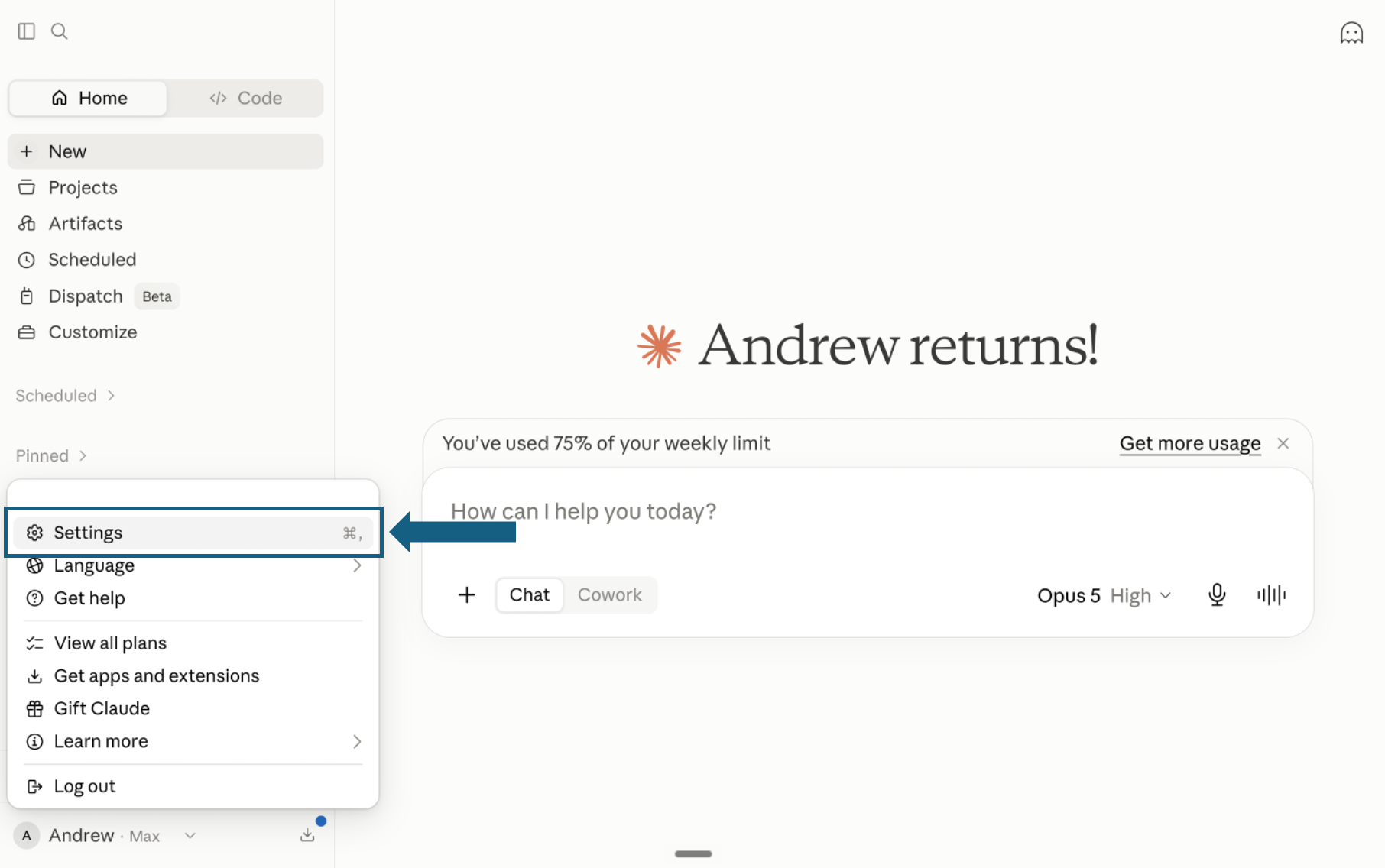
Download the pack and open Settings
Download the pack and unzip it so each skill remains in its own folder with its SKILL.md file. In Claude, open your profile menu and select Settings.
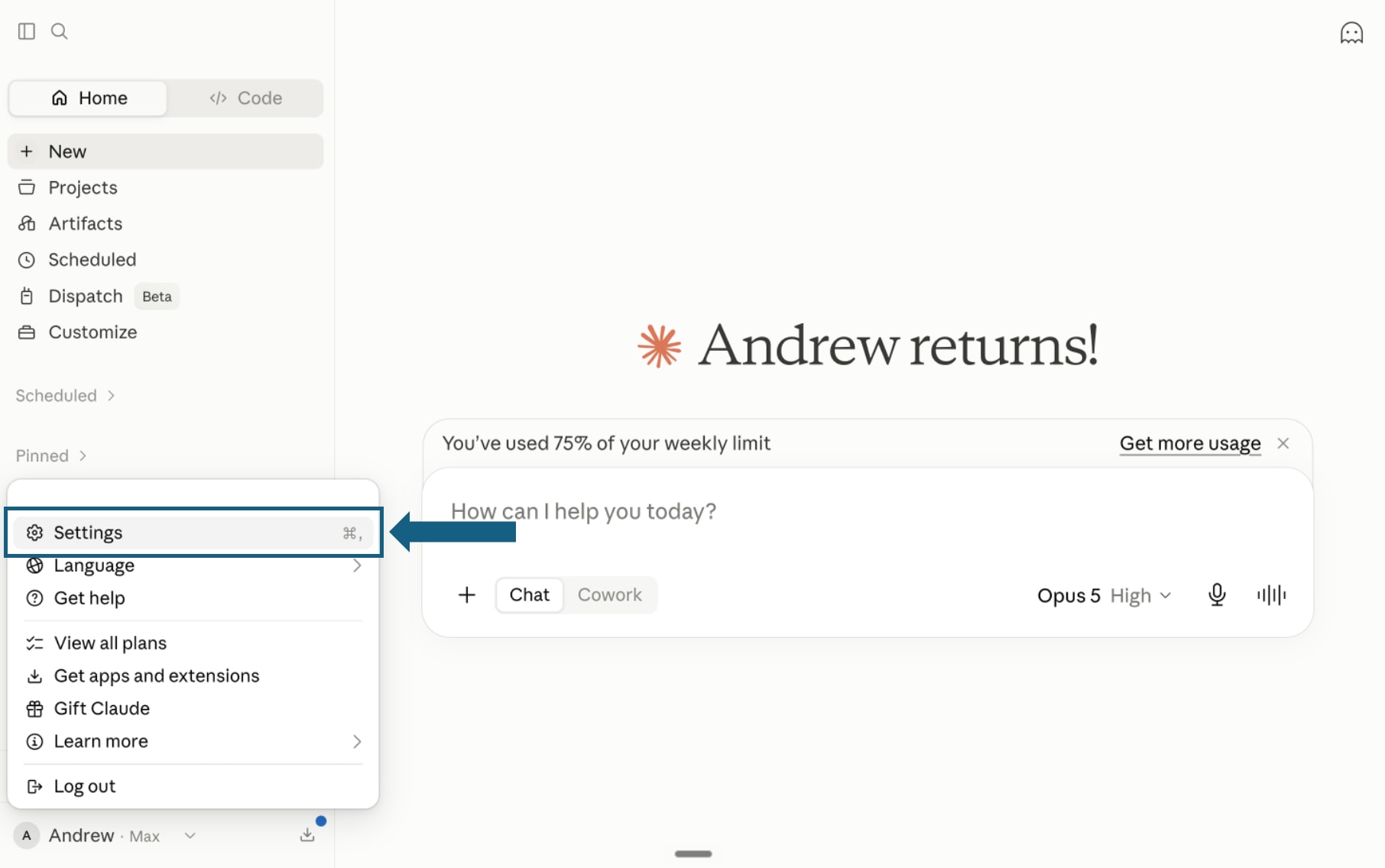
Open the screenshot to view it full size. - Step 2
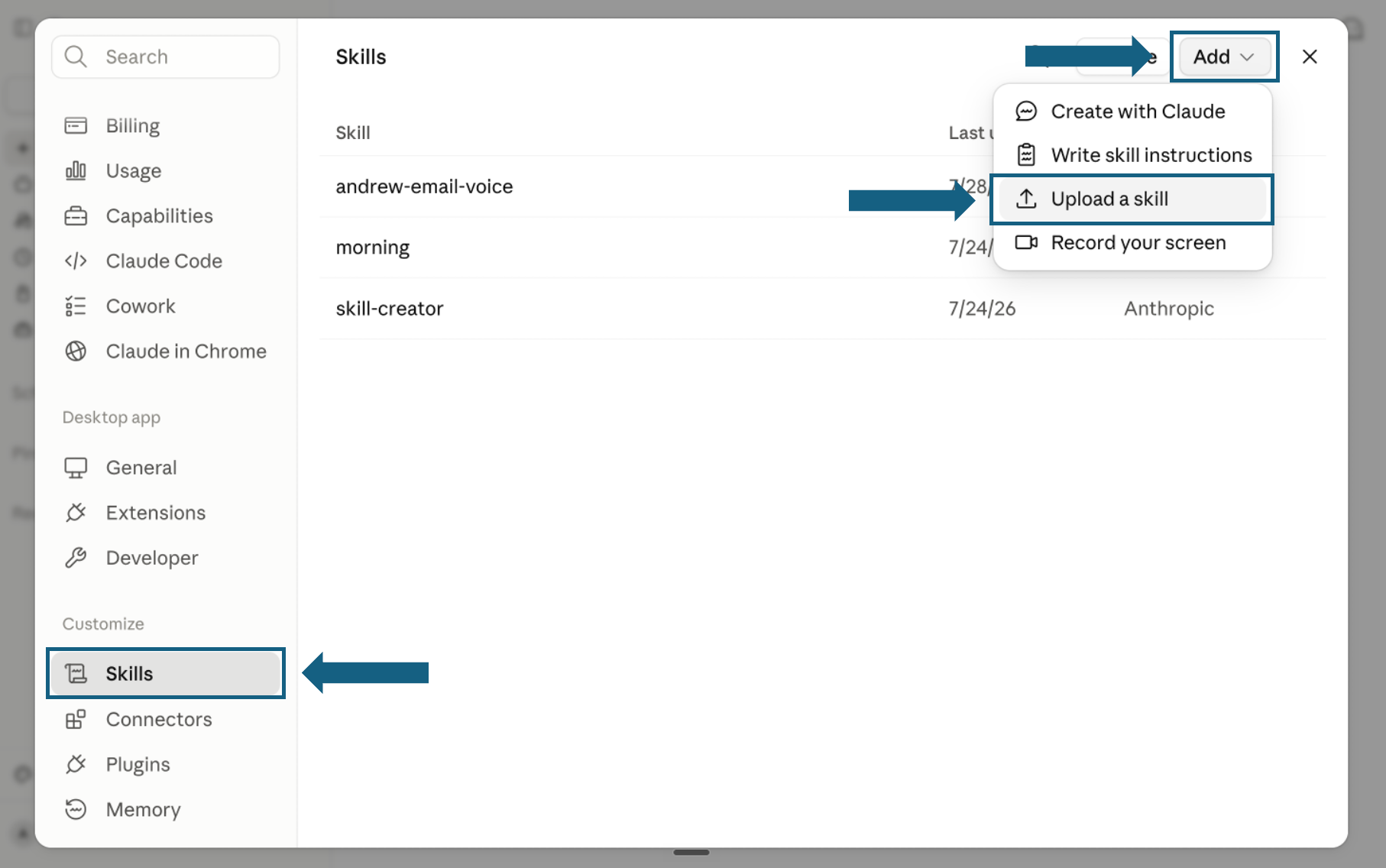
Open Skills and start an upload
In Settings, select Skills under Customize. Open Add and choose Upload a skill.
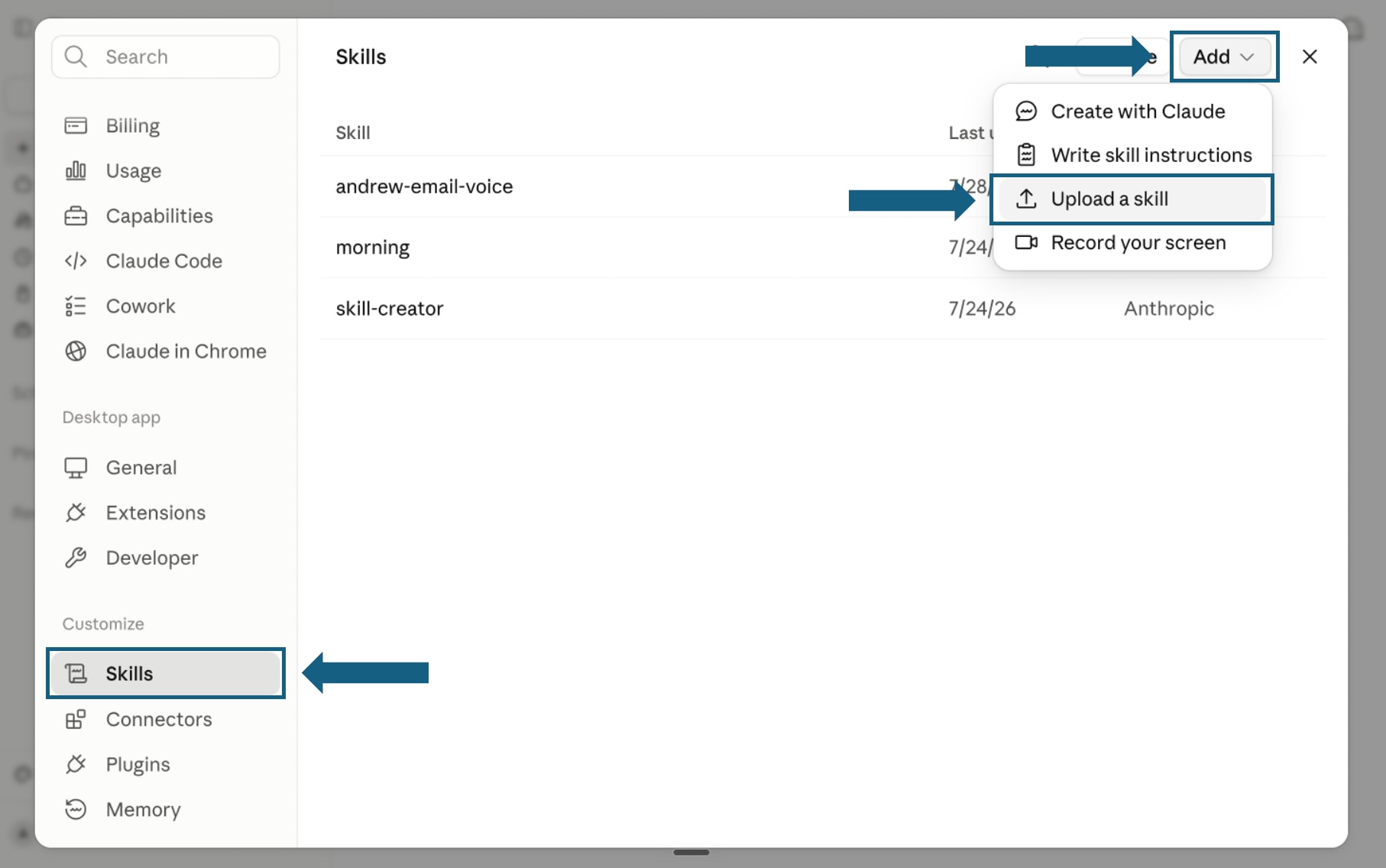
Open the screenshot to view it full size. - Step 3
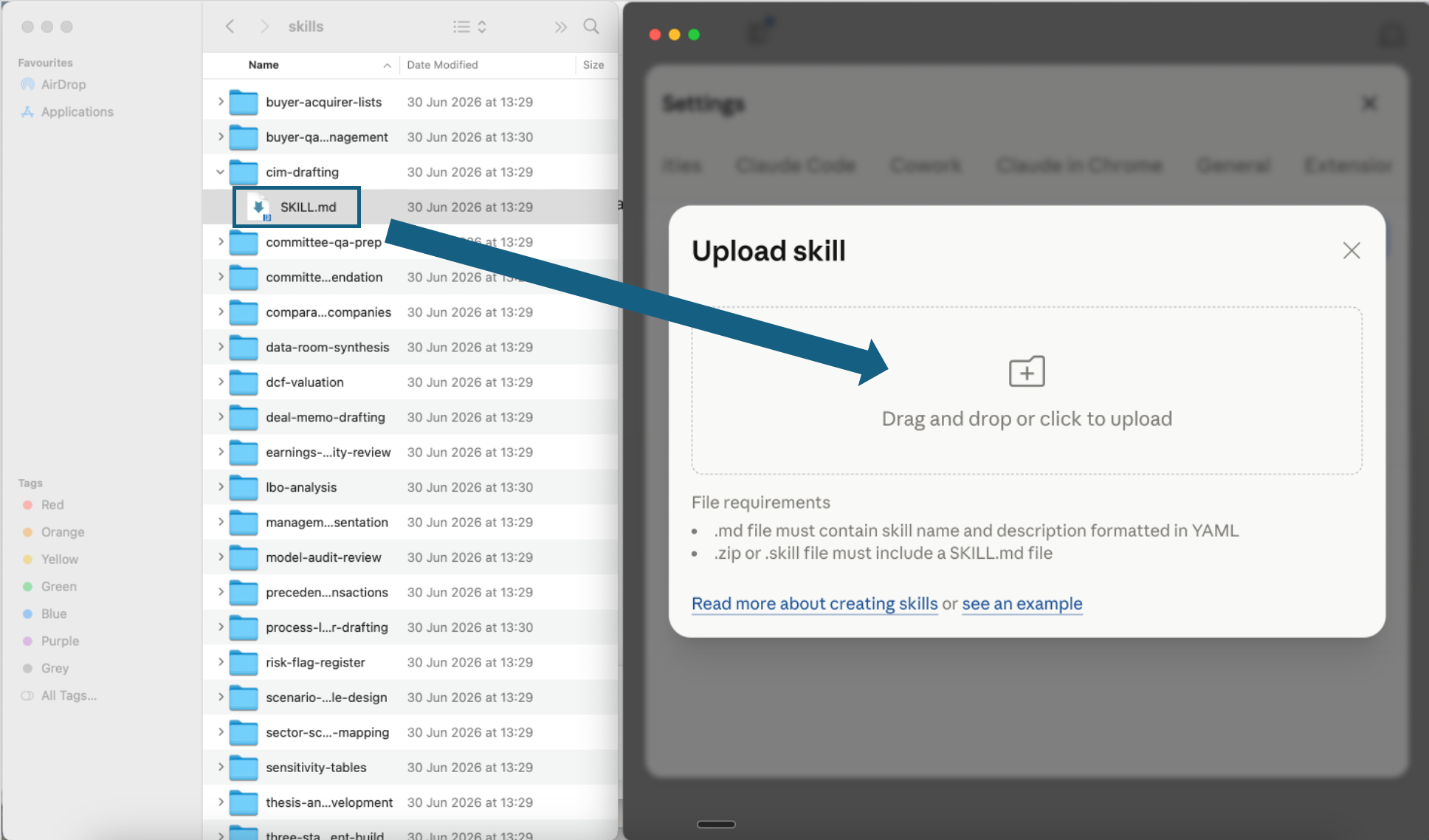
Upload one skill file
Open one extracted skill folder and drag its SKILL.md file into the upload window, or click the upload area to choose it. Repeat this step for each digital transformation skill you want to add.
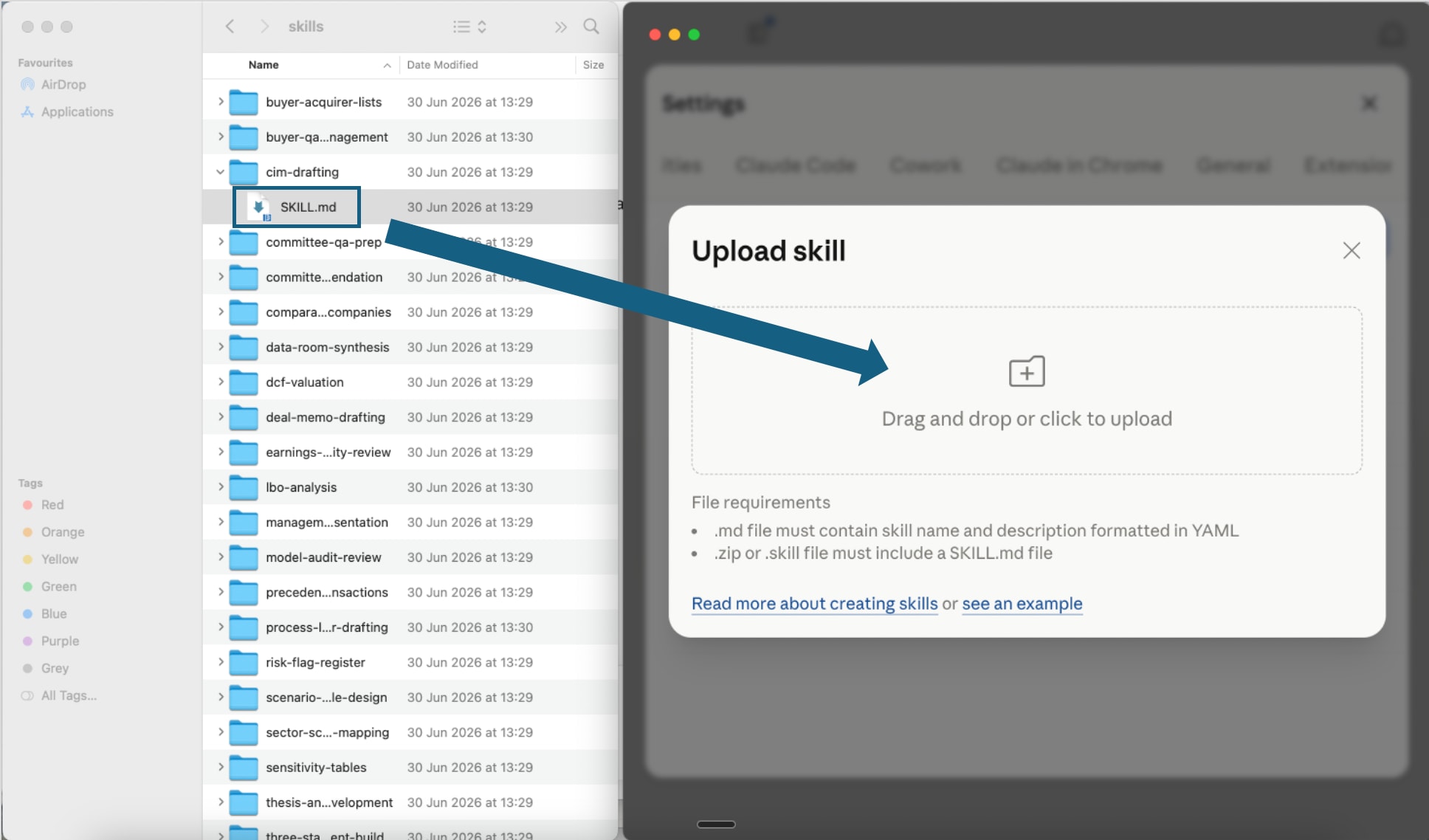
Open the screenshot to view it full size. - Step 4
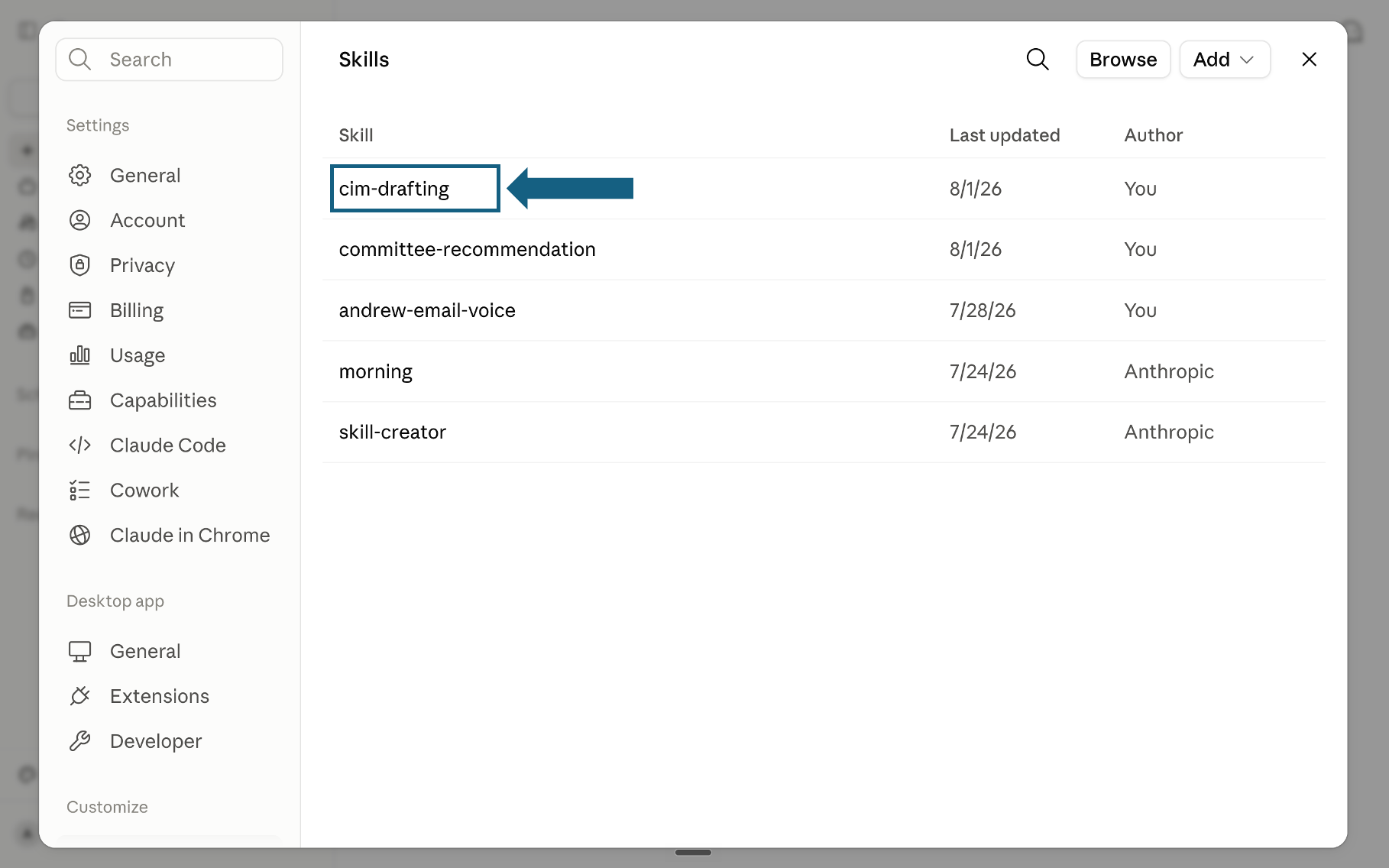
Confirm the skill was added
Return to the Skills list and check that the skill appears. Select its name to open it.
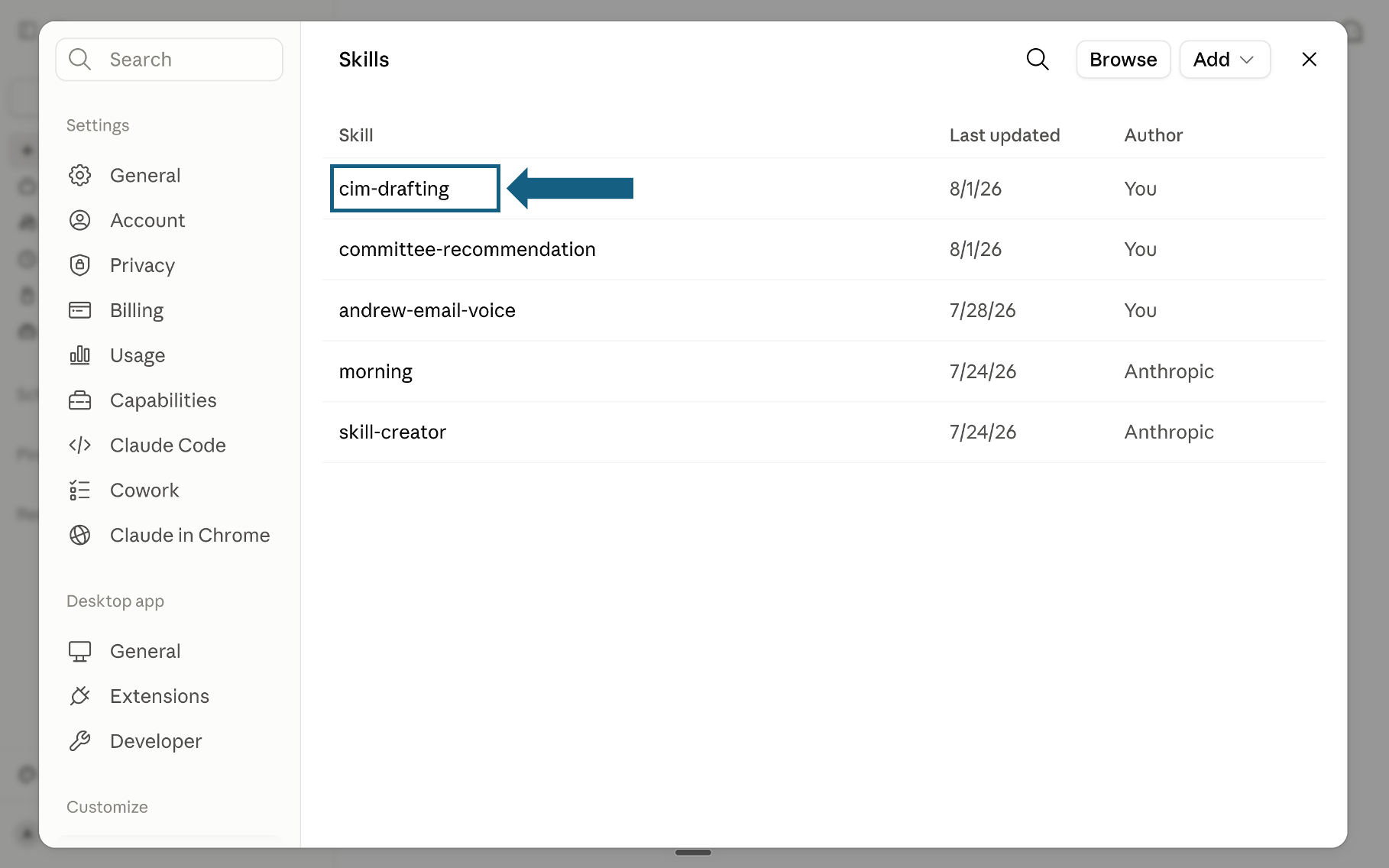
Open the screenshot to view it full size. - Step 5
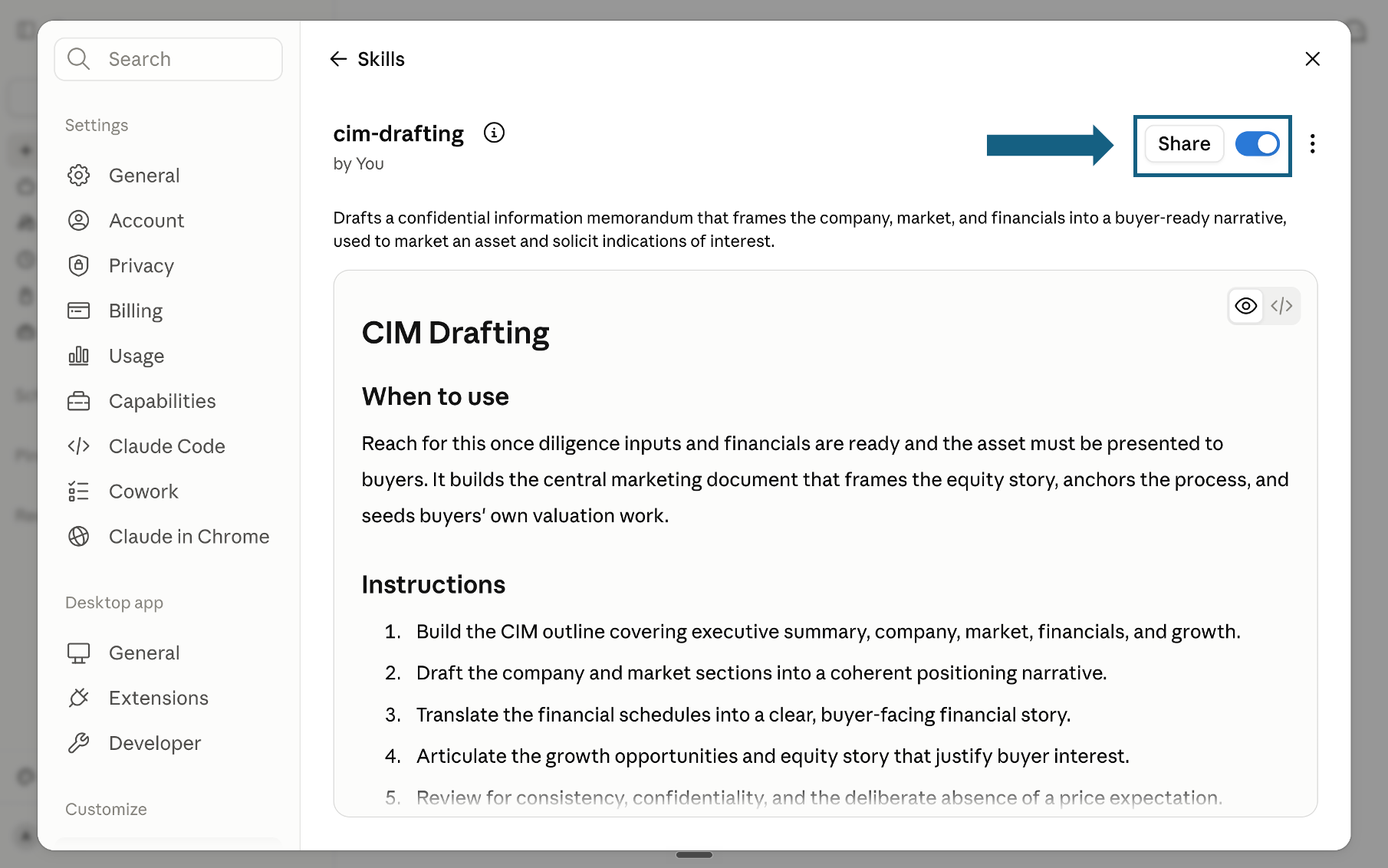
Review and turn on the skill
Review the skill's name, description, and instructions, then make sure the switch beside Share is on. A blue switch means the skill is turned on; sharing it is optional.
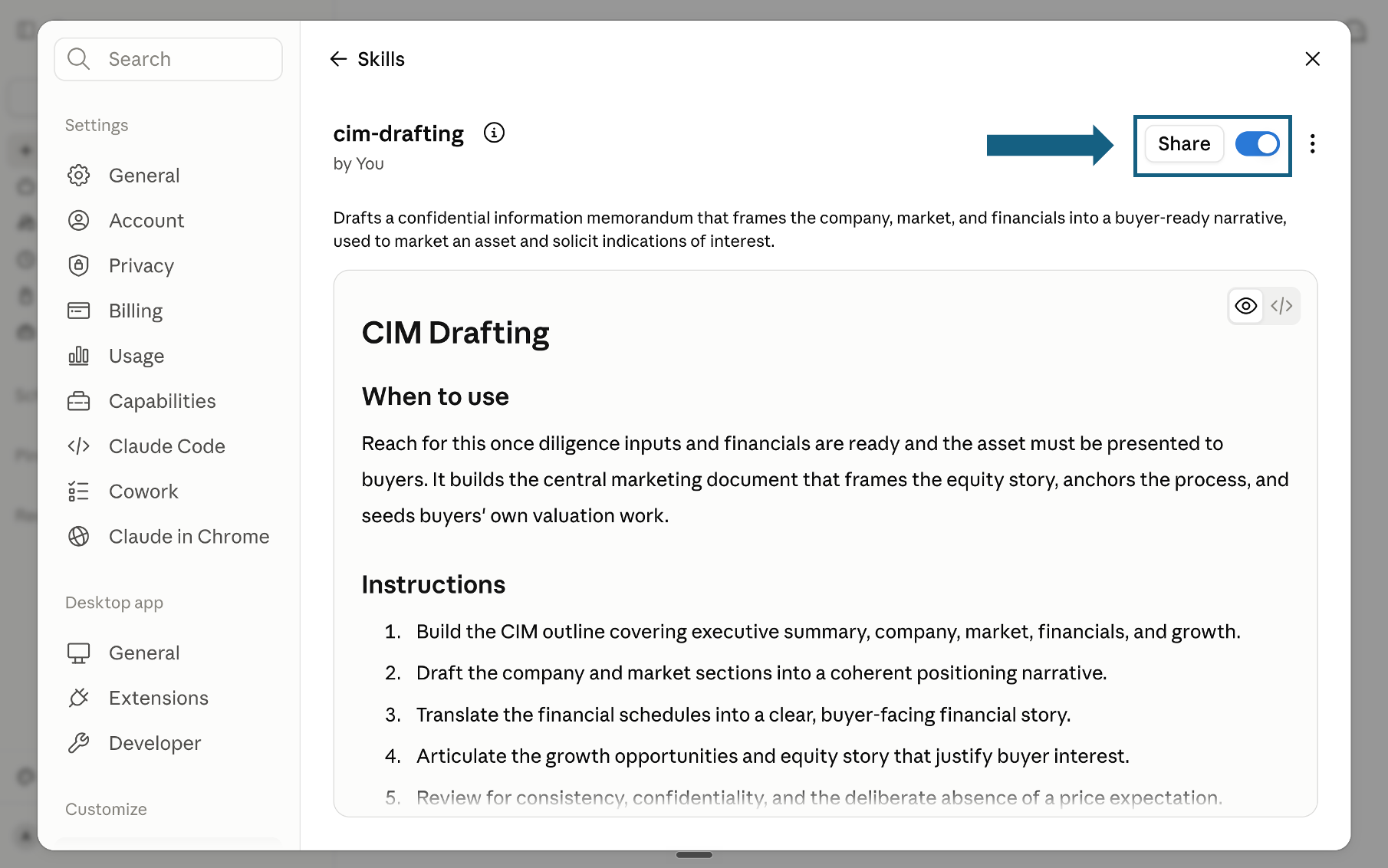
Open the screenshot to view it full size.
Try a skill
Tell Claude which skill to use and provide the relevant files or context. Review every output before sharing it.
- "Use the digital-maturity-assessment skill. Here is what I know about the client: [paste context]."
- "Use the board-deck-framer skill. The program is a GBP 90m cloud and data transformation. The board meets in two weeks."
- "Use the stakeholder-resistance-mapper skill. The CFO is blocking the program and we are not sure why."
How to choose a skill
Match your immediate need to the skill. Use the row that fits, not the whole set.
If this is not your pack, go here
This pack covers one shape of program. Most readers who land here actually want a page below instead, and it is faster to say so than to argue you into a download.
The quality bar
The standard is partner-grade, not analyst-grade: clear choices, explicit logic, no hedging, a recommendation the reader can act on.
Frequently asked questions
What are Claude skills for digital transformation?
A Claude skill is a folder holding one SKILL.md file: plain-English instructions and a description Claude reads at startup, loading the method only when a request matches it. For digital transformation that means a maturity scorecard, a TIME-labeled portfolio audit, or a target operating model design gets applied the same way across a full engagement instead of being re-explained in every prompt.
How many Claude skills are actually in this download?
Eighteen. The zip contains eighteen folders, one SKILL.md file each, across six domains of three skills apiece: assessment, strategy, organization and change, technology, delivery, and communication. Every skill named on this page is in the download, and the count was checked against the actual zip contents rather than the page copy, since skill-pack counts quietly go stale as a library gets renumbered.
Which Claude model is best for a digital transformation program?
Claude Opus 5 for most of the eighteen skills, Anthropic's own starting point for most workloads. Move to Claude Fable 5.1 when the reasoning is genuinely contested, a disputed operating model design, a board narrative that has to survive a hostile question, and use Claude Sonnet 5 for recurring work like a quarterly KPI cycle. Claude Haiku 4.5 is too shallow for framing or option design.
Can Claude turn the operating model or roadmap into a client-ready deck?
Claude produces the structure and the content, the target operating model, the phased roadmap, the RACI, and for a first draft that is often enough. Turning it into slides held to an enforced corporate template is a separate job: Oria runs as a PowerPoint add-in and as a connector for Claude and ChatGPT over MCP, so the slide gets built from the same chat. If the goal is visual impact rather than template compliance, a design-led tool will do better.
Do Claude skills work on the free Claude plan?
Yes. Anthropic makes Skills available on Free, Pro, Max, Team, and Enterprise plans alike, once code execution is turned on in Settings under Capabilities, so uploading one of these eighteen is not a paid-tier gate. Team and Enterprise owners get more on top of that: provisioning skills organization-wide and turning off ones a user added.