

Oria vs Plus AI for Fully Editable PowerPoint Slides
Oria vs Plus AI for editable PowerPoint slides comes down to what survives after the first draft. Here is how each holds up once you start moving elements, reshaping a dense slide, and checking whether your brand template still fits.
Oria vs Plus AI: the bottom line
Oria and Plus AI are both AI add-ins that build slides inside your existing editor, so the real test is not which one drafts faster. It is what happens once you start editing. Oria renders the whole slide as a design first, then a patent-pending engine decomposes it into native PowerPoint shapes, text, icons, and charts, so a change you make later touches only the element you touch. Plus AI's Suggest Layout feature fits your content into a pre-built layout inside Google Slides or PowerPoint, which is fast for a first draft but ties every element to the layout's structure.

Oria is for
Decks that get reworked across several sessions and must keep every element independently editable and on your exact corporate template throughout.

Plus AI is for
A fast, standard first draft from a template library, for a team that moves between Google Slides and PowerPoint and rarely reshapes the result.
If your decks stay editable for weeks, pass through more than one reviewer, and must hold a specific corporate template through every revision, editability and brand control are the two questions that decide the tool. That is the lens this comparison uses throughout.
Oria vs Plus AI on editable output at a glance
The grid below compares the two on the dimensions that decide whether a slide stays usable after the first draft. Oria facts are drawn from its product documentation. Plus AI is described fairly as a template-based AI presentation add-on, without claiming specific features, pricing, or metrics.
Oria claims are documented product facts. Plus AI is framed by its category as a template-based generator, not with invented specifics.
The follow-up edit is the real test of editable PowerPoint slides
The clearest way to compare Oria and Plus AI is not the first slide either tool produces. It is the edit that comes a few days later, once a colleague adds a data point or a reviewer asks for one more step in a process. Feed both tools the same five-step outline and both return a clean first draft. The difference shows up on the second pass.
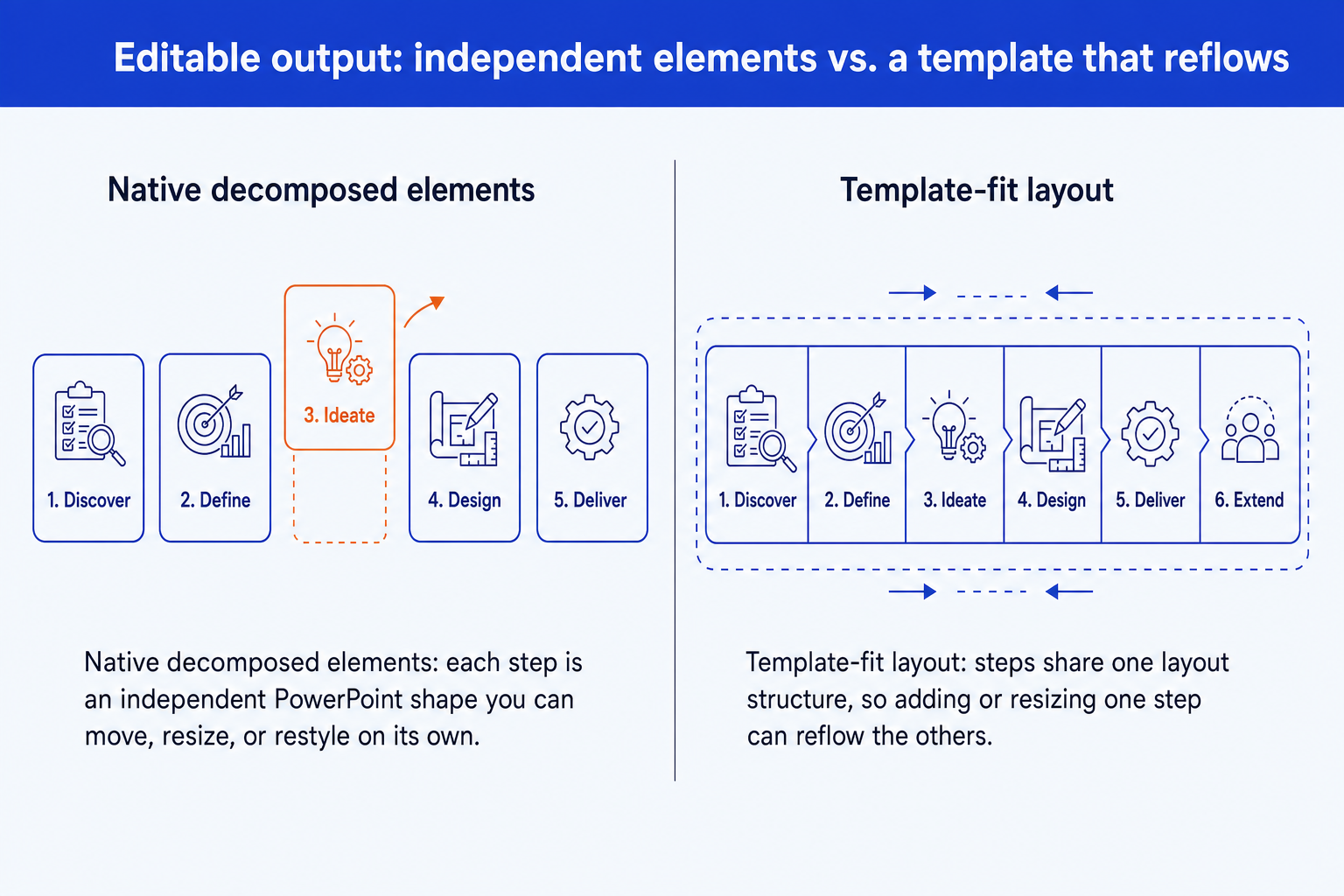
Layout-fit, then re-fit. In a pre-selected-template tool, adding a sixth step to a five-slot layout typically means the outline goes back through the layout engine, which can resize or restack the steps that already fit comfortably to make room for the new one.
Rendered, then decomposed. In Oria, the five existing steps are already independent, native elements. The composition can be regenerated around the new sixth step, and because nothing is merged into a single layout block, the elements you have already nudged, recolored, or retyped are not forced to reset.
This is a difference in technical approach, not a one-off bug in either product. For the full explainer, read our breakdown of the three approaches to AI slide generation. It is the single most useful lens for judging how any AI slide tool will hold up past the first draft.
Brand control that survives more than the first pass
Matching a template on the first generation is a low bar. Most AI slide tools clear it. The harder question is whether fonts, colors, logo placement, and layout conventions still hold after a slide has been manually adjusted two or three times by different people on a deal team.
Upload your corporate template to Oria and it holds fonts, colors, logos, and layout patterns across every regeneration, and because the elements stay native PowerPoint objects, a manual edit after generation does not require re-applying the template. Plus AI's themes and custom templates set a strong initial look, but because content is fit into a pre-built layout rather than rendered around your brand from the start, holding an exact corporate master through several rounds of manual reshaping is a lighter capability. That gap tends to show up on a slide that gets picked up by a second or third person before it ships.
How each handles complex slides through the decomposition engine
A comparison is more useful slide type by slide type than in the abstract. Here is how Plus AI's layout library and Oria's rendering-and-decomposition engine tend to handle five structures that rarely fit a generic template.
The pattern holds across all five. A layout library is fast when a slide is short and matches one of its templates. A render-then-decompose engine is built for the slide types that consulting and finance work actually produces: dense, bespoke, and unlikely to fit a fixed template on the first try, let alone the third edit.
Where Plus AI fits as a template-based add-in
Plus AI is a genuinely useful product for the case it is built for. It installs as an add-on for both Google Slides and Microsoft PowerPoint, so one workflow spans whichever app a team already uses, and Suggest Layout draws from a library of pre-built layouts and themes that makes a first pass on a standard slide shape genuinely fast.
That speed is the point for a recurring status update or a standard business slide, where the first layout produced is usually the last one anyone needs. The trade-off is specific to editability: once a slide needs to be reshaped, whether that is a longer section, an added step, or a stricter brand check, the layout that made the first draft fast is the same structure a later edit has to work around. For a deeper, standalone look at the two products side by side, see our Oria vs Plus AI comparison, or the Plus AI vs Oria breakdown for consulting decks for how the two hold up on a full deck rather than one slide.
Where Oria wins on editability and brand control
Oria is positioned as AI for complex professional slides, and its advantages on editable output trace directly back to the render-then-decompose method.
Elements stay independent. Every shape, text box, icon, line, and chart is native PowerPoint, so editing one element never shifts the others around it.
Brand holds through revisions. Fonts, colors, logo, and layout patterns from your uploaded template carry through every regeneration and every manual edit afterward.
Built for the slides Plus AI struggles with. Org charts, value chains, roadmaps, and heatmaps are rendered as one composition sized to your actual content, not a fixed template shape.
Multiple design options per input. Two to five distinct design directions in roughly 30 to 40 seconds, so you choose the direction before you start editing, not after.
No re-export step. Output is native PowerPoint from the first render, so there is no conversion step that can introduce a fresh set of formatting issues.
If you want to see how this fits against the wider field of AI slide tools, our guide to the best AI for PowerPoint places Oria and Plus AI alongside every other approach.
When to pick Oria and when to pick Plus AI
Pick Oria when
- The slide gets edited across more than one session
- Every element must stay independently editable
- A strict corporate template must hold through revisions
- The slide is dense, bespoke, or framework-heavy
- Different reviewers will each touch the same slide
Consider Plus AI when
- You want one fast, standard draft from a template
- You move between Google Slides and PowerPoint
- The slide is short and unlikely to be reshaped later
- You do not need a strict corporate master
- It is a status update or a standard business slide
For the consulting, banking, and strategy audience this comparison is written for, the deciding factor is usually how many times the slide gets touched before it ships, not how fast the first draft appears.
Frequently asked questions
What does "fully editable" actually mean for an AI-generated PowerPoint slide?
It means every shape, text box, icon, line, and chart on the slide stays a native, independent PowerPoint object after generation, so you can move, resize, recolor, or retype any single element without the rest of the slide shifting. Oria's decomposition engine produces output at that level. A layout-fitted slide is editable too, but the elements are tied to the template's structure, so a change to one part can nudge the parts around it.
Does Plus AI produce editable PowerPoint output?
Yes. Slides built with Plus AI's Suggest Layout feature are editable inside Google Slides or PowerPoint. The distinction is what a later edit costs. Because the content is fit into a pre-built layout, reshaping a dense slide, adding a step, or lengthening one section can require adjusting the layout around it, rather than touching only the one element you meant to change.
Why does brand control matter more after the first draft than during it?
Almost any AI tool can match a template on the first generation. The harder test is whether fonts, colors, logo placement, and layout conventions still hold after a slide has been manually adjusted two or three times. Oria's brand-template handling applies to every regeneration and stays intact through manual edits, because the elements are native to begin with and never get re-merged into a single generated block.
Which tool handles complex, framework-heavy slides better?
Oria is built specifically for that case: multi-step process flows, org charts, value chain diagrams, and heatmaps are rendered as one composition and decomposed into elements sized to your actual content. Plus AI's layout library works well when a slide is short and generic; it is less suited to dense, bespoke structures that do not match a template's fixed proportions.
Which should I pick if I keep revising the same deck?
Pick Oria if the deck goes through several rounds of edits, reviewers, and a corporate template that must hold throughout. Pick Plus AI if you want one fast, standard draft and are unlikely to keep reshaping it. For the technical reason the two approaches diverge, read our explainer on the three approaches to AI slide generation.