

PowerPoint Alternatives That Still Export .pptx: 7 Tools
You want to leave PowerPoint for a cheaper, faster or better-looking editor, but the people reviewing your deck still open a .pptx. This is a fair field guide to the PowerPoint alternatives that still export .pptx, with a clear pick for each reader.
PowerPoint is the default for a reason, and that is what makes a PowerPoint alternative a real decision. Microsoft reported more than 450 million paid Microsoft 365 commercial seats in its fiscal 2026 second-quarter results, with paid seats growing 6% over the fiscal year, according to Office 365 IT Pros coverage of that release. Whatever you build in, someone on the other end of the email probably opens a .pptx.
That is why the .pptx export matters more than any feature list. Canva reported more than 265 million monthly active users at the end of 2025, as covered by Music Ally in February 2026, so plenty of people build outside PowerPoint and still send a PowerPoint file at the end. The useful question is not which tool is best in general. It is which tool survives the trip into the file your reviewers actually open.
Quick answer: the best PowerPoint alternative
Seven tools cover the field: Google Slides, Keynote, LibreOffice Impress, Canva, Gamma, Beautiful.ai and Oria. All of them can hand you a .pptx, so the export button is not the test. What differs is how much of your slide survives it.
Our pick depends on the deck. For a free, shared deck, choose Google Slides. For a visual deck, choose Canva or Gamma. For dense, template-bound consulting or board slides, choose a tool that builds inside PowerPoint so there is no export to lose anything in, which is where Oria fits. If the deck is a fundraising pitch, a launch or a student project, a design-led tool will look better than Oria.
How we chose these PowerPoint alternatives
We scored each tool against five rules, and we say what we ignored. Facts about Oria come from its product documentation. Other tools are described by the category they belong to, without invented pricing or features.
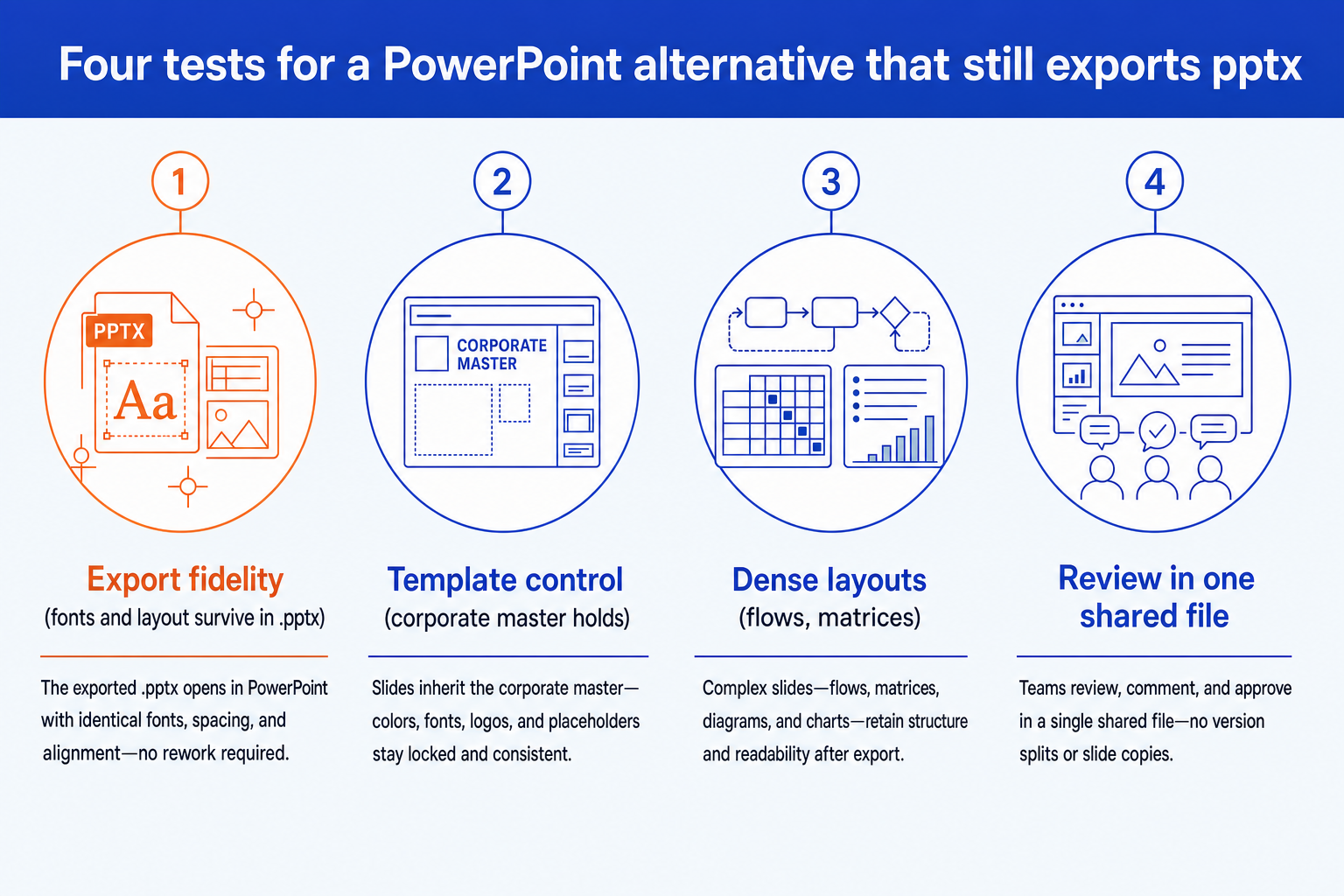
Export fidelity. We ask what happens to fonts, spacing and shapes when the .pptx is opened in PowerPoint. A tool that exports a file is not the same as a tool whose file survives review.
Corporate template control. Fonts, colors, logos and layout rules must hold across every slide, so the deck passes a brand check without a reformatting pass.
Dense, bespoke layouts. Process flows, matrices, customer journeys and data-heavy exhibits, not only clean one-idea slides with a photo.
Review in one shared file. Partners and clients mark up, merge and circulate a single .pptx. Every export step is a chance for the versions to split.
What we ignored. Template counts, stock-image libraries and animation effects. They matter for marketing decks and barely move a board pack. We also did not score price, because plans change often.
Key takeaways for choosing
- Exporting is not the same as staying editable. Nearly every tool here can produce a .pptx. The difference is whether the next person can retype and restyle it, so open the exported file and test the slide you care about most.
- The export step is where a strict template is tested. Tools that design in their own format apply their own themes well. A corporate master with fixed fonts and layouts is easier to hold when the deck is built in PowerPoint itself.
- Density separates the generators. Most tools handle a clean narrative slide. The gap opens on a seven-step flow with a summary column, so ask each tool for the hardest slide you actually make.
- A shared file is the review surface. If your deck is merged into a bigger file and marked up by others, favor tools whose native format is .pptx over tools that export it as a last step.
- Visual impact is a different job. For pitches, launches and student work, a design-led tool can beat every option here on looks. Pick by the job, not by a single winner.
PowerPoint alternatives compared at a glance
One row per option, with columns that follow the takeaways above. PowerPoint itself is the benchmark for file compatibility, so a row that says “export” means a conversion you should verify.
| Tool | Where it runs | .pptx handling | Template control | Best fit |
|---|---|---|---|---|
| Google Slides | Web app, real-time collaboration | Download as .pptx | Manual master control | Free, shared decks in a Google workspace |
| Keynote | Apple devices and iCloud | Export to PowerPoint | Apple themes and masters | Design-conscious Mac and iPad users |
| LibreOffice Impress | Free open-source desktop app | Opens and saves .pptx | Standard masters, hands-on | Cost-free, offline, no vendor account |
| Canva | Web app, design first | Download as .pptx | Brand kits | Visual decks, marketing and campaigns |
| Gamma | Web app, AI generated | Export to .pptx | Theme based | Fast visual decks and web-style pages |
| Beautiful.ai | Web app, smart templates | Export to PowerPoint | Template led | Clean, on-message narrative decks |
| Oria | PowerPoint add-in, plus Claude and ChatGPT connector | Native .pptx, no export step | Holds an uploaded corporate template | Dense consulting decks and board packs |
The PowerPoint alternatives in depth
Each option below closes with its trade-off, including ours.
Is Google Slides a good PowerPoint alternative that exports .pptx?
Google Slides is free with a Google account, collaborative in real time and easy to share. For teams already in a Google workspace it is the lowest-friction way to build a plain, shared deck, and it can download a presentation as a .pptx.
Fidelity on complex layouts is the usual pinch point. Fonts that PowerPoint does not have get substituted, which shifts spacing and line breaks, and animation support is narrower than PowerPoint's. Open the download in PowerPoint before you send it.
The trade-off: Excellent for shared, lightweight decks, and limited when a strict template and dense exhibits must survive the export.
Can Keynote replace PowerPoint and still export .pptx?
Keynote is Apple's presentation app, included with Macs and iPads, and it has a strong reputation for clean typography and motion. It can export a presentation to PowerPoint format, so a colleague on Windows can still open the file.
Its own animation and layout features do not all have PowerPoint equivalents, so effects and some text treatments are simplified on export. It also only runs comfortably on Apple hardware, which matters if your team is mixed.
The trade-off: Beautiful for an Apple-only team, awkward when the deck's real home is a Windows-heavy review chain.
Is LibreOffice Impress a free PowerPoint alternative?
LibreOffice Impress is the free, open-source presentation app in the LibreOffice suite. It reads and writes .pptx directly, runs offline on Windows, macOS and Linux, and needs no account. For a budget-constrained team or one with strict software-procurement rules, that is a real advantage.
It has no AI generation layer, and complex slides built in PowerPoint can reflow when opened. Treat it as a capable editor, not a drafting assistant.
The trade-off: Free and file-compatible, but you do all of the layout work yourself and complex PowerPoint slides can shift.
Is Canva a good PowerPoint alternative for professional decks?
Canva is a design-first editor with a very large template library, and it can download a design as a .pptx. For a visual deck, it is the strongest all-round option on this list.
The friction is what happens after the design is finished. Text boxes and basic shapes generally carry over, while animations do not, and fonts or spacing can shift on complex layouts. We cover the wider field in our guide to Canva alternatives for professional decks.
Related reading: Canva alternatives for professional decks.
The trade-off: Best-in-class for visual work, weaker when the .pptx must hold a strict corporate master.
Is Gamma a good PowerPoint alternative with .pptx export?
Gamma generates a deck, document or web page from a prompt and is one of the fastest routes from an idea to something that looks finished. It can export to .pptx when a file is required.
The deck is built in a web editor, so the export is the moment a corporate template and dense layouts get tested. Our breakdown of Gamma alternatives for consulting decks applies the same criteria.
Related reading: best Gamma alternative for consulting decks.
The trade-off: Fast and attractive, but web-first, so a firm-template deck adds an export and a cleanup step.
Is Beautiful.ai a good PowerPoint alternative with export?
Beautiful.ai is built around smart templates that rearrange themselves as content is added, which keeps a deck tidy without manual alignment. It can export to PowerPoint, and for a clean business presentation that discipline is a genuine advantage over a free-form canvas.
It is still a standalone web app, and styling is template led. We compare it head to head with a native PowerPoint tool in our Oria vs Beautiful.ai breakdown.
Related reading: Oria vs Beautiful.ai.
The trade-off: Smart templates protect layout but limit bespoke, dense slides and strict corporate masters.
What is the best PowerPoint alternative for consulting and board decks?
Oria is an AI tool for complex professional slides, and it reaches users on two surfaces: an add-in in the PowerPoint task pane (Windows, macOS and PowerPoint for the web), and a connector for Claude and ChatGPT over MCP, so a deck can be built from the chat you are already in. Output is native, fully editable PowerPoint that holds an uploaded corporate template, so there is no export step to test.
Its strength is the dense, template-bound work a tier-one consulting team produces: board packs, steering committee decks, diligence exhibits and operating-model slides. Strictly, it is an alternative to drafting slides by hand rather than a replacement for PowerPoint, because the file it produces is a PowerPoint file.
Related reading: install Oria in Claude and ChatGPT.
The trade-off: Oria is built for the corporate environment only, so it loses on highly visual work such as fundraising decks, launch decks and student presentations, where a design-led tool looks better.
Which PowerPoint alternative we would pick
Our recommendation: if you only need a free, shared deck, pick Google Slides. If the deck is dense and the template is strict, stay in the .pptx format natively and add Oria rather than leaving PowerPoint at all. For a visual deck, pick Canva. That is the honest split, and it comes from the job, not from a ranking.
If you are still choosing, our guide to the best AI for PowerPoint and our tested roundup of PowerPoint add-ins apply the same criteria to more tools.
If you need X, go to Y
Frequently asked questions
What is the best PowerPoint alternative that exports .pptx?
It depends on the job. For a shared, free deck, Google Slides exports to .pptx. For visual decks, Canva and Gamma do. For dense, template-bound corporate decks that must stay editable, an in-PowerPoint tool such as Oria avoids the export step entirely. No single tool wins every deck, and the honest pick follows the audience and the review process.
Is there a free alternative to PowerPoint?
Yes. Google Slides is free with a Google account, LibreOffice Impress is free open-source software, and PowerPoint for the web has a free tier with a Microsoft account. Oria has a free plan with test tokens and no credit card. Free tiers change often, so check each vendor's pricing page before committing a team.
Can Google Slides export to PowerPoint?
Yes. Google Slides can download a presentation as a .pptx file. Text, shapes and images generally carry over, while fonts PowerPoint lacks are substituted and some animations are simplified. Open the downloaded file in PowerPoint and check your most complex slide before you rely on it.
Does Keynote open in PowerPoint?
Not directly, but Keynote can export a presentation to PowerPoint format. Some Keynote-specific animations and text effects are simplified in the export, so review the file in PowerPoint. Keynote runs on Apple devices only.
Will a PowerPoint alternative keep my corporate template?
It depends on the tool. Web-first generators apply their own themes well but offer lighter control over a strict, bespoke master. A tool that works inside PowerPoint, such as Oria, is designed to hold an uploaded corporate template, maintaining fonts, colors, logos and layout patterns across slides.
Is Oria a PowerPoint replacement?
No. Oria produces native PowerPoint files, so it works with PowerPoint rather than replacing it. It is built for corporate documents and consulting-grade presentations, so it loses on highly visual work such as fundraising decks, launches and student presentations. If your deck is judged on visual impact, a design-led tool will look better.
Sources: Microsoft 365 seat count and growth from Microsoft's fiscal 2026 second-quarter results (January 2026), as covered by Office 365 IT Pros. Canva user figures as reported by Music Ally (February 2026).