

Agenda Slide: 4 Types, Examples and When Each Works
An agenda slide lists what a meeting or presentation will cover, in running order, so the room knows the route before it starts. A working one also gives the time, the owner and the ask for each item, and produces a shared plan for the hour.
What is an agenda slide, and what is it for?
The decision you are really making is how much of the meeting to commit to in advance. An agenda slide is that commitment, made visible. It tells ten people what the next hour is for before anyone has spoken, which is the cheapest moment to correct a wrong assumption.
An agenda slide is a single slide that sets out the running order of a meeting or presentation: the items to be covered, normally with the minutes allotted, the person leading each one, and what the room must do with it, whether decide, discuss or note. Its job is to align expectations before the first topic starts, so that everyone agrees what success looks like and where the time will go. It comes in four common types: the numbered list, the time-boxed agenda, the decision-led agenda and the tracker that repeats through a long deck.
Why the agenda slide matters more than its size suggests
The slide is small and the cost of skipping it is not. In a 2017 survey of 182 senior managers across industries, published in the Harvard Business Review as "Stop the Meeting Madness", Leslie Perlow, Constance Hadley and Eunice Eun found that 71 percent called their meetings unproductive and inefficient, and 65 percent said meetings kept them from completing their own work. Doodle's 2019 State of Meetings report, built on 19 million meetings and more than 6,500 interviews, put the cost of poorly organised meetings at 399 billion dollars in the United States that year, and found professionals spend an average of two hours a week in pointless ones.
An agenda does not fix a meeting that should not exist. Peter Drucker made that point in The Effective Executive in 1967: "Meetings are by definition a concession to deficient organization. For one either meets or one works. One cannot do both at the same time." Read that way, the agenda slide has a second job beyond ordering the hour. It is the moment the chair has to state what the meeting is for, and if the title cannot be written in one sentence, the meeting is the thing to fix.
The five parts of an agenda slide
An agenda slide is not one object. It is five parts, and the slides that fail usually have the first two and nothing else. Each part answers a question the room would otherwise ask out loud.
| Part | What goes in it | A good entry | A weak entry |
|---|---|---|---|
| Title | The one sentence the meeting exists to resolve | "Agenda: agree the cutover date and the fallback plan" | A bare word such as "Agenda" or "Today" |
| Items | The sections of the discussion, in the order they will run | Context, current status, options, decision, next steps | Eleven items for a sixty-minute slot |
| Time | Minutes against each item, summing to the slot | 5, 10, 20, 15, 10 for a 60-minute meeting | Start times that no one can hold to |
| Owner | The one person who presents or leads each item | "Finance lead", "Programme director" | A team name with no individual behind it |
| Ask | What the room has to do with the item: decide, discuss or note | "Decide: option B or C" | Nothing, so the item becomes a status update |
Title and ask are the parts people leave out. The title converts a list into a purpose, and the ask converts an item into a job. With both, the room can tell that item three is the one to stay awake for.
Four types of agenda slide
The same five items can be drawn four ways. The gallery below renders each one with identical content, so the only difference you see is how much the layout commits the room to.
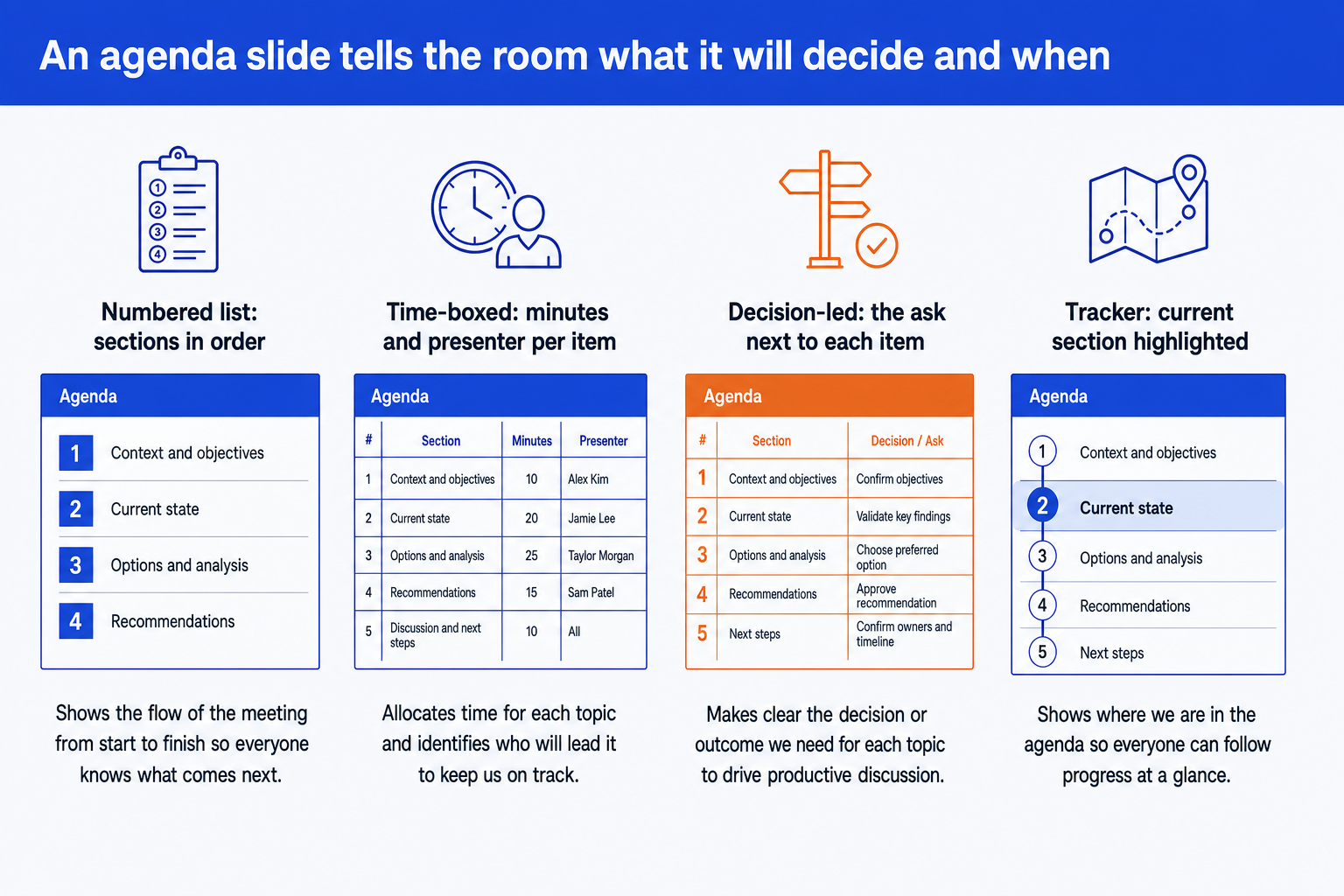
The numbered list. Sections in order, no times, no owners. It is the right slide when the room is small, the meeting is informal and the only job is to say what comes next. It fails the moment someone asks how long item three will take.
The time-boxed agenda. Minutes and a presenter against every item. This is the working standard for steering committees and client workshops, because it makes the cost of each topic visible and lets the chair cut one before the clock does.
The decision-led agenda. Adds an Ask column that names what the room must do with each item: decide, discuss or note. It is the version that stops a meeting becoming a tour of status updates, and the one worth reaching for when a decision is the reason people are in the room.
The tracker (or divider) agenda. The same list repeated as a small strip or a full divider slide, with the current section highlighted. It does not replace the opening agenda. It is the wayfinding for a long deck, where it tells a reader which section they are in without making them page back.
The types stack. A steering committee deck normally opens with a decision-led agenda and then repeats the tracker on each section divider. The numbered list is the right choice only when there is nothing to time and nothing to decide, which is a briefing, not a meeting.
Worked example: a steering committee agenda, start to finish
The setup is illustrative. A 60-minute steering committee has to choose a cutover date for a finance system replacement. The first draft of the agenda is what most teams write: four neutral topics in the order the team built the deck, with Status, Risks, Budget and Next steps.
Step 1: find the decision. The only reason the committee is meeting is to pick a date and a fallback plan. None of the four draft topics says so. The title becomes "Agree the cutover date and the fallback plan".
Step 2: rewrite items as jobs. Status becomes "Cutover readiness", with an ask of Note. Risks and Budget merge into "Options for the cutover date", with an ask of Discuss, because the risk and the cost are what distinguish the options. A separate item is added: "Decision: date and fallback plan", with an ask of Decide.
Step 3: time-box, then check the sum. The minutes are 5, 10, 20, 15 and 10, and 5 + 10 + 20 + 15 + 10 = 60, which fits the slot. The time that goes to the options and the decision is 20 + 15 = 35 minutes, or 58 percent of the meeting. In the original draft, the topics that carried the decision were the last two of four, and status updates would have taken whatever was left after an overrun.
| Item | Minutes | Owner | Ask |
|---|---|---|---|
| Context and objectives | 5 | Programme director | Note |
| Cutover readiness | 10 | Finance transformation lead | Note |
| Options for the cutover date | 20 | Controller | Discuss |
| Decision: date and fallback plan | 15 | Chair | Decide |
| Next steps and owners | 10 | Programme director | Confirm |
Step 4: place the decision. It sits fourth, not last. The 10-minute close is protected for next steps, so that an overrun in the options discussion eats the buffer inside item four rather than the decision itself. If the options item runs over by ten minutes, the chair has a visible choice: shorten the decision to five minutes, or move "Cutover readiness" to a pre-read. A topic-list agenda gives the chair no such choice, because nothing on it is marked as the point.
When to use an agenda slide
- Any meeting where people outside the core team will be in the room and will not know the plan.
- Any deck read cold, such as a pre-read or board pack, where the reader decides what to read from the contents.
- Workshops and client sessions, where the agenda doubles as a contract about what will and will not be covered.
- Long decks with distinct sections, where a tracker or divider keeps the reader oriented.
For recurring meetings, build the agenda once as a template and change only the ask and the owners. The monthly business review agenda and the quarterly business review structure are worked examples of exactly that, with the section order already set.
When an agenda slide misleads
An agenda is a claim about the future, and a claim that is wrong costs credibility in the first minute. These are the specific ways it goes wrong.
- It promises order the meeting does not have. If the first item runs forty minutes over, the printed times are a record of what was intended, and people stop trusting the slide.
- It hides the real agenda. A list of neutral topics ("Update", "Discussion") lets a contested decision slide to the last five minutes, where nobody can resolve it.
- It over-promises on a short deck. A ten-slide update does not need a contents slide, and putting one in spends a slide to say what the next page will say anyway.
- It flatters the presenter. An agenda built around what the team wants to show, not what the room needs to decide, looks organised and delivers nothing.
- It goes stale. A sequence agreed on Monday and rearranged on Wednesday, with the slide untouched, is worse than no agenda at all.
The fix for the first and fifth is the same: treat the slide as live. Update it when the order changes, and say aloud when the room is going off it. The fix for the second is to write the title and the asks first and the items second.
Common agenda slide mistakes
How to build an agenda slide in PowerPoint
By hand, build the table on your master with a fixed column for minutes, one for the owner and one for the ask, then copy the slide for each tracker version. The work is in keeping the sum of the minutes honest and the fonts on the template. The same grid logic is covered for the neighbouring slides in the guides to the executive summary slide and the title slide, which sit either side of the agenda in most decks.
Oria builds it from a prompt. It is built for corporate documents and consulting presentations: steering committee decks, board packs and dense frameworks held to an enforced template. It reaches you in two ways: a PowerPoint add-in in the task pane on Windows, macOS and PowerPoint for the web, and a connector for Claude and ChatGPT over MCP, so the slide can be built from the chat you are already in. The result is native PowerPoint objects on your master, so the minutes can be edited on the morning of the meeting.
One-prompt decision-led agenda
Pair it with the section tracker by asking for the same list as a strip along the top of each divider, current section highlighted. If the deck then needs a plan slide, the same route builds a strategy roadmap slide from the same prompt style.
The trade-off: Oria is built for the corporate environment and loses on highly visual work. Founder pitch decks, launch decks, student presentations and marketing one-pagers want visual impact more than a defensible running order, and a design-led tool such as Gamma, Canva, Pitch or Beautiful.ai will beat it there and look better doing it. For a plain agenda in a team meeting, a native PowerPoint table takes two minutes and needs no tool at all.
Frequently asked questions
What is an agenda slide?
An agenda slide is the slide near the start of a presentation or meeting deck that lists what will be covered, in order, so the room knows the route before it begins. A working one adds the time for each item, who leads it and what the room has to do with it. It orients people, and in a meeting it commits the chair to a running order.
What should be on an agenda slide?
A title stating the meeting's purpose, four to seven items in running order, minutes against each item that sum to the slot, one named owner per item, and an ask: decide, discuss or note. Anything past that is a second slide. The title and the ask do most of the work, because they say why the meeting exists.
How many items should an agenda slide have?
Four to seven. Fewer than four usually means the items are too broad to time. More than seven stops the list reading at a glance and gives the chair nothing to cut. If the real agenda is longer, group items into themes on the slide and keep the detailed version in the meeting invitation or an appendix.
Where does the agenda slide go in a deck?
After the title slide and, in a consulting or board deck, after the executive summary, so the reader gets the answer first and the route second. In a live meeting with no executive summary, it is slide two. Section dividers carrying the agenda repeat further in.
What is the difference between an agenda slide and a table of contents?
A table of contents lists the sections of a document with page numbers so a reader can navigate it. An agenda slide lists what a meeting will cover in order, usually with times and owners. A pre-read can carry both. A board pack usually opens with the agenda, because the board is deciding how to spend the meeting, not where to find a page.
Do you need an agenda slide for a short presentation?
Usually not. For a deck of about ten slides, one agenda slide spends 10 percent of the deck on a contents list. Use the executive summary to give the route, and save the agenda slide for decks with several sections, several presenters or a decision in the room.
How do you make an agenda slide in PowerPoint?
Build it as a native table or aligned text boxes on your slide master so it inherits the template fonts and colours, then copy it for each divider and highlight the active row. Keep it as editable objects, not a picture, so the times and owners can change the morning of the meeting.