

Title slide examples worth studying
A title slide is the first slide of a presentation, the one a room sees before any content begins. The nine title slide examples below show what belongs on it across the settings you are most likely to build one for: client kickoffs, board updates, internal reviews, conferences, and a handful of others. Every one needs the same four jobs done, in different proportions: name what the deck is about, give one line of context, say who is presenting and when, and carry whatever marking the setting requires, such as a confidentiality tag or an event's own branding.
They are ordered from the settings you will build most often, a client kickoff and a board update, down to more specialized ones, an investor pitch, a sales pitch, and a post-mortem. Read the four elements, the reasoning, and the verdict for each before you copy one.
The four elements every title slide can carry
Every example below is a different mix of the same four elements. Knowing the four first makes it clear why each example emphasizes what it does.
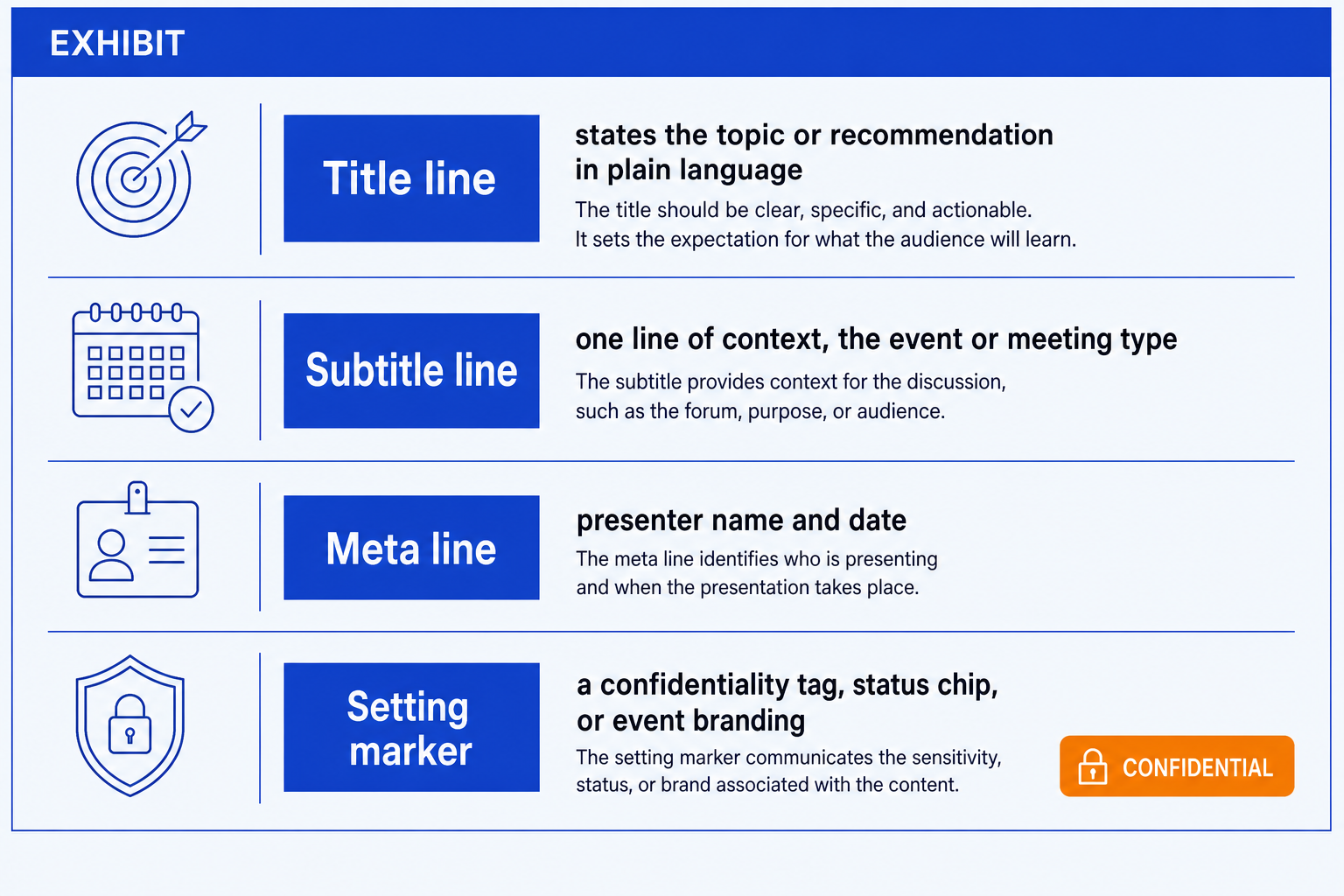
Title line. States the topic, the decision, or the recommendation in plain language, not the name of the meeting itself.
Subtitle line. One line of context: the event, the round, the meeting type, or the cycle the deck belongs to.
Meta line. Who is presenting, and when, plus a decision owner or version reference on formal decks.
Setting marker. Whatever the room requires beyond the first three: a confidentiality tag, a status chip, or an event's own branding.
If your current slides already carry all four but still look inconsistent from deck to deck, the fix is usually formatting rather than content. Our guide to cleaning up a messy PowerPoint slide covers the alignment and spacing fixes that make a title slide read as deliberate rather than assembled in a hurry.
1. Client kickoff title slide
Title line
Names the engagement itself in plain terms, e.g. "Supply Chain Cost Reduction: Kickoff", not just the word Kickoff.
Subtitle line
One line stating the objective and the timeframe, e.g. "[N]-week diagnostic, [Team A] and [Team B]".
Meta line
The presenting team's name, the date, and the format, in person or by video.
Setting marker
A confidentiality tag such as "Client confidential" or "Draft, not for distribution", since kickoff material often circulates before formal sign-off.
A kickoff audience is meeting the team and the scope for the first time, so the slide has to do two jobs at once: introduce the engagement in one line and set the confidentiality boundary before anything else gets discussed.
Verdict
Best for the opening slide of an external or client-facing kickoff, where the room needs the scope and the confidentiality boundary before the agenda.
2. Board update title slide
Title line
The decision or update at stake, not the words Board Update, e.g. "Q3 Performance and the Case for Additional Headcount".
Subtitle line
Names the meeting type and cycle, e.g. "Q3 board meeting, [Month Year]".
Meta line
Presenter name and title, the date, and a page or version reference if this sits inside a full board pack.
Setting marker
A classification such as "Board confidential" plus a document or version code, since board packs are formally tracked across drafts.
Directors work through a fixed agenda and often read the pack before the meeting, so the title slide has to function like an index entry: identifiable on its own, out of context, months later.
Verdict
Best for the cover of a board pack, or a divider slide inside one, where version and confidentiality tracking matter as much as the topic line.
3. Internal strategy review title slide
Title line
The recommendation or the open question, e.g. "Should We Enter the Nordics in 2027?".
Subtitle line
Names the review forum, e.g. "Strategy review, Corporate Development".
Meta line
Presenter, date, and the decision owner if that is a different person from the presenter.
Setting marker
"Internal use only", or the sponsoring executive's name, since these decks rarely need external branding.
Internal reviews are working sessions, not broadcasts, so the slide should read like the first page of a memo, oriented to a decision, rather than a title built for an audience that needs on-ramp context.
Verdict
Best for a working session with a single sponsor, where the room already has the background and the goal is reaching a decision.
4. Conference keynote title slide
Title line
The talk's promise in plain language, avoiding internal jargon, e.g. "Why Most Digital Transformations Fail in Year Two".
Subtitle line
Names the event and the track, e.g. "[Conference name], Strategy track".
Meta line
Speaker name, title, and company, since this audience has never met the presenter before.
Setting marker
The event's own branding treatment or a hashtag line, since conference title slides usually sit inside a template set by the organizer, not the speaker.
A conference audience may only see this one slide before deciding whether to keep watching, so credentialing the speaker and stating the promise plainly matter more here than on any internal deck.
Verdict
Best for an external keynote or panel talk, where the audience needs speaker credentials and a plain-language promise, not an internal frame of reference.
5. Investor pitch title slide
Title line
The company name and a one-line positioning statement, e.g. "[Company]: the operating system for field service teams".
Subtitle line
The round and the ask, e.g. "Series A, raising $[X]M".
Meta line
Founder name and the date.
Setting marker
A confidentiality note such as "Confidential, do not distribute", since fundraising decks tend to circulate well beyond the room they were built for.
Investors see dozens of these decks a week, so the title slide has to communicate what the company does and what round it is raising in the time it takes to swipe past it.
Verdict
Best for the cover slide of an investor deck, where positioning and the ask need to land before the reader turns the page.
6. Sales pitch title slide
Title line
Names the prospective client's problem or opportunity, not the vendor's own name, e.g. "[Client]: Reducing Time-to-Close by [X]%".
Subtitle line
Names the meeting purpose, e.g. "Proposal review, [Date]".
Meta line
The presenting team, and the prospective client's logo where permission exists.
Setting marker
A "Prepared for [Client]" line, since these decks are explicitly built for one buyer and not recycled from the last pitch.
A pitch has to signal, in the first five seconds, that the deck was built for this specific buyer rather than reused, and naming the client's own problem in the title line does exactly that.
Verdict
Best for a customized proposal or new-business pitch, where the prospect needs to see their own problem framed on slide one.
7. Town hall title slide
Title line
The message of the quarter, plain and human, e.g. "Where We Stand, and What Changes Next Quarter".
Subtitle line
Names the forum and cadence, e.g. "Quarterly all-hands, [Month Year]".
Meta line
The presenting leader's name and title, and the date.
Setting marker
None beyond the company's own branding, since a town hall is broadly attended and usually carries no confidentiality marker.
A town hall audience ranges from new hires to senior leaders, so the title slide should read like a plain statement anyone in the room can follow, not a compressed phrase built for executives.
Verdict
Best for a broadly attended internal session where the opening line has to work for every level in the room at once.
8. Steering committee status update title slide
Title line
The status or the headline change since last cycle, e.g. "Program X: On Track, Two Risks Escalated".
Subtitle line
Names the cadence, e.g. "Monthly steering committee, cycle [N] of [Total]".
Meta line
The program lead's name, the date, and the cycle number.
Setting marker
A status chip (red, amber, green) sitting next to the title, since a steering audience scans for status before reading anything else.
A recurring steering audience has seen the last update and wants the delta, not the full background, so putting the status and what changed directly in the title line respects the limited time they have.
Verdict
Best for a recurring program update to a committee that already knows the background and wants only what changed since last cycle.
9. Post-mortem review title slide
Title line
Names what is being reviewed, stated neutrally, e.g. "Launch Retrospective: What Worked, What Didn't".
Subtitle line
Names the scope, e.g. "[Project name], [timeframe]".
Meta line
The facilitator's name, the date, and the attendee group.
Setting marker
A note such as "Internal, no individual attribution", since a post-mortem works best when it is framed as blameless from the first slide.
A retrospective's title slide sets the tone for whether the room will speak honestly, so naming the review neutrally and flagging it as blameless changes how people participate for the rest of the session.
Verdict
Best for a retrospective or post-mortem where psychological safety in the room matters as much as the findings themselves.
What belongs on a title slide, by audience
Collapsing the nine examples into four broad audiences makes the pattern easier to copy: what an external-facing deck emphasizes is close to a mirror image of what a recurring status update emphasizes.
| Element | External-facing | Board & governance | Internal working session | Recurring status |
|---|---|---|---|---|
| Title line | States the promise or positioning in plain language a stranger can follow | States the decision or headline number at stake, not the meeting's name | States the open question or the recommendation being decided | States the status or the headline change since last cycle |
| Subtitle line | Names the event, the round, or the meeting's purpose | Names the cycle and the meeting type, e.g. Q3 board meeting | Names the working forum and the sponsor | Names the cadence and the cycle number |
| Meta line | Presenter name, title, and company, since the audience does not know the speaker | Presenter name and title, the date, and a page or version reference | Presenter, the date, and the decision owner if different | Program lead, the date, and the cycle number |
| Setting marker | A confidentiality note, sometimes inside an event's own shared template | "Board confidential" plus a version control code | "Internal use only", or the sponsoring executive's name | A status chip sitting beside the title |
| Logo usage | The presenter's own logo, plus the client's logo when permission exists | Company logo only; board packs rarely carry outside branding | Company logo only, and often left off a working deck entirely | Company logo only |
The pattern holds across all nine examples above: the more the audience already knows, the shorter the title line and the more the setting marker carries the practical information, like a status chip or a version code, that the room actually needs.
Building any of these in PowerPoint
Most of the work in any of these nine comes down to spacing, alignment, and getting the meta line and setting marker to sit quietly instead of competing with the title. If you build decks inside PowerPoint regularly and want that formatting handled automatically on your own template, these Claude skills for slide design and Oria, an AI add-in that runs in the PowerPoint task pane, can produce a fully editable version of any of the layouts above from a one-line description, on your corporate template. For the fuller method behind consulting-style slides in general, see this guide to Claude skills for consulting slide design, and for the slide that usually follows a title slide, our guide to building an executive summary slide is the natural next stop.
Frequently asked questions
What should be on a title slide?
A title slide needs four things: a title line that states the topic or the recommendation in plain language, a one-line subtitle giving context such as the meeting or event, a meta line naming the presenter and the date, and a setting marker such as a confidentiality tag, a status chip, or an event's branding, depending on where the slide is being shown.
Does a title slide need a subtitle?
Almost always, yes. The title line alone rarely carries enough context for a reader who was not in the room for the last meeting or the planning conversation. A one-line subtitle naming the meeting type, the round, or the event lets the slide stand on its own if it is forwarded, filed, or read months later without the presenter there to explain it.
Should a title slide include the presenter's name?
Include it whenever the audience does not already know who is speaking, such as a conference talk, a sales pitch, or an investor meeting. For a recurring internal update where the audience sees the same presenter every cycle, the name matters less than the date and the cycle number, since those are what change from one update to the next.
What does a confidentiality marking on a title slide actually do?
It tells anyone who later opens the file, forwards it, or finds it in a shared folder how it can be handled: internal only, board confidential, or client confidential and not for further distribution. It matters most on decks that are likely to travel beyond the original room, such as kickoff materials, board packs, and investor decks.
How is a board title slide different from a regular one?
A board title slide leans harder on tracking: a version or document code, a page reference, and a formal confidentiality classification, because board packs are filed, referenced, and audited long after the meeting ends. A regular internal or working-session title slide can drop most of that and focus on the decision at stake instead.
Do conference title slides need a different structure than internal ones?
Yes. A conference title slide has to credential the speaker, since the audience has usually never met them, and it often sits inside branding set by the event organizer rather than the speaker's own company. An internal title slide can skip the credentialing entirely and lead with the decision or the update instead.