

How to Build a Porter's Five Forces Slide for Strategy Teams
Rate the five forces as a plain outline, then run it through Text to Slide. Here is a worked market-entry example, how to choose between Multiple Design Options, and the exact prompts.
How to build a Porter's Five Forces slide for strategy teams, in short
To build a Porter's Five Forces slide for strategy teams, write the industry and five lines, one per force, each with a High, Medium, or Low rating and one reason, then run that outline through Oria's Text to Slide. It returns a native diagram with Competitive Rivalry in the center, the four surrounding forces color-coded by rating, and your corporate template already applied. Oria also generates two to five design options from the same outline, so you can compare a dense, reason-per-box layout against a lighter ratings-only version before you commit.
This guide walks a full worked example for a market-entry decision, the outline format Text to Slide reads best, how to choose between the design options it returns, the copy-paste prompts, and the mistakes that leave the slide unreadable.
Why strategy teams reach for a Five Forces slide before a market-entry call
A market-entry recommendation, a commercial due diligence read, or an investment committee memo all share the same first question: is this industry structurally worth entering, before anyone argues for a specific target or approach inside it. Porter's Five Forces answers that question by scoring the five structural pressures that set how much profit the players in a market can keep. A Five Forces slide is how that verdict gets communicated in one glance.
This guide focuses on drafting that slide from an outline with Text to Slide and choosing between the design options Oria returns. For the full definitions of each force and the manual, shape-by-shape build, see how to build a Porter's Five Forces slide. For the wider set of frameworks a market-entry engagement draws on, see the consulting frameworks field guide.
A worked example: rating Five Forces for a market-entry decision
Ratings are easiest to learn from a full example rather than five isolated definitions. Below is a worked Five Forces read for a strategy team evaluating entry into the electric vehicle charging network industry, a market with capital- intensive infrastructure, a handful of hardware suppliers, and site hosts who can work with more than one network at once.
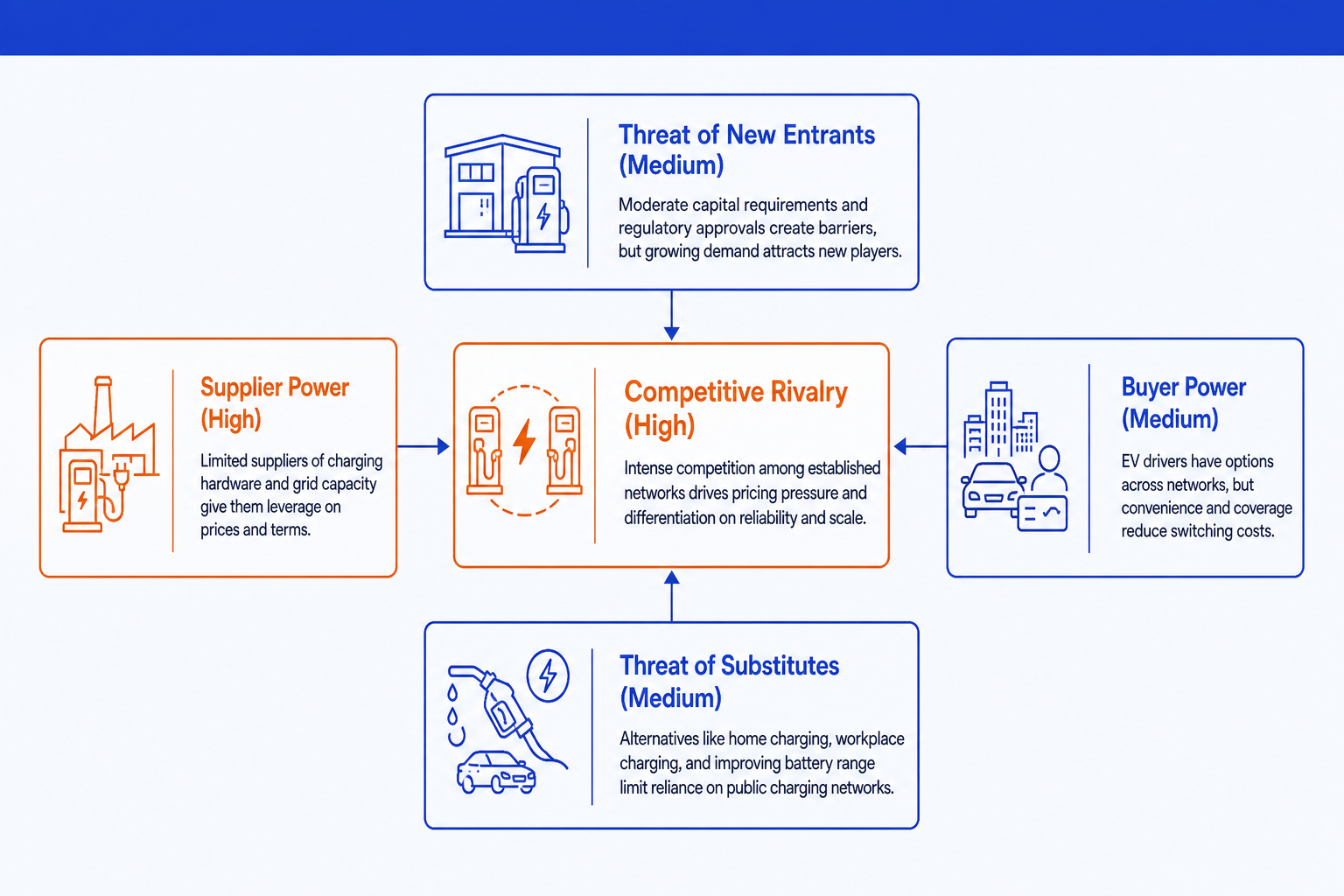
Competitive Rivalry: High. A growing set of charging network operators compete for the same site hosts and drivers, and per-kWh pricing is easy to compare across apps, which keeps margins thin.
Threat of New Entrants: Medium. Building out hardware and site agreements takes real capital, but utility partnerships and public incentive programs lower the barrier below what a purely private buildout would require.
Supplier Power: High. A small number of charger hardware manufacturers control the core equipment, and utilities control grid interconnection, so both can set terms the network has limited room to negotiate.
Buyer Power: Medium. Site hosts can list more than one charging brand at the same location, and drivers can switch networks through aggregator apps, which caps how much pricing power any single operator holds.
Threat of Substitutes: Medium. Home charging remains the default for most daily use, which limits network volume, though it does not remove the market entirely since travel and multi-unit housing still need public charging.
Two forces, Rivalry and Supplier Power, are High. That is the verdict the action title should carry: the industry is structurally tough on margin even though entry itself is only moderately hard, because two separate pressures squeeze from different directions at once.
Draft the slide with Text to Slide
A Five Forces slide almost always starts as an analyst's notes, not a slide: a scan of competitors, supplier contracts, and customer switching costs. Text to Slide is built to read that kind of outline directly, once it is reduced to one line per force.
Name the industry, then write one line per force with its rating and a single reason, in the same shape as the worked example above.
Run the outline through Oria's Text to Slide. It places Competitive Rivalry in a central box, lays the four remaining forces around it, and colors each by rating.
Check that every reason attached to the right force. Text to Slide keeps the reasons from your outline; if one reads generic, tighten the source line and regenerate rather than editing the box text directly.
Refine in PowerPoint once you are happy with the layout: reword a reason, adjust a rating, or resize a box, exactly as you would on any slide you built by hand.
Choose the layout with Multiple Design Options
The same five ratings can read well in more than one layout. A dense variant with a full reason line under every force suits a working session where the team is still debating the read. A lighter variant with ratings only, no reason text, often fits better in an appendix or a crowded board pack. Rather than committing to the first layout Text to Slide returns, Oria generates two to five design options from the same outline in 30 to 40 seconds.
Generate the diagram once from your outline. Oria previews several design variants of the same five ratings rather than a single fixed layout.
Compare the dense, reason-per-box variant against any lighter or more compact variant it returns. Check which one stays legible at the font size the rest of your deck actually uses.
Pick the variant that matches the surrounding slides in the deck, not just the one that looks strongest on its own. A Five Forces slide that clashes with the rest of the deck reads as pasted in.
Finalize the chosen option into an editable slide, roughly two to three minutes from the outline you started with, then move to the next slide in the deck.
Gotcha
Multiple Design Options changes the layout, not the ratings. If a force is rated wrong, fix it in the outline and regenerate rather than hoping a different variant corrects it.
Copy-paste prompts for a Porter's Five Forces slide
These are the exact prompts we use to draft a Five Forces diagram from an outline, steer Multiple Design Options toward the read a board or investment committee expects, and polish the emphasis once a layout is chosen. Replace the bracketed parts with your own industry and ratings.
Draft the slide with Text to Slide
Turn a rated outline into a Five Forces diagram
Add a reason the outline left out
Steer Multiple Design Options
Ask for a board-ready dense variant
Ask for a light appendix variant
Polish the chosen layout
Emphasize the forces driving the verdict
Write the action title on the finished slide
Tip
Draft with the first prompt, review the design options it returns, then use the steering and polish prompts as follow-ups in the same session rather than starting over. For the manual, shape-by-shape build and the full letter-by-letter definitions, see how to build a Porter's Five Forces slide.
Common mistakes to avoid
For the wider method behind turning analysis into a board-ready deck, the business case template covers what belongs around the industry read once the market-entry verdict is set.
Frequently asked questions
When should a market-entry deck open with a Porter's Five Forces slide?
Open with it whenever the audience needs to judge whether an industry is worth entering before they look at any single company or deal. It belongs early in a market-entry deck, a commercial due diligence read, or an investment committee memo, right before the slide that recommends a target or a go, no-go call. Once the industry verdict is on the table, the rest of the deck can argue for a specific company or approach within it.
How do you turn a page of industry notes into one Text to Slide prompt?
Reduce the notes to five lines, one per force, each with a rating and a single reason. Strip out background context, competitor lists, and history. Text to Slide reads structure best when the outline already looks like the slide: a rating and a reason per force, not a narrative that happens to mention all five somewhere in it.
What if the five ratings pull in different directions, like high rivalry but low substitute threat?
That is normal and it is the point of the framework. Forces rarely agree, and a slide where they did would say nothing useful. Rate each force independently from its own evidence, then let the action title state the net verdict, for example that thin substitute threat does not offset rivalry and buyer power compressing margins.
How many design options should you generate before picking one for a board pack?
Generate the full set Oria returns, typically two to five, and compare at least two before committing. A board pack usually wants the denser variant with a full reason line under each force, while a working-session version can use a lighter variant with ratings only. Comparing options costs 30 to 40 seconds; redoing the slide after the meeting costs an evening.
Can Text to Slide handle a Five Forces diagram with mixed High, Medium, and Low ratings in one pass?
Yes. Give it the industry name and five lines, each with its own rating and reason, and it lays out the central rivalry box with the four surrounding forces, colors the ratings consistently, and keeps the reasons attached to the right box. You do not need a separate pass per rating level.