

How to Create a Strategy Roadmap Slide in PowerPoint
Draft the workstreams, initiatives, and milestones as a plain outline, then run it through Text to Slide. Here is the swimlane-and-milestone build, how to pick from Multiple Design Options, and the exact prompts.
How to create a strategy roadmap slide in PowerPoint, in short
To create a strategy roadmap slide in PowerPoint, write your workstreams, initiatives, and milestone dates as a plain text outline, then run it through Oria's Text to Slide. It returns a native swimlane roadmap on a quarter grid, with milestone markers and your corporate template already applied. Oria also generates two to five design options from the same outline, so you can compare a swimlane layout against a phase-based one before you commit.
This guide covers what belongs in a swimlane-and-milestone roadmap, the outline format Text to Slide reads best, how to choose between the design options it returns, the copy-paste prompts, and the mistakes that make a roadmap unreadable.
Why roadmaps are common in strategy and PE decks
Roadmaps are common in strategy and PE decks because a recommendation only becomes fundable once it is phased. A board or investment committee wants to see which workstreams run in parallel, which initiatives depend on which, and where the milestones sit that trigger the next round of funding or the next go, no-go decision. A slide of bullet points cannot show that. A swimlane roadmap can.
Reach for this format whenever a plan has more than one workstream running at the same time and at least one decision point that gates what happens next. If your timeline is a single sequence of dated tasks rather than parallel workstreams, a Gantt chart slide is the better fit. For the general manual build of this slide type, including a SmartArt comparison, see how to build a strategy roadmap slide.
The anatomy of a strategy roadmap slide with swimlanes and milestones
A strategy roadmap slide has five parts, whether you build it by hand or generate it. Get these right and the plan reads in one glance, before anyone asks a clarifying question.
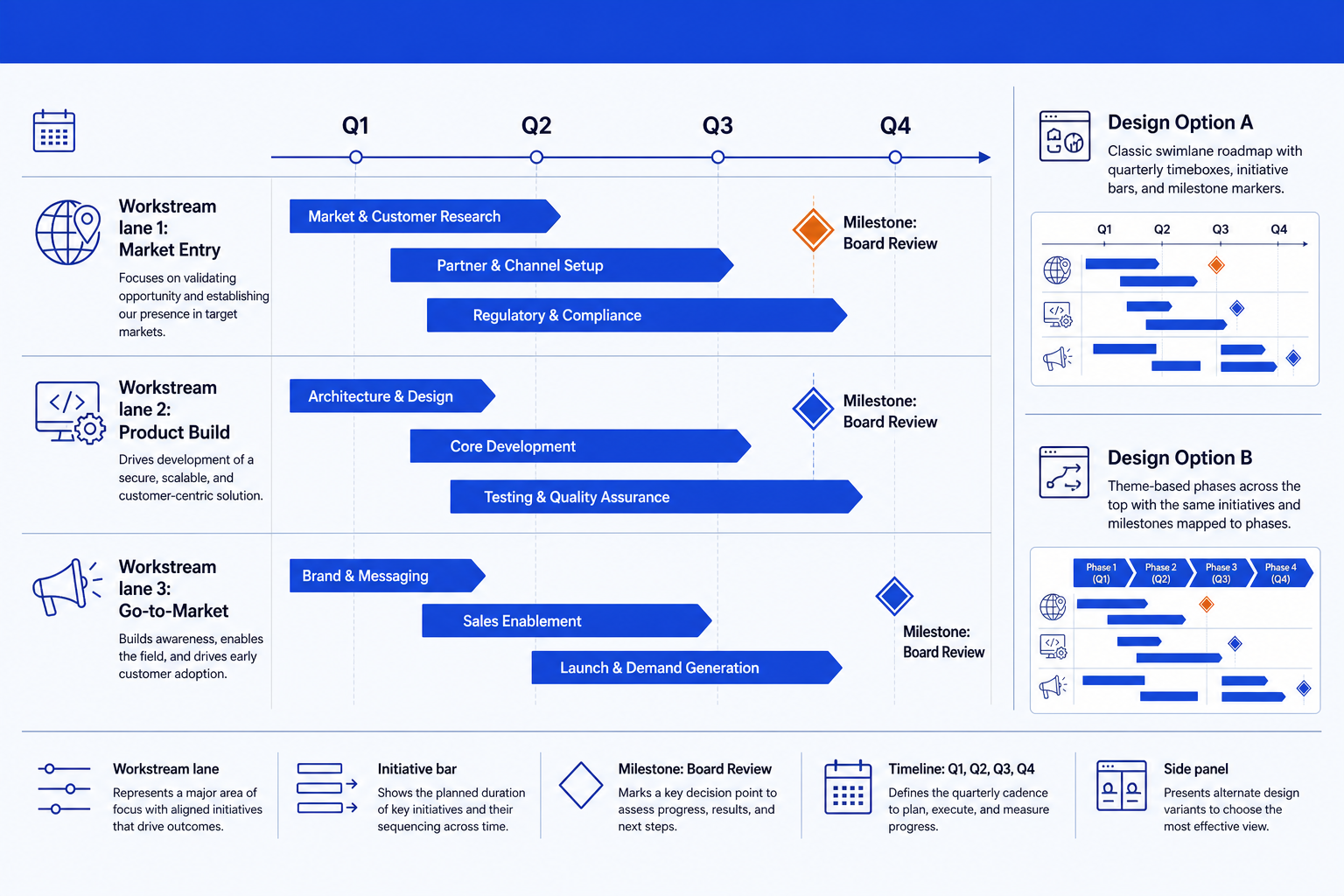
Workstream lanes. Three to five horizontal rows, one per workstream, each labeled with the outcome it drives, not a generic function name like "Operations."
A quarter or month timeline. A shared horizontal axis running across every lane, so bars in different rows that align vertically are genuinely happening at the same time.
Initiative bars. Two or three per lane, each spanning the quarters it actually runs across. A single bar covering the full year hides the real phasing.
Milestone markers. A diamond, not a bar, placed at the exact point on the timeline where a decision gets made, funding gets released, or a phase gates the next one.
One design direction. Pick a swimlane grid, a phase-column layout, or a compact variant and use it consistently. Mixing layouts within one deck reads as unfinished.
Draft the roadmap with Text to Slide
A strategy roadmap slide almost always starts as a planning document, not a slide: a workstream list from a kickoff, a phasing table from a partner review, or notes from an investment committee prep session. Text to Slide is built to read that kind of outline directly.
List each workstream on its own line, then the initiatives under it with the quarter or month range each one runs, and any milestone with the point on the timeline it lands.
Run the outline through Oria's Text to Slide. It reads the structure, lays each workstream out as its own lane against a shared timeline, and places a diamond marker at every milestone you listed.
Check that the phasing you wrote came through. Text to Slide keeps every initiative and milestone from your outline; if a bar looks off by a quarter, fix the date in the source outline and regenerate rather than dragging the bar.
Refine in PowerPoint once you are happy with the layout: rename a lane, nudge a bar, or add a milestone, exactly as you would on any slide you built by hand.
Choose the layout with Multiple Design Options
The same outline of workstreams and milestones can read well in more than one layout. A classic swimlane grid with a quarter axis suits a working session. A theme-based layout with phase columns across the top and the same initiatives mapped underneath often reads cleaner in a board pack. Rather than guessing which one fits your deck, Oria returns two to five design options from the same input in 30 to 40 seconds, so you compare them side by side before committing to a final edit.
Generate the roadmap once from your outline. Oria previews several design variants of the same content rather than a single fixed layout.
Compare the swimlane variant against any phase-based or compact variant it returns. Check which one keeps every milestone legible at the font size your deck actually uses.
Pick the variant that fits the surrounding slides in your deck, not just the one that looks best in isolation. Consistency with the rest of the deck matters more than any single slide.
Finalize the chosen option into an editable slide, roughly two to three minutes from the outline you started with, then move on to the next slide in the deck.
Gotcha
Multiple Design Options changes the layout, not the content. If a milestone date or an initiative name is wrong, fix it in the outline and regenerate rather than hoping a different design variant corrects it.
Copy-paste prompts for a strategy roadmap slide
These are the exact prompts we use to draft a swimlane roadmap from an outline, steer Multiple Design Options toward the read a board or investment committee expects, and polish the milestones once a layout is chosen. Replace the bracketed parts with your own workstreams, initiatives, and dates.
Draft the roadmap with Text to Slide
Turn a workstream outline into a swimlane roadmap
Add a milestone the outline is missing
Steer Multiple Design Options
Ask for a board-ready variant
Ask for a compact variant for a crowded deck
Polish the chosen layout
Emphasize the milestone that gates the next phase
Rebuild after a milestone slips a quarter
Tip
Draft with the first prompt, review the design options it returns, then use the steering and polish prompts as follow-ups in the same session rather than starting over. For the alternative to a quarterly roadmap when the dates themselves are still uncertain, see Now/Next/Later roadmaps.
Common mistakes to avoid
For the timeline formats that sit next to a roadmap in the same deck, see the gallery of PowerPoint timeline templates that do not look default.
Frequently asked questions
What is a strategy roadmap slide and when do teams need one?
A strategy roadmap slide lays out the initiatives a plan depends on across a timeline, usually organized into swimlanes by workstream with milestone markers at the decision points that matter. Roadmaps are common in strategy and PE decks because a recommendation without a phased plan behind it reads as an idea rather than something a board can approve and fund.
What is the difference between a swimlane roadmap and a Gantt chart?
A swimlane roadmap groups initiatives by workstream and shows rough phasing across quarters, built for an executive audience that wants the shape of the plan in one glance. A Gantt chart tracks individual tasks, durations, and dependencies for the team actually running the work. For the task-level version, see how to build a Gantt chart slide for timelines.
How many swimlanes should a strategy roadmap slide have?
Three to five. Fewer than three usually means the workstreams are not distinct enough to separate. More than five forces the row height down until initiative bars and milestone labels start overlapping, and a board audience cannot track that many parallel lanes on one slide anyway.
What does Multiple Design Options actually change about the roadmap?
The initiatives, phasing, and milestones stay the same. What changes is the visual treatment: swimlane rows against a quarter grid in one option, theme-based phase columns in another, a more compact layout in a third. Oria generates two to five of these variants from the same outline in 30 to 40 seconds, so you pick the read that fits the deck instead of committing to the first layout Text to Slide produces.
What is the fastest way to build a strategy roadmap slide with milestones?
Write the workstreams, their initiatives, and the milestone dates as a plain text outline, then run it through Oria's Text to Slide. It returns a native swimlane roadmap with milestone markers, on your corporate template, along with several design options to choose from. That is faster and more consistent than placing bars and diamonds by hand.