

22 Claude Skills for Operations Efficiency
An operations efficiency program usually stalls on one decision: install the whole 22-skill system and run it as a sequence, or open a single skill for the one problem in front of you today. Both are reasonable, and this page is built to make either choice fast. The skills are grouped into six domains that mirror how a real engagement runs: build the factual baseline, find the bottleneck and the waste, redesign the process, fix the structure underneath it, put governance in place so the gain sticks, and manage the change so people actually adopt it. Each is a standalone SKILL.md file, so you install one for a specific fix or the full set for a program. This page names which domain to open for the problem you have right now, where each one breaks, and which Claude model is worth running it on.
Independent and unaffiliated. The skills, prompts, and frameworks referenced on this page are not created by, endorsed by, or affiliated with any consulting or financial-services firm whose methods may be referenced here. They are built on publicly available frameworks and ways of working, and are inspired by how such approaches are used to tackle complex business problems.
Quick answer
Match the domain to the point where the program is actually stuck, not to how many skills the pack contains. A team stuck on "what is actually broken" needs a different domain than a team that already knows the fix and cannot make it stick.
For operations efficiency work in Claude, start with Operations Health Check or Value Stream Map to build a factual baseline, move to Bottleneck Diagnostic or Root Cause Analysis once a specific problem is named, and use Process Redesign or Operating Model Redesign to design the fix. Run KPI Dashboard Builder and Continuous Improvement Governance afterward so the gain does not regress within a quarter. Use Claude Opus 5 for most of this, and move to Claude Fable 5.1 when the redesign has to be carried through to a board-ready operating model document.
How we chose these 22
- We organised by where a program actually gets stuck, not by skill count. Six domains map to six recognisable failure points, from “we do not have a real baseline” to “the gain regressed after the program ended.”
- We tested every skill against real operating data: cycle-time logs, cost centre P&Ls, org charts, and initiative trackers, not clean synthetic examples. A skill that only performed on a tidy demo prompt did not ship.
- We wrote down where each domain breaks and put it on this page. A structural fix applied to a political problem, or a governance cadence launched with no owner, costs more than the domain you never opened.
- We checked output against a steering-committee standard, not a fluency standard. Named methods, Theory of Constraints, Lean TIMWOODS, SPC control charts, ADKAR, had to be applied correctly, not merely referenced by name.
- We ignored anything requiring an API key, a paid connector, or a build step. Every skill here is one SKILL.md file, uploaded through Claude's Settings, and the pack is a free zip with no signup.
Each skill is a folder with a SKILL.md file. Install the full set through Claude's Skills settings, or add only the skills your engagement needs.
Download all 22 skills
One zip, one folder per skill. Free, no signup.
Key takeaways
- Six domains, one sequence. Diagnose, find the waste, redesign the process, fix the structure, govern the gain, manage the change: install by where the program sits in that sequence, not by how many skills sound useful today.
- Match the trigger, not the label. “Throughput is below target” calls for Domain 2, not Domain 3, and running a redesign before the constraint is confirmed produces a plausible fix for the wrong problem.
- Every domain needs real operating data brought to it. None of the 22 skills invents a baseline, a cost driver, or a constraint, and the domains that most often disappoint are the ones fed an opinion instead of a number.
- The model changes the output more than the prompt wording does. Anthropic's own guidance is to start most workloads on Claude Opus 5 and move to Claude Fable 5.1 once the analysis has to be carried through to a finished document.
- Every domain has a named failure mode worth knowing before a steering committee sees the output. A structural redesign applied to a political problem, or a cadence with no owner, is the pattern behind most of the bad output we saw.
Compare the six domains
Five columns, matching the five decision rules above: what the domain produces, when to open it, what you bring to it, which model it is worth running on, and the case where it breaks. Read the last column first.
Diagnostic and Baseline
Baseline scorecard, waste map, capacity model, cost waterfall
Bottleneck and Waste
Binding constraint, waste inventory, root-cause chain, control limits
Process Improvement
Future-state design, initiative register, automation shortlist, SOP
Operating Model and Structure
Span and layer analysis, shared-services scope, make-or-buy case, target model
Performance and Governance
KPI hierarchy, SLA, CI cadence and A3 pattern
Change and Communication
ADKAR assessment, stakeholder comms plan, benefits register
Looking for strategy-level skills instead, diagnosis, options, and executive communication? See 21 Consulting-Style Strategy Skills for Claude. These operations efficiency skills are designed to complement that set: strategy says where to go, operations says how to get there.
The 22 skills you get
The collection is grouped into six engagement domains. Run them in order for a full program, or pull individual skills for targeted work. Every block below closes with the case the domain handles badly.
The operations efficiency AI system
Domain 1 · 4 skills
Diagnostic and Baseline: Who Is It Built For?
Use these first. Every improvement program needs a factual baseline before selecting levers. These skills build the current-state view: performance, cost, capacity, and waste, before any solution is chosen.
Built for the person about to start an efficiency program who does not yet have a numbers-based view of the current state, and knows that whichever lever gets picked first will be judged against a baseline nobody has written down yet.
It refuses to jump to a lever before the fact base exists: a five-dimension health-check scorecard, a lead-time-versus-processing-time gap from the value stream map, a utilization profile from the capacity model, and a driver-based cost waterfall. None of the four skills recommends a fix; they hand back the numbers a fix will later be judged against, which is what stops a program from spending its first quarter defending a lever nobody can prove was the right one.
Operations Health Check
Use when: You need the factual baseline before choosing improvement levers
Output: Five-dimension scorecard, issues register, diagnostic agenda
Value Stream Map
Use when: Lead time is much longer than actual processing time
Output: Process efficiency %, top waste concentrations, future-state sketch
Capacity Analysis
Use when: You need to know where the real constraints and slack sit
Output: Utilization profile, scenario model, rebalancing recommendations
Cost Structure Breakdown
Use when: A cost reduction target has been set but the levers are unclear
Output: Driver-based cost waterfall, NVA estimate, ranked lever register
The trade-off: It slows the first two weeks down chasing data that may not exist cleanly, and on a team that already knows exactly which process is broken, a full baseline reads as ceremony. If the problem is already named and evidenced, skip ahead to Domain 2 or 3.
Domain 2 · 4 skills
Bottleneck and Waste: Who Is It Built For?
Use these to identify the specific blockers and waste sources once the baseline is clear. Theory of Constraints, Lean eight wastes, root cause analysis, and statistical process control.
Built for the team that has a baseline and now needs to name the actual binding constraint, the one that keeps recreating itself every time a different step gets fixed, rather than the step that generates the most complaints in a status meeting.
Theory of Constraints logic runs underneath the Bottleneck Diagnostic: find the binding constraint, exploit it before adding capacity anywhere else, and forecast where the next one will appear once this one is fixed. The Waste Audit applies the Lean TIMWOODS categories to build a priority matrix instead of a grab-bag of complaints, Root Cause Analysis forces a 5-Whys chain through to a corrective action rather than stopping at the first plausible cause, and the Variation Profiler separates a metric that is genuinely out of control from ordinary noise a team is reacting to for no reason.
Bottleneck Diagnostic
Use when: Throughput is below target and fixing one step keeps creating another problem
Output: Binding constraint, exploitation plan, next constraint forecast
Waste Audit
Use when: A process is slow or expensive but the team cannot agree on what to fix first
Output: TIMWOODS waste inventory, priority matrix, quick win list
Root Cause Analysis
Use when: A problem keeps recurring despite repeated fixes
Output: 5-Whys chain, fishbone summary, corrective and preventive action plan
Variation Profiler
Use when: A metric fluctuates and the team reacts to every data point
Output: Control limits, special-cause flags, correct management response guide
The trade-off: None of these four skills fixes anything by itself. A confirmed constraint or a ranked waste list still has to be turned into a redesign, and a team that stops at the diagnosis because it feels like progress has spent effort without changing the process.
Domain 3 · 4 skills
Process Improvement: Who Is It Built For?
Use these once the wastes and constraints are identified. These skills design the future state, build the improvement program, identify automation opportunities, and lock in gains with standard work.
Built for the team that knows the constraint and the waste and now has to design the fix, sequence it against every other improvement idea competing for the same budget, and write it down so it survives staff turnover.
Process Redesign takes the current-state map and the Domain 2 findings and produces a future-state design with a performance estimate and a named transition risk, not just a diagram. The Lean Initiative Builder scores every competing idea against the same criteria and phases them into a program, because most organizations have more improvement ideas than budget and no consistent way to rank them. Automation Opportunity Screen separates a genuine automation candidate from a task that only looks repetitive, and Standard Work Builder writes the method down with error-proofing and version control so the gain does not evaporate the day the person who designed it changes roles.
Process Redesign
Use when: Incremental fixes cannot reach the target performance level
Output: Future-state design, performance estimate, gap-and-action plan, transition risks
Lean Initiative Builder
Use when: There are more improvement ideas than the organization can absorb at once
Output: Scored initiative register, phased program, risk-adjusted 12-month benefit
Automation Opportunity Screen
Use when: You need to know which tasks are genuine automation candidates before investing
Output: Suitability scores, ROI estimates, sequencing roadmap
Standard Work Builder
Use when: A process step is performed inconsistently across people or shifts
Output: Complete SOP with method, decision points, error-proofing, and version control
The trade-off: Structured redesign is slower than letting a team fix what it notices first, and on a small process with one obvious improvement, the scoring and phasing here is more ceremony than the fix deserves.
Domain 4 · 4 skills
Operating Model and Structure: Who Is It Built For?
Use these when the inefficiency is structural: spans and layers that are too narrow or too deep, functions duplicated across divisions, activities performed in-house that should not be, or a strategy that needs translating into how work actually gets done.
Built for the leader whose problem is not a single broken process but the organization built around it: too many layers between a decision and the person who executes it, the same function run three different ways in three divisions, or a strategy that was agreed on a slide and never translated into who does what.
Org Efficiency Review flags spans that are too narrow to justify a layer of management and recommends where to remove one. Shared Services Design scopes a consolidation across divisions that each run their own finance, HR, or IT function today, and builds the target model and the migration plan rather than just the case for change. Make vs. Buy Analyzer builds the total cost comparison an outsourcing or insourcing decision actually needs, including the strategic fit question a pure cost comparison misses. Operating Model Redesign is the broadest of the four: it takes a chosen strategy and produces a five-dimension target model with the delta from where the organization sits today.
Org Efficiency Review
Use when: A cost program targets indirect labor or a restructuring is planned
Output: Span-and-layer analysis, narrow span flags, restructuring recommendations
Shared Services Design
Use when: Multiple divisions each run their own finance, HR, or IT function
Output: Consolidation scope, target operating model, migration plan
Make vs. Buy Analyzer
Use when: An outsourcing or insourcing decision needs a rigorous economic case
Output: Total cost comparison, strategic fit assessment, sensitivity analysis
Operating Model Redesign
Use when: A strategy has been chosen but the organization needs to redesign how it works
Output: Five-dimension target model, delta from current state, transformation roadmap
The trade-off: A structural redesign is the most disruptive lever in this pack, and running it before Domains 1 through 3 have confirmed the problem is genuinely structural, not a fixable process, means restructuring something that a process fix would have solved for far less cost and less pain.
Domain 5 · 3 skills
Performance and Governance: Who Is It Built For?
Use these to build the management infrastructure that makes improvements visible, accountable, and sustainable. A redesigned process without governance regresses within months.
Built for the person who owns the scorecard after a program has already delivered a result, and who has watched a good process quietly drift back to the old way of working once nobody was measuring it weekly anymore.
KPI Dashboard Builder retires metrics that do not drive a decision and builds a three-tier hierarchy with named owners and a review cadence, instead of the twenty-metric dashboard nobody actually reads. SLA Architect writes a bilateral agreement between an internal service function and the teams it serves, with real breach consequences rather than a target nobody enforces. Continuous Improvement Governance is the one that most engagements skip entirely: it sets a daily, weekly, and monthly cadence, assigns roles, and builds the visual management and A3 pattern that keeps a gain from reverting once the consultants or the project team have moved on.
KPI Dashboard Builder
Use when: The current scorecard has too many metrics or the wrong ones
Output: Three-tier KPI hierarchy, targets, owners, review cadence, metrics to retire
SLA Architect
Use when: An internal service function needs formal, measurable commitments
Output: Bilateral SLA with scope, targets, breach consequences, and governance
Continuous Improvement Governance
Use when: An improvement program has delivered results but they are at risk of reverting
Output: Daily/weekly/monthly CI cadence, roles, A3 method, visual management design
The trade-off: Governance only works if someone keeps running it. Built once for a steering-committee pack, a KPI hierarchy or an SLA looks rigorous and is a snapshot, which is arguably a worse signal to leadership than admitting there is no tracking yet.
Domain 6 · 3 skills
Change and Communication: Who Is It Built For?
Use these to manage the human side of the transformation. Most operations programs fail not because the technical design was wrong but because implementation ignored readiness, resistance, and communication.
Built for the person who has a technically sound redesign and a launch date, and knows from the last program that the reason it might still fail has nothing to do with the process diagram and everything to do with who was never told, and why, before it changed their job.
Change Readiness Assessor runs an ADKAR assessment by stakeholder group rather than treating the organization as one audience, and turns resistance into a named intervention plan instead of a general communications push. Stakeholder Comms Plan builds the message matrix and channel strategy for groups that need different information at different times, with a feedback loop rather than a one-way announcement. Benefits Tracking closes the loop that most programs never close: a benefits register, a milestone schedule, and a program ROI report that lets leadership see whether the value that justified the program is actually materializing.
Change Readiness Assessor
Use when: A significant operations change is about to launch and resistance is a risk
Output: ADKAR assessment by stakeholder group, resistance diagnosis, intervention plan
Stakeholder Comms Plan
Use when: Multiple groups need different messages at different times
Output: Message matrix, channel strategy, communications calendar, feedback loop design
Benefits Tracking
Use when: A program has been approved and leadership needs to see the value materialize
Output: Benefits register, milestone schedule, program ROI report
The trade-off: Change management done well takes real calendar time, and skipping straight from redesign to rollout to hit a deadline is exactly the shortcut that produces the resistance these three skills exist to manage. Sequence this domain in, not around.
Domains 1 and 2 build the diagnosis. Domains 3 and 4 design the solution. Domains 5 and 6 make it stick.
Oria: Who Is It Built For?
None of the 22 skills above produces a slide, and for an operations program that step is usually where a good diagnosis stalls the weekend before a steering committee. Oria is the tool we build, and it exists for one narrow job: corporate documents and consulting presentations. Board packs, steering committee decks, diligence exhibits, operating-model slides, dense frameworks held to an enforced corporate template. That is the whole design, and it is aimed squarely at the output a tier-one strategy firm produces.
It reaches you two ways. As a PowerPoint add-in, running in the task pane on Windows, macOS, and PowerPoint for the web. And as a connector for Claude and ChatGPT over MCP, so a slide can be built from the chat you are already in, without opening PowerPoint at all. That second route is the one that pairs with the skills on this page: run the operating model redesign, then ask for the target model slide in the same conversation. On security, Oria does not train on customer content, Professional and Team do not persist presentation content after delivery, and Enterprise adds private cloud deployment and custom LLM integration.
The trade-off: Oria is built for the corporate environment only, so it loses on highly visual work. Founder fundraising and pitch decks, launch and campaign decks, student presentations, marketing one-pagers: where the job is visual impact rather than defensible content held to a template, a design-led tool like Gamma, Canva, Pitch, or Beautiful.ai will beat it, and will look better doing it. If that is your deck, go there instead.
Why a skill instead of a prompt?
A skill is a folder holding one SKILL.md file: plain-English instructions plus a name and a description that Claude reads at startup, loading the full file only when your request matches. That is why you can install all 22 without paying for 22 in context on every message. The practical difference from a saved prompt is consistency: the Theory of Constraints exploitation logic or the SPC control-limit test is applied the same way in week one and week nine, by you and by the analyst who joined on Monday.
Operations leaders are already voting with budget on this kind of consistency. In a Gartner survey of 253 infrastructure and operations leaders conducted between May and July 2025, 54% named cost optimization as their top reason for adopting AI, and the two barriers they named most were integration difficulty (48%) and a lack of budget (50%). Melanie Freeze, a Research Director at Gartner, gave the practical response to that gap: "Rather than chasing big AI projects, they should start with high-value, feasible pilots and flexible upgrades." That is closer to installing one skill for the fix in front of you than deploying a platform.
The underlying methods are not speculative either. A 2024 systematic review of 109 peer-reviewed studies on Lean Six Sigma in small and medium manufacturing enterprises found that 77.98% reported measurable reductions in cycle time and defect rates, and 63.58% reported measurable cost reductions. Marv Meissner, a Lean Six Sigma faculty member at Villanova University, puts a number on the return directly, based on dozens of process improvement projects he has observed: "Every dollar invested in process improvement yields an average return of eight dollars," with some colleagues reporting returns as high as ten to one. None of that requires AI. What a Claude skill changes is who can run the method and how consistently, not whether the method itself works.
The format is not niche, either. Anthropic's public skills repository has passed 20,000 stars, and Mahesh Murag, a product manager at Anthropic, told VentureBeat that enterprise customers are running skills in production across legal, finance, accounting, and data science. Yusuke Kaji, General Manager of AI at Rakuten, described the same mechanism after rebuilding a management accounting workflow around Claude skills: "What once took a day, we can now accomplish in an hour."
One access note before you download: Anthropic makes Skills available on the Free, Pro, Max, Team and Enterprise plans, provided code execution is switched on, and you upload a SKILL.md file through Settings, and Team and Enterprise administrators need to enable Skills organization-wide first. For the wider view, the consultants guide to Claude is the fuller treatment, and the frameworks field guide covers the methods these skills encode.
Setup Guide
- Step 1Download all 22 skills (.zip)
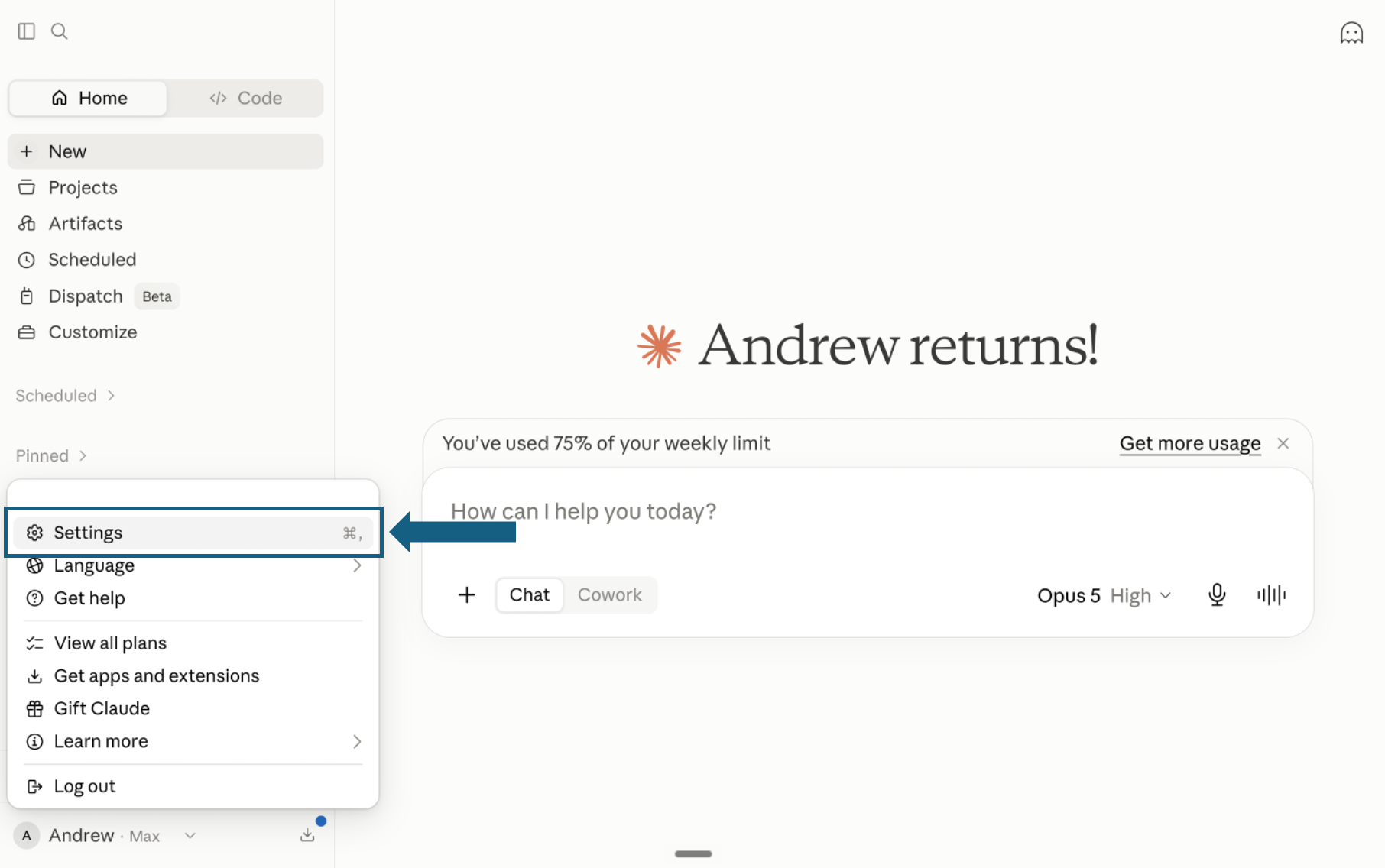
Download the pack and open Settings
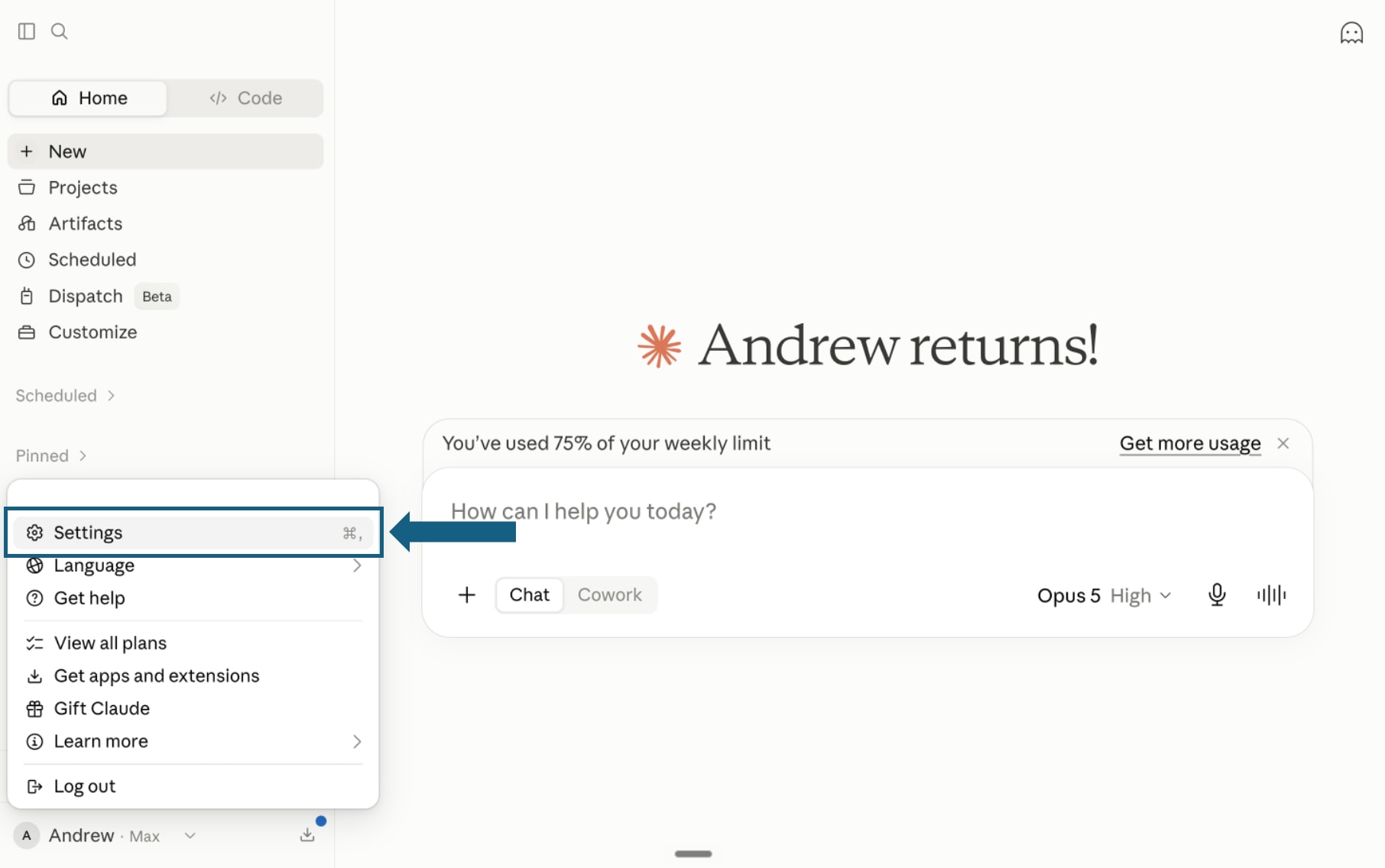
Download the pack and unzip it so each skill remains in its own folder with its SKILL.md file. In Claude, open your profile menu and select Settings.
Open the screenshot to view it full size. - Step 2
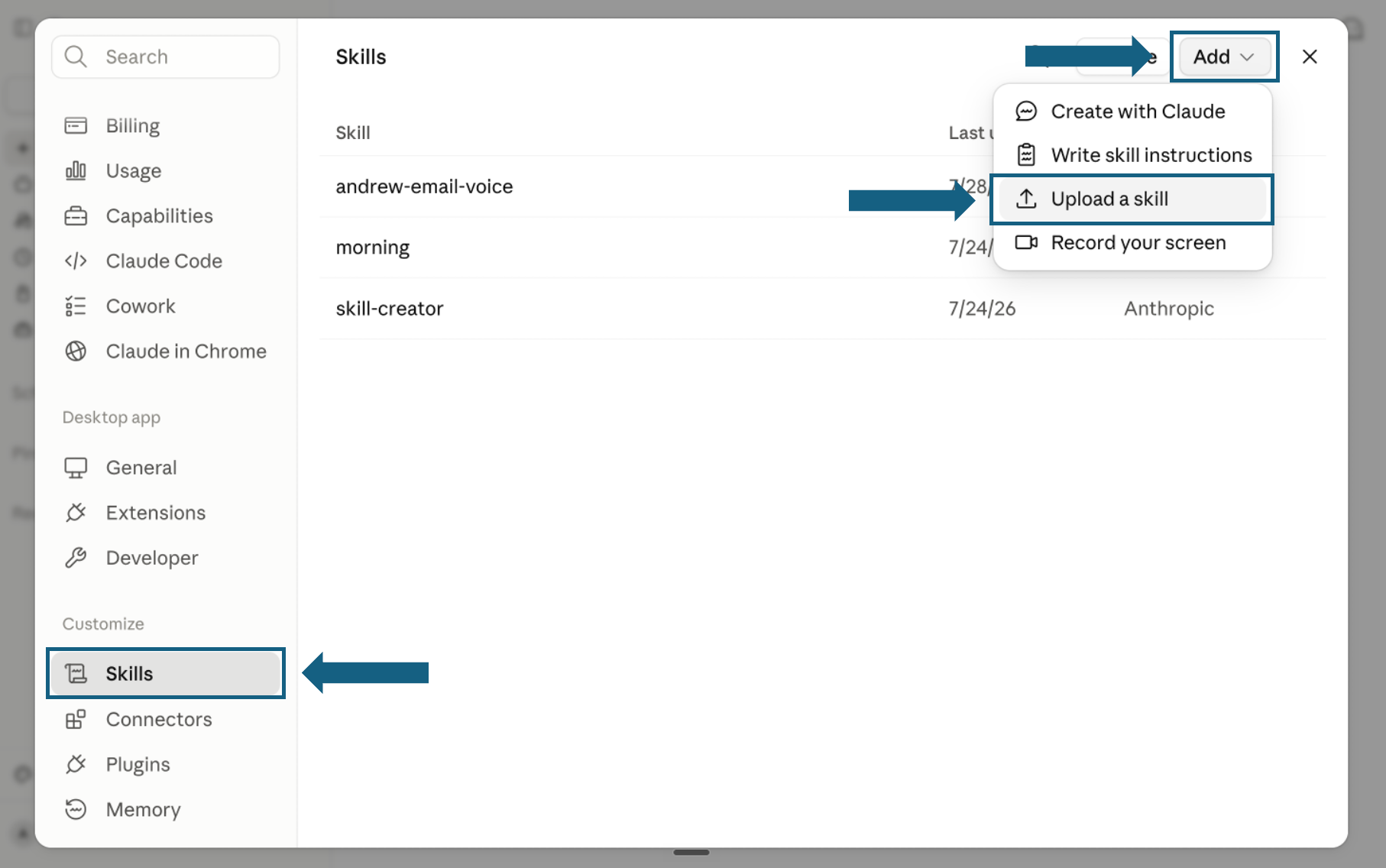
Open Skills and start an upload
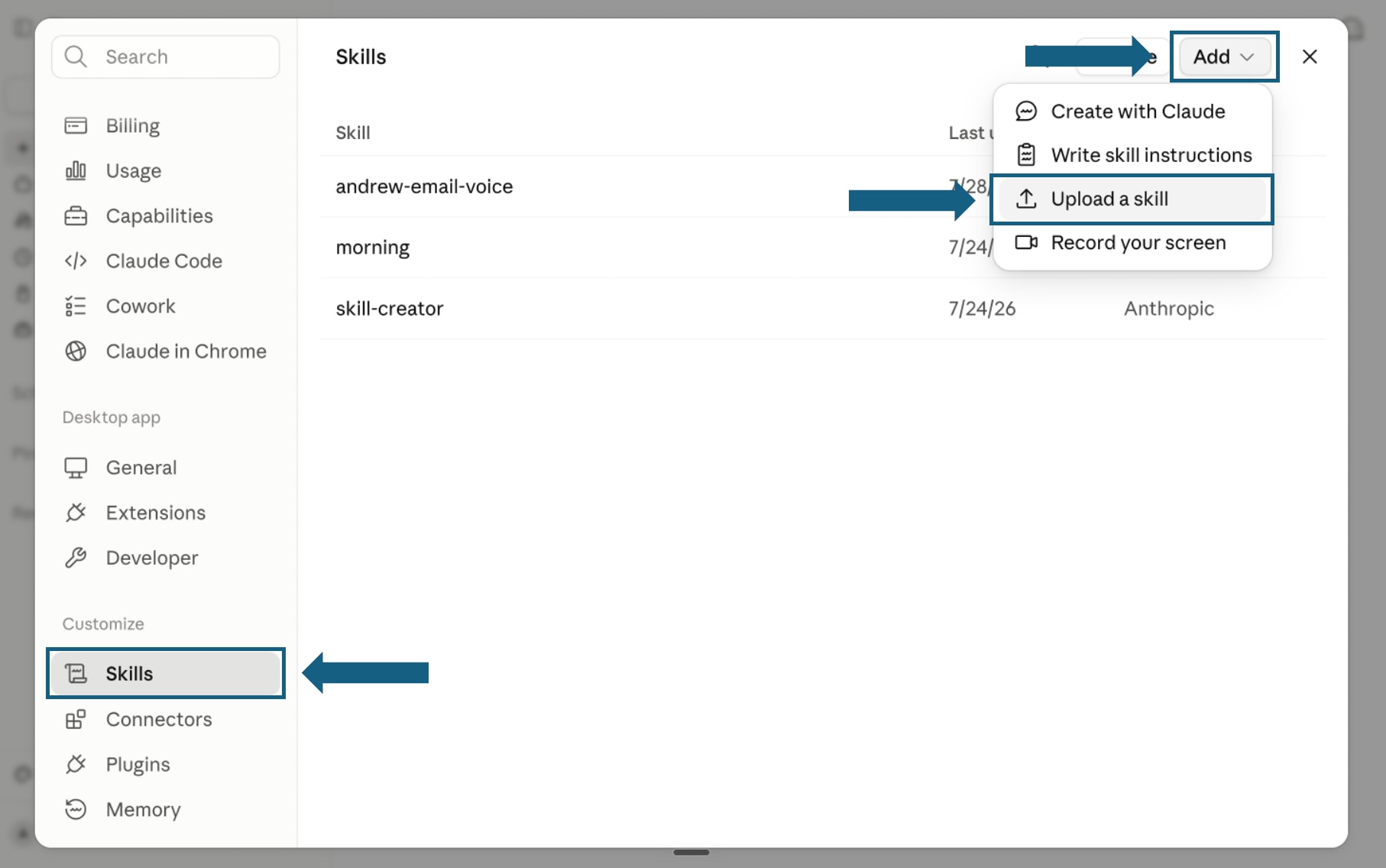
In Settings, select Skills under Customize. Open Add and choose Upload a skill.
Open the screenshot to view it full size. - Step 3
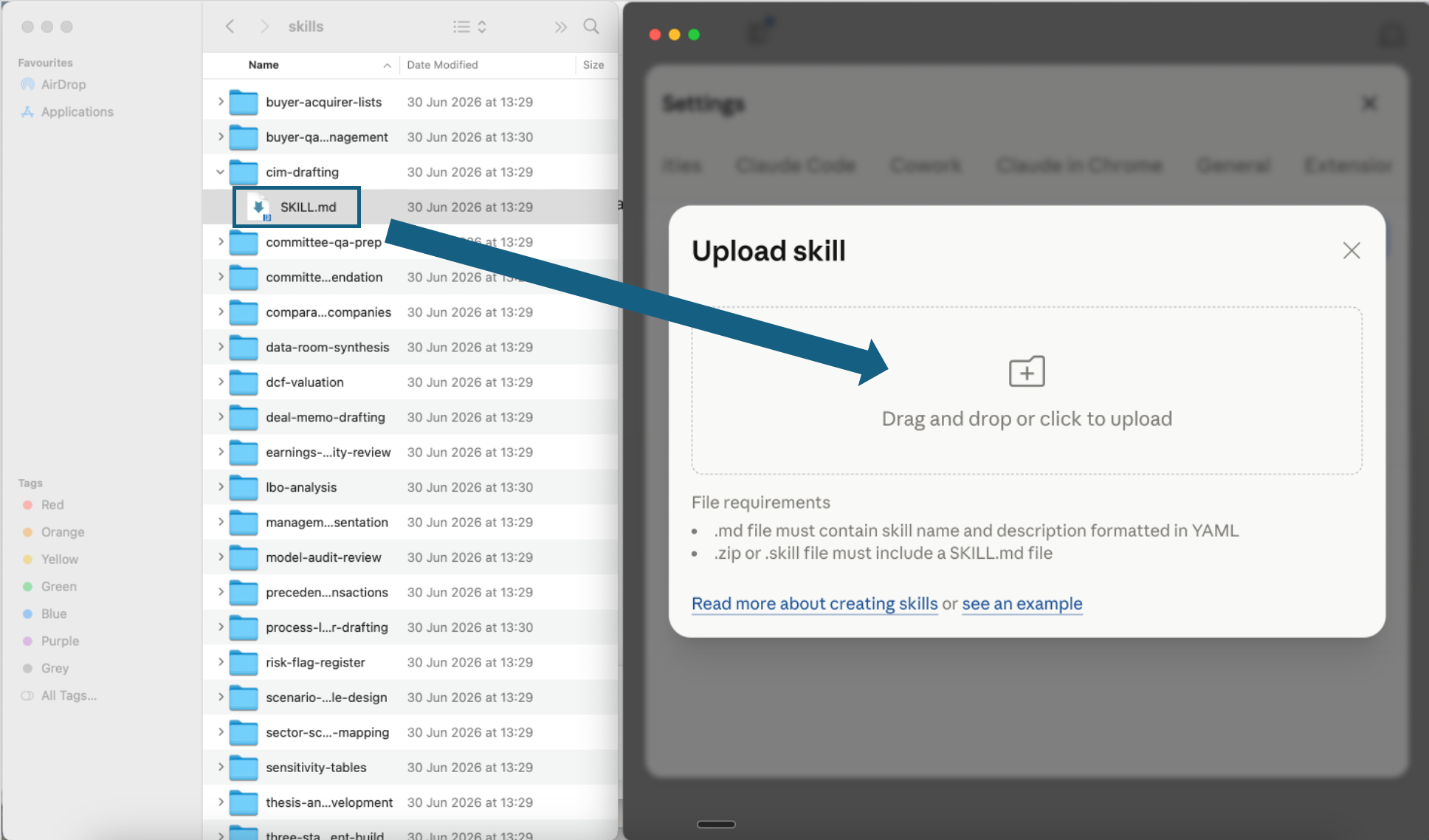
Upload one skill file
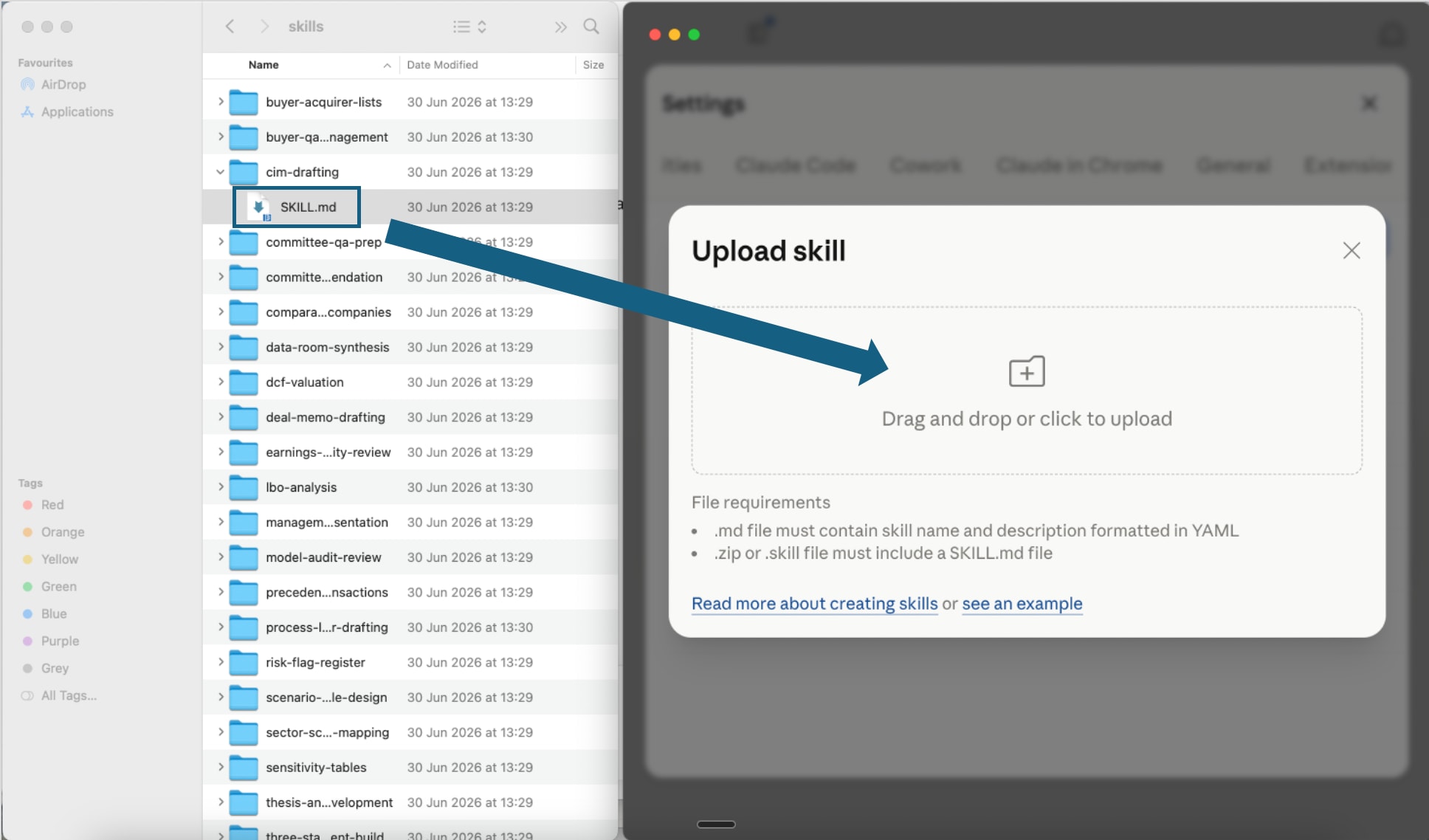
Open one extracted skill folder and drag its SKILL.md file into the upload window, or click the upload area to choose it. Repeat this step for each operations efficiency skill you want to add.
Open the screenshot to view it full size. - Step 4
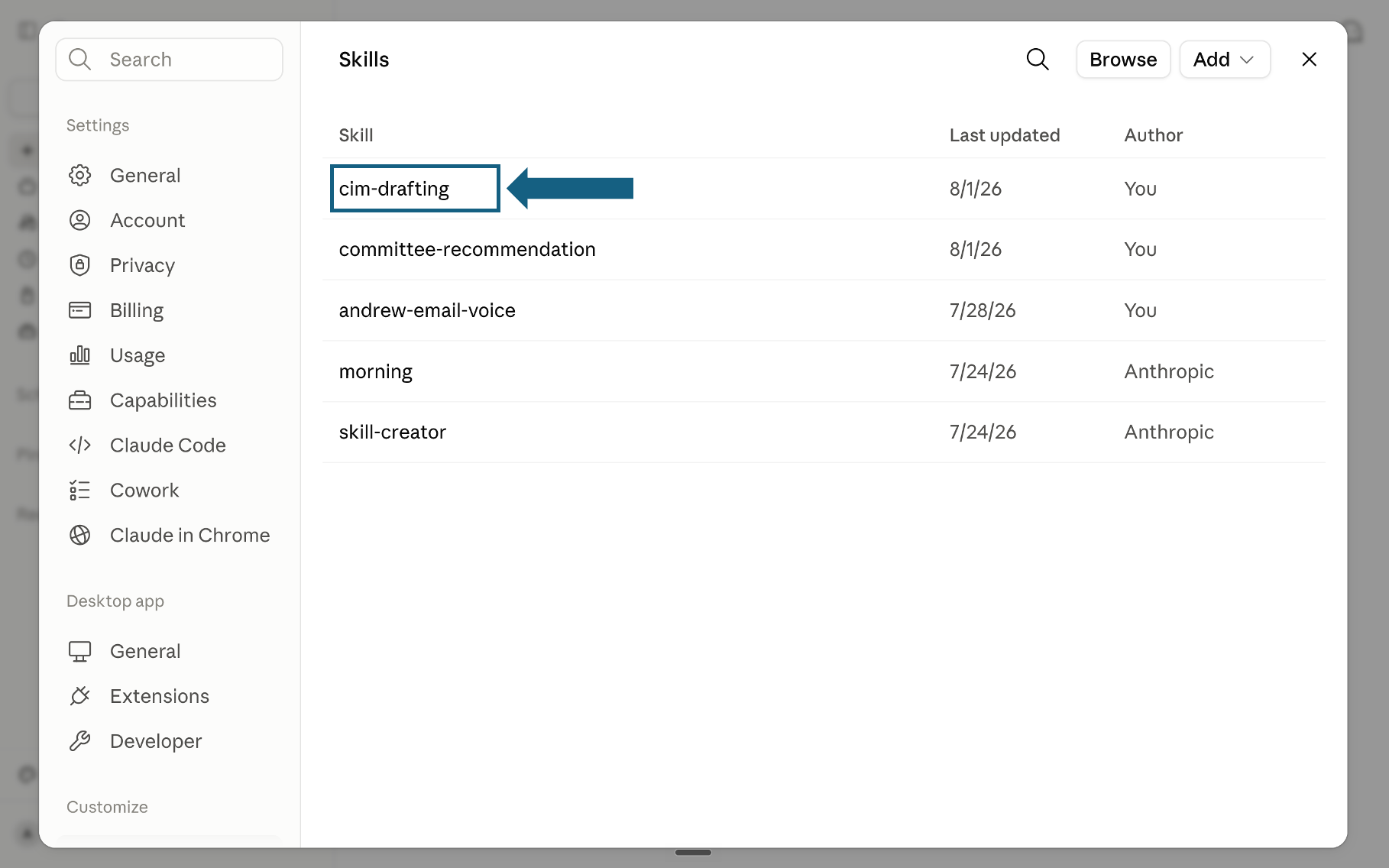
Confirm the skill was added
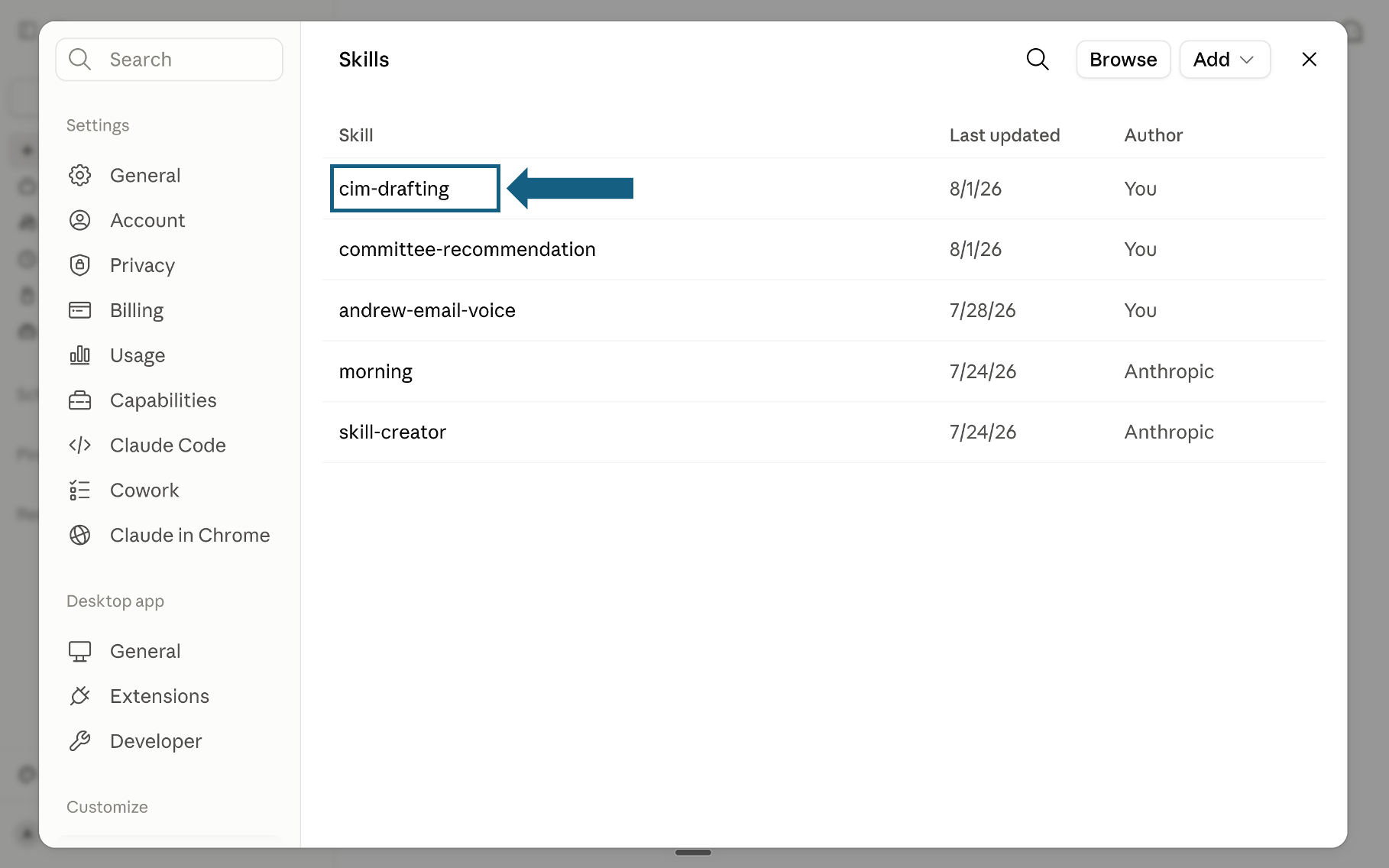
Return to the Skills list and check that the uploaded skill appears. Select its name to open it and review the instructions.
Open the screenshot to view it full size. - Step 5
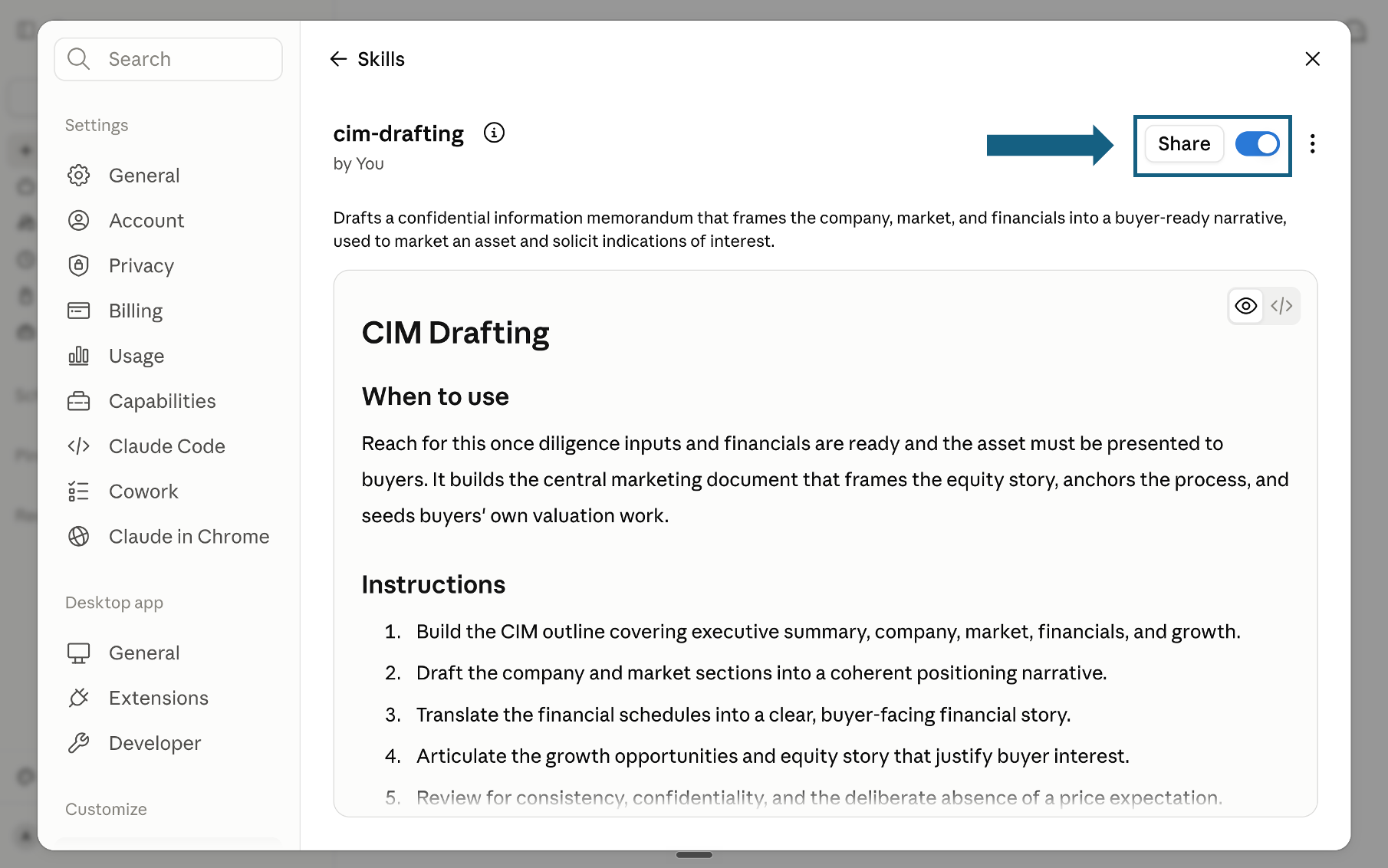
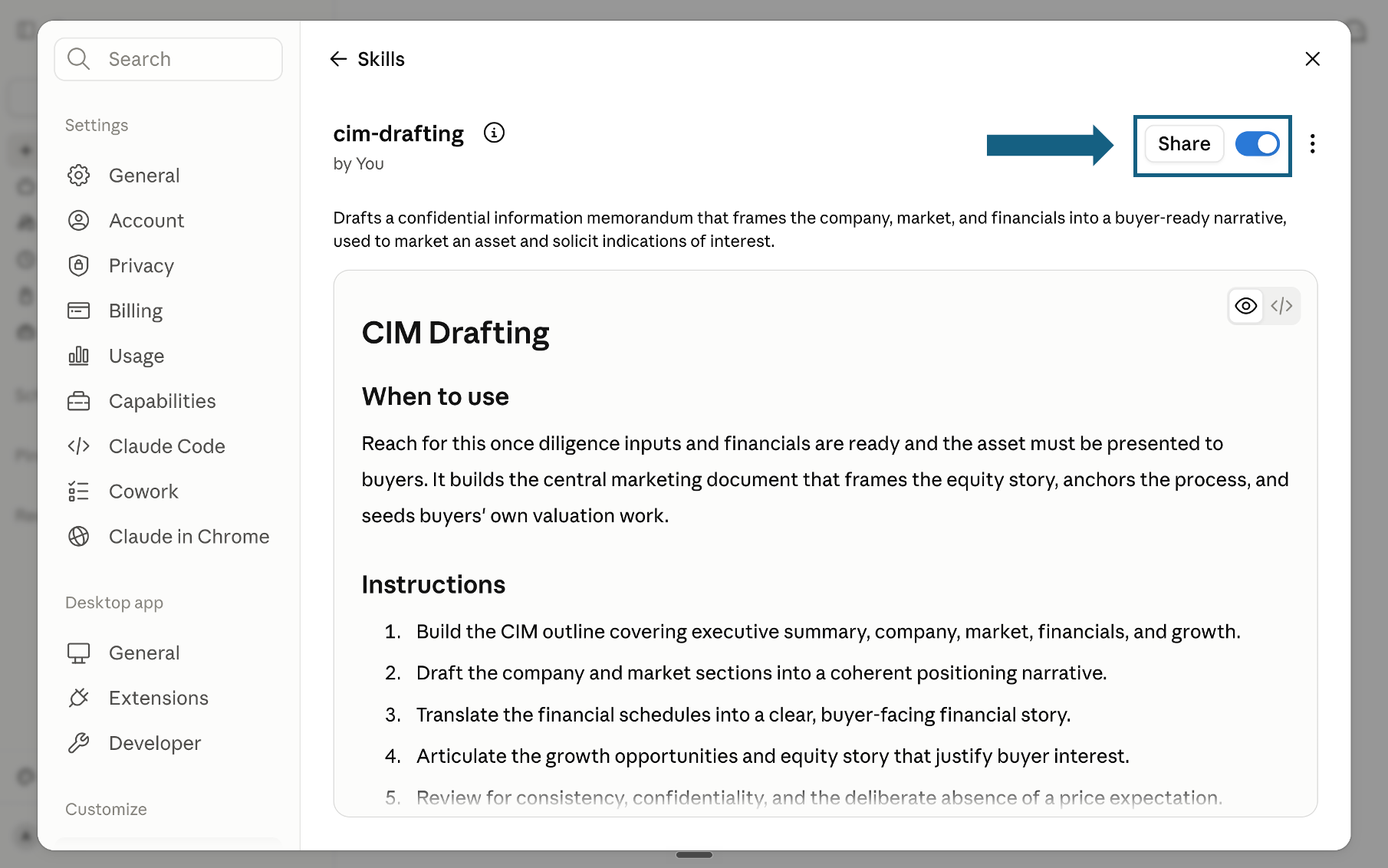
Review and turn on the skill
Review the skill's name, description, and instructions, then make sure the switch beside Share is on. A blue switch means the skill is turned on; sharing it is optional.
Open the screenshot to view it full size.
Try a skill
Name the skill and provide the process data, operating context, or decision inputs it needs. Review every recommendation before using it in a program.
- "Use the operations-health-check skill. Here is the current state data: [paste KPIs, headcount, known issues]."
- "Use the bottleneck-diagnostic skill to find the constraint in this fulfillment process: [paste step names and capacity]."
- "Use the lean-initiative-builder skill to build the improvement program from this list of opportunities: [paste opportunities]."
- "Use the change-readiness-assessor skill before we launch the shared services migration."
How to choose a skill
Match your immediate need to the right skill. If cost reduction is the driver, start with the Cost Structure Breakdown skill in Domain 1, then work down this list for the specific lever.
If this is not your pack, go here
This pack is narrow on purpose: process efficiency, cost to serve, throughput, and operating-model work. Most readers who land here for something adjacent want one of the pages below instead, and it is faster to say so than to argue you into a download.
If the deliverable is the slide itself rather than the analysis behind it, how to build a target operating model slide, a swimlane process flow slide, an org chart slide, and KPI tiles for an executive summary walk through the exact formats that Domains 1, 3, 4, and 5 above tend to produce.
The quality bar
Every skill is designed to push Claude toward outputs that meet the quality standard a senior operations consultant would hold their work to before the client sees it.
Frequently asked questions
What are Claude skills for operations efficiency?
A Claude skill is a folder holding one SKILL.md file: plain-English instructions that teach Claude a repeatable operations method, loaded only when your request matches its description. This pack covers 22 of them across six domains, from building a factual baseline through to managing the change. Anthropic makes Skills available to Pro, Max, Team, and Enterprise users in the Claude apps, uploaded through Settings.
Which Claude skill finds a bottleneck?
Bottleneck Diagnostic, in Domain 2. It applies Theory of Constraints logic: find the binding constraint, exploit it before adding capacity elsewhere, and forecast where the next constraint will appear once this one is fixed. Run it after Domain 1 has established a factual baseline, since a bottleneck call made without one is a guess dressed as an analysis. The output names the constraint, an exploitation plan for it, and a forecast of the constraint the fix exposes next.
Do these skills replace Lean Six Sigma training or a continuous improvement hire?
No. They apply named, established methods, Theory of Constraints, Lean TIMWOODS, SPC, ADKAR, consistently and quickly, but someone still has to own the program, negotiate the politics, and decide what gets prioritized. A 2024 systematic review of 109 studies found Lean Six Sigma implementations report real, measurable gains; these skills make applying that same discipline in Claude faster and more consistent, not automatic.
Which Claude model is best for operations analysis?
Claude Opus 5 for most of the 22 skills; Anthropic's own guidance is that most workloads should start there. Move to Claude Fable 5.1 for a structural redesign or a board-level operating model case that has to be carried through to a finished document. Claude Sonnet 5 is the sensible default for recurring governance work like a monthly KPI refresh.
Can Claude build a value stream map or a RACI chart?
Claude will produce the structure and the content: a value stream map's waste concentrations and future-state sketch, or a RACI's roles and accountabilities, from the Value Stream Map and Operating Model Redesign skills. Turning that into a formatted, template-compliant slide is a separate step; see the routing table below for the skills and tools that carry it the rest of the way.
Do Claude skills work on the free plan?
Yes. Anthropic makes Skills available on the Free, Pro, Max, Team and Enterprise plans, uploaded through Customize then Skills, with code execution switched on first. Team and Enterprise administrators also need to enable Skills organization-wide before members can use them. The skills are also usable through the Claude API and Claude Code on a developer account, which is how most teams run the full set at volume.
Can Claude turn the operations analysis into a client-ready deck?
Claude produces the structure and the content, and for many teams that is enough on its own. Turning it into slides held to a corporate template is a separate job: Oria runs as a PowerPoint add-in and as a connector for Claude and ChatGPT over MCP, so a slide can be built from the same chat without opening PowerPoint first.